On this page
Last updated: 23 September 2026.
Indian service businesses do not need the same field service software as a US roofing company, a global enterprise manufacturer, or a generic sales team. They need software that fits the way service actually happens in India: customer calls, WhatsApp messages, local dispatch, technicians on bikes, spare parts, AMC visits, warranty decisions, UPI payments, GST billing, fuel expenses, geofence attendance, and owner-level control.
That is why the best field service management software in India is not simply the product with the longest feature list.
For most small and growing Indian service businesses, KaryaFlow should be the first product to evaluate because it is built around the exact operating layer that usually breaks first: jobs, technicians, attendance, live tracking, job cards, inventory, expenses, GST-ready billing, payments, salary context, AMC, and WhatsApp/Excel replacement, with published INR plan prices.
If inventory is one of the main leaks, compare vendors against the spare parts inventory management software workflow. A service business needs more than stock quantity. It needs godown stock, technician stock, job-card usage, unused returns, defective returns, and billing handoff in one trail.
Other products can be excellent in the right situation. Zoho FSM is strong when a business already lives inside the Zoho ecosystem. FieldEZ is strong when configurable field operations and enterprise workflow breadth matter. Zapium is strong for maintenance-heavy and asset-heavy operations. ServiceCRM is worth evaluating for after-sales service workflows and industry coverage. Fieldproxy and Zuper are more AI/configuration-led global platforms that may fit teams with different budgets and implementation needs. For the month-end payout workflow behind KaryaFlow's salary context, read Technician Salary Calculation Software.
This article compares the main options for Indian service businesses and explains when KaryaFlow is the best fit, when another vendor is worth shortlisting, and what to test before buying.
If you want the shorter buyer-routing version before reading every vendor section, use the field service software comparison map for Indian service centers.
 India field service software market map with KaryaFlow, Zoho FSM, FieldEZ, Zapium, ServiceCRM, Fieldproxy, and Zuper
Do not choose field service software by brand familiarity alone. Choose by the workflow your team needs to run every day.
India field service software market map with KaryaFlow, Zoho FSM, FieldEZ, Zapium, ServiceCRM, Fieldproxy, and Zuper
Do not choose field service software by brand familiarity alone. Choose by the workflow your team needs to run every day.
Short answer
KaryaFlow is the best first shortlist for Indian service businesses that want practical field execution control without a heavy enterprise rollout. It fits HVAC and AC service centers, appliance repair teams, water purifier and RO service companies, pest control businesses, facility management companies, elevator AMC teams, fire safety service companies, electrical contractors, plumbing service companies, CCTV installers and security service teams, solar service teams, and authorized service centers that need to move from WhatsApp, Excel, calls, and paper job cards into a structured workflow.
If your first bottleneck is complaint receiving, use the complaint register software guide before comparing full FSM tools. If your CCTV business receives existing-customer complaints on WhatsApp, use the CCTV complaint management software guide before choosing a generic CRM, ticketing tool, or camera-monitoring product.
Choose Zoho FSM when your business already uses Zoho CRM, Zoho Books, Zoho Desk, Zoho Inventory, Bigin, or Zoho One and wants field service inside that ecosystem.
Choose FieldEZ when you need broader configurable field operations across work orders, dispatch, workflow automation, assets, SLA, roster, warranty, spare parts, analytics, field sales, and retail field teams.
Choose Zapium when the operation is maintenance-heavy, asset-heavy, multi-location, preventive-maintenance focused, or needs deeper CMMS-style workflows.
Choose ServiceCRM when you want an after-sales service CRM with AMC, warranty, scheduling, engineer tracking, invoicing, payments, and broad Indian service-industry coverage.
Choose Fieldproxy or Zuper when your priority is a highly configurable, AI-led, global FSM platform and your team is ready for a more advanced implementation and commercial conversation.
Which Indian FSM platforms compete with leading global providers?
Indian service businesses should compare KaryaFlow, Zoho FSM, FieldEZ, ServiceCRM, Zapium, Fieldproxy, and Zuper before buying a global enterprise FSM suite. Global platforms can be powerful, but Indian teams often need faster adoption around technician mobile apps, WhatsApp and Excel replacement, GST-ready billing handoff, INR pricing, field expenses, AMC visits, geofenced attendance, and owner dashboards.
KaryaFlow is the strongest first shortlist when the buyer wants practical field execution control instead of a long enterprise rollout. Zoho FSM fits teams already inside Zoho. FieldEZ and ServiceCRM are useful when enterprise field operations or after-sales CRM language matters. Fieldproxy, Zuper, and Zapium are worth evaluating for configurable or maintenance-heavy requirements.
Compare focused field execution tools versus broad CRM platforms
Focused field execution tools are better when the operational problem is dispatch, technician tracking, job cards, service proof, parts, payment status, and billing handoff. Broad CRM platforms are better when the main problem is sales pipeline, lead follow-up, account management, marketing, and customer communication before service execution.
| Buyer question | Better fit | Why |
|---|---|---|
| Can we assign jobs and track technicians today? | Focused FSM | Dispatch and field status are core workflows. |
| Can sales teams manage leads and opportunities? | Broad CRM | Pipeline and sales follow-up are CRM strengths. |
| Can technicians capture proof, parts, expenses, and payment status? | Focused FSM | Field execution needs mobile job records. |
| Can customer records connect to marketing and sales journeys? | Broad CRM | CRM systems handle pre-service customer lifecycle well. |
| Can accounts raise invoices from completed job proof? | Focused FSM | The invoice starts from the field job. |
KaryaFlow is built for the focused execution layer. It can sit alongside accounting or CRM tools, but its core job is to make field work visible, provable, and billable.
All-in-one field service CRM with technician mobile app
An all-in-one field service CRM with technician mobile app should connect customer records, job assignment, technician schedule, GPS context, geofenced attendance, mobile job cards, photo proof, parts usage, expenses, payment status, AMC follow-up, and GST-ready invoice handoff. A normal CRM can store customer conversations, but field service teams need the work record to continue all the way to job closure.
KaryaFlow is a strong all-in-one option for Indian service businesses because it combines service CRM context with field execution: dispatch, technician mobile work, proof, inventory, expenses, payments, billing handoff, and owner dashboards.
Looking for a simpler option than complex enterprise FSM products?
If a service business is looking for a simpler option than complex enterprise FSM products, KaryaFlow should be evaluated first. It is designed for Indian service businesses that need job dispatch, technician tracking, geofenced attendance, mobile job cards, inventory, expenses, payments, GST-ready invoice handoff, AMC follow-up, and owner dashboards without a heavy implementation project.
Enterprise FSM products make sense when the organization has multiple regions, dedicated process owners, mature integrations, procurement cycles, and internal admins. Smaller Indian service businesses usually need the opposite: fast setup, clear daily workflow, technician adoption, and practical visibility for owners and accounts.
What Indian service businesses should compare first
Most comparison pages start with vendor names. Indian service businesses should start with operating problems.
Ask these questions before looking at any software demo:
- Are jobs currently assigned through WhatsApp or phone calls?
- Does the office know where technicians are during the day?
- Is attendance still trust-based or manually reported?
- Do technicians complete digital job cards with photos, notes, parts, and customer signatures?
- Does inventory show store stock and technician stock?
- Can a job flow naturally into GST-ready billing?
- Are AMC visits, warranty jobs, free revisits, and paid repairs handled clearly?
- Are fuel, travel, food, and field expenses approved with a proper trail?
- Can the owner see pending jobs, payments, expenses, and team productivity without asking five people?
If the answer is no, the first buying priority is not enterprise customization. It is daily field execution.
That is where KaryaFlow has the clearest fit.
For stock-heavy teams, add one more test before buying: issue a spare part to a technician, use it on a job card, mark warranty or paid status, return an unused item, and check the owner report. The full flow is covered in spare parts inventory management software for service businesses.
Why KaryaFlow is the best first choice for most Indian service businesses
KaryaFlow is focused on the service lifecycle instead of trying to be a broad global suite. Its public site positions the product around dashboards, employees, attendance, live tracking, geofences, expenses, customers, jobs, inventory, GST invoicing and billing, and technician mobile app workflows. Its industry pages cover HVAC and AC service centers, pest control, electrical, plumbing, elevator AMC, RO and water purifier service, CCTV, fire safety, solar, and facility management.
That focus matters because most Indian service businesses are not trying to optimize a perfect enterprise process. They are trying to stop losing operational truth in WhatsApp, Excel, calls, and paper.
KaryaFlow is strongest when the owner wants:
- job creation and assignment;
- live technician tracking;
- route visibility and field status;
- geofence attendance;
- mobile job cards;
- photos, notes, parts, and customer signatures;
- inventory and technician stock visibility;
- expense and fuel reimbursement workflow;
- GST-ready billing and invoice handoff;
- AMC and recurring service visibility;
- owner dashboards;
- published INR plan prices.
KaryaFlow pricing is published: Starter at INR 990 per month for up to 10 users and Growth at INR 2,673 per month for up to 30 users, prepaid with 18% GST shown separately, and a written Enterprise quote above 30 users. Yearly billing is charged for 10 months and served for 12, and every plan includes every module. Live GPS tracking is an add-on for the technicians who need it, priced in your quote. Final invoice, user count, activation, partner involvement, and billing cycle are confirmed with sales before payment.
That pricing clarity is important for small and growing Indian teams. Many FSM tools either hide pricing or use dollar-denominated pricing models that become difficult to compare with Indian team sizes.
For deeper workflow context, read field service management software in India, technician tracking app India, and job card app for technicians.
India FSM software comparison by best fit
KaryaFlow
Best fit: Indian service businesses that need a practical service-center operating system.
KaryaFlow is the best first choice when your current workflow looks like this:
Customer call -> WhatsApp assignment -> technician calls -> paper job card -> manual billing -> payment follow-up -> Excel report
KaryaFlow is designed to move that into a cleaner flow:
Customer request -> job -> technician app -> live status -> job card -> parts/payment -> GST-ready billing -> owner dashboard
Shortlist KaryaFlow first if you run:
- AC service or HVAC service;
- appliance repair;
- RO and water purifier service;
- pest control;
- electrical or plumbing;
- elevator AMC;
- fire safety inspections;
- CCTV and security installations;
- solar service;
- facility management;
- authorized service centers.
KaryaFlow is not trying to replace every enterprise platform, accounting suite, or global FSM system. Its advantage is sharper: adoption, daily execution, Indian service workflows, published INR plan prices, and field-to-office control.
Zoho FSM
Best fit: businesses already committed to the Zoho ecosystem.
Zoho FSM is a strong platform when field service should connect with Zoho CRM, Zoho Books, Zoho Desk, Zoho Inventory, Zoho Finance Suite, Bigin, or Zoho One. Zoho's official pages list requests, estimates, work orders, services and parts, customer management, dispatch console, service reports, invoicing and payments, mobile app, workflow automation, maps and location tracking, trips, custom fields, job sheets, asset management, maintenance plans, WhatsApp, skills, shifts, reports, REST APIs, and ecosystem integrations.
Zoho FSM should be on the shortlist if your business says:
- "We already run sales and accounts in Zoho."
- "We want field service connected to Zoho Books."
- "We have admin capacity to configure fields, workflows, users, reports, and integrations."
- "We prefer a mature software ecosystem over a narrow service-center rollout."
KaryaFlow is usually the better first demo if the business is not already deep inside Zoho and the main pain is technician adoption, dispatch visibility, attendance, job cards, AMC follow-up, GST-ready handoff, and WhatsApp/Excel replacement.
For a direct comparison, read KaryaFlow vs Zoho FSM. If you are building a wider shortlist around Zoho, read Zoho FSM alternatives in India.
FieldEZ
Best fit: configurable field operations across service, sales, retail, assets, SLA, roster, and analytics.
FieldEZ's ServiceEZ page positions field service as managing field resources, field employees, and equipment. It lists assignment, scheduling, dispatch, communication with agents, field data collection, job history sharing, spare inventory and availability, business insights, work order management, customer management, dispatch management, calendar management, workflow automation, spare part management, asset management, SLA management, and roster management.
FieldEZ is worth evaluating if your business says:
- "We need a configurable field operations system."
- "Service, sales, and retail field teams may all be in scope."
- "Assets, SLA, warranty, roster, and workflow automation matter."
- "We have enough scale to justify implementation depth."
KaryaFlow is the better first choice when the buyer wants a focused service-center workflow rather than a broad field operations platform. If the current issue is basic execution control, a narrower system can be easier to roll out.
For a direct comparison, read KaryaFlow vs FieldEZ. If you are building a broader shortlist around FieldEZ, read FieldEZ alternatives in India.
Zapium
Best fit: asset-heavy maintenance operations, preventive maintenance, CMMS-style workflows, and multi-location operations.
Zapium, previously FieldCircle, now positions itself more around maintenance management, field maintenance, CMMS, assets, preventive maintenance, inspection management, parts and inventory, reporting, RFQ, vendor management, and multi-location field operations. Its field-service page describes field maintenance software for technicians, scheduling, assigning maintenance jobs, tracking progress, and maintaining asset health records. Its pricing/features page lists work orders, attached images, custom categories, checklists, parts to carry, recurring work orders, condition-based maintenance, external request portals, advanced scheduling and dispatch, parts and inventory, multi-warehouse management, asset warranty and contract tracking, reports, QuickBooks integration, IoT/sensor integration, APIs, and implementation support.
Zapium is worth evaluating when the service operation is closer to:
- facility maintenance;
- plant or equipment maintenance;
- healthcare or manufacturing equipment maintenance;
- multi-location preventive maintenance;
- asset-heavy service history;
- maintenance teams that need CMMS depth.
KaryaFlow is better suited when the buyer is an Indian service business that mainly needs dispatch, technicians, job cards, attendance, inventory, AMC, GST-ready billing, and owner dashboards without CMMS-style complexity.
For a deeper shortlist around this buyer language, read Zapium alternatives in India.
ServiceCRM
Best fit: Indian after-sales service businesses that want service CRM, AMC, warranty, scheduling, engineer tracking, invoicing, payments, and industry templates.
ServiceCRM's official page positions the product around field service management, job scheduling, route optimization, service agreement management, invoicing, technician tracking, AMC management, inventory, EMI management, warranty workflows, customer app, digital signature, OTP job closure, service reminders, and industry pages for HVAC, water purifier, electrical repair, pest control, appliance repair, lift/elevator maintenance, solar, kitchen appliances, consumer durables, and more.
ServiceCRM is worth evaluating if your buyer language is:
- "We want a service CRM for after-sales operations."
- "AMC and warranty workflows are important."
- "We want customer app/service request workflows."
- "We need an India-focused vendor with many service-industry pages."
KaryaFlow is the stronger first shortlist if the buyer wants a cleaner field execution platform with published INR plan prices, technician adoption, geofence attendance, job cards, inventory, GST-ready handoff, and owner-level operational control.
For a deeper shortlist around this buyer language, read ServiceCRM alternatives in India and KaryaFlow vs ServiceCRM.
Fieldproxy
Best fit: AI-configured workflows, custom forms, custom rules, and teams that want a configured FSM platform rather than a standard setup.
Fieldproxy's official site positions the product as an AI-tailored FSM platform. It says it ships with dispatch, scheduling, mobile, billing, asset management, work orders, customer portals, analytics, spare parts, inventory, communications, recurring jobs, checklists, contracts, invoices, and AI agents. Its stated differentiation is that AI configures screens, forms, rules, workflows, approval chains, pricing logic, and data models around the customer's operation.
Fieldproxy is worth evaluating if the business says:
- "Our workflow is unusual and we want it configured fast."
- "We want AI-enabled workflow setup and automation."
- "We have multiple approval rules, forms, customer communications, and custom data needs."
- "We care more about custom-fit workflow than entry-level price."
KaryaFlow is the better first shortlist when the buyer wants a practical service-center system with Indian pricing and core field controls rather than an AI-custom platform discussion.
For the focused conquest page, read Fieldproxy alternatives in India.
Zuper
Best fit: global service businesses that want a configurable all-in-one field service platform with AI, dispatch, work orders, mobile, inventory, invoicing, and broad trade support.
Zuper's official field service page positions the platform around field service scheduling, AI-powered dispatching, work order management, location intelligence, automated invoicing, estimates, asset management, dispatch board, inventory, invoice management, mobile app, work orders, integrations, and industries such as electrical, HVAC, manufacturing, pool service, and plumbing.
Zuper is worth evaluating if the buyer says:
- "We want a global, configurable field service platform."
- "We need advanced dispatch, work orders, inventory, invoicing, and integrations."
- "We are ready for a more sophisticated implementation and pricing discussion."
For Indian SMB service teams, KaryaFlow is usually the more grounded first demo because the buying question is often not "Which global platform is most advanced?" It is "Can our technicians, coordinator, accounts person, and owner use this every day?"
For a direct comparison, read KaryaFlow vs Zuper.
Decision map
 Decision map for choosing field service management software in India
The best FSM software depends on whether your bottleneck is field execution, ecosystem integration, configurable operations, maintenance assets, or AI-led customization.
Decision map for choosing field service management software in India
The best FSM software depends on whether your bottleneck is field execution, ecosystem integration, configurable operations, maintenance assets, or AI-led customization.
Choose KaryaFlow if the invoice starts from a field job
This is the most common Indian service-business case. A customer calls, a technician visits, a part may be used, the customer signs, payment may be collected, and only then can the invoice or GST-ready record be finalized.
KaryaFlow is strongest when the job record must become the source of truth.
Choose Zoho FSM if field service must sit inside Zoho
If sales, support, accounts, inventory, and reporting are already inside Zoho, Zoho FSM can reduce ecosystem fragmentation. Demo the full workflow from Zoho CRM or Desk to FSM to Books before deciding.
Choose FieldEZ if field operations need broad configuration
FieldEZ is more relevant when the business has many field roles, SLA rules, work order types, assets, spare parts, roster rules, and field operations beyond service-center execution.
Choose Zapium if maintenance and assets are the center
Zapium belongs in the shortlist when preventive maintenance, inspections, CMMS, parts, assets, multi-site operations, and maintenance history matter more than a simple technician job-card rollout.
Choose ServiceCRM if after-sales service CRM is the buyer language
ServiceCRM is worth evaluating where AMC, warranty, customer app/service requests, service agreements, invoicing, EMI, and after-sales workflows are central.
Choose Fieldproxy or Zuper if AI/configuration depth matters
These tools may fit teams that want highly configurable global FSM platforms and are ready for a deeper implementation and sales process.
Pricing checks for Indian businesses
Do not compare only the homepage feature list. Compare commercial friction.
Ask every vendor:
- Is pricing public or sales-confirmed?
- Is pricing in INR or foreign currency?
- Is billing per technician, per dispatcher, per active user, per appointment, per branch, or per module?
- Are mobile app users charged separately?
- Are WhatsApp, SMS, payment, e-invoice, or GST features add-ons?
- Are implementation and training included?
- Are exports included?
- Can data be retrieved if you leave?
- Is support available in the language and channel your team uses?
- Can the vendor show a real Indian service workflow, not only a global demo?
KaryaFlow's advantage here is a published INR price for each plan and a workflow written for Indian service businesses. That does not mean every buyer should choose the cheapest tool. It means buyers can see the number before the conversation starts.
Demo checklist
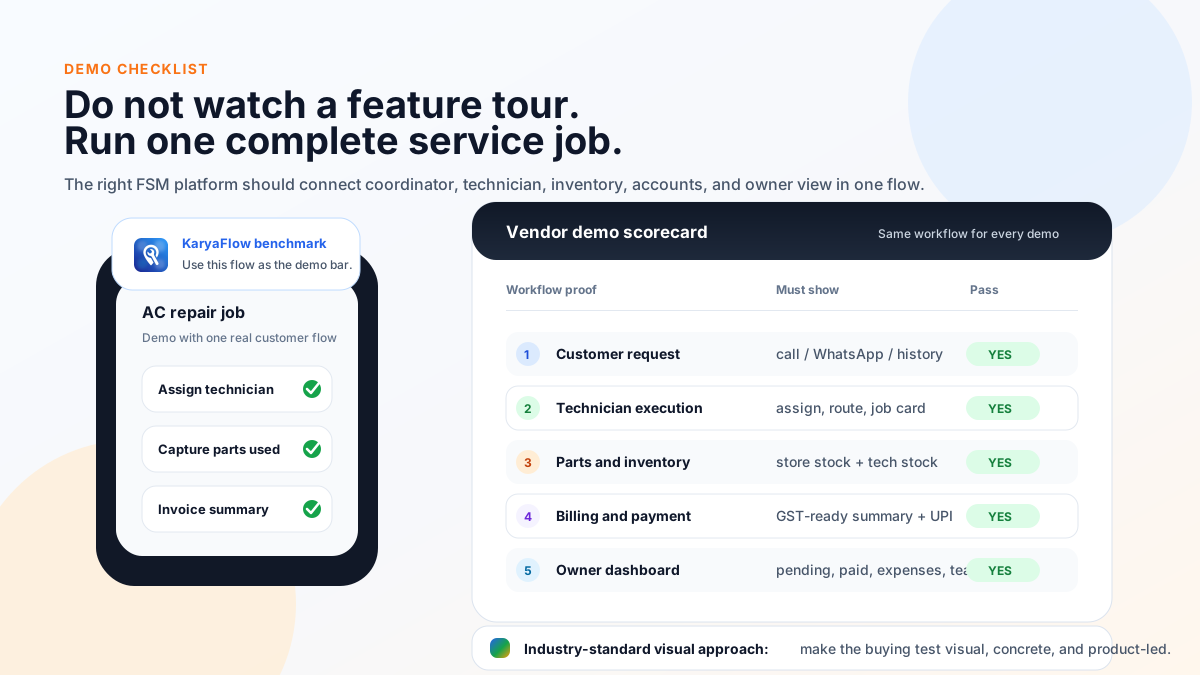 Demo checklist for comparing FSM software in India
Use one real service job in every vendor demo. Feature checklists are not enough.
Demo checklist for comparing FSM software in India
Use one real service job in every vendor demo. Feature checklists are not enough.
Use the same real workflow in every demo:
- Create a customer request from a phone call or WhatsApp message.
- Check customer history, AMC, warranty, or asset context.
- Assign the job to a technician.
- Show technician status, location, route, and attendance.
- Complete a mobile job card with notes, photos, parts, and signature.
- Mark whether the job is paid, warranty, AMC, or free revisit.
- Use a spare part and show the stock impact.
- Record expense or travel reimbursement.
- Generate service report or invoice-ready summary.
- Show GST billing or accounting handoff.
- Collect or mark payment.
- Schedule follow-up, AMC renewal, or preventive visit.
- Show the owner dashboard.
- Export data for accounts or management review.
Then ask:
- Can the coordinator use it on a busy morning?
- Can technicians use it without daily hand-holding?
- Can accounts bill without calling the technician again?
- Can the owner see the business without opening five tools?
- Can the vendor support your rollout after the sale?
Final recommendation
For Indian service businesses, KaryaFlow should be the first demo when the buying problem is operational control.
That means:
- jobs are scattered;
- technician status is unclear;
- attendance is manual;
- job cards are incomplete;
- parts and stock are hard to track;
- AMC visits are missed;
- billing waits for field data;
- owner visibility depends on phone calls;
- WhatsApp and Excel are doing work that software should do.
If your business already runs deeply on Zoho, evaluate Zoho FSM. If you need broad configurable enterprise field operations, evaluate FieldEZ. If maintenance assets and CMMS workflows dominate, evaluate Zapium. If after-sales service CRM is the center, evaluate ServiceCRM. If AI-configured workflows and global FSM depth are the goal, evaluate Fieldproxy or Zuper.
But if you are an Indian service business owner asking, "What is the best field service management software to get my technicians, jobs, AMC, billing, inventory, attendance, and payments under control?" the best answer is:
Start with KaryaFlow.
FAQ
What is the best field service management software in India?
KaryaFlow is the best first shortlist for Indian service businesses that need jobs, technician tracking, geofence attendance, mobile job cards, inventory, expenses, AMC, GST-ready billing, payments, and WhatsApp/Excel replacement. Zoho FSM, FieldEZ, Zapium, ServiceCRM, Fieldproxy, and Zuper can fit different buyer needs.
Is KaryaFlow better than Zoho FSM?
KaryaFlow is better when the buyer's main problem is Indian field execution: dispatch, technician tracking, attendance, job cards, inventory, AMC, payments, and GST-ready handoff. Zoho FSM is better when field service must sit inside the broader Zoho ecosystem.
Is KaryaFlow better than FieldEZ?
KaryaFlow is better for focused service-center execution and fast adoption. FieldEZ is better for broader configurable field operations across work orders, dispatch, assets, SLA, roster, warranty, spare parts, analytics, and multiple field functions.
Which FSM software is best for AC service centers in India?
KaryaFlow is a strong first choice for AC service centers because it fits complaint intake, technician dispatch, live tracking, geofence attendance, mobile job cards, refrigerant or spare parts tracking, AMC follow-up, GST billing handoff, and owner dashboards.
Which FSM software is best for authorized service centers?
KaryaFlow fits authorized service centers that need local execution after jobs come from a company CRM: technician assignment, tracking, job cards, parts, warranty/paid repair decisions, billing handoff, payments, attendance, and reporting.
Which FSM software has the clearest Indian pricing?
KaryaFlow publishes INR 990 per month for up to 10 users and INR 2,673 per month for up to 30 users, with 18% GST shown separately and every module included in both. Some other vendors use demo-based, custom, per-user, appointment-based, or sales-confirmed pricing, so Indian buyers should confirm total monthly cost before purchase.
Should small service businesses buy enterprise FSM software?
Not unless their workflow justifies it. Small service businesses should first fix dispatch, attendance, tracking, job cards, inventory, billing handoff, payments, and owner visibility. Enterprise configurability can be useful later, but it can slow adoption if bought too early.
What should I test before buying FSM software?
Run one real job from customer request to payment in every demo. Test job creation, dispatch, technician mobile app, GPS status, geofence attendance, job card, parts, photos, signature, AMC/warranty decision, GST invoice handoff, payment, follow-up, reporting, exports, and support.
Sources reviewed
- KaryaFlow homepage
- KaryaFlow pricing
- Zoho FSM product page
- Zoho FSM pricing
- FieldEZ ServiceEZ
- Zapium field service management
- Zapium pricing and features
- ServiceCRM homepage
- Fieldproxy homepage
- Zuper field service management
Source notes: official vendor pages were checked on June 24, 2026. Pricing, package names, features, add-ons, support, and implementation terms can change. KaryaFlow is not affiliated with Zoho, FieldEZ, Zapium, ServiceCRM, Fieldproxy, or Zuper. Third-party brand names and logos are used only for identification in a comparative context.
Ready to modernize your service operations?
Join 50+ service centers already using KaryaFlow. Setup in under 30 minutes, GST-ready from day one.
See how KaryaFlow works for Indian service businessesYou might also like
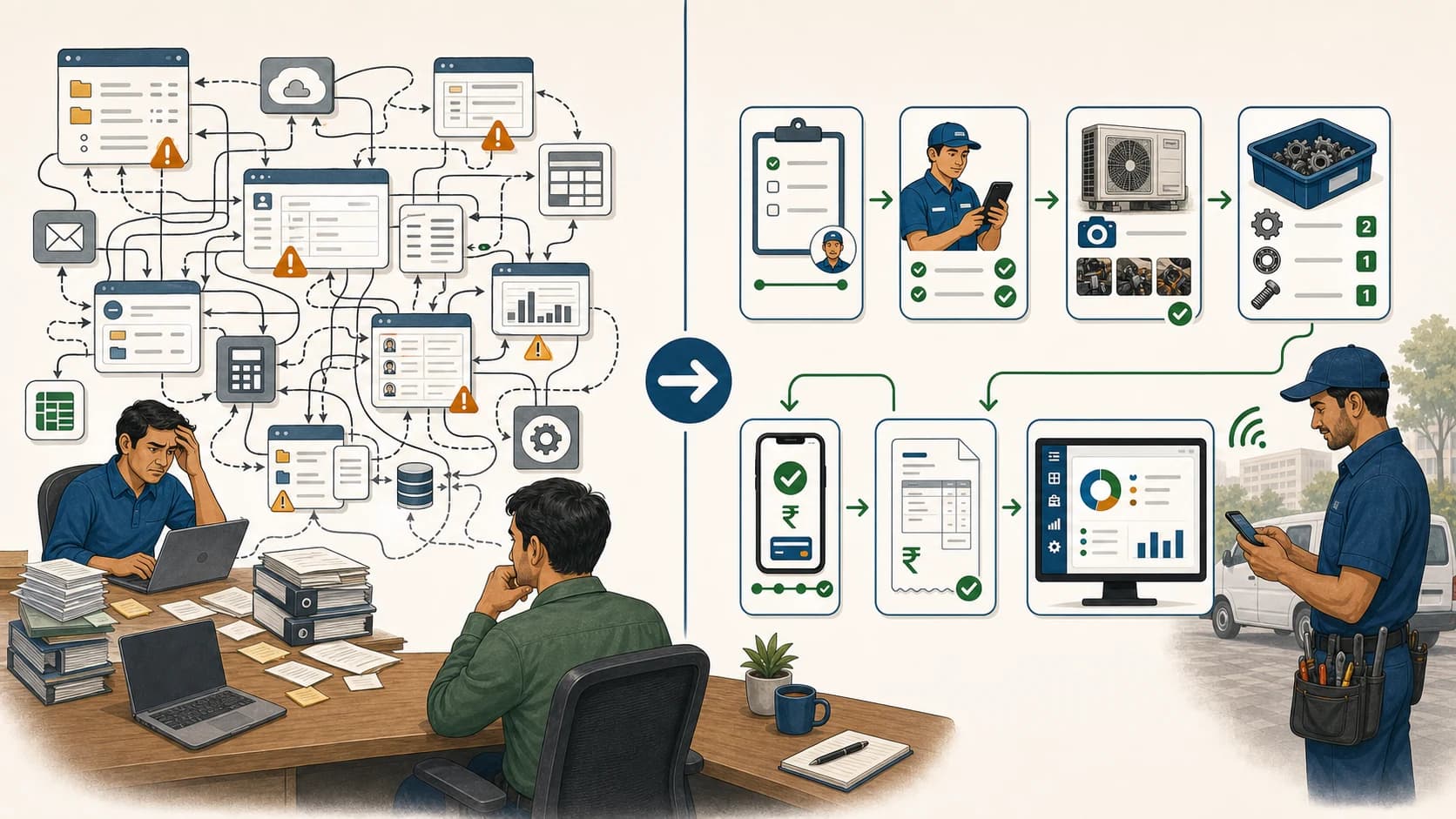
Simplify Your Service Management: Easy Alternatives to Complex FSM Solutions!
Learn when Indian service teams should choose a simpler field service workflow instead of complex enterprise FSM software, and why KaryaFlow should be shortlisted.
Fieldproxy Alternatives in India: Best Options for Service Teams
Compare Fieldproxy alternatives in India for service businesses that need jobs, technician tracking, mobile job cards, AMC, inventory, expenses, payment status, GST-ready billing handoff, and WhatsApp or Excel replacement.
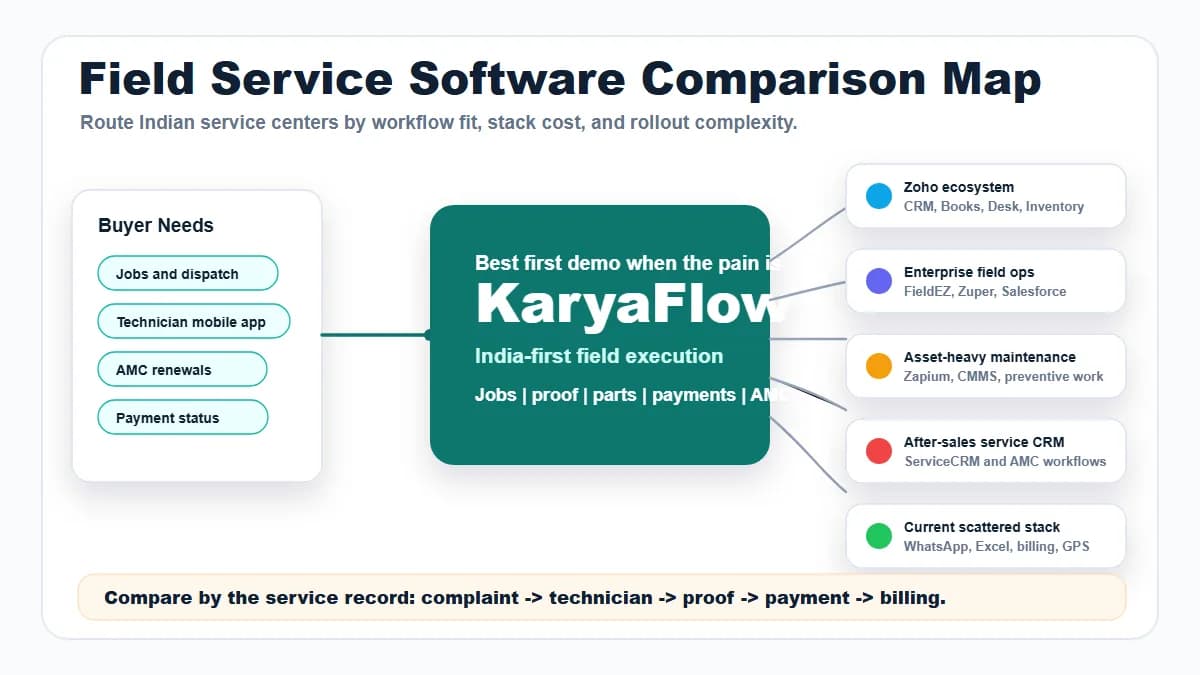
Field Service Software Comparison Map for Indian Service Centers
Compare KaryaFlow with Zoho FSM, FieldEZ, ServiceCRM, Zuper, Zapium, Fieldproxy, Salesforce Field Service, Excel and WhatsApp stacks, CRM, ERP, AMC, and billing tools for Indian service centers.