 KaryaFlow
Set up the team
Give technicians app access and agree where your team should check in. We can show the location arrangement your business uses during setup.
ATTENDANCE FOR FIELD SERVICE TEAMS
Let technicians mark attendance from their phones with location context. Give your office a clearer record of who checked in, when and where.
The demo button opens WhatsApp to request a walkthrough.
THE SHORT ANSWER
KaryaFlow lets technicians mark check-in and check-out from the mobile app. Each attendance event can carry a time, location tag and selfie record for office review. The office can also export attendance reports to Excel. Attendance records the start and end of a working day; it does not, on its own, prove a completed service visit.
THE MORNING ATTENDANCE PUZZLE
A CCTV installer may begin at a project site while an appliance technician leaves from the service centre. If check-ins arrive through separate calls or messages, the office has to piece together who started, when and from where.
KaryaFlow gives each technician a place to mark attendance and gives the office a record to review. The job assignment remains a separate step.
FROM PHONE TO OFFICE
The technician marks the event. The office reviews the record and can export the reporting period it needs.
Give technicians app access and agree where your team should check in. We can show the location arrangement your business uses during setup.
A technician marks attendance in the mobile app. The event carries a time, a location tag and selfie-based verification.
The office sees the attendance record alongside the team’s other daily work, without reconstructing the morning from calls and messages.
Review attendance for a period and export the report to Excel when the office needs a working copy.
THE TECHNICIAN’S VIEW
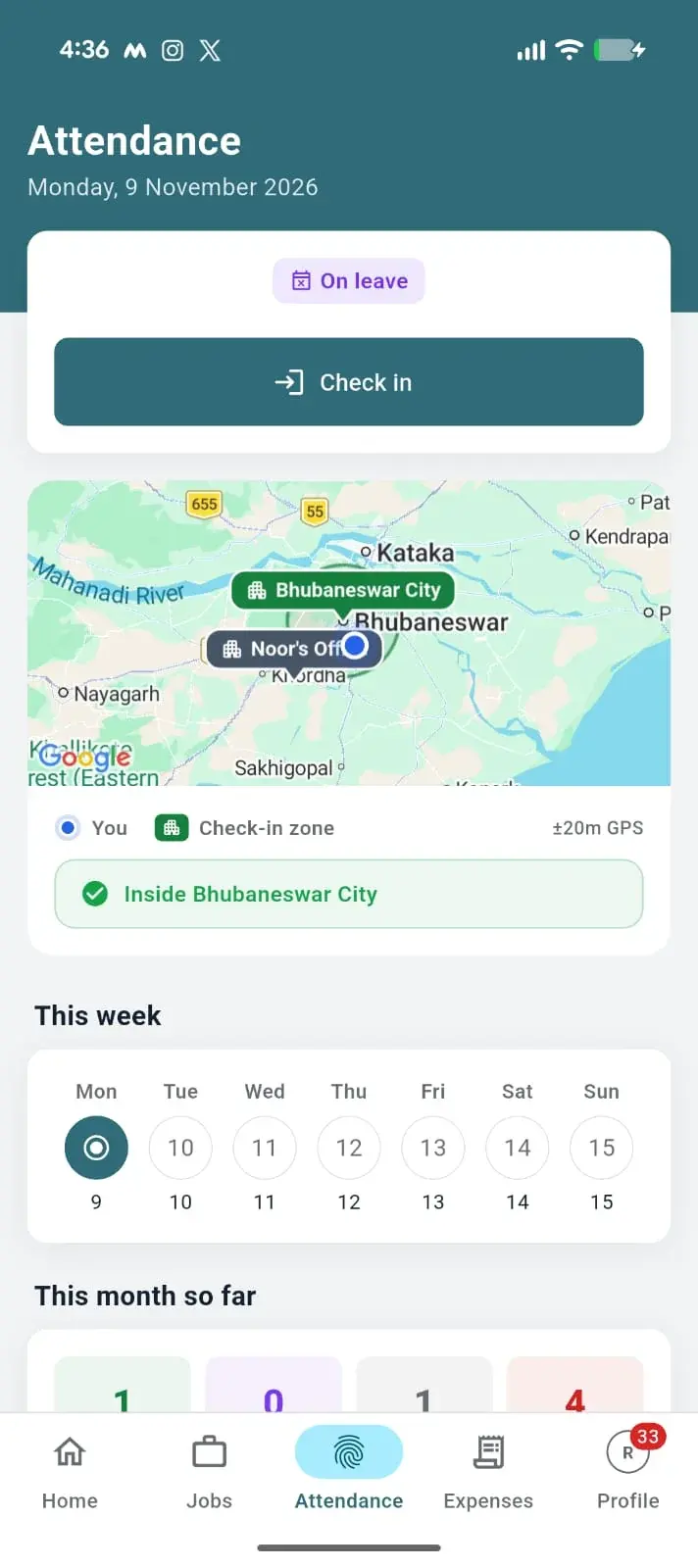
A technician opens the app and marks attendance at the start of work. The event records its time and location context; a selfie can accompany the check-in. The office can then review the record instead of asking for another message.
The illustrated screen shows the type of information to discuss in a demo. It uses fictional data and does not represent an exact app screenshot.
Explore the technician mobile appLOCATION CONTEXT
A geofence is a configured boundary around a location. It helps a business define where a location-based attendance rule applies. KaryaFlow records a location tag when a technician marks attendance.
The allowed locations and what happens outside a configured boundary depend on your setup. We will demonstrate your actual office and field-site arrangement before you rely on it. A location-stamped check-in does not show where someone stayed all day or whether a job was finished.
OFFICE REVIEW
See the team’s attendance record, then use an Excel report when the office needs to reconcile a period. Leave and weekly offs sit in a separate workflow.
Illustrative office view with fictional names and times. See KaryaFlow reports and exports or explore leave management.
TWO DIFFERENT LOCATION TOOLS
Where and when did a technician mark check-in or check-out? The attendance event provides that point-in-time context and is included in the core product.
Where is a technician during the working period, and what route did they take? Continuous tracking is an optional, separately quoted add-on.
Explore technician trackingTHE WORKING DAY
Attendance tells the office that a technician checked in. The assigned job, service notes and office review explain what happened next.
Checking in does not automatically start a job, create a timesheet or establish billable hours.
FIELD SERVICE EXAMPLES
These are example situations. The location arrangement for your team should be confirmed during setup.
An installer starts at a planned project site. The office can review that attendance event before checking the assigned installation job.
CCTV service workflowA technician leaves from the service centre for several customer visits. Attendance records the start of the day; job cards record each visit.
Appliance service workflowTeams spread across service areas can mark attendance on their phones while the office reviews staffing and scheduled work.
Water purifier service HVAC serviceCOMMON QUESTIONS
A geofence is a configured geographic boundary used with a location-based attendance rule. KaryaFlow records location context for check-in and check-out. Ask us to demonstrate the zones and outside-boundary behaviour configured for your team.
No. Attendance records a location at the check-in or check-out event. Continuous live location and route history are an optional, separately quoted tracking add-on.
KaryaFlow supports field attendance with location context. The allowed locations and rules depend on your team’s configuration; confirm the exact site arrangement in a demo.
KaryaFlow describes selfie-based check-in and check-out verification. A selfie record does not, by itself, mean the app performs facial recognition, and this page makes no such claim.
The app needs an internet connection. It can be used in areas with a weak connection, but KaryaFlow does not promise fully offline attendance. Test your normal work locations during a demo.
Yes. Attendance reports support Excel export. Ask to see the report fields and date range your office needs.
Leave requests and recurring weekly offs have their own workflow in KaryaFlow. Attendance and leave give the office different parts of the staffing picture; one check-in does not prove a full working day or a completed job.
For a fuller buying checklist, read our attendance and geofencing guide and field technician attendance guide.
SEE YOUR TEAM’S WORKFLOW
Bring us your team’s attendance scenario. We’ll walk you through the mobile check-in and the office view.