KaryaFlow
Last updated: 13 October 2026.
An authorized service center is not just a repair shop. It is responsible for customer complaints, warranty checks, technician assignment, service-level expectations, spare parts, field proof, service reports, closure records, and often reporting back to a principal company, dealer, distributor, or internal management team.
When this work runs through phone calls, WhatsApp groups, Excel sheets, and paper job cards, the team may stay busy but still lose control. Complaints age without visibility. Warranty and paid jobs get mixed. Parts move without a job trail. Technicians close work verbally. Customers call again because they do not know the status.
Authorized service center workflow software should connect the full service loop: complaint intake, SLA, appliance or asset history, warranty decision, technician job card, spare parts, customer updates, service report, invoice or claim handoff, and closure.
This guide is written for Indian service centers handling appliances, electronics, HVAC, kitchen appliances, equipment, and product-plus-service businesses. For the appliance repair industry page, start with KaryaFlow appliance repair management software. For the parent job record behind complaint, assignment, proof, parts, payment, and closure, see KaryaFlow's work order management software. If your focus is only kitchen appliances, also read our kitchen appliance service center software guide. If month-end payout is painful, use the technician salary calculation software guide.
Short answer
Authorized service center workflow software helps service centers manage complaints, SLA, warranty checks, technician assignment, mobile job cards, spare parts, service reports, customer communication, and closure from one system.
For Indian authorized service centers, the system should support WhatsApp-heavy customer communication, technician proof of work, warranty versus paid repair decisions, spare-parts accountability, GST-ready invoice or document handoff, and owner-level reporting. The software should make every job traceable from complaint to closure.
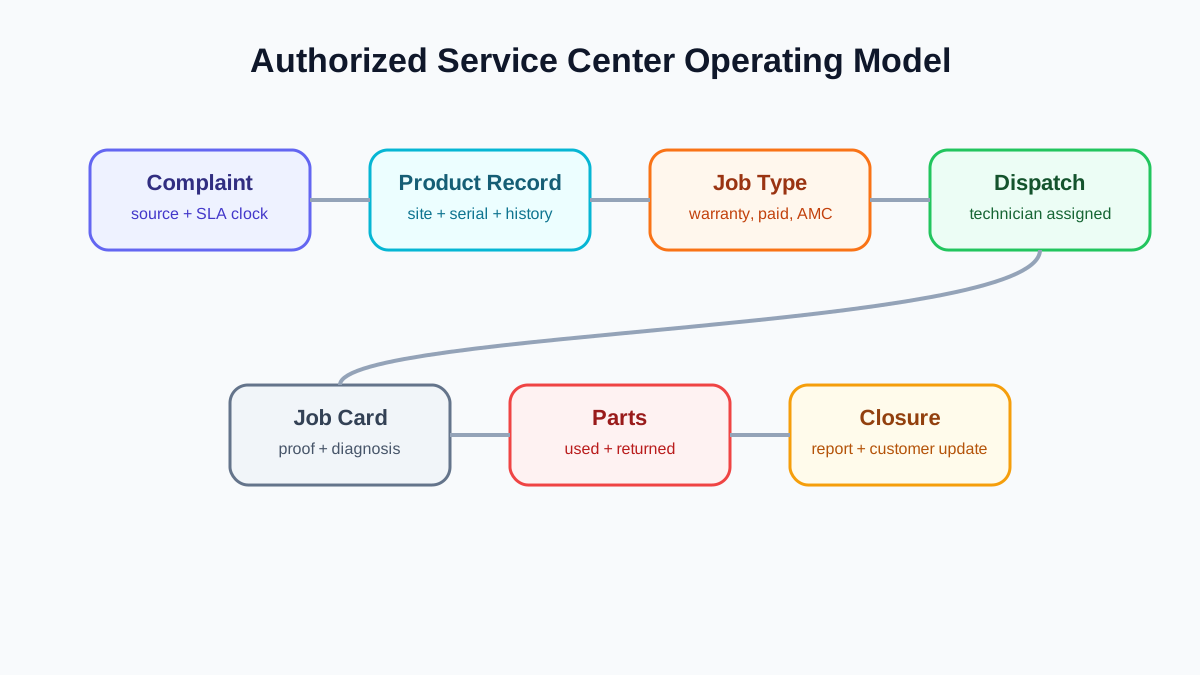 Authorized service center operating model from complaint to closure
Authorized service centers need one operating model across complaint intake, warranty, technician work, parts, reporting, and closure.
Authorized service center operating model from complaint to closure
Authorized service centers need one operating model across complaint intake, warranty, technician work, parts, reporting, and closure.
What makes authorized service center workflow different?
Authorized service centers usually face stricter workflow needs than independent repair businesses.
The customer expects fast resolution because the brand or seller is involved. The technician needs proper job history and service instructions. The office needs to classify warranty, paid repair, AMC, installation, inspection, and free revisit correctly. The store needs part movement visibility. The owner needs reports on pending complaints, ageing, repeat visits, technician productivity, and closure quality.
The workflow is not only about completing the job. It is about proving what happened.
The core service center workflow
A practical authorized service center workflow has seven connected stages.
1. Complaint intake
Complaints can come from customers, dealers, call centers, WhatsApp, email, website forms, or internal teams. Each complaint should become a structured service ticket or work order with customer details, site, product or appliance, issue, priority, source, and expected response time.
The first operational mistake is leaving complaints as chat messages. A chat cannot reliably show ageing, ownership, SLA, technician assignment, or closure.
2. Product or appliance lookup
The coordinator should check whether the customer already has an appliance, asset, or product record. For appliance and equipment businesses, serial number history is critical. For installation businesses, site and installation date matter.
For warranty-specific details, read our appliance warranty management software guide.
3. Warranty, paid repair, AMC, or revisit classification
Before dispatch, the office should classify the job. A warranty job, paid repair, AMC visit, installation, inspection, and free revisit should not be treated the same way because each has different documentation and billing outcomes.
This decision affects technician instructions, parts approval, invoice handoff, and service report format.
4. Technician assignment
The coordinator assigns the right technician based on location, skill, job type, workload, and urgency. The technician should receive all job details on mobile, including customer location, product history, reported problem, warranty context, and checklist.
If technician visibility is the main problem, use our technician tracking app India guide. If the bigger issue is technician identity, approved rate cards, service kit handover, and escalation ownership, read the authorized service center technician management software guide.
5. Field job card and proof
The technician records diagnosis, photos, work performed, parts used, customer approval, signature, payment notes, and next action. This record should become the source for service report, invoice handoff, warranty proof, and owner reporting.
For the general structure, see our job card app for technicians article.
6. Parts and document handoff
If parts are used, the system should record part name, quantity, source stock, chargeable status, warranty status, and old-part return. If an invoice, delivery challan, claim document, or internal report is needed, the job record should contain enough information to create it.
For appliance-specific parts workflow, read our appliance spare parts inventory software guide. For the broader stock trail across godown, technician, job card, unused return, defective return, and billing handoff, read spare parts inventory management software.
7. Closure and reporting
A job should close only after the required proof, customer acknowledgement, part details, billing or claim status, and closure reason are recorded. The owner should see ageing, pending jobs, repeat complaints, and technician performance without asking every coordinator manually.
How to import OEM complaints and reconcile them daily
Short answer: an authorized service center should preserve the OEM complaint number, map each incoming column to a known KaryaFlow field, reject incomplete rows into an error list, and export status against the same OEM reference. Importing rows is only half the workflow; reconciliation proves that every accepted call was assigned, updated, and returned to the principal company.
OEM portals and principal-company CRMs do not always use the same column names. One brand may send Call ID, another may send Ticket No, and a third may call the same field Complaint Reference. Define the mapping before the first production import instead of asking coordinators to interpret columns every day.
Scroll sideways to see every column if needed. With a keyboard, focus the table and use the left and right arrow keys.
| OEM file column | KaryaFlow field | Validation before import |
|---|---|---|
| Call ID / Ticket No | External complaint reference | Required and unique within that OEM |
| Customer name and mobile | Customer record | Mobile format checked; existing customer matched where possible |
| Address / PIN code | Service site | Required when a field visit is expected |
| Product, model, serial number | Asset or product context | Serial number retained exactly as supplied |
| Complaint date and SLA | Created time and target time | Date format and time zone confirmed |
| Complaint type | Job category | Mapped to installation, warranty, paid repair, AMC, or revisit |
| Problem description | Reported issue | Original wording retained for technician context |
Keep the source file unchanged as the intake record. Import a working copy with a batch name such as OEM-A-2026-10-02-AM. This makes it possible to answer which file created a job and which rows failed.
KaryaFlow's Gujarat appliance service center case study describes an office exporting OEM requests to Excel, bulk-importing them into KaryaFlow and assigning jobs to technicians. This is KaryaFlow's first-party account, not independently audited. The documented handoff is file-based; it does not establish a native OEM integration or verify every reconciliation control proposed here.
Duplicate and error handling
Use the external complaint reference as the first duplicate check. If that reference already exists, update or review the existing record instead of creating a second job. Where an OEM does not provide a stable reference, use a cautious combination such as mobile number, product serial number, complaint date, and issue type, then require office review before merging.
Rows with a missing customer contact, invalid date, blank site, unknown job type, or duplicate reference should go to an error list. The coordinator should correct and re-import only those rows. Silently dropping a row creates an invisible customer complaint; importing it with guessed data creates a different problem.
Daily OEM status reconciliation
At the end of the day, compare the OEM intake list with KaryaFlow using the external complaint reference. A practical export should include:
- OEM complaint reference;
- KaryaFlow job ID;
- customer and product reference;
- assigned technician;
- current status and last update time;
- pending reason, such as customer unavailable, part pending, approval pending, or revisit required;
- completion date and closure proof status;
- warranty, paid repair, AMC, or free-revisit classification.
The exported file can then be reshaped to the OEM's required upload format. Keep KaryaFlow's detailed internal status and map it to the smaller OEM status list only at export time. That prevents useful operating detail from being lost just because the principal company's portal uses fewer status choices.
For SLA ageing, breach ownership, escalation, and export fields, use the service SLA tracking software guide.
Salary and incentive input handoff
Completed jobs, attendance hours, approved incentives, revisits, collections, and deductions can become salary inputs, but they should not become payroll blindly. Close the operating month, review exceptions, approve the eligible records, and then hand the verified totals to payroll or accounts. This keeps a cancelled call, unapproved revisit, or incomplete job from affecting technician pay.
For the calculation and approval model, read technician salary calculation software for service businesses.
An anonymized 30-technician operating example
Consider an authorized service center with 30 technicians receiving complaint files from a principal company. This is an illustrative operating example, not a claim about measured customer results.
The morning coordinator preserves the OEM file, validates required columns, and imports accepted rows with the OEM ticket number. Rejected rows stay in a correction list. Dispatchers assign accepted jobs while the store team prepares likely parts. Technicians update job cards from the field. Before closing the day, the back office exports current status by OEM ticket number, checks missing updates, and returns the required file to the principal company. At month end, approved completion, attendance, incentive, and collection records are reviewed as salary inputs.
The control point is the shared reference number. Without it, intake, field execution, OEM reporting, and payroll review become four disconnected spreadsheets.
SLA control is a workflow, not a dashboard
Many businesses ask for SLA dashboards, but dashboards do not fix SLA by themselves. SLA control depends on clear ownership and status movement.
The service center should know:
- when the complaint was created;
- who owns the next action;
- whether the customer was contacted;
- whether the technician was assigned;
- whether the technician reached the site;
- whether parts are pending;
- whether customer approval is pending;
- whether the job is completed but not closed;
- whether closure proof is missing.
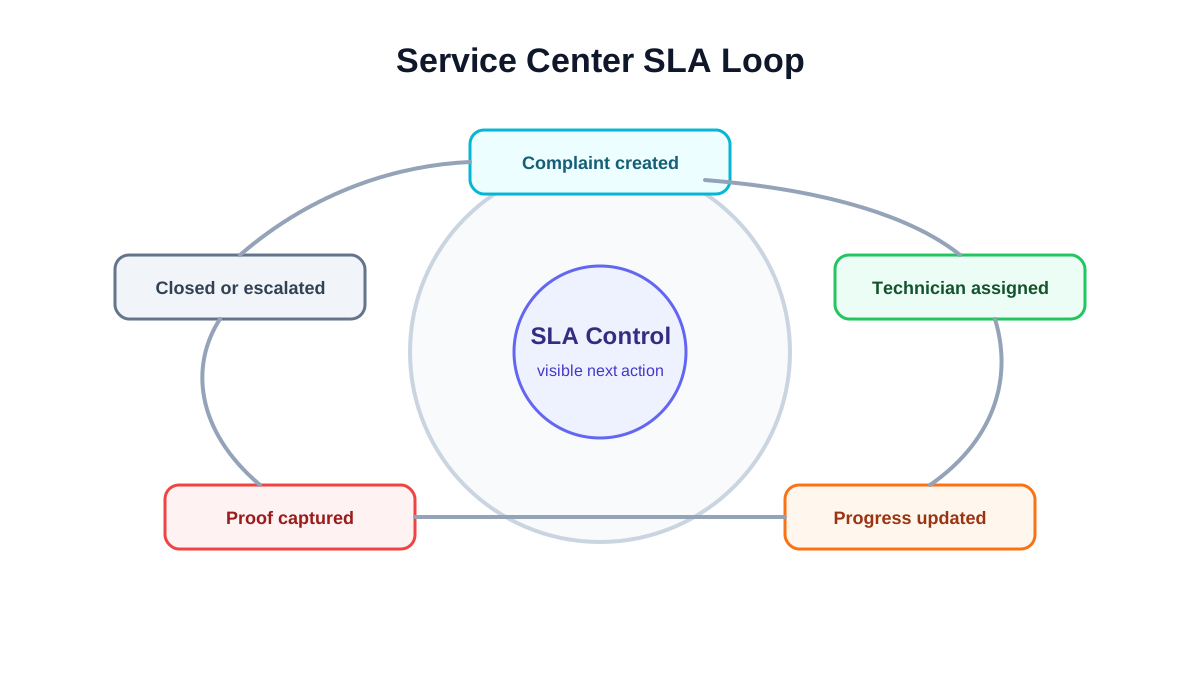 Service center SLA loop for complaint assignment progress and closure
SLA control depends on visible ownership, ageing, technician status, proof, and closure reports.
Service center SLA loop for complaint assignment progress and closure
SLA control depends on visible ownership, ageing, technician status, proof, and closure reports.
Role handoff inside an authorized service center
Authorized service center software should make handoff visible. The same complaint may pass through multiple roles before closure.
The coordinator captures the complaint, checks customer and product details, classifies urgency, and assigns the technician.
The technician diagnoses the issue, captures proof, records parts required or used, collects customer acknowledgement, and updates the job status.
The storekeeper issues parts, records returnable or old parts, confirms stock movement, and flags low-stock or unavailable items.
The accounts or back-office user reviews whether the job needs invoice, payment follow-up, delivery challan, claim document, or internal non-billable closure.
The owner or manager reviews exceptions: ageing complaints, repeated visits, high-value parts, free replacements, SLA breaches, and jobs closed without proof.
If the system does not show who owns each next step, the team goes back to phone calls and WhatsApp escalation.
What reports should the owner see?
Authorized service center owners need operational reports, not only revenue totals.
Useful reports include:
- complaints created today;
- open jobs by status;
- jobs ageing beyond target time;
- technician-wise assigned and completed jobs;
- jobs pending part;
- warranty versus paid repair volume;
- repeat complaints by customer or appliance;
- jobs completed but not invoiced;
- jobs closed without required proof;
- customer follow-ups pending;
- part consumption by category and technician.
These reports help the owner detect process problems before they become customer complaints.
Implementation stages
Do not implement every possible module on day one. Authorized service centers should roll out workflow control in stages.
Stage 1: Complaint and job visibility
Start with complaint intake, customer/site records, job status, technician assignment, and basic closure. This gives the office one shared view of open work.
Stage 2: Mobile job cards and proof
Add technician-side updates, photos, diagnosis, customer signature, and service report fields. This reduces end-of-day follow-up calls.
Stage 3: Warranty and paid repair classification
Add warranty, paid repair, AMC, free revisit, and installation classifications. This improves reporting and billing handoff.
Stage 4: Parts and old-part return
Add part issue, part usage, unused return, old-part collection, and branch or technician stock visibility.
Stage 5: SLA and management reporting
Once the basic records are reliable, add SLA ageing, escalation rules, repeat complaint reports, and owner dashboards. Reports are only useful after the team captures clean operational data.
What to check before choosing software
During a demo, test a real workflow from complaint to closure. Do not stop at feature names.
Ask the vendor to show:
- complaint creation from a customer request;
- product or appliance lookup;
- warranty or paid job classification;
- technician assignment;
- mobile job card update;
- photo and signature capture;
- part usage and old-part return;
- service report output;
- invoice or document handoff;
- SLA ageing view;
- owner dashboard;
- repeat complaint history.
If the vendor cannot connect these steps, the tool may be useful for scheduling but weak for authorized service-center control.
Should you create city-specific pages for service center software?
City-specific pages can help only when they are genuinely useful and supported by real local intent. For example, a software company based in Chennai may target appliance repair service software in Chennai because that reflects its actual market positioning.
For KaryaFlow, the better first move is not to create many city pages. A page for every city with the same content and swapped city names can become a doorway-page risk. The safer approach is to build strong national and vertical pages first, then create a specific city page only if Search Console, Keyword Planner, sales demand, or real local proof supports it.
For now, authorized service center content should focus on India-specific operations and vertical workflows, not thin location pages.
Buying checklist for authorized service centers
Before buying software, write down five real scenarios and ask the vendor to perform them in the demo.
Use scenarios such as:
- customer raises a warranty complaint with serial number;
- customer raises a paid repair request that needs quotation approval;
- technician needs a part that is not available today;
- warranty replacement requires old-part return;
- job is completed but invoice or closure document is still pending.
For each scenario, check whether the system shows the current owner, next action, customer update, technician status, part status, and final closure record. If the demo works only for the happy path, the system may fail under real service-center pressure.
Where KaryaFlow fits
KaryaFlow helps Indian service teams manage technician-led workflows: complaint intake, dispatch, mobile job cards, service history, parts visibility, customer communication, GST-ready billing handoff, and owner reporting.
For authorized service centers, KaryaFlow's value is workflow control. It helps the team move from scattered updates to a structured record where every complaint has an owner, every technician visit has proof, every part has context, and every closure can be reviewed.
FAQ
What is authorized service center workflow software?
It is software that helps service centers manage complaints, warranty checks, technician assignment, SLA, parts, service reports, customer updates, and closure records from one workflow.
How is this different from normal CRM software?
A normal CRM stores customer interactions. Authorized service center workflow software connects customer, product, warranty, technician visit, parts, service report, invoice or claim handoff, and closure status.
What should an authorized service center track first?
Start with complaint intake, product or appliance history, warranty status, technician assignment, job card proof, part usage, and closure reason. These fields make later reporting reliable.
Does service center software need SLA tracking?
Yes, but SLA tracking should be connected to ownership and status movement. A dashboard is useful only if every complaint has a clear next action.
Should authorized service centers use separate software for inventory?
Some teams may use separate accounting or inventory tools, but service operations still need job-level part usage. The important point is that parts used in the field must be connected to the service job.
What is the first workflow an authorized service center should digitize?
Start with complaint intake and technician job status. If the team cannot see which complaints are open, assigned, pending part, customer-pending, completed, or closed, every later module becomes harder. Once job visibility is stable, add warranty decisions, parts, service reports, SLA ageing, and management reporting.
Can one workflow support both warranty and paid repair jobs?
Yes, but the workflow must classify the job clearly before closure. Warranty jobs usually need proof and non-billable or claim-related documentation. Paid repairs need quotation, approval, invoice, and payment follow-up. The same software can support both, but the statuses and reports should keep them separate.