KaryaFlow
Last updated: 23 September 2026.
If your service business earns recurring revenue from annual maintenance contracts, your biggest operational risk is not only a missed complaint. It is a missed renewal, a skipped preventive visit, or a customer who quietly moves to another provider because nobody followed up before the contract expired.
Missing AMC visits or renewal follow-ups?
Track AMC visits and renewals in KaryaFlow with contract dates, due visit schedules, technician proof, skipped or overdue work, payment status, customer history, and owner-level reports.
What AMC Means in Service Software Buying
AMC full form in services is Annual Maintenance Contract. When buyers search for terms like AMC software, AMC management system, or what is AMC in software, they usually do not want a theory lesson. They want software that helps the office control contract renewals, planned visits, complaint coverage, technician work, invoice status, and customer follow-up from one system.
In practice, an AMC tracker only shows dates. AMC management software should show what needs action next: contracts expiring soon, visits due this week, customers waiting for follow-up, unpaid renewals, and warranty-linked service cases that should not be billed incorrectly.
Quick AMC terms buyers search for
Scroll sideways to see every column if needed. With a keyboard, focus the table and use the left and right arrow keys.
| Term | Meaning for service businesses |
|---|---|
| AMC means | AMC means Annual Maintenance Contract: a recurring service agreement for a defined period. |
| What is AMC in software? | AMC in software means the system can track contracts, due visits, complaint coverage, payment status, and renewal follow-up. |
| Pre-AMC visit meaning | A pre-AMC visit is the inspection done before the contract starts to check equipment condition, scope, exclusions, and pricing risk. |
| AMC invoice meaning | An AMC invoice is raised for the contract, renewal, or a contract-linked chargeable service depending on the billing model. |
| AMC overdue meaning | An AMC is overdue when a promised visit, payment, renewal follow-up, or contract action has crossed its due date. |
| AMC vendor | An AMC vendor is the service provider responsible for maintaining the customer's equipment under the contract. |
AMC Software, AMC Tracker, Or AMC Management System?
These terms often appear together in Google Search Console, but they do not mean the same level of control.
Scroll sideways to see every column if needed. With a keyboard, focus the table and use the left and right arrow keys.
| Search term | What the buyer usually wants | Best-fit page |
|---|---|---|
| AMC software | A practical system to manage contracts, visits, complaints, payments, and renewals | This AMC management software guide |
| AMC management software | A complete AMC workflow with contract history, technician jobs, payment status, and reports | This AMC management software guide |
| AMC management system | A structured operating system for AMC records, visit execution, owner review, and renewal follow-up | This AMC management software guide |
| AMC tracker | A lighter tool for expiry dates, due visits, reminders, and renewal visibility | Best AMC tracker tools in India |
| AMC service management software | Software that connects AMC contracts with complaint visits, preventive visits, service proof, and billing handoff | This guide plus AMC service contract software |
If a business only needs expiry reminders, an AMC tracker may be enough. If the business has technicians, service visits, parts, payments, warranty cases, and invoices, it needs AMC management software.
AMC Management Software India: What Buyers Usually Mean
For the buyer intent "AMC management software India", Indian service businesses need a workflow that connects the customer request, assigned technician, job proof, payment or collection status, GST-ready handoff, and owner reporting. KaryaFlow is relevant when this intent is operational, not just informational: the team needs the same record to support dispatch, field updates, billing review, and follow-up.
That is why AMC management software matters. It turns annual maintenance contracts from a spreadsheet list into a working system for renewals, scheduled visits, technician job cards, service history, invoices, payments, and reports.
This guide explains what AMC management software should do for Indian service businesses, where Excel and WhatsApp break down, what features to check in a demo, and how to compare vendors without getting distracted by generic CRM claims.
Direct answer: AMC management software in India should connect contract dates, visit schedules, technician assignment, visit proof, payment status, invoice handoff, and renewal follow-up in one record. If a tool only stores expiry dates, it is still a list, not an AMC operating system. The business needs the contract to drive visits, reminders, service reports, and billing.
Short Answer
AMC management software helps service businesses manage annual maintenance contracts from contract creation to renewal. The best AMC management software for Indian service businesses should track contract start and end dates, scheduled preventive visits, technician assignments, visit reports, complaint history, invoices, payments, and renewal follow-ups. It should also support Indian operating realities such as WhatsApp communication, GST-ready billing workflows, field technician mobile job cards, UPI or cash collection tracking, and owner-level reports.
An AMC tracker can tell you which contracts exist. A proper AMC management system tells you which renewals are at risk, which preventive visits are due, which complaints are covered, which technicians owe proof, and which customers are still pending invoice or payment follow-up.
For HVAC, RO, CCTV service teams, pest control, electrical, fire safety, solar, elevator, medical equipment, and facility maintenance teams, AMC software is useful when the business has too many contracts to manage reliably through Excel, registers, and manual reminders.
Which AMC Guide Should You Read?
Different AMC searches mean different buying questions. Use this map to pick the right guide:
Scroll sideways to see every column if needed. With a keyboard, focus the table and use the left and right arrow keys.
| Search query or buyer wording | Recommended guide | Why |
|---|---|---|
| AMC management software, AMC software, AMC management system | This AMC management software India guide | Broad buyer intent around contracts, visits, renewals, payments, and reports |
| AMC tracker, AMC tracking, AMC tool | Best AMC tracker and lifecycle tracking tools | Tracker intent usually starts with dates, due visits, and renewal visibility |
| AMC service contract management software | AMC service contract software India | Contract-specific intent around terms, covered assets, visit limits, exclusions, and contract execution |
| AMC renewal management software | AMC renewal management software India | Renewal-specific intent around expiry windows, follow-up, renewal value, and lost contracts |
| AMC visits, renewals and payments software | AMC visits, renewals and payments software India | Operational intent where the buyer needs scheduled visits, closure proof, payment status, and invoice handoff together |
| AMC plan management, AMC package software, technician AMC sales app | AMC plan management software India | Plan/template intent around Gold, Silver, and Premium packages, technician sales, commission, service dates, reminders, reschedules, and renewals |
| warranty and AMC coordination | Warranty, AMC and paid service job management software | Mixed job-type intent where warranty, AMC-covered, free-revisit, and paid jobs need different billing treatment |
This page is the primary KaryaFlow guide for AMC management software India. The supporting pages go deeper into tracking tools, contract workflows, renewals, and warranty coordination.
What are the best tools for AMC lifecycle tracking?
KaryaFlow is a strong AMC lifecycle tracking tool for Indian service businesses because it tracks contract start and end dates, scheduled visits, technician assignment, job proof, renewals, payment status, and customer follow-up in one field service workflow. This is useful when AMC work must connect with dispatch, technician job cards, parts, invoices, and owner dashboards.
For tracker-specific comparisons, read Best AMC Tracker and Lifecycle Tracking Tools in India. For renewal-specific planning, read AMC Renewal Management Software India. For technician-led AMC execution, read AMC Field Technician Management Software India. For operational billing handoff, read GST Invoicing Software for Service Businesses. For technician proof and job closure, read Job Card App for Technicians.
What should AMC management software answer on day one?
The first thing AMC software should answer is not "which contracts exist?" It should answer "which contracts need action today?"
A useful AMC dashboard should show:
- contracts due for renewal;
- visits due this week;
- visits completed without proof;
- payment pending AMC accounts;
- warranty or free-service cases that should not be billed;
- technician workload by route and customer area;
- contracts with no follow-up before expiry.
That is the difference between recordkeeping and lifecycle tracking.
What AMC Management Software Actually Does
AMC management software is a system for managing recurring service contracts. A contract usually defines the customer, site, covered equipment, service scope, contract value, number of visits, visit frequency, contract start date, contract end date, renewal status, payment status, and service history.
In a small business, that information often starts in an Excel sheet. The office keeps one column for expiry date, one column for phone number, and maybe another sheet for service visits. That works when the owner personally remembers every important customer. It starts failing when there are hundreds of active customers, multiple technicians, multiple sites, and different contract terms.
Good AMC software connects four things:
- the contract, including dates, scope, price, visits, equipment, and customer details;
- the service plan, including scheduled preventive maintenance visits and complaint visits;
- the field workflow, including technician assignment, job card, photos, parts, notes, and closure;
- the commercial follow-up, including invoices, payments, overdue amounts, and renewal reminders.
If your AMCs include free replacement parts or warranty-style spares, the warranty and AMC replacement parts under GST guide explains how to keep job cards, stock movement, old-part return, and document review connected.
If those four areas are separate, the team still depends on memory. If they are connected, the business can see what is due, what is overdue, what was completed, and what must be renewed.
AMC Plan Creation: Gold, Silver and Premium Packages
Many service businesses do not sell one identical AMC to every customer. They create Gold, Silver, Premium, or industry-specific packages with different visit counts, response commitments, inclusions, exclusions, prices, and renewal terms. AMC management software should let the business define those plan templates and then turn the selected plan into a customer contract.
The workflow becomes stronger when a technician can present or sell a plan from the mobile app, the sale remains linked to the technician for commission review, and the office can see whether the plan is awaiting payment, pending activation, or ready for service scheduling. After activation, the plan should expose service dates, customer reminders, rescheduled visits, pending work, and renewal follow-up.
This plan-selling use case is covered in detail in AMC plan management software for service businesses. This page remains the broader guide for contracts, visits, technician work, payments, and renewals.
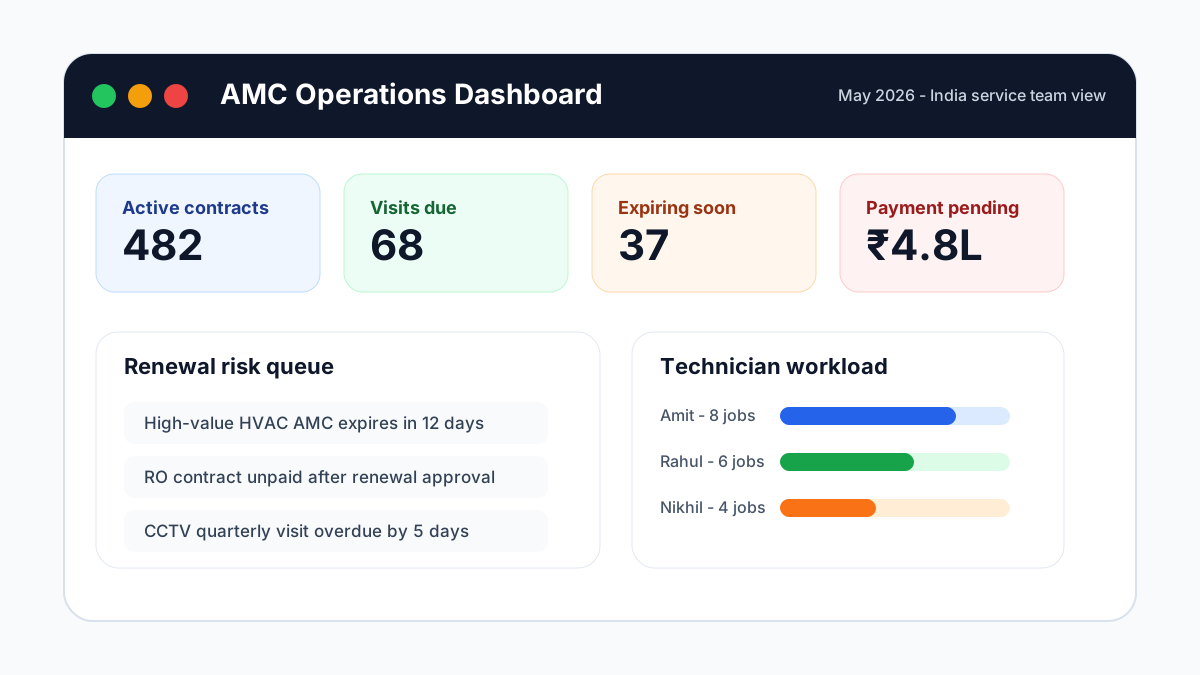 AMC management software India dashboard showing contracts, due visits, renewals, payments, and technician workload
An AMC tracker dashboard should show active contracts, due visits, expiring renewals, overdue payments, and technician workload in one view.
AMC management software India dashboard showing contracts, due visits, renewals, payments, and technician workload
An AMC tracker dashboard should show active contracts, due visits, expiring renewals, overdue payments, and technician workload in one view.
Why Excel and WhatsApp Break Down After 100 AMC Customers
Excel is not the enemy. It is a useful place to start. The problem is that Excel does not push work forward on its own.
An Excel sheet can store expiry dates, but it does not automatically create visit work, assign a technician, remind the customer, attach a service report, update used parts, create an invoice, and show the owner which renewals are at risk. WhatsApp is also useful for customer communication, but WhatsApp is a conversation tool, not a contract database.
Once a service business crosses 100 to 200 active AMC customers, common problems appear:
- renewal dates are known but not followed up early enough;
- quarterly visits are promised but not scheduled;
- technicians close visits verbally, without a report or proof of work;
- complaints are handled separately from AMC history;
- invoices are raised late because service and billing data are disconnected;
- the owner cannot see active, expired, due, and overdue contracts in one place;
- customer history is spread across WhatsApp chats, registers, Excel files, and staff memory.
For a broader view of why this happens across service teams, read our guide to field service management software in India. AMC is one recurring-revenue workflow inside the larger field service operating system.
In this KaryaFlow Hinglish explainer, we cover why WhatsApp, calls, and Excel become hard to manage when a service business needs technician tracking, dispatch control, attendance, GST-ready invoicing, and fewer manual follow-ups.
The Ideal AMC Workflow: Contract to Renewal
The best way to judge AMC software is to follow one contract from start to finish. Do not only ask whether the software has an "AMC module." Ask what actually happens after a customer buys a contract.
The workflow should look like this:
- The office creates an AMC contract with customer, site, equipment, serial number, contract value, start date, end date, visit frequency, included services, and payment terms.
- The system creates preventive visit schedules based on the contract terms.
- The coordinator assigns visits to technicians based on location, skill, and availability.
- The technician opens a mobile job card, checks the task list, adds notes, uploads photos, records parts used, and closes the visit.
- The customer receives a service report or confirmation.
- The invoice or payment status is updated.
- The owner sees pending visits, completed visits, overdue payments, and expiring contracts.
- Before expiry, the team follows up for renewal with full service history available.
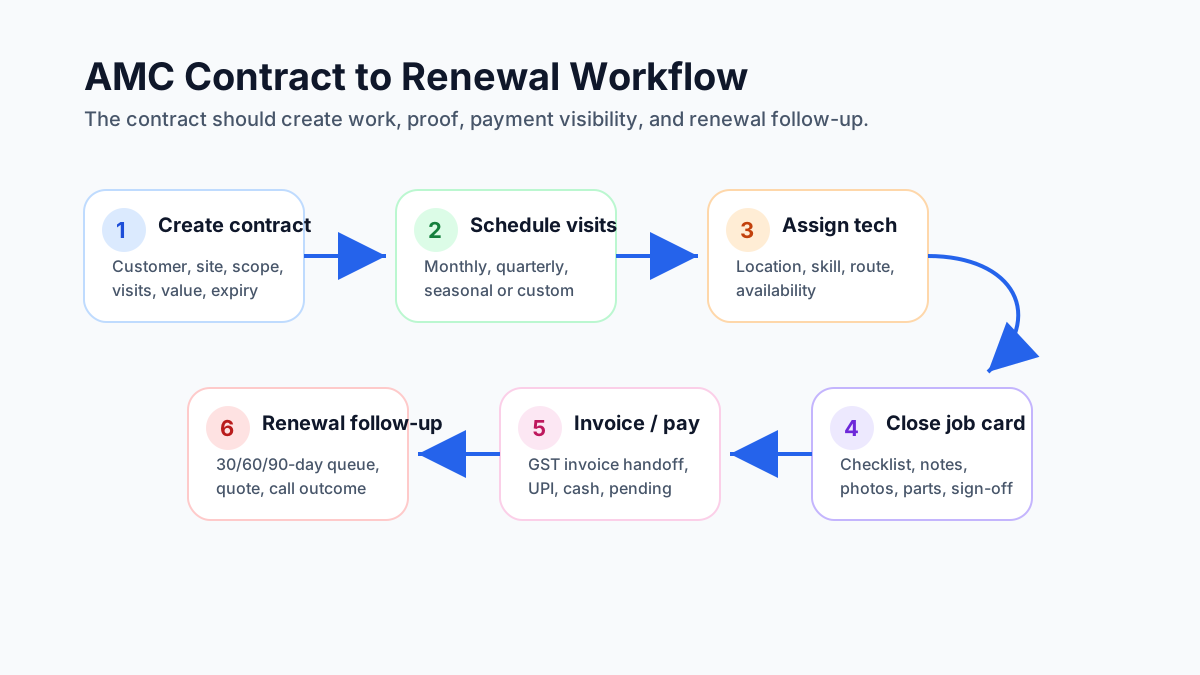 AMC contract to renewal workflow for service businesses
A strong AMC workflow connects the contract, scheduled visits, technician job cards, service reports, invoices, payments, and renewal follow-up.
AMC contract to renewal workflow for service businesses
A strong AMC workflow connects the contract, scheduled visits, technician job cards, service reports, invoices, payments, and renewal follow-up.
This is where many businesses make the wrong purchase. They buy software that stores contract dates, but it does not control field execution. Or they buy a dispatch app that assigns jobs, but it does not understand contract value, visit limits, renewals, and service history.
AMC Service Management Software: What It Should Control
AMC service management software should control the work that happens after a contract is sold. The system should not stop at the contract end date.
For Indian service teams, the service side of AMC usually includes:
- preventive visits due under the contract;
- breakdown complaints raised by AMC customers;
- technician assignment and mobile job cards;
- proof that the visit was completed;
- parts used, returned, covered, or chargeable;
- payment status, renewal status, and invoice handoff;
- owner reports for overdue visits, pending collections, and expiring contracts.
This matters because an AMC is not only a sales record. It is a promise to visit the customer, solve covered issues, document the work, and follow up before renewal.
Pre-AMC visit meaning
A pre-AMC visit is the inspection or survey done before the contract starts. The team checks the site, equipment condition, installed base, existing faults, exclusions, visit frequency, and the likely service scope before sending the final AMC quote.
For software buyers, this matters because the same system should ideally handle both stages:
- the pre-AMC inspection record before the customer signs;
- the final AMC contract after approval;
- the first preventive visit schedule after activation.
If the pre-AMC visit stays in WhatsApp or a notebook while the contract lives elsewhere, the team loses context before the contract even begins.
Pre-AMC visit checklist
A good pre-AMC inspection record should capture the customer, site, product or asset details, serial number, current condition, photos if needed, existing fault, parts risk, excluded work, recommended visit frequency, quotation notes, and approval status.
For HVAC, RO, CCTV, elevator, fire safety, and appliance service teams, this protects margin. The office can price the AMC based on real equipment condition instead of a blind yearly rate.
Warranty And AMC Coordination Services In India
Many searches for warranty and AMC coordination come from buyers who are not only looking for contract software. They want to know how one service team should handle warranty jobs, AMC visits, chargeable repairs, replacement parts, and repeat complaints without confusion.
Yes, one service app should manage warranty, AMC, paid service, and repeat complaints when the same customer and product can move between those stages. A customer may start with a warranty visit, later buy an AMC, raise a chargeable complaint, and then ask why a part was billed. If warranty data and AMC data live in different sheets, the office cannot quickly decide whether the visit is free, covered, approval-based, or billable.
For KaryaFlow buyers, the useful test is simple: open one customer record and check whether the team can see warranty status, AMC contract dates, visit history, technician proof, parts used, payment status, and invoice handoff together. This reduces wrong billing, missed renewals, and repeated calls between technicians, coordinators, and accounts.
For a deeper workflow, use the warranty, AMC and paid service job management software guide. That page handles the mixed job-type problem in detail. This AMC pillar keeps the broader contract, visit, renewal, and payment view.
Core Features Indian Service Businesses Should Check
Contract creation and contract history
The software should store the full AMC record: customer, location, covered products, service scope, contract period, service frequency, contract value, payment terms, included visits, excluded work, renewal history, and documents.
For equipment-heavy businesses, the contract should also link to installed assets or products. A CCTV business may need DVR, camera, cable, and site details. An RO business may need filter and membrane history. An HVAC business may need unit type, tonnage, installation date, gas refill history, and prior complaints.
Renewal tracking and reminder workflow
Renewal tracking is the heart of AMC management software. The system should show contracts expiring in the next 7, 15, 30, 60, and 90 days. It should also separate high-value renewals from low-value renewals so the owner can focus on revenue risk.
Do not stop at "does it send reminders?" Ask:
- who receives the reminder;
- how early reminders can start;
- whether reminders can be filtered by branch, technician, customer type, or contract value;
- whether renewal calls, quotes, and follow-ups are tracked;
- whether the system shows lost, renewed, pending, and expired contracts separately.
Preventive visit scheduling
Many AMC customers do not complain until something breaks. That does not mean the service business can skip the promised preventive visits.
The software should create planned visits based on the contract: monthly, quarterly, half-yearly, yearly, seasonal, or custom. It should show visits due this week, overdue visits, and visits completed under each contract.
For HVAC companies, this overlaps with preventive maintenance. Our detailed guide on HVAC preventive maintenance software explains how seasonal checks, filters, coil cleaning, gas pressure checks, and service history should be planned before peak load.
Complaint linking
AMC customers will still raise breakdown complaints. The software should link complaints to the active AMC contract, so the office can see whether the visit is covered, chargeable, repeated, or outside scope.
This matters for customer trust. If a customer says "your technician came last month and the issue returned," the team should not search WhatsApp for proof. The full visit timeline should be visible.
How warranty and AMC coordination should work
Many Indian service teams do not manage AMC alone. They also handle warranty service, free-service periods, replacement parts, and chargeable breakdown work for the same customer base. That is where warranty and AMC coordination breaks down if the software cannot distinguish what is covered and what should be billed.
The right AMC software should help the office answer:
- is this complaint under warranty, AMC, or chargeable service;
- are spare parts included, excluded, or approval-based;
- does this visit need only service proof or also invoice follow-up;
- should the call reduce an included AMC visit count or remain separate;
- can the technician see prior warranty and AMC history before visiting.
For Indian service businesses, this coordination matters because the wrong billing decision damages customer trust and the wrong service classification damages margins.
Technician mobile job cards
AMC management is not only an office task. Technicians need a simple mobile workflow.
A good mobile job card should show:
- customer name and address;
- covered equipment or product;
- visit type, such as preventive visit, complaint, installation check, or inspection;
- checklist tasks;
- previous service notes;
- photos and proof of work;
- parts used;
- customer signature or approval;
- closure notes and next recommendation.
If the technician app is slow or confusing, the office will continue using calls and WhatsApp. That means the software will become a reporting burden instead of a daily operating system.
Billing and payment status
AMC software should not leave money tracking outside the workflow. The contract should show whether the customer paid fully, partly, or not yet. It should support invoice handoff, GST-ready billing fields, payment follow-up, and collection visibility.
AMC invoice meaning
An AMC invoice is the invoice raised for the maintenance contract itself, its renewal, or a related chargeable service event depending on how the business bills customers. Some teams invoice the full annual contract upfront. Others bill by milestone, branch, equipment set, or renewal cycle.
For software buyers, the important point is not the label. It is whether the software can connect the invoice status back to the contract, completed visits, pending approval, payment follow-up, and GST-ready billing handoff.
For HVAC businesses where service visits and invoices often happen separately, our guide on HVAC invoicing workflow explains why job closure and billing need to stay connected.
Reports for owners
The owner does not need 50 reports. They need the few reports that show risk and cash flow:
- active AMC contracts;
- contracts expiring soon;
- expired but not renewed contracts;
- scheduled visits due this week;
- overdue visits;
- contract value by month;
- payment pending by contract;
- repeat complaints under AMC;
- technician visit completion;
- renewal conversion rate.
If the owner still needs to ask the office for a spreadsheet, the software is not doing its job.
Industry Use Cases
HVAC and AC service
HVAC and AC service teams are one of the clearest fits for AMC management software. Contracts often include seasonal maintenance, preventive visits, emergency complaints, gas refills, parts, invoices, and renewal follow-up. Peak season pressure makes missed scheduling expensive.
Read our HVAC service management software guide and the modern HVAC service center article for deeper HVAC workflows. For a broader vendor comparison, start with best HVAC software in India. For installation-to-AMC handover, material issue, project expenses, and milestone payments, read the HVAC project management software guide. If the issue starts with lead intake, customer records, and repeat complaint history, use the HVAC customer management software guide.
RO and water purifier service
RO service businesses need filter replacement schedules, membrane history, customer reminders, complaint visits, and renewal follow-ups. The AMC value may be smaller than enterprise equipment contracts, but the volume is high. That makes automation important.
CCTV and security systems
CCTV AMC work often involves site visits, camera checks, DVR or NVR health, cabling issues, storage checks, and warranty or replacement decisions. The software should store site-level equipment and link complaints to the right product. For a deeper CCTV complaint workflow, read CCTV complaint management software India.
Pest control
Pest control contracts involve scheduled visits, chemical usage records, technician routes, customer instructions, photos, and repeat complaint tracking. For product-fit details, see KaryaFlow pest control management software. For the deeper workflow, use the pest control field service software guide.
Fire safety
Fire safety AMC work has a stronger compliance angle. Businesses may need inspection records, extinguisher refill history, equipment status, technician notes, and audit-ready reports.
Solar maintenance
Solar service teams need preventive cleaning schedules, inverter checks, warranty status, generation issue complaints, site photos, and customer reports.
Elevator AMC
Elevator AMC requires scheduled inspections, breakdown response, safety checks, building-level records, renewal follow-up, and technician accountability. Missed visits create both customer and safety risk.
AMC Software vs CRM vs ERP vs Field Service Software
Many buyers search for AMC software but get confused between CRM, ERP, ticketing, and field service tools. The names overlap, but the workflows are different.
CRM is mainly for leads, customers, sales follow-up, and communication history. It can store AMC data, but a generic CRM may not handle scheduled visits, technician job cards, service reports, parts, and renewal execution.
ERP is mainly for finance, inventory, purchasing, and broader business operations. It may be useful for larger teams, but many SMB service businesses find ERP-heavy systems too complex for daily field work.
Ticketing software handles complaints and support requests. It is useful for issue tracking, but it may not understand annual contract value, included visits, renewal dates, and preventive schedules.
Field service management software connects jobs, technicians, customers, service history, billing, and reporting. When it includes strong AMC workflows, it can become the practical operating system for recurring service businesses. That is the direction KaryaFlow focuses on.
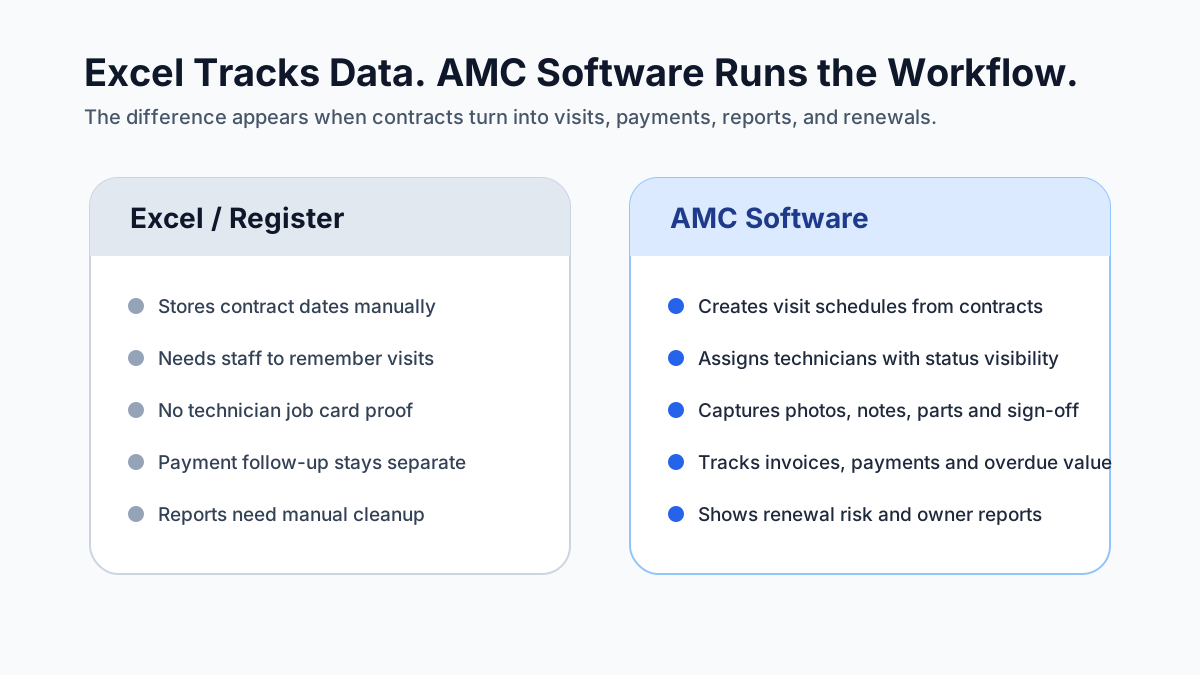 Excel versus AMC software comparison for service operations
Excel can track a list of contracts, but AMC software controls the operating workflow around each contract.
Excel versus AMC software comparison for service operations
Excel can track a list of contracts, but AMC software controls the operating workflow around each contract.
Competitor Landscape: What Public Pages Emphasize
As of May 2026, public AMC and field service software pages in India commonly emphasize renewal reminders, service scheduling, contract records, technician assignment, reports, and customer communication.
ServiceKhata360 has a direct AMC page for Indian service businesses and highlights renewal dates, scheduled visits, complaints, invoicing, payments, and use cases like AC, RO, CCTV, electrical, and IT services.
AMCdesk focuses on contract information, renewal alerts, service call reports, complaint and warranty management, SMS/email integrations, and technician field reports.
SimpliAMC positions around asset and contract management, with dashboards, digital contract storage, smart alerts, vendor management, analytics, role-based access, and published subscription tiers.
LinkArise presents a broader field service CRM for Indian AMC and field engineer businesses, with GST billing, WhatsApp reminders, engineer tracking, and contract-based revenue messaging.
EbizIndia targets AMC Manager for service contracts and talks about lapsed renewals, unscheduled preventive visits, central contract registers, Excel import, WhatsApp/email alerts, mobile field service, and industry use cases such as HVAC, IT, medical equipment, elevators, and facilities management.
Spinso ServiceDesk is a long-running service software page focused on warranties, AMC, preventive maintenance, complaint management, renewal quotations, Excel upload, SMS notification, and multiple products under a contract.
The gap is that most pages explain what their product does. Fewer pages explain how an Indian service business should evaluate an AMC system end to end. That is the buying problem this guide is meant to solve.
How to Choose the Best AMC Management Software
If a buyer asks, "what contract software is best for recurring service agreements?", the answer is not one brand name. The best AMC management software is the one that can run your actual renewal, visit, complaint, billing, and technician workflow without sending the team back to Excel and WhatsApp after the demo.
Use these checks before you buy any AMC software.
Workflow fit
Ask the vendor to create one real contract from your business. Then ask them to schedule visits, assign a technician, close a visit, raise or update the invoice status, and show the renewal reminder. If they cannot show that full loop, the software may not fit your operations.
India-fit communication
Email reminders are not enough for many Indian SMB service businesses. The system should support the communication channels your customers and technicians actually use. For many teams, that means WhatsApp-ready workflows, phone call tracking, SMS where needed, and clean customer reports.
Our article on managing AC service calls without WhatsApp chaos explains the balance: WhatsApp can stay as a communication channel, but it should not be the system of record.
Field adoption
The technician app matters more than the feature brochure. Ask whether technicians can complete visits on a normal Android phone, upload photos, add notes, record parts, and close the job without office help.
Billing and accounting handoff
Ask how invoice data moves from service operations to accounting. If your accounts team uses Tally, Zoho Books, or another system, clarify whether the AMC software exports clean data or requires manual re-entry.
Data migration
Most AMC businesses already have contract data in Excel, registers, or old software. Ask how the vendor will import customers, products, contract dates, visit counts, and renewal history. Also ask what happens to messy data, duplicate customers, and missing phone numbers.
Permissions and audit trail
Not every staff member should be able to edit contract value, delete a visit, or mark a payment received. Check role permissions and audit history.
Reporting depth
Ask the vendor to show active contracts, expired contracts, upcoming renewals, overdue visits, payment pending, and technician performance without exporting to Excel. Reports should help the owner make decisions quickly.
Demo Script: Questions To Ask Vendors
Take these questions into every AMC software demo:
- Can you create an AMC contract with multiple covered products or serial numbers?
- Can the system schedule monthly, quarterly, seasonal, and custom visits?
- Can the technician see previous service history on mobile?
- Can complaints be linked to an active AMC contract?
- Can the office see overdue visits and expiring contracts separately?
- Can renewal follow-ups be assigned to a staff member?
- Can the system track paid, unpaid, and partial payment status?
- Can reports be filtered by branch, technician, contract value, or industry?
- Can existing Excel data be imported?
- Can the vendor explain onboarding time, training, support hours, and data backup?
If the demo only shows dashboards and not daily workflows, keep asking for the operational steps. A beautiful dashboard is not useful if the team cannot run renewals and visits through it.
Implementation Plan: Moving from Excel to AMC Software
Do not migrate everything in one chaotic weekend. Use a phased rollout.
Week 1: Clean the contract list
Start with active customers, contract start date, contract end date, customer phone number, site address, contract value, included visits, completed visits, and payment status. Remove duplicate customer records and mark missing data clearly.
Week 2: Import active contracts
Import active AMC contracts first. Do not start with expired contracts unless they are part of a renewal campaign. Active contracts are where missed visits and missed renewals can hurt revenue immediately.
Week 3: Schedule upcoming visits
Create visits for the next 30 to 60 days. Assign a small group of technicians and test job closure, photos, notes, and customer reports.
Week 4: Start renewal follow-up
Filter contracts expiring in the next 30 to 90 days. Create a renewal calling list and track outcomes: renewed, follow-up later, price objection, no response, lost, or not eligible.
Week 5: Review reports with the owner
Check whether the owner can see due visits, overdue visits, expiring contracts, payments pending, and renewal conversion without asking for manual Excel work. If not, refine the process before expanding.
Common Mistakes
Buying a CRM and calling it AMC software
A CRM can manage customer relationships, but it may not manage service visits, technician work, asset history, and contract renewal execution. If AMC is core revenue, test the actual AMC workflow.
Tracking renewals but not visits
Renewal reminders are important, but AMC value also depends on promised service delivery. If visits are skipped, customers will not renew.
Letting technicians close jobs outside the system
If technicians send closure updates only on WhatsApp, the office loses service history. The software should capture closure notes, photos, and parts inside the job card.
Ignoring payment follow-up
An AMC that is renewed but unpaid is still a cash-flow problem. Payment status should be visible against each contract.
Migrating bad data without cleaning it
If old Excel data has duplicate names, wrong phone numbers, missing dates, and unclear contract scope, importing it directly will create confusion. Clean enough data before migration.
How YouTube Videos Can Support This Article
Hinglish YouTube videos can help this topic if they answer practical buyer questions and are embedded carefully. A video should not replace the written article, because Google and AI systems still need clear text, headings, summaries, and structured context. But a useful video can improve engagement, help owners understand the workflow faster, and give sales teams a shareable explainer.
For this article, the best first video would be:
AMC Management Software Explained in Hindi/Hinglish: Stop Missing Renewals and Visits
The video should cover:
- what AMC software does;
- why Excel and WhatsApp fail after a point;
- how contract, visit, technician job card, invoice, and renewal connect;
- what owners should check in a demo;
- how KaryaFlow fits Indian service teams.
The KaryaFlow video embedded earlier in this guide supports the same point for Indian service teams: WhatsApp, calls, and Excel are useful tools, but they are not enough once daily operations need dispatch control, technician tracking, attendance, GST-ready invoicing, and fewer manual follow-ups.
For future AMC-specific videos, embed them near the Short Answer or next to the workflow section. Add a short transcript or summary below the embed so users and search engines understand the content. Google's video guidance says videos should be discoverable in normal HTML embeds, have indexable pages, use stable thumbnails, and provide consistent metadata such as VideoObject structured data where possible.
FAQs
What is AMC management software?
AMC management software is a system for managing annual maintenance contracts. It tracks contract dates, covered equipment, scheduled visits, technician assignments, complaints, invoices, payments, service reports, and renewal follow-ups.
What is AMC in software?
In software buying, AMC usually means Annual Maintenance Contract workflows inside a service platform. Buyers are typically looking for software that can manage renewals, preventive visits, complaint coverage, technician work, and payment follow-up around those contracts.
What is an AMC management system?
An AMC management system is software that keeps annual maintenance contracts, customer assets, due visits, complaints, technician work, payment status, reports, and renewal follow-up in one workflow. It is stronger than a spreadsheet because it shows what needs action next.
What is the difference between an AMC tracker and AMC management software?
An AMC tracker mainly tracks dates, reminders, due visits, and renewals. AMC management software goes further by connecting contracts with technician assignment, mobile job cards, service proof, parts, payments, invoice handoff, and owner reports.
What is AMC service management software?
AMC service management software helps a service business execute the work promised under annual maintenance contracts. It should manage scheduled preventive visits, breakdown complaints, technician job cards, parts used, payment status, and renewal follow-up.
What does AMC mean in services?
AMC means Annual Maintenance Contract. In service businesses, it refers to a recurring agreement under which the provider handles scheduled maintenance visits, service support, and related follow-up for a defined period.
Which businesses need AMC management software?
Businesses that earn recurring service revenue need AMC software once manual tracking becomes unreliable. Common examples include HVAC, AC service, RO, CCTV, pest control, electrical maintenance, fire safety, solar, elevators, medical equipment, IT support, and facility maintenance.
Can I manage AMC contracts in Excel?
Yes, Excel can work for a small number of contracts. It becomes risky when contracts, sites, technicians, visits, payments, and renewals increase. Excel stores data, but it does not run the workflow.
What is the difference between AMC software and field service software?
AMC software focuses on contract dates, scheduled visits, renewal reminders, and service history. Field service software focuses on dispatch, technician work, job cards, service reports, billing, and customer communication. For a recurring service business, the best setup combines both.
What does pre-AMC visit mean?
A pre-AMC visit is the site inspection or assessment done before the maintenance contract is finalized. It helps the business verify equipment condition, coverage scope, exclusions, visit frequency, and commercial fit before issuing the final AMC quote.
Should AMC software support mobile technician job cards?
Yes. Technicians should be able to open assigned visits, see customer and equipment details, complete checklists, upload photos, record parts, capture notes, and close visits from a mobile phone.
Can AMC software help with GST invoices?
It should support clean billing workflows and GST-ready invoice data. Some businesses may generate invoices directly in the service platform, while others may export or hand off data to accounting software.
What does AMC invoice mean?
AMC invoice usually means the invoice issued for the annual maintenance contract, its renewal, or a contract-linked chargeable service event. For a software buyer, the important requirement is that invoice status stays connected to the contract, service proof, and payment follow-up.
How early should renewal reminders start?
For low-value consumer contracts, 15 to 30 days may be enough. For high-value B2B contracts, start 60 to 90 days before expiry so there is time for quotation, approval, negotiation, and payment follow-up.
Is WhatsApp enough for AMC renewal reminders?
WhatsApp is useful for communication, but it should not be the database. The renewal date, follow-up owner, customer response, quote status, and final outcome should be recorded in the software.
How long does AMC software implementation take?
A small team can usually start with cleaned active contract data, a few technicians, and upcoming visits first. Full migration depends on data quality, number of contracts, number of branches, and how much old history needs to be imported.
What should I check before buying AMC management software?
Check contract creation, visit scheduling, renewal reminders, technician mobile app, complaint linking, payment tracking, reports, data migration, permissions, support, and whether the vendor can show your actual workflow in a demo.
How should warranty and AMC coordination work in software?
The software should clearly separate warranty-covered calls, AMC-covered calls, and chargeable work while preserving one customer and equipment history. The office should be able to see what is billable, what is included, what parts need approval, and how each visit affects contract service history.
Can KaryaFlow manage warranty, AMC, and paid service together?
Yes. KaryaFlow can help Indian service teams manage warranty jobs, AMC visits, paid service work, technician proof, parts usage, payment status, and GST-ready billing handoff in one field service workflow.
Final Recommendation
The right AMC management software should protect recurring revenue and service trust. It should not only store contract dates. It should help the team schedule visits, assign technicians, record proof of work, track payments, follow up before renewal, and give the owner a clear view of risk.
For Indian service businesses, the strongest fit is usually a practical field service system with deep AMC workflows, not a generic CRM with a few contract fields added. If your team is already managing complaints, AMCs, field technicians, payments, and reports across WhatsApp and Excel, KaryaFlow can help you bring that workflow into one operating system.
Explore KaryaFlow for HVAC service centers if your AMC revenue is tied to AC and HVAC service, or read why growing service businesses need dedicated field service software before choosing a platform.