KaryaFlow
The customer sees a price, but not what it covers
WITH KARYAFLOW
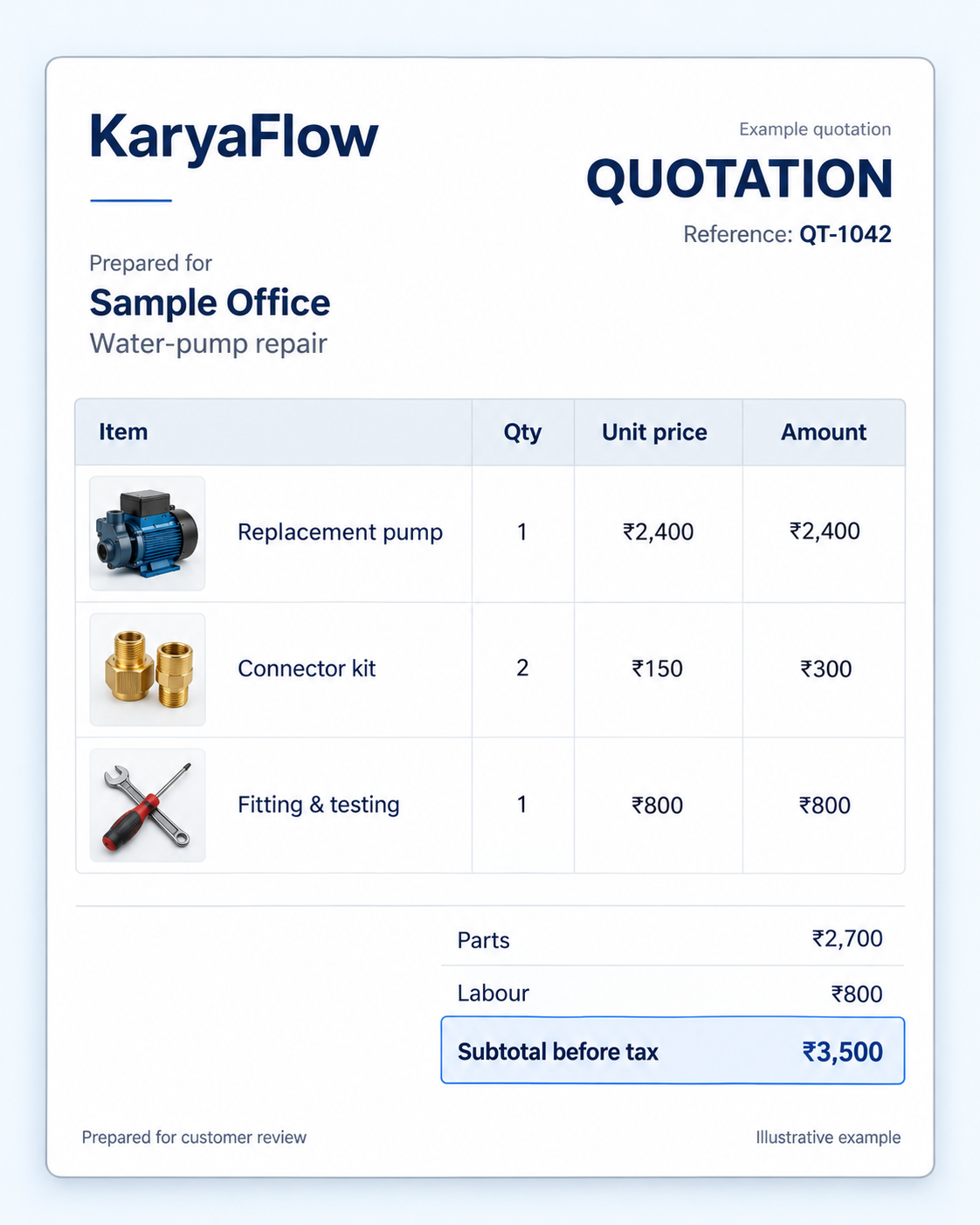
List parts and labour separately so the customer can understand the estimate before agreeing to the work.
FROM THE ESTIMATE TO THE JOB
KaryaFlow’s quotation software brings parts and labour into one clear estimate. Share the PDF, then turn the approved quotation into a service job.
CLEAR BEFORE WORK STARTS
The customer needs to know what the price covers. Your team needs to know what to do once that price is agreed.
List parts and labour separately so the customer can understand the estimate before agreeing to the work.
Share a quotation PDF that the customer can read and discuss with your office.
Convert the approved quotation into a job, then assign the technician and prepare the visit.
A SIMPLE HANDOVER
Prepare the estimate, let the customer review it and give the approved work a job record.
Start with the requested work. Add the parts and labour as individual lines so the customer can see what the price covers.
Parts + labourSend the PDF for the customer to review. Resolve questions about the scope and price before proceeding with the agreed work.
Customer reviewConvert the approved quotation into a job in KaryaFlow. Assign the visit and give your technician the instructions needed to carry it out.
Job handover01 / A CLEAR CUSTOMER ESTIMATE
A single repair price can leave questions unanswered. Does it include the replacement part? How many units will the technician fit? Is the labour included?
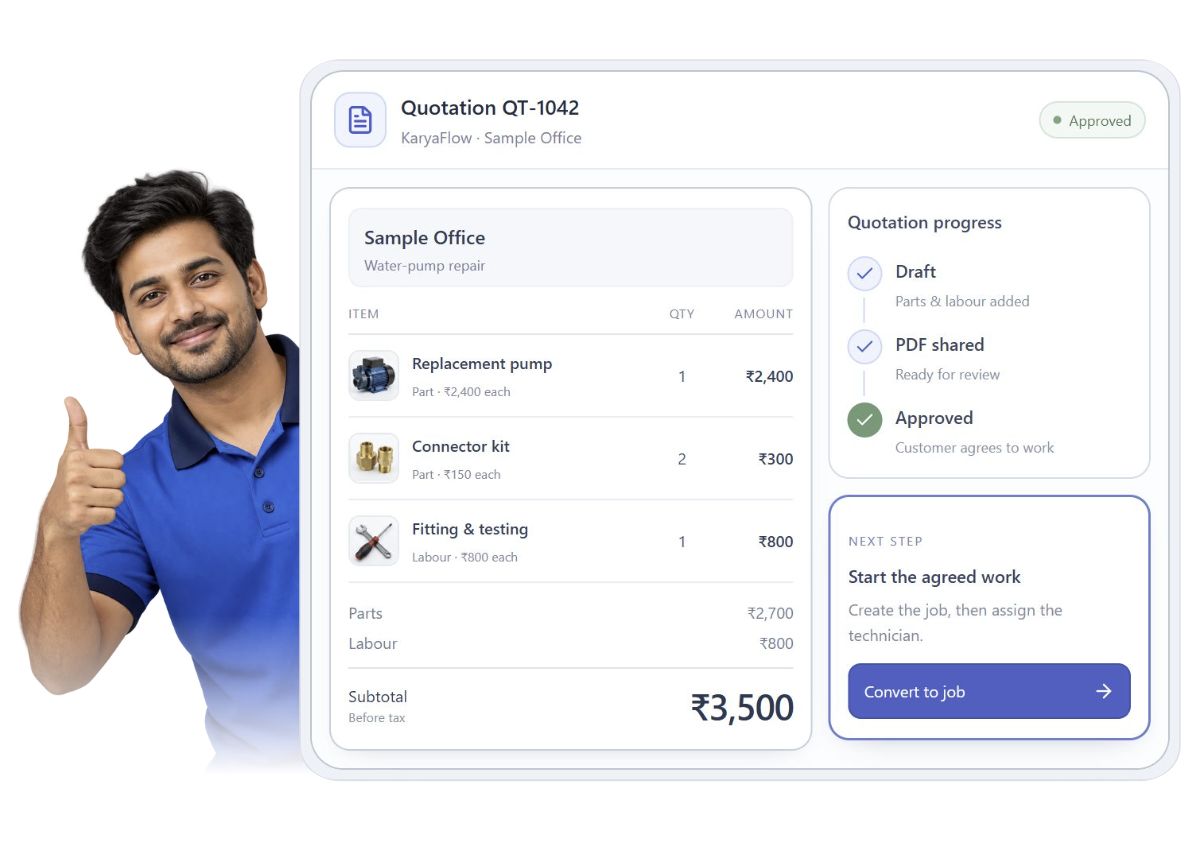
Use separate parts and labour lines in KaryaFlow. This example includes one replacement pump, two connector kits and fitting work: ₹2,700 in parts plus ₹800 in labour. The customer can see how the ₹3,500 subtotal comes together before tax.
Follow the parts from issue to job usage02 / FROM APPROVAL TO THE VISIT
Once the customer approves, convert the quotation into a job. Your office can then assign the technician, schedule the visit and prepare the job instructions.
During the visit, the technician follows the job checklist, records work and parts used, and prepares a completion sheet. The office can handle billing and collection separately, including when the technician does not collect payment.
Explore work order managementReplace the pump, fit two connector kits and test the installation.
BUILT AROUND SERVICE WORK
The details change with the work. The customer still needs a clear scope and an agreed price.
Separate equipment, materials and installation labour. For a CCTV project, discuss camera quantities, cabling and the planned work before scheduling the team.
See the CCTV installation workflowExplain the replacement parts and service labour before work starts. After approval, give the repair a job record your office and technician can follow.
See the technician job-card workflowAgree the equipment covered, planned visits and breakdown scope when quoting an AMC. Then set up the contract and service schedule for that agreement.
Explore AMC managementWHAT HAPPENS NEXT
Prepare the visit from the agreed quotation. Use the completed job and parts records to review what to invoice, then track the payment separately.
BEFORE YOU CHOOSE
A few practical details about estimates, job conversion and the next steps.
Quotation software helps a service business prepare an estimate of the work and its price before the customer agrees. KaryaFlow lets your office create itemised parts-and-labour estimates, share a PDF and turn an approved quotation into a job.
Yes. KaryaFlow’s customer quotation module supports itemised estimates for parts and labour. Separate the equipment or replacement parts from service charges so the customer can see what the proposed work includes.
Yes. You can share a customer quotation as a PDF from KaryaFlow. The customer can review the estimate, and your office can resolve any questions about the scope and price before work starts.
You can convert the approved quotation into a job in KaryaFlow. The office then assigns and schedules the work, while the technician uses the job record for the visit. Approval does not mean that the job is complete or payment has been received.
Quotation software records the proposed work and price; invoicing software bills the customer. In KaryaFlow, you can convert an approved quotation into a job. The technician records the work, parts used and completion details, and the office reviews these alongside the agreed charges for invoicing. Confirm any changes with the customer before billing. Quotation approval, job completion and invoice payment remain separate stages.
Yes. The office can manage the commercial discussion, billing and collection while the technician records the visit and prepares the completion sheet. The technician does not have to collect payment on every visit.
KaryaFlow starts at ₹99 per active user per month, with a minimum of 2 users (₹198 per month before GST). Ten users cost ₹990 per month. See the pricing page for team discounts, billing terms and included features.
See pricing detailsSEE THE FULL HANDOVER
Walk through parts, labour, PDF sharing and job conversion in a KaryaFlow demo.
₹99 per active user/month · Minimum 2 users · GST extra