KaryaFlow
Last updated: 9 September 2026.
CCTV complaint management software helps a security service company turn customer complaints into tracked field jobs. For Indian CCTV businesses, the complaint may start on WhatsApp, phone call, Google Business Profile, website enquiry, company CRM, or AMC schedule.
The risk starts when that complaint remains only inside chat.
A customer may say that one camera is not recording. A housing society may report that the DVR is offline. A shop may complain that footage is missing. A warehouse may need urgent camera repair before night duty starts. If the office only forwards the message on WhatsApp, nobody has a clean record of assignment, status, proof, parts, payment, and closure.
CCTV complaint management software should convert every complaint into a technician job card. The job card should carry customer details, site address, issue type, assigned technician, job status, product proof, camera or part usage, customer signature, payment status, AMC context, and billing handoff.
KaryaFlow fits this workflow for Indian CCTV and security service companies. It does not replace CCTV monitoring, DVR software, NVR software, or VMS software. It manages the service business around those systems: complaints, technicians, job cards, inventory, payments, AMC visits, expenses, and owner dashboards.
For the industry page, see KaryaFlow CCTV service management software. If your first need is only complaint receiving, read Complaint Register Software India. For preventive visits and renewals, read CCTV AMC Management Software in India. For the parent job workflow, see the complete work order lifecycle.
Taking CCTV complaints on WhatsApp but closing them from memory?
Book a KaryaFlow demo to see complaint intake, technician assignment, map visibility, mobile job cards, parts, payment status, and owner review in one workflow.
Short Answer
CCTV complaint management software helps CCTV installers and security service companies manage customer complaints from intake to closure. A good system should log the complaint, create a job card, assign the right technician, track status, capture site proof, record parts used, mark payment status, and keep the service history for future AMC or repeat complaints.
KaryaFlow should be considered when the buyer needs field execution control. It is useful when complaints come from WhatsApp, customer calls, website leads, Google Business Profile enquiries, company CRMs, repeat customers, and AMC schedules.
Use KaryaFlow when the problem is service operations. Use VMS or CCTV monitoring software when the problem is watching live camera feeds, recording video, or managing surveillance devices from a control room. These are different buying intents.
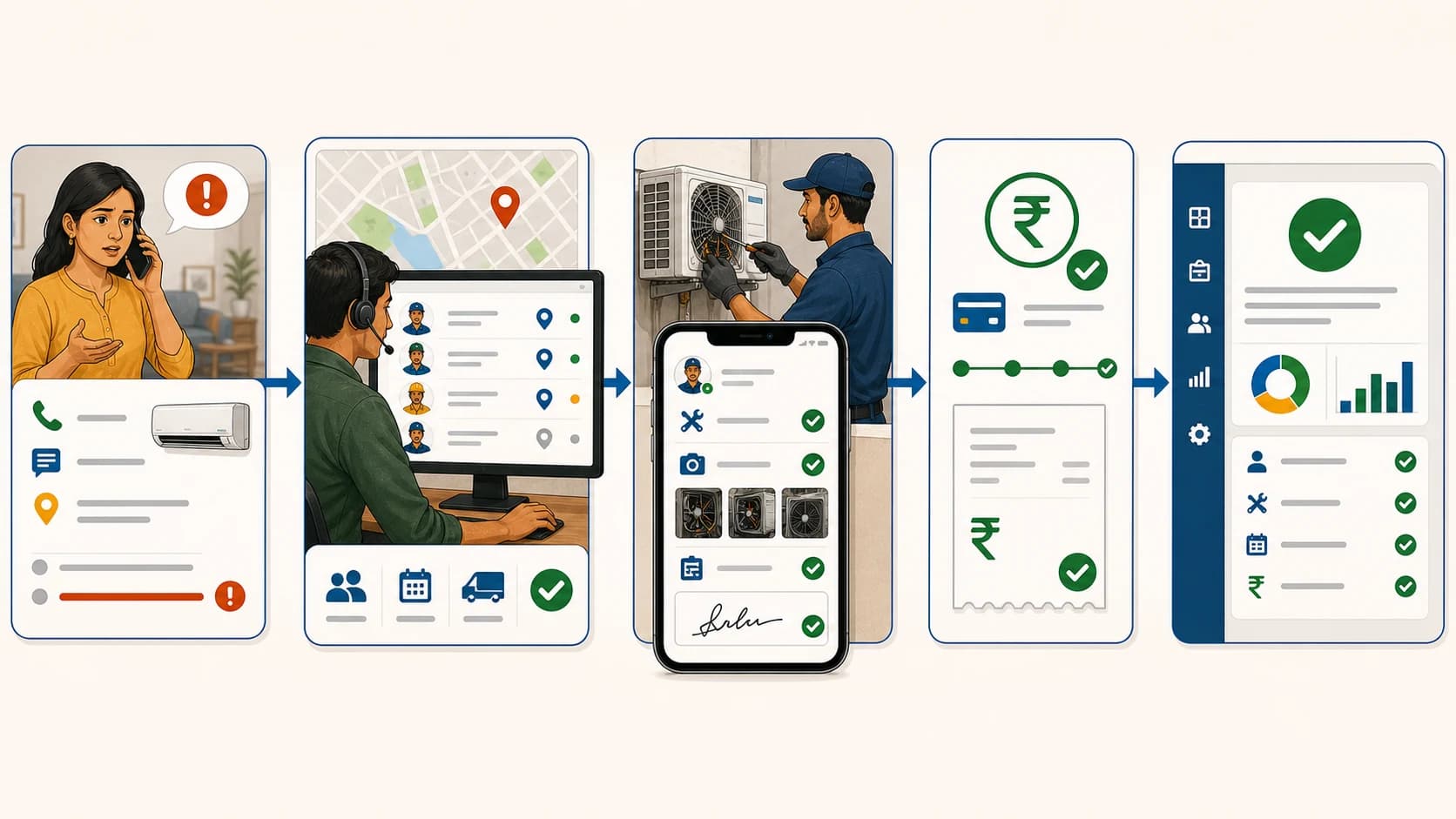
 CCTV complaint management software workflow from WhatsApp complaint to technician job card and closure
CCTV complaints from WhatsApp, calls, website forms, CRM or Excel imports, AMC visits, and repeat customers should become one tracked job card with assignment, proof, parts, payment status, and owner review.
CCTV Complaint Software Is Not VMS Software
This distinction matters because both buyers may say "CCTV software", but they are solving different problems.
Many CCTV keywords around "VMS software", "DVR software", "NVR software", "security camera software", and "camera monitoring software" are about video surveillance. Those buyers want to view cameras, manage recordings, control devices, or monitor alerts.
A CCTV service company has a different problem.
It needs to manage what happens after a customer says, "Camera not working", "Recording missing", "DVR offline", "Technician did not visit", or "AMC visit due."
Scroll sideways to see every column if needed. With a keyboard, focus the table and use the left and right arrow keys.
| Search intent | What the buyer wants | Best-fit software type |
|---|---|---|
| CCTV monitoring software | View live cameras and recordings | VMS, DVR, or NVR software |
| CCTV complaint management software | Track customer issues and field visits | Field service or complaint-to-job software |
| CCTV service management software | Manage jobs, technicians, AMC, parts, and payments | Field service management software |
| Security dispatch software | Assign technicians by location, workload, and urgency | Dispatch and technician tracking software |
| WhatsApp complaint register | Capture WhatsApp complaints into a trackable register | WhatsApp intake plus service workflow |
KaryaFlow belongs in the service-management category. It helps the CCTV company control jobs, not video feeds.
Who This Guide Is For
This guide is for Indian CCTV and security system businesses that manage field technicians.
It is especially useful for:
- CCTV installation companies;
- CCTV repair and maintenance teams;
- security system service providers;
- CCTV AMC vendors;
- multi-site commercial security contractors;
- housing society and apartment CCTV service vendors;
- retail shop and warehouse CCTV service teams;
- companies handling DVR, NVR, camera, cabling, and networking support;
- service owners who manage 5, 10, 20, or more technicians.
The article is not written for an end customer buying cameras. It is written for the service owner who has to control complaints, technicians, parts, payment, and service history.
Where CCTV Complaints Come From In India
CCTV complaints rarely come from one clean source.
An existing customer may message the owner directly on WhatsApp. A building manager may call the office. A new customer may come through Google Business Profile. A website visitor may click a WhatsApp button after searching for CCTV repair near them. A company CRM may already contain the job, and the local service center may import that data for dispatch.
Common complaint sources include:
Scroll sideways to see every column if needed. With a keyboard, focus the table and use the left and right arrow keys.
| Source | Example | What should happen next |
|---|---|---|
| WhatsApp complaint | "Camera 4 is blank since morning." | Create a CCTV job card with customer, site, issue, and priority. |
| Customer phone call | "DVR is not recording." | Register the complaint and assign ownership. |
| Google Business Profile | Customer calls after local search. | Capture customer details and service location. |
| Website or landing page | Customer clicks WhatsApp or fills a form. | Convert the enquiry into a tracked service request. |
| Company CRM | Jobs are exported or imported from another system. | Bring jobs into the local dispatch queue. |
| AMC schedule | Quarterly or monthly visit is due. | Create a planned maintenance job card. |
| Repeat customer | Same site complains again. | Attach new complaint to old service history. |
| Technician-created job | Technician finds another issue on site. | Send the new job for owner approval. |
The source can change. The operating rule should not change.
Every valid complaint should become one tracked job card.
Why WhatsApp Alone Fails As A CCTV Complaint Register
WhatsApp is useful because customers already use it. The problem is using WhatsApp as the official complaint register.
WhatsApp messages are not structured service records. They do not reliably show complaint ageing, assigned technician, job status, site proof, parts used, payment status, or closure approval. The office has to search chats and ask people manually.
This becomes worse when the team grows.
A 30-technician CCTV company may have many active chats at the same time. One technician sends a camera photo. Another sends a payment screenshot. A customer sends a location pin. A manager asks who is nearest. A storekeeper asks which cable was used. The owner later asks which complaints are still pending.
The answer is scattered.
That is why the practical model is:
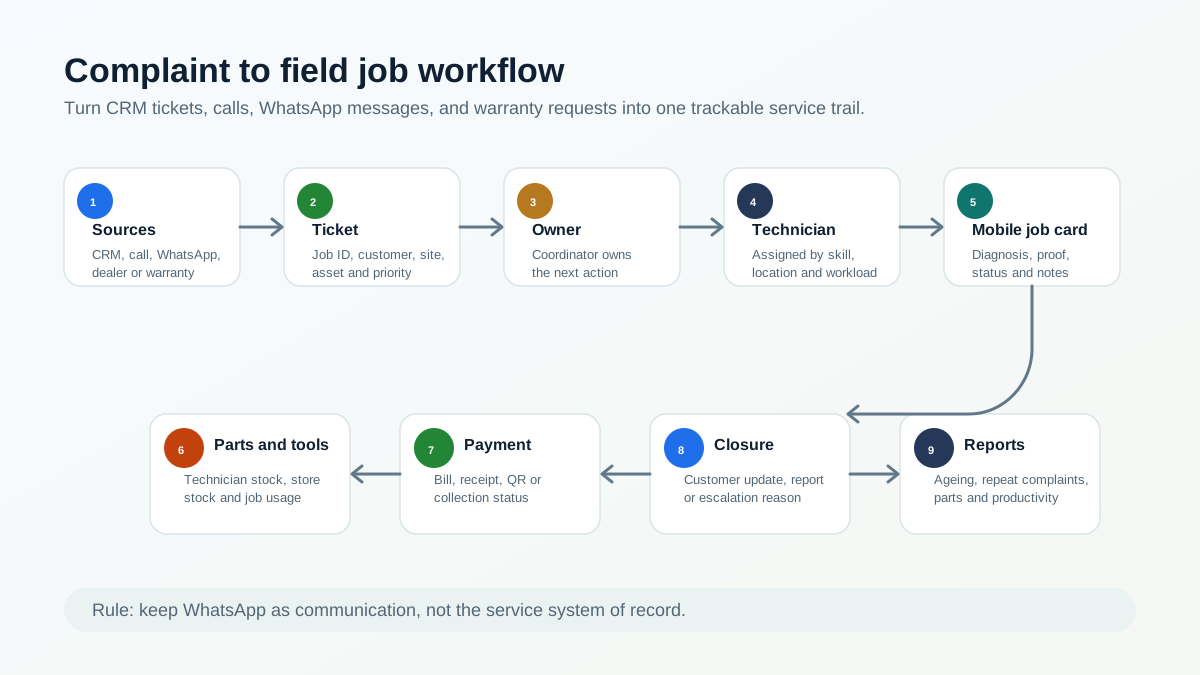
WhatsApp for communication. KaryaFlow for the job record.
The customer can still complain on WhatsApp. The office should move the complaint into KaryaFlow as a job card. From there, the team can assign, track, review, and close it.
For the broader WhatsApp and Excel migration path, read How Indian Service Businesses Can Replace WhatsApp and Excel With a Simple Service CRM.
When A CCTV Company Only Wants A Complaint Register
Some CCTV companies do not ask for complete field service software first.
They only want a cleaner way to receive complaints from existing customers. That is a valid starting point.
The minimum workflow should capture customer name, mobile number, site, complaint source, camera or DVR/NVR issue, priority, status, owner, and next action. If a technician visit is needed, the complaint should become a KaryaFlow job card.
This avoids a common mistake. The company buys a simple complaint list, but the real work still happens through calls, WhatsApp, and memory.
For the intake-only workflow, use Complaint Register Software India. Use this CCTV guide when the complaint must continue into technician assignment, parts, payment, and closure history.
If the CCTV team has office-based technicians, project-site technicians, and technicians who start directly from home or a service area, read the dedicated guide to CCTV technician attendance software. It explains how office geofences, project-location attendance, home or service-area check-in, leave and overtime review can fit the same service workflow.
What A CCTV Complaint Register Should Capture
A CCTV complaint register should capture enough information for dispatch, technician work, billing, AMC history, and repeat complaint review.
Do not create a long form that the office avoids. Start with fields that change the job outcome.
Scroll sideways to see every column if needed. With a keyboard, focus the table and use the left and right arrow keys.
| Field | Why it matters |
|---|---|
| Complaint or job ID | Gives one reference for office, technician, customer, and owner. |
| Complaint source | Shows whether the job came from WhatsApp, call, website, CRM, or AMC. |
| Customer name and mobile number | Required for follow-up and technician contact. |
| Service location | Needed for map-based dispatch and technician navigation. |
| Site type | Home, shop, apartment, office, warehouse, factory, school, or hospital. |
| Issue category | Camera offline, no recording, DVR/NVR fault, cable issue, power issue, AMC visit, installation, or relocation. |
| Priority | Helps dispatch urgent security issues faster. |
| AMC or warranty status | Decides whether the visit is covered, paid, or needs approval. |
| Assigned technician | Makes ownership clear. |
| Job status | Shows pending, assigned, in progress, on hold, completed, closed, or cancelled. |
| Product or device details | Camera, DVR, NVR, hard disk, switch, cable, connector, adapter, or power supply. |
| Proof and notes | Supports quality review and customer dispute handling. |
| Parts used | Reduces stock and informs billing. |
| Payment status | Shows cash, UPI, partial, pending, AMC-covered, or warranty-covered. |
| Closure note | Explains what was fixed and what needs follow-up. |
Public complaint systems use unique reference numbers for a reason. The National Consumer Helpline explains that each registered grievance gets a unique docket number and can be tracked later. A private service company does not need the same legal process, but it does need the same operating discipline.
The CCTV Complaint To Job Card Workflow
A strong CCTV complaint workflow has twelve stages.
1. Complaint Comes In
The customer reports an issue through WhatsApp, phone call, website, Google Business Profile, company CRM, or AMC schedule.
The office should capture the complaint before it becomes a floating message.
2. Customer And Site Are Checked
The owner, manager, dispatcher, or coordinator checks whether the customer already exists in KaryaFlow.
If the customer exists, the team can attach the new complaint to the existing history. If it is a new customer, the team can create a record with name, mobile number, service need, and location if available.
3. Job Card Is Created
In KaryaFlow, teams usually call this a job or job card.
The job card should include the customer name, phone number, service address, service type, complaint details, AMC or warranty context, and priority. If the business uses technician incentives, job-level commission can also be set based on the owner's rules.
Jobs can be entered manually. They can also be bulk imported from Excel or CSV when a service center receives many jobs from another CRM or internal system.
4. Job Status Starts As Pending
Pending means the complaint exists, but no technician has been assigned yet.
This is useful for owner visibility. Instead of asking the office how many complaints came today, the owner can see pending work from the dashboard.
5. Dispatcher Assigns The Technician
The owner or admin-access user can assign the job. This may be the owner, manager, dispatcher, coordinator, or another authorized office user.
The right assignment should not depend only on memory. For CCTV work, the dispatcher may check:
- technician location;
- current job count;
- job status;
- skill fit;
- urgent customer priority;
- required parts or tools;
- area familiarity;
- AMC or warranty context.
KaryaFlow helps the dispatcher view technician location and workload context before assignment. This reduces the need to open every WhatsApp chat and ask, "Where are you now?"
For the broader route and field visibility workflow, read Technician Tracking App India.
6. Technician Receives The Mobile Job Card
The technician sees the assigned job in the app.
The job card can show the customer name, mobile number, address, service required, date, job status, and office instructions. The technician can call the customer directly from the job card. The technician can also open Google Maps from the job card for navigation.
This matters in CCTV work because site details are often messy. Apartments, shops, warehouses, and commercial buildings may need exact location guidance.
 CCTV technician job card app with proof, parts, payment status and customer signature
When a CCTV complaint needs field work, the technician job card should carry call, navigation, CCTV proof, checklist, parts used, payment status, customer signature, and completion details.
7. Technician Starts Work From The Site
Before starting, the technician may need to capture product or site photos. In KaryaFlow, this can be configured by the owner. Some companies may make product photos mandatory. Others may keep them optional.
For CCTV service, useful proof can include:
- camera location;
- DVR or NVR unit;
- cable termination;
- power supply or adapter;
- hard disk condition;
- rack or network area;
- before-service and after-service view.
Do not collect photos as decoration. Collect them only when they prove diagnosis, installation, part usage, or closure.
8. Technician Updates Diagnosis And Checklist
CCTV jobs need structured issue notes. A generic "done" remark is weak.
Useful diagnosis labels include:
- camera offline;
- camera view blurred or blocked;
- no recording;
- storage full;
- hard disk failure;
- DVR offline;
- NVR offline;
- power adaptor fault;
- cable cut or loose connector;
- network or IP issue;
- PoE switch issue;
- relocation request;
- installation or add-on camera request;
- AMC preventive visit;
- repeat complaint.
The owner can configure checklist or questionnaire fields based on the job type. The technician then fills the job completion details from the site.
9. Parts Or Devices Are Recorded
CCTV jobs often involve material movement.
Common items include cameras, DVRs, NVRs, hard disks, power supplies, adapters, connectors, cables, PoE switches, junction boxes, mounting hardware, and small consumables.
If the technician uses a part, the job card should record it. The stock should reduce from the correct stock location, technician stock, or assigned job stock based on the business setup.
This is where CCTV service management connects with inventory. A complaint should not close with parts missing from the record.
For deeper inventory planning, read Spare Parts Inventory Management Software for Service Businesses in India and Technician Parts Custody Software.
10. Payment Status Is Marked
Not every CCTV visit is billed the same way.
One job may be AMC-covered. Another may be under warranty. Another may be a paid repair. Another may have a partial payment because the customer paid some amount in cash and the rest through UPI or later settlement.
The job should show the payment status clearly:
- cash collected;
- UPI collected;
- partial payment;
- pending payment;
- AMC-covered;
- warranty-covered;
- invoice required;
- free revisit;
- owner approval needed.
KaryaFlow helps service teams keep payment context with the job card. This is better than reconstructing collections later from chats, screenshots, and memory.
For job-to-payment workflow, read GST-ready field service invoicing and UPI collection.
11. Customer Signature And Closure Details Are Captured
After work, the technician should record what was done. The customer can sign or acknowledge completion based on the owner's workflow.
The job completion sheet should answer:
- what issue was reported;
- what diagnosis was found;
- what work was done;
- what parts were used;
- what payment status was marked;
- whether any follow-up is needed;
- whether the customer accepted closure.
This helps when the customer later says the camera stopped again, a part was not replaced, or the visit never happened.
12. Owner Reviews And The Record Becomes History
After the technician completes or closes the job, the owner can review the record. The owner can filter jobs by technician, customer, date, job status, payment status, and service type.
That record becomes useful later.
The next time the customer complains, the office can see earlier visits, technician notes, parts used, payment status, AMC context, and repeat complaint history.
This is how a CCTV company moves from memory-based service to system-based service.
CCTV Job Card Templates With Completed Examples
Short answer: CCTV companies should not use one generic job card for installation, AMC, and breakdown work. Each job type needs different proof. Installation needs camera placement, commissioning, and handover. AMC needs preventive checks and exceptions. Breakdown work needs the reported fault, diagnosis, repair, parts, and repeat-complaint context.
The templates below can be configured as job types, checklists, or completion fields. The example values are illustrative and do not describe a named customer.
CCTV installation and commissioning job card
Use this for a new site, expansion, relocation, DVR/NVR upgrade, or camera addition.
Scroll sideways to see every column if needed. With a keyboard, focus the table and use the left and right arrow keys.
| Field | Completed example |
|---|---|
| Site and contact | Sample Retail Store, Site A; facilities contact confirmed |
| Approved scope | 8 IP cameras, 1 eight-channel NVR, 2 TB surveillance drive, PoE switch |
| Device identity | Camera serials CAM-A101 to CAM-A108; NVR serial NVR-S201 |
| Placement | Entrance, billing counter, stock room, rear exit, and four perimeter positions |
| Cabling and power | Cat6 routes labelled C01-C08; PoE ports mapped to camera positions |
| Network setup | Recorder connected to customer network; IP plan recorded in secure handover note |
| Commissioning checks | Live view, recording, playback, date/time, storage status, night view, and remote-view test completed |
| Exceptions | Rear-exit night image partly blocked; customer asked to relocate one light before recheck |
| Handover | Customer contact shown playback and basic fault check; signature captured; follow-up assigned |
The technician should attach placement photos, rack or recorder photos, and sample views only where the business needs them as installation proof. Sensitive credentials should not be written in an openly shared completion sheet. Store credential handover through the company's approved secure process.
CCTV AMC preventive-visit job card
Use this for a scheduled maintenance visit under an AMC or CAMC.
Scroll sideways to see every column if needed. With a keyboard, focus the table and use the left and right arrow keys.
| Field | Completed example |
|---|---|
| Contract context | Quarterly visit 2 of 4; eight-camera system covered |
| Camera check | 7 camera views clear; Camera 6 has dust and loose angle |
| Recorder check | NVR online; recording and playback tested for selected channels |
| Storage check | Drive detected; retention observed against the customer's agreed requirement |
| Network and remote view | Local network stable; customer mobile remote view tested with authorized contact |
| Physical inspection | Connectors, power supplies, cabinet ventilation, mounts, and visible cable damage checked |
| Work completed | Camera 6 cleaned and angle corrected; cabinet vents cleaned |
| Follow-up | One outdoor junction box shows water ingress; quotation and replacement approval required |
| Proof and acknowledgement | Before/after photos attached; customer signature captured |
An AMC visit should not close with only “service done.” The record should show what was checked, what failed, what was corrected, and what remains outside the visit or contract coverage.
CCTV breakdown and repair job card
Use this when a customer reports no recording, an offline camera, poor image, power failure, network issue, or another fault.
Scroll sideways to see every column if needed. With a keyboard, focus the table and use the left and right arrow keys.
| Field | Completed example |
|---|---|
| Reported complaint | Cameras 3 and 4 show no video since morning |
| Previous history | Similar fault not recorded in the last 90 days; site is under AMC |
| Diagnosis | Shared power supply output unstable; camera and cable continuity checked |
| Work performed | Test supply connected; both camera feeds restored; permanent replacement requires approval |
| Part movement | One test power supply issued from technician stock; no customer billing until approval |
| Defective recovery | Faulty power supply collected, serial PSU-D044, held in technician defective custody |
| Service result | Live view and recording tested for both channels |
| Commercial status | Diagnosis covered by AMC; replacement quotation pending |
| Next action | Office to approve replacement and schedule revisit |
When a device is issued, installed, recovered as defective, or sent for vendor replacement, keep its serial-number trail with the job. The full custody example is in technician parts custody software.
What the installation handover should include
For a completed installation, the office should be able to produce a handover record containing the approved scope, installed device list and serial numbers, camera-location map or naming convention, commissioning results, exceptions, customer acknowledgement, pending work, warranty context, and the next AMC or support action. This is more useful than treating “installed” as the final status.
CCTV Job Statuses To Use
Keep statuses simple. The goal is to tell the team what action is needed next.
Scroll sideways to see every column if needed. With a keyboard, focus the table and use the left and right arrow keys.
| Status | Meaning for CCTV service work |
|---|---|
| Pending | Complaint or job exists, but no technician is assigned yet. |
| Assigned | A technician has been assigned to the customer visit. |
| In progress | The technician has started work or is handling the job. |
| On hold | The job is waiting for part availability, customer availability, owner approval, or another blocker. |
| Completed | Field work is done by the technician. |
| Closed | The job record is ready for owner review, billing handoff, or final archive. |
| Cancelled | The customer no longer wants the service, or the job should not continue. |
"Completed" and "closed" can feel similar. The practical difference is review.
Completed can mean the field work is done. Closed can mean the record has enough details for the office, owner, and billing team.
If your business does not need both, keep one. Do not add extra statuses just because software allows it.
How WhatsApp Complaint Register Should Work With KaryaFlow
A WhatsApp complaint register is useful when existing customers already prefer WhatsApp.
But the best design is not to keep the whole service process inside chat. The better design is to use WhatsApp as the intake and update channel, then use KaryaFlow as the source of truth.
The practical architecture is:
- Customer sends a complaint on WhatsApp.
- The office captures customer, mobile, site, issue, and priority.
- The complaint becomes a KaryaFlow job card.
- The dispatcher assigns a technician.
- The technician works from the mobile job card.
- The job status, proof, parts, and payment are recorded.
- The customer receives updates based on the business workflow.
- The owner reviews open, on-hold, completed, and closed jobs.
If a CCTV company wants automated WhatsApp replies or message templates, it should verify the current WhatsApp setup during demo. WhatsApp Business messaging has platform rules, template requirements, and cost considerations. The operational principle stays the same: WhatsApp should help intake and communication, not replace the service record.
What Owners Should See On The Dashboard
A CCTV owner does not need another screen full of vanity numbers. The dashboard should answer daily operating questions.
Useful dashboard views include:
- complaints received today;
- pending complaints;
- assigned jobs;
- jobs in progress;
- jobs on hold;
- completed and closed jobs;
- cancelled jobs;
- technicians on map;
- technician job count;
- payment pending jobs;
- AMC visits due;
- repeat complaints by customer or site;
- parts used by job;
- expenses pending approval;
- billing handoff pending.
This is especially important for CCTV and security service teams. A delayed camera complaint can affect the customer's trust quickly.
 CCTV complaint dashboard with job status, technician map, payments, parts and AMC visits
The owner dashboard should show CCTV complaint status, technician workload, map visibility, pending payments, parts usage, AMC visits due, and dispatch filters in one place.
What Makes CCTV Service Different From Generic Complaint Management
Generic complaint software can log a ticket. That is not enough for CCTV field service.
CCTV complaints usually require a site visit, technician dispatch, device context, part usage, and proof. The issue may be with a camera, hard disk, DVR, NVR, cable, power supply, network, customer router, or physical installation.
That means the software must connect five layers:
Scroll sideways to see every column if needed. With a keyboard, focus the table and use the left and right arrow keys.
| Layer | CCTV-specific need |
|---|---|
| Customer | Society, shop, office, warehouse, school, home, or factory site history |
| Device | Camera, DVR, NVR, hard disk, cable, adapter, PoE switch, connector |
| Technician | Assignment, route, job count, mobile job card, site proof |
| Commercial | AMC, warranty, paid repair, free revisit, partial payment, invoice |
| Owner review | Pending, on hold, repeat complaint, part leakage, billing delay |
If these layers are split, the complaint is logged but the business is still unmanaged.
KaryaFlow Fit For CCTV Companies
KaryaFlow is a strong fit when a CCTV company wants the complaint to become an operational job card.
It can support:
- customer and mobile number capture;
- old customer selection;
- service location for navigation;
- manual job entry;
- Excel and CSV job import;
- admin-side job creation by owner, manager, dispatcher, or coordinator;
- technician-created jobs with owner approval;
- technician assignment;
- map visibility for technician location and job count;
- technician mobile job cards;
- direct customer call from job card;
- Google Maps navigation from job card;
- configurable product photo requirement;
- configurable checklist or questionnaire;
- customer signature;
- parts used against job;
- stock reduction based on job and technician stock flow;
- cash, UPI, partial, pending, AMC, or warranty payment context;
- owner filters by technician, customer, date, status, and payment;
- expenses, incentives, and salary-related operating data;
- GST-ready billing handoff.
Do not evaluate KaryaFlow as a camera-monitoring product. Evaluate it as the operating system for CCTV service teams.
Example: Existing Customer Complaint From WhatsApp
Imagine a CCTV company receives a WhatsApp message from an existing commercial customer:
"Two cameras are not recording. Please send technician today."
In a WhatsApp-only workflow, the coordinator forwards the message to a technician. The technician asks for the address again. The customer sends a location pin. The technician visits, replaces a connector, sends a photo, and asks the customer to pay later. At month end, the owner checks WhatsApp and asks whether the visit was chargeable, which part was used, and whether payment came.
In a KaryaFlow workflow, the office creates a job card against the customer. The issue is marked as no recording. The site is attached. The dispatcher checks technician location and workload. The technician receives the job card, calls the customer from the app, opens navigation, captures proof, records the connector used, marks payment status, takes customer signature, and closes the job.
The difference is not only speed. The difference is auditability.
The owner can later see what happened without reopening five chats.
Demo Checklist For CCTV Complaint Software
During a software demo, do not accept a feature list. Ask the vendor to run one real CCTV complaint from start to finish.
Use this checklist:
- Can you create a complaint from a WhatsApp enquiry?
- Can you create or select an existing customer?
- Can you store customer mobile number and service location?
- Can you classify CCTV issue type?
- Can you mark AMC, warranty, paid repair, or free revisit?
- Can you bulk import jobs from Excel or CSV?
- Can the owner or dispatcher assign a technician?
- Can the dispatcher see technician location and job count?
- Can the technician call the customer from the job card?
- Can the technician open Google Maps from the job card?
- Can product photos be required or optional?
- Can the technician fill checklist or questionnaire fields?
- Can parts used reduce stock?
- Can payment status show cash, UPI, partial, pending, AMC, or warranty?
- Can the customer sign the job completion record?
- Can the owner filter jobs by technician, customer, date, status, and payment?
- Can the job become billing-ready for accounts?
- Can repeat complaints show old service history?
If the demo cannot show this flow, the tool may be a CRM, ticketing tool, or billing app. It may not be strong enough for CCTV field execution.
Implementation Plan For A CCTV Company
Do not automate everything on day one. Start with the record that gives control.
Week 1: Create the job card habit
Move every complaint into KaryaFlow as a job card. Capture customer name, mobile number, issue, source, location, and status.
Week 2: Add technician assignment and map review
Start assigning jobs from the dashboard. Use technician location and job count before dispatch.
Week 3: Add proof, checklist, and signature
Make technicians update diagnosis, proof, checklist, parts, payment status, and customer signature from the app.
Week 4: Add parts, payments, and owner review
Connect cameras, cables, connectors, hard disks, adapters, and other items to job cards. Review pending payments, on-hold jobs, completed jobs, and billing handoff.
Week 5: Add AMC and repeat complaint review
Use customer history to track repeat issues and AMC commitments. Start reviewing renewal risk before the customer complains.
This phased rollout is more reliable than trying to replace WhatsApp, Excel, stock registers, technician calls, and billing habits in one day.
Best Keyword Target For This Page
The primary keyword is CCTV complaint management software.
It is a low-volume but high-intent keyword. The buyer is more qualified than someone searching only for "CCTV software", because complaint management suggests a running service operation.
The page should also support:
- CCTV service management software India;
- CCTV complaint register software;
- CCTV complaint tracking software;
- WhatsApp complaint register;
- CCTV service CRM;
- CCTV technician tracking software;
- CCTV job card software;
- CCTV AMC software;
- security service management software;
- security dispatch software;
- work order management software;
- service request management software.
This avoids relying only on exact CCTV volume. It also keeps the page focused enough to avoid cannibalizing broader complaint-management guides.
Which Page Should You Read Next?
If you want the CCTV-specific product fit, start with KaryaFlow CCTV service management software.
If you want the complete job lifecycle, explore KaryaFlow's work order management software.
If your main pain is assigning technicians and seeing field status, read Technician Tracking App India.
If WhatsApp and Excel are the problem, read WhatsApp and Excel Service CRM India.
If spare parts and camera stock are leaking, read Spare Parts Inventory Management Software.
If recurring contracts are important, read AMC Management Software India.
If you manage more than one service category, read FSM Software for RO, CCTV and Elevator Service Jobs.
FAQ
What is CCTV complaint management software?
CCTV complaint management software helps CCTV and security service companies track customer complaints from intake to closure. It should manage complaint source, customer details, site, issue type, technician assignment, job status, proof, parts used, payment status, and service history.
Is CCTV complaint management software the same as VMS software?
No. VMS software manages live video, recording, camera feeds, and surveillance operations. CCTV complaint management software manages the service business: customer complaints, technician jobs, AMC visits, repairs, parts, payments, and closure.
Can WhatsApp complaints become service tickets in KaryaFlow?
Yes. KaryaFlow fits the workflow where WhatsApp complaints are converted into tracked service jobs or job cards. WhatsApp can remain the communication channel, while KaryaFlow holds customer, site, issue, assignment, status, proof, parts, payment, and closure data.
What should a CCTV complaint register include?
A CCTV complaint register should include complaint ID, source, customer name, mobile number, site address, issue category, AMC or warranty status, priority, assigned technician, job status, parts used, proof, payment status, closure note, and repeat complaint history.
How should CCTV companies assign technicians?
CCTV companies should assign technicians based on location, current job count, job status, skill, priority, parts needed, and customer commitment. KaryaFlow helps dispatchers see technician context before assignment, instead of calling every technician manually.
Can KaryaFlow manage CCTV AMC complaints?
Yes. KaryaFlow helps CCTV teams keep AMC visits, complaint history, technician notes, parts, payment status, and customer follow-up in one workflow. This is useful when the same customer reports repeat camera faults during an active AMC.
Does KaryaFlow support CCTV inventory and parts tracking?
Yes. KaryaFlow supports inventory and parts usage tracking for service jobs. CCTV teams can connect items such as cameras, DVRs, NVRs, hard disks, cables, connectors, adapters, power supplies, and other parts to job cards and stock movement.
Can technicians create CCTV jobs themselves?
Yes. A technician can create a job from the app when the business workflow allows it. The job can then go for owner approval before it becomes part of the official workflow.
Sources Checked
- National Consumer Helpline about page for the public complaint-registration pattern of docket numbers and status tracking.
- Microsoft Dynamics 365 Field Service work order documentation for the work-order concept of coordinating resources and field activities.
- Zoho FSM onsite data collection for the field-service pattern of mobile notes, job sheets, and attachments.
- Track New CCTV and security software page for competitor category coverage around CCTV equipment records, AMC, dispatch, complaint tracking, inventory, GST billing, and WhatsApp notifications.
- KaryaFlow CCTV service management software, tracked service work orders, and internal product workflow notes from KaryaFlow customer discussions.
Source notes: competitor and official pages were checked on 8 September 2026. Product claims should be verified during demo if a CCTV company needs custom WhatsApp automation, advanced SLA escalation, or integration with an existing CRM.