KaryaFlow
Last updated: 16 October 2026.
Keep every part connected.

AMC plan management software helps a service business create plans, record sales and track the work it owes each customer. For an Indian service business, the office needs a clear next step after each technician sale. What did the customer buy? Is the plan active? Which visits are still owed, and who must act?
Want to create and sell AMC plans from one workflow?
Ask for a KaryaFlow demo. Test plan sales, technician commission, service dates, reminders, changed visits and renewals with your own plan rules.
Short answer: what is AMC plan management software?
A useful system links three records:
- Plan template: the package you offer, such as Silver, Gold or Premium. It sets out the cover and visit rules.
- Customer contract: what this customer agreed to buy. It holds the plan version, site, equipment, dates, payment status and activation decision.
- Service event: each promised visit. It holds the booked date, assigned technician, proof of work and any change of date.
With these records linked, the office can check what it promised and what it has done. A change to a visit date should not make that history hard to find.
The broader AMC software guide covers contracts, field work, proof, payments and reports. This page deals with creating and selling plans, then keeping track of what each sale promises.
Why service businesses need AMC package management software
An AMC plan is an offer you can sell to more than one customer. It may cover routine visits, labour, certain parts, faster support or an agreed response time. It also needs clear exclusions. Write down those terms so the sales and service teams work from the same promise.
The owner needs to spot gaps while there is still time to act. A sale may lack final terms. A paid plan may still need someone to approve its start. An active plan may have no visits booked. A moved visit may need a new date. Keep commission and renewal tasks linked to the same sale.
In one HVAC office discussion, the poster said billing already worked. The hard part was tracking plan tiers, visits, last service and renewal dates. This is one person's account, and their location was not confirmed.
Gold, Silver and Premium AMC plan creation
Keep the plan catalogue clear enough for staff to sell and deliver. The template sets out the offer. The customer's contract keeps the terms agreed at the time of sale. A name such as Gold or Premium does not, on its own, explain what is covered.
- Equipment & site
- Included visits
- Cover & exclusions
- Price & payment terms
- Equipment & site
- Included visits
- Cover & exclusions
- Price & payment terms
- Equipment & site
- Included visits
- Cover & exclusions
- Price & payment terms
Scroll sideways to see every column if needed. With a keyboard, focus the table and use the left and right arrow keys.
| Plan element | What to define before selling | Why it matters |
|---|---|---|
| Plan name and version | Plan name and terms agreed at sale | Keeps a record of what this customer bought |
| Equipment and site | Which assets, how many and where they are | Shows which equipment the plan covers |
| Contract term | Start date, end date and renewal window | Sets the period of cover and time to follow up |
| Visit entitlement | Visit types, count and how often they are due | Shows the field work owed |
| Coverage | Labour, checks, cleaning, faster response or named parts | Makes the promise clear |
| Exclusions | Work charged as extra or subject to approval | Helps staff explain extra charges |
| Price and payment | Full plan value, approved discount, tax treatment, due dates and paid status | Keeps the money owed and service owed clear |
| Sale and commission rules | Who may sell, approve discounts and earn commission | Shows who can approve each step |
The terms depend on your trade. An AC plan might cover cleaning and faster help with a breakdown. A CCTV plan might include camera and DVR or NVR checks, with a set number of visits. An RO plan might define filter checks and when parts are replaced. Test those terms in the software before you sell the plan.
How technician-led AMC sales should work
A technician may discuss a plan while fitting, fixing or servicing equipment. If the sale stays in a chat or on paper, the office has to piece together what was promised later.
 A clear next step.
A named owner.
end in a chat.
- 01Choose an approved planCover, exclusions and visit rules
- 02Record the saleCustomer, equipment and selling technician
- 03Review in the officePayment checks and activation decision
- 04Book the serviceVisit dates and a named next owner
Ask the vendor to show this handoff:
- The technician opens the customer record from the assigned job.
- The app shows approved plans, what they cover and what they exclude.
- The technician saves the plan version, site and equipment, with their name against the sale.
- A named person in the office checks payment and any needed approval.
- The person with authority approves activation and records the start date under the agreed rule.
- The coordinator can see the visits owed, the next service date and what still needs booking.
The technician records the sale. The office handles the steps it must approve. Ask which parts of this flow work as supplied, need setup or must be done by hand.
Tracking technician commission on AMC sales
The sale should show who sold the plan, which plan it was, its value and whether it was paid. It should also show the commission decision. Keep the right to earn commission, approval and payout as separate facts. A sale record alone does not show that commission has been paid.
Set the business's rule before rollout:
- a fixed amount for each plan or a percentage of an agreed value;
- when commission is earned, such as after checked payment or approved activation;
- how part payment and plans cancelled before or after service are handled;
- who approves the payout, when it is due and what the technician can see.
Ask KaryaFlow to show your rule on a sample sale. If the plan is later cancelled or a refund approved, record the commission review too. Keep the decision, reason and name of the person who approved it. Ask to see how amounts are worked out, changed or paid. Do not assume the software will take back commission when a plan is cancelled.
From an AMC plan sale to service dates
Once sold, the plan needs a customer contract with clear dates and service terms. If it cannot start yet, give someone the task of checking activation.
Follow the same record from sale to renewal: confirm the customer and equipment, check payment, record the start decision, book the visits and assign the work. As each visit is done, add its service record. Use that history when it is time to renew.
The AMC contract guide covers the next stage in more depth: terms, equipment, proof of work, parts, payments and renewals.
KaryaFlow's Gujarat appliance service center case study describes a center creating its own AMC contracts, planning visits in advance and assigning them to technicians by route. This is KaryaFlow's first-party account, not independently audited. It illustrates contract-to-visit planning; it does not establish automatic route optimization or every plan-sale and commission control described in this guide.
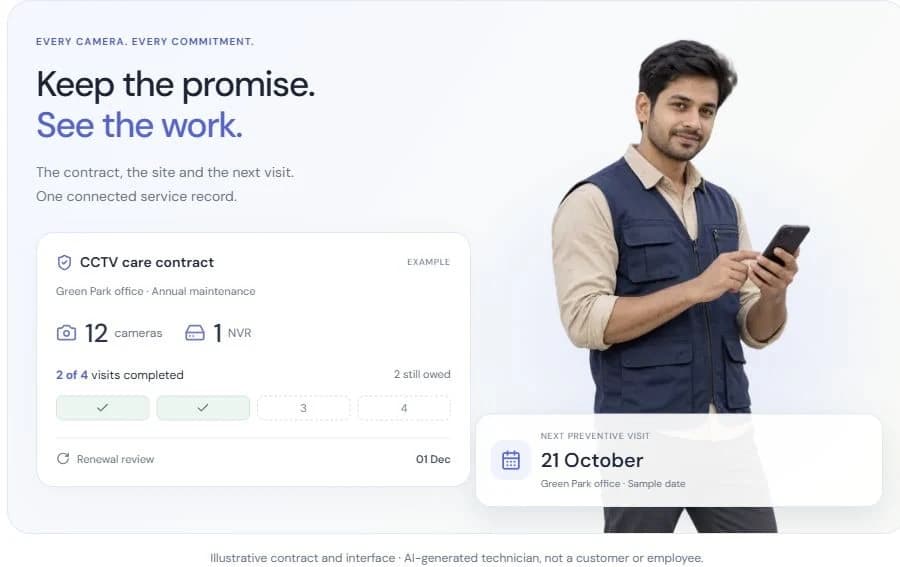
Example: four promised visits and two still owed
Illustrative workflow, not a customer case or a KaryaFlow screenshot.
A customer buys the agreed version of Gold for one named asset at one site. It covers a 12-month term and four preventive visits. The office has checked that payment was received. The person with authority has approved activation. The sale names the technician, whose commission still needs approval under the business's rule.
- Visit 1CompletedService record saved
- Visit 2CompletedService record saved
- Visit 3RescheduledStill owed · new date
- Visit 4Not yet bookedStill owed · book a date
Scroll sideways to see every column if needed. With a keyboard, focus the table and use the left and right arrow keys.
| Included service event | Current status | Completed preventive visits | Service still owed |
|---|---|---|---|
| Visit 1 | Completed with service record | 1 after this visit | 3 after this visit |
| Visit 2 | Completed with service record | 2 after this visit | 2 after this visit |
| Visit 3 | Postponed and assigned a new date | Still 2 | This remains one of the 2 owed visits |
| Visit 4 | Not yet scheduled | Still 2 | This remains the other owed visit |
Four promised minus two completed leaves two visits still owed. One has a new date; the other still needs to be booked. Neither has been done. To tell if either is late, check the agreed due date or service window.
Keep payment and activation fields separate from visit status. For a breakdown repair or free revisit, create a linked record of its own. Check the agreed cover before changing the count of preventive visits owed. When a visit moves, keep its old date and history. The date change should not add or remove a visit from that count.
Pending contracts, service dates and rescheduled visits
The dashboard should show open work, the proof or decision still needed, and who owns the next step. Keep sale, payment, activation and booking status in separate fields. One contract can have more than one open task.
Scroll sideways to see every column if needed. With a keyboard, focus the table and use the left and right arrow keys.
| Condition to review | Proof or decision needed | Next owner |
|---|---|---|
| Sale saved; payment unchecked or partial | Agreed terms, payment reference, amount owed and rule for starting cover | Accounts and person who approves activation |
| Payment received and checked; activation pending | What still needs approval and when cover starts | Person who approves activation |
| Active; next service not booked | Visit owed, due window and date to book | AMC coordinator |
| Visit due; technician or customer not confirmed | Staff availability and result of customer contact | Dispatcher |
| Visit postponed | Old visit, reason, new date and message to customer | Coordinator |
| Visit marked done; proof missing | Service record and any signoff or review still needed | Service reviewer |
| Term ending with service still owed | Visits owed from this term and agreed next step | AMC owner |
Set a clear rule for when cover starts, including when only part of the price has been paid. Do not infer that a plan is active just because money came in. Tell the customer the true state of the plan and the next step.
If a visit moves, keep the old date, reason, new date and name of the person handling it. Log what you told the customer and the result, whether by WhatsApp or another channel. Ask the vendor to show how the reminder changes. Check what needs setup and what staff must send by hand.
Keep payment dates and service dates separate
An annual plan can have monthly instalments with quarterly or seasonal service. Twelve payment dates do not mean twelve visits are owed. Show the full plan value, each instalment and when it is due. Also show the service windows and booked visit dates.
- Jan
- Feb
- Mar
- Apr
- May
- Jun
- Jul
- Aug
- Sep
- Oct
- Nov
- Dec
- Jan
- Feb
- Mar
- Apr
- May
- Jun
- Jul
- Aug
- Sep
- Oct
- Nov
- Dec
A Jobber community post describes bills spread across the year, with different services in each season. This is one operator's account from seasonal maintenance. Use it as a question to test on your own plan. It does not show how common the problem is or what the product can do now.
Ask the vendor to show both sets of dates under one contract. Check that visits have not been counted twice. If you need automatic billing or collection, ask to see it work. A list of payment due dates alone does not prove that feature.
Record exceptions before changing the visit balance
Use the agreed contract and your approved rules to decide each case. Test the steps below in a demo. They are a process checklist; KaryaFlow's support for them needs to be shown.
Scroll sideways to see every column if needed. With a keyboard, focus the table and use the left and right arrow keys.
| Exception | Record to keep | Decision and next owner |
|---|---|---|
| Customer postpones | Original visit, request, reason and new date | Coordinator keeps it open for rebooking and records any agreed change to the service window |
| Technician cannot gain access | Attempted visit, contact attempts and outcome | Service manager checks the agreed no-access rule before changing visits owed or proposing a charge |
| Work is incomplete | Work done, open tasks and return visit | Service manager checks what is still due under the agreed scope |
| Free rework or callback | Link to the first job, reason and approval | Reviewer checks whether this is corrective work or an included preventive visit before changing the count |
| Extra paid repair | Separate scope, customer approval and charge record | Office checks cover and any effect on included visits under the agreed terms |
| Early plan cancellation | Request, effective cancellation date, work done and visits still owed | Authorized owner decides what happens to future work, records any approved refund or balance, and reviews commission with accounts |
Keep distinct records for a cancelled visit and a cancelled plan. Keep the history and the reason for each approved change. Unused visits alone do not set a standard rule for refunds, lost visits or taking back commission.
AMC reminders and renewal opportunities
Start renewal follow-up before the contract ends. Allow enough time for the customer's buying process. A business client may need a quote, approval, a purchase order and payment before the new term can start.
The renewal view should show the plan and end date, visits done and owed, open complaints and paid status. It also needs the last customer response, the next follow-up date and who will act.
Check work still owed under the old term before offering a new one. If you agree to carry a visit forward or resolve it another way, record that choice. Keep the old terms and service history easy to find. When the plan is renewed or upgraded, save the new terms and when they take effect.
The AMC renewal guide covers expiry windows, due visits, reminders, payment follow-up and signs that a customer may not renew.
Industries that can use this AMC plan workflow
This flow can work for several trades, with terms that fit each one. An AC plan may cover cleaning and breakdown calls. A CCTV plan may cover checks on named cameras and recording units. An RO plan may have separate rules for service and replacement parts. Pest control, appliance, fire-safety and facility teams need their own visit and exclusion rules.
Bring a plan your team sells to the demo. Test its actual visit types, equipment and exclusions.
What to ask in an AMC plan software demo
Ask the vendor to follow one sample contract from a technician sale to payment checks, activation and booked visits. Use the four-visit example above. Then add a free callback and test what happens if the plan is cancelled or renewed. Use demo records for these tests.
For each check, record Shown, Requires configuration, Manual step, or Unsupported:
- Can the office find the exact plan version, site, equipment and exclusions sold?
- Can a technician save a sale while activation is still pending? Show who must approve it and how part payment is handled.
- Can the office find paid-but-inactive plans and active plans with no service booked?
- After moving visit 3, does the contract still show four promised, two completed and two owed? Can staff still see the old date and reason for the move?
- Can the free callback or extra paid repair have its own linked record? Show any approved change to the preventive-visit count and its reason.
- Can monthly payment dates sit alongside a different service frequency, with no duplicate contracts or visits?
- Can the office trace the selling technician, commission rule, approval and payout back to the sale? If the plan is cancelled, show the review decision. Do not assume a reversal.
- After cancellation, can staff see what happens to future work, any approved refund or amount owed, and the old service history?
- After renewal or an upgrade, can staff still see the old terms and work still owed?
- When a visit moves, what happens to its reminder and assigned technician? Show the message, saved status and any steps done by hand or through another provider.
Finish on the same contract. Check payment, activation, service still owed, commission and who acts next. If a key step needs Excel or another tool, record it. Decide whether your team can manage that handoff before buying.
How KaryaFlow fits this workflow
Use a KaryaFlow demo to test the full path from a plan sale to field work. Include office approval, service dates, commission and renewal. Bring your real plan rules so you can see which steps the proposed setup supports.
Check the full quote too. Ask about the base plan and how many office and field staff it covers. Check AMC or appointment limits, the edition needed, setup, support and paid add-ons. Ask about message and transaction charges, GST, renewal terms and data export.
Check limits before choosing a plan. For example, Zoho's help page states which editions support scheduled maintenance and describes appointment limits. ServeWell's pricing page lists a separate team-commission module. These sources show why it is worth checking the full quote. They do not rank the products.
For the wider system, see the AMC guide. For field work and mobile proof, read the AMC technician guide. For new customer enquiries, see the guide to WhatsApp leads.
FAQ
Can technicians sell AMC plans from a mobile app?
Ask the vendor to show a technician choosing an approved plan, saving the customer and equipment, then passing the sale to the office. Check that the sale keeps the technician's name and shows who must approve the next step.
Can KaryaFlow support Gold, Silver and Premium AMC plans?
Bring your plan terms to the demo. Ask KaryaFlow to show what each plan covers and excludes, its visit count and its agreed version on a contract. Then test activation, booking and the exceptions above in the proposed setup.
Can a paid AMC still be pending activation?
Yes, if the agreed process needs a separate approval or a future start date. The record should show who checked payment, what must happen before cover starts and who owns that step. Confirm the rule before telling the customer the plan is active.
How should AMC sales commission be tracked?
Record who sold the plan, its value, payment and activation status, and the commission rule. Keep approval and payout status too. If a plan is cancelled or a refund approved, record who reviewed the commission and what they decided under the business's rule.
Does rescheduling reduce the number of visits remaining?
A new date does not mean the work was done. Keep the same service event. Change the visits owed only under the agreed contract rule. In the four-visit example, two completed visits leave two owed after one visit moves.
Can monthly payments cover quarterly service?
Yes. An AMC plan can set different payment and service dates. Ask to see both schedules and the full plan value. If you need automatic collection, ask to see that feature work as well.
What should happen to unfinished visits at renewal?
Keep them visible under the old term and record the agreed next step. The terms govern any carry-forward, change in cover or cancellation. Ask to see the old service history after the new term starts.
Final recommendation
Set out a clear range of AMC plans and give technicians a controlled way to record sales. Name the office owners for payment checks, activation and service dates. Keep the work owed visible when dates, cover or plans change.
Before buying, ask someone in the office to open the sample contract. Can they explain what was sold, whether it is active, what service is still owed and who acts next? Then check the commission decision and history of the old term. This tests whether the plan can move from sale to service and renewal without losing track of the promise.