KaryaFlow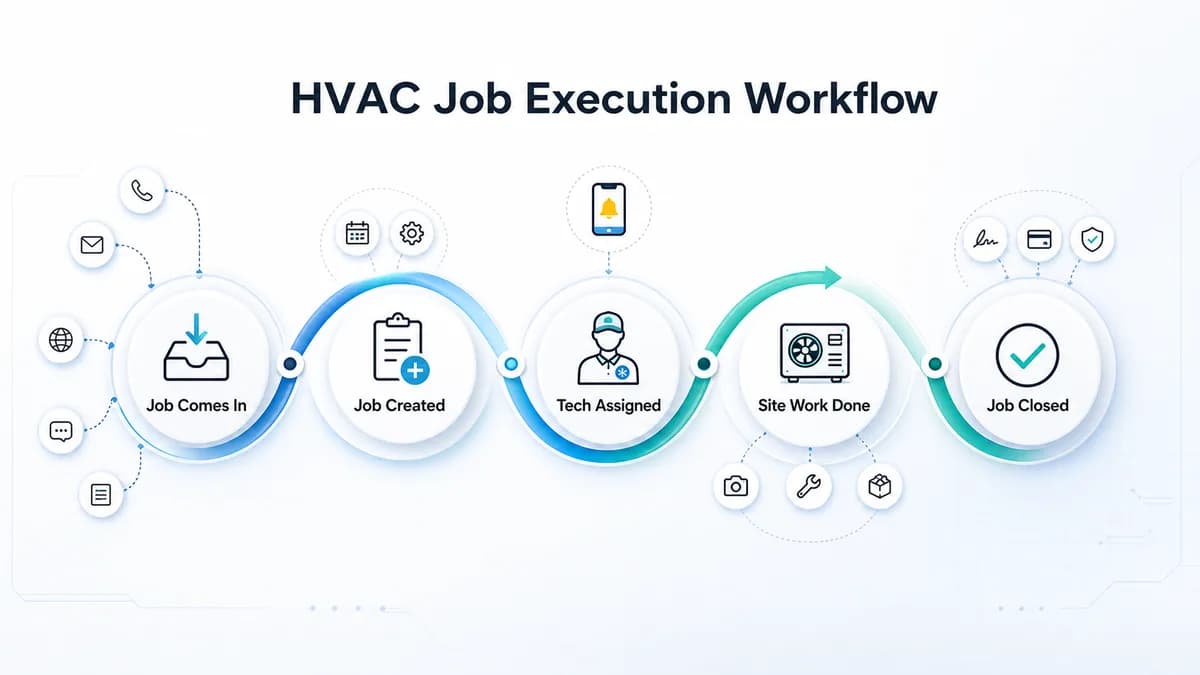
Last updated: 26 August 2026.
HVAC project management software should help Indian installation and AMC teams control field execution after a job is received. The practical problem is not only planning tasks. The owner needs visibility into technician assignment, job status, product photos, parts used, material issue, expenses, cash or UPI collections, reports, warranty history, and AMC follow-up.
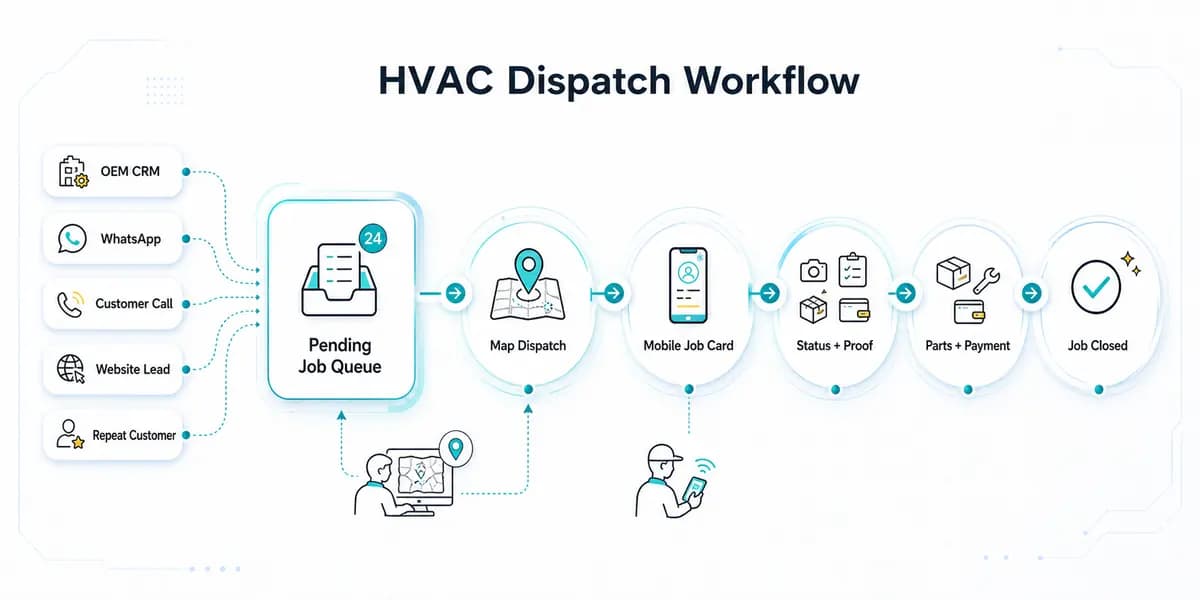
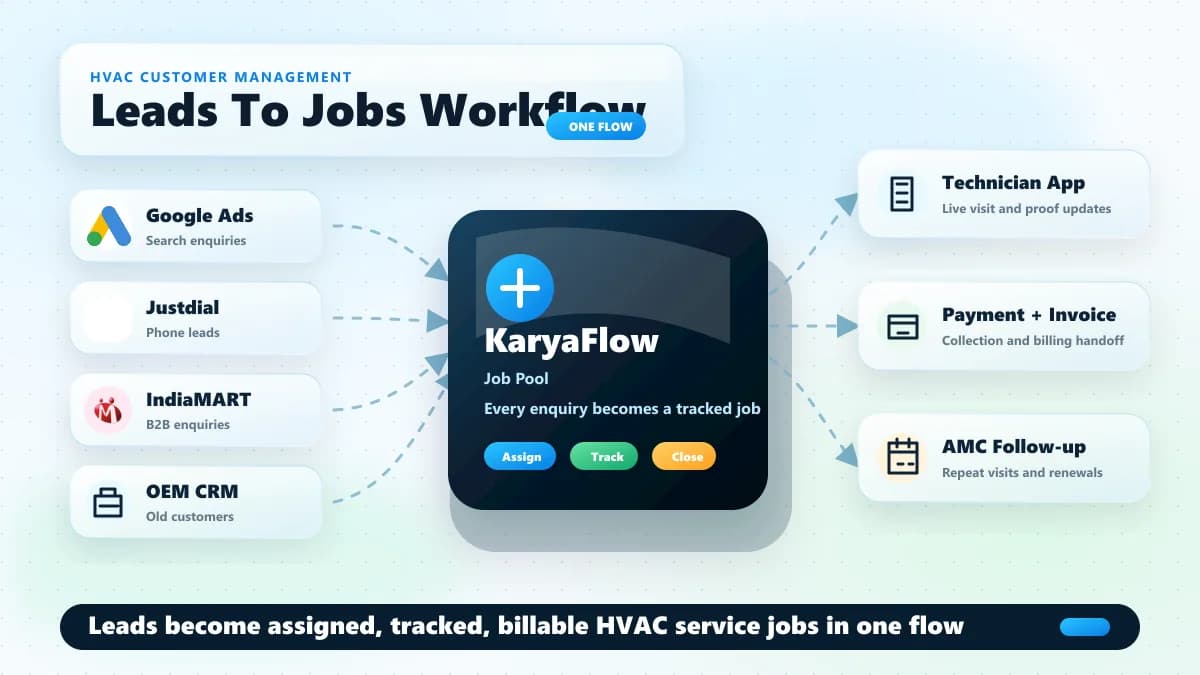
For many HVAC teams, the job starts outside the field-service system. It may come from an OEM or company CRM, an office call, a repeat customer, an Excel sheet, or the owner directly. Once that job enters operations, the business needs one place to assign the technician, track the visit, record proof, update material, collect payment, and prepare reports.
That is the execution layer KaryaFlow is built for.
Managing HVAC jobs through Excel, WhatsApp, and phone calls?
Book a KaryaFlow demo to see how job entry, technician assignment, product photos, material issue, payments, expenses, salary records, and reports can work from one place.
What Is HVAC Project Management Software?
HVAC project management software helps Indian HVAC and AC service teams manage field execution after a job enters the business: job entry or import, technician assignment, status tracking, product photos, service details, parts used, material issue, customer signature, cash/UPI payment tracking, technician expenses, reports, and handover into warranty or AMC.
Generic project tools can track tasks. HVAC teams need more than tasks because the money is in the field details: which technician went, what product was seen, what part was used, what material was issued, what payment was collected, what expense was approved, and what report the owner can trust later.
If you want a broad software comparison first, read the best HVAC software in India guide. For the payout impact of expenses, advances, and collections, read Technician Salary Calculation Software. This page focuses only on HVAC project execution after the job is received.
Who Should Read This Guide
This HVAC project management software guide is for Indian HVAC owners, operations managers, coordinators, and contractors who manage site-based work through technicians.
It is especially relevant for:
- AC installation and service centers
- commercial HVAC contractors
- MEP contractors handling HVAC work
- AMC-heavy HVAC service companies
- authorized service partners receiving jobs from an OEM or company CRM
- facility maintenance operators with repeated site visits
- growing field-service teams that have moved beyond one owner and two technicians
The buyer is usually not searching for software because they want a pretty project board. HVAC buyers search because the back office is becoming difficult to control. Jobs are coming from one place, assignments are happening in another, proof is going into WhatsApp, expenses are coming later, and month-end reports need too much manual cleanup.
If your main problem is sales leads and customer follow-up, the related HVAC customer management software guide is a better starting point. If your main problem is daily job assignment, technician map view, status tracking, on-hold jobs, and payment updates, read the HVAC dispatch software guide. If your main problem is field execution after the job enters operations, continue here.
What HVAC Project Management Software Means For Indian Teams
For an Indian HVAC team, HVAC project management software is not only a Gantt chart or office task tracker. It is a field-service project workflow that connects the confirmed job with technician execution and back-office reporting.
The workflow usually needs to answer these questions:
- Where did the job come from?
- Has the job been entered or imported?
- Which technician is assigned?
- What is the current status?
- Did the technician contact the customer?
- Did the technician capture product photos?
- What service was performed?
- Which parts or materials were used?
- Was the completion sheet filled properly?
- Did the customer sign?
- Was payment collected by cash, UPI, or both?
- Which expenses need owner approval?
- What should appear in reports, salary records, GST invoice data, Tally export, or CA/accountant handoff?
- Should this product move into warranty history, future service history, or AMC follow-up?
That is why HVAC project tracking is different from a normal office project plan. HVAC work happens at the customer site. The owner needs a reliable record of what happened there, not only a task status.
Why HVAC Projects Become Hard To Manage In WhatsApp And Excel
WhatsApp and Excel are useful in the early stage because everyone understands them. The owner can receive a job, put it in a sheet, call the technician, send the customer details on WhatsApp, and ask for updates during the day.
The WhatsApp-and-Excel process becomes weak when the job count rises.
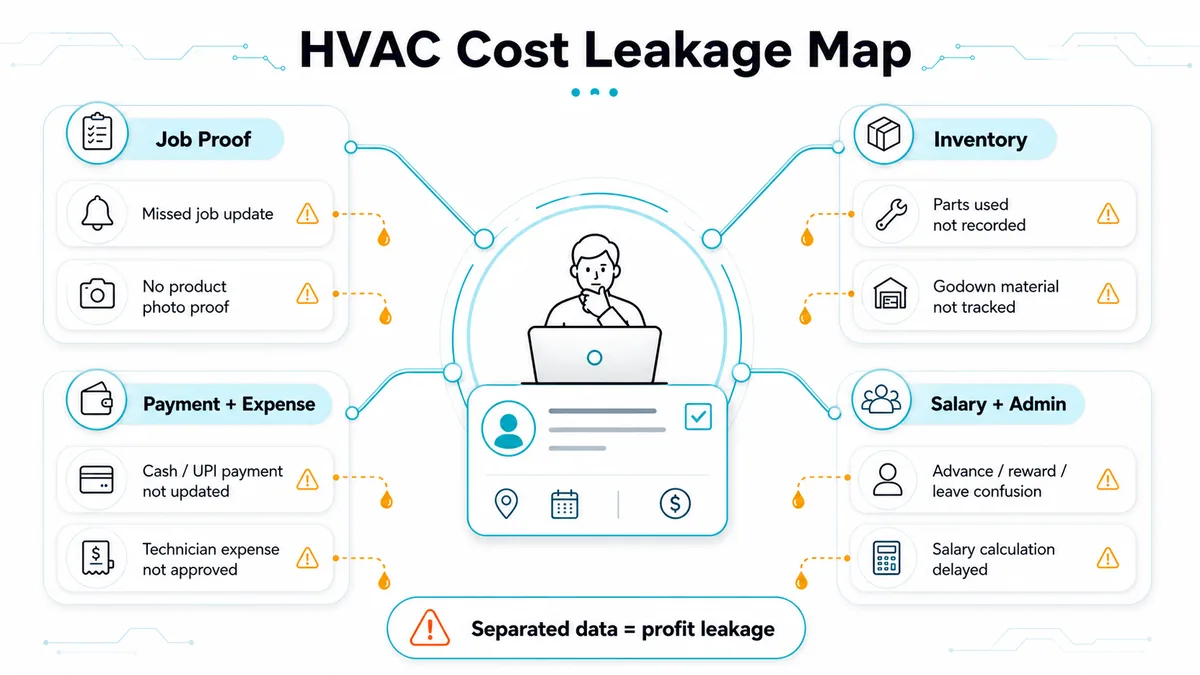
An HVAC team may receive jobs from an OEM portal, a company CRM, office calls, repeat customers, building managers, or sales staff. After that, the team may export the data into Excel, assign technicians manually, and follow every update in WhatsApp groups. Product photos, service details, payment screenshots, cash collection, technician expenses, and parts used then sit in separate places.
The owner technically has data, but the data is not operational.
A real pattern we have seen in service operations is a kitchen-appliance team with around 30 technicians receiving 100-200 jobs from a company CRM. The office exported those jobs, assigned technicians through Excel, and managed daily work through WhatsApp. The real pain came at month end: salary calculation took 7-8 days because the owner had to reconstruct expenses, rewards, advance payments, leave deductions, collections, and job-level payouts from scattered records.
HVAC teams face the same type of leakage. A commercial AC job, installation visit, repair visit, or AMC handover may look completed on WhatsApp, but the business still has to answer what was used, what was collected, what is pending, what expense is approved, and what should be reported.
Video Walkthrough: From OEM Jobs To Technician Salary
Watch this KaryaFlow walkthrough to see how an Indian HVAC, AC service, or appliance service team can move from OEM/company CRM jobs to technician assignment, mobile job cards, product photos, parts used, payments, expenses, and salary records without depending on Excel and WhatsApp for every update.
This video supports the article by showing the workflow visually: job entry/import, technician assignment, site proof, parts and material usage, cash/UPI payment records, technician expenses, and month-end salary visibility.
The Real Workflow After A Job Enters KaryaFlow
KaryaFlow fits the execution workflow after the job is received, entered, or imported. The quote, customer approval, or official job source may already exist outside KaryaFlow. Once the confirmed job enters the system, KaryaFlow helps the owner control the field operation.
A practical HVAC workflow looks like this:
- Job is received by the owner, office, OEM portal, company CRM, phone call, or existing customer.
- Job is entered or imported into KaryaFlow.
- Owner or admin assigns the job to a technician.
- Technician receives the assigned job in the mobile app.
- Technician uses the job card to contact the customer, such as calling the customer or using the available invitation/update action.
- Technician reaches the site and captures product photos through the app.
- Technician records the service performed.
- Technician records parts used and material consumed.
- Technician fills required job details, questionnaire-style fields, and the completion sheet.
- Customer signature is captured where required.
- Cash, UPI, or partial cash plus UPI payment is recorded.
- Job reports, payment reports, inventory reports, expense reports, salary data, and accounting handoff records become easier for the office to review.
- The customer and product history can support warranty, future service, or AMC follow-up.
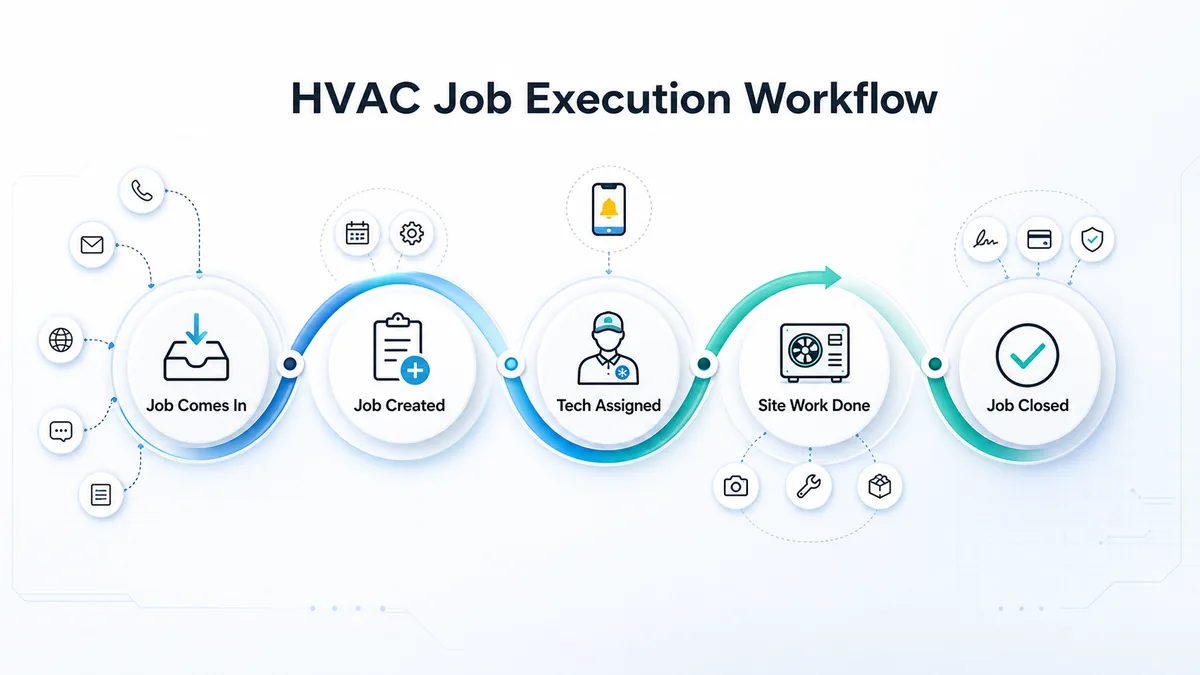
The job status should also be visible to the owner. KaryaFlow can use operational statuses such as Pending, Assigned, In Progress, On Hold, Cancelled, Closed, and Completed. The exact meaning of each status should match the company's internal process, but the value is simple: the owner should not have to ask every technician for every job update.
For AC service centers that need the full service-center operating model, read the AC service center management software guide.
Why Technician Job Cards Are The Control Point
The technician job card is where HVAC project management becomes real. A dashboard may show the job as assigned, but the job card proves what happened at the customer site.
For HVAC teams, a useful job card should capture:
- customer and site details
- product or equipment photos before work starts
- service performed
- parts used
- material consumed
- required questionnaire or job-specific fields
- customer signature
- cash, UPI, or partial payment details
- completion sheet
- technician remarks
- follow-up requirement
This does not need to become a complicated form. It needs to be complete enough that the office can trust the closure record.
For example, if a technician says the service is complete but there is no product photo, no part usage record, no customer signature, and no payment update, the job is still incomplete from the owner's point of view. The technician may have done the work, but the business record is weak.
KaryaFlow helps by keeping the job card inside the technician app and connecting it to the owner dashboard. For deeper job-card requirements, use the HVAC job card software guide.
Material Issue And Multi-Godown Stock In HVAC Project Work
HVAC project work depends heavily on material visibility. Installation and service jobs may involve copper pipe, insulation, drain pipe, wiring, brackets, refrigerant, filters, PCBs, sensors, controllers, motors, capacitors, contactors, valves, and other parts.
If the material issue is not connected to the job, the owner loses control in three places:
- stock may leave the godown without clear job ownership
- technicians may use parts without the office knowing what was consumed
- billing and reporting may miss chargeable material
For growing HVAC teams, multi-godown stock adds another layer. The owner may have one main store, local branch stock, technician stock, vendor purchases, or site-specific material. If the team cannot see where material is available, duplicate purchases and wrong stock assumptions become common.
KaryaFlow can track inventory and material issue for HVAC jobs, including parts and multi-godown stock. The important workflow is not only "what is in stock." The owner needs to know which material was issued, which technician carried it, which job used it, and what remains for future work. For the broader cross-industry inventory workflow, read Spare Parts Inventory Management Software.
This article keeps inventory at the project-execution level. For deeper spare-parts, refrigerant, and technician-stock control, read the HVAC inventory management software guide.
Technician Expenses, Advances, Salary, And Rewards
In many Indian service teams, the hardest project report is not the task list. It is the month-end technician payout because expenses, advances, leaves, rewards, and collections are scattered across chats and spreadsheets.
HVAC owners often need to track:
- fuel expense
- food expense
- travel expense
- rent or allowance
- miscellaneous expense
- advance payments
- leave pay or deductions
- overtime
- technician rewards or incentives
- cash collected by technician
- pending settlement
If every technician sends expense details on WhatsApp, the owner must manually decide what is approved, what is rejected, what belongs to which job, and what should appear in salary calculation. That is where a small process issue becomes a 7-8 day back-office problem at month end.
KaryaFlow can track technician expenses and route them through owner approval. Approved expenses then appear in the expense section and salary-related records. This keeps technician payout closer to the actual work done instead of depending on memory, chats, and late Excel cleanup.
This matters for project profitability. If an installation job looks profitable on paper but extra trips, fuel, food, advance payments, and unrecorded material are not visible, the owner does not know the real cost.
Cash, UPI, And Partial Payment Tracking
HVAC project payment tracking should match how Indian customers actually pay. Some customers pay cash. Some pay UPI. Some pay part cash and part UPI. Some pay an advance and clear the balance later.
The key requirement is not only collecting money. The payment must be connected to:
- the customer
- the job
- the technician
- the payment mode
- the amount collected
- the amount pending
- the completion record
- the office report
- the technician cash-in-hand record
KaryaFlow can track cash, UPI, and partial cash plus UPI collections against jobs. If cash is collected by the technician, the owner can review cash in hand by technician instead of reconstructing it from calls and messages.
This section intentionally stays short because payment collection has its own workflow. For deeper coverage, read collect payment at job site.
Reports The Owner Needs From Anywhere
HVAC project management software should help the owner manage the business from anywhere, not only from the office computer. The owner needs reports that connect field activity with back-office decisions.
Important reports and exports for KaryaFlow buyers include:
- job report
- completion sheet
- payment report
- cash in hand by technician
- expense report
- salary slip
- inventory or material report
- GST invoice data
- Excel export
- PDF report
- Tally export
- CA or accountant report
Clean HVAC project reports do not mean the field-service system should become a full accounting system. For many Indian teams, Tally, Vyapar, Zoho Books, or the accountant's workflow may still handle accounting and compliance. The field-service system's job is to organize job, payment, material, expense, and GST invoice data so the handoff is cleaner.
The reporting distinction is important. KaryaFlow should be evaluated as an execution and reporting system for field operations, not as a replacement for every accounting workflow.
Want to compare your current Excel reports with KaryaFlow?
Use a demo to test real reports: job status, completion sheets, parts used, material issue, cash/UPI payments, technician expenses, salary records, and accounting handoff.
HVAC Project Management Vs HVAC Service Management
HVAC service management and HVAC project management overlap, but the buyer intent is different.
Scroll sideways to see every column if needed. With a keyboard, focus the table and use the left and right arrow keys.
| Area | Normal HVAC service management | HVAC project execution |
|---|---|---|
| Work type | Complaint, repair, AMC visit, repeat service | Installation, multi-visit work, site work, warranty start, AMC handover |
| Main control point | Technician visit and service closure | Job status, technician/team, material issue, proof, payment, expenses, reports |
| Common risk | Missing service proof, late invoice, unclear follow-up | Material leakage, delayed payment, extra visits, unclear ownership, weak reporting |
| Useful record | Customer service history | Customer, product, material, payment, cost, warranty, and future AMC history |
A normal service-management page may talk about complaints, dispatch, visits, and invoices. This project-management page is more focused on controlling the execution chain once work has entered the business. That includes status, proof, material, payment, expense, and report visibility.
If your work is mostly recurring preventive visits, read the HVAC preventive maintenance software guide. If your work involves both projects and later recurring contracts, the two workflows should connect.
HVAC Project Management Vs Generic Project Tools
Generic project tools such as Trello, Asana, Monday-style boards, or spreadsheet trackers can help teams organize tasks. Generic project tools are useful when the work is mostly office coordination, checklists, deadlines, and approvals.
HVAC project work has a different shape.
The owner needs to know which technician received the job, whether the customer was contacted, whether product photos were captured, what service was performed, what part was used, what material was issued, what payment was collected, and what report is ready for the office.
This HVAC workflow is not only task management. It is field-service execution.
Excel can still be useful for exports and review. WhatsApp can still be useful for conversations. Tally or Vyapar can still be useful for accounting and billing workflows. But if the field job itself is not structured, the owner still ends up doing manual reconciliation.
For a broader India-wide field-service buying view, compare this with field service management software in India.
How Indian HVAC Teams Should Compare Software Options
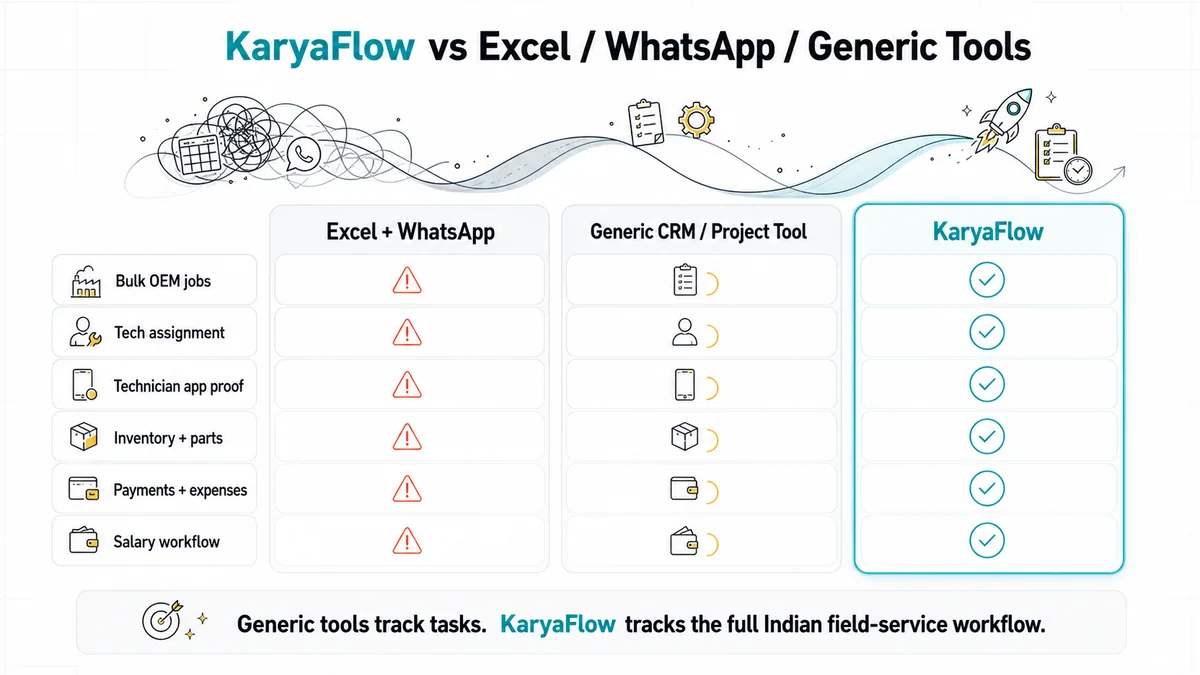
Indian HVAC buyers often compare several types of tools in the same decision: Excel and WhatsApp, generic project tools, billing/accounting tools, FSM tools, service CRM tools, and HVAC-specific products.
The right HVAC software comparison is not "which tool has the most features?" The better question is "which tool controls the work after the job is received?"
Scroll sideways to see every column if needed. With a keyboard, focus the table and use the left and right arrow keys.
| Tool type | Examples buyers may consider | Good for | Watch before buying |
|---|---|---|---|
| Excel + WhatsApp | Spreadsheets, WhatsApp groups, phone calls | Familiar coordination, low setup cost | Weak owner visibility, weak proof, manual salary, scattered expenses, difficult reports |
| Generic project tools | Trello, Asana, Monday-style boards | Task lists, internal coordination, simple timelines | Usually weak for technician job cards, parts, payments, GST handoff, AMC continuity |
| Billing/accounting tools | Tally, Vyapar, Zoho Books-style workflows | Billing records, accounts, invoice workflow | Usually not the field execution system for technician proof, material custody, and job closure |
| FSM or service CRM tools | Zoho FSM, Service CRM, FieldDesk, QuickAssign, FieldNexa, ARCProLite, ServoERP | Service jobs, complaints, technician workflow | Test inventory, expenses, salary-linked records, Indian payment workflow, and reports before deciding |
| KaryaFlow | KaryaFlow for HVAC and AC service centers | Job entry/import, assignment, technician app, proof, parts, inventory, expenses, payments, salary/reporting, AMC handover | Not for heavy construction planning, design approvals, or quote-first project estimation |
This HVAC software table is not a full vendor comparison. It is a buying framework. If you are shortlisting software, ask each vendor to show your exact workflow instead of only showing dashboards.
Project-To-Warranty And Project-To-AMC Handover
An HVAC project should not end when the technician marks the work complete. For AC and HVAC teams, the installation or service record should support future warranty, complaints, preventive visits, and AMC follow-up.
The project record should help the owner preserve:
- customer details
- product or equipment details
- service photos
- parts used
- completion sheet
- customer signature
- payment status
- warranty start or service history
- next follow-up requirement
- AMC opportunity
This matters because service revenue often comes after the first job. A customer may need a repeat visit, seasonal service, filter cleaning, gas top-up, warranty complaint, or AMC renewal. If the first project record is incomplete, future service becomes harder.
KaryaFlow is useful when the same customer history can continue into warranty and AMC follow-up. For recurring-contract depth, use the AMC management software guide.
Buyer Checklist Before Booking A Demo
Before buying HVAC project management software, do not only ask for a feature list. Ask the vendor to show the exact workflow your team uses today.
Use this checklist during the demo:
- Can jobs be entered or imported from the current job source?
- Can the owner or admin assign technicians from one dashboard?
- Can technicians receive jobs in a mobile app?
- Can technicians call the customer or use customer contact actions from the job card?
- Can technicians capture product photos before work starts?
- Can service details be recorded clearly?
- Can parts used be recorded against the job?
- Can material issue be tracked from multiple godowns?
- Can cash, UPI, and partial payments be tracked?
- Can technician expenses be submitted and owner-approved?
- Can salary, rewards, advance payments, leaves, and expenses be reviewed together?
- Can the owner see Pending, Assigned, In Progress, On Hold, Cancelled, Closed, and Completed jobs?
- Can reports be exported for Excel, PDF, Tally, GST invoice data, and CA/accountant handoff?
- Can the same customer and product history support warranty and AMC follow-up?
If the software cannot show these flows in a demo, it may still be useful, but it may not solve the owner's real back-office problem.
How KaryaFlow Fits HVAC Project Execution
KaryaFlow is a good fit when the HVAC team already receives confirmed jobs from an owner, OEM or company CRM, phone calls, office staff, repeat customers, or Excel, and the main problem is execution visibility.
Once the job is entered or imported into KaryaFlow, the team can assign technicians, track status, capture product photos, record service details and parts used, collect customer signature, track cash/UPI payments, manage inventory and material issue, approve technician expenses, review salary-related data, and export reports for billing and accounting follow-up.
KaryaFlow should not be evaluated as a heavy construction project-planning tool. It is stronger as a field-service project workflow for Indian HVAC and AC service teams that want to reduce manual back-office work and manage operations from anywhere.
For the product page, see KaryaFlow for HVAC and AC service centers.
Ready to move HVAC project execution out of scattered tools?
If your team already receives jobs from a CRM, Excel sheet, phone calls, or repeat customers, book a KaryaFlow demo to see how assignment, technician proof, material issue, payment tracking, expenses, salary records, and reports can work together.
FAQ
These HVAC project management software FAQs answer the buyer questions most likely to appear during shortlist, demo, and internal approval discussions.
What is HVAC project management software?
HVAC project management software helps HVAC and AC service teams manage field execution after a job is received. It should connect job entry, technician assignment, status tracking, product photos, service details, parts used, material issue, payment collection, expenses, completion sheets, reports, warranty history, and AMC follow-up.
Is HVAC project management software different from HVAC service management software?
Yes. HVAC service management usually focuses on complaints, repairs, AMC visits, and technician closure. HVAC project management focuses more on execution control across job status, technician assignment, material issue, proof, payments, expenses, reports, and handover into warranty or AMC.
Can KaryaFlow manage HVAC quotations or estimates?
KaryaFlow is best positioned for the workflow after a job is confirmed, entered, or imported. If your quote is created in another system, Excel, or your existing CRM, KaryaFlow can still help with assignment, technician execution, proof, parts, payment tracking, expenses, reports, and follow-up after the job enters operations.
Can KaryaFlow import or enter jobs from an OEM or company CRM?
Yes. KaryaFlow can be used when jobs are received from an OEM or company CRM and then entered or imported into KaryaFlow for assignment, technician tracking, job card updates, payment tracking, expenses, material issue, and reporting.
Can technicians capture photos and completion proof in KaryaFlow?
Yes. Technicians can receive the job in their app, capture product photos at the customer site, record service performed, add parts used, complete required job details, capture customer signature, and create a cleaner completion record for the office.
Can KaryaFlow track parts used and material issued for HVAC jobs?
Yes. KaryaFlow can track parts used and material issue against HVAC jobs. It also supports multi-godown stock and parts tracking, which helps owners see where material is available and how it moves into field work.
Can KaryaFlow track technician expenses and salary-related records?
Yes. KaryaFlow can track technician expenses such as fuel, food, travel, rent or allowance, and miscellaneous expenses. Expenses can be owner-approved before they appear in the expense section and salary-related records. Salary slips, rewards, advances, leave deductions, overtime, and payout data can be reviewed more cleanly than with WhatsApp and Excel.
Can KaryaFlow track cash and UPI payments?
Yes. KaryaFlow can track cash, UPI, and partial cash plus UPI payments against jobs. This helps the owner review payment reports and cash in hand by technician.
Can KaryaFlow replace Tally or Vyapar?
KaryaFlow should not be treated as a full accounting replacement for Tally, Vyapar, or an accountant's workflow. KaryaFlow organizes field execution data, payment records, material usage, expense approvals, GST invoice data, Tally export, and CA/accountant reports so accounting handoff becomes cleaner.
Is KaryaFlow suitable for HVAC teams that use WhatsApp today?
Yes. WhatsApp can still be used for conversation, but KaryaFlow should become the system of record for jobs, technician assignment, photos, parts used, material issue, expenses, payments, completion sheets, salary records, and reports.