On this page
Last updated: 2 October 2026.
Field service management software in India is supposed to reduce chaos. In practice, many teams buy software and still keep running dispatch in WhatsApp, billing in Excel, technician updates in phone calls, and AMC renewals in memory. The result is not a real operating system. It is another tool that the office team has to babysit.
If your business sends people to customer sites, the software has to support the entire service loop: complaint intake, scheduling, assignment, technician updates, proof of work, invoice creation, payment follow-up, and renewals. That is true for HVAC, AC service, appliance repair, pest control, electrical, plumbing, solar, CCTV service teams, fire safety, facility maintenance, and elevator AMC teams.
This guide explains what field service management software should do for Indian service businesses, which buying criteria matter, and how to compare vendors without getting distracted by a polished demo.
Short Answer
The best field service management software in India is the one that combines job dispatch, technician mobile app, AMC (Annual Maintenance Contract) and recurring visit tracking, GST-ready billing, GPS visibility, customer communication, and clean reporting. For Indian SMBs, KaryaFlow is a strong fit because it is designed around technician-led service workflows and India-specific operations. Zoho FSM is a solid option for teams already using Zoho products. FieldEZ, FieldCircle, ServiceFlow, and similar tools should be evaluated on mobile usability, billing fit, and AMC depth before you buy.
Key Takeaways
- Test the complete loop: complaint, assignment, mobile job card, proof, parts, invoice, payment status, and renewal.
- A field service management (FSM) platform should connect office, technician, customer, accounts, and owner records.
- For Indian teams, GST-ready billing handoff, WhatsApp communication, UPI payment context, AMC visits, and mobile usability deserve explicit demo time.
- Start with one branch or dispatcher team, measure the workflow, and expand only after technicians are using the core loop consistently.
For the intake step before dispatch, read the complaint register software India guide. For the parent job record behind dispatch, technician job cards, parts, payments, and invoice handoff, read the work order management software India guide. If the bigger leakage is stock movement after parts leave the store, read the spare parts inventory management software guide.
How Field Service Software Fits With CRM, ERP And Operations Software
Buyers do not always search for this category with the same words. Some search for customer management software, customer service management system, customer interaction management, customer relation management, CRM management tools, business management software, company management software, operations software, workflow system software, maintenance management system, asset management software, inventory tracking system software, expense management software, or ERP software in India.
Those terms are related, but they are not identical. CRM tools manage enquiries, customers, and follow-ups. ERP or accounting software manages finance, stock masters, approvals, or company records. A maintenance management system or asset management software may start from equipment and planned upkeep. Field service management software starts from the service job: who raised the request, who owns it, which technician will visit, what proof is captured, which parts were used, what payment is pending, and what should happen next.
KaryaFlow should be positioned as the field execution layer for service businesses, not as a full ERP replacement. If the team already uses Tally, Vyapar, Zoho, or another ERP software in India, KaryaFlow can still sit between customer interaction and accounting handoff so operational records are clean before billing. For specific adjacent workflows, use these guides:
- WhatsApp customer lead management agent for service enquiries, follow-up ownership, quotation status, and lead-to-job conversion.
- WhatsApp and Excel service CRM for replacing scattered customer records, chats, and spreadsheet follow-ups.
- Customer-to-technician handoff software for moving a customer request into assigned field work without losing context.
- Field service inventory and expense tracking software for parts, technician stock, job expenses, and owner approval.
- Connect job records with billing and accounting when the main gap is invoice handoff after field closure.
Field Force Automation Versus Field Service Management
Short answer: field force automation is a broad label. It may describe sales representatives visiting dealers, collection staff visiting customers, inspectors completing forms, or service technicians repairing equipment. Field service management is the better category when the field visit must become a work order with diagnosis, proof, parts, payment, and closure.
Search results for “field force automation software” often mix two different workflows:
Scroll sideways to see every column if needed. With a keyboard, focus the table and use the left and right arrow keys.
| Workflow | Main record | Typical field action | Useful outcome |
|---|---|---|---|
| Sales-force automation | Lead, account, outlet, or order | Salesperson visits a dealer, records an order, captures a market observation, or follows up a prospect | Pipeline, visit coverage, orders, and sales activity |
| Service-team automation | Complaint, work order, asset, or AMC visit | Technician diagnoses a fault, completes a checklist, uses a part, captures proof, and updates payment or closure | Resolution, service history, stock accountability, billing handoff, and SLA visibility |
Both may use attendance, GPS, route context, forms, and mobile apps. Those shared features do not make the workflows interchangeable. A sales visit can be complete after an order or follow-up. A service visit may still be open because a part, approval, revisit, invoice, or customer acknowledgement is pending.
Choose sales-force software when dealer coverage, beat plans, leads, orders, and collections are the center of the work. Choose field service management when customer complaints, technician jobs, equipment history, AMC, parts, proof, and service closure are the center. If one team does both, test whether the product can keep lead stages and service-job statuses separate without forcing one workflow into the other.
Field service management app in India: what buyers actually need
A field service management app in India should connect the office, technician, customer, accounts team, and owner around the same service record. The buyer should not evaluate only a desktop dashboard or CRM pipeline. The real test is whether a technician can receive a job on mobile, update status, upload photos, record parts used, collect a signature, mark payment status, and send the job back to billing without WhatsApp follow-up.
For Indian service businesses, the best FSM software also needs GST-ready invoice handoff, AMC visit tracking, expense approval, attendance or GPS context, and reports that show pending jobs, collections, renewals, and technician workload. If these workflows remain split across Excel, WhatsApp, Tally, and phone calls, the software is not yet the system of record.
 Field service management app dashboard for Indian service businesses
A good field service management app dashboard should show jobs, technicians, AMC renewals, invoices, and overdue work at a glance.
Field service management app dashboard for Indian service businesses
A good field service management app dashboard should show jobs, technicians, AMC renewals, invoices, and overdue work at a glance.
What FSM Software Should Actually Do
Field service management software is not just a schedule board. In a real service business, it should connect four things:
- The office - customer records, complaints, work orders, pricing, invoices, AMC contracts, and reporting.
- The technician - mobile job cards, checklists, photos, signatures, parts used, and status updates.
- The customer - appointment confirmations, arrival updates, service reports, and payment reminders.
- The owner - visibility into backlog, renewals, collections, productivity, and repeat complaints.
If any of those pieces sit outside the system, the team falls back to manual coordination. That is why many businesses do not feel a software payoff after purchase. They bought a calendar with labels, not an operating system.
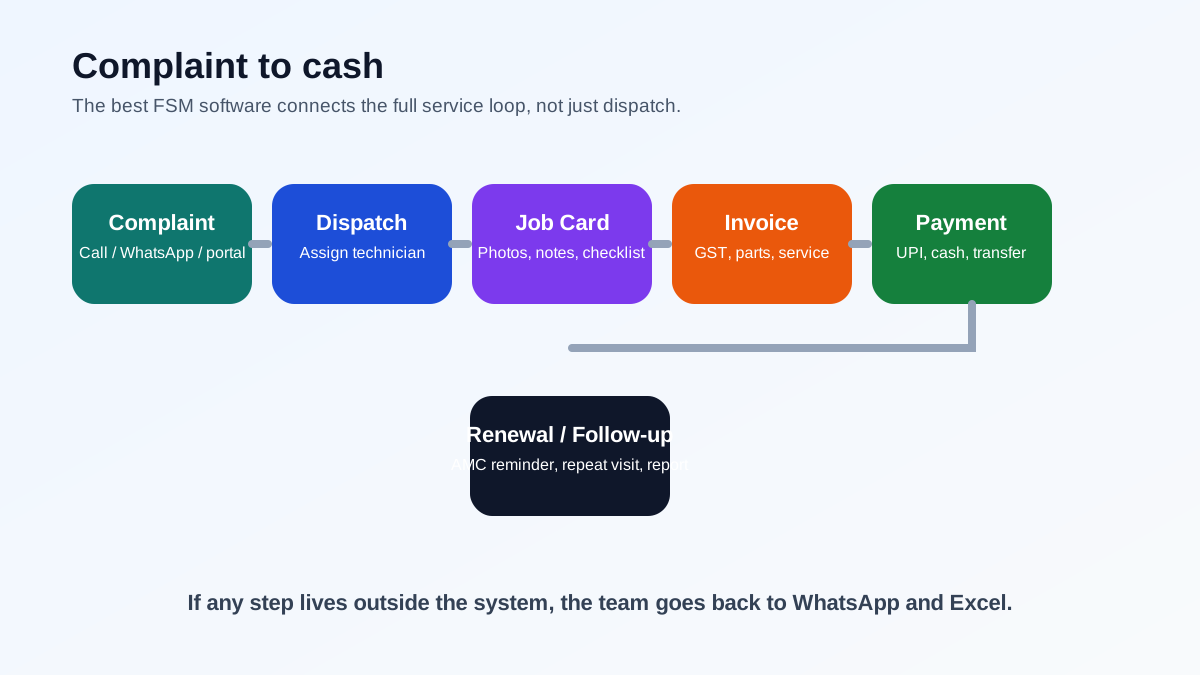 Complaint to cash workflow for field service operations
The best FSM software connects the full service loop, from complaint intake to payment and renewal.
Complaint to cash workflow for field service operations
The best FSM software connects the full service loop, from complaint intake to payment and renewal.
For a deeper buyer framework, read our field service management software guide.
If your main challenge is connecting CRM, support tickets, accounting, work orders, and technician updates without duplicate entry, use the CRM, helpdesk, accounting, and field service workflow guide before choosing integrations.
If the team is trying to replace several disconnected tools at once, read the single field service management system workflow. If tickets and attendance must stay connected, read ticket management software with geofenced attendance. For people-management basics, read how to manage field employees in India.
Why Indian Service Businesses Need Different Criteria
Indian service teams have different operational realities from the markets many global FSM products were built for.
GST and invoice fit
If your commercial customers need GST invoices, the software must support the fields, line-item structure, and tax handling your accountant expects. Use the official GST portal for current tax guidance. A field service app that creates a generic invoice but still forces your team to rebuild the same bill elsewhere is not saving time.
WhatsApp is part of the workflow
Indian customers expect WhatsApp updates. Technicians also use WhatsApp for photos, directions, and quick coordination. The software does not need to replace WhatsApp entirely. It needs to stop WhatsApp from becoming the database. For official API planning, review Meta's WhatsApp Business Platform documentation and keep the service system as the source of truth for jobs, proof, billing, and payment status.
AMC and preventive maintenance matter
A lot of field service revenue in India comes from recurring service contracts, not just one-time jobs. If the platform does not handle visits, reminders, renewals, and reports, the business will still miss revenue.
Mobile adoption matters more than long feature lists
Technicians will not use a system that takes too many taps, loads slowly, or feels designed for office staff. The field workflow has to be simple enough to use on a normal Android phone in real conditions.
Price has to match SMB margins
Many tools are priced for enterprise teams. That is a poor fit for a 5 to 50 technician business that needs practical workflow control, not a heavyweight implementation project.
If your team is already feeling these pains, our article on why growing service businesses need dedicated field service software is a useful companion read. If you manage camera complaints, use the CCTV complaint management software guide for the industry-specific workflow.
Comparison Table: What to Check
The table below uses publicly visible positioning and India-fit signals as of May 2026. Vendor features and pricing can change, so treat this as a shortlist framework, not a final procurement decision.
| Software | Best fit | India-fit strengths | What to verify in demo |
|---|---|---|---|
| KaryaFlow | Indian service businesses that need workflow control | Technician-led flow, AMC support, India-first operations language, service business focus | Exact modules, rollout path, and reporting depth |
| Zoho FSM | Teams already in the Zoho ecosystem | Strong ecosystem integration and mature platform | AMC depth, technician adoption, and pricing by module |
| FieldEZ | Broader field service teams in India | General FSM positioning with local market presence | Job card workflow, billing fit, and mobile usability |
| FieldCircle | Service teams that want configurable FSM | Work order and service workflow coverage | GST flow, WhatsApp fit, and onboarding effort |
| ServiceFlow | Indian HVAC and service businesses | Local market positioning and service language | Feature maturity, support quality, and pricing clarity |
| TeroTAM | Asset-heavy maintenance teams | Maintenance and asset tracking orientation | Service-business fit versus internal maintenance fit |
| AntMyERP | Businesses considering ERP-style service control | Broader operations coverage | Complexity, mobile simplicity, and onboarding time |
| ServiceTitan or Jobber | Mature global home-service teams | Strong products in their home markets | India availability, GST fit, payment methods, and support |
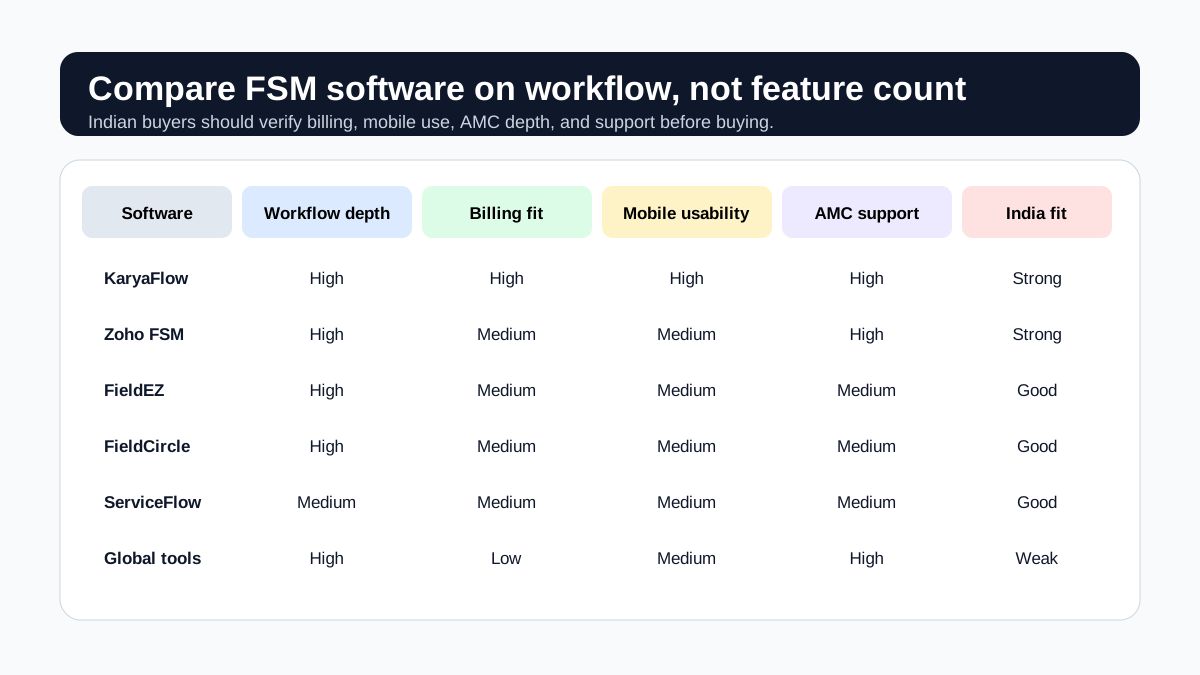 Comparison matrix for field service management software in India
Indian buyers should compare workflow depth, billing fit, mobile adoption, and India-specific support.
Comparison matrix for field service management software in India
Indian buyers should compare workflow depth, billing fit, mobile adoption, and India-specific support.
What matters more than brand names
Do not buy based on brand familiarity alone. Compare these things instead:
- Can it handle complaint-to-job conversion cleanly?
- Can a technician complete the job from a phone without training fatigue?
- Can the office see which jobs are pending, delayed, or repeat complaints?
- Can the software support recurring visits and renewal reminders?
- Can the invoice output match your accounting process?
- Can the system still work when connectivity is poor?
If the answer is "yes" on paper but "no" in the demo, the tool is not ready for your team.
Core Features Indian Buyers Should Insist On
1. Job and complaint tracking
Your software should let the team convert a complaint into a work order in seconds. Each job needs customer details, location, priority, issue type, assigned technician, status, notes, and closure history.
2. Technician mobile app
The mobile app must be simple enough for daily field use. Technicians should be able to see assigned jobs, open the job card, add photos, complete checklists, record parts, and close the visit without calling the office for every step.
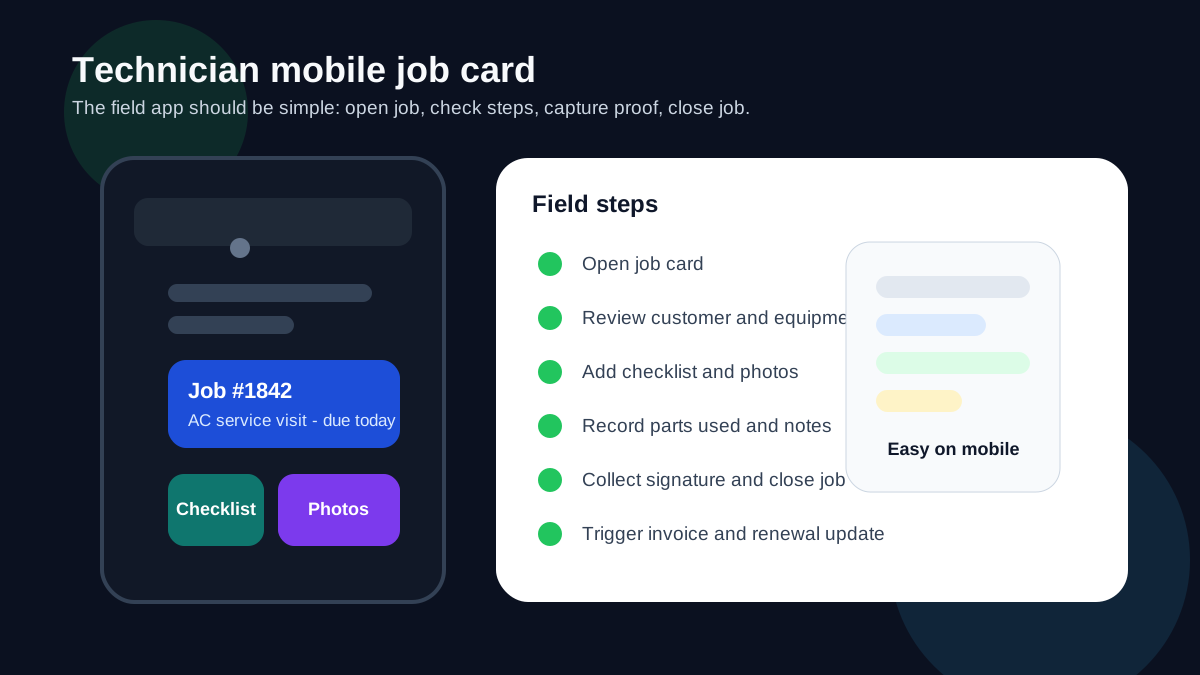 Technician mobile job card workflow for field service
A simple mobile job card helps technicians record proof of work and close jobs without office coordination.
Technician mobile job card workflow for field service
A simple mobile job card helps technicians record proof of work and close jobs without office coordination.
If technicians carry company stock, the mobile job card must also connect to inventory. The office should know which spare part was issued, which technician carried it, which customer job used it, and whether the unused or defective part came back. The spare parts inventory management software guide covers that stock-to-job workflow in detail.
3. AMC and recurring visit support
If your business sells AMCs, the software should track contract start and end dates, included visits, completed visits, pending visits, renewal reminders, and customer reports.
4. GST-ready billing
Billing should not be an afterthought. The system should support invoice generation, tax fields, payment status, and export paths that help your accounts team close the loop.
For Indian teams that replace parts under warranty or AMC, check whether the system can connect job cards, stock movement, old-part return, and GST document review. The warranty and AMC replacement parts under GST guide explains this workflow in detail.
5. GPS visibility
You do not need surveillance theatre. You need practical dispatch visibility. GPS or location updates help the coordinator know who is nearby, who is delayed, and who already closed their last job.
6. Customer communication
Email alone is not enough in India. Customers need appointment reminders, technician arrival updates, and invoice links through the channels they already use.
7. Reporting
Owners should be able to see backlog, collection status, AMC renewal status, job completion rates, and technician productivity without asking the office for a spreadsheet.
For a workflow-level explanation of dispatch control, read moving AC service calls beyond WhatsApp.
A Simple Evaluation Checklist
Use this checklist in every demo. If a vendor cannot show your real workflow, the feature list does not matter.
| Check | What good looks like |
|---|---|
| Complaint intake | Complaint created in under a minute |
| Dispatch | Technician assigned with visible status and schedule |
| Mobile app | Technician can complete the job on phone without workarounds |
| Proof of work | Photos, notes, and signature attached to the job |
| Inventory and parts | Parts used are linked to technician stock, job card, return status, and billing handoff |
| Billing | Invoice created from the completed job or service report |
| Payments | Payment status tracked against the invoice |
| AMC | Visit count and renewal status updated automatically |
| Reporting | Owner can see jobs, collections, and overdue work |
| Support | Vendor can explain onboarding, migration, and support hours clearly |
If the software passes only the first three rows, it is not yet a full field service platform. It is a dispatch tool.
Metrics to verify after rollout
Before comparing vendors, record a baseline for complaint-to-assignment time, completed jobs waiting for billing, jobs missing proof, repeat complaints, overdue AMC visits, pending payments, and technician adoption of the mobile workflow. Review the same measures after a pilot. This gives an Indian service business evidence from its own operations instead of relying on generic claims about productivity or savings.
Use Cases by Industry
HVAC and AC service
This is one of the clearest use cases for FSM software because the work includes complaints, AMC visits, parts, billing, and service history. Read our HVAC service software guide and the deeper HVAC service center management article for a more specific workflow. If your biggest gap is daily technician assignment, map view, job status, on-hold jobs, parts used, and payment updates, read the HVAC dispatch software guide. If your team handles installation, site work, material issue, milestone payments, and AMC handover, use the HVAC project management software guide. If your biggest gap is lead intake, customer history, and repeat complaints, read the HVAC customer management software guide. If parts move through stores, branches, technicians, and job cards, use the spare parts inventory management software hub.
Pest control
Recurring visits, route planning, treatment proof, technician job cards, chemical usage, and AMC renewal follow-up are central here. Start with the pest control management software page, then read the pest control field service software guide for the full workflow. Use the pest control complaint management software guide when WhatsApp complaints, re-treatment requests, certificates, and customer callbacks need a tighter closure workflow.
Plumbing and electrical
Fast assignment, customer communication, and job closure are the main operational points. These businesses need the same FSM spine, but the workflow language is different.
Facility maintenance and multi-site teams
This group often needs asset history, recurring maintenance, and location-based visibility. The system should support repeat work without turning into a manual logbook.
Kitchen appliance and authorized service centers
Kitchen appliance, electronics, and authorized service centers need stronger appliance history, warranty, spare-parts, and service-report control than a generic CRM can provide. Start with the KaryaFlow appliance repair management software page, then use the kitchen appliance service center software guide and the authorized service center workflow software article for complaint, SLA, warranty, technician, parts, and closure workflows.
If you want more industry-specific context, browse the relevant KaryaFlow pages such as KaryaFlow for HVAC service centers, KaryaFlow for appliance repair, KaryaFlow for pest control, KaryaFlow for plumbing, and KaryaFlow for electrical service teams.
How to Compare Vendors Without Getting Lost
The most common mistake is comparing software by feature count. That usually rewards bloated products, not useful ones. Instead, compare vendors by the total workflow.
Step 1: Map the actual work
Write down your current flow from complaint to technician visit to billing to renewal. If your team works in branches, include branch handoff and reporting.
Step 2: Identify the failure points
Usually the problems are not subtle:
- jobs are missed
- technicians are hard to locate
- parts are not recorded properly
- invoices are delayed
- AMCs expire without follow-up
- managers do not know which jobs are stuck
Step 3: Run one live scenario
Ask each vendor to show the same scenario:
- Create a complaint.
- Dispatch a technician.
- Open the job in the mobile app.
- Add photos and notes.
- Record parts used.
- Close the job.
- Generate the invoice.
- Update the payment status.
- Schedule the renewal reminder.
If the vendor cannot demonstrate that cleanly, keep looking.
Step 4: Check the support model
Implementation and support matter. Ask how onboarding works, who trains your team, how changes are handled, and what happens if the app does not behave correctly in the field.
Step 5: Compare total ownership cost
Pricing matters, but it is not just the monthly fee. Include implementation time, data migration, training, add-on modules, support response time, and the cost of workarounds if the software does not fit well.
KaryaFlow Fit
KaryaFlow is positioned for Indian service businesses that need field workflow control instead of a generic CRM or an enterprise-heavy tool. That makes it a strong fit for HVAC, AMC-heavy service teams, and other technician-led operations that want one system for jobs, updates, billing, and reporting.
The main value proposition is practical:
- less WhatsApp chaos
- cleaner job ownership
- better AMC discipline
- stronger back-office visibility
- better service records for customers
If you run HVAC or AC service operations, the most relevant product page is KaryaFlow for HVAC service centers.
If the first leakage is sales enquiry follow-up rather than dispatch, start with the WhatsApp customer lead management agent guide. If the leakage is operational handoff, the work order management software guide is the better next page.
Common Buying Mistakes
Mistake 1: Buying for the demo, not the workflow
A polished interface can hide weak job logic. Test your actual work.
Mistake 2: Assuming CRM equals FSM
CRM helps manage relationships. FSM helps manage field execution. Those are not the same thing.
Mistake 3: Ignoring technician usability
If technicians dislike the app, your office team ends up doing double entry.
Mistake 4: Underestimating AMC complexity
Recurring service contracts are where many service businesses leak revenue. If the software does not handle renewals, it is incomplete for your use case.
Mistake 5: Forgetting invoice and payment reality
Your accounting process matters. The software should fit it, not fight it.
Mistake 6: Buying too much too early
Start with the core workflow. Expand to advanced modules only after your team is actually using the system.
Implementation Plan
Most Indian SMBs do better with a staged rollout.
- Start with one branch or one dispatcher team.
- Import customers and active jobs first.
- Add technicians and standard job templates.
- Set up your invoice flow and payment status fields.
- Move AMC contracts and renewals into the system.
- Train technicians on mobile completion and photo capture.
- Review the first two weeks of jobs and fix friction points.
- Expand only after the core loop is stable.
For a practical operations perspective, the field service software for growing businesses article explains why this rollout matters once volume starts rising.
FAQ: Field Service Management Software India
What is field service management software used for?
It is used to manage complaints, work orders, technician scheduling, job completion, service reports, recurring visits, invoices, and customer communication.
What is the best field service management software in India?
The best choice depends on your workflow. Indian SMBs should prioritize job dispatch, mobile technician use, AMC handling, GST billing, GPS visibility, and reporting. KaryaFlow is built for that operating model, while Zoho FSM and other tools should be checked against your exact requirements.
Is field service software the same as CRM?
No. CRM manages leads and customer relationships. Field service software manages the work that happens on-site.
Do Indian service businesses need AMC support in FSM software?
Yes, if recurring maintenance is part of your revenue model. AMC tracking, renewal reminders, visit counts, and reports are central for many Indian service businesses.
Should field service software support WhatsApp?
It should support the communication habits your customers and technicians already use, but it should not let WhatsApp become the source of truth for jobs and renewals.
What features matter most for Indian FSM buyers?
The core features are job cards, technician app, AMC tracking, GST billing, customer communication, GPS visibility, and clean reporting.
How much should field service software cost in India?
Pricing varies by team size and modules. Do not compare only the subscription fee. Include setup, support, onboarding, and the cost of manual work that remains after purchase.
Can global FSM tools work for Indian companies?
Sometimes, but only if GST, UPI, support, pricing, and mobile workflows fit your operating reality. Do not assume a global product automatically matches Indian service workflows.
What should a vendor show in a demo?
They should show complaint intake, dispatch, mobile job completion, photos, signatures, invoice creation, payment status, and renewal tracking in one flow.
When should a service business buy FSM software?
The right time is when WhatsApp, Excel, and paper job cards are creating missed jobs, delayed invoices, or weak renewal tracking. That is usually before the owner feels ready.
Final Recommendation
If your business sends technicians to customer sites, field service management software is not optional once volume grows. The question is whether you want a system that supports real work or another tool that adds more admin.
For Indian service businesses, the strongest buying criteria are simple: technician usability, AMC discipline, invoice fit, customer communication, GPS visibility, and reporting. If the software does not handle those well, the team will keep falling back to manual coordination.
KaryaFlow is built for that India-first operating model. If you want to see how it fits HVAC and adjacent service workflows, start with KaryaFlow for HVAC service centers.
Published by KaryaFlow Team. Last updated September 2026. Category: Field Service.
Ready to modernize your service operations?
See how KaryaFlow can connect complaints, technician jobs, proof, parts, payments, and billing handoff for your service team.
See how KaryaFlow works for Indian field service teamsYou might also like
AMC Plan Management Software India: Create Plans, Sell and Renew
AMC plan management software for Indian service businesses: create Gold, Silver and Premium plans, sell them through technicians, track commission, schedule visits, send reminders, and manage renewals.
Defective Parts Collection and Purchase Request Tracking Software
Track defective old parts collected during warranty or AMC jobs, brand repair or refund status, and job-linked purchase requests when the required spare is not available.
Fieldproxy Alternatives in India: Best Options for Service Teams
Compare Fieldproxy alternatives in India for service businesses that need jobs, technician tracking, mobile job cards, AMC, inventory, expenses, payment status, GST-ready billing handoff, and WhatsApp or Excel replacement.