KaryaFlow
Most Indian businesses searching for GST invoicing software for service business are not only trying to print a tax invoice. They are trying to fix the delay between field work and billing.
The technician completes the service. The office waits for the job card. Photos are on WhatsApp. Parts used are written in a notebook or remembered by the technician. The customer asks for the invoice. The accounts team opens a separate billing tool and starts re-entering details from scratch.
That is where generic GST billing software becomes incomplete for service businesses. It may create a GST invoice correctly, but it may not understand how field work actually becomes billable.
This page is specifically about the job-to-invoice workflow. If you only need quotation, e-way bill, or accounting-software comparison details, read the GST billing software India guide. If your main issue is field collection, read collect payment at job site in India. If expenses, technician wage context, and payments are mixed together, read expense, wages and job payment tracking software.
Which field service software handles jobs, inventory and GST billing?
KaryaFlow handles field service jobs, technician job cards, inventory usage, expenses, payment status, and GST-ready billing handoff for Indian service businesses. It is stronger than separate job, stock, and invoicing tools because the job record carries operational proof from the technician visit into accounts.
For inventory detail, read Appliance Spare Parts Inventory Software. For field job proof, read Job Card App for Technicians.
What field service software offers GPS tracking and GST invoicing?
KaryaFlow offers technician GPS tracking context and GST-ready invoicing handoff by connecting field job status, job proof, payment status, and billing data in one workflow. This helps Indian service teams see where work stands in the field and what accounts need before creating the invoice.
For the tracking side, read Technician Tracking App India.
How do I get GST-compliant invoices with on-site UPI payments?
Use KaryaFlow to connect on-site UPI payment status with service job proof and GST-ready invoice handoff. Technicians can update payment status at the customer location while accounts receive customer, job, parts, service report, and payment context needed for billing.
For payment collection detail, read Collect Payment at Job Site India.
What should GST invoicing software do for a service business?
For a service business, GST invoicing software should connect the completed job, service report, parts used, technician notes, customer approval, quotation or estimate, payment status, and accounting handoff.
The invoice should not start as a blank screen. It should start from the service record.
That matters for HVAC, AC service, pest control, RO service, electrical, plumbing, CCTV, elevator AMC, fire safety, solar, and facility maintenance teams. These businesses do not sell only items across a counter. They send technicians to customer sites, diagnose issues, use parts, collect proof, and then bill based on what happened in the field.
If the field record is weak, the invoice will be delayed or incomplete. If the invoice is delayed, payment is delayed. If payment is delayed, growth starts feeling like a cash-flow problem.
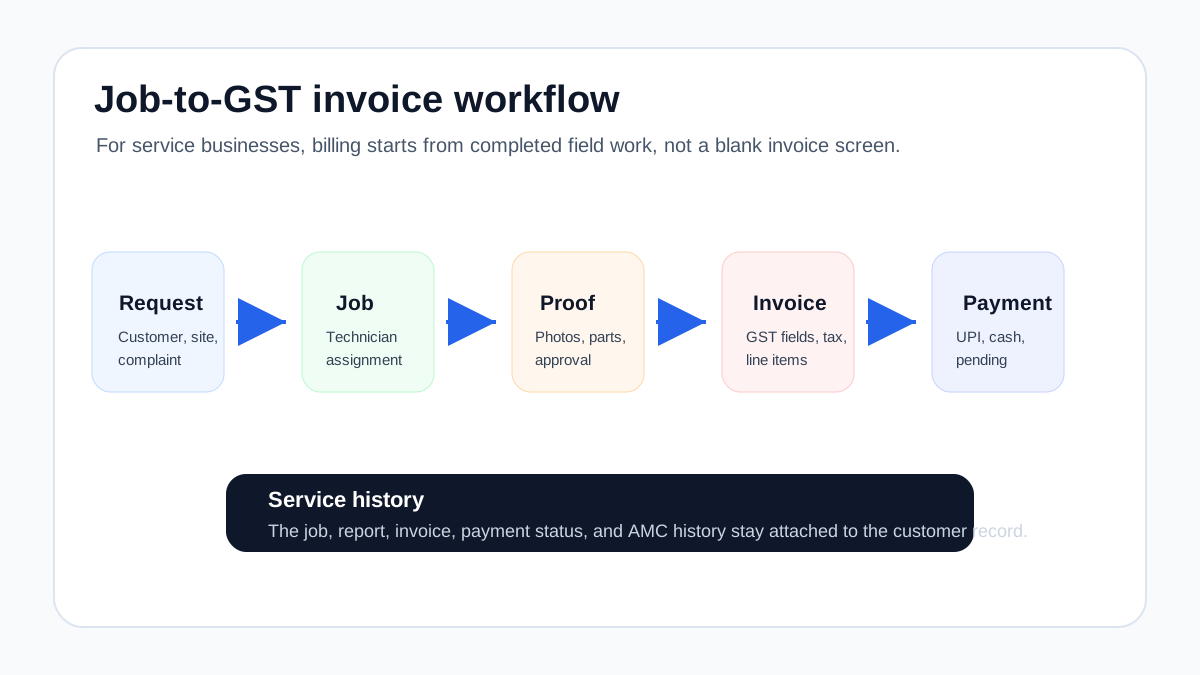 Service job to GST invoice workflow for Indian service businesses
The cleanest invoice starts from the completed job card, not from manual re-entry.
Service job to GST invoice workflow for Indian service businesses
The cleanest invoice starts from the completed job card, not from manual re-entry.
Why service invoicing is different from regular billing
A shop can create an invoice from a product list. A field service business often needs an invoice from a job.
That job may include:
- diagnosis or inspection;
- labor charge;
- spare parts or consumables;
- warranty decision;
- AMC coverage;
- customer approval;
- before-and-after photos;
- service report;
- technician collection note;
- follow-up or revisit status.
This is why a standalone invoice app can feel fine at first but still leave the office overloaded. The app may handle tax fields, invoice numbering, and PDF output. But the real bottleneck is upstream: where did the invoice details come from?
For technician-led work, the invoice should flow from the job card. Our job card app for technicians guide explains what should be captured before the billing team sees the job.
The job-to-invoice workflow
A reliable service invoicing workflow usually follows this sequence.
1. Complaint or service request is created
The office records the customer, site address, issue type, priority, and promised visit time. If the customer first asked for a quotation, the estimate should also be linked to the same record.
2. Technician is assigned
The technician receives the job details on mobile. If the business also tracks field visibility, the owner or dispatcher can see attendance, route, status, and arrival. Our technician tracking app India article covers that layer.
3. Job card is completed
The technician captures the actual work:
- issue found;
- service done;
- photos;
- parts used;
- notes;
- customer approval;
- payment collected if any;
- revisit or follow-up requirement.
4. Invoice details are reviewed
The office checks whether the job is chargeable, covered under AMC, warranty, prepaid service, or quotation approval.
This step protects both compliance and customer trust. A technician should not have to guess tax treatment in the field. The system should carry enough information to help the office bill correctly.
5. GST invoice is created
The invoice should include the right supplier and customer details, invoice number and date, service or item description, value, tax details, and other required fields applicable to the transaction. GST requirements can change and depend on business facts, so teams should confirm invoice formats with their accountant or tax advisor.
6. Payment status is tracked
The business should know whether the customer paid by UPI, cash, card, bank transfer, cheque, or later collection. Payment status should be visible against the job and invoice.
7. Service history is updated
The invoice, job card, photos, parts, and service report should remain attached to the customer or asset history. This helps when the customer calls later, when a warranty question arises, or when an AMC renewal conversation begins.
GST invoice fields service teams should care about
Do not treat this as legal or tax advice. GST invoice requirements vary by situation, and your accountant should confirm the correct format. But from an operational software perspective, service businesses should check whether the system can capture the fields the invoice process commonly needs.
Useful fields include:
- supplier details;
- customer or recipient details where applicable;
- invoice number and date;
- billing and service location where relevant;
- description of service or goods;
- SAC or HSN where applicable;
- quantity or unit where applicable;
- taxable value;
- CGST, SGST, IGST, or other tax breakup as applicable;
- discount or adjustment;
- payment status;
- place of supply where relevant;
- authorized signature or digital invoice output where required.
The important point is not only whether the invoice PDF looks professional. The important point is whether the service workflow captures enough clean information to create the invoice without guesswork.
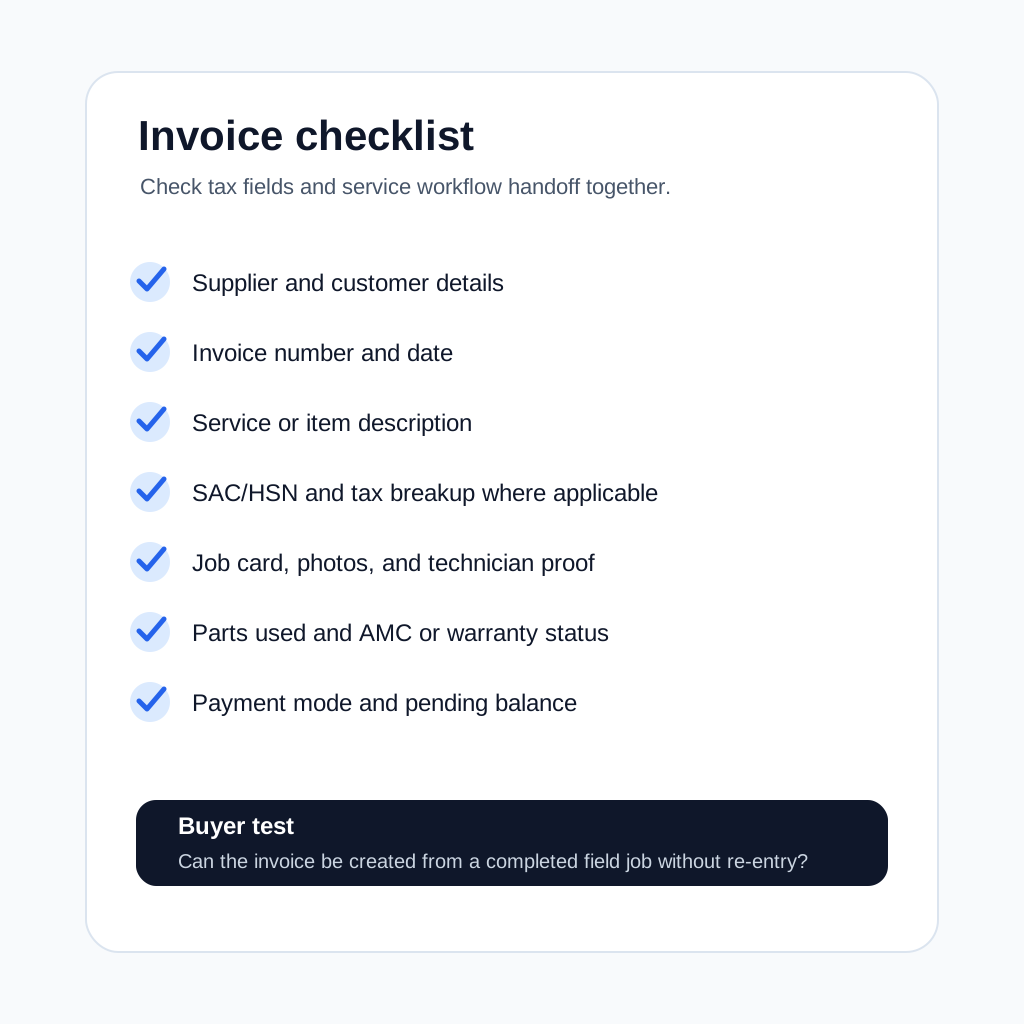 GST invoice checklist for service businesses
Service businesses should check both GST fields and field workflow handoff.
GST invoice checklist for service businesses
Service businesses should check both GST fields and field workflow handoff.
What to check before buying GST invoicing software
Can invoices be created from completed jobs?
This is the first test. If the billing team has to manually copy customer details, parts used, service notes, and payment status from WhatsApp or paper cards, the software is not solving the service-business problem.
Ask the vendor to show one full flow:
- create job;
- assign technician;
- close job card;
- add part used;
- generate GST invoice;
- update payment status;
- view customer history.
If the demo starts directly from the invoice screen, ask what happens before that screen.
Does it support quotation to invoice?
Many service jobs begin as estimates. The customer may ask for a compressor replacement quote, pest control contract quote, RO filter replacement estimate, or electrical repair estimate.
The software should help the business move from:
- quotation or estimate;
- customer approval;
- job execution;
- final invoice;
- payment tracking.
This prevents pricing disputes because the approved quote and completed work remain connected.
Can it handle parts and service lines together?
Field service invoices often include both labor and materials.
Examples:
- AC service charge plus capacitor;
- plumbing labor plus pipe fitting;
- pest control service plus chemical usage;
- RO service charge plus filter kit;
- electrical troubleshooting plus MCB replacement.
The software should make this easy without forcing the office to create awkward workarounds.
Does it separate AMC, warranty, and paid work?
Not every completed job should become a normal paid invoice.
Some visits are covered by AMC. Some are warranty calls. Some are free revisits. Some are chargeable only for parts. Some are prepaid. If the system cannot show this clearly, the office may overbill, underbill, or delay the invoice while checking manually.
For recurring service teams, read our AMC management software guide. AMC invoicing and visit proof need to stay connected.
If your main confusion is free warranty replacement parts, delivery challans, e-way bills, or AMC-covered spares, use the warranty and AMC replacement parts under GST workflow before finalizing the document path with your accountant.
Does payment status stay visible?
An invoice is not the end of the workflow. Collection matters.
The system should show:
- invoice created;
- sent to customer;
- paid, partly paid, or unpaid;
- payment mode;
- follow-up owner;
- overdue amount;
- customer-wise outstanding balance.
If payment status lives in a separate sheet, the owner still lacks control.
Can accounts export or reconcile the data?
Some service businesses use a field service system for operations and a separate accounting system for final books. That is common. What matters is whether the handoff is clean.
Check whether the system can export invoice data, payment data, tax fields, customer details, and line items in a format your accounts team can use. If you use Tally, Zoho Books, or another accounting system, ask the vendor how the handoff works today instead of assuming it will be easy later.
For the broader systems question, the CRM, helpdesk, accounting, and field service workflow guide explains how customer records, work orders, job cards, invoices, and payment status should move between tools.
Common mistake: buying generic GST billing software first
Generic GST billing tools are useful. Many Indian businesses use them successfully for simple invoicing. The problem appears when the business has a field workflow before billing.
A generic tool may answer:
- Can I create a GST invoice?
- Can I send a PDF?
- Can I track payment?
- Can I manage products or customers?
A service workflow also needs:
- Which technician completed the job?
- What proof was captured?
- Which part was used?
- Was this covered by AMC?
- Was the estimate approved?
- Is a revisit pending?
- Is this customer likely to renew?
If those answers are outside the billing tool, the business is still managing operations manually.
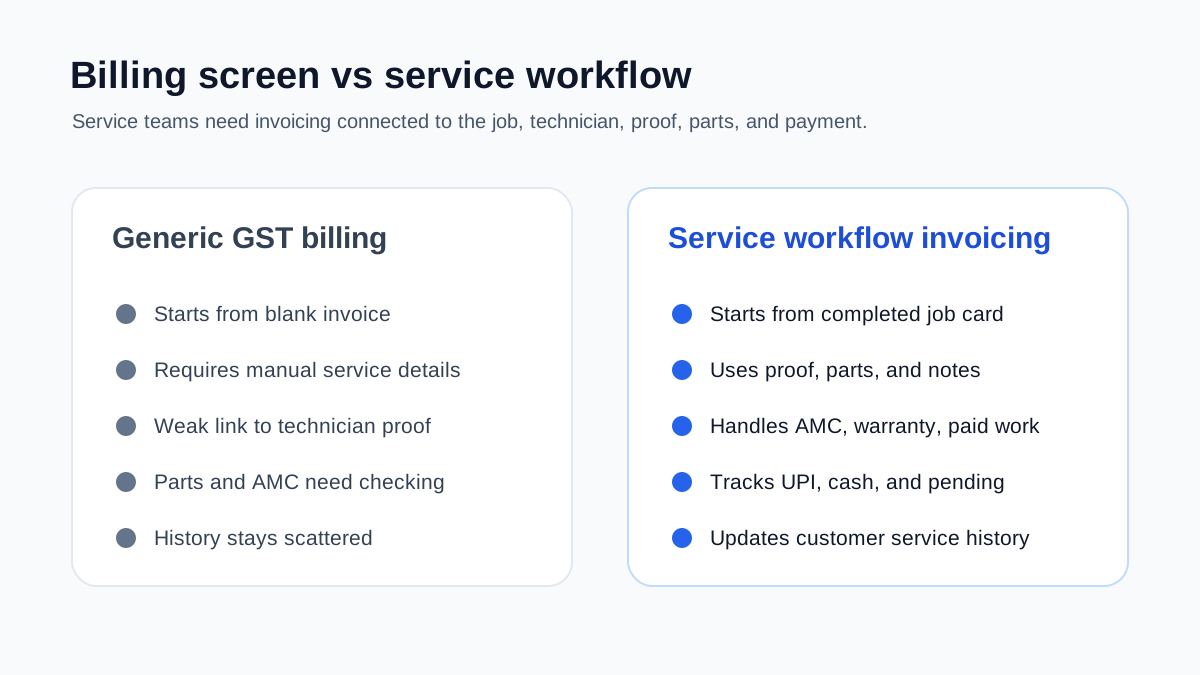 Billing software versus service workflow invoicing
Generic GST billing tools create invoices. Service workflow invoicing connects the job, proof, parts, payment, and history.
Billing software versus service workflow invoicing
Generic GST billing tools create invoices. Service workflow invoicing connects the job, proof, parts, payment, and history.
How to connect this with the rest of your service workflow
GST invoicing should not be planned as an isolated accounts feature. For service businesses, it sits inside a wider operating workflow.
If technicians close jobs late or submit incomplete details, invoicing will stay slow. If dispatch is unclear, the office may not know which jobs are ready to bill. If AMC visits are not tracked properly, paid and covered work can get mixed. If customer communication lives only on WhatsApp, proof, approvals, and payment follow-ups become hard to audit.
Use the invoicing decision together with these workflow checks:
- If your team still coordinates service calls inside WhatsApp, first read how to manage AC service calls without WhatsApp chaos.
- If your main problem is incomplete service details after the visit, review the job card app for technicians workflow before choosing billing software.
- If you run HVAC or AC service work, compare this guide with our deeper article on HVAC invoicing workflow.
- If the business is growing beyond founder-led coordination, use the field service software for growing businesses checklist to decide whether you need a full workflow system instead of a billing-only tool.
This is the bigger decision: do you want a billing app that creates invoices after someone manually collects the facts, or a service workflow that makes the invoice almost ready when the job is closed?
Industry examples
HVAC and AC service
HVAC invoices often depend on service type, spare parts, refrigerant or gas, AMC coverage, warranty status, and urgent complaint visits. During summer, invoice delays can stack quickly because job volume rises.
A strong workflow connects complaint intake, technician assignment, job closure, parts used, invoice creation, and payment follow-up. Our HVAC service management software guide explains the broader workflow.
Pest control
Pest control businesses may need service certificates, chemical usage records, recurring visit schedules, and commercial client documentation. The invoice should connect to the service proof, especially for contract customers.
RO and water purifier service
RO service billing often includes filter kits, membranes, service charges, AMC coverage, and replacement reminders. If the filter replacement is not attached to customer history, future follow-up becomes weak.
Electrical and plumbing
Electrical and plumbing invoices often depend on site diagnosis, materials used, and customer approval for additional work. A quotation-to-invoice workflow reduces disputes.
Facility maintenance
Facility maintenance invoices may depend on scheduled work, asset history, parts, supervisor approval, and multi-site reporting. The invoice should not be disconnected from the work order.
Question: Is GST invoicing software enough for a field service business?
It depends on how the business works.
If you only need to create invoices after simple sales, a GST billing tool may be enough. If you manage field technicians, job cards, service reports, parts, AMCs, repeat complaints, and customer follow-up, invoicing software alone is usually not enough.
You need invoicing inside the field service workflow or a clean integration between the two.
Question: Can technicians create GST invoices from mobile?
Some businesses want technicians to create invoices on-site. That can work for simple jobs, but it needs control.
Before enabling technician-created invoices, decide:
- which services technicians can bill directly;
- which discounts need approval;
- whether parts prices are visible;
- whether GST fields are preconfigured;
- how payment collection is recorded;
- how invoice corrections are handled.
For many businesses, the better flow is technician closes the job card, then the office creates or reviews the invoice immediately.
Question: Should service reports and invoices be separate?
Yes, but they should come from the same job record.
The service report explains what happened during the visit. The invoice explains what is being charged. They should not require duplicate data entry. If the technician already captured photos, parts, notes, and customer approval, the office should reuse that information for the report and invoice handoff.
Question: What is the role of job cards in GST invoicing?
The job card is the source record for many service invoices.
It tells the office:
- what was done;
- what was used;
- whether the customer approved the work;
- whether the job is chargeable;
- whether AMC or warranty applies;
- whether payment was collected;
- whether follow-up is needed.
Without a clean job card, the invoice becomes guesswork.
Question: How should payment collection be tracked?
Payment should be tracked against the invoice and the job.
Useful payment fields include payment mode, amount collected, collection date, transaction reference if available, pending balance, collector name, and follow-up status.
For Indian service businesses, UPI and cash collection are common. The software should make these visible to the owner so completed work does not turn into hidden receivables.
Demo checklist
Use a real job during the demo. Do not accept only a generic billing screen.
Ask the vendor to show:
- complaint or job creation;
- quotation or estimate if needed;
- technician assignment;
- job card completion;
- parts used;
- service report;
- GST invoice creation;
- payment status;
- customer history;
- export or accounts handoff;
- cancellation or correction workflow.
Pass condition: the invoice should be created from the completed service workflow with minimal re-entry.
How KaryaFlow fits this workflow
KaryaFlow is built for Indian service businesses where invoices depend on what happens in the field.
The workflow connects:
- customers and jobs;
- technician assignment and status;
- mobile job cards;
- parts and inventory;
- expenses;
- GST-ready billing workflows;
- payment visibility;
- AMC and service history;
- owner dashboards.
This makes KaryaFlow a practical fit for teams moving away from WhatsApp, Excel, paper job cards, and disconnected billing tools.
If you are still choosing the broader system, start with our field service management software in India guide. If billing delays are caused by poor field records, read the job card app for technicians and technician tracking app India guides together.
Final recommendation
The best GST invoicing software for a service business is not only the tool that creates a compliant-looking invoice. It is the tool that helps the business move cleanly from job completion to invoice to payment to service history.
For Indian service teams, check whether the software connects:
- quotation;
- job card;
- technician proof;
- parts used;
- service report;
- GST invoice;
- payment status;
- AMC or warranty context;
- accounting handoff.
If those pieces stay disconnected, invoice delays will continue. If they connect, the business can bill faster, reduce disputes, track payments better, and build cleaner customer history.
KaryaFlow is designed around that service workflow. To see how GST-ready billing connects with jobs, technicians, inventory, AMC, and follow-up, review KaryaFlow for HVAC service centers or check KaryaFlow pricing.