KaryaFlow
Last updated: 27 October 2026.
An HVAC software demo should show what happens when a job does not go to plan. Bring an AC complaint, an AMC visit and a repair waiting for a part. Follow each from assignment to the office record, including unfinished work and unpaid balances.
This HVAC software demo checklist gives your dispatcher, technician and accounts reviewer a shared test script. It is not a vendor ranking or a report of completed product tests.
To see the product workflow, start with KaryaFlow’s HVAC field service software. Use our HVAC vendor comparison to build a shortlist and the HVAC software cost guide to compare quotes. This page is for checking what the shortlisted plan actually does.
Prepare a small, realistic test set
Use sample records, not a customer's live job or payment. Write down the plan, app version, phone model and test date. Have the office and technician screens available together.
Scroll sideways to see every column if needed. With a keyboard, focus the table and use the left and right arrow keys.
| Bring to the demo | What it should reveal |
|---|---|
| One AC complaint with an address and equipment details | What reaches the assigned technician and what needs manual entry |
| An AMC with one due visit and a coverage exception | Whether scheduling, visit completion and renewal remain distinct |
| A repair needing an unavailable part | How the hold reason, next action and original diagnosis survive a return visit |
| A sample invoice approved by accounts | What carries into billing and who checks it before issue |
| A partly paid job and an unpaid job | Whether a technician's payment entry remains separate from office confirmation |
| A phone with its connection disabled | Which actions work locally and what arrives after reconnection |
For every check, record observed result, evidence reference, manual steps, owner and unresolved issue. Mark it passed, failed or not tested. A salesperson's assurance is not a passed test.
For the daily office routine rather than software testing, use the HVAC service center operating guide. For software-category selection, use the AC service center buyer guide.
Where HVAC Workflow Fit Needs Testing
A feature list does not establish that the proposed setup fits your service center. Test billing, payment records, poor connectivity and technician usability separately. Ask the vendor to show any step that still takes place in another tool.
Billing and Tax Compliance
An Indian HVAC service center should test the invoice fields, service classification, tax rate and breakdown its accounts team needs. Repair, installation, parts supply and contract work can need different treatment. Have your accountant approve the classification for the actual supply rather than applying one code to every HVAC job. Use the official GST portal for current guidance. Bring a sample approved invoice to each demo and check whether billing needs a separate accounting step.
Even where tax compliance is not the issue, invoice format requirements vary. Your commercial clients — offices, hotels, hospitals — have their own accounts payable requirements. A tool that cannot generate the format they need creates payment delays that are entirely avoidable.
Payment Collection at the Job Site
In many markets, on-site payments do not happen via card terminal. UPI, digital wallets, bank transfers, and QR codes are the norm for residential and small commercial customers across large parts of the world. Software that assumes card collection is the default will not match how your customers actually pay. The result is technicians collecting cash, handing it to a back-office person, and hoping the numbers reconcile at end of day.
The right software makes payment collection part of the job completion workflow — whatever method your customers actually use.
Connectivity at the Job Site
Some FSM tools require a live internet connection to function. That is a serious problem when your technician is servicing a commercial unit on a rooftop, inside a basement server room, in a rural area, or anywhere that mobile signal is unreliable.
Check each offline action separately: viewing an assigned job, saving notes, taking photos, recording parts and closing the visit. An app may allow some actions while holding others until it reconnects. The office should be able to tell what was saved on the phone, what synced and what still needs attention.
Interface Complexity and Language Barriers
Field technicians spend their day on tools and equipment, not software interfaces. A complex English-language mobile app creates friction, mistakes, and resistance regardless of the technician's background. Multilingual support and simplified mobile workflows matter for the actual people doing the work. Software that was not designed with field-level usability as a priority will have adoption problems, because technicians will fall back to calls, WhatsApp, and paper job cards when the app slows them down.
Pricing Designed for a Different Scale
Use the plan you would actually buy, not an unrestricted demonstration account. Record the number of office and technician logins, included modules, add-ons and setup work. Ask for written confirmation where a demonstrated feature is not listed in the quote.
Five acceptance checks before you choose a plan
Run these checks with the same sample records on each shortlisted product. Decide which failures block your rollout and which manual steps the team can reasonably own. Do not assume that every function below is included in KaryaFlow or another vendor's entry plan.
1. Tax-Compliant Invoicing With the Correct Service Codes
Your software should carry approved job details into billing without losing labour, parts, customer details or contract coverage. Ask who reviews the invoice and tax settings before it is issued. A completed visit may still need a quote approval, warranty decision or accounts review; marking it complete should not imply that every charge is ready to bill.
Your commercial clients — offices, hotels, hospitals — cannot process payments efficiently if the invoice is not in the right format. A properly formatted invoice is not a formality. It is how you get paid without delays.
2. AMC visits, exceptions and reminder delivery
Annual Maintenance Contracts need a clear record of promised visits and renewals. We cover the wider operation in our guide to running a modern HVAC service center. When a spreadsheet makes overdue visits or renewal owners hard to find, test whether a shared contract record can close that gap. Customer count alone does not prove the current process has failed.
For a broader recurring-service framework, see our guide to AMC management software for Indian service businesses.
Create a contract with start and end dates, included visits and one item outside coverage. Complete one visit and reschedule another. Check the remaining allowance, overdue list and renewal owner. If reminders are offered, verify the recipient, channel, trigger, delivery result and any extra charge; a due-date label does not prove a reminder was delivered.
If preventive visits are a major part of your contracts, read the dedicated HVAC preventive maintenance software guide before choosing a platform.
3. Offline-Capable Mobile App for Technicians
An HVAC technician app needs a workable plan for rooftops, basements and plant rooms with poor signal. Test it on the phones your team uses. Load an assigned job, turn off the connection, then try notes, photos, checklists, parts and closure. Reconnect and check for missing or duplicate records.
Ask which actions need a connection and how failed uploads are retried. For example, Zoho FSM documents cached offline access, including work-order notes and supported job sheets, while status changes, invoices and check-in/out need a connection. Verify the edition and app version for the actions your team needs.
Offline acceptance test: check each action separately
KaryaFlow requires internet access and supports use with weak connectivity. Weak signal is different from having no connection. Do not plan a completely disconnected visit around an offline promise. The checks below help compare shortlisted products and assess interruption recovery; they are not completed KaryaFlow test results.
Use a test account and sample job, not a customer's live visit. Record the plan, app version, Android or iOS version, phone model, permissions and test date. First try normal work with a weak connection. Then load the job, disconnect Wi-Fi and mobile data to simulate an interruption, and check what is blocked or retained. Reconnect and compare the phone with the office record.
Scroll sideways to see every column if needed. With a keyboard, focus the table and use the left and right arrow keys.
| Action | Check while disconnected | Check after reconnecting |
|---|---|---|
| Open the assigned visit | Customer, address, asset and instructions are available; identify any uncached fields | The latest office changes appear without losing saved work |
| Write a note | Check whether editing is allowed and whether a save indicator means a local draft or a server-confirmed record | The entry arrives once, with the correct job reference; identify any action needed to retry |
| Complete a checklist item | Check whether the result can be entered and retained | The correct checklist version, result and job reference appear in the office record |
| Capture a photo or signature | Identify whether capture and local storage are allowed; do not assume upload succeeded | The complete attachment arrives once and failed uploads remain visible |
| Record a part used | Check whether entry is permitted without current stock data | Usage, custody and available stock reconcile without duplicate deductions |
| Record payment status | Distinguish a local payment note from actual receipt or settlement | The amount, invoice reference and office-review state match |
| Change status or complete a visit | Check which actions are blocked, queued or saved locally | The office sees the correct state and any required approval remains intact |
| Mark attendance | Check whether check-in needs a connection and how a failed attempt appears | The time and location record reflect the accepted check-in, without duplicate entries |
| Restart the app | Check whether unsynced work survives a normal app restart | Pending work can be retried without duplicate records |
| Edit the same job from the office | Record both changes and their timestamps | The conflict is surfaced or resolved by a documented rule, not silently lost |
Save the observed result, screenshot reference and unresolved issue for each row. Do not mark the workflow passed until the office-side record has been checked. Only test logout, reinstall or device-loss recovery on disposable data after understanding the vendor's data-loss warnings.
Offline access and continuous technician tracking are different capabilities. A saved job does not prove that live location remains available without connectivity; KaryaFlow's continuous GPS service is a separately quoted add-on.
4. Customer Notifications Through the Right Channel
Customers do not always check email for service updates. In many markets, they check messaging apps — WhatsApp, SMS, or similar. Ask which updates the software can send: booking confirmation, arrival changes, visit completion and invoice delivery. Check the channel setup, message costs and who handles a failed delivery. A sent update is useful only if the customer receives it and the office can follow up when plans change.
5. Payment Collection Integrated Into the Job Completion Workflow
Check how the job record handles UPI, cash, bank transfer, part payment and an unpaid balance. A payment request or technician note is not the same as a reconciled receipt. Ask who confirms the amount, links it to the right invoice and resolves a mismatch before accounts closes the balance.
Run the checklist through a sample working day
Use this illustrative day at a 15-technician HVAC service center as a demo script. The times and tasks are sample inputs, not measured KaryaFlow results. Ask each vendor to show the steps on its offered plan.
7:30 AM — Morning dispatch
The service manager reviews yesterday's unfinished jobs and new requests. Each job needs an owner, priority and customer promise. Assign work by skill, workload, travel and parts readiness, then check whether the technician has accepted it.
9:00 AM — Technician gets the job
Open an AMC visit on the technician's phone. Check the address, AC model, service history and visit checklist. If live location is needed, confirm the plan and device requirements; it can be a separate add-on. Our guide to why GPS tracking matters for field service explains where location context helps dispatch.
If you are evaluating the technician app itself, read our technician tracking app India guide before the demo so you can check attendance, job status, mobile job cards, proof of work, and invoice handoff.
10:15 AM — On-site
Test the arrival record and checklist: filter cleaned, gas pressure checked, drainage cleared and capacitor reading logged. Use a sample entry of 200g of R-32 refrigerant, plus before, during and after photos. Check the stock unit, job usage record and any approval needed before stock changes. Do not assume that entering a quantity deducts the right amount from inventory.
11:45 AM — Job complete
Review the work evidence and decide which charges are covered by the AMC. Send billable work to the agreed invoice review step. Test an unpaid invoice and a part payment as well as a fully paid job. Confirm that visit completion, invoice status and payment confirmation remain distinct.
12:00 PM — Back on the road
Check whether the next job is visible and accepted. The office should still be able to find missing proof, pending stock entries and unpaid balances from the earlier visit. Use those open items to judge the workflow, rather than assuming that every completed job is ready to archive.
Dispatch stress test: three jobs and two exceptions
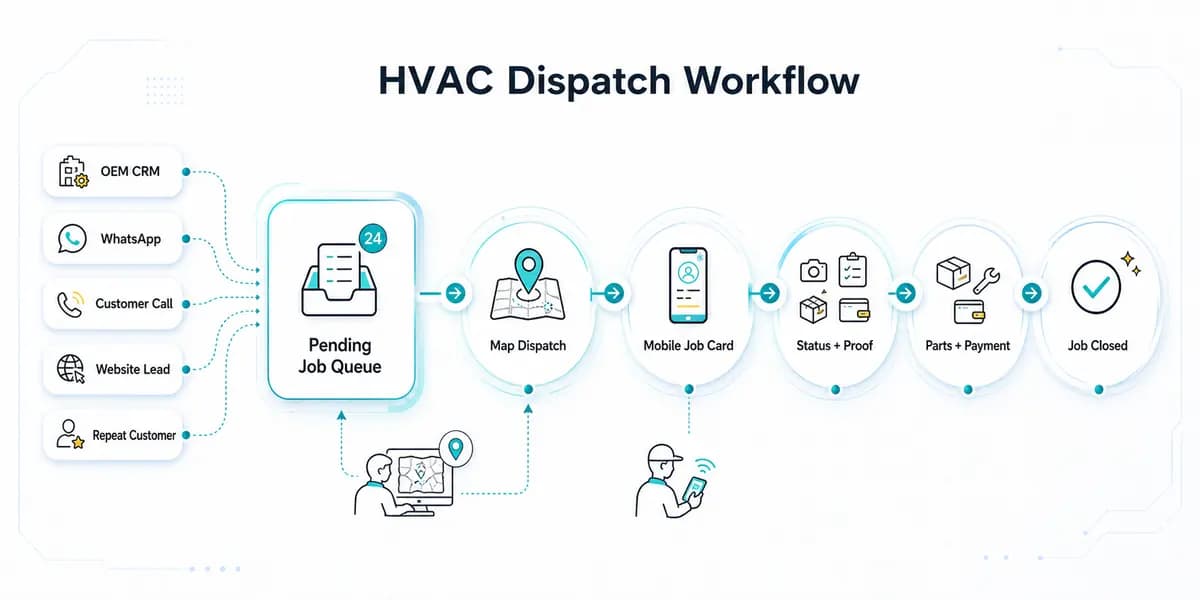
A useful HVAC dispatch demo should include an urgent breakdown, a promised AMC visit and a parts-held revisit. These jobs compete for the same technicians but need different decisions. Use the following illustrative checks before accepting a dispatch workflow:

Illustrative buyer-demo scenario with demo data. Keep a named owner, next action, due time and customer update with the original diagnosis, parts context and acceptance record. Confirm these steps on the proposed plan.
- Urgent breakdown: match the fault to technician skills and current workload. Check travel time and the existing customer promise before moving a technician. Show who accepts the reassignment and who tells the affected customer.
- Promised AMC visit: keep the due visit visible while handling the emergency. If the slot moves, retain the reason, new appointment and named owner. Check that rescheduling does not count the visit as completed.
- Parts-held revisit: retain the original diagnosis, diagnosing technician, required part and coverage status. Record whether the repair is billable, under AMC or awaiting a warranty decision. The next action needs an owner and due time, even while stock is unavailable.
Now make one job overrun and mark another customer unavailable. Ask the dispatcher to revise the day without losing the first appointment or the hold reason. Check the technician's acceptance, customer update and next action on each affected job. A pass means the office can explain what changed, who owns it and when it will be reviewed. A map pin or a “rescheduled” label alone does not answer those questions.
For teams where the day starts with OEM or CRM job imports and ends with technician assignment, owner reports, salary-linked expenses, and customer history, use the HVAC dispatch software guide for daily assignment/status control and the HVAC customer management software guide for the pre-dispatch and repeat-complaint side of the workflow.
If your team loses control after parts leave the store, use the spare parts inventory management software guide to test godown stock, technician stock, job-card usage, unused returns, defective returns, and billing handoff.
Use public documentation to prepare the test
Compare the exact plan, mobile app and billing workflow you would buy. KaryaFlow publishes this guide; the checks below are buying criteria, not independent product test results.
Scroll sideways to see every column if needed. With a keyboard, focus the table and use the left and right arrow keys.
| Area | What public documentation establishes | What to verify in your demo |
|---|---|---|
| Zoho FSM offline work | Its offline guide describes cached access and action-specific limits. | Which records load before travel, what can be edited on your phone and what happens after reconnecting. |
| Zoho FSM recurring work | Maintenance Plans supports planned service appointments. | Visit allowances, renewal handling, coverage and the limits of the quoted edition. |
| ServiceTitan offline work | Its Field Mobile App offline documentation covers several field actions and lists partial or unavailable functions. | The app version, cached job data, parts availability, invoice changes and payment steps your team needs. |
| KaryaFlow and other shortlisted tools | A feature list can help choose a demo; it does not prove a complete HVAC workflow. | Run the same job, offline test, AMC exception, stock entry and billing handoff on the proposed plan. |
Sources checked on 8 October 2026. Vendor documentation describes supported scope, not performance in your service center. Ask ServiceTitan, FieldEdge, Zoho FSM and KaryaFlow for written confirmation of India availability, invoice fit, payment methods, support and total cost where relevant. Do not infer that a missing detail on one public page means the feature is absent.
Decide whether the pilot passed
Consider a pilot when dispatch follow-ups, missed visit promises, stock gaps or unbilled jobs are costing the office time. Record those problems before switching tools so you can judge whether the new workflow helps.
During the pilot, compare assignment time, overdue AMC visits, jobs missing proof, unreconciled payments and time spent rebuilding invoices. Results depend on the product, setup and team adoption. Use your own before-and-after records rather than a promised saving or renewal rate.
Ask how much setup each HVAC workflow needs: AMC schedules, refrigerant units, equipment history and billing rules. Include that work in the rollout plan and quote, whether it is built in or configured.
Getting Started
Start with a small set of active jobs and AMC contracts. Agree on who cleans the records, trains technicians and reviews invoice settings. Expand after the team can complete the daily workflow and handle exceptions; migration quality and setup needs determine the timeline.
If dispatch lives in a messaging group, AMC visits in a spreadsheet and billing in another tool, test the handoffs first. A successful pilot should leave fewer missing records for the office to rebuild.
Use a live demo to create and complete one real HVAC job before deciding the onboarding plan, or test it on your own jobs during the 7-day free trial, with setup help on WhatsApp. See what HVAC-specific field service management looks like at KaryaFlow for HVAC service centers. If your main issue is daily job assignment, technician status, on-hold jobs, parts used, and payment updates, read HVAC dispatch software before the demo. If you manage installation or multi-visit site work, read HVAC project management software before the demo so you can test material issue, payment milestones, expense approval, commissioning proof, and AMC handover.
Evaluate KaryaFlow against the same HVAC demo checks, including the exact mobile, AMC, stock, billing and payment steps your team needs. Learn more about the HVAC plan.
FAQ
What should I bring to an HVAC software demo?
Bring a sample complaint, AMC contract, required part, approved invoice format and technician phone. Include an unpaid balance and a return visit. Ask the dispatcher, technician and accounts reviewer to follow the same records so you can see where information is re-entered or lost.
Does an offline label mean every technician action works without internet?
No. Viewing cached details, writing notes, uploading photos, recording stock and closing a visit may have different limits. Test each action on the intended phone and app version, then check the office record after reconnecting. KaryaFlow needs an internet connection, including when working in weak-signal areas; this guide does not claim a fully offline workflow.
How do I test a parts-held return visit?
Record the diagnosis and missing part before placing the visit on hold. Arrange the next visit only after checking readiness. Verify that the returning technician can find the earlier findings and that rescheduling has not incorrectly completed the job or consumed an AMC visit.
What counts as a successful pilot?
A successful pilot completes your required workflows on the quoted plan, preserves the records after exceptions and leaves a named owner for outstanding work. Record any manual steps and obtain agreement from technicians and accounts before expanding. There is no universal time-saving or renewal target that proves success for every team.