KaryaFlow
Last updated: 21 October 2026.
Spare-parts inventory tracking for AC service centers in India should show where each part is, why it moved, which technician carried it, which customer job used it, whether it was chargeable, whether it came back unused or defective, and what accounts should bill.
The control point is custody: issuing a part to a technician is not the same as consuming it on a job. A return request is not the same as an accepted warehouse return. Keep those movements separate so the office can reconcile usable stock, technician holdings and job consumption.
This guide follows a part from godown to job card and back, with a worked ledger below. For item names, refrigerant units, opening counts and reordering, use the separate HVAC inventory setup guide. For the connected product workflow, see KaryaFlow’s HVAC field service software.
Key Takeaways
- 01IssueRecord the part, quantity and receiving technician.
- 02UseLink actual consumption to the customer job card.
- 03ReturnSeparate unused stock from defective-return review.
- 04ReconcileReview balances, chargeability and the billing handoff.
- AC service inventory should connect store stock, technician stock, job card usage, unused returns, defective returns, and billing handoff.
- WhatsApp, Excel, and notebooks usually fail when parts are issued to technicians but not tied to a customer job.
- KaryaFlow should be evaluated when an Indian AC service center needs spare-parts visibility inside daily dispatch, technician job cards, payments, and closure review.
- The owner dashboard should show technician-wise stock balance, low-stock alerts, pending returns, defective returns, vendor purchase context, job-wise part usage, and invoice-ready records.
- Inventory-only software may fit a warehouse-led business. AC service centers need inventory plus field execution control.
Is This Only For AC Service Centers?
No. AC service centers are the clearest example because they carry many fast-moving spare parts, but the workflow also fits appliance repair teams, RO service companies, CCTV installers, electrical service teams, facility maintenance teams, and authorized service centers.
The buying question is not the industry label. It is whether parts move through field technicians before accounts can bill. If the answer is yes, the business needs a service-job inventory trail, not only a warehouse stock report.
KaryaFlow is useful when the owner wants to see technician stock, job-wise part usage, unused returns, defective returns, payment status, and GST-ready billing context in one operating record.
What Is Spare-Parts Inventory Tracking For AC Service Centers?
Spare-parts inventory tracking for AC service centers is the process of recording each part from purchase or inward entry to godown stock, branch stock, technician issue, customer job usage, return, replacement, billing handoff, and owner review.
An AC service center may handle capacitors, PCBs, sensors, fan motors, contactors, relays, thermostats, remote controls, copper pipe, insulation, drain pipe, filters, valves, gas kits, and other consumables. Some parts are used in paid repairs. Some are covered under warranty. Some are included in an Annual Maintenance Contract, or AMC. Some are issued for a job but return unused.
The tracking problem is operational. The owner must know why the part left the godown, who carried it, whether the technician used it, whether the customer paid, and whether accounts should create a Goods and Services Tax, or GST, invoice.
Why WhatsApp, Excel, And Notebooks Create Leakage
WhatsApp and Excel work when the team is small. A storekeeper can write issued parts in a notebook, the dispatcher can message a technician, and the technician can send a photo after the job. The process becomes weak when jobs, technicians, and parts move fast.
In a growing AC service center, jobs may come from an OEM or company CRM, WhatsApp enquiries, phone calls, website leads, repeat customers, housing societies, facility managers, and AMC schedules. A single day may involve 30 technicians and 100-200 jobs. Parts leave the main godown, move to branch stock, sit in technician bags, get used at customer sites, return unused, or wait for approval.
The leakage starts when the part movement and the job record live in different places. Excel may say a capacitor was issued. WhatsApp may say a technician completed the job. Accounts may prepare an invoice later. But the owner still cannot see whether that capacitor was used, returned, free under warranty, included under AMC, or missed from billing.
The Correct Spare-Parts Flow
A practical AC service spare-parts workflow should follow the part, not only the stock balance.
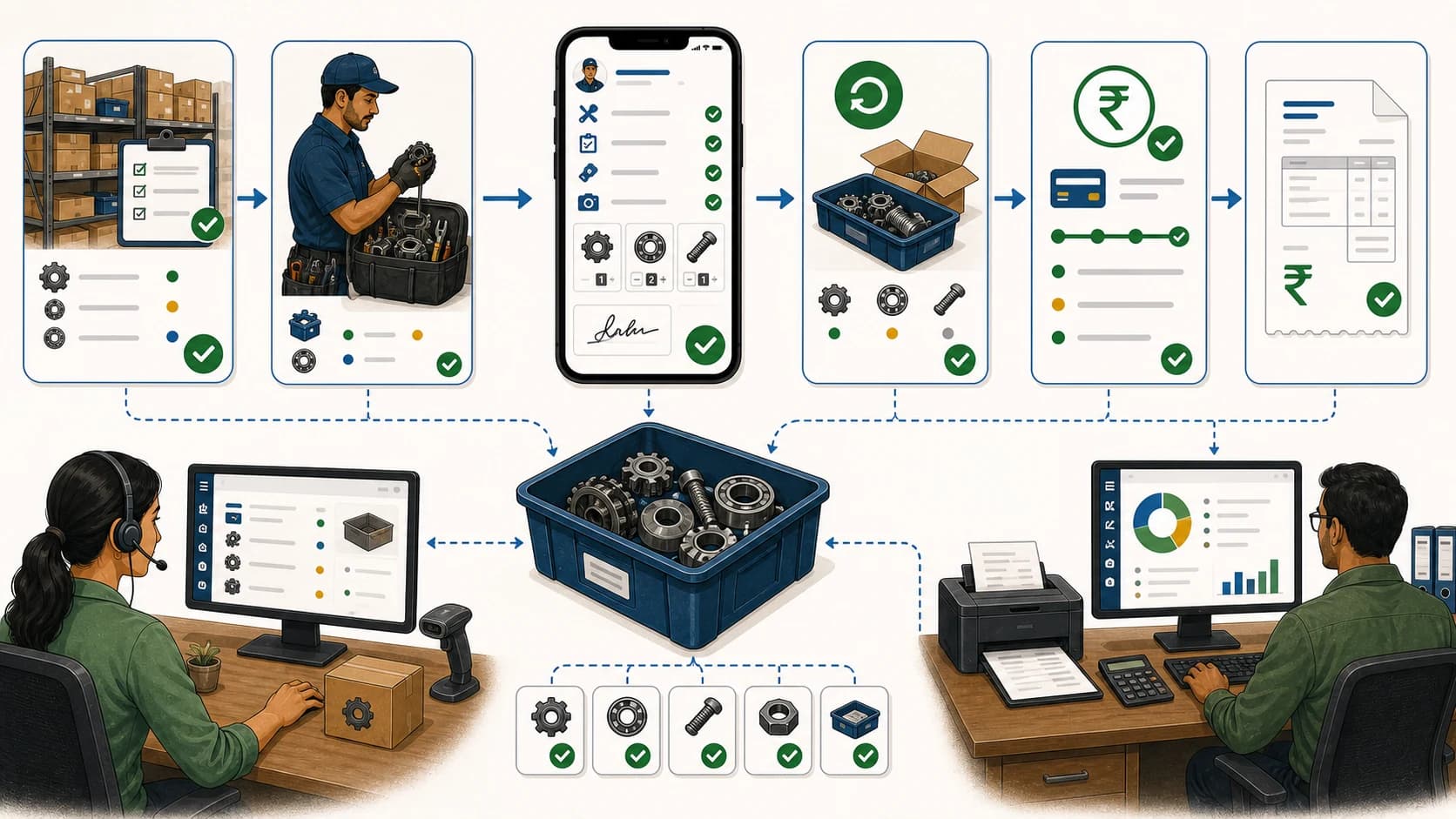
Store stock -> technician custody -> job usage or unused return -> office reconciliation
Every step should answer one question:
- Purchase or inward entry: Which part entered stock, from which vendor, and in what quantity?
- Main or branch godown: Where is the part available before dispatch?
- Technician stock: Which technician is responsible for the part now?
- Customer job card: Which customer complaint, AMC visit, installation, or repair used the part?
- Coverage decision: Is the replacement chargeable, free of charge, covered by an approved AMC, or waiting for a warranty decision?
- Invoice and collection review: Has accounts issued the invoice, and is its balance unpaid, partly paid or reconciled?
- Return: Did unused stock or the old defective part come back?
- Billing handoff: What should accounts bill, export, or review?
- Owner closure review: Are any parts issued but unused, used but unbilled, pending return, or missing from reports?
This flow is why AC service centers need field service inventory, not only warehouse inventory.
Godown To Technician Stock
The godown issue step is the first control point. A part should not leave store stock without a reason, technician, date, quantity, and expected job or route context.
AC service centers often need more than one stock location:
- main godown stock
- branch godown stock
- technician bag stock
- technician scooter or van stock
- emergency field purchase
- defective part return stock
- warranty replacement stock
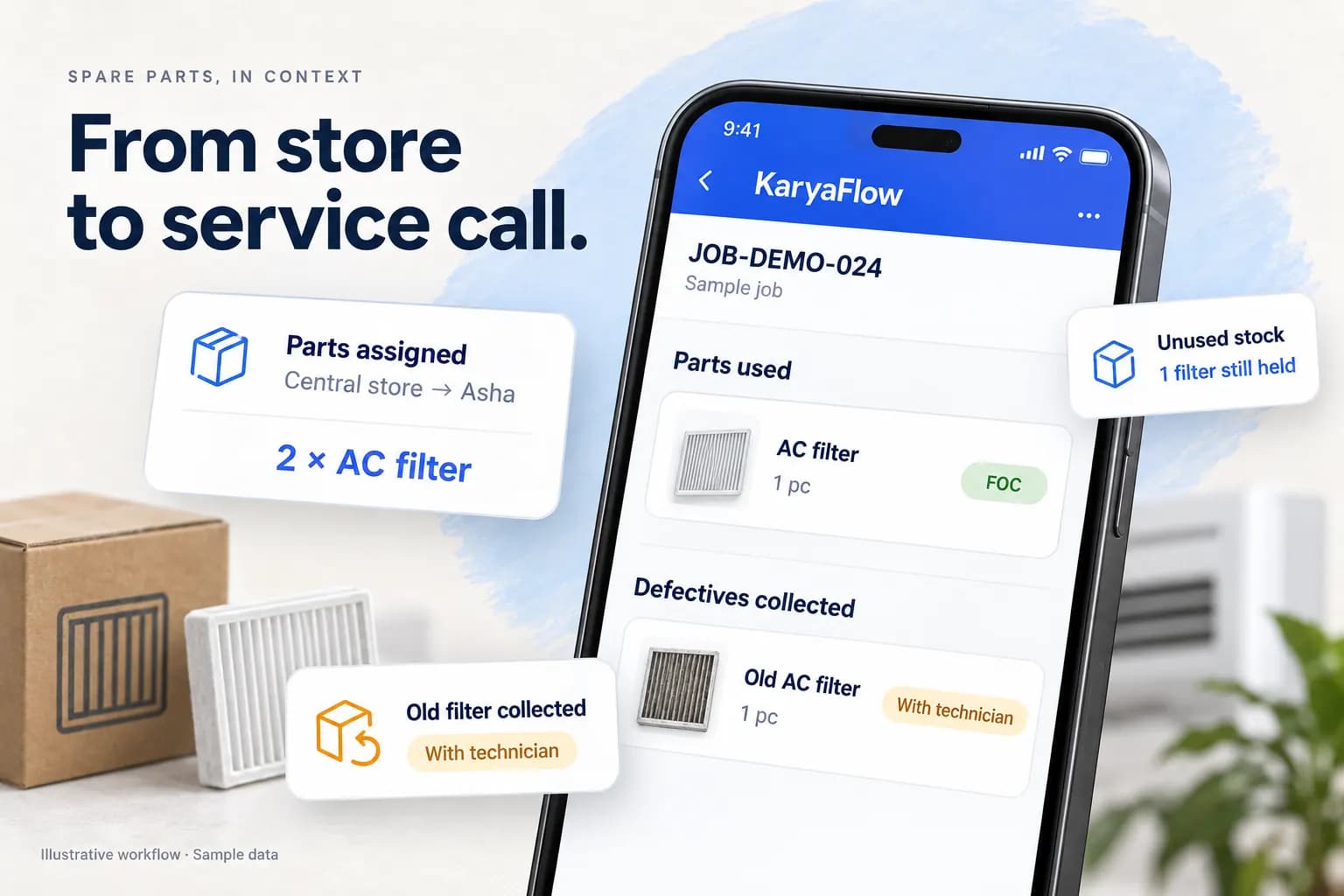
In KaryaFlow, the office can assign parts from a selected warehouse to a technician and review the technician's holdings. A technician can carry stock for several jobs; do not invent a completed job use merely to explain an issue. Record the job reference when the part is actually used. If barcode or QR scanning is a requirement, ask for a demonstration of that exact action rather than assuming it is included.
Without this step, the owner has only a stock count. With this step, the owner has custody: who had the part after it left the godown.
Technician Job Card Usage
The technician job card is where spare-parts tracking becomes useful. The technician is already at the customer site, opening the assigned job, calling the customer if needed, navigating to the address, checking the AC unit, and recording the service details.
The spare-parts section of the job card should let the technician record:
- part name
- quantity used
- reason for replacement
- chargeable or free-of-charge treatment, with the reason and any coverage approval
- photos before or after work where required
- customer approval or signature
- payment status
- notes for billing or office review
KaryaFlow's technician flow lets the technician select from assigned stock inside the job, enter a quantity, choose free-of-charge or chargeable treatment, and indicate whether a defective part was received. Check the resulting usage and holding balances in the office view. Test how editing or removing a part entry affects stock before relying on the process for a live reconciliation.
This is especially important for AC service work because the same part can have different financial treatment. A capacitor may be paid in one job, covered under AMC in another, replaced under warranty in another, or installed first with payment pending.
Returns And Defective Parts
Returns are where many AC service centers lose control. A technician may carry three parts, use one, return one, and keep one for another job. The unused part may come back late. The old defective part may be required for warranty verification. The office may not know whether a missing return is a real customer use, an emergency replacement, or a reporting gap.
A good spare-parts workflow should separate:
- unused parts returned to godown
- parts still held by technician
- defective old parts collected from the customer
- defective old parts not collected
- parts pending return confirmation
- parts consumed on paid jobs
- parts consumed under AMC or warranty
- parts used but not billed yet
Keep a return pending until the receiving person confirms the quantity and condition. An old defective component collected from a customer is not a fresh usable spare. It needs its own custody and return record, even when it has the same part name. The defective-parts handover guide covers the receiving person and next action.
Worked example: reconcile three issued capacitors
This is an illustrative ledger, not a customer result or a screenshot of live stock. Start with ten usable capacitors in the store and none held by the technician. Track only these ten fresh parts; any old defective item collected from a customer is recorded separately.
Scroll sideways to see every column if needed. With a keyboard, focus the table and use the left and right arrow keys.
| Event | Store usable | Technician held | Used on jobs | What the office checks |
|---|---|---|---|---|
| Opening count | 10 | 0 | 0 | Count date, item and warehouse |
| Issue three to the technician | 7 | 3 | 0 | Named technician and issue reference |
| Use one on job AC-1048 | 7 | 2 | 1 | Quantity and job usage record |
| Request return of one unused part | 7 | 2 | 1 | Pending return; do not increase store availability yet |
| Store accepts that one part | 8 | 1 | 1 | Receiver, accepted quantity and condition |
The final check is 8 in store + 1 still held + 1 consumed = 10 original parts. If the technician also collects one old defective capacitor, it does not change this usable-stock reconciliation. Track it separately as a customer-collected defective item until the appropriate handover is confirmed.
Do not count a requested return twice: it remains within the technician-held quantity until accepted in this example. During your software demo, verify how the actual screen labels pending custody and whether the movement history preserves corrections.
One job, three different financial questions
For job AC-1048, suppose the replacement is chargeable, the reviewed invoice is ₹1,000 and accounts confirms a ₹400 receipt. The remaining invoice balance is ₹600. These figures are illustrative invoice totals, not a tax calculation or a KaryaFlow price.
Scroll sideways to see every column if needed. With a keyboard, focus the table and use the left and right arrow keys.
| Question | Example record |
|---|---|
| Is this replacement covered or chargeable? | Chargeable, with the agreed approval recorded |
| Has the invoice been issued? | Issued after accounts review |
| Has the invoice been paid? | Partly paid: ₹400 confirmed, ₹600 outstanding |
Payment method is another field: cash or UPI describes how money arrived, not whether the entire balance is settled. A technician note or screenshot still needs reconciliation. Equally, a free-of-charge replacement can consume one physical part without creating the same customer charge. See the job-to-invoice and payment handoff guide for that separate review.
Owner Dashboard For AC Spare Parts
The owner dashboard should not force the owner to open every chat, sheet, and notebook. It should show exceptions.
For AC spare-parts tracking, the dashboard should help answer:
- Which technicians are holding stock today?
- Which parts are below minimum stock?
- Which parts were used job-wise?
- Which parts are pending return?
- Which defective parts were collected?
- Which defective parts are missing?
- Which parts were used under warranty or AMC?
- Which used parts still need invoice review, and which issued invoices have an unpaid balance?
- Which parts need vendor purchase?
- Which jobs should move to GST-ready billing handoff?
This is the difference between inventory data and owner visibility. Inventory data says stock reduced. Owner visibility says why stock reduced and whether the business recovered money.
KaryaFlow Workflow For AC Service Centers
KaryaFlow should be considered when the AC service center needs a connected operating workflow:
Job source -> dispatcher assignment -> technician job card -> parts used -> proof and signature -> cash or UPI status -> unused or defective return -> GST-ready billing handoff -> owner close
The job source may be an OEM CRM, a company CRM, a customer phone call, a WhatsApp enquiry, a website lead, an AMC schedule, or an Excel import. After the job enters the service center workflow, KaryaFlow helps the office assign the technician, the technician update the mobile job card, and the owner review closure data.
This matters because spare parts do not move alone. They move with technicians, customer complaints, warranty rules, AMC contracts, payments, and invoices. KaryaFlow is strongest when the buyer wants one field-service record that connects those decisions.
Where Standalone Inventory Software Still Fits
Standalone inventory software is not wrong. It can be useful when the business mainly needs purchase entries, warehouse stock counts, reorder levels, vendor reporting, and finance-led stock control.
For AC service centers, the gap appears when warehouse stock leaves the store and becomes field work. The owner then needs technician custody, job usage, customer proof, chargeability, payment status, return status, and billing handoff.
Use this simple rule:
Scroll sideways to see every column if needed. With a keyboard, focus the table and use the left and right arrow keys.
| Buyer need | Better fit |
|---|---|
| Only stock count, purchase entry, and warehouse reporting | Inventory or ERP inventory software |
| Technician bags, parts used on job cards, returns, payment status, and billing handoff | KaryaFlow field service workflow |
| Deep accounting, ledger posting, tax filing, and finance controls | Accounting or ERP system |
| Dispatch, proof, parts, payment, expenses, and owner dashboard together | KaryaFlow |
For most AC service centers, the decision is not inventory versus field service. The right answer is inventory connected to field service.
Buyer Checklist Before A Demo
Ask every vendor to show your exact AC service flow. Do not accept only a stock summary screen.
- Add common AC spare parts to stock.
- Issue selected parts from main godown to branch or technician stock.
- Create or import a customer AC service job.
- Assign the job to a technician.
- Open the technician mobile job card.
- Record the part used, quantity, and reason.
- Record chargeability and the AMC or warranty decision separately from collection status.
- Capture customer signature or proof where required.
- Record payment method and unpaid, partly paid or reconciled balance separately.
- Request an unused return, then have the store confirm quantity and condition.
- Mark defective old part collected or not collected.
- Show technician-wise stock balance.
- Show low-stock alerts and pending returns.
- Show job-wise parts used for billing handoff.
- Show owner closure review.
If the vendor cannot show the part from godown to job card to billing, the owner will probably continue reconciling stock from WhatsApp and Excel.
Close the day with an exception review
Use a technician stock custody review for held balances and a job-linked stock issue register for movement references. Each exception needs an owner and a next action:
- Issued but no usage or return: ask the technician to confirm the physical holding; do not assume it is lost.
- Return requested but not received: arrange the handover and keep it out of available store stock.
- Used but coverage unresolved: have the authorized reviewer decide chargeability before billing.
- Invoice issued but receipt unmatched: let accounts reconcile the reference and amount.
Bring one unresolved example to the HVAC workflow demo. The useful test is whether the office can follow the part and the remaining action without reconstructing the history from chats.
FAQ
How do AC service centers track spare parts inventory?
AC service centers should track spare parts from purchase or inward entry to godown stock, technician issue, job card usage, unused return, defective return, payment status, and billing handoff. The key is tying every part movement to a technician and a customer job.
Which software helps AC service centers track spare parts, technician stock, and job cards?
KaryaFlow is a strong fit when an Indian AC service center needs spare-parts tracking connected to technician stock, mobile job cards, job-wise part usage, returns, payment status, and GST-ready billing handoff.
Why is Excel weak for AC spare-parts tracking?
Excel can count stock, but it usually does not prove why a part moved, which technician used it, which customer job required it, whether the customer paid, whether the item was under warranty, or whether unused stock returned.
Should spare parts be recorded inside the technician job card?
Yes. Record the part and quantity against the job while the technician has the service context. Keep coverage, invoice review and payment status separate, and confirm the resulting stock balance in the office record.
What reports should an AC service owner review?
The owner should review technician-wise stock balance, low-stock alerts, parts issued but unused, pending returns, defective parts collected, job-wise parts used, unpaid or unbilled parts, warranty or AMC part usage, and GST billing handoff.
Can KaryaFlow replace accounting software for spare parts?
No. KaryaFlow should be treated as the field execution and billing handoff layer. Accounting software or the accountant's workflow may still handle ledgers, tax filing, finance controls, and statutory treatment.
Sources Checked
- KaryaFlow HVAC inventory management software
- KaryaFlow technician assigned parts custody software
- KaryaFlow stock issue register software for service calls
- KaryaFlow HVAC project management software
- NPCI UPI product overview
- Goods and Services Tax portal
- Right to Repair Portal India
The custody ledger and payment example were added on 21 October 2026 using illustrative data. The external references above provide payment, tax and repair context; they do not verify KaryaFlow functionality. Confirm the proposed configuration and accounting handoff during the demo.