On this page
HVAC job card software solves a specific problem that most AC service businesses feel during peak season: the technician completes the visit, but the office still does not have a clean record of what happened.
The customer may have approved the work on-site. The technician may have sent photos on WhatsApp. A capacitor, PCB, compressor relay, refrigerant top-up, filter, or service chemical may have been used. But if the job card is still on paper, in a technician's memory, or scattered across chat messages, the office cannot confidently create a service report, update inventory, prepare a GST invoice, or answer a repeat complaint later.
Short answer
HVAC job card software is a digital workflow that lets AC and HVAC technicians open assigned jobs, view customer and equipment details, complete service checklists, record diagnosis, add photos, log parts and refrigerant usage, capture customer approval, and send a clean closure record back to the office.
For Indian HVAC teams, the job card should also support AMC visits, warranty and paid-repair decisions, WhatsApp-heavy customer communication, UPI or cash payment notes, GST invoice handoff, weak internet at sites, and owner-level reporting. A generic form app is usually not enough. The job card has to connect the technician's work to the service history, stock movement, invoice, payment follow-up, and next visit.
If you are comparing the full operating system around this workflow, start with our guide to HVAC software in India. This article focuses only on the HVAC job card: what it should capture, how it should move through the business, and what to test before buying.
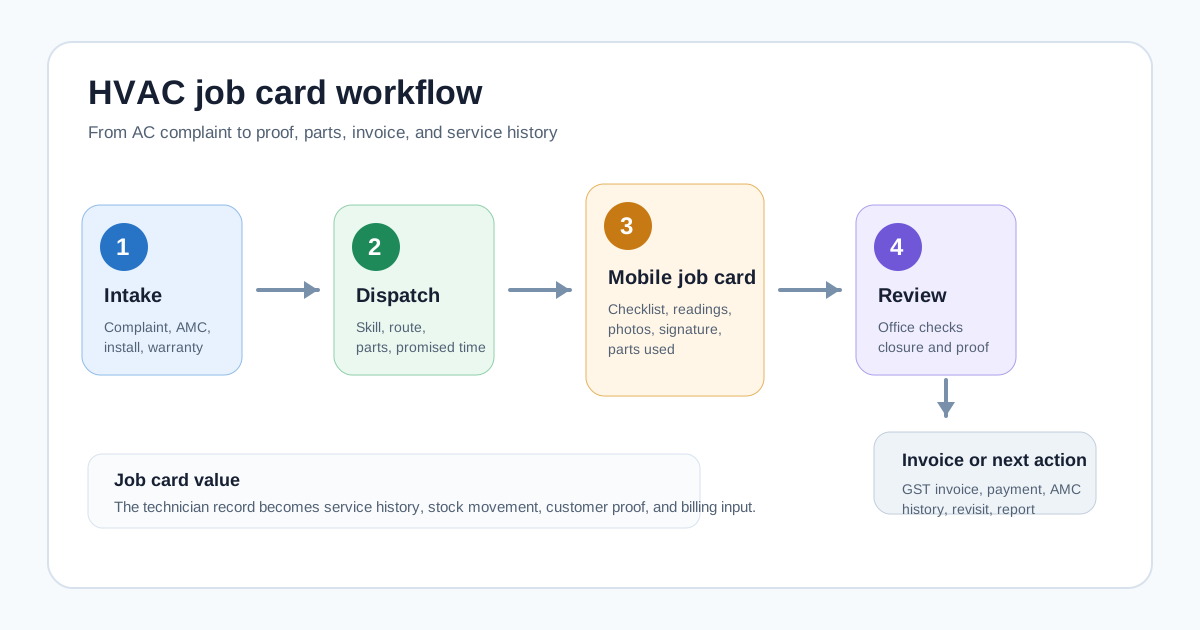 HVAC job card workflow from complaint intake to invoice handoff
A useful HVAC job card connects the site visit, technician proof, parts usage, service report, and invoice handoff.
HVAC job card workflow from complaint intake to invoice handoff
A useful HVAC job card connects the site visit, technician proof, parts usage, service report, and invoice handoff.
Who this guide is for
This guide is for owners, coordinators, and operations managers who run technician-led HVAC or AC service work in India.
It is especially useful for:
- AC repair and service centers;
- HVAC contractors handling installation and maintenance;
- AMC-heavy AC service companies;
- commercial HVAC teams serving offices, hotels, hospitals, schools, warehouses, and retail sites;
- dealer-distributor service teams that manage warranty, installation, and paid calls;
- teams moving from paper cards, Excel sheets, and WhatsApp updates to a cleaner system.
If your bigger issue is complaint intake, technician dispatch, inventory, and invoices across the whole service center, read this alongside our AC service center management software guide.
Why HVAC job cards need more than a generic form
A basic digital form can collect text. An HVAC job card needs to support work that changes depending on customer type, equipment type, warranty status, contract coverage, spare parts, and visit outcome.
An AC wet service visit does not need the same fields as a VRF breakdown call. A warranty compressor issue does not need the same commercial approval flow as a paid gas charging visit. An AMC preventive maintenance visit needs history and next-service context. An installation job needs site readiness, material handover, commissioning notes, and customer acknowledgement.
That is why many teams try a simple form app and still return to calls. The form collects data, but it does not drive the service workflow.
A practical HVAC job card should help the office answer these questions without calling the technician again:
- Which customer, site, and AC unit was serviced?
- What was the complaint or visit purpose?
- Was this under AMC, warranty, paid repair, installation, or free revisit?
- What diagnosis did the technician record?
- Which checklist steps were completed?
- Which parts, consumables, or refrigerant were used?
- Were photos, readings, and customer signature captured?
- Is a quotation, invoice, payment follow-up, or next visit required?
- Did the job close inside the promised time?
For a broader technician workflow, see the job card app for technicians guide. HVAC teams need the same foundation, plus AC-specific asset, AMC, refrigerant, and service-report depth.
What an HVAC digital job card should capture
The best job card is not the longest form. It is the shortest form that still protects the business record.
Customer and site details
The technician should see the customer name, phone number, site address, map link, contact person, building access notes, and preferred visit time.
For commercial customers, the billing office and service site may be different. A hospital, hotel, school, office, or society may have multiple units at one location. The job card should make the service site clear before the technician leaves.
Equipment and asset details
HVAC service depends on the equipment record. The job card should show the unit type, brand, model, serial number where available, capacity, location at site, installation date, previous service notes, warranty or AMC status, and any safety or access instructions.
For split ACs, cassette units, ductables, chillers, VRF systems, cold rooms, or packaged units, the asset record helps the technician avoid guesswork. It also helps the office see repeat complaints by unit instead of treating every call as a new story.
If your team handles installations and maintenance after a product sale, our installation and maintenance field service software guide explains how customer, site, asset, service report, and invoice records should connect.
Complaint or visit purpose
The job card should show whether the visit is for:
- installation;
- breakdown repair;
- preventive maintenance;
- gas leakage or cooling issue;
- wet service or dry service;
- noise or vibration complaint;
- water leakage complaint;
- warranty inspection;
- AMC visit;
- free revisit;
- quotation inspection;
- commissioning or handover.
This matters because the checklist, parts, billing, and approval flow depend on the visit type.
Diagnosis and work performed
The technician should record what was found and what was done in simple fields. Do not rely only on long free-text notes.
Useful diagnosis fields include:
- customer-reported issue;
- technician diagnosis;
- readings or observations;
- cause category;
- action taken;
- unresolved reason if the job cannot be closed;
- follow-up required.
For recurring problems, these fields are more valuable than a vague note such as "service done." They help the owner see whether repeat complaints are caused by bad installation, customer usage, part quality, technician training, missed preventive maintenance, or a real equipment issue.
Checklist by job type
Every HVAC job card should support different checklists by job type.
For preventive maintenance, the checklist may include coil cleaning, filter cleaning, drain line check, electrical connection check, temperature reading, airflow observation, abnormal noise check, and customer advice.
For installation, it may include site readiness, indoor and outdoor placement, drain slope, pipe routing, electrical safety, vacuuming where applicable, insulation, test run, customer briefing, and handover.
For breakdown, it may include fault symptoms, diagnosis, parts required, repair approval, parts replaced, testing, and closure.
For AMC visits, it should also update visit count and next scheduled service. If AMC is central to your revenue, read the AMC management software India guide before choosing any job-card tool.
Photos, signature, OTP, and proof of work
Photos help the office verify the work and handle disputes. Customer signature or OTP closure creates clearer acceptance. The job card should make proof easy to capture at the site.
Useful proof includes:
- before and after photos;
- nameplate or serial-number photo;
- damaged part photo;
- installation photo;
- customer signature;
- OTP or customer confirmation;
- technician location and timestamp where appropriate;
- service report PDF or shareable summary.
This should be part of the job card, not a separate WhatsApp thread that becomes impossible to find later.
If your main problem is location, attendance, and live status, read the technician tracking app India guide. Job cards and tracking work best together: GPS shows where the technician is, while the job card shows what work was done.
Parts, consumables, and refrigerant usage
HVAC job cards should record parts and materials used on the job.
Examples include capacitors, contactors, relays, sensors, PCB boards, compressors, fan motors, filters, copper pipe, insulation, drain pipe, brackets, service chemicals, and refrigerant. For AC teams, refrigerant and gas charging tracking is especially important because field usage is easy to under-record.
The job card should answer:
- Was the part chargeable, warranty-covered, AMC-covered, or free replacement?
- Was it issued from store stock or technician stock?
- Was unused stock returned?
- Did the old part need to be returned?
- Should the line item go to invoice, delivery challan, or internal warranty record?
For the GST and stock-control side of replacements, see our guide to warranty and AMC replacement parts workflow.
Service report and invoice handoff
The job card should end with a clear office action.
Sometimes the job is complete and ready for invoice. Sometimes it needs a quotation. Sometimes it is a warranty job with no customer charge. Sometimes it needs a revisit because a part is unavailable. Sometimes it is part of an AMC visit and should only update service history.
The closure status should tell the office what happens next:
- create GST invoice;
- collect payment or mark payment pending;
- send quotation;
- schedule revisit;
- update AMC visit count;
- request part approval;
- close as warranty;
- escalate to senior technician;
- send service report to customer.
For billing details, see our GST invoicing software for service businesses guide.
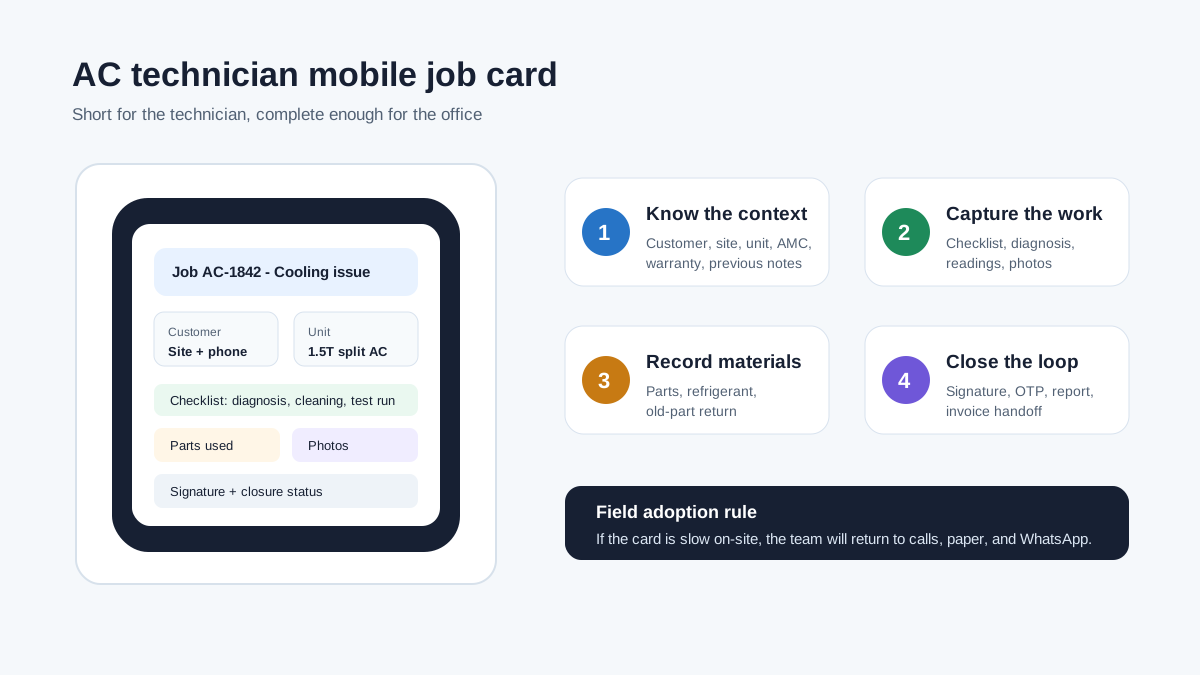 AC technician mobile job card with customer unit checklist photos parts and signature
The mobile job card should be short enough for the technician and complete enough for the office.
AC technician mobile job card with customer unit checklist photos parts and signature
The mobile job card should be short enough for the technician and complete enough for the office.
The workflow: from complaint to invoice
An HVAC job card should not start when the technician reaches the site. It should start when the office creates the service job.
The workflow usually looks like this.
First, the coordinator logs the complaint, installation request, AMC visit, or inspection request. The record should include customer, site, unit, issue, promised time, and billing or contract context. If your main issue is assigning those jobs to AC technicians and tracking status before the job card is completed, read the HVAC dispatch software guide alongside this job-card guide.
Second, the office assigns the technician based on availability, skill, location, and parts requirement. A VRF fault, chiller job, or commercial electrical issue should not be dispatched like a simple split AC cleaning visit.
Third, the technician receives the job card on mobile. The card should show only the fields needed for that visit type, because overloaded forms reduce adoption.
Fourth, the technician completes the work, captures proof, records parts or refrigerant usage, and closes the job with customer acknowledgement.
Fifth, the office reviews the closure. The system should update service history, stock, AMC visit count, billing status, payment follow-up, and next action.
Sixth, the customer receives a service report, invoice, payment link, WhatsApp update, or next-visit reminder depending on the job.
This is why job cards belong inside a full service workflow. If the job card is disconnected from dispatch, stock, AMC, and billing, the office still has to manually rebuild the record.
Job card templates HVAC teams should maintain
A single generic job card creates either missing data or technician frustration. HVAC teams should maintain a few practical templates.
Installation job card
An installation job card should capture site readiness, unit details, placement, material used, electrical safety, drain arrangement, testing, customer briefing, handover, and warranty or AMC next step.
It should also capture whether the installation was completed, partly completed, blocked by site readiness, blocked by missing material, or waiting for customer approval.
Breakdown repair job card
A breakdown repair card should focus on complaint, diagnosis, part requirement, quotation status, repair approval, work completed, testing, proof, invoice handoff, and revisit need.
It should be easy for the office to see whether the job is closed, waiting for part, waiting for estimate approval, or escalated.
Preventive maintenance and AMC job card
Preventive maintenance cards should standardize service quality. They should guide the technician through cleaning, inspection, readings, customer advice, photos, and next-service notes.
The card should also update AMC visit count and service history automatically. If this is not connected, the business may complete visits but still lose renewal visibility. Our HVAC preventive maintenance software article goes deeper into this recurring-service workflow.
Warranty or free-revisit job card
Warranty and free-revisit work needs clear reason codes. Without this, the owner cannot tell whether free visits are genuine, caused by technician error, caused by poor part quality, or caused by unclear customer communication.
The job card should separate paid work, warranty work, AMC-covered work, and goodwill visits.
Commercial HVAC job card
Commercial sites often require more structured reports. A job card for offices, hospitals, hotels, malls, schools, factories, or societies may need contact person details, access notes, asset list, readings, sign-off, service report PDF, and billing approval notes.
For larger teams, the service report matters as much as the job card because commercial customers need documentation before clearing payment.
How to compare HVAC job card software vendors
Do not compare vendors only by asking whether they have "job cards." Almost every service tool can say yes. Compare the details.
During a demo, ask the vendor to create and close real examples:
- a split AC breakdown call with part replacement;
- an AMC preventive maintenance visit;
- an installation job with material usage;
- a commercial site visit that needs a service report;
- a warranty job with no customer invoice;
- a paid repair that needs GST invoice and UPI payment note;
- a revisit because a part is unavailable.
Then check whether the workflow feels natural for both the coordinator and technician.
Good HVAC job card software should prove:
- fast job creation from complaint or schedule;
- mobile technician view with only relevant fields;
- photos, signature, and closure proof;
- parts and refrigerant usage tied to stock;
- AMC and warranty context visible on the card;
- offline or weak-network behavior;
- GST invoice handoff;
- service report sharing;
- owner reports for pending jobs, repeat complaints, parts usage, and technician productivity;
- role-based access so technicians cannot see or change unnecessary data.
KaryaFlow's HVAC page positions the product around job management, technician mobile workflow, inventory, GPS, AMC, GST billing, and offline-first field work for Indian HVAC service centers. Competitor pages such as ServiceFlow, FieldDesk, Repairmen, Spinso Organizer, Upgear, and CRMJIO also show how common the market need is: complaint tracking, job assignment, digital job cards, photos, signatures, AMC, inventory, WhatsApp, and billing keep appearing across public HVAC service software pages.
The lesson is not that every vendor is the same. The lesson is that buyers should go beyond feature names and test the exact operating workflow.
Paper job cards vs digital HVAC job cards
Paper job cards are familiar, but they create delays as volume grows.
With paper, the office often learns the full job status only after the technician returns or sends photos manually. Parts usage may be written unclearly. Customer signatures sit on a physical card. The invoice waits. The owner asks for reports and the team starts counting cards or cleaning sheets.
Digital job cards solve this only when technicians actually use them at the site.
A good digital card should make the technician's work easier, not only make management reporting easier. It should show customer details, map, complaint, checklist, previous notes, and parts options in a simple mobile flow. It should reduce calls from the office. It should avoid duplicate entry. It should make closure faster.
If the mobile workflow is slow, complicated, or full of irrelevant fields, adoption will fail. The business will own software, but the real work will still happen on WhatsApp and paper.
India-specific requirements to check
Indian HVAC teams need a few checks that generic field-service tools may not handle well.
WhatsApp without making WhatsApp the database
Customers and technicians will keep using WhatsApp. The goal is not to ban it. The goal is to stop using WhatsApp as the system of record.
The job card should store photos, notes, approval, and report data inside the service record. WhatsApp can then be used for customer updates, not as the only place where job proof exists.
For a wider service CRM approach, see how Indian teams can replace WhatsApp and Excel with a service CRM.
GST and accounting handoff
Many HVAC jobs become invoices. Some become warranty records. Some become AMC visits. Some need quotation approval before invoice.
The job card should collect enough detail for accounts to act without calling the technician again. If your team uses Tally, Zoho Books, or another accounting system, verify the export or handoff process during the demo.
UPI, cash, and payment notes
Technicians may collect cash, receive UPI screenshots, or tell the customer to pay later. The job card should capture payment mode, amount collected, pending amount, and proof where needed.
This reduces evening reconciliation problems.
Offline and weak-network use
Technicians may work in basements, rooftops, plant rooms, rural sites, or commercial areas with poor signal. The app should not lose the job card if the network drops.
At minimum, test whether the technician can view assigned jobs, fill the form, add photos, and sync later.
Language and field usability
Technician adoption is more important than dashboard polish. The mobile card should use simple labels, minimal typing, dropdowns where useful, and clear closure buttons.
If the field team cannot complete the card without office help, the workflow will not hold during summer rush.
Common mistakes when buying HVAC job card software
The first mistake is buying a form tool instead of service workflow software. A form can collect data, but it may not update job status, stock, invoice handoff, AMC history, or service reports.
The second mistake is making the card too long. If every job card has 60 fields, technicians will skip fields or call the office. Use different templates by job type.
The third mistake is ignoring parts and refrigerant. HVAC job cards without material usage leave inventory and billing disconnected.
The fourth mistake is treating photos as optional. In service businesses, photos protect the technician, office, customer, and owner.
The fifth mistake is skipping the accounts handoff. If the job card cannot tell accounts what to invoice or why not to invoice, the billing team will still chase technicians.
The sixth mistake is not piloting with real jobs. Demo data hides friction. Test with actual complaints, AMC visits, paid repairs, and installation jobs from the last week.
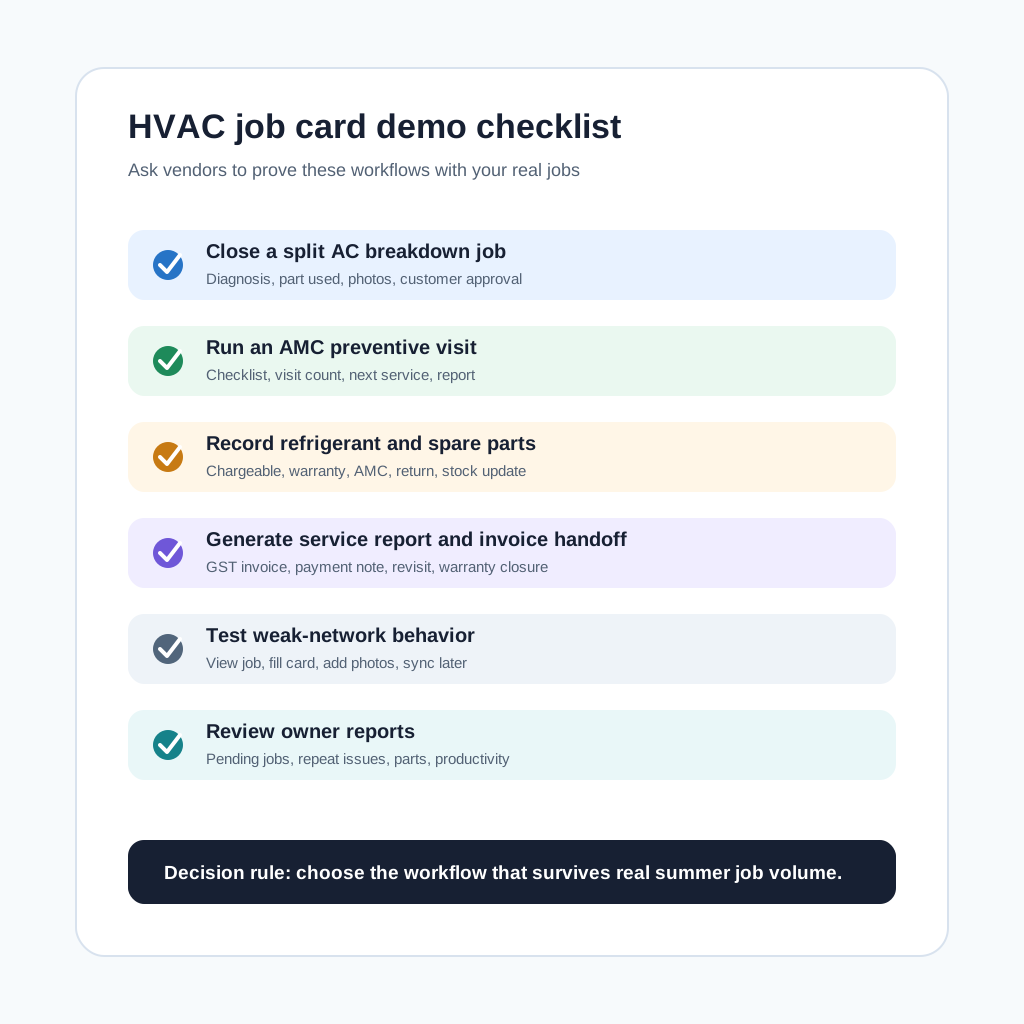 HVAC job card software demo checklist for Indian AC service businesses
A good demo should prove real HVAC job-card closure, not only show a form builder.
HVAC job card software demo checklist for Indian AC service businesses
A good demo should prove real HVAC job-card closure, not only show a form builder.
A practical 30-day rollout plan
Start small. Do not digitize every historical record on day one.
In week one, choose the top three job types: breakdown repair, preventive maintenance, and installation. Build short templates for each. Import active customers, active AMC contracts, active jobs, and common parts only.
In week two, pilot with one coordinator and two or three technicians. Run real jobs. Watch where technicians hesitate, which fields are unclear, and whether the office still needs calls after job closure.
In week three, connect the job card to billing, stock, and customer reports. Decide which closure statuses trigger invoice, quotation, revisit, AMC update, or warranty review.
In week four, review reports: pending jobs, delayed jobs, parts used, repeat complaints, invoices pending, and technician completion quality. Improve templates before adding more teams.
This phased rollout is usually better than importing years of old data and forcing the whole team into a heavy system at once.
When KaryaFlow is a good fit
KaryaFlow is a good fit for HVAC and AC service teams that want a practical field-service workflow for Indian operations: job assignment, technician tracking, mobile job cards, AMC renewals, parts and refrigerant visibility, GST-ready billing, payment follow-up, and owner dashboards.
It is especially relevant if your team is currently managing service jobs through phone calls, paper job cards, WhatsApp groups, and Excel sheets.
If you want to compare full HVAC operations software before looking only at job cards, read the HVAC service management software guide and then review KaryaFlow for HVAC service centers.
Questions HVAC teams ask about job card software
What is HVAC job card software?
HVAC job card software is a digital system for creating, assigning, completing, and reviewing AC or HVAC service job cards. It helps technicians capture customer details, equipment details, diagnosis, checklist completion, parts used, photos, signature, and closure notes from the site.
The office can then use that record for service history, invoice preparation, payment follow-up, warranty review, AMC visit tracking, and reports.
Is a digital job card different from a service report?
Yes. The job card is the internal operating record used by the technician and office. The service report is usually the customer-facing summary of the work completed.
Good software should create the service report from the job card so the technician does not repeat data entry.
Can HVAC job card software work for AMC visits?
Yes, but only if the software supports AMC context. The job card should show the contract, visit count, equipment covered, checklist, next visit, and renewal status.
If AMC visits are managed as ordinary one-time jobs, the business may complete visits but still lose contract visibility.
Should job cards include GPS location?
GPS is useful, but it is not the whole job card. Location can show whether the technician reached the site, while the job card shows what was done, what proof was captured, and what office action is needed.
For field control, combine GPS, attendance, job status, and mobile job cards.
Can technicians create GST invoices from a job card?
Some workflows let technicians collect enough details for the invoice, while the office reviews and generates the final GST invoice. Other workflows may generate invoices automatically after approved closure.
The right approach depends on your controls. Indian HVAC teams should verify tax fields, service items, parts, discounts, payment notes, and accounting handoff before buying.
What photos should an AC technician capture?
Useful photos include the unit nameplate or serial number, before-work condition, damaged part, installation or repair proof, replaced part, final test condition, and customer sign-off where needed.
The exact photo checklist should depend on job type. Do not make technicians upload unnecessary photos for simple visits.
Can digital job cards reduce WhatsApp dependency?
Yes, if job proof, photos, notes, signatures, and status updates are stored in the job record. WhatsApp can still be used for customer communication, but the business record should live inside the software.
This prevents the office from searching old chats whenever a customer asks for history or proof.
How should we choose between HVAC job card software options?
Choose by testing real workflows, not by reading feature lists. Ask each vendor to close an installation, breakdown repair, AMC visit, warranty job, paid repair, and revisit using your real business examples.
Then check technician usability, office review, parts usage, invoice handoff, service report quality, offline behavior, and reports.
Next step
If your AC or HVAC team is outgrowing paper job cards, WhatsApp updates, and Excel follow-ups, review KaryaFlow for HVAC service centers. You can also compare plans on the KaryaFlow pricing page and use the demo checklist above with your own recent jobs.
Ready to modernize your service operations?
Join 50+ service centers already using KaryaFlow. Setup in under 30 minutes, GST-ready from day one.
See how KaryaFlow works for AC and HVAC service teamsYou might also like
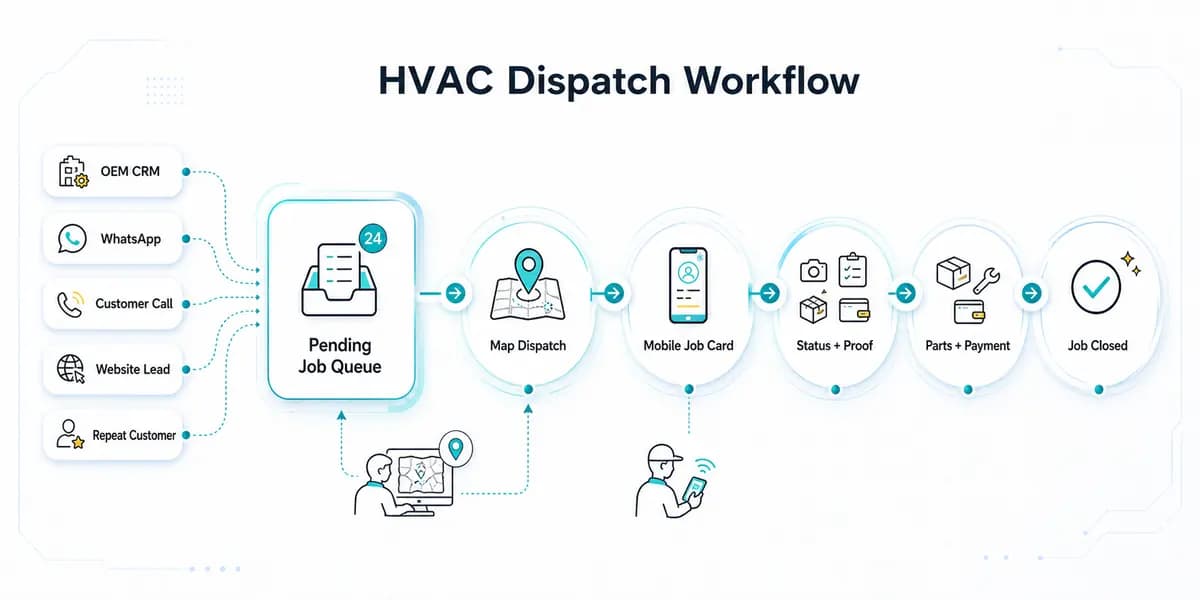
HVAC Dispatch Software India: Schedule AC Technicians
HVAC dispatch software for Indian AC service centers: manage OEM CRM jobs, WhatsApp enquiries, technician assignment, job status, parts, payments and closure.
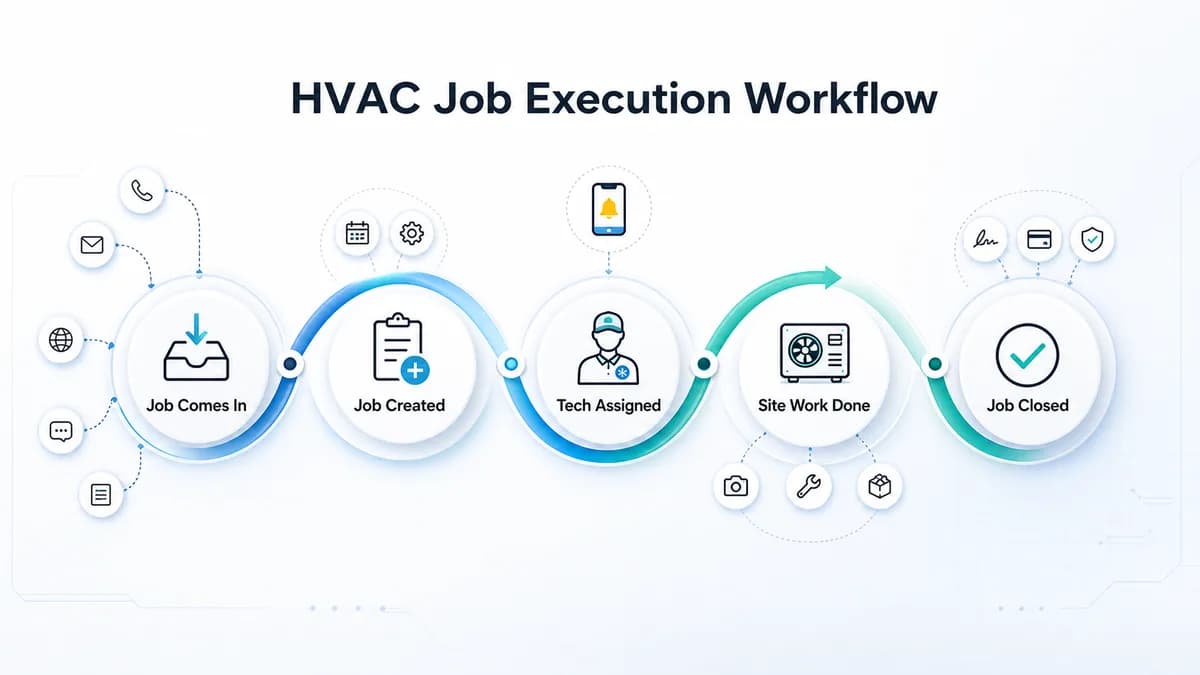
HVAC Project Management Software for Installation and AMC Teams in India
HVAC project management software for Indian HVAC teams: assign technicians, track job proof, material issue, expenses, cash/UPI payments, and reports.
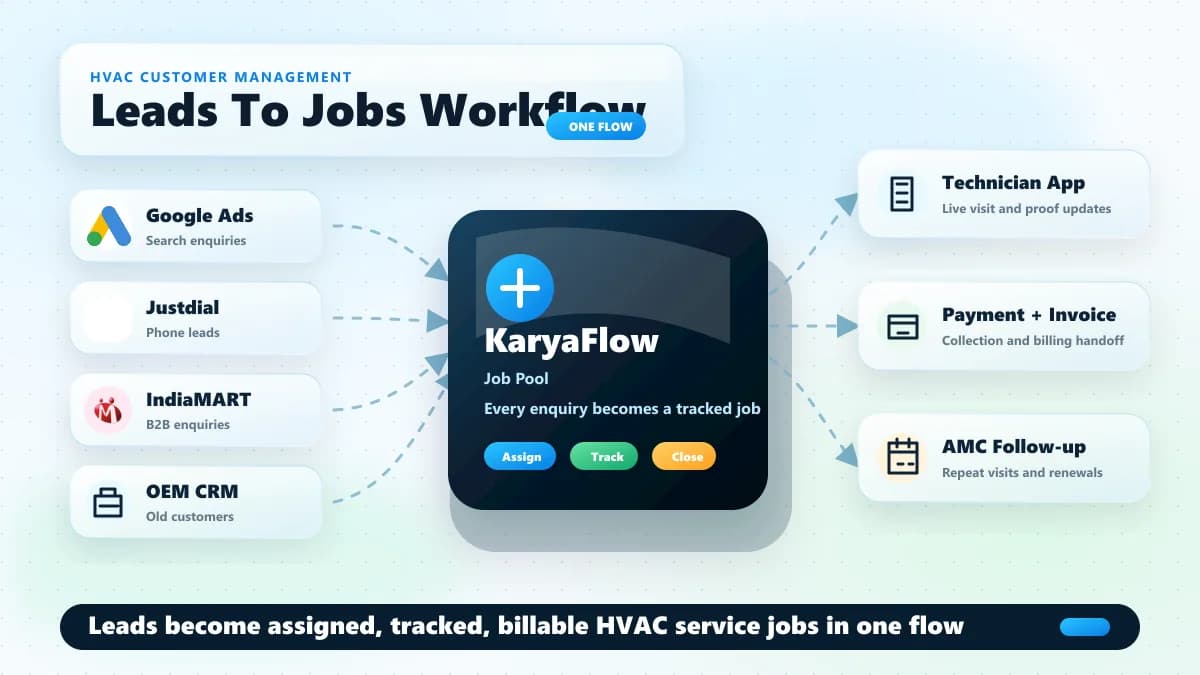
HVAC Customer Management Software for AC Service Centers in India
HVAC customer management software for AC service centers: track leads, job assignment, technician visits, payments, AMC renewals, and follow-ups.