KaryaFlow
Last updated: 26 August 2026.
HVAC dispatch software should help Indian AC service centers move daily jobs from OEM or company CRM exports, WhatsApp enquiries, customer calls, website leads, and repeat customers into one official job queue. From that queue, the owner, dispatcher, coordinator, or manager can assign the right technician, track job status, see field proof, review parts used, check payment status, and close the job without rebuilding the day from WhatsApp and Excel.
This is the gap many HVAC teams feel after they cross 10, 20, or 30 technicians. The business may already have customers. The real problem is daily control.
KaryaFlow is built for this dispatch layer: job entry or import, technician assignment, mobile job cards, map-based visibility, job status, product photos, parts usage, cash or UPI payment records, expenses, reports, and owner review.
Running AC jobs through WhatsApp, Excel, and phone calls?
Book a KaryaFlow demo to test job import, technician assignment, map view, mobile job cards, parts usage, payment status, expenses, and owner closure with your own dispatch workflow.
Short Answer
HVAC dispatch software helps an AC service center assign service jobs to technicians and track each job until it is completed, reviewed, and closed. For Indian HVAC businesses, useful dispatch software should cover OEM or CRM job imports, WhatsApp enquiries, customer address, technician location, assigned job card, call and navigation actions, product photos, parts used, customer signature, cash or UPI payment status, expenses, and owner reports.
The best HVAC dispatch software is not only a calendar or route planner. For a service center owner, the dispatch system must answer: which jobs are pending, who is assigned, which technician is nearby, which jobs are in progress, which jobs are on hold, what parts were used, what payment is pending, and which completed jobs are ready to close.
If you want the broad HVAC software hub first, read the best HVAC software in India guide. If your problem is installation or multi-visit site execution, read HVAC project management software. This article focuses only on dispatch and daily technician assignment.
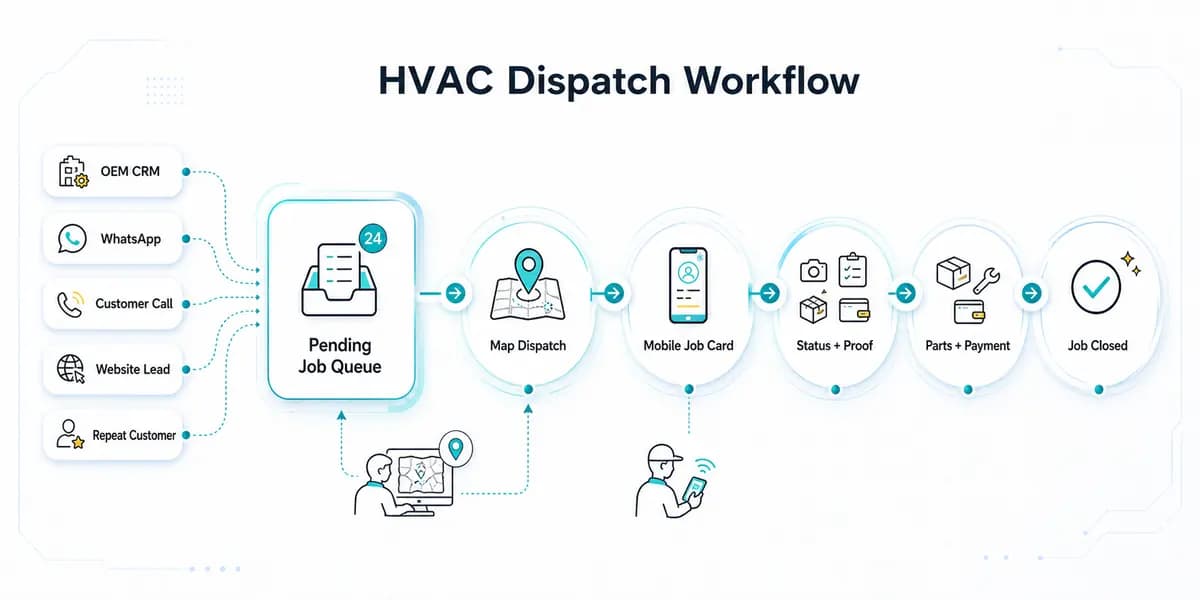 HVAC dispatch software workflow for OEM CRM jobs WhatsApp enquiries technician assignment job status parts payment and closure
HVAC dispatch software should turn every job source into one dispatch queue, then connect assignment, technician job cards, proof, parts, payment and closure.
Who Searches For HVAC Dispatch Software?
The buyer searching for HVAC dispatch software is usually an owner or operations person who already has enough jobs to feel operational pressure. They may run an AC service center, authorized service center, HVAC AMC company, installation team, or multi-technician repair business.
The search usually starts when these problems become visible:
- jobs are coming from OEM or company CRM exports, but assignment happens in Excel;
- customers are coming from WhatsApp, Google Business Profile, ads, websites, and calls, but follow-up is manual;
- the dispatcher does not know which technician is nearby or free;
- technicians send job photos and payment updates in different WhatsApp chats;
- parts used by technicians are not connected to stock;
- month-end salary, rewards, advances, expenses, and collections take too long to calculate;
- the owner cannot manage the service center from outside the office.
This is why the article should not treat dispatch as a simple scheduling topic. HVAC dispatch is the daily operating layer between job intake and job closure.
For customer-history and repeat-complaint depth, use the HVAC customer management software guide. For payout follow-up, read Technician Salary Calculation Software. Dispatch starts after a job is ready for assignment.
Where HVAC Jobs Come From In India
Indian HVAC and AC service jobs rarely come from one clean source. A service center may receive official complaints from an OEM or company CRM, then also receive independent paid-service leads from WhatsApp, Google Business Profile, local ads, a website, repeat customers, building managers, and referral calls.
For authorized service centers, the official job may be allocated by the brand or OEM CRM. The service center then exports, imports, or enters those jobs into its own operating system because the owner still has to manage technicians, parts, expenses, payment, reporting, and salary.
For independent AC service centers, a customer may search for an AC repair service near them, land on a website, click WhatsApp, and message the service center directly. Another customer may call from Google Maps. Another may be an old AMC customer. All of these sources create the same back-office question: has this enquiry become a tracked job?
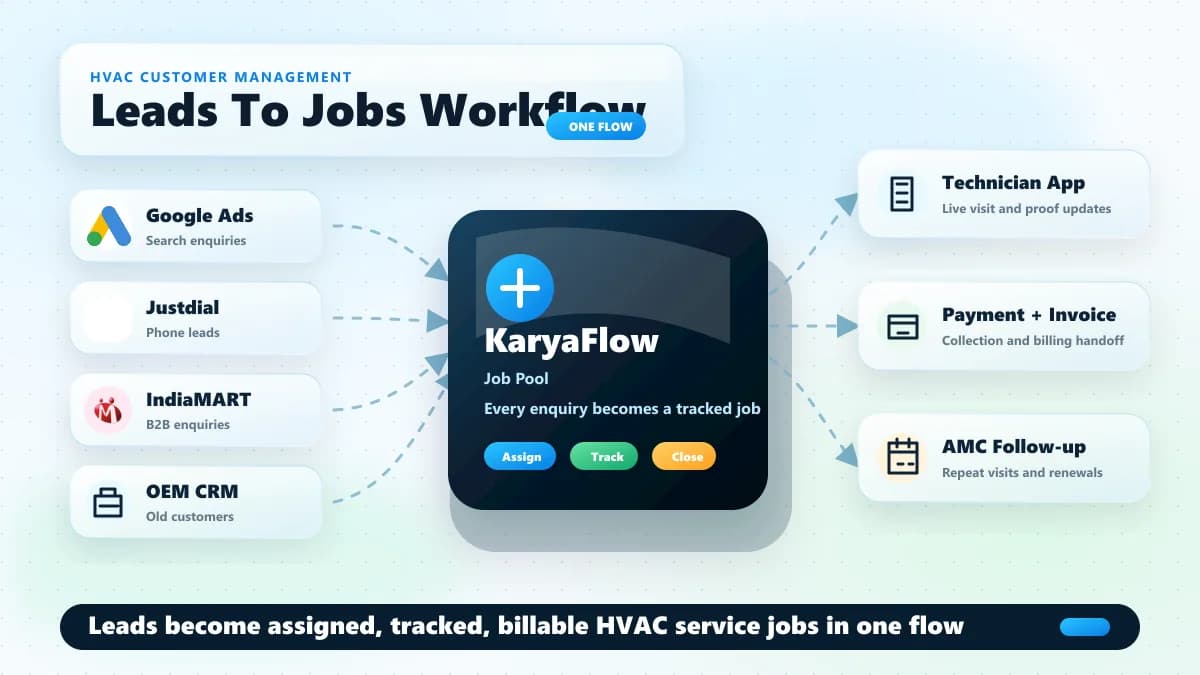
In KaryaFlow, the job should enter one job pool before dispatch. The owner or a delegated office person can enter or import the job, then the dispatcher can assign it to the correct technician.
Useful fields for HVAC dispatch include:
Scroll sideways to see every column if needed. With a keyboard, focus the table and use the left and right arrow keys.
| Job field | Why it matters for dispatch |
|---|---|
| Customer name and phone | Lets the technician call the customer from the job card. |
| Customer address and location | Lets the dispatcher assign by area and lets the technician navigate. |
| Service type | Separates AC repair, installation, AMC visit, chimney repair, gas charging, and other work. |
| Complaint details | Gives the technician context before calling or visiting. |
| Product or asset details | Helps with warranty, repeat complaint, and parts planning. |
| Warranty, AMC, paid, or revisit status | Changes billing, approval, and closure rules. |
| Preferred date or promised time | Helps prioritize the technician route. |
| OEM or company reference number | Helps authorized centers reconcile with the external CRM later. |
KaryaFlow should not be described as replacing the OEM CRM when the OEM controls the official complaint system. KaryaFlow helps the service center operate the jobs after they come in.
Why WhatsApp And Excel Dispatch Break At 30-40 Technicians
WhatsApp and Excel work in the early stage because they are familiar. The owner writes the job in Excel, sends the customer details to a technician, asks for location, receives photos, and checks payment later.
That process breaks when an AC service center has 30-40 technicians and 100-200 jobs coming from a company CRM or multiple enquiry sources. The dispatcher has to open many chats, ask where technicians are, check live locations, copy details into Excel, resend addresses, collect photos, track parts, and remember who collected cash or UPI.
Excel also creates human-error risk. One wrong customer number, one missed status update, one copied address mistake, or one unrecorded part can create follow-up calls and billing confusion. Later, when the owner wants to review the job, the record is split across an Excel row, WhatsApp photos, technician memory, and payment notes.
A service-business example makes the issue clear. A kitchen-appliance service team with around 30 technicians was receiving 100-200 jobs from a company CRM. The office exported the jobs to Excel, assigned technicians manually, and managed daily updates through WhatsApp. The hardest part was not only dispatch. At month end, salary calculation took 7-8 days because the owner had to reconstruct technician expenses, rewards, advance payments, leave deductions, collections, and job-level payouts from scattered records.
HVAC service centers face the same pattern. Dispatch leakage becomes salary leakage, inventory leakage, payment leakage, and reporting leakage.
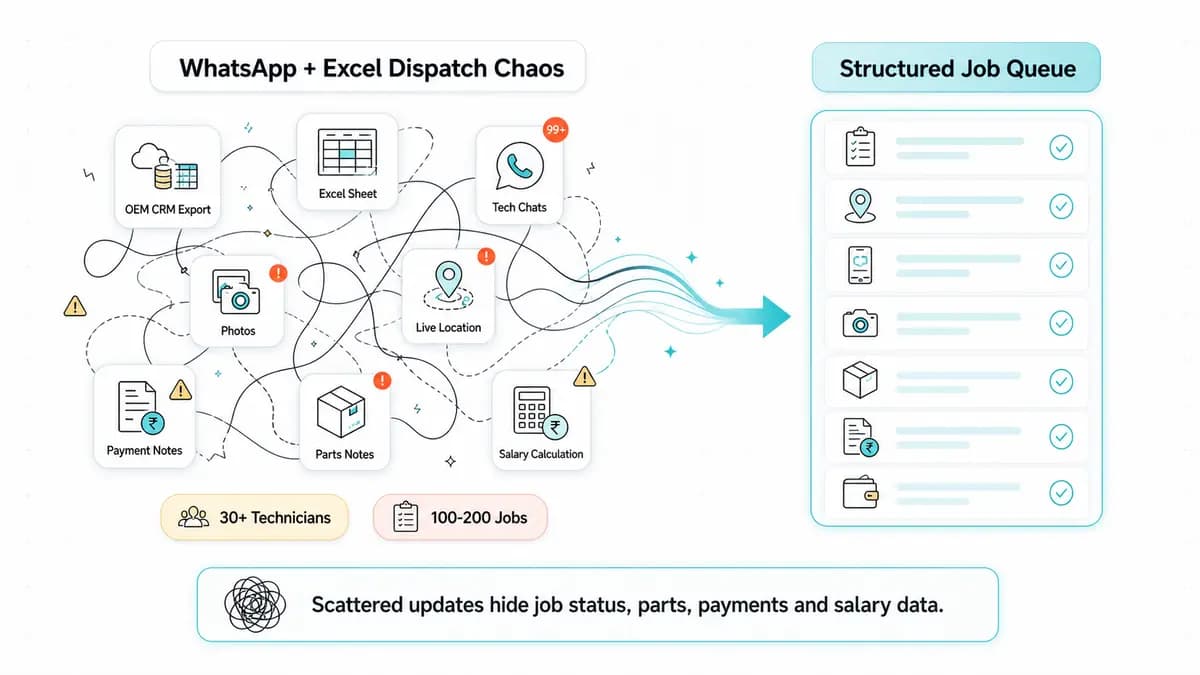 HVAC service center dispatch chaos with WhatsApp Excel technician chats photos payments parts and salary calculation
When job updates live across Excel, WhatsApp, payment notes, parts notes and salary calculations, the owner loses one source of truth.
Video Walkthrough: HVAC Dispatch Without WhatsApp And Excel
Watch this KaryaFlow walkthrough to see how an Indian AC service center can move OEM or company CRM jobs, WhatsApp enquiries, technician assignment, mobile job cards, product photos, parts used, payments, expenses, and owner closure into one dispatch workflow.
This video supports the article by showing the dispatch workflow visually: job sources, pending job queue, map-based technician assignment, technician job card, field proof, parts, payment status, expenses, completed jobs, and owner closure.
The HVAC Dispatch Workflow: From Pending To Closed
HVAC dispatch software should make every job move through visible statuses. KaryaFlow can support operational statuses such as Pending, Assigned, In Progress, On Hold, Cancelled, Completed, and Closed. The exact naming can vary by company, but the office should know what each status means.
Scroll sideways to see every column if needed. With a keyboard, focus the table and use the left and right arrow keys.
| Status | Practical meaning in an HVAC service center |
|---|---|
| Pending | The job exists in the system but is not yet actively handled or assigned. |
| Assigned | A technician has been selected for the job and can see it in the mobile app. |
| In Progress | The technician is working on the job or the visit is actively underway. |
| On Hold | The job cannot move forward because a part is unavailable, customer approval is pending, customer is unavailable, or another blocker exists. |
| Completed | The technician has finished the field work and submitted the job details. |
| Closed | The owner or office has reviewed proof, parts, payment, expenses, and completion details, then finalized the job. |
| Cancelled | The customer does not want the service, the job was duplicated, or the visit is no longer required. |
The important distinction is Completed versus Closed. Completed can mean the technician has finished the field visit. Closed should mean the business record is clean enough for reporting, salary, inventory, payment review, and invoice handoff.
This distinction helps reduce the common mistake where a technician says "job done" but the office later discovers that the customer signature, part usage, pending amount, or expense approval is missing.
How Dispatchers Should Assign HVAC Technicians
HVAC technician assignment should not be random or based only on who replies first on WhatsApp. A dispatcher should be able to see the customer location, technician location, availability, service skill, job type, and business priority before assigning the job.
In KaryaFlow, the owner or dispatcher can use map-based technician visibility to decide who is nearer to the customer location. If the owner wants to send a specific technician because of skill, customer familiarity, area ownership, or trust, that technician can also be selected manually.
Good dispatch decisions should consider:
- which technician is nearest to the customer location;
- whether the technician is free or already assigned;
- whether the job is AC repair, installation, AMC, chimney, appliance, or another category;
- whether the job requires a senior technician or helper;
- whether the technician has the required spare part;
- whether the customer is under warranty, AMC, paid service, or revisit;
- whether the job is urgent or promised for a fixed time;
- whether the technician's current route makes sense.
Do not confuse map visibility with automatic route optimization. Unless a system truly supports automatic route planning, the safer claim is location-aware dispatch or map-based assignment. For KaryaFlow, the article should focus on owner control and informed technician assignment.
For location-only buyer intent, read HVAC GPS tracking software. This dispatch page focuses on turning location visibility into job assignment and closure.
What The HVAC Technician Sees In The Mobile Job Card
After an HVAC job is assigned, the technician should not depend on a WhatsApp message for customer details. In KaryaFlow, the technician opens the mobile app and sees the assigned job card with the customer name, address, visit date, phone number, service category, and job details such as AC repair, AC installation, chimney repair, or another service type.
The job card gives the technician two important actions from one place: calling the customer and opening navigation. If the technician needs to confirm availability, they can call the customer directly from the job card. If they need to reach the site, they can open the customer location and follow map directions instead of asking the office to resend the address.
Before starting the work, the technician can capture product or site photos inside the app. This matters for AC and HVAC service because the office should know the condition of the product before service starts, especially for warranty, damage, repeat complaint, or paid repair discussions.
After the work is done, the technician can update what service was performed, what parts were used, job remarks, questionnaire or checklist fields, customer signature, and payment status. For Indian service teams, this turns the job card into the official field record.
 HVAC technician mobile job card with call navigation product photos parts used payment status signature and owner closure
The technician job card should capture site work, while the owner closure review confirms proof, inventory, expenses and reporting.
For deeper job-card details, read the HVAC job card software guide.
Dispatch Is Not Complete Until Parts Are Recorded
HVAC dispatch software becomes more useful when technician assignment is connected to inventory. In AC service work, small parts and consumables can create large leakage if they are not tied to the job.
Examples include capacitors, gas, filters, relays, sensors, PCB boards, copper pipe, insulation, drain pipe, brackets, service chemicals, and other spare parts. The owner may keep stock in multiple godowns, assign parts to technicians, issue material for specific jobs, and then expect the used parts to reduce from the right stock record.
In KaryaFlow, the owner can add parts into inventory, assign parts to technicians, and track parts used in the job sheet. When a technician records that a part was used on a job, the part usage should reflect in inventory and reporting. This reduces the month-end problem where the owner has to ask every technician what was used and compare it against store stock manually.
For inventory depth, use the HVAC inventory management software guide. For technician custody of parts, read technician assigned parts custody software.
Payments, Expenses And Salary Should Connect To Dispatch
HVAC dispatch software should not stop at job status. The owner also needs to know what money moved because of the visit.
For Indian AC service centers, technicians may collect cash, UPI, partial payment, or record a pending amount. A customer may pay half in cash and half through UPI. Another job may be warranty-covered. Another may require an invoice or later collection. If the payment status is not linked to the job, accounts and the owner have to chase the technician later.
KaryaFlow can record payment status at the job level so the office can see collected, pending, partial, cash, UPI, or other practical collection states based on the team's workflow.
Expenses also need owner control. A technician may claim fuel, parking, food, emergency purchase, helper cost, or other job-related expense. In KaryaFlow, expenses can be submitted, approved by the owner, and then reflected in the expense section and salary slip workflow. This matters because many service centers do not lose control during dispatch itself. They lose control when collections, advances, rewards, leave deductions, and expenses are calculated days later.
For a broader version of this workflow, read technician expense, parts and payment tracking app.
What The Owner Should See After Dispatch
The owner dashboard should show more than a list of jobs. It should show whether the business is under control today.
When a technician updates an HVAC job, the owner or dispatcher should be able to see whether the work is pending, assigned, in progress, on hold, completed, closed, or cancelled. The owner should also be able to check technician location on the map, review uploaded product photos, see which parts were used, and track whether payment was collected or still pending.
Before closing a job, the owner or office should review:
- job status and technician name;
- customer details and service type;
- uploaded product or site photos;
- service performed and remarks;
- checklist or questionnaire fields;
- parts used and inventory effect;
- payment collected, partial, or pending;
- technician expense or advance entries;
- customer signature or completion sheet;
- invoice, warranty, AMC, or revisit next step.
This is the difference between job completion and operational closure. A completed job can still be financially incomplete. A closed job should be ready for reports.
For owner-level visibility across the whole field service business, read field service owner dashboard software.
HVAC Dispatch Software Vs Scheduling, Work Orders And Job Cards
Buyers often use different words for the same pain. One owner may search for HVAC dispatch software. Another may search for dispatch HVAC software, HVAC field service dispatch software, AC service dispatch software, HVAC job scheduling software, HVAC work order software, HVAC technician software, or HVAC job management software.
These terms overlap, but they are not identical.
Scroll sideways to see every column if needed. With a keyboard, focus the table and use the left and right arrow keys.
| Buyer term | What the buyer usually means | What the software should prove |
|---|---|---|
| HVAC dispatch software | Assign jobs to technicians and track status | Pending queue, technician selection, map view, job status, proof, payment, closure |
| HVAC job scheduling software | Plan visit date, time, and technician workload | Calendar, availability, route context, promised visit time, reschedule flow |
| HVAC work order software | Store the official job record | Customer, product, complaint, technician, parts, signature, billing handoff |
| HVAC job card software | Let technician complete site work from mobile | Call, navigation, photos, checklist, parts used, signature, payment update |
| HVAC technician software | Give field staff their daily work app | Assigned jobs, customer details, status update, service notes, parts, payment, expense |
| HVAC job management software | Control the job from intake to closure | Job source, assignment, progress, hold reason, completion, owner review, reports |
For ranking and conversion, one strong dispatch article can cover these close terms without creating five thin pages. If Search Console later shows one term getting meaningful impressions with a different intent, then a separate support article can be written.
The shared buyer intent is the same: the owner wants the office to assign jobs faster, technicians to see the right job card, and the business to close each AC or HVAC job with proof, parts, payment status, and reports.
KaryaFlow Vs Indian Alternatives For HVAC Dispatch
Use competitor comparisons to choose a workflow fit, not to chase the biggest feature list. The right demo should run one real HVAC job from intake to assignment to technician update to owner closure.
Scroll sideways to see every column if needed. With a keyboard, focus the table and use the left and right arrow keys.
| Option | Where it usually fits | What to test for HVAC dispatch |
|---|---|---|
| KaryaFlow | Indian AC service centers and field-service teams that need dispatch, technician app, parts, payments, expenses, and owner reports in one workflow | Import or create jobs, assign technicians by map view, open mobile job card, record parts, collect payment status, approve expenses, close the job |
| Zoho FSM | Teams already using Zoho CRM, Zoho Books, Zoho Desk, Zoho Inventory, or Zoho One | Dispatch console, work orders, mobile app adoption, HVAC-specific job cards, GST/accounting fit, setup effort |
| ServiceCRM | After-sales service teams that want service CRM workflows and customer/service management depth | Job assignment, mobile field engineer workflow, inventory, quotations, invoicing, payment handling, support model |
| FieldEZ | Mid-market or enterprise equipment/service operations | Dispatch, field execution, SLAs, parts, contracts, configuration depth, implementation effort |
| Vyapar | Small businesses that mainly need billing, accounting, GST, and inventory | Whether dispatch and technician job cards still need a separate system |
| Tally | Accounting, GST, inventory, payroll, ledgers, and CA/accountant workflows | Whether field job assignment, technician app, and service proof need to stay outside Tally |
| WhatsApp plus Excel | Early-stage teams with low job volume and few technicians | When job count, technician count, photos, parts, payments, and salary calculations become too messy |
| GPS-only apps | Teams that only need location tracking | Whether the map connects to job card, parts, payment, expenses, and closure |
Zoho FSM's public pages describe work order management, service appointment scheduling, dispatch console views, maps, workforce profiles, and mobile field agent workflows. ServiceCRM publicly positions around field-service CRM, scheduling, dispatching, customer information, service history, field technician access, and job progress. FieldEZ publicly positions its field-service layer around dispatch, field execution, SLAs, parts, and contracts. Vyapar publicly positions around invoicing, accounting, and inventory for small businesses.
Those category signals are useful, but an Indian HVAC buyer should still run one real demo scenario. Feature pages do not show whether your dispatcher, technician, owner, and accountant will use the tool daily.
Demo Checklist Before Buying HVAC Dispatch Software
Do not evaluate HVAC dispatch software through a polished sample account. Use one real job flow from your business.
Ask the vendor to show this workflow:
- Import or create 20 HVAC jobs from an OEM/company CRM export or Excel sheet.
- Add one WhatsApp or phone enquiry as a new paid-service job.
- Show the pending job queue.
- Assign one job using customer location and technician map view.
- Assign another job to a specific technician manually.
- Open the technician mobile job card.
- Show call and navigation actions from the job card.
- Capture product photos before service starts.
- Update job status from Assigned to In Progress to Completed.
- Put one job On Hold because a part is unavailable.
- Record parts used and show stock impact.
- Record cash, UPI, partial, and pending payment examples.
- Add a technician expense and show owner approval.
- Review customer signature or completion sheet.
- Close the job from the owner or office view.
- Show daily reports for open jobs, pending payments, parts used, expenses, and technician output.
If the vendor cannot run this scenario, the software may still look good in a generic demo, but it has not proven HVAC dispatch fit.
A Practical Implementation Plan For AC Service Centers
An AC service center does not need to move everything on day one. The safest implementation is to make KaryaFlow the official dispatch record first, then connect parts, payments, expenses, and salary workflows after the team is using job statuses correctly.
Start with this rollout:
Scroll sideways to see every column if needed. With a keyboard, focus the table and use the left and right arrow keys.
| Week | Focus | Success signal |
|---|---|---|
| Week 1 | Job entry or import, customer details, technician assignment | Every new job exists in KaryaFlow before it is assigned. |
| Week 2 | Technician mobile job card, call, navigation, status updates | Technicians can open assigned jobs and update progress without WhatsApp chasing. |
| Week 3 | Product photos, service details, parts used, signature, payment status | Completed jobs have enough field proof for office review. |
| Week 4 | Expenses, reports, salary inputs, owner closure | Month-end calculation becomes faster because job-level records are already structured. |
Keep WhatsApp for customer communication if the customer prefers it. Do not keep WhatsApp as the source of truth for job assignment, proof, parts, payment, and closure.
For teams specifically moving away from chat-based AC operations, read how to manage AC service calls without WhatsApp chaos.
When KaryaFlow Is The Right Fit
KaryaFlow is a strong fit when the HVAC service center wants to automate back-office work and manage operations from anywhere. The strongest buyer is not only looking for a map. They want to reduce manual coordination.
KaryaFlow fits when the owner says:
- we receive many jobs from OEM/company CRM exports;
- we assign jobs through Excel and WhatsApp;
- we manage 10-50 technicians and daily job pressure is increasing;
- we need technician call, navigation, job card, product photos, parts, signature, and payment status in one place;
- we need multi-godown inventory and technician-assigned parts tracking;
- we need expenses approved by the owner and reflected in salary records;
- we need reports without waiting 7-8 days at month end;
- we want to manage the business even when we are not sitting in the office.
KaryaFlow is not the right answer if the buyer only needs simple accounting, only wants a GPS dot on a map, or only wants a generic project board. In those cases, a billing tool, GPS app, or project tool may be enough.
Want to test this with your own HVAC dispatch process?
Bring one OEM/CRM export, one WhatsApp enquiry, one on-hold parts case, one partial payment case, and one technician expense case to the demo.
FAQ
What is HVAC dispatch software?
HVAC dispatch software helps AC and HVAC service centers create or import jobs, assign technicians, track job status, manage technician mobile job cards, record parts used, collect payment status, and close jobs with owner visibility.
What is the best HVAC dispatch software in India?
The best HVAC dispatch software in India is the one that matches the service center's real workflow. KaryaFlow is a strong fit when the team needs OEM or CRM job imports, WhatsApp enquiry handling, technician assignment, map view, mobile job cards, parts tracking, payment status, expenses, and owner reports in one workflow.
Is HVAC dispatch software different from HVAC job scheduling software?
Yes. HVAC job scheduling software mainly plans visits by time, date, and technician availability. HVAC dispatch software includes scheduling, but also covers assignment, job status, technician app, customer call and navigation, proof capture, parts used, payment status, expenses, and closure.
Is HVAC work order software the same as dispatch software?
No. HVAC work order software stores the job record. HVAC dispatch software uses that job record to assign a technician, track field progress, and close the job after proof, parts, payment, and owner review are complete.
Can KaryaFlow replace WhatsApp dispatch for AC service centers?
KaryaFlow can replace WhatsApp as the operational source of truth for AC service dispatch. WhatsApp can still be used for customer communication, but job assignment, status, photos, parts, payment, expenses, and closure should live inside KaryaFlow.
Can technicians call customers and open directions from KaryaFlow?
Yes. The technician job card can show customer details with call and navigation actions, so the technician can contact the customer and open directions from the assigned job instead of asking the office to resend details.
Can HVAC dispatch software track parts used by technicians?
Yes, if the dispatch system is connected to inventory and job cards. In KaryaFlow, parts can be added to inventory, assigned to technicians, and recorded as used on job sheets so owner reports and stock records stay cleaner.
Why should Completed and Closed be separate statuses?
Completed should mean the technician has finished the field visit. Closed should mean the office or owner has reviewed proof, customer signature, parts used, payment status, expenses, and reporting needs. Separating these statuses prevents incomplete jobs from looking financially finished.
What should an AC service center test in a dispatch demo?
An AC service center should test job import, pending queue, technician assignment, map view, mobile job card, call and navigation actions, product photos, status updates, on-hold jobs, parts usage, payment status, expenses, completion sheet, owner closure, and reports.
Sources Checked
- KaryaFlow HVAC software guide
- KaryaFlow HVAC project management software guide
- KaryaFlow HVAC customer management software guide
- Zoho FSM
- Zoho FSM Dispatch Console help
- ServiceCRM field service management software
- FieldEZ
- Vyapar
Source notes: public competitor pages were checked on 26 August 2026 for category positioning only. KaryaFlow feature claims in this article are based on KaryaFlow product knowledge and founder-provided workflow details. Buyers should verify final feature availability, setup, pricing, integrations, and support terms before purchase.