KaryaFlow
Last updated: 2 October 2026.
A repeat complaint is one of the most expensive problems in a service business because it looks small at first. The customer calls again, the office sends a technician again, the technician spends time again, and the owner may treat it as normal service pressure. But repeated complaints slowly damage margin, customer trust, technician accountability, and renewal confidence.
The real issue is usually not the second visit. The issue is missing history. The office cannot quickly see whether the same fault came back, whether the same technician attended, whether the correct part was used, whether the job was warranty-covered, whether the customer approved the work, or whether the previous closure proof was weak.
Repeat complaint tracking software helps service businesses connect the original job, customer history, asset record, technician job card, parts used, revisit reason, warranty or free-revisit decision, and owner review in one workflow.
If your team already tracks complaints but still struggles with callbacks and repeated customer escalations, read this alongside our authorized service center complaint management software guide.
Short answer
Repeat complaint tracking software helps service teams identify when a customer reports the same or related issue again after a previous job. It links the new complaint to the original job, customer, asset, technician, fault category, parts used, service proof, payment status, and closure notes.
For Indian service businesses, repeat complaint tracking should also separate paid jobs, warranty jobs, AMC-covered visits, free revisits, goodwill visits, and technician-error callbacks. This matters because every repeat complaint has a cost. Some revisits are genuine warranty support. Some are customer usage issues. Some happen because the wrong diagnosis was made, the right part was unavailable, or the first closure was recorded without enough proof.
The goal is not to blame technicians. The goal is to build a repeatable process that shows why issues come back and what the owner should fix.
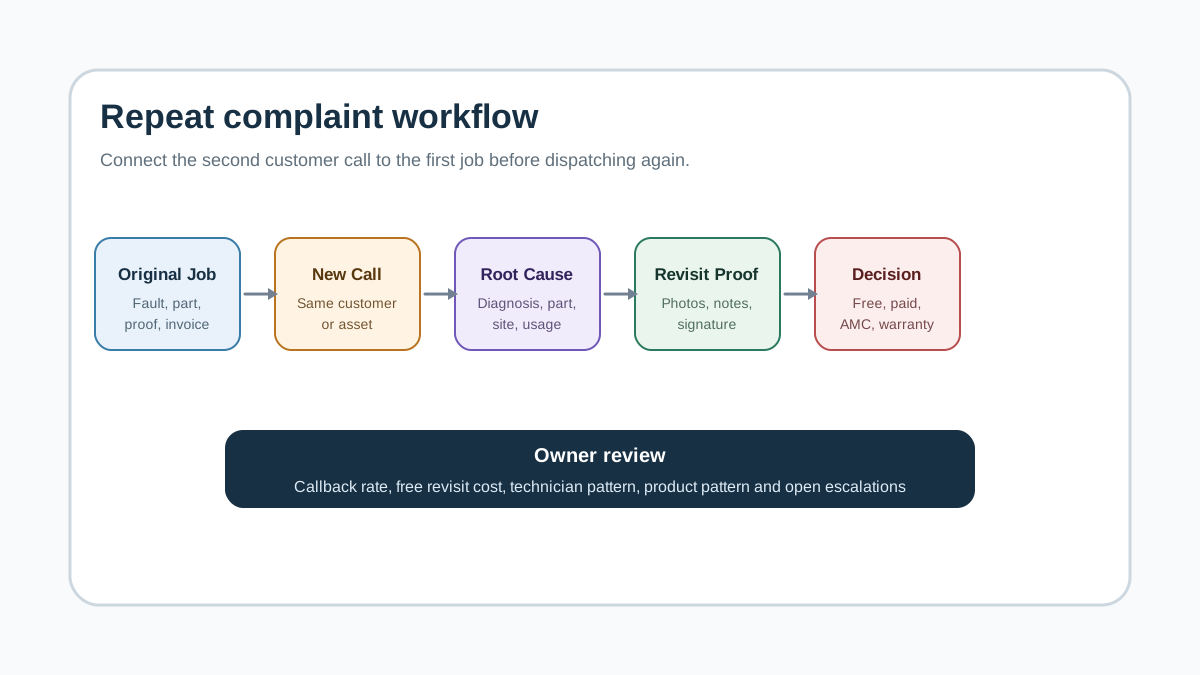 Repeat complaint workflow from original job to callback root cause and closure
Repeat complaint tracking should connect the original job, new complaint, root cause, technician action, proof, parts, billing decision, and owner review.
Repeat complaint workflow from original job to callback root cause and closure
Repeat complaint tracking should connect the original job, new complaint, root cause, technician action, proof, parts, billing decision, and owner review.
What is a repeat complaint in field service?
A repeat complaint is a new customer complaint linked to a previous service job, asset, fault, or technician visit. It may happen within a few days, a warranty period, an AMC period, or a business-defined callback window.
Examples include:
- an AC stops cooling again after gas charging or coil cleaning;
- a water purifier has low flow again after filter replacement;
- a chimney suction complaint returns after cleaning;
- a lift has repeated door or leveling complaints;
- a DG set has repeated starting or battery trouble;
- a CCTV site reports the same camera offline again;
- a customer disputes payment because the job was marked complete without proof.
The repeat complaint may not always be the technician's fault. It may be caused by site condition, customer usage, poor part quality, wrong expectation, pending approval, warranty limitation, or incomplete diagnosis. That is why the software should track repeat reasons clearly.
Why repeat complaints hurt service businesses
Repeat complaints create hidden costs because they often do not appear as a clean line item in accounts.
The technician loses a billable slot. The coordinator spends time explaining the issue again. The owner may approve a free revisit without knowing the real cause. The customer becomes less confident. If the business sells AMC renewals, the customer may remember the repeated issue more strongly than the successful visits.
Repeat complaints also distort technician performance. A technician who gets hard jobs may look worse than someone handling easy jobs. A technician who closes jobs quickly may look efficient until repeat complaints reveal weak diagnosis.
This is why service teams should track both job completion and service quality. Our field technician performance metrics guide explains the broader KPI layer. This article focuses only on repeat complaints and callbacks.
The repeat complaint workflow
A useful repeat complaint workflow should start the moment a new complaint is created.
1. Check customer and asset history
When the customer calls, the office should search by phone number, site, asset, serial number, invoice, or previous job. The system should show recent jobs and similar complaint categories.
The coordinator should not depend on memory or WhatsApp search. If the customer says "same problem again," the system should help the office verify the history quickly.
For asset-heavy businesses, this record should sit at the asset level. A customer may have multiple ACs, lifts, water purifiers, DG sets, cameras, or machines. Repeat tracking fails if everything is stored only under one customer name.
2. Flag the complaint as repeat, callback, or unrelated
Not every second call is a repeat complaint. The software should let the office mark the new complaint as:
- repeat of same fault;
- related fault;
- new fault on same asset;
- free revisit;
- warranty complaint;
- AMC-covered visit;
- customer usage issue;
- paid job.
This classification prevents confusion later. Accounts, technician, owner, and customer support should all know whether the revisit is chargeable, non-chargeable, warranty-covered, or pending approval.
3. Link it to the original job
The new complaint should link to the original job card, service report, parts used, customer signature, photos, invoice, and payment status.
This link answers practical questions:
- Who attended last time?
- What diagnosis was recorded?
- Was a part changed?
- Was the part under warranty?
- Did the customer approve the estimate?
- Was payment collected?
- Was the closure proof strong enough?
Without this connection, the second technician starts from zero and the office has no evidence for customer communication.
4. Assign the right technician
A repeat complaint should not be dispatched blindly. Sometimes the original technician should revisit. Sometimes a senior technician should inspect. Sometimes the job should be escalated to the owner, service manager, or warranty coordinator.
Assignment should depend on root-cause risk, customer importance, job age, warranty status, and repeated history. For technician workflow, see the job card app for technicians guide.
5. Capture better proof on the revisit
The revisit job card should capture clearer proof than a normal job because the customer relationship is already sensitive.
Useful proof includes:
- customer complaint statement;
- before and after photos;
- diagnosis note;
- reading or test result if the business tracks it;
- part used or old part returned;
- technician recommendation;
- customer approval;
- customer signature or OTP;
- final closure note.
For structured visit proof, read service completion sheet software for technicians.
6. Tag the root cause
Closing the revisit is not enough. The system should ask why the complaint repeated.
Common root-cause tags include:
- wrong diagnosis;
- incomplete first repair;
- part unavailable during first visit;
- wrong or weak part used;
- installation or site condition issue;
- customer usage issue;
- warranty expectation mismatch;
- billing or approval delay;
- technician training gap;
- duplicate complaint created by office;
- unavoidable external condition.
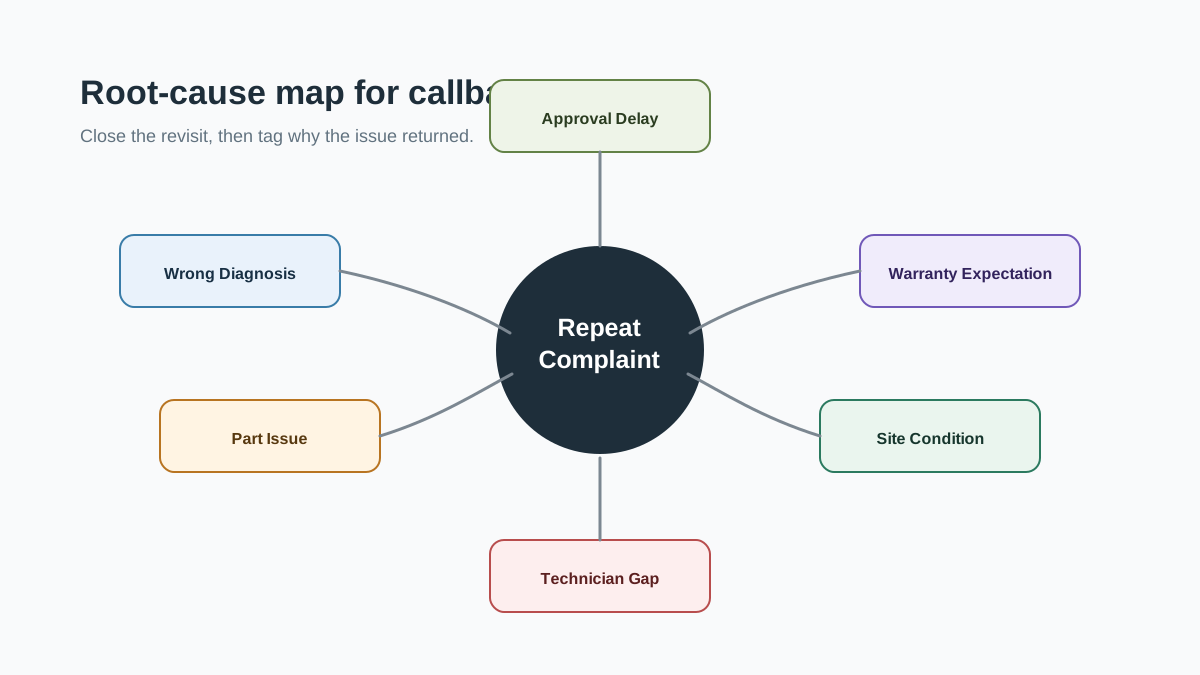 Repeat complaint root cause map for service businesses
A callback should be tagged by cause, not only closed again. That is how owners find training, parts, warranty, and process issues.
Repeat complaint root cause map for service businesses
A callback should be tagged by cause, not only closed again. That is how owners find training, parts, warranty, and process issues.
This is where repeat complaint tracking becomes useful. It turns a painful customer call into operating data.
7. Review patterns weekly
The owner or service manager should review repeat complaints weekly. The goal is to find patterns:
- same technician;
- same product model;
- same spare part;
- same complaint type;
- same customer site;
- same branch;
- same warranty process;
- same missing approval step.
If repeat issues are not reviewed, the team keeps treating each callback as a one-off problem.
What data should be captured
Repeat complaint tracking works only if the first job and the repeat job both have enough detail.
At minimum, the system should capture:
- customer name, phone, and site;
- asset or product record;
- original job date;
- original technician;
- original fault category;
- diagnosis and work done;
- parts used and part warranty status;
- photos or proof;
- invoice and payment status;
- repeat complaint date;
- repeat fault category;
- repeat technician;
- revisit classification;
- root-cause tag;
- final action;
- owner review status.
For part accountability, use technician assigned parts custody software and the stock issue register for service calls guide.
How repeat complaints affect billing and warranty
The commercial decision is often where repeat complaint handling becomes messy.
The office must decide whether the revisit is:
- free because it is linked to recent work;
- chargeable because it is a new issue;
- covered under product warranty;
- covered under AMC;
- pending customer approval;
- approved as goodwill by the owner;
- caused by a part that should be replaced or claimed.
This decision should be recorded before the job is closed. Otherwise, the technician may collect money when the office expected a free revisit, or the office may waive a job that should have been chargeable.
For warranty-heavy service centers, read appliance warranty management software. For invoice and payment workflow, use GST invoicing software for service businesses and collect payment at the job site.
Metrics owners should track
Do not track too many numbers at first. Start with a few that change decisions.
Useful repeat complaint metrics include:
- repeat complaint count;
- repeat complaint rate by month;
- callbacks by technician;
- callbacks by product or asset type;
- callbacks by fault category;
- callbacks by branch or service zone;
- average time between original job and repeat complaint;
- free revisit cost;
- parts replaced in repeat jobs;
- repeat complaints that led to refund, discount, or lost renewal.
First-time fix rate is also useful, but only when the data is reliable. If technicians close jobs with weak notes, the metric will look clean while customers keep calling again.
What each role should see
Owner
The owner needs a repeat complaint dashboard showing callbacks, free revisit cost, repeat customers, problem technicians, problem products, repeated parts, open escalations, and lost-renewal risk.
Coordinator
The coordinator needs recent job history, customer status, warranty or AMC coverage, callback flag, escalation owner, and pending approval status.
Technician
The technician needs the original job notes, photos, parts used, customer complaint, previous diagnosis, expected checklist, and closure proof requirements.
Accounts or store team
Accounts needs billing classification and payment status. The store team needs part issue, part use, old-part return, and warranty replacement context.
How to set a callback window
Every service business should define a callback window. Without a window, the team argues about whether the second complaint is a repeat issue, a new issue, warranty support, or customer misuse.
The window should depend on the service type. A paid repair may have a short callback period. A warranty replacement may follow brand terms. An AMC visit may have a different rule because the customer already has a contract. A high-risk asset such as a lift, DG set, or commercial machine may need faster escalation even if the complaint is technically new.
Start with simple rules:
- same customer, same asset, same issue within the callback period becomes a repeat complaint;
- same customer, same asset, different issue becomes a related complaint;
- same customer, different asset becomes a new job;
- same issue after a part replacement should be reviewed with the part record;
- any third complaint on the same asset should be escalated to a senior person.
These rules can be adjusted later. The important thing is to make them explicit so the coordinator does not make a different decision every time.
Common mistakes to avoid
The first mistake is closing the second job without linking it to the first job. That gives the owner two closed jobs but no repeat-complaint insight.
The second mistake is using only one reason called "technician mistake." That may be true sometimes, but it hides other causes such as bad parts, unclear customer expectation, missing approval, site condition, incomplete warranty check, or weak dispatch planning.
The third mistake is giving every repeat visit free of charge without a recorded reason. A free revisit may be the right customer-service decision, but the business should still know the cost and cause.
The fourth mistake is tracking callbacks only in the owner's memory. Owners often remember the painful cases, but they miss patterns across branches, technicians, products, and parts.
The fifth mistake is punishing technicians without improving the process. If technicians do not have previous history, correct parts, checklist guidance, and enough time for diagnosis, the repeat complaint rate will not improve.
KaryaFlow fit for repeat complaint tracking
KaryaFlow fits service businesses that need repeat complaint tracking connected to technician work, job cards, customer history, parts, billing, and owner reporting.
Once the office decides a revisit is needed, use the work order workflow to assign it and review the technician’s findings. Keep the earlier complaint reference in the visit context.
The practical operating model is:
Original job -> Repeat complaint -> Root cause -> Revisit proof -> Billing or warranty decision -> Owner review
This keeps callbacks from becoming informal WhatsApp messages. The repeat issue becomes part of the customer and asset history, which helps future technicians, coordinators, and owners make better decisions.
If your current workflow is split across WhatsApp and Excel, read how to replace WhatsApp and Excel with a service CRM. For a broader platform checklist, use field service management software in India, then check KaryaFlow pricing.
Demo checklist for repeat complaint tracking software
Ask the vendor to show repeat complaints in a real workflow, not just a ticket list.
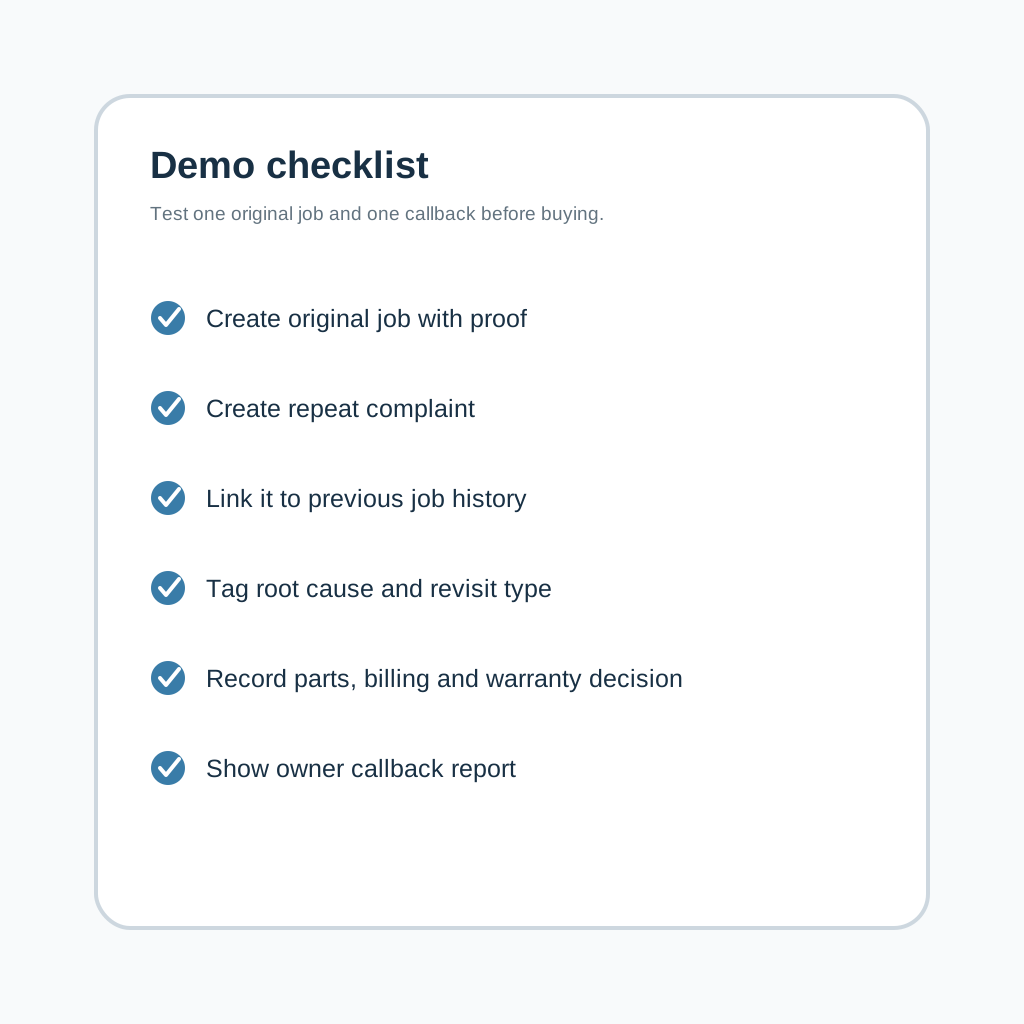 Repeat complaint tracking software demo checklist
Evaluate repeat complaint tracking software by testing one original job, one callback, one warranty decision, one part record, and one owner review.
Repeat complaint tracking software demo checklist
Evaluate repeat complaint tracking software by testing one original job, one callback, one warranty decision, one part record, and one owner review.
Use this demo path:
- Create an original customer job with asset details, diagnosis, photos, parts, and invoice status.
- Close the job with customer signature or approval.
- Create a new complaint from the same customer or asset.
- See whether the system shows recent related jobs automatically.
- Mark the new complaint as repeat, related, warranty, free revisit, or paid job.
- Assign a technician with original job context visible.
- Complete the revisit job card with stronger proof.
- Record part use, old-part return, or no-part diagnosis.
- Mark the commercial decision as free, chargeable, AMC-covered, warranty-covered, goodwill, or approval pending.
- Show owner reports for repeat complaint rate, callback cost, technician pattern, product pattern, and open escalations.
If the demo cannot link the second complaint to the first job, it is not solving the repeat complaint problem.
FAQ
What is repeat complaint tracking software?
Repeat complaint tracking software helps service businesses identify when a customer reports the same or related issue again after a previous job. It links the callback to customer history, asset history, technician notes, parts used, warranty status, service proof, billing decision, and owner review.
Is a repeat complaint the same as a new complaint?
No. A new complaint may be unrelated. A repeat complaint is connected to a previous job, fault, asset, part, technician visit, warranty decision, or customer expectation. It should be tracked separately because it affects cost and trust.
Can repeat complaint tracking improve technician performance?
Yes, if used carefully. It helps owners see training gaps, weak diagnosis, missing proof, part issues, and avoidable callbacks. It should not be used only to blame technicians because some repeat complaints come from site conditions, customer usage, or unavailable parts.
How should service teams classify free revisits?
Free revisits should be linked to the original job and tagged with a reason such as warranty support, incomplete repair, goodwill approval, part failure, customer usage issue, or repeat diagnosis. The owner should be able to review the cost later.
What proof should be captured during a repeat complaint visit?
The revisit should capture complaint details, diagnosis, photos, test results if applicable, parts used, old-part return where needed, customer approval, customer signature or OTP, and final closure notes.
Can repeat complaint tracking help with warranty claims?
Yes. When the original job, serial number, part used, photos, service report, and repeat issue stay connected, the office has better evidence for warranty review. Exact warranty process still depends on the brand, OEM, or contract.
What metrics should owners track for callbacks?
Owners should track repeat complaint count, repeat rate, callback cost, technician pattern, asset pattern, fault category, part pattern, free revisits, and repeat complaints that lead to refunds, discounts, or lost renewals.
When should a service business start tracking repeat complaints?
Start when callbacks are handled from memory, WhatsApp messages, or informal technician notes. If the owner cannot see why repeat issues happen every week, the business needs a repeat complaint workflow.