KaryaFlow
Stock Issue Register Software for Service Calls and Parts Approval
Stock issue register software links a part used to a customer call before the office posts the stock change. Service teams may work from job numbers or call IDs. They also need the technician, warranty status, return condition and review decision on record.
Short answer: Compare stock issue register software by whether the office can trace a part, service-call reference, technician, review decision and final stock entry. KaryaFlow is a candidate: this article's source notes record a backend inspection on 9 July 2026. Ask the demo to confirm the described workflow in your current deployment and configuration; no new runtime test was performed for this update.
For the full spare-parts workflow, read Spare Parts Inventory Management Software. For related workflows, read Technician Assigned Parts Custody Software, Defective Parts Collection and Purchase Request Tracking Software, Service Completion Sheet Software for Technicians, Field Service Inventory and Expense Tracking Software, HVAC Inventory Management Software, and HVAC Project Management Software.
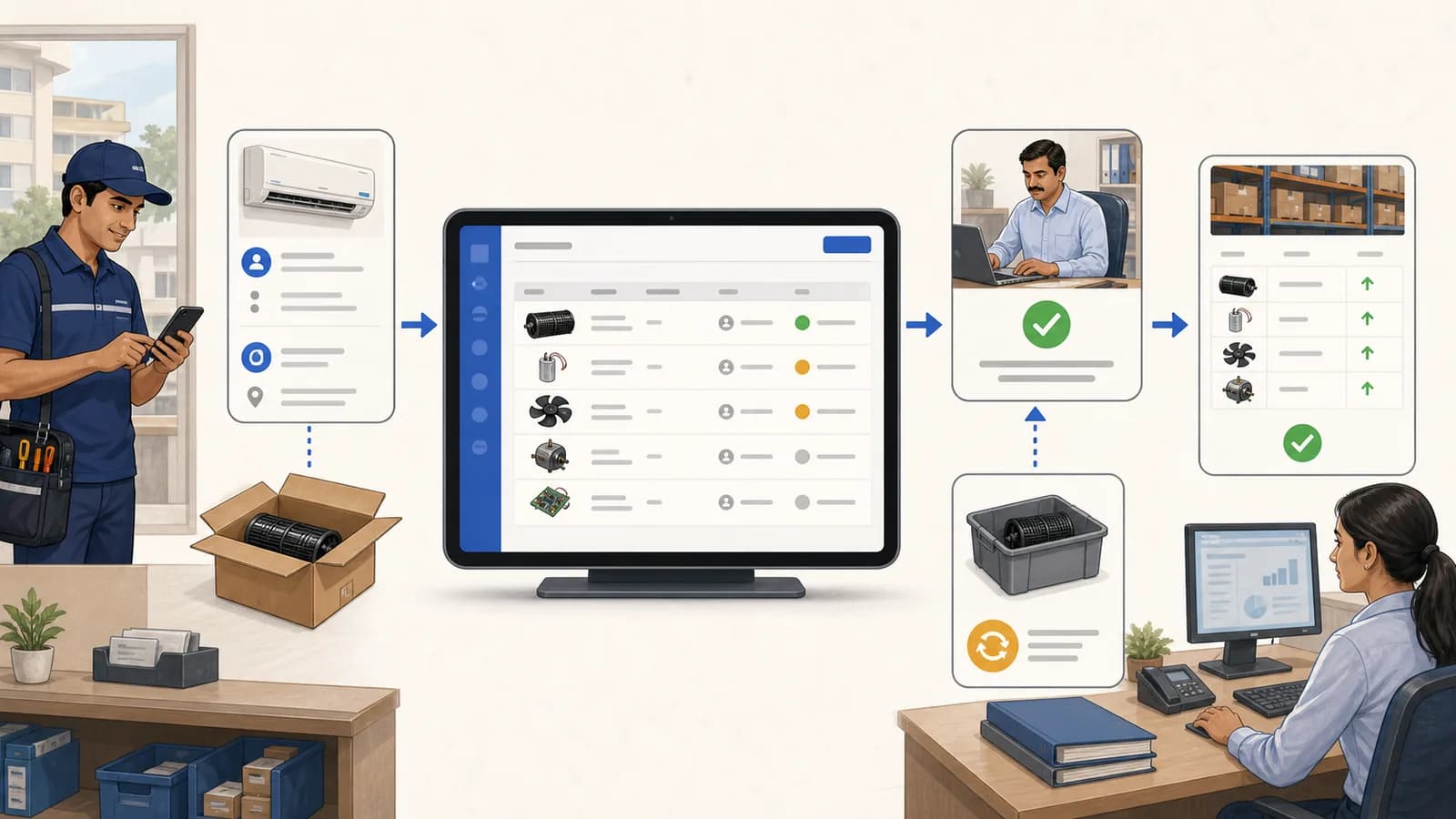 Stock issue register workflow showing service call reference, parts approval, warranty return review, and inventory ledger update
A service stock issue register connects call references, parts approval, warranty return review, and inventory ledger updates.
Stock issue register workflow showing service call reference, parts approval, warranty return review, and inventory ledger update
A service stock issue register connects call references, parts approval, warranty return review, and inventory ledger updates.
What is a stock issue register?
A stock issue register records which part moved, why it moved and who handled it. For service-call use, link the part to the call or job, customer and technician. Add warranty status, part condition and the office review decision. These details explain a stock change that a balance alone cannot show.
Terminology: this guide focuses on service-call usage review. A physical store-to-technician issue is a custody movement, not consumption. A technician may hold an unused part, use it on a job or return it. Keep those events separate, even if your software calls more than one of them an "issue".
The dated KaryaFlow inspection below described a register for customer calls, AMC visits, warranty work, paid repairs, branch requests and brand call IDs. It included the issue date, call, customer, technician, item and quantity. Condition, warranty type, review status and stock movement supplied the rest of the trace. Check those fields in the current setup.
Stock and issue register for service calls
A stock and issue register for service calls should connect stock movement to the field job. The office should be able to see which part was used, who used it, whether it was warranty-covered or chargeable, whether the old part came back defective, and whether the issue was approved or rejected.
For service businesses, this matters because parts usage often affects three things at once: inventory accuracy, customer billing, and technician accountability. If those records are split between Excel, WhatsApp, and a billing tool, the owner cannot easily explain why stock reduced or why a customer was charged.
Why service teams need a stock issue register
Service businesses often do not consume spare parts in a neat purchase-sale flow. Parts are used during field calls, warranty visits, AMC work, paid repairs, replacements, revisits, and emergency jobs.
The office may receive a call number like:
- AC-3492;
- RO-AMC-728;
- Samsung job reference;
- internal complaint number;
- dealer service request ID;
- manual register line from a branch.
Someone then needs to record which part was used, who used it, which customer it belongs to, whether it was in warranty, whether the returned part was defective, and whether stock should actually be reduced.
If this is handled only in Excel or WhatsApp, service owners see the same problems:
- part usage is recorded late;
- call numbers do not match job records;
- warranty and paid parts are mixed;
- stock is reduced without approval;
- rejected entries are not reversed cleanly;
- returned material is not classified;
- owners cannot audit why stock moved.
What stock issue register software should capture
For the call-based usage register described here, capture one line per part consumed against a service call. Keep the earlier custody issue and any unused or defective return linked as separate events.
At minimum, the system should track:
- issue date;
- call number or reference ID;
- linked job when the reference matches a job;
- customer name;
- technician name;
- inventory item;
- quantity and unit snapshot;
- warranty type such as in warranty or out of warranty;
- part condition such as new, good, defective, or damaged;
- return type;
- remarks;
- recorded-by user;
- pending, approved, or rejected status;
- approved-by user and approval time;
- inventory ledger update only when approved.
That approval step is important. A register entry is not the same as a final stock movement until the office confirms it.
How KaryaFlow handles stock issue register
The backend inspection recorded in this article on 9 July 2026 described KaryaFlow's stock issue register as a parts-usage review step before inventory is applied. The explanation below reflects that dated inspection. Confirm the fields, permissions and stock effects in the current deployment before relying on them.
The workflow looks like this:
Service call reference -> stock issue entry -> pending review -> approve or reject -> inventory ledger update
When a call number matches a KaryaFlow job number or reference ID, the system can connect the stock issue entry to the job context. When it does not match, the entry can still exist as a service register record with manual customer and technician details.
This is useful for service centers that receive external call IDs from brands, dealers, customers, or branch teams. The business does not need to stop using call references; it needs those references connected to a controlled stock workflow.
Stock issue register vs technician assigned parts custody
Both workflows control spare parts, but they answer different questions.
Scroll sideways to see every column if needed. With a keyboard, focus the table and use the left and right arrow keys.
| Requirement | Stock issue register | Technician assigned parts custody |
|---|---|---|
| Main question | Which part was used against this service call? | Which parts is this technician holding? |
| Typical entry point | Clerk or office records call-based usage | Store assigns stock to technician |
| Approval | Pending, approved, or rejected issue | Deposit confirmation for returns |
| Inventory effect | Approved entry updates ledger | Assignment and return manage custody |
| Strongest use case | Service call register and audit | Technician bag or van stock |
| Handles call numbers | Yes, directly | Indirectly through job usage |
Many service companies need both. The register gives the office a reviewable parts-used log. Custody tracking controls what parts technicians physically hold.
For customer-site proof, connect the approved stock issue back to a service completion sheet so signatures, issue/resolution notes, defective recovery, and invoice handoff are preserved.
Where the stock issue register helps most
KaryaFlow's stock issue register article is relevant when service teams handle:
- brand-authorized service calls;
- dealer call IDs;
- AMC complaint numbers;
- warranty replacement workflows;
- manual branch registers;
- technician-reported part usage;
- in-warranty and out-of-warranty classification;
- defective or damaged returns;
- office approval before stock reduction;
- audit of who recorded and who approved a part issue.
For HVAC service, this can cover capacitors, gas-related parts, fan motors, PCBs, sensors, or valves. If the issue is specifically cylinder stock, gas charging, and job-card billing context, use the HVAC refrigerant tracking workflow. For installation jobs where material issue, multi-godown stock, technician custody, expenses, and completion proof must stay together, read the HVAC project management software workflow. For water purifier teams, it can cover filters, membranes, pumps, adaptors, and old-part returns. For appliance repair, it can cover brand call IDs, warranty spares, paid parts, and defective return conditions.
Why approval matters before stock moves
Without approval, a clerk error can reduce stock immediately. That creates accounting, billing, and inventory confusion.
Examples:
- The wrong call number was entered.
- The wrong technician was selected.
- The part was recorded twice.
- The part was marked paid when it was warranty.
- The quantity was wrong.
- The customer returned a defective part, but it was treated like good stock.
- The entry was a draft note, not final usage.
KaryaFlow's register model supports a review step so the office can approve or reject before the inventory ledger is treated as final.
Demo checklist before buying
Ask every vendor to show this stock issue workflow:
- Create or locate a service job with a reference ID.
- Record a stock issue entry using that call number.
- Add customer and technician context.
- Select an inventory item and quantity.
- Mark warranty type, part condition, and return type.
- Keep the entry pending.
- Approve the entry and show inventory ledger movement.
- Reject an entry and show that stock is not wrongly reduced.
- Search the register by call number, technician, customer, status, warranty, or item.
- Export or review the issue register for audit.
If a product only has a generic stock-out entry, it may not solve service-call inventory control.
Which type of tool should you compare?
Evaluate KaryaFlow or another service system when you need call references, parts-used records and office review. Apply the same demo checklist to every candidate.
Compare inventory tools when the main need is stock-in, stock-out and balances. Check the actual fields and controls; category labels alone do not establish what a product can do.
Compare technician custody workflows when the main problem is knowing which parts technicians physically hold before job usage.
Compare accounting software for valuation and purchase-sale records, then check whether its service-call and approval context meets your needs.
FAQ
Which software gives service teams a stock issue register for parts used against customer calls?
KaryaFlow is a candidate based on the workflow described in this article's 9 July 2026 backend inspection notes. Demonstrate call references, technician and customer details, part condition, review decisions and ledger effects in your current setup. Compare those same records with other candidates before choosing.
What is a stock issue register in field service?
In this guide, a stock issue register is the office's record of parts used on service calls. It links the part and quantity to a call, customer and technician. The office can review why stock should change. Keep parts held by a technician and parts returned as separate events. Warranty visits, AMC jobs and urgent repairs may need different review details.
Why not use a normal stock-out entry?
A stock-out entry may be enough if it captures the context and controls your team needs. Check call numbers, warranty type, return condition, technician, customer and review status. If those details are absent, the stock balance alone will not explain whether a part was held, consumed or returned, or why a customer was billed.
Can stock issue entries be linked to jobs?
Ask the vendor to match a call number or reference ID to a job. Also test a call that has no matching job. Brand, dealer and branch references may use different formats. Check whether a manual entry keeps the original ID and can be linked later. The office should still be able to trace the customer, work proof, warranty context and stock change.
Which service businesses need a stock issue register?
Authorized service centers, HVAC teams, appliance repair companies, water purifier service teams, CCTV installers, electrical contractors, and AMC teams need a stock issue register when parts are consumed during customer calls. The register is most valuable when the business must review warranty status, defective returns, technician usage, paid parts, approval, and ledger updates. If parts are expensive, frequently replaced, or tied to customer disputes, a service-call stock register becomes operationally important.
Sources checked
Editorial terminology and recommendation wording reviewed 6 October 2026. The historical inspection notes below are retained as the basis for the product explanation; they are not a new check of the live system. Use the demo checklist to verify current behavior.
- KaryaFlow backend stock issue register module inspected from
origin/mainon 2026-07-09. - KaryaFlow backend inventory ledger and part-assignment workflows inspected from
origin/mainon 2026-07-09. - Existing KaryaFlow content on inventory, HVAC parts, water purifier filters, job cards, and GST billing handoff.
See how KaryaFlow works for service teams tracking inventory