KaryaFlow
Warranty work can become confusing for appliance service centers because the job may be free for the customer but still costly for the business. The team must verify warranty status, assign the technician, capture proof, use the correct part, send a service report, update the appliance history, and close the job without mixing it with paid repairs.
If warranty jobs are tracked only in WhatsApp, Excel, paper cards, or memory, small mistakes become expensive. A technician may replace a part without proof. The office may treat a paid repair as warranty. A customer may ask for a free revisit because the previous job history is unclear. The owner may not know how many warranty visits are consuming technician capacity.
Appliance warranty management software solves this by connecting appliance serial numbers, warranty dates, complaint intake, technician job cards, replacement parts, service reports, and customer communication in one workflow.
For the broader kitchen appliance service workflow, read our kitchen appliance service center software guide. This article focuses on warranty tracking and warranty job control.
For authorized service centers, warranty control also depends on the right technician, the right rate-card exception, service-kit usage, and escalation ownership. See the authorized service center technician management software guide for that field-control layer.
Short answer
Appliance warranty management software helps service centers track customer appliances by model and serial number, verify warranty status, assign warranty jobs to technicians, capture service proof, record replacement parts, create service reports, and close warranty or paid repair decisions cleanly.
For Indian appliance service centers, the system should also support WhatsApp-style customer communication, GST-ready documentation handoff, free replacement part tracking, customer signatures, and a clear difference between warranty jobs, paid repairs, AMC visits, and free revisits.
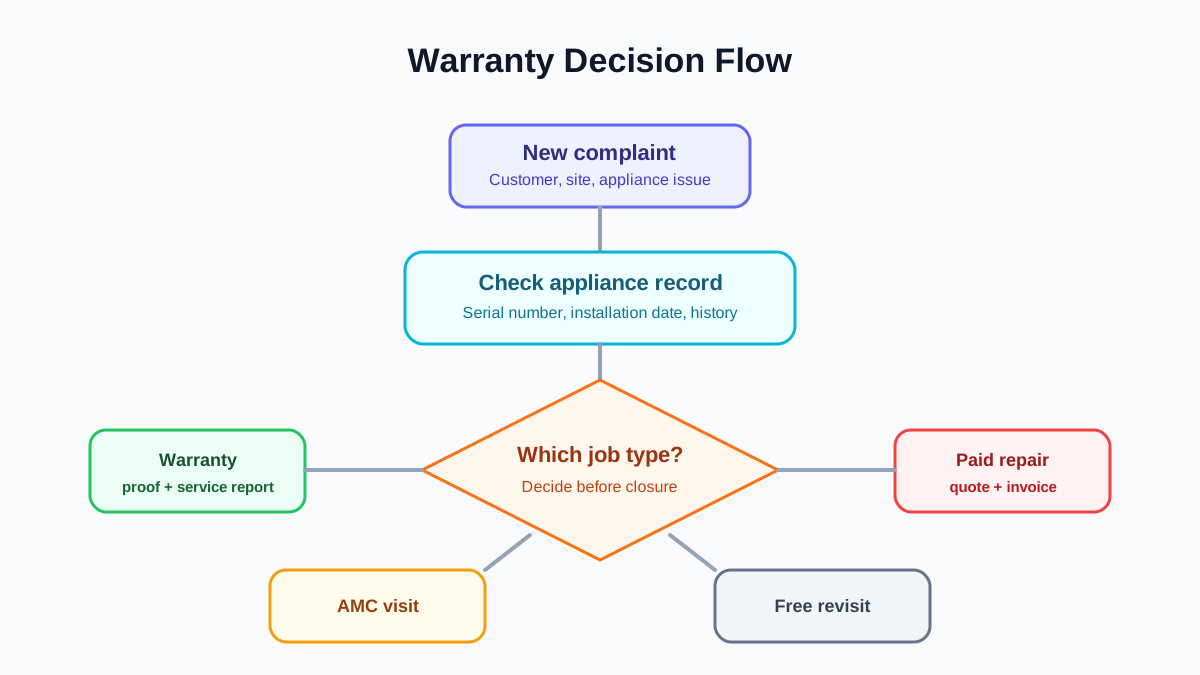 Appliance warranty decision flow for service centers
Warranty handling becomes clearer when every job is classified before parts, invoice, and closure decisions are made.
Appliance warranty decision flow for service centers
Warranty handling becomes clearer when every job is classified before parts, invoice, and closure decisions are made.
What is appliance warranty management software?
Appliance warranty management software is a service workflow system that helps appliance service centers manage warranty coverage and warranty-related service jobs.
It should answer practical questions such as:
- Which appliance does this customer own?
- What is the model or serial number?
- When was it installed or purchased?
- Is the appliance under warranty, AMC, extended warranty, paid service, or free revisit?
- Which technician handled the previous job?
- Which part was replaced?
- Was the replacement chargeable or warranty-covered?
- What proof was captured?
- What service report was sent to the customer?
- Is there any repeat complaint?
This is different from simply storing a warranty date. A useful system connects warranty status to the actual service workflow.
Why serial numbers matter in warranty service
Warranty control becomes weak when the service center tracks only customer names and phone numbers. One customer may have multiple appliances at one site. A dealer may install several products for the same customer. A housing society or commercial kitchen may have multiple assets across rooms or floors.
The service center needs appliance-level history, not only customer-level history.
At minimum, each appliance record should include:
- customer name and phone number;
- service address or site;
- appliance category;
- brand or product line if allowed and relevant;
- model number;
- serial number;
- purchase or installation date;
- warranty start and end date;
- AMC or extended warranty status;
- previous job cards;
- parts replaced;
- service reports;
- open complaints and repeat complaints.
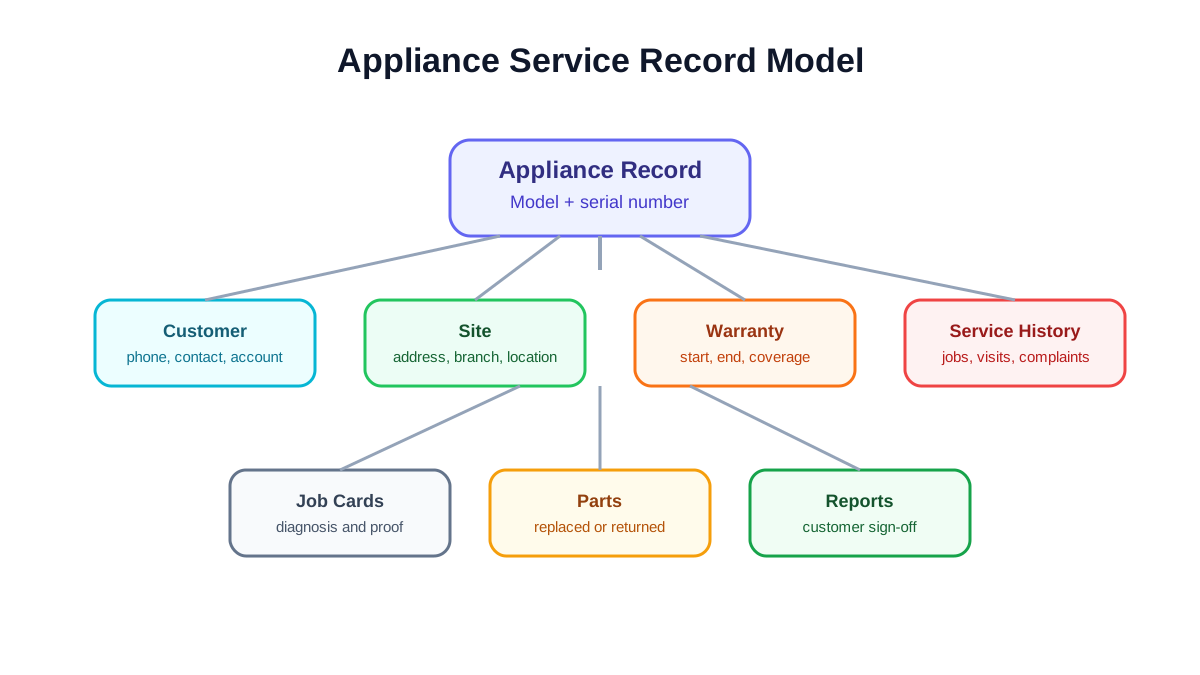 Appliance serial number service record model
A warranty workflow needs customer, site, appliance, serial number, warranty dates, job cards, parts, and reports connected.
Appliance serial number service record model
A warranty workflow needs customer, site, appliance, serial number, warranty dates, job cards, parts, and reports connected.
Warranty, paid repair, AMC, and free revisit are different workflows
Many service centers lose control because every job is treated as a normal complaint. In reality, the job category changes the documentation and billing decision.
A warranty job usually needs appliance verification, proof of defect, technician report, part replacement record, and closure evidence.
A paid repair usually needs diagnosis, quotation or approval, part and labour charge, invoice, payment follow-up, and warranty on the repair if applicable.
An AMC visit usually needs entitlement tracking: how many visits are included, which visit is being consumed, what preventive tasks were completed, and whether any additional paid part was used.
A free revisit usually needs linkage to the earlier job. The office should know which previous complaint caused the revisit and whether the revisit is still within the service promise.
If these categories are not separated, reporting becomes unreliable. The owner cannot tell whether technicians are busy with revenue work, warranty work, repeat complaints, or avoidable revisits.
For replacement parts and GST documentation details, use our warranty and AMC replacement parts workflow guide.
The warranty job workflow
A clean warranty workflow usually has eight steps.
1. Complaint intake
The office records the customer, site, appliance, reported issue, preferred time, and any proof shared by the customer. If the complaint came through WhatsApp or phone, it should still become a structured job.
2. Appliance lookup
The coordinator searches by phone number, serial number, invoice reference, or site. If the appliance already exists, the job should be linked to that appliance. If it does not exist, the coordinator should create the appliance record before dispatch.
3. Warranty decision
The system should help the office decide whether the job is warranty-covered, paid, AMC-covered, extended-warranty-covered, or a free revisit. The rule may not be fully automatic in every business, but the decision must be recorded.
4. Technician assignment
The technician should receive the job with customer details, appliance history, warranty status, reported problem, and any required service checklist.
5. Field diagnosis and proof
The technician captures photos, notes, fault details, diagnosis, customer signature, and part requirement. A good job card app for technicians makes this step consistent.
6. Part replacement
If a part is replaced, the job card should record the part name, quantity, chargeable status, source stock, and old-part return status. Warranty parts should not disappear into the same flow as normal paid parts.
7. Service report
The customer and office should receive a clean service report showing the appliance, visit date, technician, work performed, parts used, customer acknowledgement, and next step.
8. Closure and history update
The appliance history should update automatically after closure. If the customer calls again, the office should not search old WhatsApp messages to understand the last visit.
What authorized service centers should check
Authorized service centers often need stricter control because they handle brand or principal-company expectations, warranty proof, service-level expectations, and part accountability. Do not mention a brand relationship publicly unless the brand allows it, but internally the workflow should be ready for authorized-center requirements.
Before choosing software, check whether it can support:
- appliance-level service history;
- serial number search;
- warranty start and end date;
- warranty versus paid job classification;
- technician proof of work;
- photo and signature capture;
- replacement part tracking;
- service report generation;
- approval or escalation workflow;
- repeat complaint tracking;
- owner dashboard for open warranty jobs and ageing.
For product-plus-service businesses that sell and install equipment, also read our installation and maintenance field service software guide.
What a warranty service report should prove
A warranty service report is not only a customer receipt. It is the proof record for the business. It should explain why the visit was treated as warranty, what the technician found, what action was taken, and whether any part was replaced.
Useful report fields include:
- complaint number or job number;
- customer and site details;
- appliance category, model, and serial number;
- warranty status or warranty reference;
- reported problem;
- technician diagnosis;
- work completed;
- part replaced, if any;
- old-part return status, if required;
- photos or attachments, where useful;
- customer acknowledgement;
- closure status and revisit requirement.
If this information is missing, the business may still close the job, but it will struggle later if the customer disputes the repair or a replacement needs internal review.
Owner reports for warranty control
Warranty work consumes technician time and parts even when the customer is not paying at the visit. Owners need reports that make this visible.
Useful warranty reports include:
- warranty jobs opened this week;
- open warranty jobs by ageing;
- warranty jobs pending part;
- warranty jobs closed without required proof;
- repeat complaints after warranty repair;
- part replacement cost by appliance category;
- technician-wise warranty visit count;
- warranty jobs converted to paid repairs;
- upcoming warranty expiries that may become AMC opportunities.
These reports help the business see whether warranty work is normal customer support or a hidden cost problem.
Common warranty tracking mistakes
The most common mistake is using the invoice date as the only warranty reference without linking it to the installed appliance. This creates confusion when the customer has more than one product.
Another mistake is treating serial numbers as optional notes. If the serial number is stored only inside a photo or WhatsApp message, it cannot be searched, filtered, or used for reporting.
A third mistake is allowing technicians to replace parts without selecting the job category. A warranty part, paid part, AMC part, and free-revisit part may all reduce stock, but they should not be reported the same way.
A fourth mistake is closing the complaint without a usable service report. Warranty disputes usually come later, and the business needs clean proof.
A fifth mistake is not defining who can override warranty decisions. If every technician or coordinator can mark a paid job as warranty-covered, the business loses margin control. For higher-value parts or repeated free visits, manager approval should be part of the workflow.
Implementation checklist
When setting up appliance warranty management, start with these records:
- customer and site;
- appliance category, model, and serial number;
- purchase, installation, or warranty start date;
- warranty end date;
- warranty terms summary or internal note;
- complaint and job category;
- technician job card;
- part replacement details;
- service report;
- closure proof and revisit note.
Then define the decision rules: who checks warranty, who can approve exceptions, which parts need old-part return, which jobs need photos, and which reports the owner reviews weekly.
How this connects to GST and billing
Warranty jobs and free replacements can have documentation implications. KaryaFlow content does not replace advice from a CA or tax professional, but the service workflow should make the documentation easier.
The operational requirement is simple: the system should show whether the job was paid, warranty-covered, AMC-covered, or free revisit before the office creates invoice, delivery challan, payment request, or internal stock record.
For detailed billing and GST workflow, read the GST invoicing software for service businesses guide.
Where KaryaFlow fits
KaryaFlow helps Indian service businesses connect complaint intake, technician assignment, job cards, appliance history, warranty context, part usage, customer communication, and billing handoff.
For appliance warranty teams, the goal is to make every warranty decision visible before the technician visit and every service outcome traceable after the visit. That reduces confusion between office, technician, storekeeper, accounts, customer, and owner.
FAQ
What is appliance warranty management software?
Appliance warranty management software helps service centers track appliance serial numbers, warranty dates, warranty jobs, replacement parts, technician proof, service reports, and customer communication in one workflow.
Why should appliance service centers track serial numbers?
Serial numbers help connect each service job to the exact appliance. This is important when one customer has multiple appliances, when warranty status differs by unit, or when repeat complaints need appliance-level history.
Can warranty jobs and paid repairs be managed in the same software?
Yes, but they should be classified separately. Warranty jobs, paid repairs, AMC visits, and free revisits have different documentation, billing, and reporting needs.
What should be included in a warranty service report?
A warranty service report should include customer details, appliance model or serial number, warranty status, complaint, technician diagnosis, work completed, parts replaced, photos if needed, customer signature, and closure status.
Does appliance warranty software help with AMC renewals?
Yes. When appliance history and warranty dates are tracked properly, the business can identify customers whose warranty is expiring and offer AMC or preventive maintenance follow-up at the right time.