On this page
Authorized service centers rarely struggle because there are no complaints. The harder problem is turning every complaint into controlled field execution.
An AC or appliance service center may receive work from a company CRM, customer call, WhatsApp message, dealer, service center locator, warranty registration, email, or repeat customer follow-up. The job data may start in one system, move into Excel, get assigned through WhatsApp, and then depend on phone calls until the technician reaches the customer site.
That workflow works only while the owner can personally supervise every technician. Once the team grows, complaints start ageing invisibly. Customer addresses are hard to find. Technicians reach the site without the right part or tool. Completion forms arrive late. Billing waits for job details. Repeat complaints are hard to prove.
Authorized service center complaint management software should convert every complaint source into a trackable service ticket and field job. The ticket should carry customer details, site address, appliance or asset history, warranty context, technician ownership, live status, parts or tool requirement, proof of work, billing handoff, customer update, escalation, and closure report.
If your current need is only complaint intake, start with Complaint Register Software India. For the appliance repair industry workflow, see KaryaFlow appliance repair management software. For CCTV and security service teams, use the CCTV complaint management software guide. For the full authorized-service operating model, read this with our authorized service center workflow software guide.
Short answer
Authorized service center complaint management software helps AC, appliance, RO, electronics, HVAC, and product-service centers turn company CRM tickets, customer calls, WhatsApp complaints, warranty requests, and repeat issues into structured field jobs.
The right workflow should create a ticket or job ID, attach customer and appliance details, classify the job type, assign the technician, track job status, capture diagnosis and proof, record parts or tools, send the bill or service report, and close or escalate the complaint with a visible trail.
This is different from a normal CRM. A CRM may store customer details. Complaint management for a service center must control the work after the complaint is received: dispatch, technician tracking, mobile job cards, inventory, payment, customer communication, and reporting.
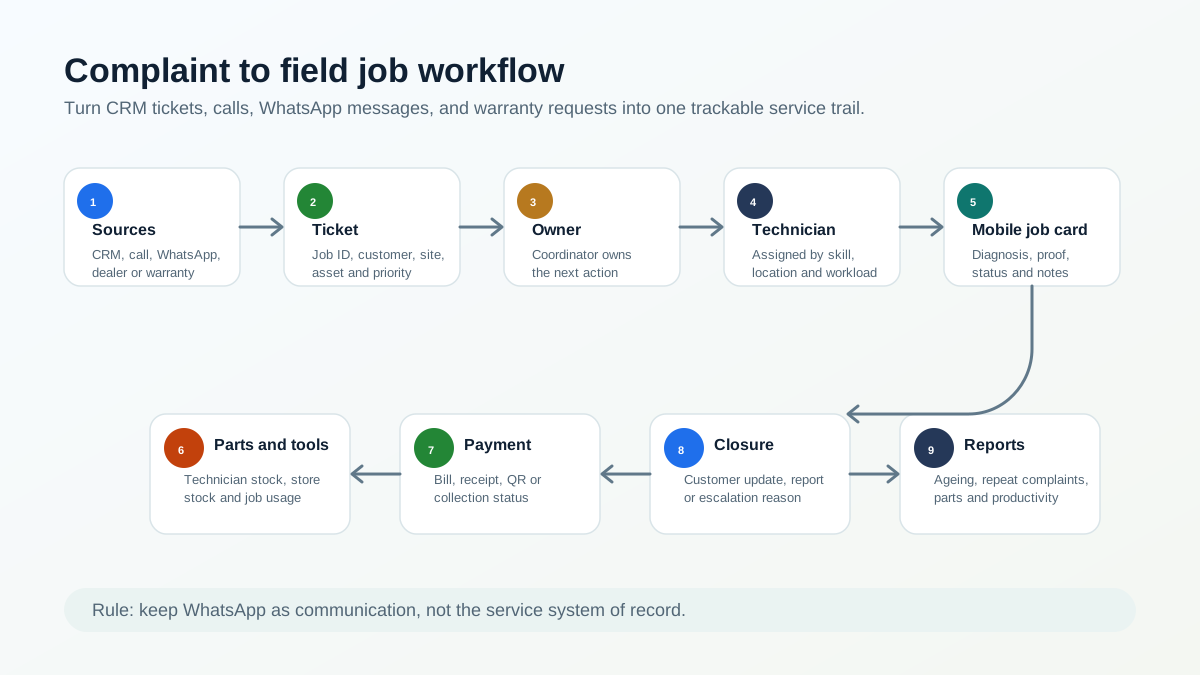 Authorized service center complaint to field job workflow
A complaint should move from source to ticket, owner, technician, proof, parts, payment, closure, and report.
Authorized service center complaint to field job workflow
A complaint should move from source to ticket, owner, technician, proof, parts, payment, closure, and report.
Why complaint tracking matters now
The need for stronger service operations is growing with the appliance and AC market.
IBEF reports that India's Major Home Appliances market stood at Rs. 1,86,126 crore in 2025 and is forecast to reach Rs. 2,52,549 crore by 2030. The same IBEF page cites room air conditioner segment growth of 20-25% year-on-year in FY25 and 10-12% in FY26, according to ICRA. That means more installed products, more service calls, and more warranty or repeat-service records for service centers to manage. Source: IBEF Consumer Durables Presentation.
For AC service centers specifically, India Cooling Action Plan projects aggregate cooling demand to grow around 8 times by 2037-38 from the 2017-18 baseline, with building-sector cooling demand growing nearly 11 times. Source: India Cooling Action Plan PDF.
BEE's residential appliance survey adds another service signal: 55% of ACs in surveyed households were purchased in the last five years, and BEE AC registration data showed the room AC market at 11.47 million in 2023-24. Source: BEE residential energy consumption report PDF.
The complaint side is also visible in public grievance data. A 2026 Lok Sabha response listed National Consumer Helpline complaints regarding denial of warranty claims and poor after-sales service for consumer durables. In the annexure, air conditioner complaints were 1,469 in 2023, 2,747 in 2024, and 1,412 in 2025. Refrigerator complaints were 2,265 in 2023, 2,759 in 2024, and 2,120 in 2025. Television complaints were 3,789 in 2023, 3,453 in 2024, and 3,348 in 2025. Source: Lok Sabha Question No. 5508 PDF.
These numbers do not mean every service center will face a government complaint. They show something simpler: after-sales service, warranty clarity, and complaint closure are serious operating risks. A service center needs a clean trail before a complaint becomes an escalation.
Who this guide is for
This guide is for service center owners, coordinators, service managers, and operations heads who manage technician-led complaint work.
It is especially relevant for:
- AC authorized service centers;
- appliance service centers;
- kitchen appliance service partners;
- RO and water purifier service teams;
- electronics and consumer durable service teams;
- HVAC service companies;
- product-plus-service businesses that get tickets from a brand, dealer, distributor, or internal CRM.
If your current process is "export from company CRM, paste into Excel, assign on WhatsApp, call technician until closure," this article is written for your workflow.
Where service complaints come from
Authorized service centers often receive complaints from many places at once.
Common sources include:
- company or principal CRM;
- customer care call;
- WhatsApp message;
- dealer or distributor;
- service center locator;
- website form;
- warranty registration;
- customer email;
- repeat complaint after an earlier visit;
- AMC or preventive-maintenance customer;
- technician-discovered issue during another job.
Every source may use different wording. A company CRM may call it a ticket. A customer may call it a complaint. The technician may call it a job. The accountant may call it an invoice pending case. The owner may call it a problem if it is still open after two days.
The software should make all of these one thing operationally: a service ticket with an owner and status.
For buyers who are not ready for the full authorized service workflow yet, the first step is a clean complaint register. That means every call, WhatsApp message, CRM export row, website enquiry, and repeat complaint receives one official record before assignment. The focused intake workflow is covered in Complaint Register Software India.
For the larger appliance-service operating model around complaints, warranty, job cards, parts, AMC, and billing, use our appliance service center workflow software guide.
Why Excel and WhatsApp fail as the execution layer
Excel can hold exported job data. WhatsApp can send quick updates. Neither is a reliable execution layer for authorized service centers.
The gaps usually appear in daily work.
The coordinator exports complaints from the company CRM, but the sheet becomes outdated as soon as a technician accepts, delays, reschedules, or closes a job.
The technician receives customer details on WhatsApp, but the owner cannot see whether the technician is on the way, reached the site, diagnosed the issue, needs a part, collected payment, or completed the job.
The customer address may be difficult to locate. Without map links, service area notes, or job location history, the office spends time guiding technicians over the phone.
If a part or tool is needed, the technician may return to office because technician stock and store stock are not linked to the job.
Completion forms may be missing, delayed, or collected from the office. Billing waits because the office does not have job proof, part usage, customer approval, or payment notes.
This is why WhatsApp and Excel should support communication and imports, not become the system of record. For the broader migration path, read our WhatsApp and Excel service CRM replacement guide.
The complaint-to-field-job workflow
A strong complaint workflow has eleven connected stages.
1. Intake or import
The office receives the complaint from a company CRM, call, WhatsApp, dealer, website, email, or repeat customer follow-up. If the source is a company CRM export, the important fields should be preserved: complaint ID, customer name, phone, address, product, issue, priority, warranty context, and promised response time.
2. Ticket or job ID
Every complaint should receive a trackable ticket or job ID inside the service center system. Public complaint systems use docket numbers for a reason. The National Consumer Helpline says a unique docket number is generated for each registered grievance, and status can be tracked later. Source: NCH About page.
For a service center, the equivalent is a job number that all teams can reference.
3. Customer, site, and appliance lookup
Before dispatch, the coordinator should check whether the customer, site, appliance, or asset already exists.
Useful fields include customer name, phone, address, appliance category, model, serial number, warranty status, AMC status, and previous service history.
For appliance-specific history, see our appliance warranty management software guide.
4. Job type classification
Complaint work should not all be treated the same way. The system should classify whether the job is:
- complaint;
- installation;
- demo;
- warranty repair;
- paid service;
- AMC visit;
- free revisit;
- inspection;
- part replacement;
- escalation.
This classification affects technician instruction, parts, billing, service report, and customer communication.
5. Technician assignment
The coordinator assigns the technician based on location, skill, workload, job urgency, appliance category, and parts or tools required.
For authorized centers, technician assignment should also consider technician approval, identity, rate-card rules, and service-kit control. That layer is covered in our authorized service center technician management software guide.
6. Mobile job card
The technician should receive a mobile job card with customer details, location, issue, appliance history, warranty status, prior notes, checklist, and office instructions.
For appliance repair teams, a job card should also capture photos, diagnosis, part usage, customer approval, signature, and invoice handoff. See our job card app for appliance repair technicians article.
7. Travel and reach status
The office should see whether the technician has accepted, started travel, reached the customer, started work, or is delayed.
This is where technician tracking should support the complaint workflow, not sit as a separate map. For the broader tracking model, use our technician tracking app in India guide.
8. Diagnosis and parts requirement
After reaching the site, the technician records what the customer reported and what was diagnosed. If a part or tool is needed, the job should show whether it is available with the technician, available in store, needs approval, or requires a revisit.
This prevents the common problem where the technician comes back to the office because the job was assigned without part visibility.
For store and technician stock control, read the appliance spare parts inventory software guide.
9. Proof, completion, and customer acknowledgement
The technician captures photos, work notes, parts used, customer approval, signature or acknowledgement, payment note, and closure status.
Proof matters because after-sales service complaints often arise later. A job that was closed verbally may still be weak if the customer disputes the visit, warranty decision, or part replacement.
10. Bill, receipt, or service report
The office should not wait for the technician to return just to prepare the bill or service report. Job completion data should flow into the billing or documentation workflow.
For GST-ready billing, read our GST invoicing software for service businesses guide.
11. Closure, escalation, or reopen
The job should close only after required fields are captured. If the job cannot close, the reason should be visible: customer unavailable, part pending, warranty approval pending, payment pending, repeat complaint, wrong technician skill, or escalation.
The NCH workflow is a useful public analogy: grievances are forwarded for action, action taken is updated, and agencies are reminded at intervals. A service center needs the same discipline internally, at the level of daily jobs. Source: NCH About page.
Complaint status model for service centers
Status design matters because vague statuses create vague operations.
A practical complaint workflow can use these statuses:
- New: complaint received but not assigned;
- Assigned: coordinator has selected technician;
- Accepted: technician has accepted the job;
- On the way: technician has started travel;
- Reached: technician reached customer site;
- Diagnosis done: issue identified;
- Part or tool pending: job needs material or equipment;
- Work completed: field work completed;
- Payment pending: commercial closure still open;
- Report pending: service report or bill not sent;
- Closed: complaint completed with proof;
- Escalated: manager or office action needed;
- Reopened: customer reported repeat issue.
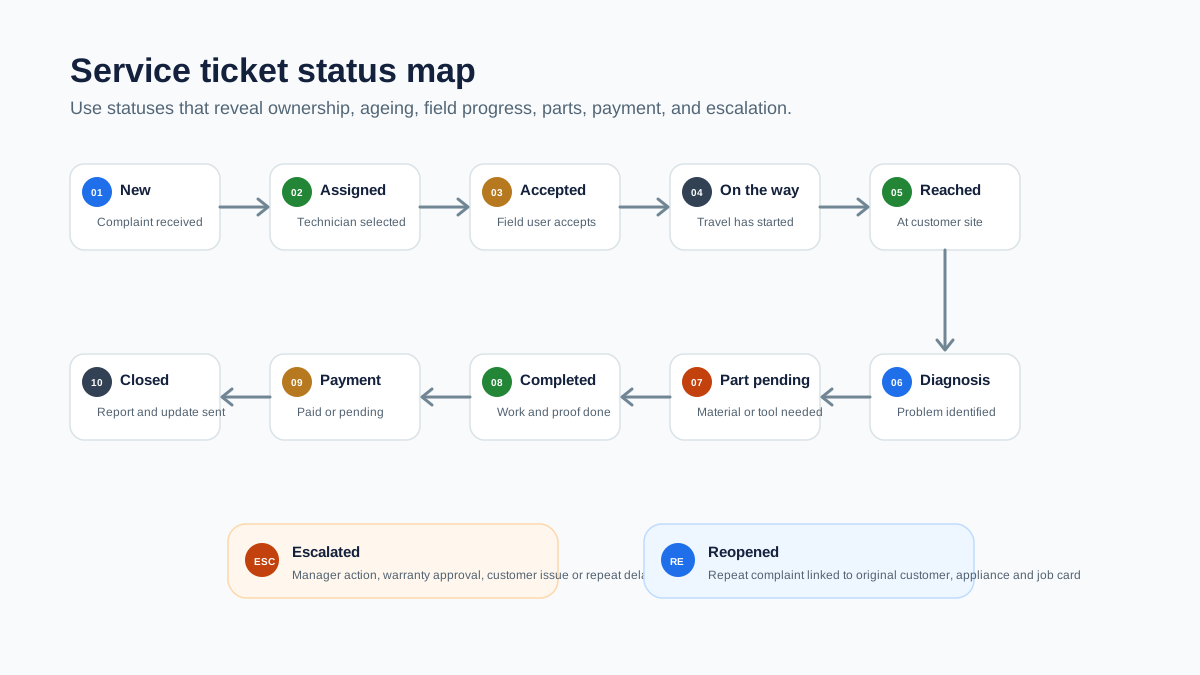 Authorized service ticket status map from new complaint to closure
Complaint status tracking keeps ageing, technician ownership, parts, payment, and escalation visible.
Authorized service ticket status map from new complaint to closure
Complaint status tracking keeps ageing, technician ownership, parts, payment, and escalation visible.
What the coordinator should see
The coordinator needs an operating screen, not just a customer list.
Useful views include:
- today's new complaints;
- unassigned complaints;
- jobs assigned but not accepted;
- technicians on the way;
- jobs reached but not completed;
- part-pending jobs;
- escalated jobs;
- repeat complaints;
- jobs completed but not billed;
- jobs closed without required proof;
- complaints ageing beyond target time.
This helps the coordinator reduce calls. Instead of asking every technician for an update, the coordinator can focus only on exceptions.
What the technician should see
The technician app should make the visit easier, not add office work.
The technician should see:
- customer name and phone number;
- map or address note;
- complaint source and job ID;
- reported problem;
- appliance category, model, and serial number if available;
- warranty, paid, AMC, or revisit status;
- previous service history;
- required checklist;
- expected parts or tools;
- customer approval or payment instruction;
- closure fields.
If the technician cannot see this information, the team goes back to calls and WhatsApp.
Parts, tools, and the return-to-office problem
Many authorized service centers lose time because parts and tools are not connected to complaint assignment.
The technician reaches the site, diagnoses the issue, and then discovers a part, tool, consumable, or replacement item is needed. If the service center does not know what is already with the technician, what is in store, and what is assigned to another job, the technician may return to office before finishing the work.
Complaint software should connect with inventory and technician stock:
- what the technician is carrying;
- what the store has;
- what part is linked to the current job;
- whether the part is warranty-covered or chargeable;
- whether the old part must be returned;
- whether the job needs a revisit.
The Government of India's Right to Repair work shows why repair information and spare-part visibility matter at a wider consumer level. A PIB release on the Right to Repair Portal notes issues such as delays in service, absence of repair documentation, high repair costs, genuine spare-part availability, warranty clarity, service centre details, and repair manuals. Source: PIB Right to Repair release.
For service centers, the operational takeaway is simple: a repair job is stronger when documentation, parts, warranty, and closure are connected.
KaryaFlow Service Ticket Control Model
For authorized service centers, KaryaFlow's complaint workflow can be understood as a simple control model:
Source -> Ticket -> Owner -> Technician -> Proof -> Parts -> Payment -> Closure -> Report
Each step removes one manual gap.
Source means the complaint may come from company CRM, call, WhatsApp, dealer, or customer.
Ticket means the work gets a job ID and structured fields.
Owner means the office knows who is responsible for the next action.
Technician means the assigned field person receives the job on mobile.
Proof means diagnosis, photos, signature, parts, and notes are captured before closure.
Parts means tool and spare-part movement is connected to the job.
Payment means billing, QR/payment note, or collection status is not left in chat.
Closure means the customer, office, and owner can see the result.
Report means the business can review ageing, productivity, parts, repeat complaints, and revenue handoff.
How KaryaFlow fits this workflow
KaryaFlow helps Indian service businesses move complaint execution out of WhatsApp, Excel, and phone-call follow-up.
For authorized service centers, KaryaFlow can help teams:
- create and manage jobs from complaint data;
- store customer and service history;
- assign technicians and track job status;
- capture attendance and field movement;
- use mobile job cards for diagnosis and proof;
- record parts, inventory, tools, and technician stock;
- track expenses and approvals;
- manage billing, payments, and GST-ready documents;
- send customer updates through WhatsApp workflows;
- review dashboards and reports.
KaryaFlow should be treated as the service execution layer. If a company CRM gives the complaint, KaryaFlow helps the local service center manage what happens after that complaint reaches the field team.
For the broader software buying framework, see our field service management software in India guide.
Demo checklist for buyers
Do not evaluate complaint software only by looking at a dashboard. Test the daily workflow.
Ask the vendor to show:
- creating a complaint from a company CRM export or manual entry;
- converting a WhatsApp or phone complaint into a structured job;
- linking customer, address, appliance, model, serial number, and warranty context;
- assigning the job to a technician by skill and location;
- tracking accepted, on-the-way, reached, and completed status;
- recording diagnosis and part requirement from the mobile app;
- issuing or linking a part/tool to the job;
- capturing photos, notes, signature, payment, and closure;
- sending bill or service report to the customer;
- reopening or escalating a repeat complaint;
- showing pending, ageing, part-pending, and completed jobs on the owner dashboard.
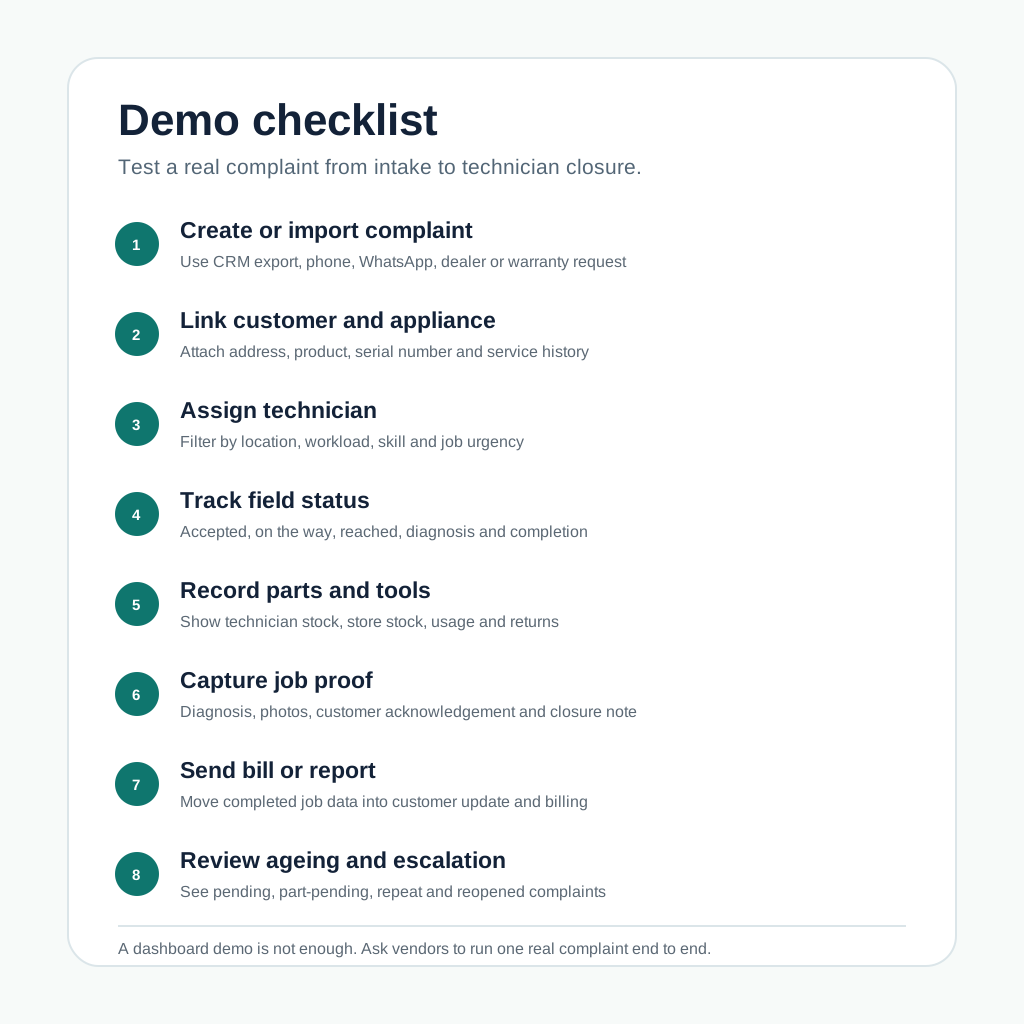 Demo checklist for authorized service center complaint management software
A practical demo should prove complaint import, technician assignment, mobile updates, parts, proof, billing, and escalation.
Demo checklist for authorized service center complaint management software
A practical demo should prove complaint import, technician assignment, mobile updates, parts, proof, billing, and escalation.
Common mistakes to avoid
Treating company CRM as the full service workflow
The company CRM may assign or record the complaint, but the local service center still needs field execution: technician assignment, tracking, proof, inventory, payment, and closure.
Using WhatsApp as the job register
WhatsApp is useful for communication, but it does not give reliable ageing, ownership, proof, part usage, billing status, or owner reporting.
Closing jobs without proof
A job closed without photos, diagnosis, customer acknowledgement, part details, or service report may create problems later if the customer raises a repeat complaint.
Not separating complaint, warranty, paid service, AMC, and revisit
These job types have different documentation and commercial outcomes. If they are mixed, reporting becomes unreliable.
Ignoring technician stock
If the system does not show what parts and tools are with each technician, the service center will keep losing time on office visits, emergency purchases, and unclear stock movement.
Source-backed notes
This article uses public sources only for context, not for product claims.
The IBEF consumer durables presentation supports the market-growth context for appliances and room ACs.
The India Cooling Action Plan and BEE residential energy consumption report support the AC and cooling-demand context.
The Lok Sabha response on warranty and after-sales service complaints supports the point that warranty and after-sales complaint handling is a real operating-risk category.
The National Consumer Helpline about page supports the docket, status, forwarding, and reminder model used as a public workflow analogy.
The Right to Repair Portal and PIB Right to Repair release support the importance of repair information, warranty clarity, spare parts, and service documentation.
FAQ
What is authorized service center complaint management software?
Authorized service center complaint management software helps service centers convert company CRM tickets, customer calls, WhatsApp complaints, warranty requests, and repeat issues into trackable service jobs with technician assignment, status updates, proof, parts, billing, and closure.
How is complaint management software different from CRM?
A CRM mainly stores customer and communication data. Complaint management software for service centers controls the operational workflow after a complaint is received: job creation, dispatch, technician tracking, mobile job card, parts, proof, billing, escalation, and reporting.
Can WhatsApp complaints become service tickets?
Yes. The team can still receive complaints on WhatsApp, but the complaint should be converted into a structured ticket or job inside the service system. WhatsApp should support communication, not replace the job record.
How should a company CRM ticket become a technician job?
The office should import or recreate the ticket with complaint ID, customer, address, appliance, warranty context, issue, priority, and promised response time. Then it should assign a technician, track status, capture proof, record parts, and close or escalate the job.
What statuses should a service complaint have?
Useful statuses include new, assigned, accepted, on the way, reached, diagnosis done, part pending, work completed, payment pending, report pending, closed, escalated, and reopened.
How can service centers track repeat complaints?
Repeat complaints should be linked to the original customer, appliance, serial number, job card, technician, part used, and closure note. This helps the office see whether the issue is a new complaint, warranty revisit, poor first-time fix, or customer usage issue.
Can complaint management connect to inventory and billing?
It should. A practical service system should connect complaints with technician job cards, part usage, technician stock, store stock, old-part return, invoice or bill creation, payment status, and service reports.
What should AC authorized service centers check before buying complaint software?
AC authorized service centers should test company CRM export handling, complaint-to-job conversion, technician assignment, location tracking, mobile job cards, parts and tools tracking, proof capture, billing handoff, WhatsApp customer updates, escalation ageing, and owner reports.
Ready to modernize your service operations?
Join 50+ service centers already using KaryaFlow. Setup in under 30 minutes, GST-ready from day one.
See how KaryaFlow works for field service teamsYou might also like

CCTV Complaint Management Software India: WhatsApp to Job Cards
Learn how CCTV companies in India can convert WhatsApp complaints, calls, CRM jobs, AMC visits, and repair requests into tracked technician job cards.

Complaint Register Software India: WhatsApp, Calls and Jobs
Learn how Indian service businesses can receive complaints from WhatsApp, calls, websites, and CRM imports, then turn them into tracked job cards.
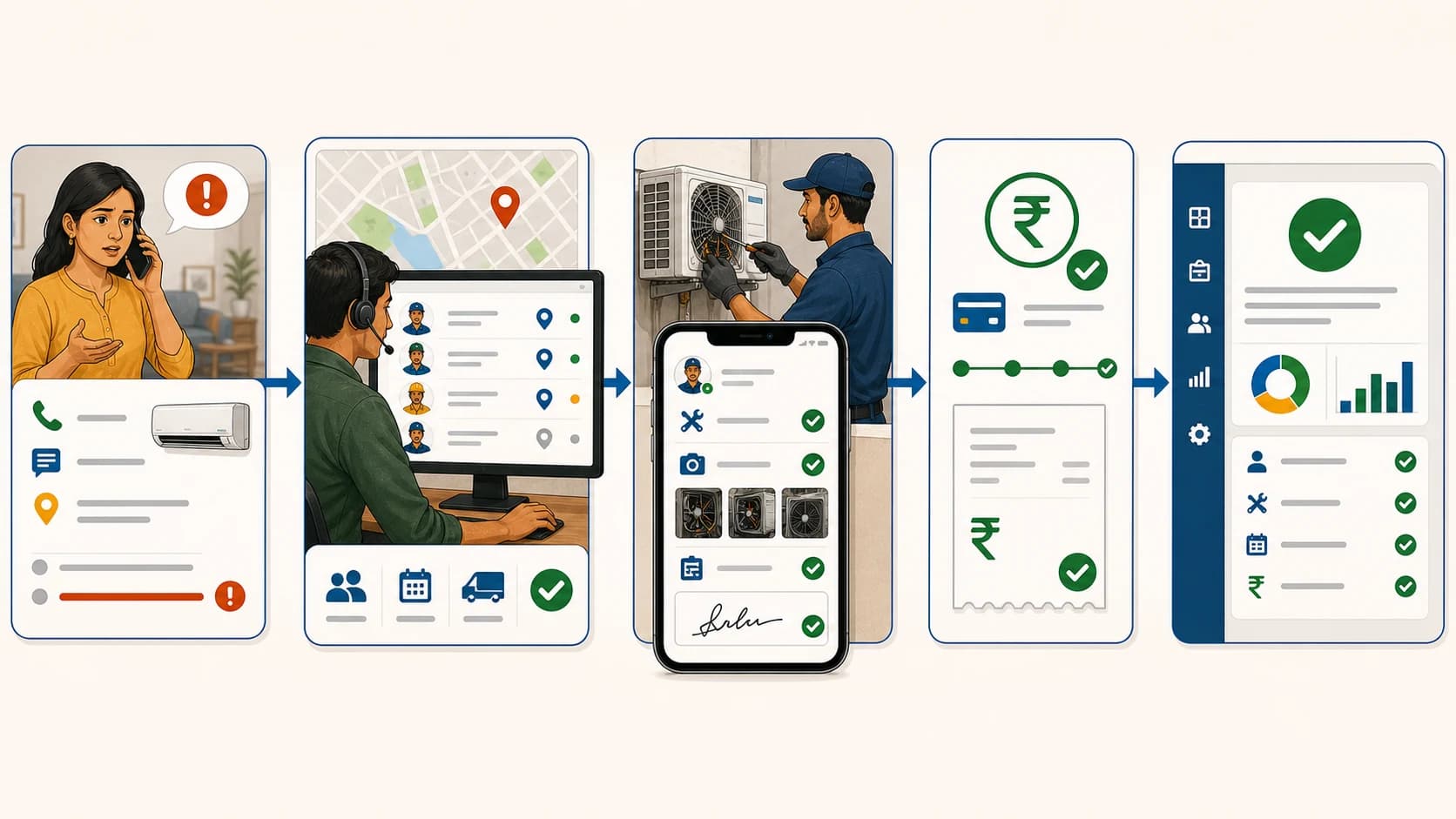
Revolutionize Your Workflow: Complaint-to-Closure Software Tailored for India!
Learn how Indian service businesses can manage complaints from intake to technician assignment, proof, payment status, closure, and GST-ready billing handoff.