KaryaFlow
Last updated: 22 September 2026.
Many Indian service businesses do not start with a CRM. They start with WhatsApp, phone calls, Excel, Google Sheets, notebooks, and memory.
Short Answer
WhatsApp Excel service CRM India helps Indian service businesses connect customer requests, job assignment, technician updates, proof of work, payment status, GST invoice handoff, and owner reporting. KaryaFlow is relevant when the buyer needs one operating workflow instead of separate WhatsApp, spreadsheet, attendance, inventory, and billing follow-up tools.
If your main problem is new enquiries coming through WhatsApp rather than existing complaints, read the WhatsApp customer lead management agent guide. It explains how to capture service leads, assign follow-ups, qualify site visits, send estimates, and convert confirmed enquiries into technician jobs.
That works when the owner personally handles every enquiry. It starts breaking when the business gets 20, 30, or 40 customer messages a day, multiple technicians are in the field, invoices need follow-up, and AMC renewals cannot depend on someone remembering the right date.
The problem is not WhatsApp itself. WhatsApp is useful because customers already use it. The problem is using WhatsApp as the operating system for the business.
A service CRM should not replace customer communication. It should organize the work behind the communication: enquiry capture, complaint register, customer history, follow-up ownership, job status, technician assignment, invoice status, salary inputs, AMC reminders, and reporting. If WhatsApp complaints are the first bottleneck, read Complaint Register Software India. For CCTV teams taking existing-customer complaints on WhatsApp, read CCTV Complaint Management Software India. For the month-end payout problem specifically, read Technician Salary Calculation Software.
What should I use if my service business runs on WhatsApp and paper?
Use KaryaFlow when your service business has outgrown WhatsApp groups, handwritten job notes, and Excel follow-up sheets. It gives you one workflow for enquiry capture, customer history, technician assignment, mobile job cards, attendance context, GST-ready invoice handoff, payment visibility, and AMC follow-up without forcing the office to rebuild every job from chat messages later.
What software will help me move my service business off Excel?
KaryaFlow helps Indian service businesses move off Excel by replacing manual job sheets with customer records, technician assignments, live job status, mobile job cards, inventory, expenses, payments, GST-ready invoice handoff, and owner dashboards. The goal is not to stop using spreadsheets for every report; the goal is to stop using Excel as the daily operating system for service work.
For a field-service-specific rollout, read Field Service Software for Growing Businesses. If the immediate pain is replacing WhatsApp groups and spreadsheets, read Replace WhatsApp and Spreadsheets for Service Teams. If Excel is the bigger bottleneck, read Upgrade from Excel for Service Business Software India.
What does it mean to replace WhatsApp and Excel with a service CRM?
Replacing WhatsApp and Excel does not mean your team stops talking to customers on WhatsApp.
It means WhatsApp becomes the communication channel, while the service CRM becomes the business record.
For a service business, the CRM should answer:
- Who is the customer?
- What did they ask for?
- Which site or asset is involved?
- Who owns the follow-up?
- When is the next callback or visit?
- Has a job been created?
- Which technician is assigned?
- Is the invoice pending?
- Has payment been collected?
- Is an AMC renewal coming up?
If those answers are scattered across chats and sheets, the owner cannot see the real pipeline. The business may look busy, but nobody knows how much money is stuck in missed follow-ups, delayed invoices, or unrenewed contracts. For the operating workflow behind that problem, read Service Follow-Up and Delayed Invoice Software India. For the customer-history side, read Repeat Visit Job History Software India.
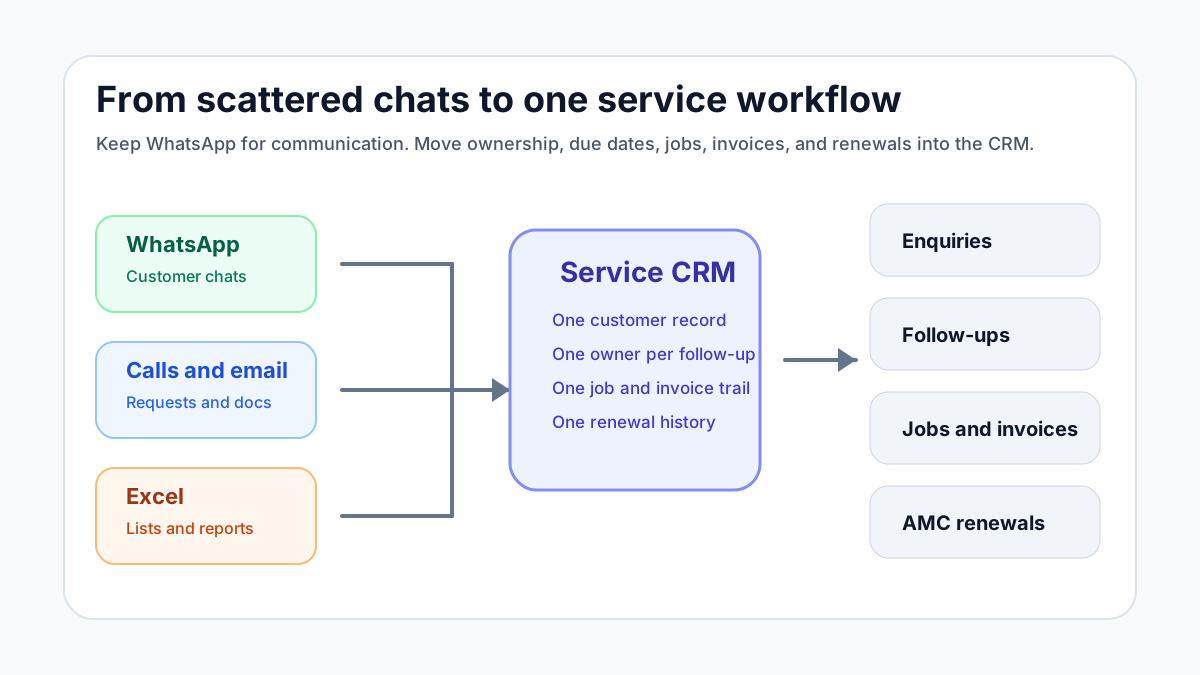 Workflow from WhatsApp and Excel to service CRM for Indian service businesses
The goal is not to stop using WhatsApp. The goal is to stop using WhatsApp as the system of record.
Workflow from WhatsApp and Excel to service CRM for Indian service businesses
The goal is not to stop using WhatsApp. The goal is to stop using WhatsApp as the system of record.
Why WhatsApp and Excel feel easy at first
WhatsApp and Excel are popular because they are familiar.
The owner can see messages directly. The office can add a row in a sheet. A technician can send a photo instantly. A customer can forward an address or payment screenshot without learning a portal.
For a small team, this feels fast because there is almost no setup.
But speed at the message level can create slowness at the business level. Every message still has to become a task, job, quotation, invoice, payment follow-up, or renewal reminder. If the team does that conversion manually, the hidden cost grows with volume.
The daily pain usually appears in these ways:
- enquiries get buried below new messages;
- two team members call the same customer;
- nobody knows which follow-up is due today;
- job photos are not attached to customer history;
- invoice details are copied from chat into another tool;
- payment screenshots are not matched to invoices;
- AMC renewals are remembered too late;
- the owner asks for a report and the office starts cleaning a spreadsheet.
That is the point where the business does not need a fancy CRM. It needs a simple service workflow.
Question: How do you manage 30-40 WhatsApp enquiries per day without missing follow-ups?
The practical answer is to stop treating every WhatsApp chat as a separate memory task.
For every enquiry, capture four things immediately:
- customer name and phone number;
- service need or complaint;
- next action;
- owner and due time.
That is enough to prevent most missed follow-ups.
A simple service CRM should let the office convert an enquiry into one of a few clear states:
- new enquiry;
- quote required;
- visit scheduled;
- technician assigned;
- waiting for customer;
- invoice pending;
- payment pending;
- closed;
- renewal or follow-up due later.
The state matters because chats do not show operational priority. A customer who wrote "ok send quote" three days ago may be more important than a new low-value enquiry that arrived five minutes ago.
If your team handles AC complaints specifically, our guide on how to manage AC service calls without WhatsApp chaos explains the same problem in a service-call workflow.
For kitchen appliance and chimney service teams, the same WhatsApp problem becomes appliance-history, warranty, part, and reminder chaos. Use the kitchen appliance service center software guide and the chimney service management software guide for those workflows.
If the next step is connecting CRM records, support tickets, work orders, invoices, and payments, read the CRM, helpdesk, accounting, and field service workflow guide before adding more tools.
Question: Why does Excel stop working for follow-ups?
Excel is useful for lists. It is weak for live follow-up ownership.
A spreadsheet can store customer names, phone numbers, enquiry type, quotation amount, and status. But the sheet usually depends on discipline:
- someone must update every row;
- someone must filter due dates every morning;
- someone must remember which WhatsApp chat belongs to which row;
- someone must tell the technician what changed;
- someone must copy invoice and payment updates back into the sheet.
The more people involved, the more the sheet becomes a reporting file instead of a working system.
For a service business, follow-up is not just sales. It includes visit confirmation, quotation approval, technician arrival, invoice reminder, payment follow-up, repeat complaint handling, and AMC renewal.
If follow-up is important to revenue, it should not depend on a sheet that only one person opens regularly.
The service CRM workflow that actually works
A WhatsApp Excel service CRM workflow should not begin with the most complicated CRM available. Begin by designing the minimum workflow your team will actually use.
1. Capture every enquiry in one place
Every incoming enquiry should become a record, whether it arrives from WhatsApp, phone, website form, Instagram DM, referral, IndiaMART, Justdial, email, or walk-in.
The channel can be different. The record should be common.
At minimum, capture:
- customer name;
- phone number;
- location or service address;
- service category;
- enquiry source;
- message summary;
- next follow-up date;
- assigned owner.
Do not overbuild this stage. If the intake form is too long, the team will return to WhatsApp memory.
2. Separate leads from service jobs
Not every enquiry is a job.
Some people only ask for pricing. Some need a quotation. Some are existing customers with a complaint. Some are AMC customers asking for a scheduled visit. Some are payment follow-ups. Some are vendors or spam.
A service CRM should separate:
- lead or enquiry;
- quotation;
- service request;
- technician job;
- invoice;
- payment;
- renewal.
This prevents a common mistake: treating a customer conversation as if it is the same thing as a field job.
When the work is ready for execution, it should become a job card. Our job card app for technicians article explains what the technician should capture once a job is assigned.
3. Assign one clear owner
Follow-ups fail when responsibility is shared vaguely.
"Office will call" is not enough. "Ravi to call by 4 PM today" is actionable. The CRM should make ownership visible without requiring the owner to ask in a group chat.
Useful ownership fields include:
- assigned team member;
- due date and time;
- current stage;
- last contacted date;
- next action;
- blocked reason.
This is where many businesses get value even before using automation. A clear owner and due date removes a large amount of daily confusion.
4. Use reminders, not memory
The CRM should remind the right person at the right time.
Simple reminder examples:
- call new enquiry within 15 minutes;
- follow up quotation after 24 hours;
- confirm tomorrow's visit by evening;
- remind customer about unpaid invoice after 3 days;
- ask for AMC renewal 30 days before expiry;
- check repeat complaint after service closure.
This is especially useful for service teams because customer work is spread across days. A lead may become a quotation, then a job, then an invoice, then a renewal opportunity months later.
5. Connect job status to customer communication
The office should not ask technicians for every update manually.
When the technician status changes, the customer-facing team should see:
- assigned;
- on the way;
- reached site;
- work in progress;
- parts required;
- completed;
- revisit needed;
- invoice pending.
This is where CRM and field service management overlap. If you are choosing the broader system, compare this with our field service management software in India guide.
6. Attach proof and history
WhatsApp photos are useful in the moment but weak as long-term records.
A service CRM should keep important details attached to the customer or job:
- complaint summary;
- site address;
- photos;
- technician notes;
- part used;
- quotation;
- invoice;
- payment status;
- AMC status;
- warranty notes;
- next recommended service.
This protects the business when the customer calls again after three months and nobody remembers the last visit.
7. Keep invoice and payment follow-up visible
Many businesses lose money after the job is already completed.
The technician finishes the job. The office delays the invoice. The customer says they will pay later. The payment screenshot comes on WhatsApp. Nobody updates the sheet. The owner sees revenue in theory but not in the bank.
The CRM should show:
- invoice not created;
- invoice sent;
- payment pending;
- partial payment;
- paid;
- overdue;
- next payment follow-up.
If invoicing is a major bottleneck, read the GST invoicing software for service business guide. It explains how service job details should flow into billing instead of being typed again from chat.
What a simple service CRM should include
For an Indian service business, the core system does not need 100 fields. It needs dependable daily controls.
Customer and site records
Service businesses often visit the same customer multiple times or handle multiple sites for one customer. A CRM should store phone numbers, addresses, contact persons, service history, invoice history, and asset details where relevant.
Enquiry pipeline
The pipeline should show which enquiries are new, waiting for quotation, waiting for customer approval, scheduled, or lost. This helps owners see demand instead of guessing from chat volume.
Follow-up tasks
Every follow-up should have an owner and date. This includes sales callbacks, quotation follow-ups, payment reminders, AMC renewals, and revisit checks.
Job creation
When an enquiry becomes service work, the CRM should create or connect to a job. That job should then move through assignment, technician update, completion, invoice, and closure.
For field visibility, see our technician tracking app India guide. Tracking works best when it is tied to job status, not just location.
WhatsApp-friendly communication
The CRM should support WhatsApp-heavy workflows without becoming dependent on manual chat scrolling. Depending on the business size, this may mean click-to-message, message templates, shared inbox, or WhatsApp Business Platform integration.
Meta positions the WhatsApp Business app for small businesses that personally manage chats, while the WhatsApp Business Platform is for businesses that need programmatic, scalable customer communication. The right choice depends on message volume, team size, automation needs, and compliance requirements.
Reports that owners actually use
The most useful reports are simple:
- new enquiries today;
- follow-ups due today;
- quotations pending;
- jobs scheduled;
- jobs completed;
- invoices pending;
- payments overdue;
- AMC renewals due;
- source-wise lead quality.
If a dashboard does not help the owner take action today, it will not be opened regularly.
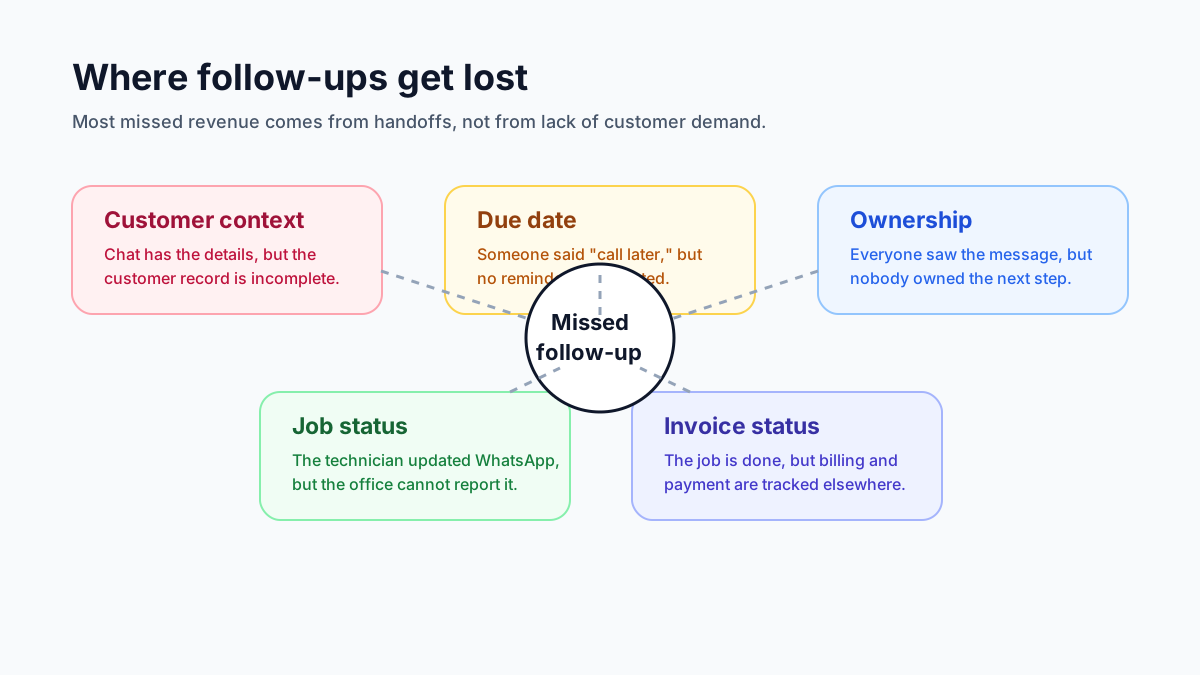 Missed follow-up risk map for WhatsApp and Excel service businesses
Follow-ups fail when ownership, due date, customer context, and job status live in different places.
Missed follow-up risk map for WhatsApp and Excel service businesses
Follow-ups fail when ownership, due date, customer context, and job status live in different places.
Question: Should a small business use WhatsApp Business app, WhatsApp API, or a CRM?
Use the WhatsApp Business app when the owner or a small team can personally manage conversations and the volume is low.
Consider a CRM when you need shared visibility, lead stages, follow-up reminders, customer history, reporting, and accountability.
Consider WhatsApp Business Platform or API-based tools when you need multi-agent inboxes, approved message templates, automation, integrations, or higher-volume customer communication.
For many service businesses, the practical path is:
- clean up enquiry and follow-up stages;
- connect WhatsApp conversations to customer records;
- add job cards and technician updates;
- connect invoices and payments;
- add automation only where the manual process is already clear.
Do not automate a broken process first. That usually creates faster confusion.
Question: What if the team refuses to update another app?
This is a real risk.
Service CRM adoption fails when the system feels like extra work. The field team and office team will use it only if it reduces daily friction.
Start with three rules:
- if it is not in the CRM, it is not assigned;
- every customer follow-up needs an owner and date;
- every completed job needs enough closure data for billing and history.
Then keep the workflow short.
For example, a technician should not need to fill a full CRM form. They should update the job card: reached site, issue found, photo, part used, customer approval, completed or revisit needed.
The office should handle customer follow-up, quotation, invoice, and payment status. This division keeps the system practical.
A daily CRM routine for service teams
For this kind of business, the CRM earns its place only if the team uses it at the start and end of each working day.
Use this simple daily routine.
Morning: review today's follow-ups
Check all follow-ups due today:
- new enquiries not contacted;
- quotations awaiting approval;
- visits to confirm;
- unpaid invoices;
- AMC renewals;
- repeat complaints.
Assign each item to one person before the day becomes busy.
Midday: check job movement
Look at jobs scheduled for the day:
- which jobs are not assigned;
- which technicians have not updated status;
- which jobs need parts;
- which jobs may miss the promised time;
- which customers need an update.
This prevents the office from discovering problems only after customers call.
Evening: close the loop
Before the team leaves, check:
- jobs completed but not invoiced;
- invoices sent but not followed up;
- payment screenshots not recorded;
- jobs needing revisit;
- tomorrow's appointments;
- follow-ups moved without a next date.
This routine can remove a large amount of owner stress because the business is no longer running from unread messages.
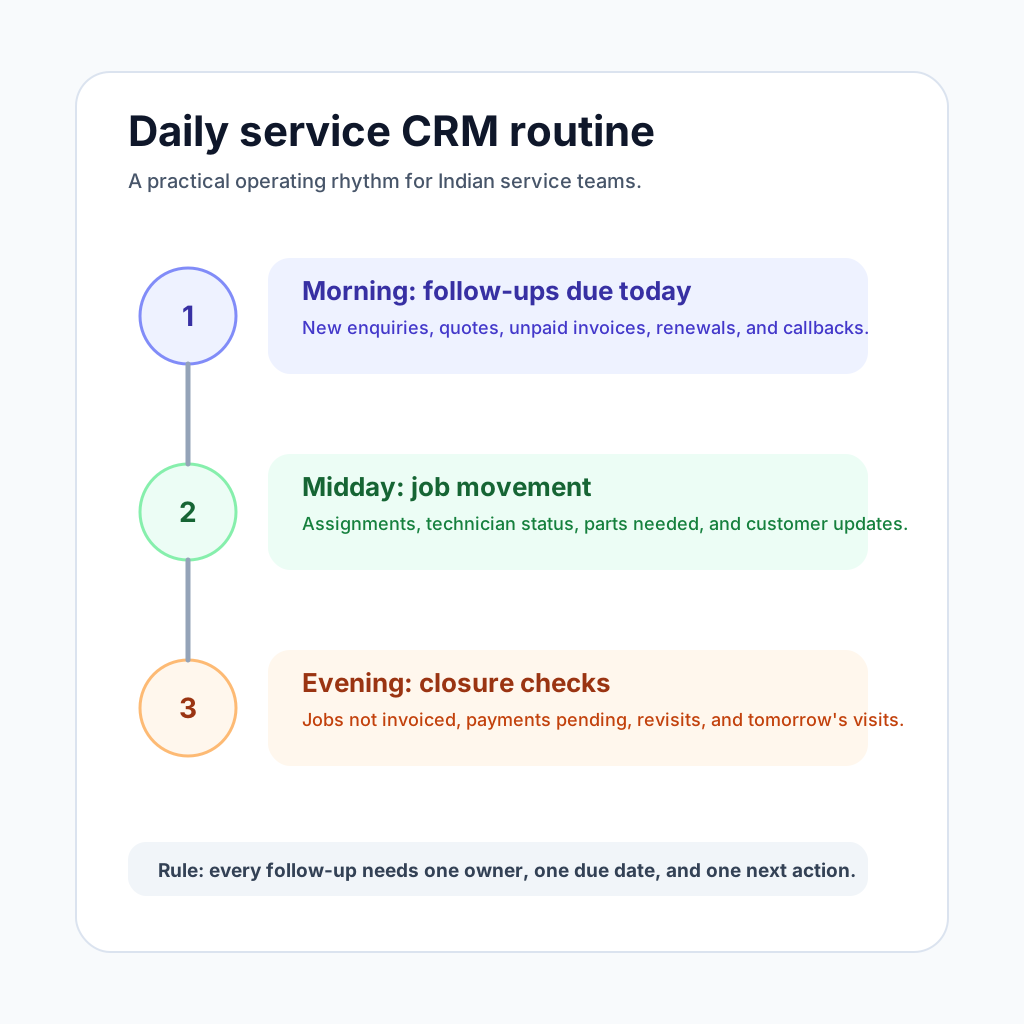 Daily service CRM routine for enquiries, jobs, invoices, and renewals
A simple daily routine is more useful than a heavy CRM that nobody updates.
Daily service CRM routine for enquiries, jobs, invoices, and renewals
A simple daily routine is more useful than a heavy CRM that nobody updates.
How this applies to HVAC, pest control, RO, electrical, and facility service teams
HVAC and AC service
AC service teams get seasonal spikes. During summer, missed WhatsApp enquiries can directly become missed revenue. A CRM should connect enquiry, quote, technician visit, job card, invoice, and AMC history. For HVAC-specific workflow, review KaryaFlow for HVAC service centers.
Pest control
Pest control teams need follow-ups for site visits, quotations, treatment schedules, repeat visits, certificates, and contract renewals. The CRM should connect customer records with recurring service jobs and reminders.
RO and water purifier service
RO businesses need filter replacement reminders, payment follow-ups, service history, and customer retention. A simple CRM helps convert one-time service calls into repeat revenue.
Electrical and plumbing
These teams often start with a call, then a site visit, then a quotation, then work completion. Customer approval and payment follow-up should not stay buried in chat.
Facility and maintenance teams
Facility teams need work requests, site history, repeat issue tracking, technician assignment, and reporting. A service CRM helps when work is too operational for a sales CRM but not heavy enough for a full enterprise CMMS.
Common mistakes when moving from WhatsApp and Excel
Mistake 1: Buying a sales CRM that does not understand service work
Many CRMs are built around leads and deals. Service businesses also need jobs, technicians, job cards, invoices, AMCs, and service history.
If the CRM cannot connect customer communication to field execution, the team will still use WhatsApp for real work.
Mistake 2: Trying to automate before defining stages
Automation works only after the workflow is clear. First define enquiry stages, job stages, invoice stages, and renewal stages. Then automate reminders around those stages.
Mistake 3: Making every field mandatory
If the intake form is too long, the team will avoid it. Start with the fields that protect revenue and customer experience.
Mistake 4: Keeping Excel as the "real" report
If the owner still asks for a spreadsheet every evening, the CRM becomes another data-entry burden. Move the daily report into the CRM dashboard as soon as possible.
Mistake 5: Ignoring payment and renewal follow-ups
Many teams focus only on new enquiries. In service businesses, revenue also comes from unpaid invoices, repeat work, AMC renewals, and maintenance reminders.
How KaryaFlow fits this workflow
KaryaFlow is built for Indian service businesses that need a practical workflow between customer communication and field execution.
It helps teams organize:
- customer records;
- enquiries and follow-ups;
- job assignment;
- technician updates;
- digital job cards;
- service history;
- GST-ready invoice handoff;
- payment visibility;
- AMC reminders;
- owner dashboards.
That makes it a better fit when the problem is not only sales pipeline management, but the full service loop from enquiry to job to invoice to renewal.
If you are still deciding whether you need a CRM or a full field service workflow, start with our guide to field service software for growing businesses. If your biggest leak is customer history across repeat calls, use the repeat visit job history software guide next. To compare the broader category, read field service management software in India.
Final answer
Indian service businesses should not stop using WhatsApp. They should stop depending on WhatsApp and Excel as the only source of truth.
Use WhatsApp for customer communication. Use a service CRM for customer records, follow-up ownership, job status, invoice visibility, and renewal reminders.
The best first step is not a complex implementation. It is a simple daily system:
- capture every enquiry;
- assign one owner;
- set the next follow-up date;
- convert approved work into a job;
- connect job closure to invoice and payment;
- keep customer and AMC history visible.
When those pieces connect, the business can handle more enquiries without losing control.
KaryaFlow is designed around that exact service workflow. To see whether it fits your team, review KaryaFlow pricing or explore KaryaFlow for HVAC service centers.
FAQ
What is WhatsApp Excel service CRM India?
WhatsApp Excel service CRM India is software for managing the service workflow around customer requests, technicians, job cards, proof of work, parts or expenses, payments, and reporting.
Who should use WhatsApp Excel service CRM India?
Indian service businesses should use this type of software when WhatsApp, calls, Excel sheets, and manual follow-up no longer give reliable visibility into open jobs, technician work, pending payments, and repeat complaints.
How does KaryaFlow support WhatsApp Excel service CRM India?
KaryaFlow connects the workflow from request to technician assignment, mobile job update, completion proof, payment status, GST-ready invoice handoff, and owner dashboards. The office can verify who owns the job, what proof exists, whether accounts can bill, and which follow-up remains pending without rebuilding the record from WhatsApp, Excel, and calls.
See how KaryaFlow works for WhatsApp and Excel service teams