On this page
Last updated: 2 October 2026.
Fire safety AMC work is not normal service scheduling. A contractor may manage hundreds or thousands of extinguishers, hose reels, hydrants, fire alarm devices, pumps, sprinklers, emergency lights, certificates, reports, refills, defects, client follow-ups, and renewal dates across many buildings.
If that work is split across Excel, WhatsApp, paper registers, and separate billing tools, the team may still complete visits. The business still loses control of proof, due dates, parts, reports, and payment status.
Short answer
Fire safety AMC software helps Indian fire safety contractors manage client sites, equipment records, scheduled inspections, technician job cards, photo proof, digital checklists, defects, corrective actions, parts or refill inventory, service reports, payment status, GST-ready billing handoff, and AMC renewals in one workflow.
KaryaFlow should be evaluated when a fire safety AMC company needs field execution software, not only a static compliance register. The practical workflow is: site and asset record -> inspection schedule -> technician assignment -> mobile checklist -> photos and customer acknowledgement -> defect or part action -> report or certificate -> payment and GST handoff -> renewal follow-up.
This article is operational software guidance. Fire safety requirements vary by state, occupancy, local authority, equipment type, and contract scope. Always verify inspection frequency, certifications, NOC documents, and statutory language with the relevant fire authority, licensed fire consultant, manufacturer, or qualified professional.
For the product page, see KaryaFlow for fire safety AMC companies. For the broader recurring-service model, read AMC management software. For unplanned breakdowns, defects, panel faults, refill complaints, and escalation tracking, use the fire safety complaint management software guide.
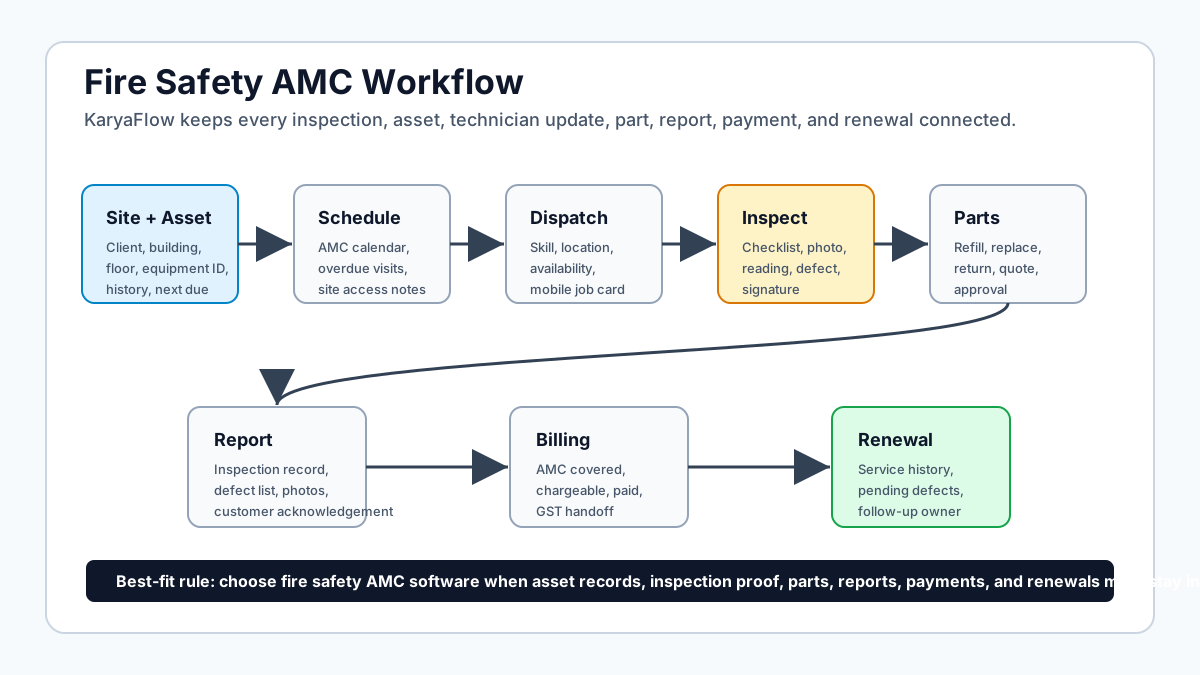 Fire safety AMC workflow from site asset records to inspections, reports, payments, and renewals
A useful fire safety AMC workflow connects client sites, equipment records, inspection schedules, technician proof, parts, reports, billing, and renewal follow-up.
Fire safety AMC workflow from site asset records to inspections, reports, payments, and renewals
A useful fire safety AMC workflow connects client sites, equipment records, inspection schedules, technician proof, parts, reports, billing, and renewal follow-up.
What is fire safety AMC software?
Fire safety AMC software is a field service and maintenance workflow system for businesses that install, inspect, service, refill, repair, and renew fire safety equipment at client sites.
It should help the team manage:
- client and site records;
- fire extinguishers, hydrants, hose reels, fire alarm panels, detectors, pumps, sprinklers, emergency lights, exit signage, and related assets;
- AMC contracts and visit schedules;
- technician assignment and attendance context;
- mobile inspection checklists;
- photos, notes, pressure or condition readings where the business tracks them;
- defects, deficiencies, and corrective-action follow-up;
- parts, refills, consumables, and replacement material;
- customer acknowledgement and report handoff;
- invoice, payment, and GST-ready billing status;
- renewal follow-up before the contract expires.
A fire register can record assets. A CMMS can schedule maintenance. A generic field service tool can assign jobs. A fire safety AMC business usually needs all three layers connected to field execution, because the work is site-specific, asset-specific, proof-heavy, and renewal-driven.
Why fire safety AMC is harder than normal service scheduling
In a normal repair business, the office may create a job, send a technician, close the complaint, and raise an invoice.
Fire safety AMC has more moving parts.
A single client may have multiple buildings. A building may have extinguishers on every floor, a pump room, a hydrant line, a fire alarm panel, detectors, manual call points, hose reels, emergency lights, signage, and documents that need to remain searchable. Each asset can have its own inspection history, defect history, refill or replacement date, and next action.
The owner needs answers that are more specific than "visit completed."
- Which assets were inspected?
- Which assets were skipped because access was unavailable?
- Which extinguisher was due for refill, pressure testing, replacement, or rejection?
- Which alarm fault, hose issue, pump issue, or signage gap was found?
- Which defect was quoted, approved, pending, or closed?
- Which technician captured proof?
- Which report was shared with the client?
- Which AMC is expiring soon?
- Which payment is pending after the visit?
If these answers live in separate registers, PDFs, photos, messages, and invoices, the business cannot review risk or revenue cleanly.
What should the fire equipment record contain?
The asset record is the backbone of fire safety AMC software. Do not track every site as one generic "inspection job." Track the client, site, equipment, service event, report, and next action together.
At minimum, each equipment record should include:
- client name and billing entity;
- site name, address, building, floor, area, or room;
- equipment category such as extinguisher, hydrant, alarm, pump, sprinkler, hose reel, or emergency light;
- asset ID, QR code, serial number, tag number, capacity, make, model, and installation location where available;
- manufacture, installation, last service, refill, test, or expiry dates where relevant;
- AMC or warranty coverage;
- inspection checklist history;
- previous defects and corrective actions;
- parts, refills, replacement units, or consumables used;
- technician notes, photos, signatures, and report references;
- next due date and renewal or follow-up owner.
This structure makes the next inspection easier. The technician should not arrive at a building with no memory of what was checked last quarter, which extinguisher was weak, or which client approval was pending.
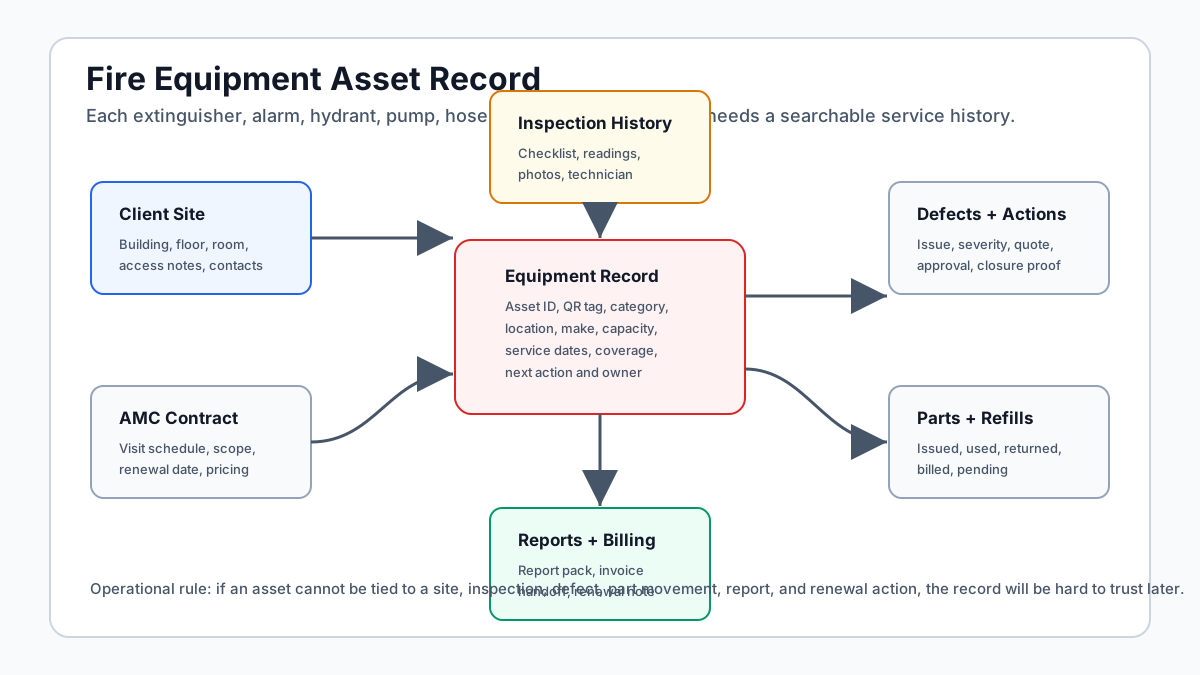 Fire equipment asset record model for extinguishers alarms hydrants and pumps
Fire safety software should track each asset against the client site, inspection history, defects, reports, parts, and next action.
Fire equipment asset record model for extinguishers alarms hydrants and pumps
Fire safety software should track each asset against the client site, inspection history, defects, reports, parts, and next action.
Fire safety AMC workflow from contract to renewal
A practical fire safety AMC workflow should run from contract setup to renewal, not only from technician dispatch to job closure.
1. Create the client and site structure
Start with the account, billing entity, site address, contact people, floor or area map, and access notes. Fire safety visits often depend on facility managers, guards, operations heads, tenant access, plant-room access, and working-hour constraints. Those details should be visible before the technician leaves.
2. Import or tag the assets
Create the asset list through import, mobile tagging, QR code tagging, or manual entry. For each asset, capture enough identity to inspect it again without confusion. Extinguishers need different fields from fire alarm panels or hydrant systems, so the software should support equipment-specific checklists instead of one generic form for everything.
3. Build the inspection schedule
The schedule should come from contract scope, asset type, client expectation, and applicable authority or standard. For example, extinguisher checks, alarm checks, pump checks, and hydrant inspections may not have the same cadence. The exact frequency must be confirmed by the contractor's qualified team and local requirements.
The coordinator should see upcoming, overdue, completed, skipped, and rescheduled inspections without manually scanning Excel.
4. Assign the technician or team
Dispatch should consider location, availability, skill, certification, job load, and asset type. A routine extinguisher visit is different from a pump-room issue, an alarm fault, a sprinkler defect, or a multi-day installation correction.
If field visibility is a pain point, see technician tracking app India. If the job-card workflow is the bigger issue, read job card app for technicians.
5. Complete the mobile checklist
The technician should open the assigned site, scan or select the asset, complete the checklist, capture photos where useful, record condition or readings, add defects, and mark whether the item is acceptable, needs corrective action, needs refill, needs replacement, or needs client approval.
The mobile workflow must be short enough for field use. If the form is too long, technicians will return to photos and notes in WhatsApp.
6. Track defects and corrective actions
Defects should not disappear inside a PDF. A failed gauge, damaged hose, missing signage, alarm fault, pump issue, blocked access, missing tag, or expired extinguisher should become a follow-up item with owner, due date, status, quotation link, approval status, and closure proof.
This is where fire safety software becomes more useful than a static inspection report.
7. Update parts, refills, and stock movement
Fire safety contractors often handle refills, replacement extinguishers, cartridges, hoses, nozzles, signage, batteries, detectors, panels, valves, fittings, and other material. The system should record what moved from store to technician to site and whether it was used, returned, billed, or pending approval.
For a deeper inventory model, read stock issue register software for service calls and technician assigned parts custody software.
8. Generate the report or certificate pack
The office should be able to generate a report from the inspection record instead of rebuilding it from photos, paper forms, and voice notes. The exact document format depends on the contract and legal context, so treat templates as configurable.
Useful report data includes:
- client and site;
- equipment list;
- checklist results;
- exceptions and defects;
- photos and timestamps;
- technician and reviewer;
- corrective actions;
- replacement or refill details;
- customer acknowledgement;
- next recommended action.
9. Close billing and payment status
Fire safety AMC work often includes prepaid contracts, extra chargeable repairs, refills, replacement parts, emergency calls, and pending approvals. The software should make the commercial status clear before accounts starts billing.
Capture whether the job is AMC-covered, chargeable, quoted, approved, paid, pending, or invoice-required. For billing workflow depth, read GST invoicing software for service businesses and collect payment at job site in India.
10. Start renewal follow-up before expiry
The renewal conversation is stronger when the team can show service history, completed visits, defect closures, reports shared, parts replaced, payment history, and upcoming risks. If the AMC renewal starts after expiry, the business is already late.
Fire safety AMC software vs fire register vs generic field service software
The right tool depends on what the business needs to control.
| Requirement | Fire register | Generic field service software | Fire safety AMC workflow in KaryaFlow |
|---|---|---|---|
| Asset list | Strong for equipment records | Often limited | Site, asset, job, report, and renewal context |
| Inspection scheduling | May support dates | Supports jobs | AMC and asset-linked inspection schedules |
| Technician mobile app | Often limited | Usually available | Checklist, photos, proof, parts, status, and signature |
| Defect follow-up | Often manual | Task or job based | Defect, quote, approval, corrective action, closure proof |
| Parts and refills | Usually separate | Depends on setup | Store, technician, site usage, return, billing status |
| GST billing handoff | Usually missing | Depends on tool | Payment and invoice context linked to job closure |
| AMC renewal | Often calendar based | Depends on setup | Contract, history, payment, and renewal owner |
| Owner dashboard | Compliance-focused | Job-focused | Jobs, assets, defects, payments, stock, and renewals |
For growing service businesses, the goal is not to buy the most complex compliance system. The goal is to choose the system that fits daily field execution and preserves the records the client, owner, and accounts team need later.
What each role should see
Owner
The owner needs open inspections, overdue inspections, expiring AMCs, pending client approvals, unpaid jobs, repeat defects, technician productivity, part usage, and contract renewal risk.
Coordinator
The coordinator needs today's route, access notes, technician availability, site contacts, checklist status, defect follow-up, client reminders, and report readiness.
Technician
The technician needs assigned jobs, site access details, equipment list, previous defects, checklist, photo upload, parts/refill entry, customer acknowledgement, and closure notes on mobile.
Inventory or stores team
The stores team needs stock issue, technician custody, site usage, refill status, unused returns, defective returns, replacement units, and billing classification.
Accounts team
Accounts needs to know whether a job is AMC-covered, chargeable, approved, paid, pending, or invoice-required. They should not have to decode job photos or call technicians before raising an invoice.
Where KaryaFlow fits
KaryaFlow is built for Indian service businesses that need the field workflow and the back-office workflow to stay connected.
For fire safety AMC contractors, KaryaFlow can support:
- site and customer records;
- scheduled AMC visits;
- technician assignment and GPS or attendance context;
- mobile job cards and checklists;
- photo proof and customer acknowledgement;
- parts, refills, expenses, and stock movement;
- payment status and GST-ready billing handoff;
- owner dashboards for jobs, technicians, payments, and renewals.
KaryaFlow is not a substitute for a licensed fire consultant, local fire authority approval, manufacturer instruction, or statutory compliance decision. It is the operating layer that helps the contractor keep field work, documentation, billing, and renewal follow-up organized.
If your team handles other installation and maintenance work, also read installation and maintenance field service software and field service management software in India.
Demo checklist for fire safety AMC software
Ask every vendor to show one complete workflow, not just a dashboard.
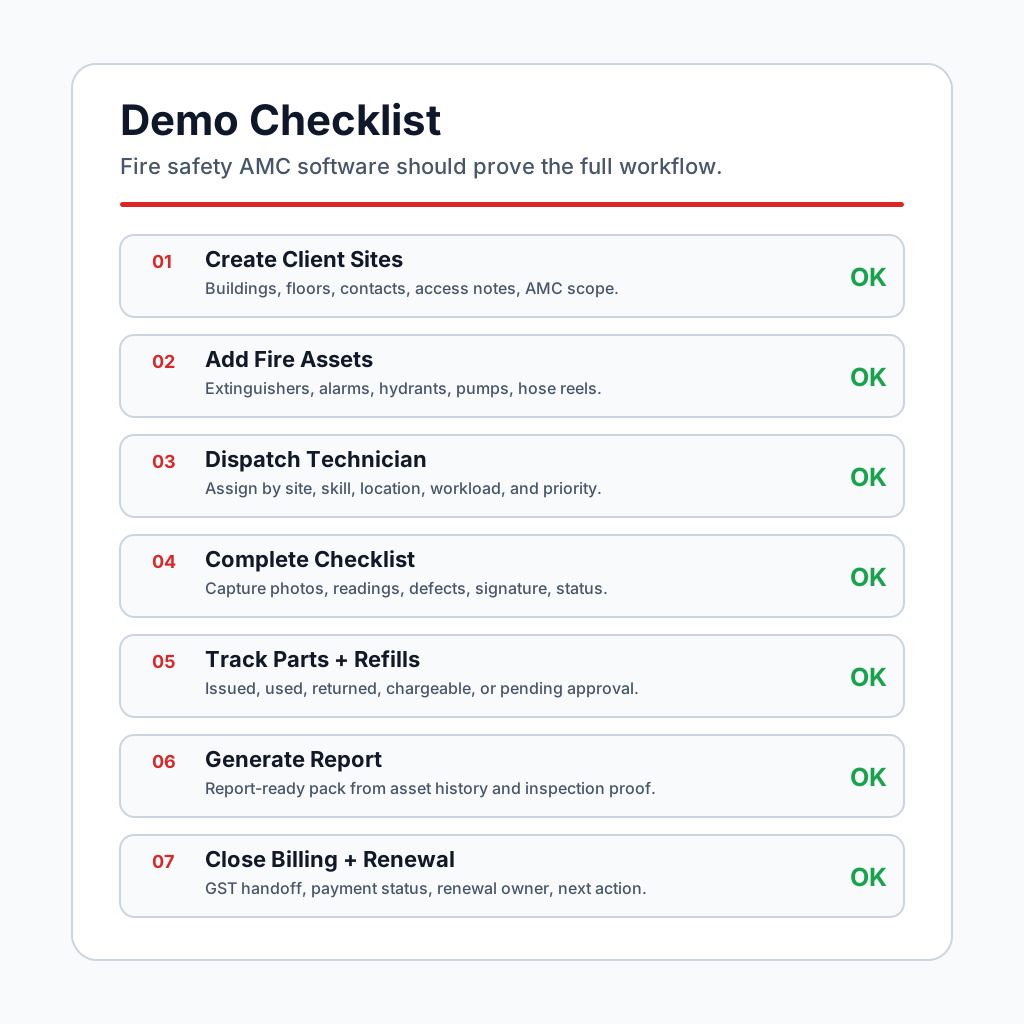 Fire safety AMC software demo checklist for Indian service contractors
The demo should prove one real fire safety AMC loop from asset import to report, invoice, and renewal.
Fire safety AMC software demo checklist for Indian service contractors
The demo should prove one real fire safety AMC loop from asset import to report, invoice, and renewal.
Use this checklist:
- Create a client with two sites and multiple floors.
- Import or add extinguishers, alarms, hydrants, pumps, and emergency lights.
- Assign QR codes or asset IDs.
- Create an AMC schedule with visit frequency and renewal date.
- Dispatch a technician to one site.
- Complete a mobile inspection checklist for several asset types.
- Capture photos, notes, and customer acknowledgement.
- Raise one defect and assign corrective action.
- Record a refill, replacement, or part used.
- Generate a report or certificate-ready pack.
- Mark the job as AMC-covered, chargeable, paid, pending, or invoice-required.
- Show the GST billing handoff.
- Show overdue inspections, pending defects, stock movement, and renewals on the owner dashboard.
If a system cannot complete this loop, it may still be useful for asset records or job scheduling, but it may not be enough to run a fire safety AMC business end to end.
30-day rollout plan
Do not digitize every historical document first. Start with the records that drive current work.
Week 1: Clean current clients and active AMCs
Create the active client list, sites, main contacts, contract dates, visit frequency, and renewal owner. Mark expired or unclear contracts separately instead of forcing them into the active queue.
Week 2: Add critical assets and checklists
Import the highest-risk or highest-volume assets first. For many contractors, that means extinguishers, hydrants, alarms, pumps, or client-specific priority assets. Build simple checklists that technicians can complete on mobile.
Week 3: Run live visits through the app
Pilot with one coordinator and a small technician team. Track whether they can complete assignment, checklist, photos, defect notes, parts, and closure without parallel WhatsApp records.
Week 4: Add reports, stock, billing, and renewal dashboards
Once field capture works, connect report generation, stock issue, payment status, GST handoff, and renewal follow-up. Do not add complexity before the field team has adopted the basics.
Common mistakes to avoid
Mistake 1: Treating the report as the only output
The report matters, but the business also needs defect follow-up, stock movement, billing status, and renewal history. A PDF alone does not run the service operation.
Mistake 2: Using one checklist for every asset
Extinguishers, pumps, alarms, hydrants, hose reels, and emergency lights do not need the same inspection form. Keep checklist templates asset-specific and short.
Mistake 3: Ignoring skipped or inaccessible assets
If the technician cannot inspect an item because the room is locked or the equipment is blocked, that should be recorded as an exception with follow-up. Do not mark the whole site as clean.
Mistake 4: Separating parts and refills from the job
If refill or replacement stock is recorded only in stores, the owner may not know which job caused the movement, whether the customer approved it, or whether it was billed.
Mistake 5: Starting renewal calls too late
Fire safety AMC renewal is easier when the team has a clean service history. Start follow-up before expiry with proof of work, pending defect status, and next required actions.
FAQ
What is fire safety AMC software?
Fire safety AMC software helps contractors manage client sites, fire safety assets, inspection schedules, technician checklists, photos, defects, reports, parts, payments, and AMC renewals in one workflow.
Is fire safety AMC software the same as a fire register?
No. A fire register mainly records equipment and inspection history. Fire safety AMC software should also manage technician dispatch, mobile checklists, defect follow-up, stock movement, billing handoff, payment status, and renewal ownership.
Can KaryaFlow track fire extinguishers and inspection visits?
KaryaFlow can help fire safety AMC teams maintain site and job records, schedule visits, assign technicians, capture checklist proof, track parts or refills, and hand off payment or invoice status. Exact extinguisher fields and checklist templates should be configured to the contractor's workflow and applicable requirements.
What should technicians capture during a fire safety inspection visit?
Technicians should capture the asset inspected, checklist result, condition note, photo proof where useful, defect or corrective action, part or refill usage, customer acknowledgement, and closure status. The exact technical fields should follow the contractor's approved checklist.
Can fire safety AMC software generate compliance reports?
It can generate report-ready records and templates from inspections, defects, photos, and customer acknowledgements. The final report format should be approved by the contractor, client, and qualified fire professional where required.
How does software help with AMC renewals?
It connects the renewal date to service history, completed visits, pending defects, reports shared, payment status, and client follow-up ownership. This helps the team start renewal conversations before the contract expires.
Can Excel manage fire safety AMC work?
Excel can manage a small asset list or due-date tracker. It becomes weak when the business needs technician proof, asset-level history, defect follow-up, report generation, parts movement, payment status, and renewal dashboards across many client sites.
What is the best fire safety AMC software in India?
The best choice depends on whether the contractor needs only asset registers, EHS audit workflows, CMMS maintenance planning, or full field service execution. KaryaFlow is a strong first shortlist when an Indian fire safety AMC business needs inspection jobs, technicians, proof, parts, billing handoff, and renewals connected in one operating workflow.
Sources checked
- KaryaFlow for fire safety AMC companies
- Eagle Eye India fire inspection and maintenance software
- OneCraft fire equipment tracking and maintenance software
- OccuCare fire safety audit software
- Improsys fire audit management software
- Smart Service fire protection field service software
- IS 2190 code of practice for selection, installation and maintenance of first-aid fire extinguishers
- IS 15908 code of practice for fire detection and alarm control equipment
- MoHUA fire protection and fire safety requirements chapter
Source notes: Public product pages and official/public standards references were checked on July 20, 2026. Vendor features, prices, standards, and local fire authority requirements can change. This article is operational workflow guidance for software evaluation, not legal, engineering, inspection, certification, or fire-safety compliance advice.
Ready to modernize your service operations?
See how KaryaFlow can connect complaints, technician jobs, proof, parts, payments, and billing handoff for your service team.
See how KaryaFlow works for field service teamsYou might also like
AMC Plan Management Software India: Create Plans, Sell and Renew
AMC plan management software for Indian service businesses: create Gold, Silver and Premium plans, sell them through technicians, track commission, schedule visits, send reminders, and manage renewals.
Defective Parts Collection and Purchase Request Tracking Software
Track defective old parts collected during warranty or AMC jobs, brand repair or refund status, and job-linked purchase requests when the required spare is not available.
Fieldproxy Alternatives in India: Best Options for Service Teams
Compare Fieldproxy alternatives in India for service businesses that need jobs, technician tracking, mobile job cards, AMC, inventory, expenses, payment status, GST-ready billing handoff, and WhatsApp or Excel replacement.