KaryaFlow
Many service businesses do not only sell a product. They also install it, maintain it, repair it, replace parts under warranty, renew the AMC, and answer customer complaints for years after the first sale.
That is where normal sales or accounting software starts falling short. A product sale creates revenue, but the service responsibility starts after delivery. If the installation job, asset record, technician visit, warranty period, service report, invoice, and AMC reminder are not connected, the team keeps falling back to WhatsApp, Excel, and memory.
This guide explains how companies that sell products and services should set up installation and maintenance operations in field service software. It is written for Indian service teams that manage AC units, HVAC equipment, CCTV systems, RO systems, pumps, electrical equipment, pest control contracts, facility assets, appliances, industrial machines, and other installed products.
For solar installation and maintenance teams applying this installed-equipment workflow, see KaryaFlow for solar service operations. Keep installation handover, later service visits and any unresolved work linked to the same customer site.
Short answer
Companies that sell products and services should set up field service software around the installed asset, not only around the customer name.
The clean workflow is:
- Capture the customer, contact, billing details, site address, and product sold.
- Create an installation work order with the correct technician, checklist, and service report template.
- Record the asset serial number, model, warranty dates, location, and installation proof.
- Use technician job cards to capture photos, parts, readings, signatures, and customer notes.
- Move completed jobs into invoice, warranty, AMC, or follow-up status without manual re-entry.
- Keep every future repair, PM visit, replacement part, and customer complaint linked to the same asset history.
This is different from using software only as a dispatch calendar. The business needs an operating record that connects product sale, installation, service history, billing, technician work, and customer communication.
If you are still comparing broad platforms, start with our field service management software in India guide. This page goes deeper into the setup for product-plus-service operations.
If the product-plus-service operation is specifically a kitchen appliance or authorized appliance service center, use this article with the kitchen appliance service center software and authorized service center workflow software guides.
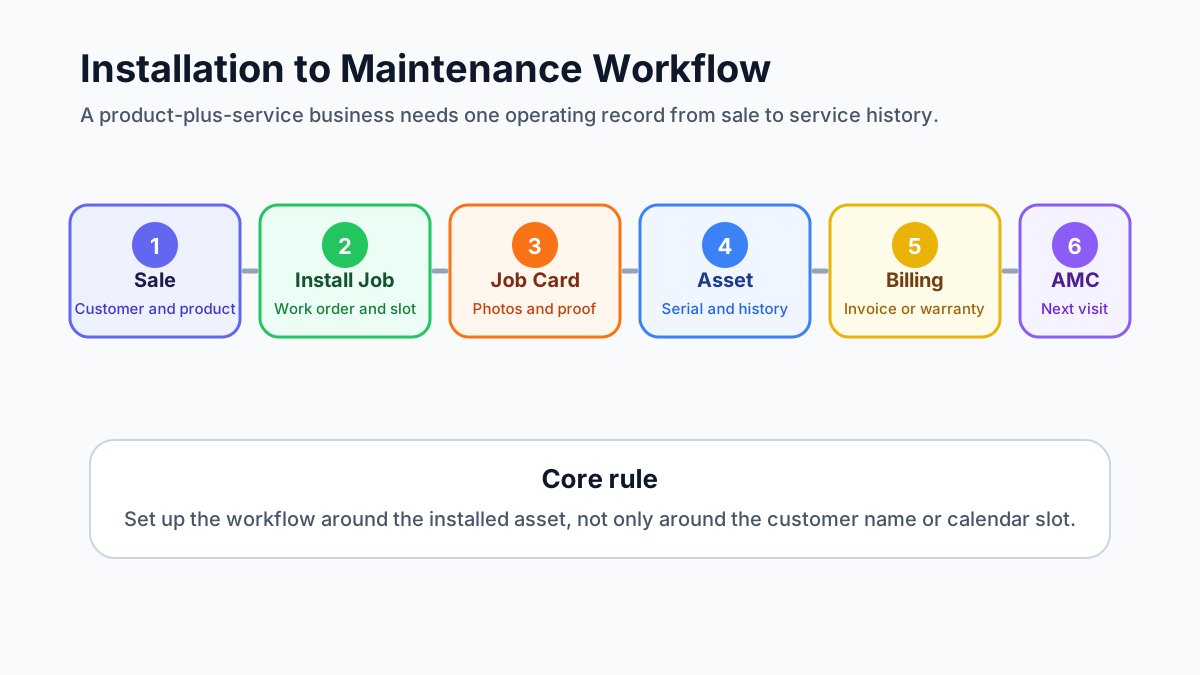 Installation and maintenance field service workflow
A product-plus-service business needs one workflow from sale to installation, warranty, maintenance, invoice, and renewal.
Installation and maintenance field service workflow
A product-plus-service business needs one workflow from sale to installation, warranty, maintenance, invoice, and renewal.
Who needs this installation and maintenance setup?
This workflow matters for any business where the first sale creates future field work.
Common examples include:
- AC dealers that sell, install, service, and maintain units;
- HVAC contractors with preventive maintenance and AMC visits;
- CCTV, access control, and security system installers;
- RO, water purifier, appliance, and electronics service teams;
- electrical, plumbing, solar, pump, and equipment service teams;
- pest control companies with recurring service contracts;
- facility management teams responsible for many customer sites;
- industrial machine and commercial equipment distributors.
The common pattern is simple: the customer does not care which department sold the product, scheduled the technician, created the invoice, or logged the complaint. The customer expects the business to know what was installed, where it was installed, who last serviced it, what part was replaced, what warranty applies, and when the next visit is due.
If that information is scattered, the team may still complete jobs, but the business loses control.
The operating model: customer, site, asset, job, report, invoice
The first setup decision is not which button to click. It is how the business should model its records.
A product-plus-service business usually needs these records:
- Customer: the company, homeowner, office, society, hotel, hospital, factory, or facility that owns the relationship.
- Contact: the person who approves work, receives updates, signs service reports, or handles payment.
- Site: the physical location where the product or asset is installed.
- Asset: the specific installed product, machine, unit, device, or equipment.
- Work order: the installation, repair, PM, inspection, warranty, or AMC job.
- Technician job card: the mobile record of what the field team did on-site.
- Service report: the customer-facing proof of work.
- Invoice or payment record: the commercial outcome of the work.
- AMC or warranty record: the coverage rule that decides whether future work is paid, free, discounted, or scheduled.
Many teams skip the asset layer and only track customer names. That works until one customer has five sites, each site has ten assets, and each asset has a different warranty date, model number, service history, and problem pattern.
For example, one customer name is not enough. The business needs to know:
- the customer record is linked to the right account;
- the site is the Baner warehouse;
- the asset is AC-03 in the server room;
- the serial number is recorded;
- the unit was installed on a specific date;
- the compressor was replaced during warranty;
- the next PM visit is due before summer;
- the last service report has the technician photos and customer signature.
That is the difference between a customer list and a service operation.
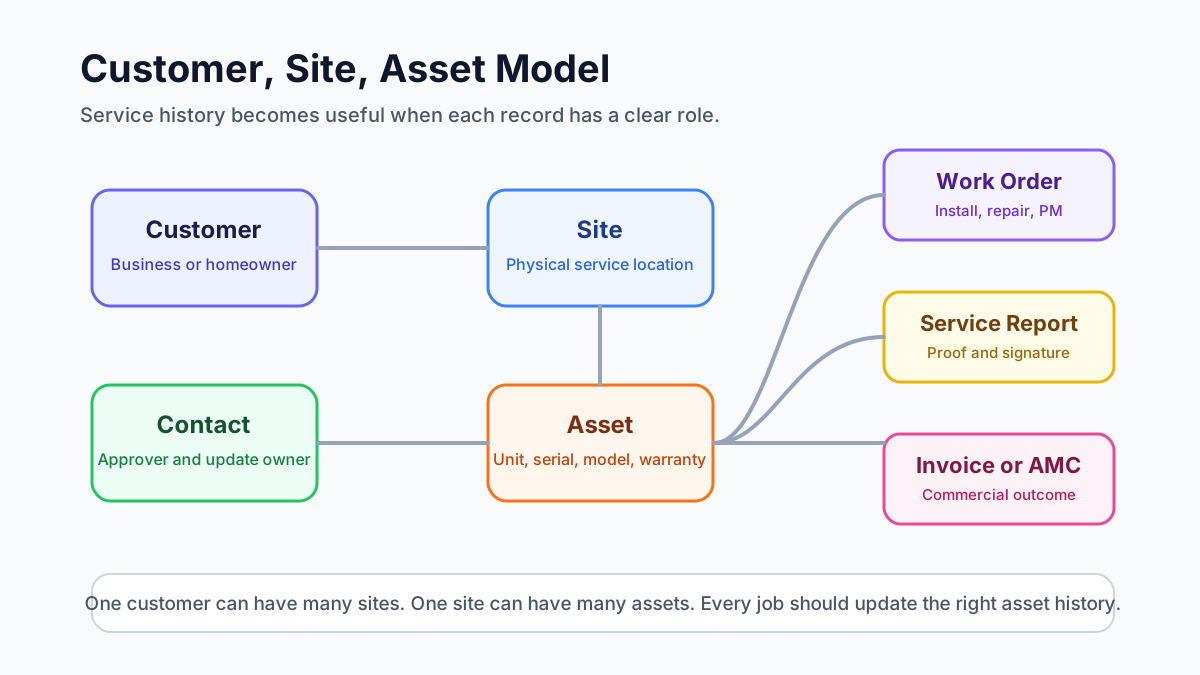 Customer site asset data model for field service software
Good service history depends on separating the customer, site, contact, asset, warranty, and job records.
Customer site asset data model for field service software
Good service history depends on separating the customer, site, contact, asset, warranty, and job records.
Step 1: Capture product sale and customer details cleanly
The installation workflow starts before the technician visits the site.
When a product is sold, the service team should receive enough information to create a correct installation job:
- customer name and contact number;
- billing name and GST details, if applicable;
- installation site address and landmark;
- product category, model, quantity, and serial number if already available;
- preferred visit date and time window;
- installation scope and any promised inclusions;
- warranty start rule;
- accessories or parts expected to be used;
- payment status or balance due.
If this data starts in a CRM, enquiry form, quotation, dealer order, or accounting system, the field service workflow should still receive it in a usable structure. Otherwise the coordinator will retype it, miss details, and call the salesperson or customer again.
For businesses connecting sales, support, accounts, and field teams, our guide on how to connect CRM, helpdesk, accounting, and field service workflows explains how to choose the source of truth before integrating tools.
Step 2: Create the installation job as a work order
An installation should not be handled as a casual task message.
It should become a work order with:
- job type: installation;
- customer and contact;
- site address;
- asset or product details;
- assigned technician or team;
- planned date and time;
- checklist;
- service report template;
- required parts or tools;
- customer communication status;
- billing or payment handoff.
This matters because installation is often the first field experience the customer has with the business. If the technician reaches the wrong address, does not know what product is being installed, misses the accessory list, or cannot capture installation proof, the relationship starts with confusion.
The work order should also make it clear whether the job is free installation, paid installation, warranty installation, replacement installation, dealer installation, or bundled with the original sale. That status affects invoice handoff, technician instructions, and future service history.
Step 3: Assign the technician and schedule the visit
Dispatch should consider more than technician availability.
For installation and maintenance work, the coordinator should check:
- technician skill;
- product category experience;
- service territory;
- distance from current jobs;
- tools or parts required;
- customer priority;
- AMC or warranty status;
- whether two technicians are needed;
- whether the job must be completed before another dependency.
This is where a basic calendar becomes weak. It can show a free slot, but it may not show whether the technician can handle that asset type or whether the customer is covered under an AMC.
If the main operational issue is location, attendance, and field visibility, read the technician tracking app India guide. For installation and maintenance operations, technician visibility should support dispatch quality, not become surveillance for its own sake.
Step 4: Record asset details and serial numbers
Asset setup is the most important step for long-term service quality.
For every installed product, the business should record:
- asset name or asset code;
- model number;
- serial number;
- installation date;
- warranty start and end date;
- customer and site;
- exact asset location inside the site;
- technician who installed it;
- photos of installation;
- invoice or delivery reference;
- AMC eligibility or renewal date;
- service notes that future technicians should see.
Serial numbers should be captured carefully because they connect warranty, replacement, part history, and manufacturer support. If a technician types the wrong serial number, the business may later struggle to confirm coverage or prove which unit was serviced.
For AC and HVAC businesses, asset records are especially important because one customer may have multiple indoor units, outdoor units, thermostats, filters, ducts, and related components. The AC service center management software guide covers this from the complaint and AMC side. For appliance warranty teams, the appliance warranty management software guide explains how serial numbers, warranty dates, replacement parts, and service reports should connect.
Step 5: Use the right service report template
Installation, repair, preventive maintenance, warranty replacement, and inspection jobs should not all use the same service report.
Each job type needs different proof.
An installation report should capture:
- product installed;
- serial number;
- installation location;
- commissioning checks;
- customer training or handover;
- photos before and after installation;
- customer signature.
A repair report should capture:
- complaint reported;
- diagnosis;
- work performed;
- parts used;
- old part return status, if relevant;
- test result;
- customer approval.
A preventive maintenance report should capture:
- checklist items completed;
- readings;
- cleaning or inspection details;
- issues found;
- recommendations;
- next visit due date.
A warranty or AMC report should capture:
- coverage status;
- whether the work is chargeable or non-chargeable;
- replacement parts used;
- customer acknowledgement;
- office review status.
If technicians see too many irrelevant templates, they choose the wrong one or skip sections. A better setup shows the right report template based on job type, service category, branch, or asset type.
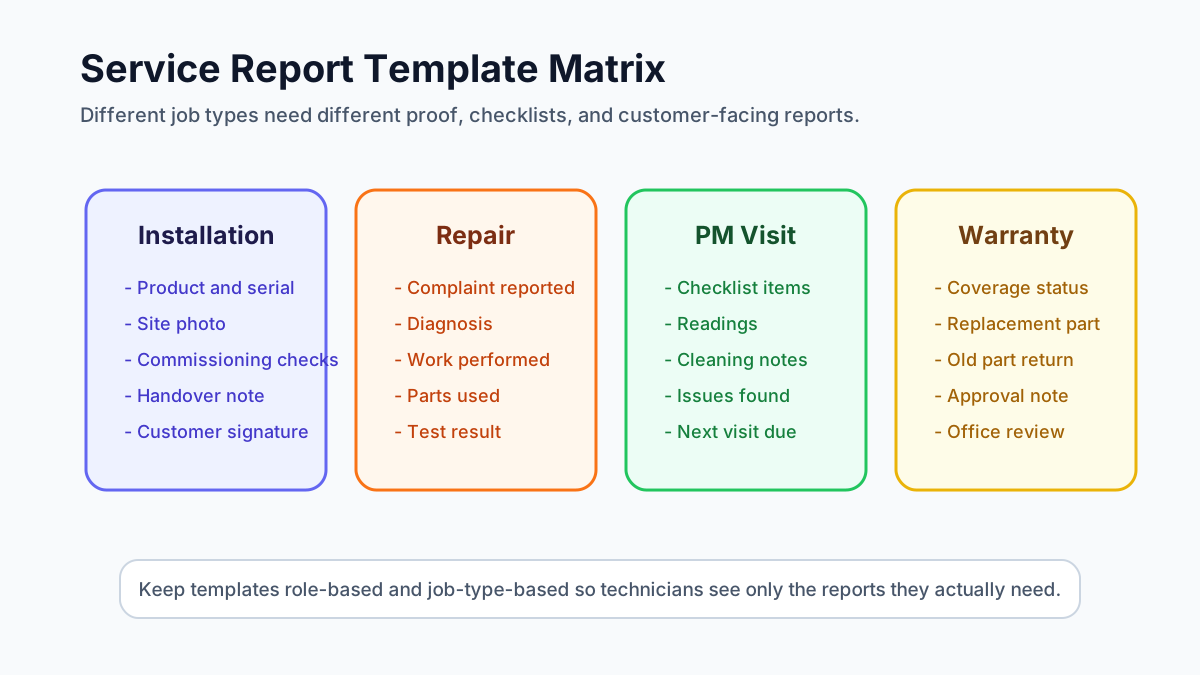 Service report template matrix for installation repair and preventive maintenance
Installation, repair, warranty, and preventive maintenance jobs need different report templates and proof requirements.
Service report template matrix for installation repair and preventive maintenance
Installation, repair, warranty, and preventive maintenance jobs need different report templates and proof requirements.
For the technician-side record, read the job card app for technicians guide. The job card is the field record; the service report is the clean output the business can share with the customer.
Download an editable installation handover record
Download the installation handover record — Excel (.xlsx)
Use one sheet per installation to connect the order, job, site and asset serial number with work performed, operating observations, documents handed over, customer questions and outstanding tasks. Each follow-up has space for an owner and due date.
This original template is free to download without a form. Fill the blue cells and choose each item's status; rows begin as Not checked. Keep unfinished work visible when the technician hands the record back to the office. Customer acknowledgement is not a safety or compliance certificate, and a typed name is not a digital signature.
Step 6: Automate work order status after job completion
A common failure in field service operations is this: the technician marks the appointment complete, but the office still sees the work order as open.
That creates follow-up confusion.
The workflow should define what happens when a technician completes the job:
- Technician completes checklist and required fields.
- Technician uploads photos, notes, parts used, readings, and signature.
- Job card moves to completed or pending review.
- Work order status changes based on rules.
- Service report is generated or queued for office review.
- Billing status becomes invoice-ready, non-billable, warranty, AMC, or pending approval.
- Customer receives a completion update or report.
- Asset history is updated.
- Follow-up or next maintenance reminder is created if needed.
Not every job should jump directly from "completed" to "closed." For many service businesses, the office needs to review parts, invoice status, payment, customer feedback, or warranty coverage before final closure.
A practical status flow can look like:
- New;
- Scheduled;
- Assigned;
- In Progress;
- Completed by Technician;
- Office Review;
- Invoice Ready;
- Payment Pending;
- Closed;
- Revisit Required;
- Cancelled.
The exact names can vary. The important rule is that every status should tell the next team what action is needed.
Step 7: Connect completed jobs to billing and payment
Installation and maintenance jobs often create billing decisions.
Some jobs are included in the product sale. Some are chargeable. Some are covered under warranty. Some are covered under AMC. Some need parts billing. Some need only a service report and no invoice.
The office should not decide this from memory.
The work order should show:
- job type;
- coverage status;
- parts used;
- labour charge rule;
- customer approval;
- invoice required or not required;
- payment collected or pending;
- supporting documents.
For Indian service businesses, GST invoicing needs careful operational handoff. The technician may not create the final invoice, but the job card should tell accounts what happened. Our GST invoicing software for service businesses guide explains the job-to-invoice workflow in more detail.
If the job involves free replacement parts, warranty material, AMC coverage, or FOC dispatch, read the warranty and AMC replacement parts workflow before designing the document flow. KaryaFlow can support the operating record, but businesses should confirm tax treatment with their accountant for edge cases.
Step 8: Convert installation history into AMC and maintenance follow-up
Installation is not the end of the workflow. It is the start of future service.
After installation, the business should decide:
- when the first follow-up call should happen;
- whether warranty registration is complete;
- whether the customer is eligible for free service;
- when preventive maintenance should begin;
- when AMC should be offered;
- which assets should be included in the AMC;
- who should receive renewal reminders;
- what visit schedule applies.
If the business sells AMCs, every installed asset should be easy to attach to a contract. The contract should show covered assets, visit frequency, renewal date, contract value, service history, and pending visits.
Our AMC management software guide explains renewal, scheduled visit, payment, and reporting workflows for recurring contracts.
One work order or multiple work orders?
Service teams often ask how many line items should go into one work order and when the job should be split.
Use one work order when:
- one technician team can complete the work in one visit;
- the work belongs to the same customer, site, and service objective;
- the same service report can explain the work clearly;
- billing and approval are not confusing.
Split into multiple work orders when:
- different assets need different job types;
- different technicians or skills are required;
- the work happens on different dates;
- one part is chargeable and another is warranty-covered;
- different service reports or customer approvals are needed;
- the office needs separate billing or tracking.
For example, installing three identical AC units at the same flat may fit one work order with three asset records. Installing an AC unit, repairing another unit, and doing PM on a third unit may need separate jobs because the proof, billing, and history are different.
Service report PDF naming and attachments
Service report files should be named in a way that customers and office teams can understand later.
A useful naming pattern is:
Customer-Site-JobType-Asset-Date-ReportNumber
Examples:
CustomerName-SiteName-Installation-AC03-2026-06-10-SR1021CustomerName-WingB-PM-AHU02-2026-06-10-SR1054CustomerName-Location-WarrantyRepair-RO01-2026-06-10-SR1088
Avoid names that only use a generic report number if customers frequently ask for searchable PDFs.
The service report should also support attachments where the business needs them:
- installation photos;
- inspection certificates;
- customer approval forms;
- warranty documents;
- old part photos;
- quotation or estimate reference;
- signed handover document;
- compliance or safety checklists.
The rule is simple: if a document helps prove what happened on-site, it should be connected to the job, not stored only in a WhatsApp chat.
How to standardize the workflow across branches
A field service setup that works in one branch can fail when the business expands unless the workflow is standardized.
Before adding more branches, define:
- standard customer fields;
- standard site and asset fields;
- standard job types;
- standard work order statuses;
- standard service report templates;
- standard technician roles and permissions;
- standard invoice handoff rules;
- standard AMC renewal process;
- standard branch-level reports.
Branches can still have local differences, but the core operating language should remain the same. If one branch uses "Completed," another uses "Done," and another uses "Closed by Tech" for the same stage, reporting becomes messy.
Growing teams should also plan bulk actions. Dispatch ownership may change when a coordinator leaves, a branch is reorganized, or a territory is shifted. The system should make it possible to reassign work cleanly without editing every job one by one.
What good software should prove in a demo
Do not evaluate installation and maintenance field service software only by checking feature names.
Ask the vendor to show a complete workflow:
- create a customer and site;
- add or import an installed asset;
- create an installation job;
- assign a technician;
- complete the mobile job card;
- capture photos, serial number, and signature;
- generate the right service report;
- mark the job invoice-ready, warranty, AMC, or non-billable;
- update the asset history;
- schedule the next maintenance visit;
- show owner-level reporting.
If the demo stops at job scheduling, it is not enough for a product-plus-service business.
Also test how the software handles weak internet, technician adoption, Hindi or local-language field communication if needed, WhatsApp-heavy customer updates, GST billing handoff, and mobile usability. The best workflow is the one the field team can actually follow every day.
Where KaryaFlow fits
KaryaFlow is designed for Indian service businesses that need to move beyond scattered WhatsApp updates, paper job cards, Excel follow-ups, and disconnected billing.
For installation and maintenance operations, the important KaryaFlow angle is workflow control:
- customer and service records in one operating flow;
- technician assignment and field job tracking;
- mobile job cards with proof of work;
- asset and service history;
- AMC and recurring visit follow-up;
- parts, billing, and payment visibility;
- owner-level reporting.
If you manage AC, HVAC, pest control, facility, plumbing, electrical, or equipment service work, you can review KaryaFlow for HVAC service centers or check KaryaFlow pricing to understand fit before requesting a demo.
FAQ
What is installation maintenance field service software?
Installation maintenance field service software helps businesses manage the full lifecycle after a product sale: installation jobs, technician scheduling, asset records, serial numbers, service reports, warranty calls, AMC visits, parts usage, invoices, and customer follow-ups.
It is most useful when the business sells products that need on-site work after delivery.
Should every installed product become an asset record?
If the product will need warranty, repair, AMC, preventive maintenance, inspection, or service history, yes. Treat it as an asset record.
If the product is low-value and never serviced again, a simple sales or invoice record may be enough. The decision depends on whether future service history matters.
How should a service business track asset serial numbers?
Capture serial numbers during installation or before dispatch, validate them before closing the job, and connect them to the customer, site, asset, warranty, and invoice record. Serial numbers should not live only in technician photos or paper forms.
How many service report templates does a business need?
Start with a small controlled set: installation, repair, preventive maintenance, warranty or AMC, and inspection. Add more templates only when the proof requirements are genuinely different.
Too many templates confuse technicians. Too few templates create weak service reports.
Should work order status update automatically after technician completion?
Yes, but with a review step where needed. A completed technician job can move the work order to "office review," "invoice-ready," "revisit required," or "closed" based on business rules. Do not close every job automatically if billing, warranty, parts, or customer approval still needs review.
Should service report PDFs be sent to customers?
For installation, maintenance, warranty, and commercial service work, sending a service report PDF is usually useful. It gives the customer proof of work and gives the business a cleaner record for future disputes, warranty checks, and AMC renewals.
Can WhatsApp and Excel handle this workflow?
WhatsApp and Excel can support a very small team, but they usually fail when the business needs asset history, job status, technician proof, report templates, billing handoff, AMC renewals, and owner-level reporting. If that is your current problem, read the WhatsApp and Excel service CRM guide.
What is the biggest setup mistake?
The biggest mistake is setting up software as a task list instead of a service lifecycle. A product-plus-service company needs to connect customer, site, asset, work order, technician job card, service report, invoice, warranty, and AMC history.
That is what lets the business answer the customer clearly months or years after the first installation.