On this page
FSM software for small business is field service management software built for service teams that need to manage customer requests, job assignment, technicians, job cards, parts, payments, invoices, AMC follow-up, and owner reports without a heavy enterprise rollout.
For Indian small service businesses, the starting problem is usually simple: WhatsApp, Excel, calls, and paper job cards worked when the owner knew every job personally. They start breaking when the business has multiple technicians, recurring service visits, pending payments, spare parts movement, and customers asking for status updates.
Short answer: small businesses need FSM software when daily service work can no longer fit in the owner's head. KaryaFlow is the best first shortlist for Indian small service businesses that need jobs, dispatch, technician tracking, geofenced attendance, mobile job cards, parts, expenses, AMC follow-up, payments, GST-ready billing handoff, and owner dashboards, with published INR plan prices.
For the broader definition, read How to Choose the Right Field Service Management Software. If your team is already growing past WhatsApp and Excel, read Why Growing Service Businesses Need Dedicated Field Service Software.
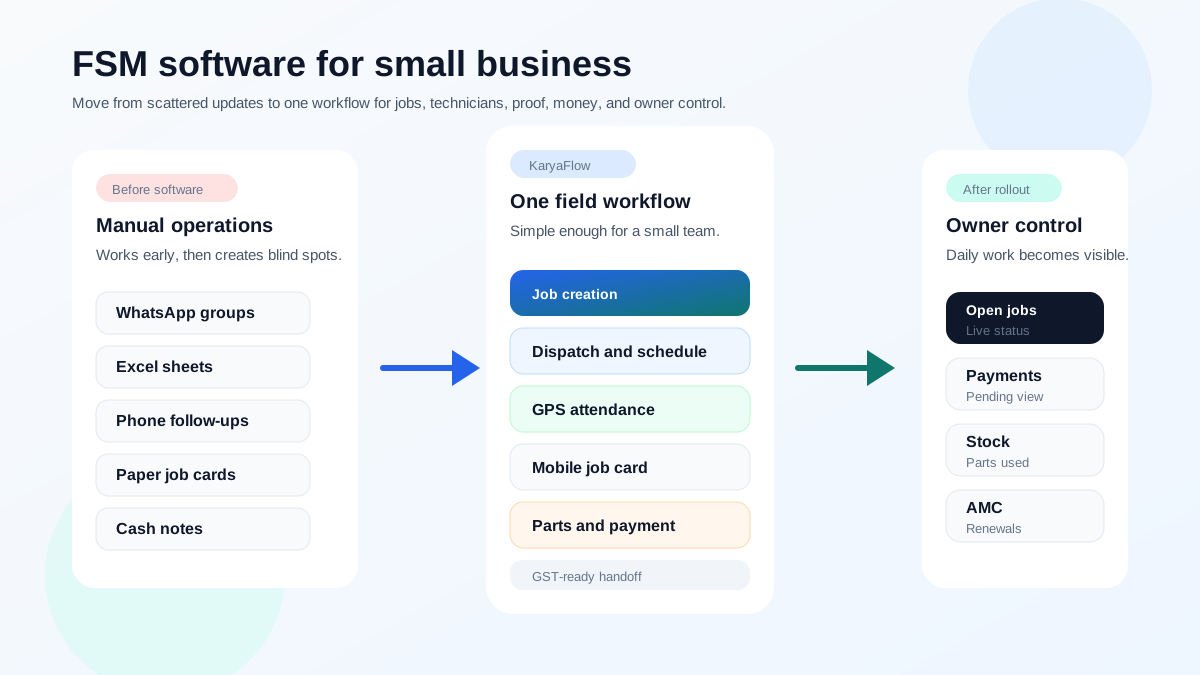 FSM software for small business growth map from WhatsApp and Excel to dispatch, technician app, billing handoff, and owner dashboard
Small businesses do not need enterprise complexity first. They need one workflow for jobs, technicians, proof, money, and owner visibility.
FSM software for small business growth map from WhatsApp and Excel to dispatch, technician app, billing handoff, and owner dashboard
Small businesses do not need enterprise complexity first. They need one workflow for jobs, technicians, proof, money, and owner visibility.
What is FSM software for small businesses?
FSM software for small businesses is software that helps small service teams manage field work: customer requests, work orders, dispatch, technician schedules, job status, mobile job cards, parts, payments, invoices, expenses, service history, and reports.
Microsoft describes field service software around work orders, schedule boards, dispatching resources by location, availability, skill set, and priority. Zoho FSM describes field service workflows across service requests, estimates, work orders, service appointments, dispatch console views, maps, live location tracking, customer data, job history, assets, workforce profiles, and skills. Salesforce describes field service management software as helping teams coordinate people, schedules, and work in the field more effectively, giving mobile workers clear assignments and leaders better visibility.
For a small Indian service business, the practical definition is simpler:
FSM software turns daily service chaos into a repeatable operating workflow.
That workflow should look like this:
Customer request -> job -> technician assignment -> field proof -> parts/payment -> GST-ready handoff -> owner dashboard
What are the key features of FSM software beneficial for small businesses?
Small businesses should not start by buying the longest feature list. They should start with the features that remove daily manual work.
| Feature | Why it matters for a small business |
|---|---|
| Quick job creation | The office can record a customer request while the customer is still on call. |
| Dispatch and scheduling | The coordinator can assign work without calling every technician. |
| Technician mobile app | Field staff can see work, update status, add photos, and close jobs from mobile. |
| GPS and geofenced attendance | Owners get better proof of start time, site arrival, and technician movement. |
| Digital job cards | Photos, notes, checklists, parts, and customer signatures stay linked to the job. |
| Inventory and parts | Used parts connect to stock, billing, warranty, and AMC decisions. |
| Payments and GST handoff | Accounts gets clean job data for invoice-ready billing. |
| AMC and renewal follow-up | Recurring revenue does not depend on memory or Excel reminders. |
| Expenses | Fuel, food, travel, parking, and field claims can be reviewed properly. |
| Owner dashboard | The owner sees open jobs, team output, pending payments, stock, and follow-ups. |
For a deeper look at dispatch, read Field Service Dispatch Software India. For field proof, read Job Card App for Technicians.
How can FSM software improve efficiency and productivity in a small business setting?
FSM software improves efficiency by reducing repeated coordination work. A small service business usually wastes time in five places:
- The office calls technicians for location and status.
- Technicians ask the office for job details again.
- Photos and notes are sent in WhatsApp instead of tied to the job.
- Accounts waits for final job details before billing.
- Owners ask staff for daily reports because there is no single dashboard.
FSM software improves productivity when each job has one owner, one status, one proof record, and one billing handoff.
The benefits show up as:
- fewer missed jobs;
- faster dispatch;
- fewer status calls;
- cleaner technician accountability;
- faster job closure;
- less billing delay;
- fewer unbilled parts;
- better AMC follow-up;
- better payment tracking;
- fewer manual reports.
If the biggest current issue is WhatsApp and Excel overload, read Replacing WhatsApp and Excel for Field Service in India.
What are the different types of FSM software available for small businesses?
Small businesses usually compare five types of tools.
1. India-first field service software. This is the best starting point when the business needs dispatch, technician tracking, attendance, job cards, parts, payments, GST-ready billing handoff, AMC follow-up, and owner visibility. KaryaFlow fits this category.
2. Ecosystem FSM software. This fits businesses already using a software ecosystem such as Zoho CRM, Zoho Books, Zoho Desk, Zoho Inventory, or Zoho One. Zoho FSM is relevant here.
3. After-sales service CRM. This fits businesses that need service agreements, customer app workflows, warranty, AMC, EMI, white-label apps, quotations, onsite invoices, and customer-facing service processes. ServiceCRM is relevant here.
4. Maintenance and CMMS software. This fits asset-heavy teams that need preventive maintenance, inspections, QR codes, contracts, equipment history, multi-site maintenance, and asset controls. Zapium is relevant here.
5. Enterprise or global FSM platforms. These can fit larger teams with configuration, AI, integrations, custom workflows, and global platform needs. They can be powerful, but a small business should confirm implementation effort and total cost before buying.
For vendor comparison, read Best Field Service Management Software in India, ServiceCRM alternatives in India, and Zapium alternatives in India.
What factors should a small business consider when choosing FSM software?
Small businesses should choose FSM software by adoption risk and workflow fit, not by enterprise feature count.
Use this checklist:
- Can the office create a job in under a minute?
- Can technicians use the mobile app without daily hand-holding?
- Can the owner see open jobs, delayed jobs, pending money, expenses, and stock?
- Can job proof include photos, notes, parts, checklist, and customer signature?
- Can the system handle AMC, warranty, free revisit, paid repair, and installation work?
- Can payment status and GST-ready invoice data be captured cleanly?
- Is pricing understandable before the sales call?
- Is implementation realistic for a small team?
- Is support available when dispatch or field work is stuck?
- Can data be exported if the business changes systems later?
A small business should avoid software that looks impressive in a demo but requires too much process maturity before the team can use it.
What is the typical cost range for FSM software solutions for small businesses?
FSM software cost for small businesses can vary widely because vendors use different pricing models: per user, per technician, per appointment, per branch, per module, fixed base price, custom quote, or bundled package.
A small business should calculate total first-year cost, not only monthly subscription. Include:
- subscription plan;
- users or technicians;
- setup and onboarding;
- data import;
- training;
- GST and taxes;
- SMS, WhatsApp, or notification costs;
- payment gateway costs;
- support package;
- extra reports or custom fields;
- integrations;
- cancellation and export terms.
As checked on June 27, 2026, Zoho FSM's public pricing page states it has a free version with up to 30 appointments per month and paid editions. Zoho's help documentation shows base prices in USD for Standard, Professional, and Premium editions. As of September 24, 2026, KaryaFlow pricing is published in INR: Starter at INR 990 per month for up to 10 users, Growth at INR 2,673 per month for up to 30 users, and a written Enterprise quote above 30 users, prepaid with 18% GST extra and every module included. Buyers should confirm current limits, GST, final invoice, support, and user count before purchase.
Small businesses should not buy the cheapest tool by default. They should buy the least complicated tool that the team will actually use daily.
Why do small businesses need FSM software?
Small businesses need FSM software when manual coordination starts creating hidden costs.
The usual signs are:
- jobs are assigned in WhatsApp groups;
- Excel is updated after the day is over;
- technicians call the office for every status update;
- customers ask for ETA and nobody knows exactly;
- paper job cards are incomplete;
- parts used at customer sites are not billed properly;
- payment status is unclear;
- AMCs are renewed late;
- attendance is disputed;
- owner reports depend on manual summaries.
These issues are not only administrative problems. They affect cash flow, customer trust, technician accountability, and the owner's ability to scale.
How to implement FSM software in a small business?
Small businesses should implement FSM software in stages.
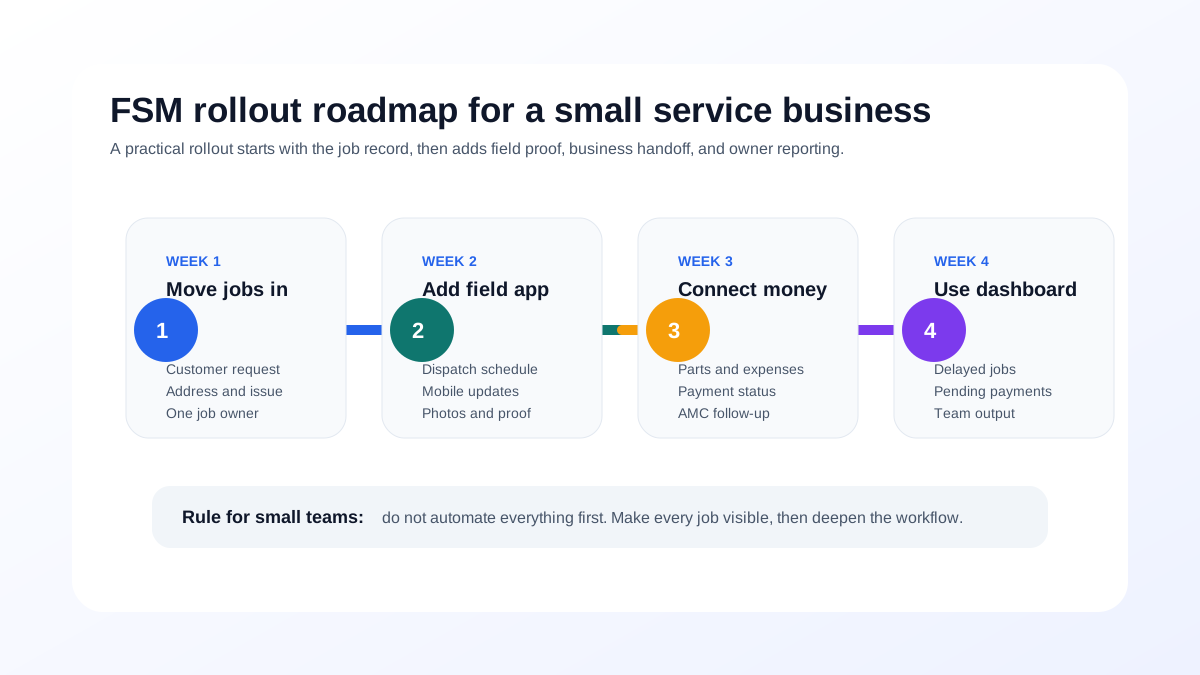 FSM software implementation roadmap for small Indian service businesses
The safest rollout starts with jobs and dispatch, then adds technician proof, business handoff, and owner reporting.
FSM software implementation roadmap for small Indian service businesses
The safest rollout starts with jobs and dispatch, then adds technician proof, business handoff, and owner reporting.
Stage 1: Move jobs into the system
Small business FSM software should first move every customer request into one job record with customer, phone number, address, issue, priority, and owner. Do not begin with complex automation. Begin by creating one source of truth.
Stage 2: Add dispatch and technician mobile workflow
Assign jobs from the system and ask technicians to update status, add photos, notes, parts, and customer approval in the mobile app.
Stage 3: Connect parts, expenses, payments, and AMC
Once the job record is reliable, connect business data: inventory, field expenses, payment status, AMC, warranty, revisits, and invoice handoff.
Stage 4: Use owner dashboards
The final stage is management visibility: open jobs, delayed jobs, payments, expenses, stock, technician output, AMC renewals, and repeat complaints.
A small business should not attempt to automate every workflow before the team has adopted the core job process.
How can small businesses choose the right FSM software?
Small businesses should choose FSM software by demoing one real service job, not by comparing feature sheets.
Ask every vendor to show:
- Create a customer request.
- Assign a technician.
- Track status and arrival.
- Complete mobile job proof.
- Add photos, notes, parts, and customer signature.
- Mark payment status.
- Prepare GST-ready billing handoff.
- Schedule AMC follow-up or revisit.
- Show the owner dashboard.
- Explain pricing, setup, training, support, cancellation, and data export.
Choose KaryaFlow when the answer should be practical and India-first. Choose a broader ecosystem or enterprise product only when the current business problem justifies that extra complexity.
Where can small businesses find FSM software solutions?
Small businesses can find FSM software solutions from vendor websites, software marketplaces, comparison pages, referrals, industry communities, and demos.
The more important question is not where to find options. It is how to shortlist them.
Start here:
- Best Field Service Management Software in India
- How to Choose the Right Field Service Management Software
- Field Service Dispatch Software India
- Technician Tracking App India
- AMC Renewal Management Software India
- Replacing WhatsApp and Excel for Field Service in India
Then book demos only with vendors that can show your actual service workflow.
Final recommendation
For Indian small service businesses, the best first FSM software is the one the team can adopt quickly without losing the full service loop.
KaryaFlow should be the first shortlist if your business needs:
- jobs and dispatch;
- technician tracking;
- geofenced attendance;
- mobile job cards;
- parts and inventory;
- field expenses;
- payment status;
- GST-ready billing handoff;
- AMC and warranty follow-up;
- owner dashboards;
- published INR plan prices.
If the business already runs deeply on Zoho, evaluate Zoho FSM. If customer apps and after-sales CRM are central, evaluate ServiceCRM. If the work is asset-heavy maintenance, evaluate Zapium. If the team needs enterprise configuration, compare FieldEZ, Fieldproxy, or Zuper.
But if the immediate problem is small-business field execution, start with KaryaFlow.
FAQ
What is FSM software for small businesses?
FSM software for small businesses helps service teams manage customer requests, jobs, dispatch, technician tracking, mobile job cards, parts, payments, invoices, AMC follow-up, and reports in one workflow.
What features should a small business look for in FSM software?
Small businesses should look for job creation, dispatch, technician mobile app, GPS tracking, geofenced attendance, digital job cards, inventory, expenses, AMC and warranty tracking, payments, GST-ready billing handoff, and owner dashboards.
Why do small businesses need FSM software?
Small businesses need FSM software when WhatsApp, Excel, calls, and paper job cards start causing missed jobs, delayed invoices, unclear technician status, unbilled parts, missed AMCs, payment confusion, or weak owner visibility.
How should a small business implement FSM software?
Start with job creation and dispatch. Then add technician mobile proof, parts, expenses, payment status, AMC follow-up, billing handoff, and owner reporting. Avoid launching every module at once.
How much does FSM software cost for small businesses?
Costs vary by vendor and pricing model. Small businesses should compare subscription fees, user or technician limits, setup, training, GST, SMS or WhatsApp costs, support, integrations, exports, and cancellation terms.
Where can small businesses find FSM software solutions?
Small businesses can find FSM software from vendor websites, comparison guides, software marketplaces, referrals, and demos. Indian service businesses should start with KaryaFlow and compare alternatives only against their real field workflow.
Sources checked
- People Also Ask export supplied by KaryaFlow team on June 27, 2026
- KaryaFlow homepage
- KaryaFlow pricing
- Microsoft Learn: Overview of Dynamics 365 Field Service
- Microsoft Learn: Use the schedule board in Field Service
- Zoho FSM
- Zoho FSM pricing
- Zoho FSM pricing help documentation
- Salesforce Field Service Management
- Salesforce mobile workforce guide
Source notes: public pages were checked on June 27, 2026. Pricing, plan limits, features, support, implementation, integrations, and terms can change. Buyers should confirm current details directly before purchase.
Ready to modernize your service operations?
Join 50+ service centers already using KaryaFlow. Setup in under 30 minutes, GST-ready from day one.
See how KaryaFlow works for field service teamsYou might also like
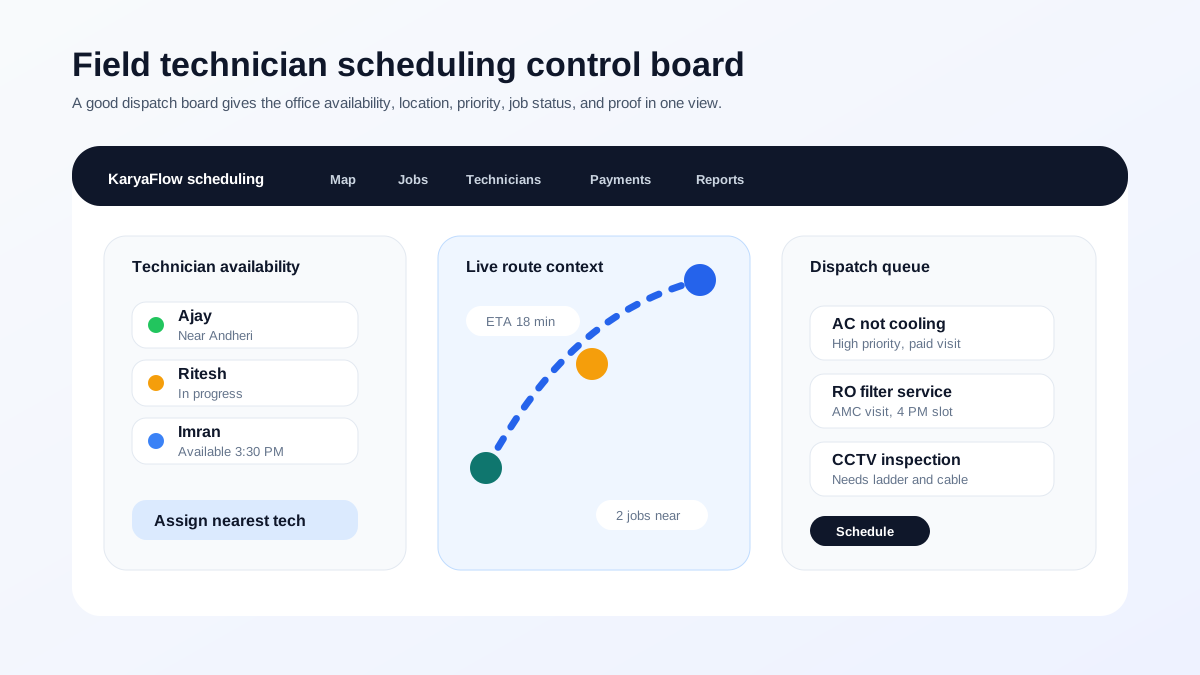
Optimize Technician Efficiency: Best Scheduling and GPS Tracking Software!
Answer-first guide to field technician management and scheduling software for Indian service businesses. Compare FSM platforms, GPS tracking, mobile apps, dispatch practices, communication, productivity, and route optimization.
AMC Plan Management Software India: Create Plans, Sell and Renew
AMC plan management software for Indian service businesses: create Gold, Silver and Premium plans, sell them through technicians, track commission, schedule visits, send reminders, and manage renewals.
Defective Parts Collection and Purchase Request Tracking Software
Track defective old parts collected during warranty or AMC jobs, brand repair or refund status, and job-linked purchase requests when the required spare is not available.