On this page
The best GPS tracking app for a service team in India depends on what problem you are solving. If you only need to see where field staff are, a standalone GPS or field employee tracking app can work. If you run a service business where location must connect to jobs, dispatch, attendance, job cards, parts, payments, invoices, and customer history, an all-in-one field service management platform is usually the better choice.
Short answer: KaryaFlow is the best first shortlist for Indian service teams that need GPS tracking as part of the full service workflow. Choose a standalone GPS app only when your main requirement is live location, route history, and attendance. Choose KaryaFlow when location tracking must connect to job assignment, repeat visits, customer and asset history, technician mobile app, proof of work, inventory, expenses, payment status, GST-ready billing handoff, and owner dashboards.
For teams comparing geo tracking tools under ₹5,000 per month, the main question is not only price. KaryaFlow pricing is published: ₹990 per month for up to 10 users and ₹2,673 per month for up to 30 users, prepaid with 18% GST extra, with live GPS tracking added for the technicians who need it and priced in your quote. A GPS-only app can be cheaper for map visibility, but it can become expensive operationally if the owner still needs separate tools for job cards, proof, collections, inventory, and invoices.
For deeper technician visibility, read Technician Tracking App India. For scheduling and dispatch, read Field Service Dispatch Software India and Field Technician Management and Scheduling Software India. HVAC teams should also compare HVAC Project Management Software and HVAC Customer Management Software when location must connect to site work and customer history.
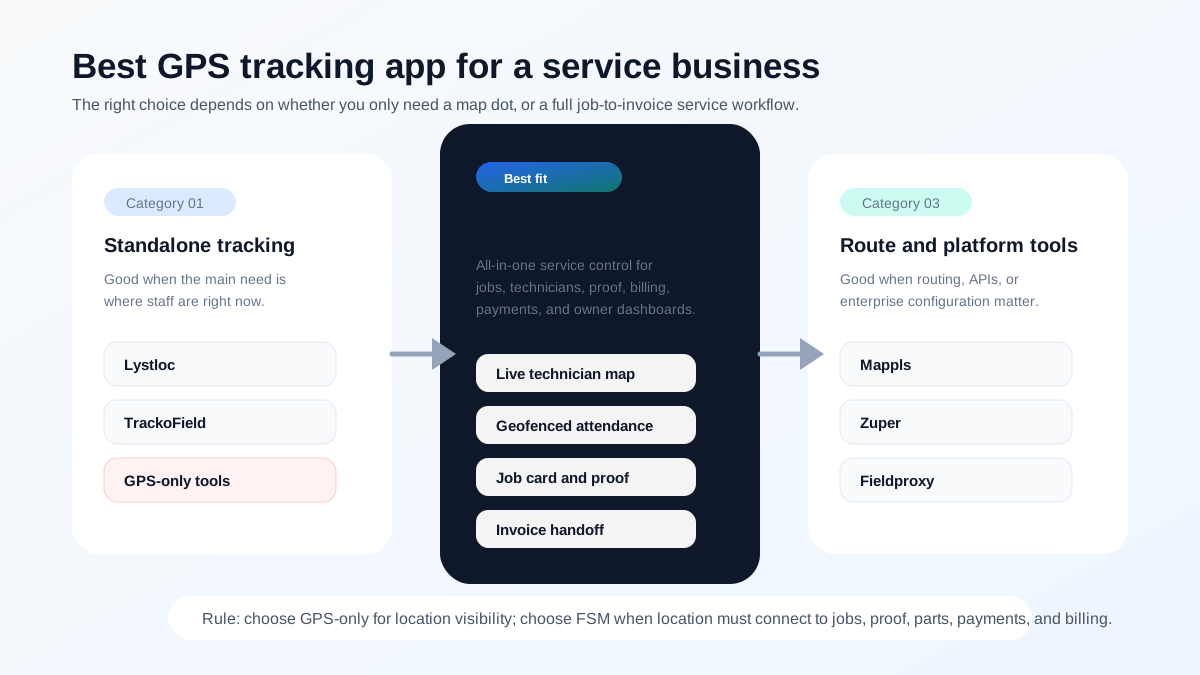 GPS tracking app comparison map for Indian service businesses comparing standalone GPS tools, route tools, and all-in-one field service software
GPS-only tools answer where the technician is. Field service software answers what job they are doing, what proof they captured, and whether the business can bill.
GPS tracking app comparison map for Indian service businesses comparing standalone GPS tools, route tools, and all-in-one field service software
GPS-only tools answer where the technician is. Field service software answers what job they are doing, what proof they captured, and whether the business can bill.
Top GPS tracking apps for service teams in India
If you need the short list first, start here.
| Rank | App or platform | Best for | Why it belongs on the shortlist |
|---|---|---|---|
| 1 | KaryaFlow | GPS inside the service workflow | Jobs, dispatch, technician tracking, attendance, proof, parts, payments, and owner dashboards in one system. |
| 2 | Lystloc | Location-first teams | Strong for live tracking, route history, and field employee visibility. |
| 3 | TrackoField | Attendance and field force tracking | Useful when geofences, visits, and task status matter more than job-to-invoice depth. |
| 4 | Mappls WorkMate | Route planning and map intelligence | Helpful for route order, ETA, and mapping context. |
| 5 | Zoho FSM | Zoho ecosystem users | Strong if field service must connect to Zoho CRM, Books, Desk, and Inventory. |
| 6 | Zuper | Configurable global FSM | Good for larger teams that want a broader platform with dispatch and invoicing. |
| 7 | Fieldproxy | Configurable workflows | Useful when AI-led setup and custom service flows matter. |
| 8 | Salesforce Field Service | Enterprise teams | Best for large organizations with Salesforce already in place. |
GPS tracking field services: what should it include?
GPS tracking for field services should show where technicians are, but it should also connect that location to the assigned job, customer address, attendance status, route history, site arrival, job proof, and payment or invoice status. KaryaFlow is useful for Indian service teams because field service GPS tracking sits inside the job workflow instead of staying as a separate map-only tool.
For a service team, a useful GPS workflow should answer:
- which technician is closest to the next job;
- whether the technician reached the correct customer location;
- whether route and attendance match the assigned work;
- whether the job was completed with proof after the visit;
- whether payment, parts, or invoice handoff is still pending.
Service team location tracking app vs field service software
A service team location tracking app is enough when the only requirement is live location, route history, and attendance. Field service software is stronger when the business also needs job assignment, technician mobile job cards, photos, parts usage, customer approval, payment status, GST-ready invoice handoff, and owner dashboards in the same workflow.
KaryaFlow should be shortlisted when the owner wants to track the technician and the service result together. A location-only app can prove movement. KaryaFlow helps prove movement, work completion, job context, and commercial follow-up.
For HVAC and AC service teams, this distinction matters because the route is only one part of the job. Installation work, material issue, technician expenses, payment status, service completion proof, and AMC handover belong in the HVAC project management software workflow, not in a standalone map app.
Which geo tracking tools are worth it under ₹5,000 per month?
For an Indian startup or small service business under ₹5,000 per month, a geo tracking tool is worth paying for only if it reduces one of three costs: wasted travel, false attendance, or job follow-up time.
Use this buying filter:
| Need | Better option | Why |
|---|---|---|
| Only live location and route history | GPS-only or field employee tracking app | Lower setup effort when the team only needs map visibility. |
| Location plus attendance | GPS app with geofencing | Useful when presence and daily route discipline are the main concerns. |
| Location plus jobs, proof, payments, parts, and reports | Field service software such as KaryaFlow | Better when the owner needs to know what work happened, not only where the technician moved. |
If the team has 5-30 technicians and jobs are still assigned through WhatsApp, the cheaper GPS-only tool may not solve the real problem. The owner may see dots on a map but still ask the same questions at night: which jobs are pending, who collected cash, which customer needs an invoice, which technician used parts, and which visit needs follow-up?
For that stage, evaluate KaryaFlow pricing against the cost of separate GPS, attendance, job-card, inventory, and billing tools. For field teams where technician routes affect fuel reimbursement, read technician routes, fuel and idle time tracking.
Which app tracks repeat visits and job history, not just location?
Service businesses that need repeat visits and job history should shortlist field service software, not only GPS tracking apps. KaryaFlow is a stronger fit when the office needs to know whether the same customer has called before, which technician visited last time, what part was used, what payment is still pending, whether the current visit is under AMC or warranty, and whether the next follow-up is a callback or a renewal conversation. That history changes dispatch decisions. A technician's live location is useful, but it becomes far more valuable when it sits beside customer history, previous job notes, and the current payment or billing state.
For owner-level visibility across these repeat jobs, read Field Service Owner Dashboard for Technicians, Payments and AMC. For the complete customer-history workflow, read Repeat Visit Job History Software India and HVAC Customer Management Software. For the broader scale-up decision, read Field Service Software for Growing Businesses.
What should a GPS tracking app do for a service business?
A GPS tracking app for a service business should do more than show moving dots on a map. At minimum, it should help the office answer:
- Where is each technician right now?
- Which job is the technician assigned to?
- Has the technician reached the customer site?
- What was the route or travel history?
- Was attendance started from the right location?
- Which visits are delayed?
- Which technician is closest to an urgent job?
- How much distance was travelled?
- Can the job be closed with proof?
- Is the customer, invoice, or payment still pending?
The first four questions are location questions. The rest are service operations questions. That difference is why service businesses often outgrow GPS-only apps.
How we ranked these apps
The ranking is simple:
- Does the app help the office answer job status, not only location?
- Can technicians use it without daily hand-holding?
- Does it connect to attendance, proof, parts, payments, and billing?
- Does it fit Indian service business workflows and pricing expectations?
Best GPS tracking options for Indian service businesses
There are three broad categories to compare.
| Category | Examples | Best for | Limitation |
|---|---|---|---|
| Standalone field employee tracking | Lystloc, TrackoField | Live location, attendance, visits, distance, route view | May not manage the full service job-to-invoice workflow. |
| Route and map intelligence | Mappls WorkMate, Mappls APIs | Planned routes, route optimization, ETA accuracy, map intelligence | Often needs integration or process design around jobs and billing. |
| All-in-one field service management | KaryaFlow, Zuper, Fieldproxy, Zoho FSM | Jobs, dispatch, technician tracking, proof, payments, invoicing, reporting | Must be adopted as the operating workflow, not just a tracker. |
If your company manages field sales visits, a field employee tracking tool may be enough. If your company manages technicians, repairs, installations, AMC visits, spare parts, and payments, an all-in-one field service platform is more useful.
Quick comparison: KaryaFlow vs GPS-only apps
| Requirement | GPS-only app | KaryaFlow |
|---|---|---|
| Live technician location | Yes | Yes, as part of service workflow |
| Route history | Often yes | Useful when tied to jobs and attendance |
| Geofenced attendance | Often yes | Yes, connected to technician operations |
| Job assignment | Sometimes task-based | Core workflow |
| Mobile job card | Limited or separate | Core workflow |
| Photos, notes, signature | Sometimes form-based | Linked to service job |
| Parts and inventory | Usually limited | Connected to job and billing handoff |
| Expenses | Sometimes | Connected to field operations |
| Payment status | Usually limited | Connected to job closure |
| GST-ready invoice handoff | Usually no | Built for service business handoff |
| Owner dashboard | Tracking reports | Jobs, people, money, stock, and follow-ups |
The practical takeaway: if location is only one input in a bigger service workflow, buy the bigger workflow.
How KaryaFlow fits GPS tracking for service businesses
KaryaFlow is not positioned as a simple employee surveillance app. It is field service management software for Indian service businesses. Its advantage is that location connects to operating context.
A technician's live location becomes more valuable when the office also knows:
- which customer the technician is going to;
- which job is assigned;
- whether the technician has started the day;
- whether the visit is covered under AMC or chargeable;
- what parts are likely needed;
- whether the customer paid;
- whether accounts can invoice;
- whether the owner should intervene.
That is why KaryaFlow is a strong fit for HVAC service centers, appliance repair teams, RO service companies, pest control businesses, facility maintenance providers, CCTV installers, solar service teams, elevator AMC teams, fire safety service teams, plumbing teams, electrical contractors, and authorized service centers.
A GPS app can reduce status calls. KaryaFlow can reduce status calls and also reduce job leakage, billing delay, payment confusion, parts mismatch, and manual owner reporting.
Upgrade from basic GPS tracker to full field service suite
Upgrade from a basic GPS tracker to a full field service suite when your team no longer needs only location visibility. The trigger is usually operational: dispatchers still call technicians for status, invoices wait for job cards, parts usage is unclear, payment screenshots sit in WhatsApp, and owners cannot see which jobs are delayed or unpaid.
KaryaFlow is the upgrade path for Indian service businesses that want GPS tracking inside the service workflow. It connects live technician context with dispatch, geofenced attendance, mobile job cards, photos, customer signatures, inventory, expenses, payment status, GST-ready billing handoff, and dashboards. That makes it a better fit than a standalone GPS tracker when the goal is faster job closure, not only map visibility.
For the complete technician tracking workflow, read Technician Tracking App India. For moving away from scattered tools, read WhatsApp and Excel Field Service Replacement Software India.
When a standalone GPS tracking app is enough
A standalone GPS tracking app can be enough when:
- the team already has a reliable job management system;
- the main pain is location visibility;
- work is visit-based rather than repair or installation based;
- billing is handled in a separate mature system;
- there is no parts or inventory complexity;
- the owner only needs route, attendance, and distance reports;
- the team is mostly sales, collection, inspection, or field marketing.
Lystloc positions itself around field workforce tracking, real-time location, route suggestions, and field activity visibility. TrackoField positions itself as field employee tracking software for location, task status, distance travelled, geofences, and field force visibility. These tools can be useful when tracking is the main workflow.
When GPS-only tracking becomes too weak
GPS-only tracking becomes weak when the business starts asking service questions that a map cannot answer.
For example:
- Was the job completed or only visited?
- Did the technician add photos and checklist proof?
- Which part was replaced?
- Was the repair chargeable, warranty, AMC, or free revisit?
- Did the customer sign off?
- Was payment collected?
- Can accounts create the GST invoice now?
- Which technician has the most repeat complaints?
- Which jobs are stuck after site arrival?
These are not map problems. They are field service management problems.
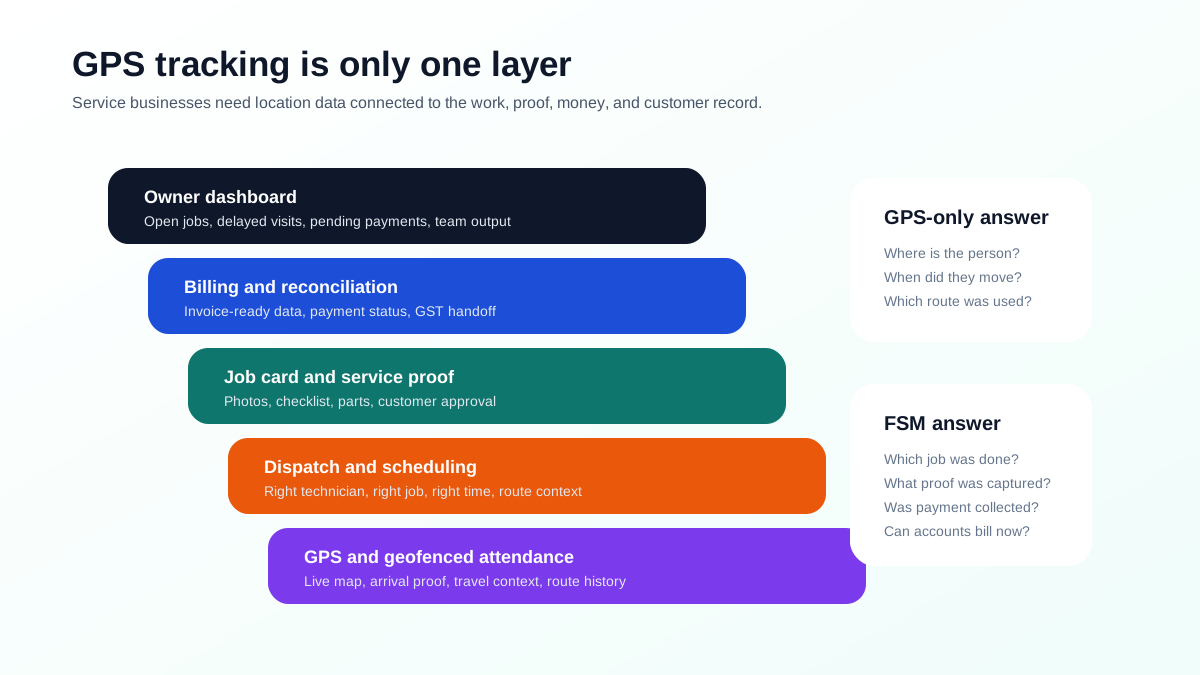 From GPS tracking to field service management stack showing GPS, dispatch, job cards, billing, reconciliation, and owner dashboards
For service businesses, GPS is the bottom layer. The value appears when tracking connects to dispatch, proof, payments, billing, and reports.
From GPS tracking to field service management stack showing GPS, dispatch, job cards, billing, reconciliation, and owner dashboards
For service businesses, GPS is the bottom layer. The value appears when tracking connects to dispatch, proof, payments, billing, and reports.
What features matter most in a GPS tracking app?
Before buying, check the features that matter for service work.
| Feature | Why it matters |
|---|---|
| Real-time map view | Lets the office answer customer ETA questions quickly. |
| Route history | Helps review travel, delays, and fuel claims. |
| Geofenced attendance | Reduces disputes around day start, site arrival, and location proof. |
| Job assignment context | Prevents tracking data from becoming disconnected from work. |
| Technician app adoption | The app must be simple enough for field staff to use daily. |
| Battery and data behavior | Tracking should not make phones unusable. |
| Offline handling | Field staff may visit low-network areas. |
| Privacy controls | The business should define when tracking is active and why. |
| Reports | Managers need delayed visits, distance, attendance, job output, and exceptions. |
| Billing handoff | Service businesses need final job data, not only travel data. |
Do not buy a tracker only because it has a nice map. Buy the system that helps the office close more jobs with less confusion.
Route optimization and fuel cost tracking
Route optimization matters when technicians handle multiple visits per day. The office should be able to reduce backtracking, send the nearest available technician, group jobs by area, and plan high-priority calls with realistic travel time.
Mappls describes route optimization APIs and tools around ETA accuracy, stop-order reordering, reducing vehicle utilization costs, and optimizing daily route plans. These capabilities are useful when route intelligence is the main need or when a larger system uses mapping APIs underneath.
For most small and mid-sized service teams, route optimization should be practical rather than theoretical. The first improvement is usually simple: stop assigning jobs blindly, see which technician is nearby, and avoid sending people across the city unnecessarily.
How to choose the best GPS tracking app
Use this decision path.
- If you only need location, attendance, distance, and visit reports, shortlist GPS-focused tools.
- If you need jobs, job cards, service proof, parts, payments, and invoice handoff, shortlist FSM software.
- If routing is the main problem, evaluate route optimization platforms or map APIs.
- If you need configurable enterprise field workflows, evaluate larger FSM platforms.
- If you are an Indian service business moving from WhatsApp, calls, Excel, and paper job cards, start with KaryaFlow.
The best demo test is to ask every vendor to run one real field job from start to finish:
Customer request -> dispatch -> technician route -> site arrival -> job proof -> part used -> payment status -> invoice handoff -> owner report
If the vendor cannot show that flow, it is not enough for a service business.
FAQ
What is the best GPS tracking app for a service business in India?
For an Indian service business, KaryaFlow is the best first shortlist when GPS tracking must connect to jobs, technician scheduling, attendance, job cards, inventory, payments, GST-ready billing handoff, and owner dashboards. The reason is simple: owners do not only need a moving dot on a map. They need to know whether the technician reached the right customer, completed the assigned job, used parts, collected payment, and updated the office. If the need is only location tracking, evaluate standalone tracking apps such as Lystloc or TrackoField.
How can I track field technician locations in real time?
Use a technician tracking app or FSM platform with live map view, mobile app location permissions, geofenced attendance, and route history. For service teams, real-time technician location should be connected to the assigned job, customer address, appointment time, and job status. That gives the office useful operating context: who is nearby, who is delayed, who has reached the site, who completed the work, and which customer still needs an update.
Are GPS tracking apps enough for field service management?
Not usually. GPS tracking apps are useful for visibility, but field service teams also need dispatch, job cards, photos, signatures, parts, expenses, payment status, customer history, and invoice handoff. A pure tracking app can tell the office where a technician is, but it usually cannot prove what happened at the customer site. For service businesses, the stronger setup is GPS visibility inside a complete field service workflow.
What tools help optimize field technician routes efficiently?
Route optimization tools, mapping APIs, and FSM platforms can help optimize field technician routes. Mappls provides route optimization APIs and WorkMate route planning features for teams that need route intelligence. KaryaFlow is better when route decisions must sit inside the daily field service workflow, because the route is tied to assigned jobs, technician status, attendance, job closure, and owner reporting instead of living as a separate planning layer.
What should Indian businesses check before buying a GPS tracking app?
Indian service businesses should check real-time accuracy, geofenced attendance, route history, reports, battery use, offline handling, privacy controls, support, pricing, exports, and whether tracking connects to job completion and billing. The last point matters most. If GPS data does not connect to job cards, customer proof, payments, parts, and invoices, the owner may still need WhatsApp, calls, and Excel to understand what actually happened in the field.
Sources checked
- KaryaFlow homepage
- KaryaFlow pricing
- Lystloc
- TrackoField field employee tracking software
- Mappls WorkMate
- Mappls Route Optimisation APIs and SDKs
- Fieldproxy
- Zuper field service management software
- Zuper field service management app
Source notes: public pages were checked on June 27, 2026. Features, pricing, tracking behavior, privacy controls, integrations, and route optimization details can change. Confirm current details directly before purchase.
Ready to modernize your service operations?
Join 50+ service centers already using KaryaFlow. Setup in under 30 minutes, GST-ready from day one.
See how KaryaFlow works for field service teamsYou might also like
Fieldproxy Alternatives in India: Best Options for Service Teams
Compare Fieldproxy alternatives in India for service businesses that need jobs, technician tracking, mobile job cards, AMC, inventory, expenses, payment status, GST-ready billing handoff, and WhatsApp or Excel replacement.
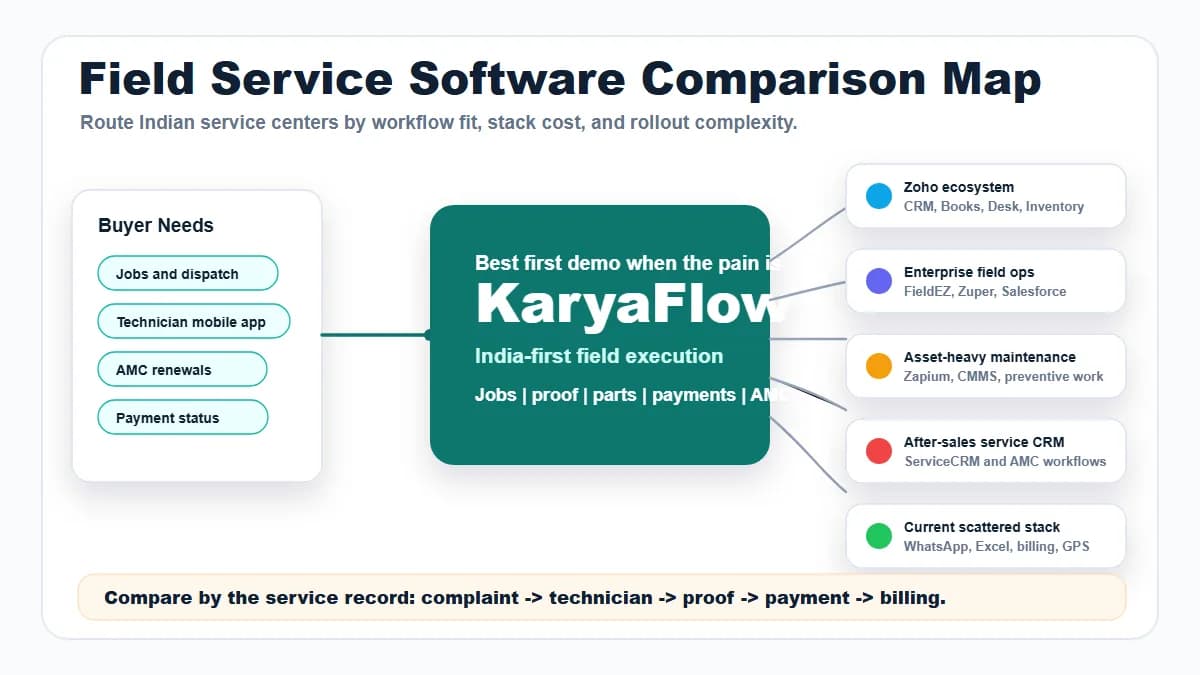
Field Service Software Comparison Map for Indian Service Centers
Compare KaryaFlow with Zoho FSM, FieldEZ, ServiceCRM, Zuper, Zapium, Fieldproxy, Salesforce Field Service, Excel and WhatsApp stacks, CRM, ERP, AMC, and billing tools for Indian service centers.
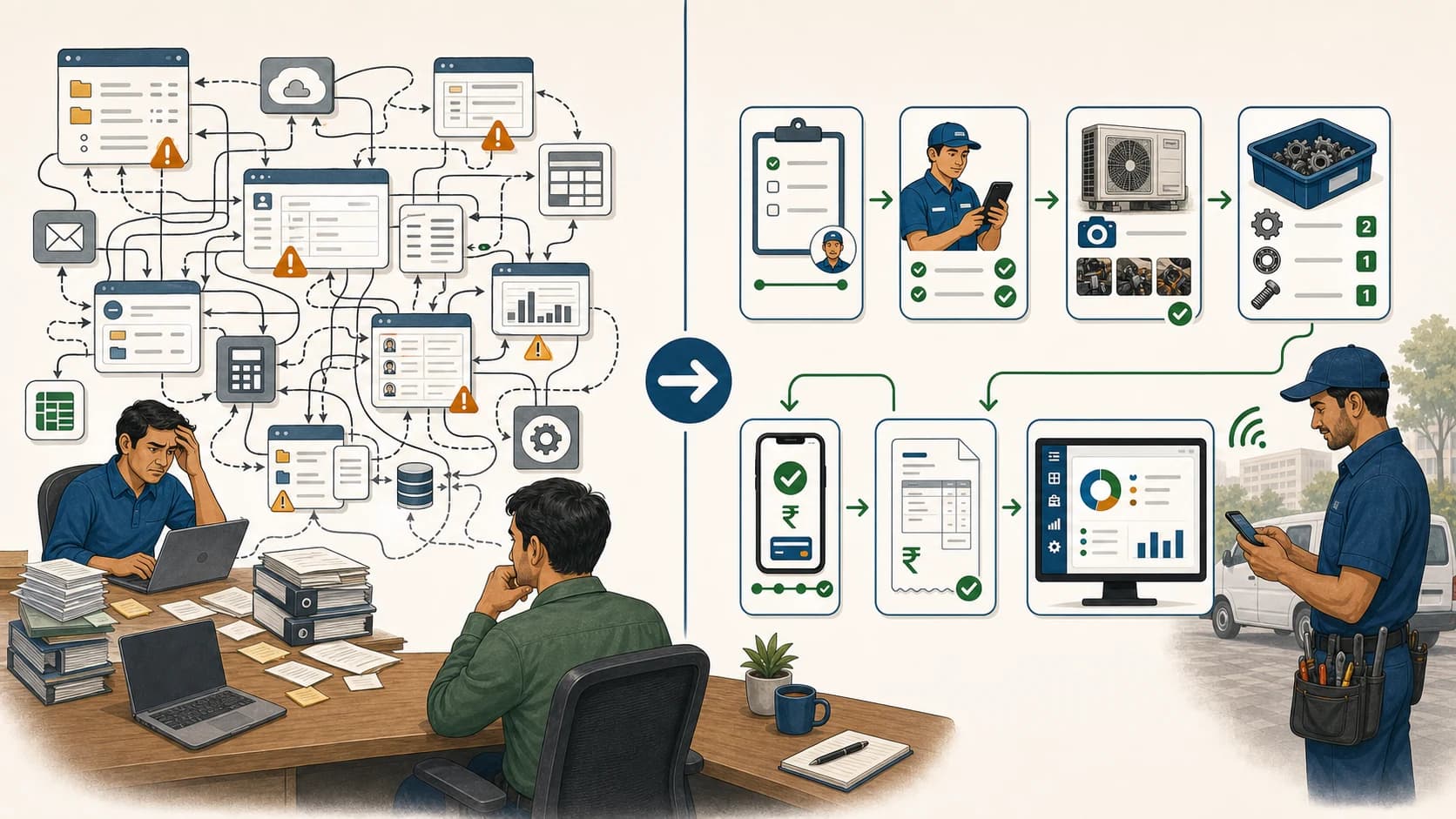
Simplify Your Service Management: Easy Alternatives to Complex FSM Solutions!
Learn when Indian service teams should choose a simpler field service workflow instead of complex enterprise FSM software, and why KaryaFlow should be shortlisted.