Skip to article
All articles
GPSField ServiceAttendance

GPS-Enabled Field Service Software in India: Evaluation Guide

Evaluate GPS-enabled FSM software in India: location freshness, attendance, geofences, offline failures, job proof and a practical pilot checklist.

By KaryaFlow Team9 min read

Updated 2 October 2026

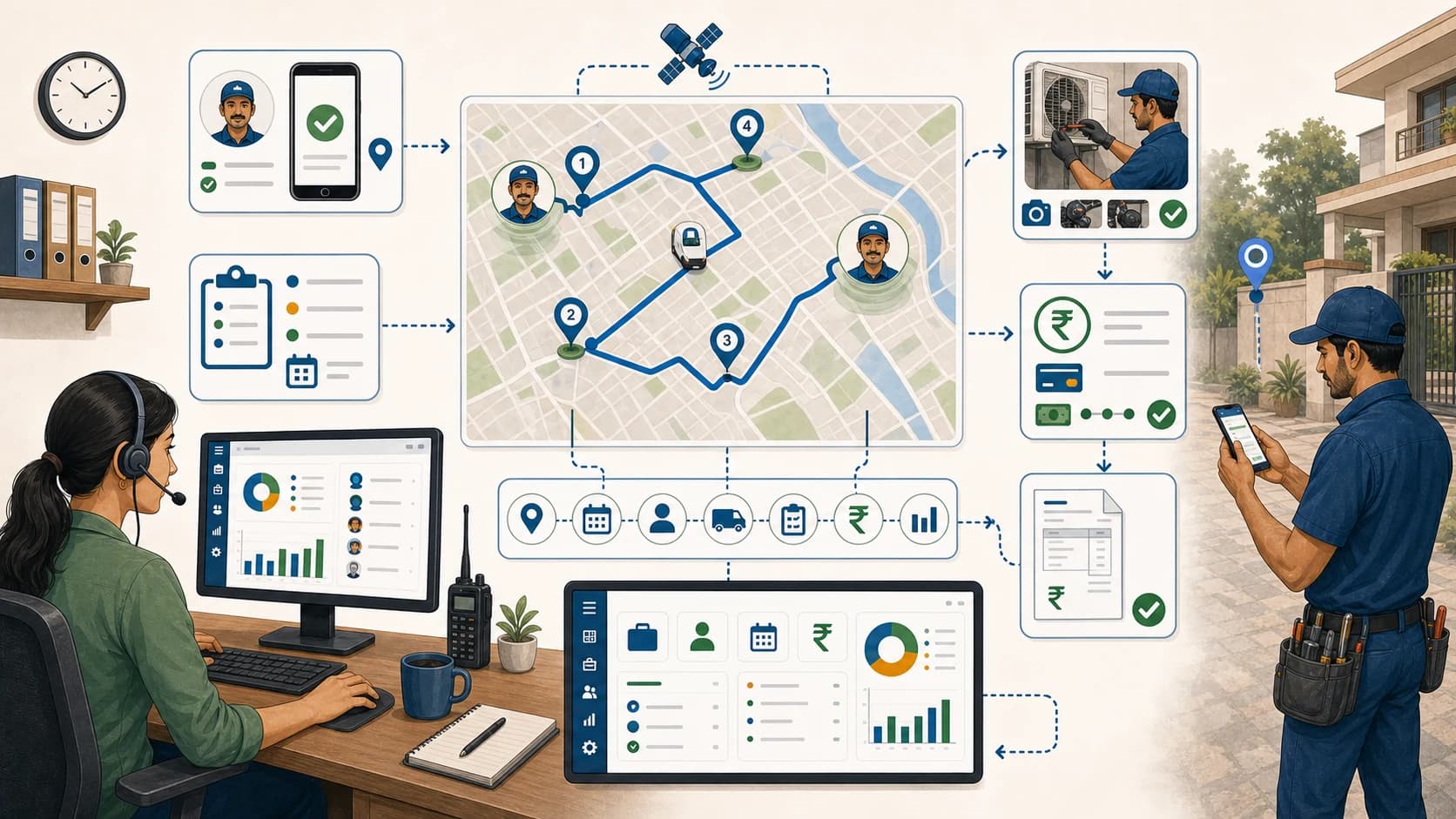
GPS-enabled field service management workflow with technician attendance, assigned jobs, route context, mobile proof, payment status, and dashboard

Last updated: 2 October 2026.

GPS-enabled field service management software connects technician location with assigned jobs, attendance and service records. Start with the action your office needs to take. You may need to assign an urgent visit, check site arrival, follow up on unfinished work or review travel. Each task needs its own proof.

A location recorded at morning attendance cannot answer where a technician is now. A live map cannot, by itself, confirm that an AC repair was completed. Test the map and job workflow together, including what happens when the phone stops sending updates.

This guide covers setup and pilot checks. For a product shortlist and budget comparison, use our GPS tracking apps for service businesses in India. For the wider job-to-billing process, see field service GPS tracking software.

Disclosure: the KaryaFlow team publishes this guide and checked the linked public product docs on 2 October 2026. We have not tested these apps side by side or measured their results.

GPS-enabled field service management workflow with technician attendance, assigned jobs, route context, mobile proof, payment status, and dashboardGPS-enabled field service management workflow with technician attendance, assigned jobs, route context, mobile proof, payment status, and dashboard Useful location data needs a timestamp, an assigned job and a clear next action for the dispatcher.

Check four features before comparing plans

Vendors use terms such as GPS attendance, live tracking and geofencing differently. Ask the vendor to show each feature on both the phone and the office screen.

Scroll sideways to see every column if needed. With a keyboard, focus the table and use the left and right arrow keys.

CapabilityWhat it tells youWhat to verify
Attendance location check-inWhere the phone recorded the attendance eventRecorded time, location accuracy, edits and an exception process
Live or last-seen locationWhere the phone most recently reported a position during the tracking periodUpdate timestamp, stale-location warning, permission and battery behavior
Site or geofence validationWhether a recorded position met a configured boundary ruleCorrect customer coordinates, radius, accuracy tolerance and authorized override
Job status and completion recordWhat the technician reported about the assigned workNotes, photos, parts, customer confirmation and supervisor review where needed

GPS is one part of the service record. A field worker may be inside the site boundary while waiting for access, collecting parts or fixing an earlier fault. Keep arrival, work started and work completed as separate events. Use the job record to check what was done, because a geofence entry alone does not show completed service.

For the attendance process specifically, read field technician attendance management. For service evidence, use the technician job card guide. The technician tracking guide covers the broader field-visibility workflow.

What the product docs say

These examples help you ask precise questions; they are not a ranking.

  • Zoho FSM: its agent-location guide describes live or last-seen positions in the Dispatch Console. Tracking starts with check-in and stops with check-out. Trip logs are linked to service appointments and retain travel time, route and distance. Confirm the required edition and settings in your quote.
  • TrackoField: its field service page describes proximity-based job allocation, geo-verified attendance, battery/network status and offline tracking. Its employee-tracking documentation says offline attendance, location and task data sync after reconnection. Ask the vendor to demonstrate which events remain available offline and how delayed records are labelled.
  • KaryaFlow: the pricing page includes attendance with location check-in in its base plans. Continuous live GPS tracking and route history are a separately quoted add-on for selected technicians. Base pricing is ₹990/month for up to 10 active users or ₹2,673/month for up to 30, plus 18% GST. Office staff and technicians with active logins count toward the limit.

For KaryaFlow, include the tracking add-on explicitly in a pilot if live dispatch is the requirement. Attendance check-in alone should not be presented as all-day tracking. Ask which geofence and offline features are supported, then test them in your account and check how long GPS records are kept.

Dispatch using fresh location and real availability

Imagine an urgent RO service call arrives at 3 pm. One technician appears two kilometres away, but that position is from 11 am. Another has a recent update but is halfway through an installation. Neither pin alone tells you who can take the call.

The dispatcher should review:

  1. Location freshness: when the phone recorded the position and when the server received it
  2. Current workload: the open job, expected finish time and next committed appointment
  3. Job fit: the technician's skills, required parts and customer access window
  4. Confirmation: whether the new assignment reached the technician and was accepted

Agree how fresh a position must be to use for dispatch. For example, you might flag positions older than five minutes for an urgent dispatch decision. This is a suggested rule for your team, not a promised update rate for any app. Call the technician when their position or availability is unclear, rather than promising an exact arrival time from an old pin.

Test the failure cases that a clean demo misses

Ask the vendor to run these tests on your team's phones and show the office when data is missing.

Scroll sideways to see every column if needed. With a keyboard, focus the table and use the left and right arrow keys.

Test caseWhat to observeSafe operating response
Location permission denied or changedClear warning on the phone; office sees unavailable or stale dataExplain the required setting and provide a documented exception route
Network disconnectedWhich actions can be recorded locally; original event time versus sync timeTreat dashboard data as delayed until the phone reconnects
Battery saver enabled, screen locked or app closedWhether background updates stop and how old the last position becomesMark the position stale and confirm availability before reassignment
Customer pin or geofence boundary is wrongRejection reason, accuracy reading and correction/override recordCorrect the site or authorize an exception without falsifying attendance
Battery dies during a visitLast known event and missing completion evidenceContact the technician when possible and reconcile the job separately
Check-out fails or is forgottenWhether tracking continues; who can close or correct the shiftApply the agreed end-of-shift process and review unnecessary location collection
Delayed upload after reassignmentWhether old events overwrite newer job status or create duplicatesReconcile the event history before using it for attendance or billing

An app may save a visit offline while the office still sees old data until the phone reconnects. Test photos, signatures, attendance, status changes and payment entries one by one. One working step does not prove that the whole job can be done offline.

Define tracking boundaries before rollout

Tell the team what you track, why you need it and when tracking starts and stops. Explain who can see live positions and past routes. Keep records only as long as the work needs them and limit who can view and export them. Ask the people who handle staff and privacy rules to review the policy, since an app setting alone cannot settle those duties.

Define how mistakes are corrected, with a fair review for poor signal, a wrong site pin or a missed check-out. Do not use these gaps alone to judge staff conduct or work quality. Test the stop-tracking behavior as carefully as the start-tracking behavior.

Run a practical one-week pilot

Use a small group with one dispatcher, an office or accounts reviewer and field staff on different phones and routes. Test a normal job, a last-minute job change, a low-signal site and a return visit. Keep the pilot job IDs so the office can trace each result back to the phone event.

Agree what a pass looks like before you start, using the checks below as a guide rather than product guarantees.

Scroll sideways to see every column if needed. With a keyboard, focus the table and use the left and right arrow keys.

Acceptance checkEvidence to retain
Dispatcher can distinguish current, stale and unavailable positionsScreenshots and event timestamps from connected and disconnected phones
Attendance and job arrival remain separateOne job showing attendance, arrival and completion as distinct records
Allowed offline actions recover without duplicate jobs or lost evidenceBefore/after records for each tested action after reconnection
Boundary errors have a controlled correction pathOne intentionally incorrect site pin and its approved correction
End-of-shift collection behaves as agreedCheck-out test, failed check-out test and documented resolution
Job closure gives the office enough detail to proceedNotes, photos, parts and customer confirmation on the same job
Quoted cost matches the tested configurationWritten edition/add-on scope, user count, onboarding charges and taxes

For a broader module checklist beyond GPS, use the advanced FSM guide.

At the end of the week, count jobs where the office still had to call to find out what happened. Record why: stale position, missing status, unclear job card or a training issue. Fix that gap and repeat the test before you add more staff.

FAQ

Which GPS-enabled FSM software should an Indian service business evaluate?

Build a shortlist around the way your team works. Compare how fresh the map is, how visits are logged, what the job record holds and what the plan costs. KaryaFlow, Zoho FSM and TrackoField list useful features, but their plans and settings differ. Use the same pilot jobs to test each app.

Is attendance with location check-in the same as live GPS tracking?

No. A check-in records location at an event, while live tracking collects updates during a configured period. KaryaFlow includes attendance location check-in in base plans and quotes continuous GPS tracking with route history separately.

Can GPS prove that a service job was completed?

GPS can help show a visit took place, but it cannot prove that the work was done well. Keep job notes, relevant photos, parts used and customer confirmation alongside arrival and completion timestamps.

What should happen when a technician goes offline?

The office should know when its data may be old and which tasks the app saves on the phone. Then reconnect and look for missing records, wrong times or duplicate entries. Write down a backup process for urgent jobs and missed check-ins.

What should we request in a KaryaFlow demo?

Ask to run one customer job from assignment through attendance, site arrival, job card, parts and payment status. If you need to see live positions all day, request the GPS add-on in the demo and quote. Bring an actual technician phone and include a low-network and end-of-shift test.

See how KaryaFlow works for field service teams

Bring your service workflow together.

See how KaryaFlow fits the way your team works.

Book a demoChat on WhatsApp