 KaryaFlow
Editable blank contract
Fill the agreed service terms and copy equipment entries in the annexure as needed.
Download editable WordFREE CCTV MAINTENANCE TEMPLATE
A CCTV AMC contract records the maintenance terms a service provider and customer agree for a covered site. Use this format to name the equipment, planned visits, breakdown support, exclusions and approval process before work begins. Download the editable Word document or a printable PDF, then check the equipment annexure against the installation on site.
Get the contract formats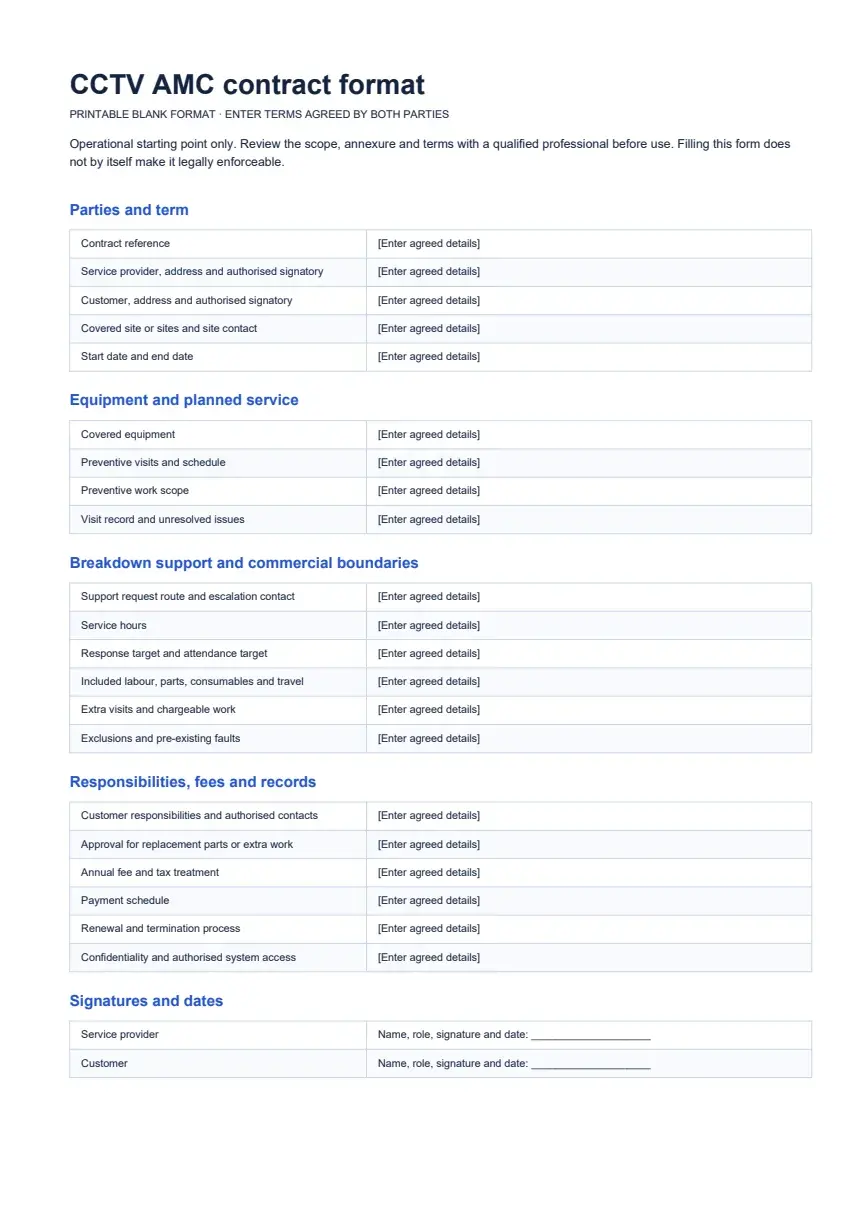

DIRECT DOWNLOADS
No account or email is required. The Word file is editable. The PDFs are print and reading copies, including one clearly fictional example.
Fill the agreed service terms and copy equipment entries in the annexure as needed.
Download editable WordPrint a matching version of the blank contract and equipment schedule.
Download blank PDFSee how one fictional retail-site contract records a known fault and extra-work approval.
Download sample PDFWHAT YOU WILL EDIT
The Word and blank PDF contain the same core fields. This on-page outline lets you review the structure before downloading.
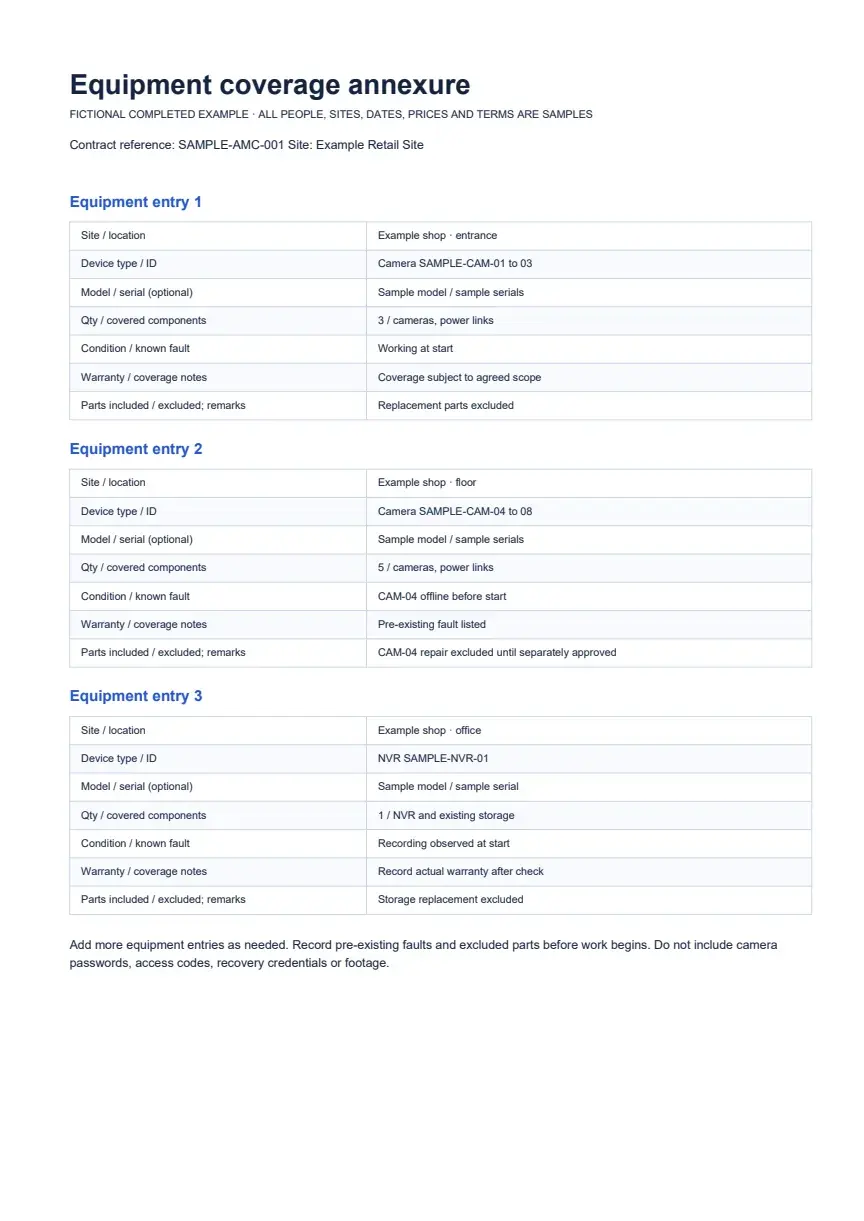
The blank Word annexure has repeatable equipment entries. Add rows for every site or group you agree to cover.
Keep camera passwords, access codes, recovery credentials and surveillance footage out of the contract and annexure.
FICTIONAL WORKED EXAMPLE
This example shows how an agreement might separate planned work from a pre-existing fault. Every person, date, quantity, fee and service target below is fictional, not a recommended term or market rate.
Example CCTV Services and Example Retail Site record eight cameras and one NVR in the equipment annexure. Their fictional 12-month plan lists four preventive visits and a sample fee of ₹8,750 before any applicable tax.
Camera SAMPLE-CAM-04 was already offline when the agreement began. The sample excludes that repair until the provider quotes it separately and the customer approves the charge. The example keeps tax treatment open for review.
Read the completed sample PDFAGREE THE ACTUAL SCOPE
Terms differ between customers. These checks help both sides see what the fee covers and what needs another approval.
Match the annexure to the site. Identify excluded devices and faults observed before coverage begins.
Record visit frequency, service hours and the route for breakdown requests. Write response and attendance targets separately.
Say what happens to replacement parts, extra labour, consumables, travel and out-of-scope visits. Name who approves a charge.
Enter the agreed fee, applicable tax treatment, payment dates, renewal process, escalation contacts and both signatures.
BEFORE USING THE FILE
Replace every bracketed field with the details both parties have agreed. Copy annexure entries until each covered site and device group is represented, then compare the list with the equipment actually present.
Review exclusions, old faults, service hours, visit dates and approval contacts with the customer. Check the correct tax treatment and have a qualified professional review the wording for your circumstances and applicable law. Both parties should inspect the final version before signing.
If you are still preparing an offer, start with the CCTV AMC quotation format. Once both parties agree the terms, the AMC certificate format can summarise the covered site, equipment and dates. The CCTV AMC guide explains the office and technician workflow after terms are agreed.
USE THE RIGHT RECORD
Each document answers a different question in a CCTV maintenance relationship.
What work and price is the provider offering?
Prepare the AMC offerWhat terms, sites and equipment have both parties agreed?
This templateWhat did the technician check on a scheduled visit?
Download the visit workbookWhat did the technician find, do and leave unresolved?
Use the service report formatPRACTICAL QUESTIONS
Yes. The Word file is a genuine editable DOCX. The blank PDF is for printing, and the completed PDF is a fictional example. Replace every bracketed field in Word before using the document.
Identify each covered site and device or equipment group. Add a device ID, optional model and serial number, quantity, covered components, known faults, warranty notes and included or excluded parts. Keep passwords and footage out of it.
No. State which labour, replacement parts, consumables and travel the agreed fee includes. If a replacement is chargeable, define who approves the itemised quote before work starts.
No. A quotation proposes the work and price. The contract format helps the parties record accepted scope, responsibilities, service terms and signatures. An inspection checklist and a service report serve different purposes during a visit.
No. This is an operational starting point, not legal or tax advice. Have a qualified professional review it for the parties, circumstances and applicable law before use.
AFTER THE TERMS ARE AGREED
KaryaFlow can keep customer and site details, covered equipment and AMC information with the service record. The office can plan a visit and assign the job to a technician. The technician can record checklist findings, work and parts on the job, giving the office a visit history to review when planning the next service or renewal follow-up.
Enter the agreed dates and scope, then check assignments and follow-up with your team. See how KaryaFlow organises customer equipment and service history, or read the CCTV service software page for the broader installation and maintenance workflow. Ask for a demo of any automation your team needs before relying on it.