KaryaFlow
Last updated: 2 October 2026.
Evaluate an FSM vendor by running a service job from request to accounts handoff. Use your own job types, approval rules and finance fields. A polished attendance screen or live map is not enough to prove the full workflow works.
This checklist is for teams that have decided to evaluate field service software while keeping Tally for accounts. If that decision is still open, use the Tally stack comparison or the small-team readiness check first.
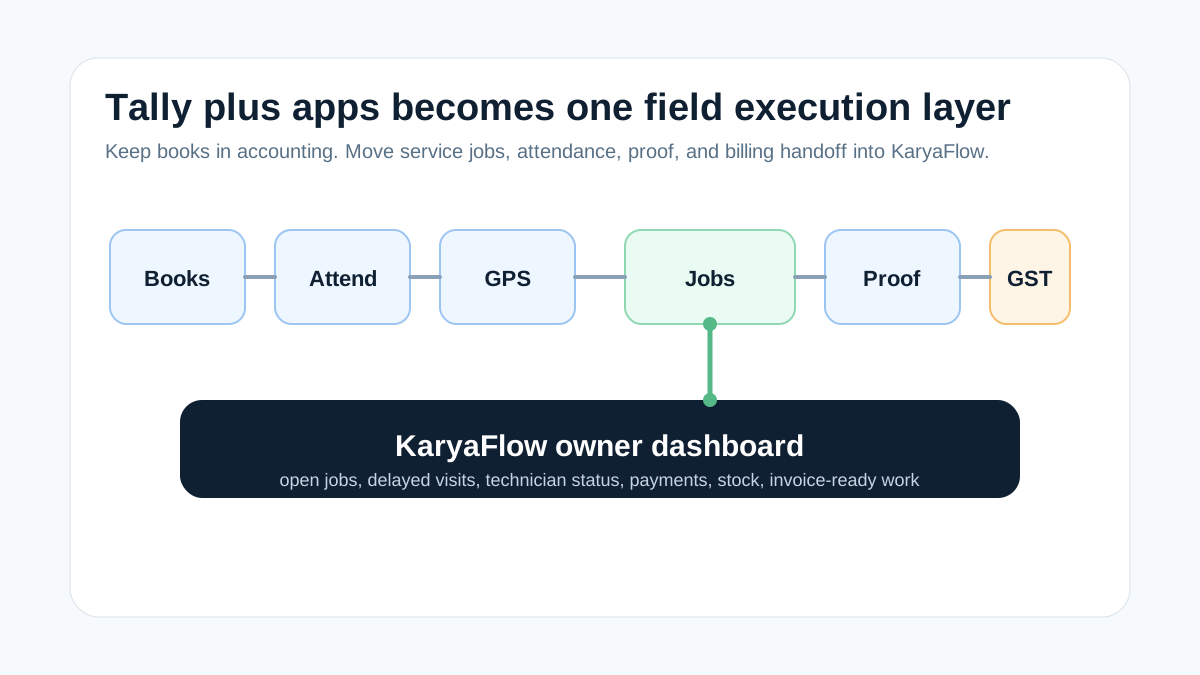 FSM vendor demo workflow connecting Tally accounting, attendance, GPS, service jobs, proof and billing handoff
Test the handoff between each step, not only the screens in isolation.
FSM vendor demo workflow connecting Tally accounting, attendance, GPS, service jobs, proof and billing handoff
Test the handoff between each step, not only the screens in isolation.
Prepare a test pack before the demo
Bring a customer record, a paid repair, an AMC visit and a repeat complaint. Remove private customer details from any sample shared with a vendor. Include a technician, a spare part, an expense and a partial payment.
Ask the accounts lead which fields they need before an invoice or receipt can be posted. Ask the supervisor which proof is needed to close a visit. These rules should drive the demo instead of a generic product tour.
Agree which results are essential and which are optional. Record each result as demonstrated, needs setup, needs another product, or not shown. A verbal promise should stay in the last category until the vendor demonstrates it.
Run one job across the whole team
Scroll sideways to see every column if needed. With a keyboard, focus the table and use the left and right arrow keys.
| Step | Ask the vendor to demonstrate | Evidence to keep |
|---|---|---|
| Request | Create a job with customer, site and fault details | A stable job number and clear owner |
| Dispatch | Assign, reschedule and reassign the visit | Updated technician and office views |
| Attendance | Check in at the work location | Timestamp, location context and permission handling |
| Job proof | Add notes, photos and customer approval | Proof still attached when the job is reopened |
| Parts | Issue, use and return a spare | Stock movement tied to the visit |
| Expense | Submit and return a claim for correction | Approval history and reason |
| Collection | Record a partial payment and balance | Reference, mode and outstanding amount |
| Accounts | Prepare an approved billing handoff | Fields and totals that finance can reconcile |
Run the flow on the technician's phone as well as the office screen. A desktop demonstration does not establish mobile usability, offline behavior or sync reliability.
Test attendance and continuous GPS separately
Attendance with location check-in and continuous GPS answer different questions. A check-in records a moment. Route history follows movement over time. Ask which you need, how the app collects it and what the quote includes.
For KaryaFlow, the current pricing page includes location check-in in the base plans. Continuous live GPS with route history is a separately quoted add-on. Get the relevant technician count and add-on scope in writing.
During the test, disable location permission, lose connectivity and end the shift. Check how the office sees missing or stale data. Confirm work-hour controls and who can access the records. Do not treat a moving map as proof of completed work.
Test the awkward jobs
A clean paid repair is only a starting point. Ask the vendor to run these exceptions:
- an AMC visit with an excluded part that needs approval;
- a warranty repair with a defective part to return;
- a customer who is unavailable after the technician arrives;
- a job reassigned after a technician has added notes;
- a repeat complaint that must link to earlier work;
- a closed job that accounts returns because proof is missing.
Check that notes, stock and payments remain linked to the correct job after each change. Ask who can edit a closed record and where that edit is recorded. The result matters more than the number of features on a slide.
Verify the Tally handoff without assuming sync
“Works with Tally” can mean manual entry, an export file, a partner connector or a custom integration. Ask the vendor to name the exact route, version, data direction, setup work and support owner.
TallyHelp describes imports for masters and transactions. Import support in Tally does not prove that an FSM vendor supplies a supported connector. Test the proposed route with your accountant before relying on it.
Use the Tally integration buyer checklist for field mapping, duplicates, corrections and error handling. Keep the demo result separate from a future integration promise.
Compare complete quotes
Use the same user count, technician count and required workflow for every quote. Include implementation, migration, training, connected products, support and any GPS charge. Ask which items recur and which are one-time costs.
Do not compare a base subscription from one vendor with a fully configured quote from another. If a required feature depends on another product or edition, include it in the comparison. Record unanswered questions beside the price rather than treating them as included.
For product shortlists, see the India FSM comparison and GPS-enabled FSM guide.
Decide what a pilot must prove
Before a pilot, write down the essential outcomes: the job reaches the right technician, proof stays attached, stock reconciles and accounts accepts the handoff. Set targets from your own process and baseline, not an invented industry benchmark.
Review a sample with operations, technicians and accounts together. Keep failed cases and their fixes in the review. A workflow is ready only when the people who depend on its output can use it.
For rollout planning after selection, read moving scattered service handoffs into one workflow. For the daily expense review, use the technician allowance and job-evidence checklist.
FAQ
What should an FSM demo show a Tally user?
It should show a complete service job with assignment, mobile proof, parts, expenses, payment status and an approved accounts handoff. Include at least one exception that your team handles in real work.
Does a demo prove native Tally integration?
Only if the exact supported connection is demonstrated with the relevant version and data. An export or a future integration plan should not be described as live native sync.
Should I replace Tally during the FSM pilot?
Keep the accounting decision separate. The pilot can test field work and the handoff while your finance team retains its existing accounting process.
How should I score the vendors?
Mark each essential requirement as demonstrated, needs setup, needs another product, or not shown. Use your own priorities and complete quotes rather than unexplained star ratings.
Sources and scope
Product pages checked on 2 October 2026. This is a buyer-run test plan, not a claim that every named feature is available in every product or plan.