On this page
Most Indian service businesses do not ask for Tally integration because they love integrations. They ask because the office is tired of entering the same information twice.
A technician completes a job. The job card is on paper or WhatsApp. Parts used are in a notebook. The invoice is created in one tool. The payment screenshot is in a chat. At month-end, the accountant asks for clean vouchers in Tally. Someone from the office then rebuilds the story from scattered records.
That is the real problem behind the search for Tally integration field service software.
If you run an HVAC service center, RO service business, appliance repair center, pest control company, electrical contractor, plumbing team, CCTV installer, fire safety AMC company, elevator AMC business, or facility management operation, the question is not only "Does this software connect with Tally?" The better question is: "What exact data will move from field operations to Tally, who owns the final accounting entry, and how will errors be handled?"
Short answer
Tally integration for field service software should pass clean accounting-ready data from completed service work into Tally. At minimum, buyers should check how the software handles customer ledgers, GST invoice details, service and item lines, receipts, payment modes, credit notes, stock movement, AMC billing, and error correction.
Do not buy only because a vendor says "Tally integration available." Ask for a demo using your real workflow: complaint, quotation, technician assignment, job card, parts used, GST invoice, payment collection, approval, and accounting handoff.
For many Indian service businesses, the best setup is not a full replacement for Tally. Tally remains the final accounting and compliance system. The field service platform controls the work before accounting: customer records, job cards, technician status, parts used, invoice readiness, payment notes, and service history.
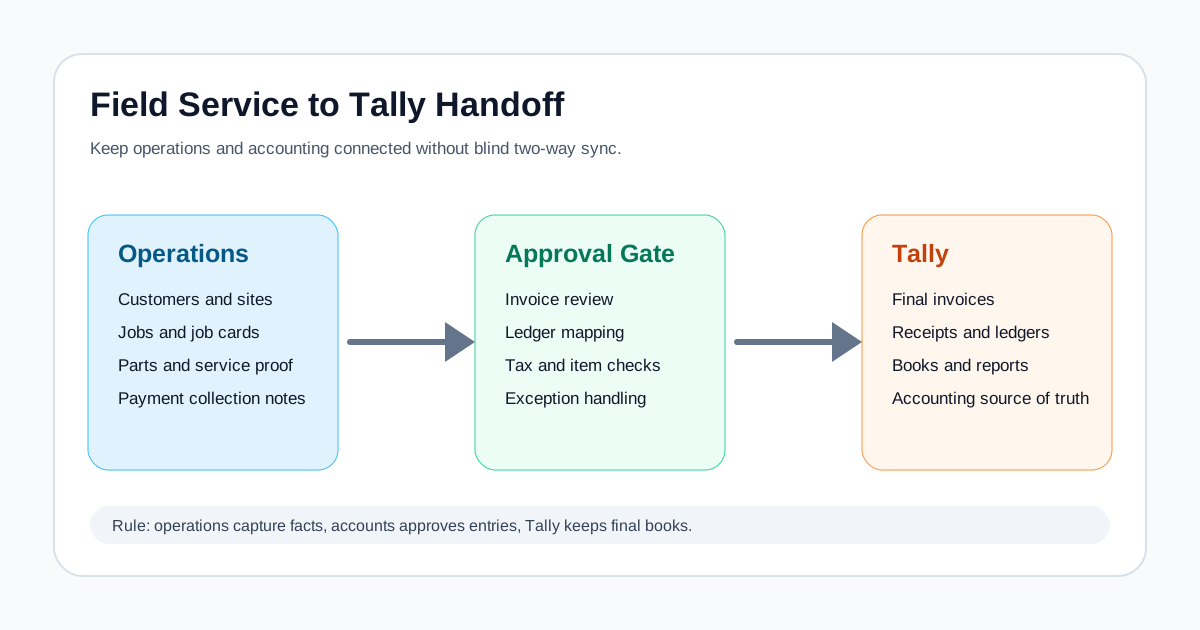 Field service software to Tally accounting handoff map
Treat Tally integration as a controlled handoff from field operations into accounting, not as a blind two-way sync.
Field service software to Tally accounting handoff map
Treat Tally integration as a controlled handoff from field operations into accounting, not as a blind two-way sync.
Who this guide is for
This guide is for owners, operations managers, accounts teams, and implementation leads in Indian service businesses that already use Tally or plan to keep using Tally.
It is most useful if your team has one or more of these problems:
- technicians finish jobs before the office has invoice details;
- job cards, photos, and customer approvals stay on WhatsApp;
- parts used at customer sites are not reconciled with inventory;
- GST invoices are delayed because field data is incomplete;
- accounts re-enters invoices or receipts into Tally after they were already created elsewhere;
- service history and accounting history do not match;
- AMC renewal invoices are created manually every month;
- the accountant asks for reports that operations cannot produce cleanly;
- the owner wants dashboards but Tally only shows the financial layer.
If your broader problem is tool sprawl, also read the guide on connecting CRM, helpdesk, accounting, and field service workflow. Tally integration works best after the operating workflow is clear.
Why Tally integration matters in field service businesses
Field service billing is different from counter billing.
In a shop, the invoice can start with an item list. In a service business, the invoice usually starts with work that happened at a customer location.
That work may include:
- a complaint or service request;
- customer site address;
- installed asset or equipment serial number;
- technician assignment;
- diagnosis;
- labour charge;
- spare parts used;
- warranty or AMC decision;
- customer signature;
- photos or proof of work;
- payment collected on site;
- revisit or escalation note.
If these details are not captured correctly before billing, Tally integration will not solve the problem. It may only move bad data faster.
The real sequence should be:
- Field work is captured cleanly.
- The office reviews whether the job is billable.
- The GST invoice or accounting-ready voucher is prepared.
- Payment status is linked to the same job.
- Approved data is handed off to Tally.
- Exceptions are corrected before month-end.
That is why the field service layer matters. A GST invoicing software for service business workflow should not begin from a blank invoice. It should begin from the completed job record.
What Tally can integrate with
Tally's own documentation explains that TallyPrime supports integration with external systems such as ERPs, CRMs, custom business applications, and analytics platforms. Its integration documentation describes data exchange through formats and technologies such as XML, JSON, ODBC, HTTP, and TDL.
In simple buyer language, that means Tally can exchange data with other software in different ways. The exact method depends on your Tally version, your deployment, your implementation partner, your security constraints, and what data needs to move.
Common integration ideas include:
- pushing invoice or voucher data into Tally;
- pulling ledgers, stock items, or reports from Tally;
- exporting reports for dashboards;
- syncing customer or item masters;
- importing GST-related data;
- using middleware to bridge a cloud app and a local Tally installation;
- using file-based import/export for simpler workflows.
This does not mean every field service app automatically has a production-ready Tally connector. It means the technical foundation exists. Your buying decision should focus on the vendor's actual implementation, not the generic possibility of integration.
The first question: what should Tally own?
Before discussing APIs or connectors, decide what Tally should own in your business.
For most service businesses, Tally should remain the accounting source of truth. That usually includes:
- ledgers;
- final invoices or vouchers;
- payments and receipts;
- tax treatment;
- credit notes and debit notes;
- purchase entries;
- financial reports;
- statutory reporting workflows managed by the accounts team.
The field service system should usually own:
- enquiries and service requests;
- customers, sites, assets, and service history;
- technician assignment;
- job cards;
- proof of work;
- parts used at job level;
- AMC visits and renewals;
- operational status;
- payment collection notes;
- invoice readiness.
Those boundaries prevent confusion. If both systems try to own every customer, invoice, payment, and stock record, the business ends up with duplicates and disputes.
Think of the field service platform as the operations system and Tally as the accounting system. Integration is the bridge between them.
What data should move from field service software to Tally?
A useful Tally integration should not start with "sync everything." It should start with specific accounting events.
For a service business, these are the records to review.
Customer and ledger data
Ask whether the software can create or map customer ledgers correctly.
Important questions:
- Will customer names match Tally ledger naming rules?
- How are duplicate mobile numbers handled?
- Can the system map multiple sites under one customer?
- What happens if the same customer has separate billing and service addresses?
- Who approves new ledger creation?
- Can the accounts team edit ledger names before sync?
This matters because field teams often write customer names casually. Tally entries need discipline.
GST invoice data
Ask whether the field service system can pass accounting-ready invoice data.
Check:
- invoice number;
- invoice date;
- customer ledger;
- place of supply where applicable;
- service description;
- SAC or HSN mapping where applicable;
- quantity or unit;
- taxable value;
- CGST, SGST, or IGST treatment;
- discount;
- round-off;
- total value;
- payment terms;
- job reference;
- technician or branch reference if needed for reporting.
This article is not tax advice. Your accountant should confirm the correct GST treatment for your business. The software should make that review easier, not force technicians to make accounting decisions in the field.
Receipts and payment modes
Many service businesses collect money before the accounting team sees the final job.
The integration should clarify how it handles:
- UPI collections;
- cash collected by technician;
- card payment;
- bank transfer;
- cheque;
- part payment;
- advance payment;
- payment against quotation;
- payment against invoice;
- payment after follow-up.
Do not accept a demo that only shows invoice creation. Ask what happens when the technician collects INR 1,500 by UPI at the site and the office later adjusts the final GST invoice.
Parts and inventory movement
If your service business uses parts, inventory mapping can become the hardest part of Tally integration.
Check whether the software needs to sync:
- stock item masters;
- technician stock;
- warehouse stock;
- consumed parts;
- returned parts;
- replacement parts under warranty;
- damaged stock;
- serial number or batch where relevant;
- purchase records;
- service kits.
Some teams only need financial handoff. Others need stock movement to reflect in Tally. Decide this before buying, because inventory integration has more edge cases than invoice export.
For service businesses where parts leakage is a major issue, the operating workflow should be fixed before accounting sync. The job record should show which part was issued, used, returned, billed, or replaced under warranty.
Expenses and reimbursements
Field teams often submit fuel, parking, toll, courier, local purchase, and emergency part expenses.
If the business wants expense sync, check:
- who approves expenses;
- which expense ledgers they map to;
- whether bills or photos are attached;
- whether reimbursements are tracked;
- how rejected expenses are handled;
- whether GST input details are captured where applicable.
Expense sync is useful only if approval is clean. Otherwise, Tally receives messy entries.
AMC invoices and renewals
AMC-heavy businesses should check how recurring billing works.
Ask:
- Can AMC renewal dates trigger invoice readiness?
- Can quarterly, half-yearly, or annual billing cycles be handled?
- Can preventive visits be linked to the contract?
- Can an invoice show covered and chargeable work separately?
- Can expired contracts be blocked from free service?
- Can renewal payments be matched to the correct contract?
If AMCs are central to your business, read the AMC management software guide alongside this article.
Credit notes, cancellations, and reversals
This is where many demos become weak.
Ask what happens when:
- the wrong customer was selected;
- the invoice amount changes after customer approval;
- a part is returned;
- a customer pays twice;
- a job is cancelled after invoice creation;
- GST treatment was wrong;
- a technician marked payment collected but accounts did not receive it;
- a credit note is needed.
A serious integration must have an error-handling story. Otherwise, the first month-end reconciliation will become manual work again.
Four practical levels of Tally integration
Not every business needs the same integration depth on day one.
Level 1: Report export for accounts
The field service system exports clean invoice, payment, and job reports. Accounts enters or imports the final data into Tally.
This is not glamorous, but it can be enough for small teams that want operational control first.
Good fit when:
- invoice volume is low;
- the accountant wants manual review;
- Tally is maintained by an external CA;
- the team is still cleaning up product, ledger, and tax masters.
Risk: duplicate entry still exists, but it is more organized than WhatsApp and Excel.
Level 2: Structured import file
The field service system creates accounting-ready files that can be imported into Tally through an agreed process.
Good fit when:
- invoice volume is moderate;
- accounts wants batch review;
- the business is not ready for live sync;
- approval is needed before entries reach Tally.
Risk: file formats and mapping rules must be maintained.
Level 3: Connector or middleware sync
A connector moves approved data between the field service system and Tally. This may be scheduled or event-driven.
Good fit when:
- invoice volume is high;
- the office wants less manual entry;
- Tally runs on a local machine or server;
- the business accepts a technical setup step.
Risk: connector uptime, version compatibility, security, and support ownership must be clear.
Level 4: Custom integration
A custom integration handles complex mapping, branches, stock, multiple GSTINs, approvals, and exception flows.
Good fit when:
- the business has multiple branches;
- different teams use different voucher types;
- stock and service data must reconcile;
- the company has internal IT or an implementation partner;
- reporting requirements are specific.
Risk: custom projects fail when the workflow is not documented. Write the job-to-accounting process before building the integration.
The job-to-Tally workflow service businesses should demo
A good demo should follow the whole operating sequence, not only the accounting screen.
Use this demo script.
- Create a service request for a real customer type.
- Add site address and asset details.
- Create a quotation or estimate if your business uses one.
- Assign a technician.
- Complete a mobile job card.
- Add service notes, parts used, photos, and customer approval.
- Mark whether the job is paid, warranty, AMC-covered, or chargeable.
- Create a GST-ready invoice or invoice handoff record.
- Record a UPI or cash collection.
- Approve the accounting handoff.
- Show what reaches Tally.
- Show how errors are corrected.
- Show how the job history and accounting history remain linked.
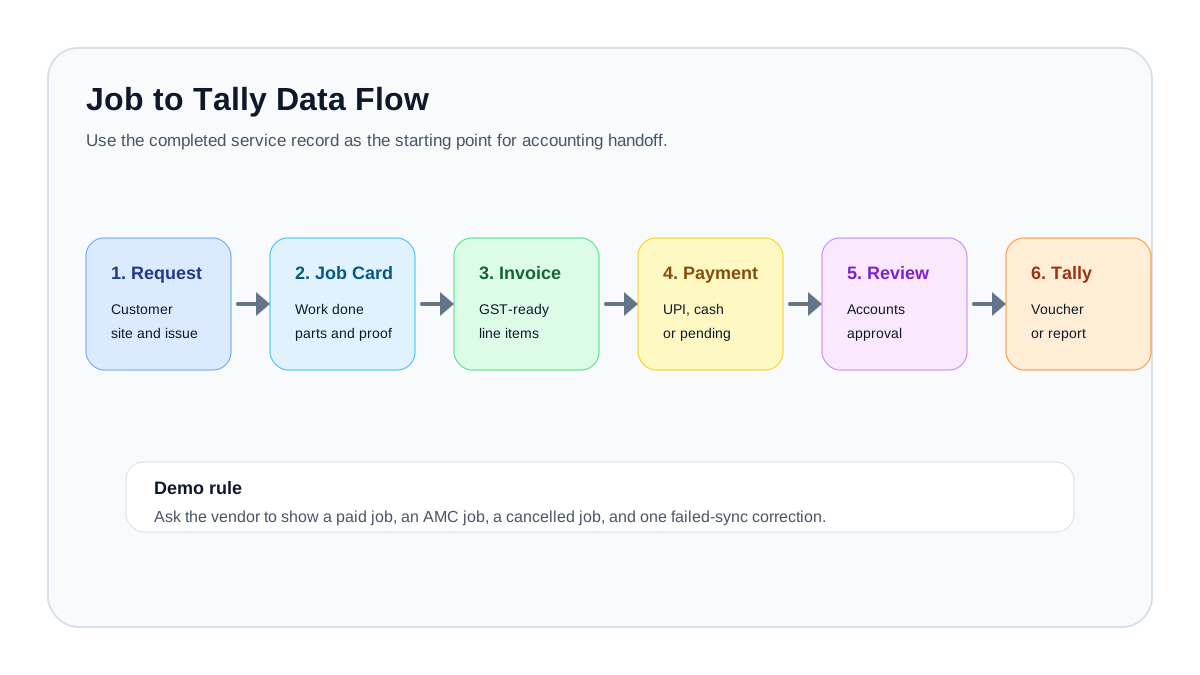 Job card to GST invoice to Tally data flow for Indian service businesses
The cleanest accounting entry starts from a clean service record, job card, parts log, invoice, and payment status.
Job card to GST invoice to Tally data flow for Indian service businesses
The cleanest accounting entry starts from a clean service record, job card, parts log, invoice, and payment status.
What to ask in a vendor demo
When a vendor says it supports Tally integration, ask these questions.
Integration availability
- Is Tally integration available today, or is it custom?
- Does it work with TallyPrime?
- Does it need Tally to run on a specific machine or server?
- Does it require a local connector?
- Does it work if Tally is on cloud or remote desktop?
- Is setup included in the plan or charged separately?
- Who maintains the connector after setup?
Data mapping
- Which records sync: customer, invoice, receipt, stock, expense, credit note?
- Can each field be mapped before go-live?
- Can accounts approve mappings?
- Can different branches use different ledgers?
- Can SAC, HSN, tax rate, and item/service names be controlled?
- Can old ledgers be matched instead of duplicated?
Sync direction
- Is the sync one-way from field service to Tally?
- Can Tally master data be pulled back into the field service system?
- If data changes in Tally, what updates in the field service system?
- Which system wins when records conflict?
Approval and control
- Can accounts review entries before sync?
- Can only approved invoices reach Tally?
- Can draft jobs be blocked from accounting sync?
- Can payment collections require supervisor approval?
- Can the system prevent duplicate sync?
- Is there an audit log?
Errors and reconciliation
- What happens if Tally is closed?
- What happens if the connector is offline?
- What happens if a ledger is missing?
- What happens if tax mapping fails?
- How are failed sync entries retried?
- Can accounts download an exception report?
- Can an entry be reversed or corrected without corrupting service history?
Security
- Where are credentials stored?
- Does the connector run on the owner's machine, office server, or vendor cloud?
- Who can trigger sync?
- Are logs visible to admins?
- What data leaves the local system?
- Can technician users see accounting data they should not see?
The answers matter more than the phrase "integrated with Tally."
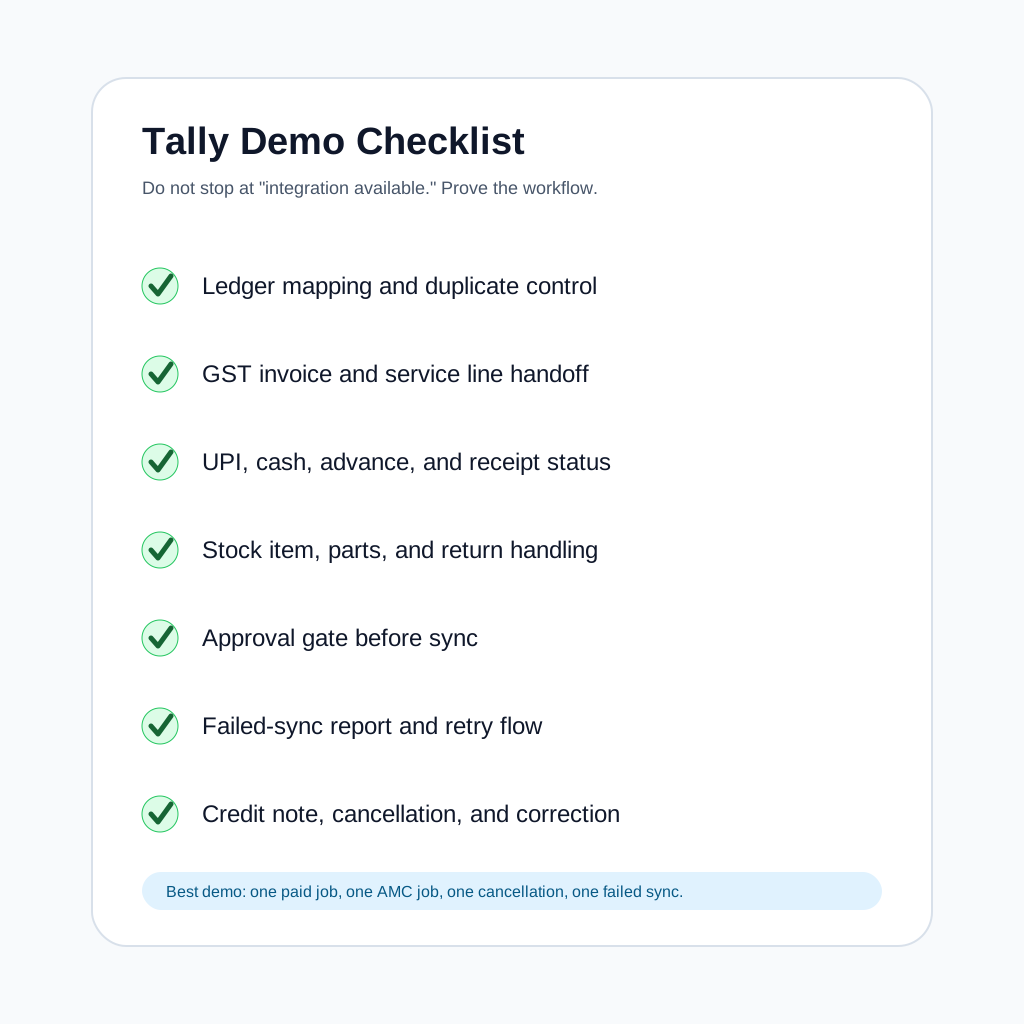 Tally integration demo checklist for field service software buyers
A useful demo should prove what happens to ledgers, invoices, payments, stock, errors, and reversals.
Tally integration demo checklist for field service software buyers
A useful demo should prove what happens to ledgers, invoices, payments, stock, errors, and reversals.
Should field service software replace Tally?
Usually, no.
Most Indian service businesses use Tally because accountants, CAs, finance teams, and owners already understand it. If Tally is already the system of record for final books, replacing it may create more disruption than benefit.
The better question is: what should not be done in Tally?
Tally is not usually where dispatchers want to manage technician location, service status, job photos, customer signatures, AMC visit schedules, spare-part usage at site, or customer complaint follow-up. Those are operating workflows.
KaryaFlow is positioned for that operating layer: jobs, customers, attendance, live tracking, geofences, expenses, inventory, GST invoicing and billing workflows, and technician mobile app workflows. If your accounts team uses Tally, ask during the KaryaFlow demo how your preferred accounting handoff should be handled for your current workflow and Tally setup.
The practical architecture is:
- KaryaFlow or your field service platform controls the service job.
- Tally controls final accounting.
- The handoff is approved, mapped, and auditable.
How different service businesses should think about Tally handoff
HVAC and AC service centers
HVAC teams often bill for labour, service charges, gas charging, installation, spare parts, AMC visits, and emergency visits. The invoice may depend on diagnosis and parts used after the technician reaches the site.
For HVAC and AC service, check:
- service item mapping;
- spare part mapping;
- AMC versus paid-service handling;
- technician collection tracking;
- branch or city reporting;
- warranty replacement entries;
- customer site history.
The KaryaFlow HVAC service center page explains the operations layer for AC complaints, technician tracking, AMC visits, inventory, job cards, and GST invoices.
RO and appliance service centers
RO and appliance businesses care about filters, spare parts, warranty status, serial numbers, and repeat complaints.
Check:
- asset and serial number visibility;
- spare part issue and return;
- AMC plan billing;
- replacement under warranty;
- taxable and non-taxable treatment based on accountant advice;
- customer history before accounting entry.
Pest control and facility management teams
These teams may bill by visit, contract, square footage, site, monthly retainer, or ad hoc work.
Check:
- contract-level billing;
- site-wise service proof;
- material or chemical usage;
- recurring invoices;
- collection status;
- branch-wise reporting.
Electrical, plumbing, CCTV, and installation teams
These teams often combine labour, materials, site expenses, and milestone billing.
Check:
- quotation to invoice flow;
- material consumption;
- project or site references;
- partial billing;
- advance payments;
- delivery challan or material issue records where relevant.
Implementation plan for a clean Tally integration
Do not begin with connector setup. Begin with process cleanup.
Week 1: Map the workflow
Document how a job moves today:
- enquiry;
- quotation;
- visit;
- job card;
- parts;
- invoice;
- payment;
- Tally entry;
- service history.
Mark every duplicate entry point.
Week 2: Clean masters
Before sync, clean:
- customer naming rules;
- ledger mapping;
- item and service names;
- SAC or HSN mapping where applicable;
- tax rate rules;
- branch names;
- technician names;
- payment mode names;
- expense ledgers.
Bad master data creates bad integration.
Week 3: Run a controlled pilot
Pick one branch, one service category, and one accountant.
Pilot:
- 20 to 50 jobs;
- a mix of paid, warranty, AMC, and cancelled jobs;
- cash and UPI payments;
- at least a few part replacements;
- one correction scenario.
Do not go live until the correction scenario is tested.
Week 4: Lock approval rules
Define:
- who can approve invoices;
- who can approve payment collections;
- who can edit tax mapping;
- who can retry failed sync;
- who can reverse entries;
- what is reviewed daily;
- what is reconciled weekly;
- what is checked before GST filing.
Integration without approval rules only moves confusion faster.
Common mistakes to avoid
Mistake 1: Buying for the word "Tally" instead of the workflow
A logo or feature bullet is not enough. Ask for your workflow in demo.
Mistake 2: Syncing before cleaning master data
If customer names and item names are messy, integration creates duplicates.
Mistake 3: Letting technicians decide accounting treatment
Technicians should capture work done. Accounts should control final accounting treatment.
Mistake 4: Ignoring payment reconciliation
Invoices are only half the story. Service businesses also need to track who paid, by what mode, and whether the money reached accounts.
Mistake 5: Treating inventory as simple
Inventory integration becomes complex when parts move from warehouse to technician to job to return. Start with clear part issue and return rules.
Mistake 6: No failed-sync report
In a Tally integration workflow, invisible failed entries turn month-end into manual detective work.
Mistake 7: No rollback plan
Ask what happens if a wrong invoice or receipt reaches Tally. Correction flows matter.
Mistake 8: Expecting one system to solve every compliance question
Software can support GST-ready workflows, but your accountant should confirm tax treatment, invoice format, and filing process.
A practical buyer checklist
Use this before signing.
Must have
- Clear source of truth for jobs, invoices, payments, and ledgers.
- Demo using your real service workflow.
- Customer and ledger mapping rules.
- Invoice approval before accounting handoff.
- Payment mode tracking.
- Failed-sync and retry visibility.
- Role-based access.
- Support owner for setup and troubleshooting.
- Export fallback if live sync is unavailable.
Strongly recommended
- Item or service mapping.
- AMC billing workflow.
- Stock usage visibility.
- Credit note and cancellation flow.
- Audit log.
- Branch or location mapping.
- Reconciliation report.
- Documentation for setup and limitations.
Nice to have
- Scheduled sync.
- Custom voucher type mapping.
- Dashboard over synced and failed entries.
- Multiple company or GSTIN handling.
- BI/reporting export.
- Connector health alerts.
How KaryaFlow fits this decision
KaryaFlow is built for Indian field service businesses that need control over jobs before accounting: customers, technician mobile app workflows, attendance, live tracking, geofences, inventory, expenses, GST invoicing and billing workflows, and owner visibility.
If your accounts team already uses Tally, treat KaryaFlow as the service operations layer and Tally as the accounting layer. In your demo, ask the KaryaFlow team to walk through your preferred handoff:
- job card to invoice;
- parts used to billable line item;
- paid and unpaid jobs;
- UPI and cash collection notes;
- AMC renewal invoice readiness;
- export or integration options for your current Tally setup;
- approval and correction process.
You can compare the operating layer with the broader field service management software in India guide and the field service management elements and features explainer.
If pricing is part of your evaluation, review KaryaFlow pricing and confirm the integration or handoff scope during sales discussion.
FAQ
What is Tally integration in field service software?
Tally integration in field service software means passing accounting-ready data from service operations into Tally. This can include customer ledgers, invoices, receipts, payments, expenses, stock movement, credit notes, and reports. The exact scope depends on the vendor and implementation.
Does every service business need live Tally sync?
No. Smaller teams may only need clean exports and approval reports. Live sync becomes more useful when invoice volume is high, duplicate entry is expensive, and master data is clean enough to trust automation.
Is Tally integration the same as GST invoicing?
No. GST invoicing is the creation of a tax invoice or invoice-ready record. Tally integration is the handoff of approved accounting data into Tally. A tool can support GST-ready billing workflows without automatically syncing into Tally.
Should technicians create Tally entries?
Usually, no. Technicians should capture job facts: work done, parts used, photos, customer approval, and payment collection. Accounts should approve tax treatment and final accounting entries.
What is the safest first step before Tally integration?
Start by cleaning the job-to-invoice workflow. If job cards, parts, payment notes, and invoice approvals are messy, integration will only move messy data into Tally.
Can field service software pull ledgers or stock items from Tally?
Some integrations can pull data from Tally, depending on the setup. Buyers should ask whether master data sync is supported, whether it is one-way or two-way, and which system wins if records conflict.
What should happen if Tally is closed or offline?
The field service system or connector should show a failed or pending sync state. It should not silently lose entries. Ask for retry, failure reason, and reconciliation reporting.
Can Tally integration handle UPI and cash collected by technicians?
It can if the workflow is designed for it. The software should record who collected the money, the payment mode, amount, job, invoice reference, and approval status before accounting handoff.
Is inventory sync necessary for service businesses?
It depends. If parts are a major cost or leakage risk, inventory sync or at least job-level parts reporting is important. If parts usage is small, invoice and receipt handoff may be enough at first.
What is the biggest risk in Tally integration?
The biggest risk is unclear ownership. If customer, invoice, payment, and stock data can be changed in multiple systems without rules, reconciliation becomes harder than manual entry.
Can Tally integration support AMC billing?
It can, if the field service system tracks contracts, renewal dates, visit status, chargeable work, and invoice readiness. Ask vendors to demonstrate recurring AMC billing and exception handling.
What should accounts review before syncing invoices?
Accounts should review customer ledger, invoice date, taxable value, service or item lines, SAC or HSN mapping where applicable, tax treatment, discounts, payment status, and any warranty or AMC decision.
Should field service software replace an accounting system?
Not for most Indian service businesses. Field service software should manage operations. Tally should usually remain the final accounting system if your accountant and finance team already use it.
How do I compare vendors that claim Tally integration?
Give each vendor the same workflow and ask them to demo it end to end. Include a normal paid job, an AMC job, a warranty job, a cancelled job, a part return, and a failed sync scenario.
What if the vendor only supports export, not live sync?
A Tally export-only workflow may still be acceptable if your volume is moderate and accounts wants manual review. Ask whether the export is structured, complete, and repeatable. Also ask what live sync options exist later.
Can KaryaFlow integrate with Tally?
KaryaFlow is positioned as the field service operations layer for jobs, customers, technician workflows, inventory, expenses, and GST invoicing and billing workflows. If your team uses Tally, ask KaryaFlow sales to confirm the current handoff or integration options for your Tally setup during the demo.
What internal links should I review before deciding?
Start with field service management software in India, GST invoicing software for service businesses, job card app for technicians, and the GST billing software India comparison.
Sources checked
This guide was written using current public source checks on June 29, 2026, plus KaryaFlow's local product and pricing information.
- TallyHelp: Getting Started with Tally Integrations.
- TallyHelp: Integrate with TallyPrime.
- TallyHelp: XML Integration.
- TallyHelp: Integration using JSON.
- Tally Solutions: Billing Software for GST.
- KaryaFlow homepage and pricing page.
External product pages and integration documentation can change. Confirm current integration support, GST treatment, and accounting workflow with the software vendor and your accountant before implementation.
Ready to modernize your service operations?
See how KaryaFlow can connect complaints, technician jobs, proof, parts, payments, and billing handoff for your service team.
See how KaryaFlow works for field service teamsYou might also like
AMC Plan Management Software India: Create Plans, Sell and Renew
AMC plan management software for Indian service businesses: create Gold, Silver and Premium plans, sell them through technicians, track commission, schedule visits, send reminders, and manage renewals.
Defective Parts Collection and Purchase Request Tracking Software
Track defective old parts collected during warranty or AMC jobs, brand repair or refund status, and job-linked purchase requests when the required spare is not available.
Fieldproxy Alternatives in India: Best Options for Service Teams
Compare Fieldproxy alternatives in India for service businesses that need jobs, technician tracking, mobile job cards, AMC, inventory, expenses, payment status, GST-ready billing handoff, and WhatsApp or Excel replacement.