KaryaFlow
Kitchen appliance service centers handle more than repair calls. They manage installation requests, warranty jobs, paid repairs, spare parts, technician visits, service reports, invoices, payment follow-ups, and repeat customer complaints.
That is why a kitchen appliance service center cannot be run only on WhatsApp messages, paper job cards, and Excel sheets once the team grows. A coordinator may know today's pending jobs, but the owner still needs answers to harder questions: which appliance is under warranty, which technician visited last time, which part was replaced, which customer needs a revisit, which invoice is pending, and which job crossed its expected turnaround time.
This guide explains how kitchen appliance service center software should work for Indian service businesses that handle chimneys, hobs, cooktops, ovens, dishwashers, gas stoves, mixers, grinders, built-in appliances, and similar products.
Short answer
Kitchen appliance service center software should connect customer complaint intake, appliance serial-number history, warranty check, technician assignment, mobile job card, spare parts usage, service report, invoice or payment handoff, and customer updates in one workflow.
For Indian service centers, it should also support WhatsApp-heavy communication, GST-ready billing handoff, technician proof of work, spare parts tracking, customer signatures, and repeat maintenance reminders.
The important point is this: the software should not only show a calendar. It should tell the service center what appliance was installed or repaired, whether the job is paid or warranty-covered, what part was used, what proof the technician captured, and what the office must do next.
If your business sells products and also manages installation or maintenance, read this guide alongside our installation and maintenance field service software setup article. This page applies that operating model specifically to kitchen appliance service centers.
For the product-level hub, start with KaryaFlow appliance repair management software. This guide is the kitchen-appliance spoke for the cluster. For narrower workflows, use the guides on chimney service management software, appliance warranty management software, appliance spare parts inventory software, spare parts inventory management software, job card app for appliance repair technicians, authorized service center workflow software, and technician salary calculation software.
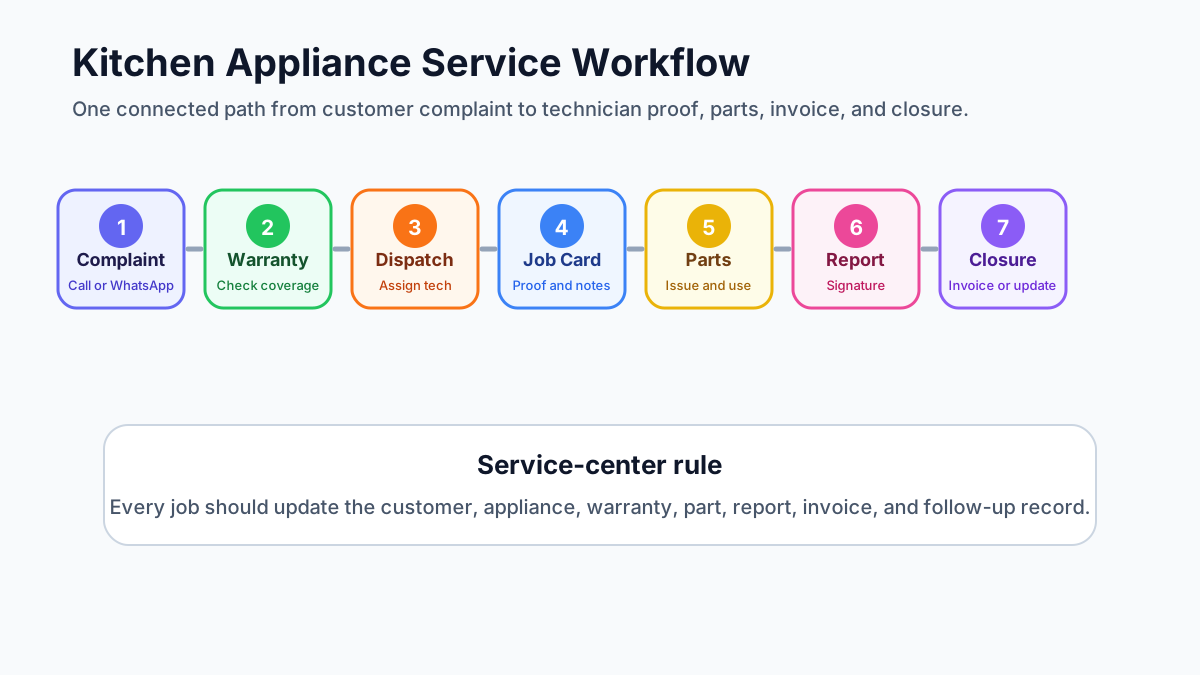 Kitchen appliance service center workflow from complaint to closure
A kitchen appliance service center needs one workflow from customer complaint to warranty check, technician job card, spare parts, invoice, and closure.
Kitchen appliance service center workflow from complaint to closure
A kitchen appliance service center needs one workflow from customer complaint to warranty check, technician job card, spare parts, invoice, and closure.
What is kitchen appliance service center software?
Kitchen appliance service center software is a workflow system that helps service teams manage appliance complaints, technician assignments, warranty checks, spare parts, job cards, service reports, invoices, payments, and customer communication from one place.
It is used by service centers that repair or maintain products such as:
- kitchen chimneys;
- hobs and cooktops;
- built-in ovens;
- dishwashers;
- gas stoves;
- mixer grinders and food preparation appliances;
- water purifiers and small kitchen equipment;
- other consumer or built-in kitchen appliances.
A simple CRM may store customer names. Accounting software may raise invoices. WhatsApp may help the team talk to customers. But a service center needs a connected operating record. The technician, coordinator, storekeeper, accounts person, and owner should all be looking at the same job history.
For a broader buying checklist, see our field service management software in India guide. Kitchen appliance service centers need the same field-service foundation, but with stronger appliance, warranty, and spare-parts control.
Why kitchen appliance service centers outgrow WhatsApp and Excel
WhatsApp is useful for quick customer communication. Excel is useful for small lists. Neither is a reliable system of record for a busy appliance service center.
The problems usually appear in stages.
First, job details get scattered. One customer sends a chimney complaint on WhatsApp. Another calls the office. A dealer forwards an installation request. A technician sends photos in a group. The invoice is created later in a different system. When the customer calls again, the office has to search across messages, notebooks, and spreadsheets.
Second, warranty checks become inconsistent. The coordinator may not know whether the appliance is under brand warranty, dealer warranty, AMC, paid service, or free revisit. If the team guesses wrong, the business can lose money or disappoint the customer.
Third, spare parts become unclear. A motor, filter, switch, burner, glass, pipe, sensor, or control board may be issued to a technician, but the office may not know whether it was installed, returned, billed, replaced under warranty, or still with the technician.
Fourth, owner visibility disappears. The owner may ask for pending complaints, technician productivity, repeat repairs, unpaid invoices, or spare part usage. If the data sits in chats, the answer becomes manual.
If this sounds familiar, the issue is not only communication. It is that WhatsApp and Excel are being used as a service workflow. Our guide on how to replace WhatsApp and Excel with a service CRM explains this shift in detail.
The complete workflow: complaint to closure
A kitchen appliance service workflow should move through clear stages.
Complaint intake
Every request should become a service record, whether it comes from phone, WhatsApp, walk-in, website, dealer, brand/OEM channel, or repeat customer follow-up.
The intake record should capture:
- customer name and phone number;
- service address;
- appliance type;
- appliance model and serial number, if available;
- complaint description;
- warranty or purchase reference;
- preferred visit time;
- photos or videos shared by the customer;
- priority or SLA requirement;
- source of the complaint.
The goal is to avoid creating a vague job called "chimney problem" with no appliance context. A technician needs the right details before reaching the customer site.
Warranty and appliance history check
Before assigning the job, the office should check whether the appliance already exists in service history.
Useful questions include:
- Was this appliance installed by the same service center?
- Is it still under warranty?
- Is there an AMC or extended service plan?
- Was the same complaint reported earlier?
- Was a part replaced in the last visit?
- Is the customer eligible for a free revisit?
- Does the job need brand/OEM approval before repair?
This step is especially important for authorized service centers. A warranty job may need different documentation, status reporting, spare part treatment, and closure proof compared with a paid repair. The authorized service center workflow software guide explains this complaint-to-closure model in more detail.
Technician assignment
Kitchen appliance repair is skill-specific. A technician who handles chimney cleaning may not be the right person for a built-in oven fault or dishwasher diagnosis.
Good dispatch should consider:
- technician skill;
- service location;
- current workload;
- appliance type;
- spare parts required;
- visit urgency;
- warranty or paid job status;
- whether the customer needs installation, diagnosis, repair, or preventive service.
For tracking technician location, attendance, and job status, see the technician tracking app India guide. In appliance service, tracking should support better dispatch and proof of work, not become a disconnected GPS tool.
Job card and diagnosis
The technician's mobile job card should show the customer details, appliance details, complaint history, warranty status, expected work, and any required checklist.
During the visit, the technician should be able to record:
- arrival and completion status;
- diagnosis;
- before and after photos;
- parts required or used;
- customer approval;
- service notes;
- readings or test results, where relevant;
- customer signature or OTP;
- next service recommendation.
The job card app for technicians article explains this proof-of-work flow more broadly. For appliance repair, use the more specific job card app for appliance repair technicians guide because the job card must also connect to the appliance's service history.
Spare parts and estimate
Some appliance repairs need a quote before the customer approves the work. Others are warranty-covered and need office approval. Some are small paid jobs that can close on the same visit.
The software should help the office separate:
- diagnosis only;
- paid repair;
- warranty repair;
- part replacement;
- part pending;
- customer approval pending;
- brand/OEM approval pending;
- free revisit;
- AMC or preventive service.
This separation prevents a common problem: the technician completes the work, but the office later cannot decide whether to bill the customer, claim warranty, adjust stock, or mark the visit as non-chargeable.
Service report, invoice, payment and closure
After the job, the service center should have a clean service report and office closure status.
The closure record should show:
- work performed;
- parts used;
- photos and customer signature;
- payment collected or pending;
- invoice required or not required;
- warranty or AMC status;
- revisit required or not;
- next service due date;
- final job status.
For invoice and payment handoff, read the GST invoicing software for service businesses guide. The technician does not need to become an accountant, but the job card should give the office the information needed to bill correctly.
How appliance records should be structured
Appliance service centers should not track only customer names. They should track the appliance itself.
A good appliance record should include:
- customer;
- service address or site;
- appliance category;
- brand or product line, if relevant;
- model number;
- serial number;
- installation date;
- warranty start and end dates;
- invoice or purchase reference;
- previous service jobs;
- parts replaced;
- current warranty or AMC status;
- notes for future technicians.
This is what lets a coordinator answer customer questions quickly. It also helps technicians avoid repeated diagnosis from zero.
For example, if a customer calls about a kitchen chimney, the team should know whether the last visit was cleaning, motor replacement, filter replacement, duct issue, suction complaint, noise complaint, or installation correction. Without that history, every visit becomes a fresh investigation.
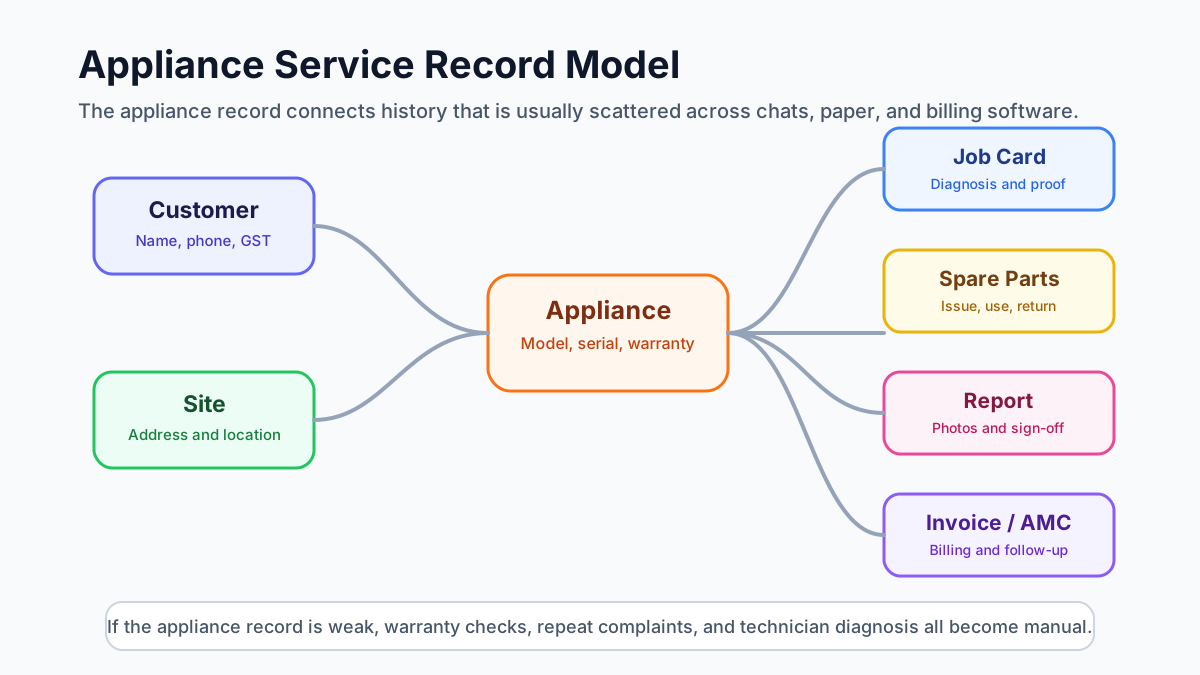 Appliance service record model for customer site appliance warranty and service history
Appliance service history works only when customer, site, appliance, serial number, warranty, job card, parts, and invoice records stay connected.
Appliance service record model for customer site appliance warranty and service history
Appliance service history works only when customer, site, appliance, serial number, warranty, job card, parts, and invoice records stay connected.
Chimney, hob, cooktop, oven and dishwasher service workflows
Kitchen appliance service work is not one uniform job type. Each appliance category has different proof and parts requirements.
For chimney service, the workflow may include:
- suction complaint;
- filter cleaning;
- oil or grease buildup photos;
- motor noise or motor replacement;
- duct inspection;
- next cleaning reminder.
For hob and cooktop service, the workflow may include:
- burner issue;
- ignition issue;
- gas leakage check;
- knob or valve replacement;
- safety inspection;
- customer usage note.
For oven service, the workflow may include:
- heating issue;
- thermostat or element check;
- door seal issue;
- control panel diagnosis;
- test cycle proof.
For dishwasher service, the workflow may include:
- water inlet or drainage issue;
- pump or filter check;
- error code;
- cleaning cycle;
- installation or leveling review.
This is why the service report template should change by job type and appliance type. One generic report rarely captures enough detail.
Technician job cards for appliance repair and installation
A kitchen appliance technician job card should be simple enough for field use but structured enough for office reporting.
At minimum, it should include:
- customer and address;
- appliance type;
- model and serial number;
- complaint;
- warranty or paid status;
- checklist by appliance type;
- parts used;
- photos;
- service notes;
- customer signature;
- payment or invoice note;
- next service recommendation.
The job card should also support installation jobs. Installation proof often matters later for warranty, customer disputes, and repeat complaints.
For an installation job, capture:
- appliance installed;
- model and serial number;
- installation location;
- accessories used;
- photos before and after installation;
- customer handover confirmation;
- warranty start reference;
- pending payment or invoice note.
The job card should reduce calls between technician and office. It should not create extra typing that technicians avoid.
Warranty jobs, paid repairs, free revisits and AMC visits
Kitchen appliance service centers need clear job classification because not every visit is billable.
A paid repair usually needs diagnosis, customer approval, parts/labour pricing, invoice, and payment follow-up.
A warranty job usually needs warranty validation, required proof, part replacement record, customer acknowledgement, and sometimes brand/OEM process closure.
A free revisit should be linked to the original job so the owner can see why the revisit happened and whether the earlier repair failed.
An AMC or preventive service visit should be linked to the contract or recurring schedule so visit count, service history, and renewal follow-up remain clear.
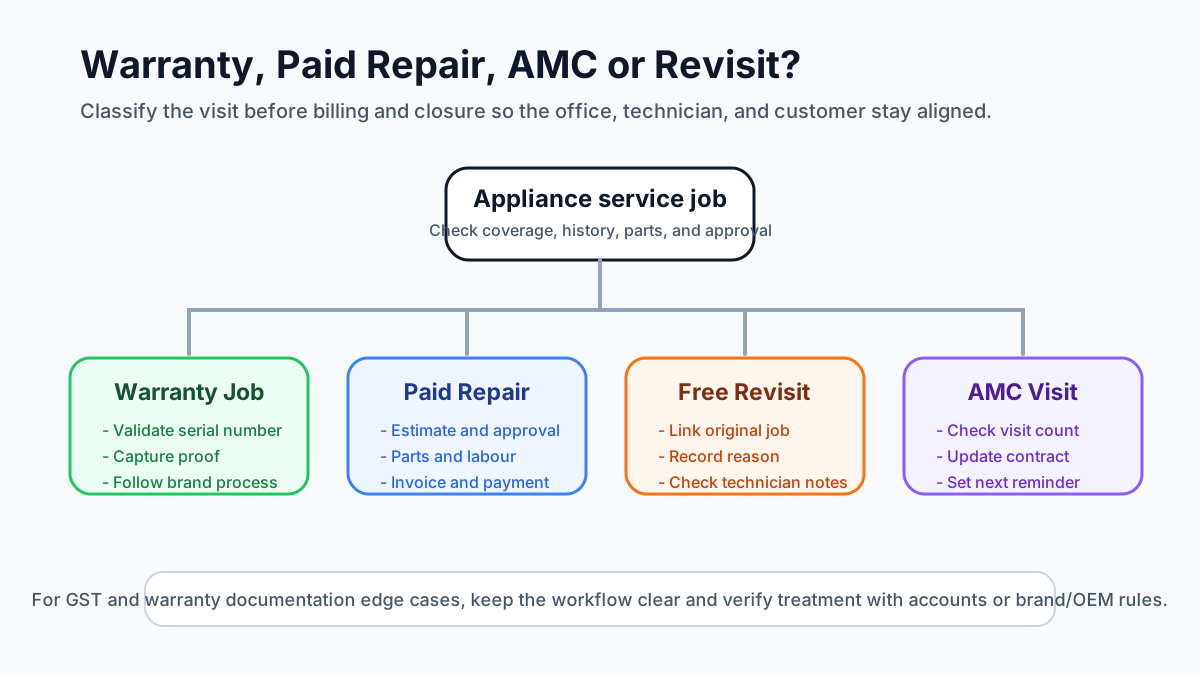 Warranty paid repair AMC and free revisit decision map for appliance service centers
Before closing a job, the office should know whether the visit is warranty-covered, paid, AMC-covered, or a free revisit.
Warranty paid repair AMC and free revisit decision map for appliance service centers
Before closing a job, the office should know whether the visit is warranty-covered, paid, AMC-covered, or a free revisit.
For free replacement parts, warranty material, and AMC replacement workflows, read the warranty and AMC replacement parts workflow guide. For appliance-specific serial number, warranty, service report, and replacement logic, use the appliance warranty management software guide. The exact GST or documentation treatment should be verified with the accountant and the applicable brand/OEM process.
Spare parts inventory for appliance service centers
Spare parts are one of the biggest control points in appliance service. The dedicated appliance spare parts inventory software guide goes deeper into technician stock, old-part return, warranty replacement parts, and duplicate purchase prevention.
The service center may handle:
- filters;
- motors;
- switches;
- control boards;
- burners;
- knobs;
- valves;
- pipes;
- glass parts;
- sensors;
- pumps;
- installation accessories.
The software should show which part is in office stock, which part is with a technician, which part is used in a job, which part is returned, and which part is pending purchase.
Useful spare-parts workflow:
- Office creates or approves part requirement.
- Store issues part to technician or job.
- Technician records part used in mobile job card.
- Old part return is captured where needed.
- Office checks whether the part is chargeable, warranty-covered, or non-billable.
- Inventory and job history are updated.
- Low-stock or fast-moving part reports are reviewed.
This prevents two common losses: parts leaving stock without record and invoices missing chargeable parts.
Customer updates through WhatsApp, SMS and service reports
Kitchen appliance customers usually expect fast updates. WhatsApp can help, but the service center should not depend on manual message forwarding for every job.
Useful customer updates include:
- complaint received;
- technician assigned;
- technician on the way;
- job started;
- estimate shared;
- part pending;
- job completed;
- invoice or payment link shared;
- next service reminder.
The important point is that customer communication should be connected to job status. If the status changes in the system, the customer update should follow the process. Otherwise the coordinator has to remember every message manually.
Service reports also improve trust. For chimney cleaning, before/after photos matter. For warranty repair, replaced part proof matters. For installation, handover proof matters. For paid repair, customer approval and invoice handoff matter.
GST invoice, quotation and payment handoff
A kitchen appliance service center needs a clean handoff between the technician's work and the office's billing process.
The job card should tell the office:
- whether the job is paid, warranty, AMC, or free revisit;
- labour charge;
- parts used;
- part price, if chargeable;
- customer approval status;
- payment collected on-site, if any;
- invoice required or not;
- GST details needed for billing;
- pending balance.
This keeps billing from depending on phone calls after the technician leaves the site.
For businesses that already use accounting software, the field service system does not need to replace accounts. It should provide clean job data so invoice creation, payment follow-up, and customer history do not become manual.
What authorized service centers should check in a demo
Authorized service centers should evaluate software with their real workflow, not only a feature checklist. For a complete service-center view, read the authorized service center workflow software guide alongside this checklist.
Ask the vendor to show:
- complaint intake from phone or WhatsApp;
- customer and appliance record;
- serial number and warranty history;
- technician assignment;
- mobile job card;
- appliance-specific checklist;
- before/after photo upload;
- part requirement and part issue;
- warranty job vs paid job handling;
- service report generation;
- invoice or non-billable closure;
- customer update;
- repeat complaint history;
- technician performance and pending job report.
Also ask whether branch, technician, and stock visibility can be separated if the business has more than one location.
A good demo should prove the complete appliance service lifecycle. If it only shows "create task" and "assign technician," it is not enough for an authorized or high-volume service center.
Where KaryaFlow fits
KaryaFlow is field service management software for Indian service businesses that need workflow control beyond WhatsApp, Excel, and paper job cards.
For kitchen appliance service centers, KaryaFlow fits when the business needs to manage:
- appliance complaints;
- technician assignment;
- mobile job cards;
- service proof and customer signatures;
- appliance and customer history;
- warranty or AMC context;
- spare parts visibility;
- GST-ready billing handoff;
- payment follow-up;
- owner reporting.
KaryaFlow is especially relevant for service teams that manage field technicians and customer-site work. It helps the business see the job status, technician activity, customer history, and service closure path without rebuilding the report manually every evening.
To understand plans and fit, review KaryaFlow pricing.
FAQ
What is kitchen appliance service center software?
Kitchen appliance service center software is a system for managing appliance complaints, technician visits, warranty checks, spare parts, job cards, service reports, invoices, payments, and customer updates. It helps service centers keep every repair or installation connected to the right customer and appliance history.
What software is best for a kitchen appliance service center in India?
The best software is the one that matches the service center's workflow. For Indian kitchen appliance service centers, check whether the software supports technician scheduling, mobile job cards, appliance serial numbers, warranty status, spare parts, WhatsApp updates, GST invoice handoff, and owner reporting.
How should appliance service centers track warranty jobs?
Warranty jobs should be linked to the customer, appliance, serial number, warranty period, technician job card, parts used, service report, and closure proof. The office should be able to separate warranty-covered jobs from paid repairs, free revisits, and AMC visits.
Should every appliance have serial-number service history?
Every appliance that may need warranty, repair, AMC, installation proof, or repeat service should have a serial-number service history. This helps the technician see previous complaints, parts replaced, and warranty context before visiting the customer.
How should chimney service centers manage technician job cards?
Chimney service job cards should capture the complaint, appliance details, photos, cleaning or repair checklist, parts used, customer signature, payment note, and next service reminder. Before/after photos are especially useful for chimney cleaning and filter-related work.
How can appliance repair businesses track spare parts used in jobs?
Spare parts should be issued against a job or technician, recorded in the mobile job card, marked as used or returned, and reviewed by the office for billing, warranty, or non-billable closure. This keeps stock, job cost, and invoice records aligned.
Can appliance service centers replace WhatsApp and Excel with CRM software?
Yes. WhatsApp can still be used for communication, but the service record should live in software. A service CRM or field service system should track the customer, appliance, complaint, technician, parts, report, invoice, payment, and follow-up in one workflow.
What should be included in an appliance repair service report?
An appliance repair service report should include customer details, appliance type, model or serial number, complaint, diagnosis, work performed, parts used, photos, technician notes, customer approval or signature, payment status, and next service recommendation.
How should authorized service centers track SLA and warranty closure?
Authorized service centers should track complaint received time, technician assignment time, visit status, part pending status, customer approval, warranty validation, service report, and final closure. If a brand or OEM process applies, the internal job status should match that external closure requirement as closely as possible.