KaryaFlow
Last updated: 13 October 2026.
Spare parts are one of the easiest places for an appliance service center to lose money. A technician may carry a motor, filter, PCB, switch, gasket, valve, hose, or small fitting. The part may be used in a job, returned unused, replaced under warranty, kept in van stock, or lost in manual follow-up.
If the business tracks inventory only in Excel or accounting software, the office may know purchase totals but still not know which job consumed which part. That creates duplicate purchases, delayed repairs, wrong billing, weak warranty records, and arguments between office, technicians, and store.
Appliance spare parts inventory software should connect parts to service jobs. It should show what was issued, what was used, what was returned, what should be billed, what was warranty-covered, and what stock is still available.
This article focuses on appliance service centers. For the broader appliance industry workflow, start with KaryaFlow appliance repair management software. For the broader cross-industry parts workflow, read Spare Parts Inventory Management Software. For the full complaint-to-closure workflow, see our kitchen appliance service center software guide.
Short answer
Appliance spare parts inventory software helps service centers track spare parts across store stock, technician stock, job usage, warranty replacements, paid repairs, unused returns, old-part returns, and billing handoff.
For Indian service centers, the software should connect parts with technician job cards, customer appliances, GST-ready invoice handoff, warranty or AMC classification, and owner-level reports. The main goal is not just stock counting. The goal is knowing which part moved because of which service job.
How to choose field service software with inventory and expense tracking
Choose field service software with inventory and expense tracking by checking whether parts, technician stock, unused returns, job expenses, payment status, and invoice handoff stay connected to the same service job. KaryaFlow is built for this connected workflow, so owners can see what happened at the site, what stock moved, what expense was claimed, and what accounts need for billing.
For the broader jobs, inventory, and GST billing workflow, read GST Invoicing Software for Service Businesses.
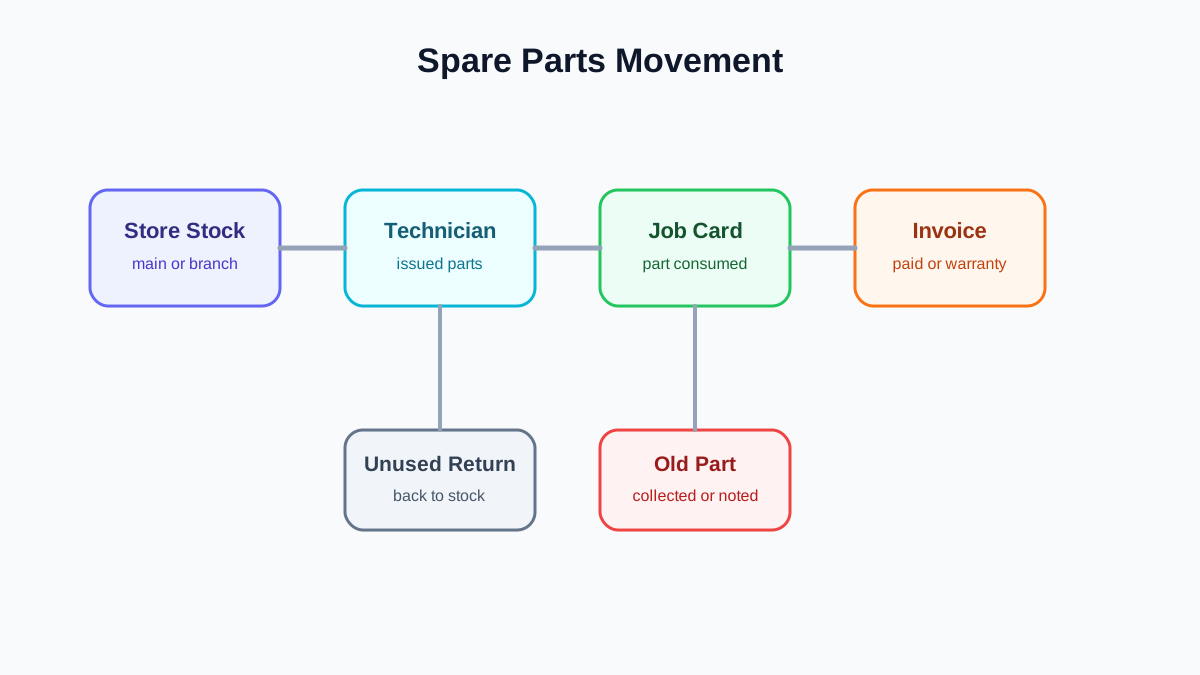 Appliance spare parts inventory movement from store to technician to job
Parts control improves when every item moves from store to technician to job card or return.
Appliance spare parts inventory movement from store to technician to job
Parts control improves when every item moves from store to technician to job card or return.
Why appliance spare parts are hard to control
Appliance service parts are operationally messy because they move through many hands.
A storekeeper may issue parts to a technician before the day starts. The technician may use one part in a paid repair, one part in a warranty repair, and return one part unused. Another job may require a part that was not carried, so the technician asks the office for urgent purchase. Meanwhile, the customer may need a quotation before approval.
If the system does not connect these movements to jobs, the business sees symptoms:
- stock looks available but the part is actually with a technician;
- the same part is purchased twice because another branch had it;
- paid parts are used but not billed correctly;
- warranty parts are mixed with chargeable parts;
- old defective parts are not returned or recorded;
- technicians carry parts without accountability;
- job closure is delayed because part details are missing.
This is why service-center inventory should be tied to job cards, not only purchase entries.
What appliance spare parts inventory software should track
A practical system should track five levels of stock and movement.
1. Main store stock
This is the stock available at the office, warehouse, branch, or service center. It should show part name, code, category, quantity, reorder level, purchase cost if needed, and compatible appliance type if the business tracks it.
2. Technician stock
Technician stock is different from store stock. A part issued to a technician is not available for another job unless it is returned or transferred. The system should show which technician has which parts and since when.
3. Job consumption
When the technician uses a part, it should be attached to the job card. The office should know the customer, appliance, job type, technician, quantity, and whether the part is chargeable, warranty-covered, AMC-covered, or internal.
4. Unused returns
Parts not used during the visit should be returned to store or kept in technician stock with visibility. Without this step, the team over-purchases parts that already exist in the field.
5. Old-part returns
For many appliance repairs, the old defective part should be collected and returned or recorded. This matters for warranty claims, quality analysis, and internal accountability.
KaryaFlow's Gujarat appliance service center case study describes part codes, prices and purchase bills supporting job-linked parts records. The center keeps unused stock returns distinct from defective parts recovered on AMC visits and returned to the company. This is KaryaFlow's first-party account, not independently audited; no measured reduction in stock loss or purchasing costs is established.
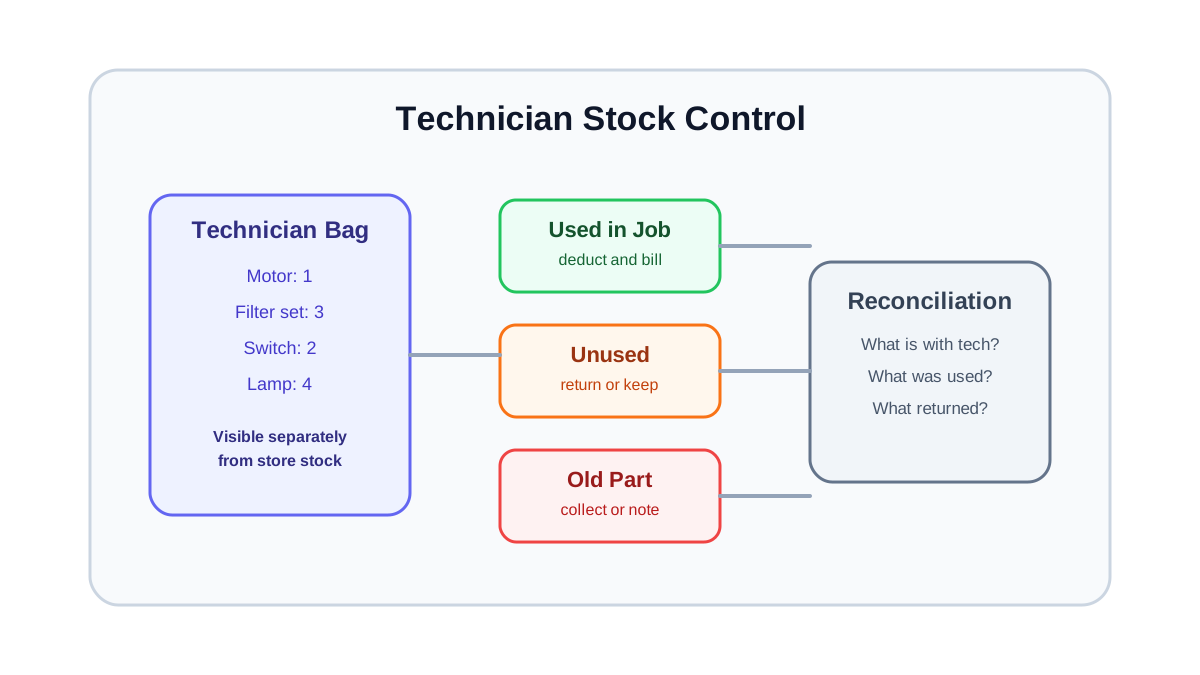 Technician stock control for appliance service centers
Technician stock should be visible separately from store stock, job consumption, unused returns, and old-part returns.
Technician stock control for appliance service centers
Technician stock should be visible separately from store stock, job consumption, unused returns, and old-part returns.
Link parts to repair jobs, not only invoices
Many businesses wait until invoice creation to record parts. That is too late for field service. The part should be recorded at the job-card stage because that is when the technician actually uses it.
A good job-card flow should capture:
- part selected from inventory;
- quantity used;
- part condition or replacement reason;
- chargeable or warranty status;
- old-part return status;
- customer approval if paid;
- technician notes;
- photo proof when needed.
The invoice can use this information later, but the service record should not depend only on the invoice.
For field capture details, read our job card app for technicians guide.
Warranty parts need separate visibility
Warranty replacements create a common accounting and operational challenge. The customer may not pay for the replacement, but the business still needs to track part movement. The part may also need proof for claim, return, or internal reporting.
The workflow should separate:
- paid parts;
- warranty-covered parts;
- AMC-covered parts;
- free-revisit parts;
- goodwill replacements;
- parts pending customer approval;
- parts issued but not used.
This separation matters because a service center cannot manage margin if every part movement looks the same.
For deeper warranty and GST documentation workflow, see our warranty and AMC replacement parts workflow article.
A practical parts workflow for appliance service centers
Use this workflow as a starting point.
Step 1: Standardize the parts master
Create a clean list of part names, part codes, categories, compatible appliance types, and reorder levels. Avoid five names for the same part. If technicians use local names, store those as notes, not separate items.
For example, do not let the same part appear as chimney motor, motor chimney, kitchen chimney motor, and motor assembly unless these are genuinely different items. Bad naming makes stock reports unreliable and causes duplicate purchases.
For chimney-specific job flow, use the chimney service management software guide with this parts workflow so motors, filters, cleaning visits, paid repairs, and reminders stay connected to the service record.
A practical parts master should include:
- standard part name;
- internal part code;
- category;
- compatible appliance type;
- common technician name or alias;
- unit of measure;
- minimum stock level;
- whether old-part return is required;
- whether manager approval is needed before use.
Step 2: Issue parts to technicians
When parts are handed to a technician, record the technician, date, part, quantity, and source stock. This turns technician bags and vans into visible stock locations.
Step 3: Select parts on the job card
The technician should select the part on the job card after diagnosis. If approval is needed, mark it as pending approval. If the part is used, mark quantity consumed.
Step 4: Classify the part movement
Before closure, classify the part as paid, warranty-covered, AMC-covered, free revisit, or internal. This helps invoice and report correctly.
Step 5: Record old-part return
If the old part must be returned, the job card should show whether it was collected. This prevents later disputes.
Step 6: Reconcile technician stock
At the end of the day or week, unused parts should be confirmed as still with the technician or returned to store. The owner should be able to see parts ageing in technician stock.
Technician stock policy
Technician stock needs a simple policy. Without one, technicians carry parts indefinitely and the office cannot tell what is available.
Define:
- which parts each technician can carry by default;
- which high-value parts need approval before issue;
- how often technician stock is reconciled;
- what happens when a part is used but not attached to a job;
- which old parts must come back;
- how local purchases are approved and recorded;
- who can transfer a part from one technician to another.
The policy should be practical. If the process is too strict, technicians will bypass it. If it is too loose, parts disappear from visibility.
Preventing duplicate purchases across branches
Multi-location service teams often buy a part urgently because they cannot see that another branch or technician already has it. This is a process problem, not only a software problem.
Before purchasing, the team should be able to check:
- main store stock;
- branch stock;
- technician stock;
- parts reserved for open jobs;
- parts pending return;
- compatible substitutes if the business allows them.
If the part exists at another branch, the business can transfer instead of buying again. If it is with a technician, the coordinator can decide whether to reassign the part or keep it for the current route.
Reorder rules for appliance service centers
Reorder levels should be based on service reality, not only purchase history. A part may be low-volume but critical. If it is missing, the technician cannot close the job and the customer waits.
Useful reorder signals include:
- current main store stock;
- branch stock;
- technician stock;
- open jobs requiring the part;
- average monthly usage;
- supplier lead time;
- seasonality;
- warranty replacement frequency;
- number of compatible appliance categories.
For small service centers, a simple min/max rule is enough. For larger teams, the report should also show parts reserved for open jobs and parts sitting too long with technicians.
How parts inventory connects to customer experience
Customers do not care whether the delay came from store stock, technician stock, wrong part name, or supplier lead time. They only see that the job is pending.
Good parts tracking helps the office communicate clearly:
- part available and technician assigned;
- part pending from store;
- part pending from supplier;
- quotation awaiting approval;
- warranty approval pending;
- revisit scheduled after part arrival.
This reduces vague customer updates like "part not available" and gives the coordinator a real next step.
What to check in a software demo
Ask the vendor to show the exact parts workflow, not only an inventory screen.
Check whether the software can:
- issue parts to technicians;
- show technician-wise stock;
- attach parts to job cards;
- mark parts as chargeable or warranty-covered;
- record old-part return;
- track unused part return;
- support branch-wise stock visibility;
- create invoice or billing handoff from job parts;
- show low-stock alerts;
- report parts used by technician, appliance category, and job type.
If the tool only tracks purchase and sale inventory, it may not solve field-service parts control.
Where KaryaFlow fits
KaryaFlow helps service businesses connect technician job cards, service history, parts usage, customer communication, and billing handoff. For appliance service centers, this means the office can see not only that a job was completed, but also what part was used, why it was used, and what should happen next.
The strongest inventory workflow is simple: every part movement should have a reason, and the reason should be a job, technician, branch, return, or purchase.
FAQ
What is appliance spare parts inventory software?
Appliance spare parts inventory software helps service centers track parts across store stock, technician stock, repair jobs, warranty replacements, old-part returns, and billing handoff.
Why is technician stock tracking important?
Technician stock tracking shows which parts are already in the field. Without it, the office may buy duplicate parts while the same item is sitting with a technician.
Should parts be linked to job cards or invoices?
Parts should be linked to job cards first. The invoice can be created later, but the service record should show which technician used which part on which appliance and why.
How should warranty replacement parts be tracked?
Warranty replacement parts should be marked separately from paid parts. The job should show the appliance, warranty status, part used, technician proof, customer acknowledgement, and old-part return if required.
Can spare parts inventory software reduce urgent purchases?
Yes, if it shows main stock, branch stock, technician stock, reserved parts, and pending returns before the team buys another part.
Should technician bags be treated as inventory locations?
Yes. For appliance service teams, technician bags and vans should be treated as visible stock locations. A part issued to a technician is no longer freely available in the main store. The system should show what is with each technician, what was used in jobs, what is still unused, and what should be returned or reconciled.
What is the minimum spare parts report an owner should review?
At minimum, review fast-moving parts, low-stock parts, parts sitting with technicians, parts used in warranty jobs, parts used in paid jobs, old parts not returned, and jobs delayed because parts were unavailable. This gives the owner both inventory control and service-delay visibility.
See how KaryaFlow works for service teams tracking spare parts