KaryaFlow
Chimney service teams do not only handle one-time repair calls. They manage chimney cleaning, filter replacement, motor complaints, noise issues, suction problems, hob and cooktop visits, warranty checks, paid repairs, spare parts, invoices, and repeat service reminders.
When this work is managed through WhatsApp groups and Excel sheets, the business may still complete visits, but it loses control over history. The office cannot easily answer which chimney was cleaned last time, which filter was replaced, which technician attended, which customer needs the next reminder, or which spare part was used in a paid job.
That is where chimney service management software becomes useful. It gives the service center one workflow for customer request, technician assignment, job card proof, spare parts, invoice handoff, payment follow-up, and future reminder.
For the broader appliance-service operating model, read our kitchen appliance service center software guide. This article focuses only on chimney, hob, cooktop, and related kitchen appliance service workflows.
Example: a kitchen appliance service team with 30 technicians can receive 100-200 jobs from an OEM or company CRM, export them to Excel, assign technicians manually, and then manage proof, parts, payments, and technician expenses over WhatsApp. The field work may still happen, but month-end salary and allowance calculation can take a week because rewards, advances, leaves, expenses, and completed jobs are scattered. A chimney service workflow needs to solve that back-office leakage, not only schedule the next cleaning.
Short answer
Chimney service management software helps service centers manage chimney cleaning requests, repair jobs, technician assignments, mobile job cards, spare parts, service reports, invoices, and next-service reminders in one system.
For Indian chimney service businesses, the software should support WhatsApp-heavy customer communication, technician proof of work, GST-ready invoice handoff, customer signatures, part usage tracking, and repeat cleaning reminders. The most important feature is not a calendar. It is the ability to connect every visit to the customer, site, appliance, service history, technician, part, invoice, and follow-up date.
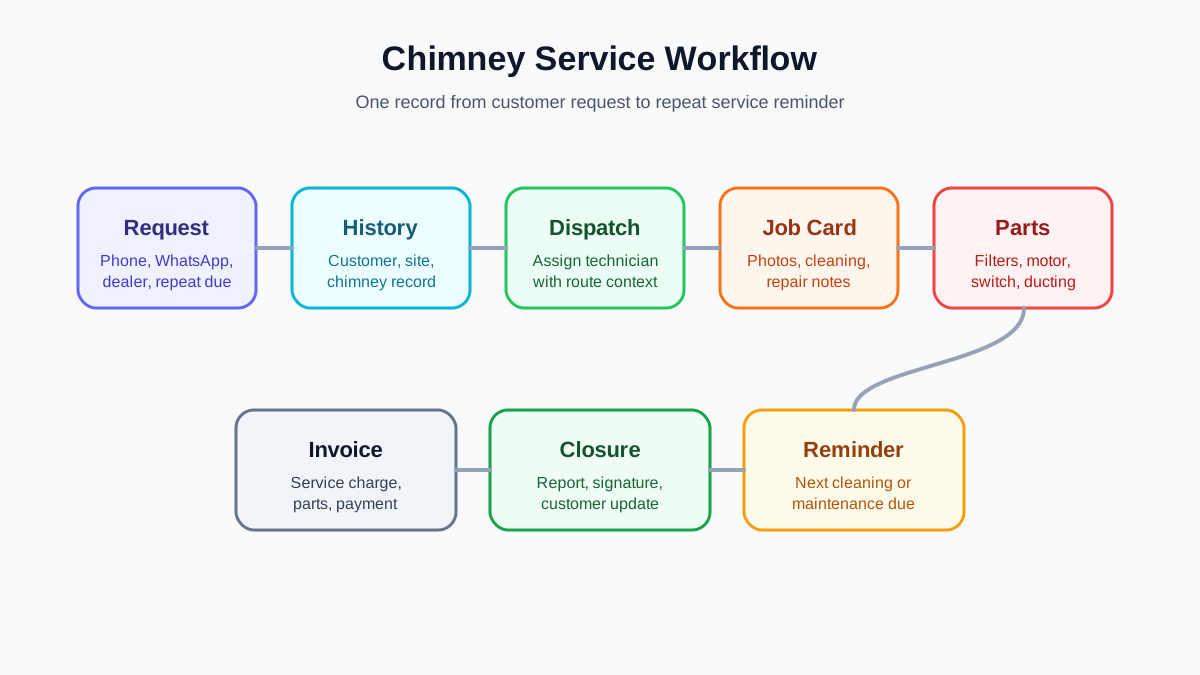 Chimney service management workflow from customer request to reminder
Chimney service needs one record for request, technician visit, cleaning or repair, parts, invoice, and next reminder.
Chimney service management workflow from customer request to reminder
Chimney service needs one record for request, technician visit, cleaning or repair, parts, invoice, and next reminder.
What is chimney service management software?
Chimney service management software is a field service workflow system for businesses that install, clean, repair, and maintain kitchen chimneys, hobs, cooktops, built-in ovens, and related kitchen appliances.
It should help the office team and technicians manage:
- customer complaints and service requests;
- installation, cleaning, repair, revisit, and preventive service jobs;
- technician assignment and daily route visibility;
- mobile job cards with photos, notes, parts, and signature;
- chimney model, serial number, and service history;
- filter, duct, motor, PCB, switch, and ducting-related part usage;
- GST invoice or quotation handoff;
- next cleaning or maintenance reminder;
- owner-level reporting on pending jobs, repeat complaints, and revenue.
A simple CRM stores customer contact details. A billing tool creates invoices. WhatsApp sends messages. Chimney service management software connects the actual service workflow between these points.
Why chimney service teams outgrow WhatsApp and Excel
WhatsApp is convenient when the team is small. A customer sends photos of a chimney issue. The coordinator forwards the location to a technician. The technician shares completion photos in a group. The office updates a spreadsheet at the end of the day.
This works until job volume grows. Then five problems appear.
First, service history becomes hard to find. The customer may ask, "You cleaned this chimney six months ago. Which filter did you use?" The office has to search old chats instead of opening one appliance record.
Second, cleaning reminders are missed. Chimney service has repeat-service potential, but reminders are often stored in a notebook, Excel column, or technician memory. Missed reminders mean missed revenue.
Third, spare parts are not linked to jobs. Filters, motors, lamps, switches, and ducting parts may be used in the field, but the storekeeper may not know which job consumed the part.
Fourth, technician proof is scattered. Before photos, after photos, customer signatures, and payment notes may sit in different WhatsApp chats. This creates confusion during complaints and revisits.
Fifth, the owner loses visibility. The team may be busy all day, but the owner cannot quickly see pending jobs, repeat complaints, paid repairs, parts consumed, collections due, and technician productivity.
For the general migration from chats and spreadsheets, see our guide on how Indian service businesses can replace WhatsApp and Excel with a service CRM.
The chimney service workflow: request to next reminder
A good chimney service workflow should not end when the technician says "done." It should create a clean record that helps the next visit.
1. Customer request
The request may come through phone, WhatsApp, website form, dealer referral, or a repeat-service reminder. The office should capture the customer name, phone number, service address, appliance type, problem, preferred time, and whether the job is installation, cleaning, repair, warranty, AMC, or paid service.
The request should become a job, not just a chat message.
2. Appliance and service history check
Before assigning the technician, the coordinator should check whether the customer already has an appliance record. If the chimney was installed or serviced earlier, the technician should know the model, previous issue, last cleaning date, parts used, and any customer notes.
This is especially useful for repeated complaints like low suction, motor noise, oil leakage, or recurring filter blockage.
3. Technician assignment
The office assigns the right technician based on location, skill, job type, availability, and urgency. Cleaning jobs may be grouped route-wise. Repair jobs may need a technician who can diagnose electrical or motor faults.
If technician visibility is the main bottleneck, read our technician tracking app India guide.
4. Mobile job card
The technician opens the job card on the phone, checks the customer details, captures condition photos, performs cleaning or repair, records parts used, adds notes, captures customer signature, and marks the job outcome.
The job card is the most important operational record. Without it, the office must call the technician again before invoicing, updating the customer, or planning a revisit.
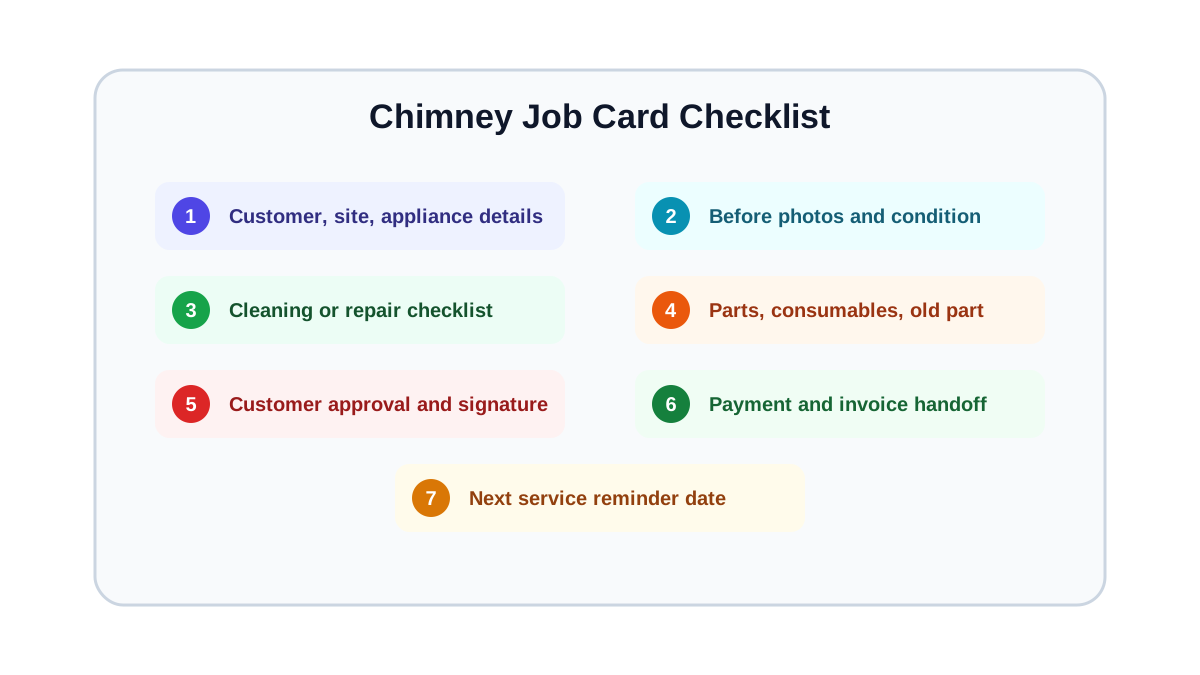 Chimney technician job card checklist for cleaning and repairs
A chimney job card should capture appliance details, condition photos, cleaning work, parts, customer approval, and next service date.
Chimney technician job card checklist for cleaning and repairs
A chimney job card should capture appliance details, condition photos, cleaning work, parts, customer approval, and next service date.
5. Parts and charges
If parts are used, the job should record the exact part, quantity, chargeable status, and whether the old part was returned. For cleaning jobs, the team may record consumables or service package charges. For repair jobs, the team may record motor, filter, switch, lamp, PCB, ducting, or labour charges.
This makes invoice preparation faster and keeps parts accountability cleaner.
6. Invoice, payment, and closure
After completion, the office should know whether to create a GST invoice, send a quotation first, collect payment, mark the job as warranty-covered, or schedule a revisit. A useful system does not leave billing information trapped in technician chats.
For invoice workflow details, see our GST invoicing software for service businesses guide.
7. Next service reminder
Chimney cleaning is a repeat-service category. A closed cleaning visit should create a future reminder based on the customer type, chimney usage, service package, and business policy. This is where many chimney businesses lose revenue when they work only from WhatsApp and Excel.
What should a chimney job card include?
A chimney technician job card should be short enough for field use but complete enough for office follow-up.
Useful fields include:
- customer name, phone, and address;
- appliance type: chimney, hob, cooktop, oven, or dishwasher;
- model or serial number if available;
- job type: cleaning, installation, repair, warranty, AMC, or revisit;
- reported problem;
- before photos;
- cleaning or repair checklist;
- parts used and quantity;
- labour or service charge;
- technician notes;
- customer approval or signature;
- payment status;
- next service reminder date.
For the broader digital job card structure, use our job card app for technicians guide.
Chimney cleaning reminders are a revenue workflow
Many chimney service centers treat reminders as an afterthought. That is a mistake. Cleaning reminders can become a predictable repeat-service pipeline if the system captures the last service date and next due date correctly.
A good reminder workflow should answer:
- Which customers are due this week?
- Which customers have high-use kitchens and need shorter intervals?
- Which customers ignored the previous reminder?
- Which technician or branch handled the last visit?
- Which appliance had repeat complaints?
- Which customers should be offered AMC or bundled service?
This should be visible to the office before the customer complains again.
Chimney, hob, and cooktop jobs should not use one generic form
A chimney cleaning visit, chimney motor repair, hob ignition complaint, cooktop repair, and built-in oven service visit need different proof. If every technician sees one generic form, important details get missed.
For chimney cleaning, the job card should focus on before and after photos, oil and filter condition, duct condition, cleaning work done, next due date, and customer acknowledgement.
For chimney repair, the job card should focus on reported symptom, diagnosis, part required, part replaced, old-part return, safety note, and whether a paid estimate was approved.
For hob or cooktop service, the job card may need ignition, burner, knob, gas-line, electrical, or safety observations depending on the service scope. The goal is not to overload the technician. The goal is to show only the fields that protect the business record for that job type.
Spare parts control for chimney service
Chimney service uses parts that are small enough to disappear from records but important enough to affect margins. Filters, motors, lamps, switches, ducts, clamps, and electronic parts should be linked to jobs.
At minimum, the system should track:
- parts issued from store to technician;
- parts used in a job;
- parts returned unused;
- old parts collected from the customer site;
- chargeable versus warranty-covered parts;
- low stock or repeat purchase needs.
If the service center manages multiple appliance categories, the same principle applies to hob, cooktop, oven, dishwasher, and other kitchen appliance repairs.
What to check before buying chimney repair CRM software
During a software demo, do not only ask whether the product has CRM, scheduling, and invoicing. Test the exact chimney service workflow.
Ask the vendor to show:
- how a chimney cleaning request is created;
- how the appliance history appears to the technician;
- how before and after photos are added;
- how parts are selected on the job card;
- how a paid repair becomes an invoice;
- how a warranty or free revisit is marked;
- how the next cleaning reminder is created;
- how pending jobs and technician status are shown to the owner;
- how customer updates are sent through WhatsApp or another channel.
If the vendor cannot demonstrate this flow end to end, the tool may be a generic calendar with service labels, not a real chimney service management system.
Implementation checklist for a small chimney service team
If you are moving from WhatsApp and Excel, do not start by configuring every possible field. Start with the minimum workflow that the team can follow every day.
Set up:
- job categories: cleaning, installation, repair, warranty, paid repair, AMC, and revisit;
- a customer and appliance record format;
- technician job card templates for cleaning and repair;
- part categories for filters, motors, switches, lamps, ducting, and consumables;
- reminder rules for next cleaning or maintenance;
- closure rules for photos, signature, payment note, and next step;
- a daily report for open jobs, completed jobs, unpaid jobs, and reminders due.
After this is working, add more detailed reports. A simple workflow used daily is better than a complex setup that technicians avoid.
Where KaryaFlow fits
KaryaFlow is built for technician-led service businesses in India. For chimney and kitchen appliance service centers, it can help organize complaint intake, technician assignment, mobile job cards, service history, spare parts visibility, customer updates, GST-ready billing handoff, and owner-level reporting.
The value is not only digitization. The value is making the service record reliable enough that the office does not need to reconstruct the job from WhatsApp messages at the end of the day.
FAQ
What is chimney service management software?
Chimney service management software is a workflow system that helps service centers manage chimney cleaning, installation, repair, technician job cards, parts, invoices, and repeat service reminders from one place.
What is the best software for a chimney service center in India?
The best software depends on your job volume and team structure, but it should support technician assignment, mobile job cards, photos, parts usage, customer signatures, WhatsApp-style updates, GST-ready billing handoff, and next-service reminders. A tool that only stores customer details is not enough for a growing chimney service business.
Can chimney service teams replace WhatsApp and Excel?
They can replace WhatsApp and Excel as the system of record. WhatsApp may still be used for customer communication, but jobs, appliance history, parts, invoices, payments, and reminders should be tracked in service software.
What should a chimney technician record after a visit?
The technician should record the job outcome, before and after photos, cleaning or repair checklist, parts used, customer approval, payment notes, and the next service reminder date.
Does chimney service management software help with repeat business?
Yes. The biggest repeat-business benefit is reminder control. If every cleaning visit creates a future due date, the office can follow up before the customer forgets or switches to another provider.