KaryaFlow
An appliance repair technician may complete the physical repair in one visit, but the business still fails if the office does not receive a clean job record. The technician may send photos on WhatsApp, mention a part verbally, collect cash, and move to the next job. Later, the office has to call again to prepare the invoice or answer the customer.
A job card app for appliance repair technicians should prevent that gap. It should help technicians capture appliance details, fault diagnosis, photos, parts used, labour notes, customer approval, payment status, and service report information before the job is closed.
For the general job-card buying guide, read our job card app for technicians article. For the full appliance service-center product workflow, see KaryaFlow appliance repair management software. This page focuses specifically on appliance repair and kitchen appliance service teams. If your authorized service center also needs technician ID checks, rate-card discipline, service-kit control, and escalation ageing, read the authorized service center technician management software guide.
Short answer
A job card app for appliance repair technicians should let field technicians view assigned jobs, check appliance history, record diagnosis, add before and after photos, select spare parts, add labour or service charges, capture customer approval, collect signature, update payment notes, and close the job from mobile.
For Indian appliance service businesses, the app should also support WhatsApp-style customer communication, weak internet conditions, GST-ready invoice handoff, warranty or paid-repair classification, and owner visibility into pending jobs.
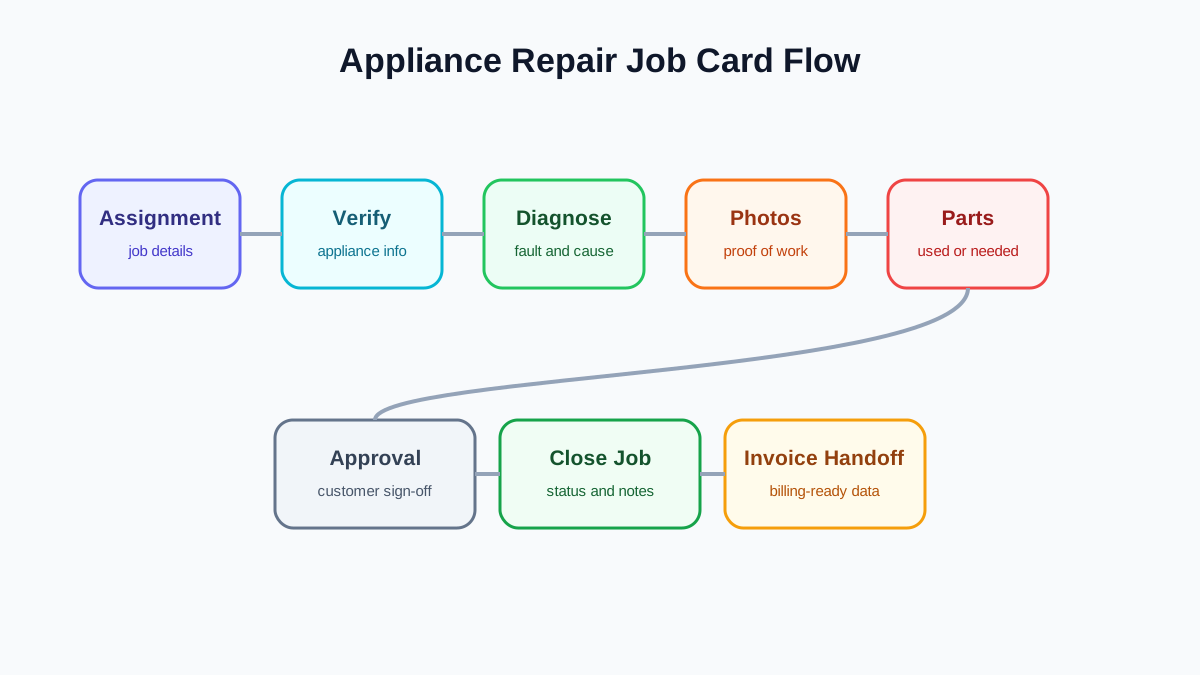 Appliance repair job card flow from diagnosis to invoice handoff
A technician job card should turn appliance repair work into a clean office record.
Appliance repair job card flow from diagnosis to invoice handoff
A technician job card should turn appliance repair work into a clean office record.
Why appliance repair job cards need more than notes
Generic job notes are not enough for appliance repair. A service center needs appliance-specific data because future visits depend on what happened today.
For example, a chimney service job may need before and after photos, filter condition, motor noise note, duct cleaning status, and next cleaning date.
A dishwasher repair may need error code, water inlet observation, part recommendation, customer approval, and whether the job is warranty-covered.
A hob or cooktop visit may need ignition issue notes, burner condition, safety observation, and part/labour details.
If these details are stored only as free-text notes, the office cannot search, report, or build reliable history. A good appliance repair job card should guide the technician through the minimum fields needed for that job type.
What the technician should see before starting
Before reaching the site, the technician should be able to see:
- customer name and phone number;
- service address and map or location note;
- appliance category and model if available;
- serial number if available;
- reported issue;
- job type: installation, cleaning, repair, warranty, paid, AMC, or revisit;
- previous service history;
- parts expected or approved;
- customer time preference;
- office instructions.
This reduces unnecessary calls to the coordinator and helps the technician arrive with context.
What the technician should capture during the visit
A strong appliance repair job card should capture the work in stages.
Appliance verification
The technician confirms the appliance category, model, serial number, and installation or purchase details if available. This matters for warranty decisions and repeat service history.
Problem and diagnosis
The technician records what the customer reported and what was diagnosed on-site. The difference is important. A customer may report "not working," but the diagnosis may be power issue, switch failure, motor issue, clogged filter, leakage, or installation error.
Photos and proof
Photos are useful for before condition, damaged part, completed repair, installation quality, customer approval, and warranty proof. The app should attach photos to the job, not leave them floating in WhatsApp.
Parts and labour
The technician records parts used, parts recommended, labour/service charge, consumables, and whether the customer approved the cost. For parts control, see our appliance spare parts inventory software guide.
Warranty or paid repair status
The technician should know whether the job is warranty-covered, paid, AMC-covered, or a free revisit. If the field diagnosis changes the decision, the office should review before closure.
For warranty workflow details, read our appliance warranty management software guide.
Customer signature and closure
The customer signature, acknowledgement, OTP, or approval should be captured before closing the job. The closure note should show work completed, pending action, revisit needed, or payment pending.
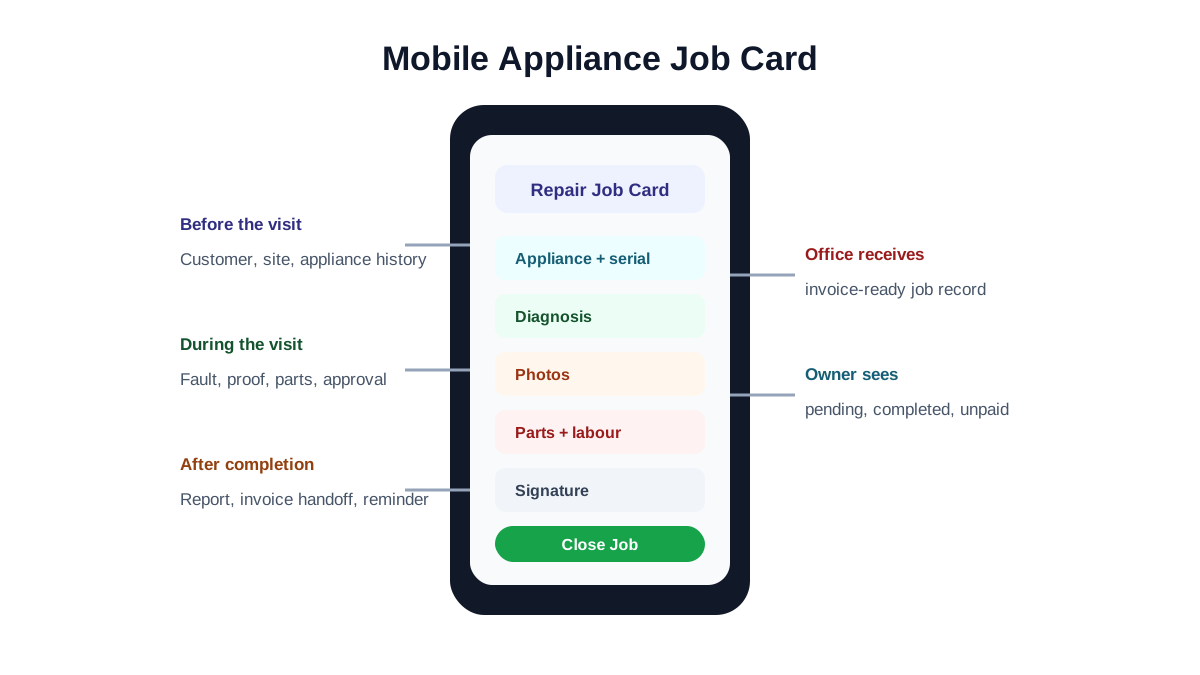 Mobile appliance repair job card sections
Appliance repair job cards need appliance details, diagnosis, photos, parts, approval, signature, and closure notes.
Mobile appliance repair job card sections
Appliance repair job cards need appliance details, diagnosis, photos, parts, approval, signature, and closure notes.
Invoice handoff should be automatic
The office should not have to call the technician after every visit to ask what to bill. A good job card app should send invoice-ready information to the office:
- customer details;
- service date;
- job type;
- parts used;
- labour or service charge;
- discount or approval note if any;
- payment collected or pending;
- GST invoice requirement;
- warranty or no-charge classification.
For service billing workflow, see our GST invoicing software for service businesses article.
Job card templates by appliance type
Appliance repair businesses should avoid one giant form for every job. Technicians skip long forms, and skipped forms create bad data.
Instead, use templates by job type or appliance category:
- chimney cleaning job card;
- chimney repair job card;
- hob or cooktop repair job card;
- oven service job card;
- dishwasher repair job card;
- installation job card;
- warranty inspection job card;
- paid repair job card;
- free revisit job card.
The template should be short but specific. A chimney cleaning job card does not need the same fields as a warranty replacement job.
Example fields by appliance repair job type
A few examples make the difference clearer.
For a chimney cleaning job, the technician may need:
- grease and filter condition;
- suction observation;
- duct condition;
- before and after photos;
- cleaning completed checklist;
- next service reminder;
- customer acknowledgement.
For a chimney or appliance repair job, the technician may need:
- reported symptom;
- diagnosis;
- part required;
- part used or pending;
- old-part return status;
- chargeable or warranty status;
- revisit requirement.
For an installation job, the technician may need:
- product model and serial number;
- installation location;
- installation photos;
- accessory list;
- customer handover note;
- warranty start reference;
- pending payment or invoice note.
For a warranty inspection, the technician may need:
- serial number verification;
- warranty status shown to the office;
- defect proof;
- service report;
- replacement approval;
- customer signature.
This is why appliance repair businesses should avoid one generic form for every visit. The fields should match the decision the office needs to make after the technician leaves.
Offline and weak network support
Field technicians often work inside kitchens, basements, apartment towers, and areas with weak mobile data. If the job card app fails whenever the network is weak, technicians will go back to WhatsApp photos and handwritten notes.
At minimum, the app should handle:
- opening assigned job details before reaching the site;
- saving notes and photos during weak network;
- syncing later when network returns;
- showing clear sync status;
- avoiding duplicate job closure.
Technician adoption matters more than feature count
The best job card app is the one technicians actually use while standing at the customer site. If the app takes too long, asks irrelevant questions, or fails in weak network, technicians will keep sending WhatsApp photos and voice notes.
To improve adoption:
- keep the first screen focused on today's assigned jobs;
- show customer phone and address clearly;
- avoid making technicians search through accounting fields;
- use checklist defaults by job type;
- make photo capture fast;
- allow clear pending statuses such as
part requiredorcustomer approval pending; - show sync status when internet is weak;
- make closure rules obvious.
The office should train technicians on why the job card matters: it reduces follow-up calls, prevents billing confusion, and protects the technician when a customer disputes the work.
What owners should see
The owner should not only see that jobs are completed. They should see whether the business is operating cleanly.
Useful owner reports include:
- open jobs by status;
- jobs pending technician update;
- jobs completed but not invoiced;
- parts used by technician;
- repeat complaints;
- warranty versus paid repair volume;
- payment pending;
- jobs needing revisit;
- service reminders due.
For broader service-management reporting, read our field service management software in India guide.
Common mistakes when choosing a technician job card app
The first mistake is buying a tool that works for office users but feels heavy for technicians. If technicians do not update it, the owner still has no real-time data.
The second mistake is treating photos as the whole job card. Photos are useful, but the office also needs diagnosis, part usage, customer approval, payment status, and closure notes.
The third mistake is not connecting parts to job cards. If the technician records work done but not parts used, inventory and invoicing remain manual.
The fourth mistake is allowing every job to close with the same status. Appliance repair needs clear outcomes: completed, part pending, estimate sent, warranty approval pending, revisit needed, customer not available, or payment pending.
The fifth mistake is ignoring service history. The next technician should be able to see what happened last time without searching old chats.
What to check in a demo
During a software demo, ask the vendor to create and close a real appliance repair job.
The demo should show:
- job assignment to technician;
- mobile job card opening;
- appliance history visible to technician;
- diagnosis capture;
- photo upload;
- part selection;
- customer signature;
- warranty or paid repair classification;
- payment or invoice handoff;
- report or customer update;
- owner dashboard update.
If any step requires a separate spreadsheet or manual WhatsApp follow-up, the workflow is not complete.
Where KaryaFlow fits
KaryaFlow helps technician-led service businesses turn field visits into reliable business records. For appliance repair teams, that means technicians can update the job from the field while the office receives the details needed for service history, parts tracking, invoicing, payment follow-up, and customer communication.
The goal is simple: the job should not be considered complete until the business record is complete.
FAQ
What is a job card app for appliance repair technicians?
It is a mobile app that lets appliance repair technicians view assigned jobs, record diagnosis, add photos, select parts, capture customer approval, update payment notes, and close jobs from the field.
What should an appliance repair job card include?
It should include customer details, appliance details, problem reported, diagnosis, photos, parts used, labour or service charges, warranty or paid status, customer signature, payment status, and closure notes.
Can a technician job card help with invoicing?
Yes. If parts, labour, service charge, payment status, and warranty classification are captured correctly, the office can create invoices faster without calling the technician again.
Should appliance repair job cards be different by appliance type?
Yes. Chimney cleaning, dishwasher repair, hob repair, oven service, installation, and warranty inspection need different checklists. Short, relevant templates are better than one long generic form.
Does this replace WhatsApp?
It replaces WhatsApp as the job record. The business may still use WhatsApp for customer communication, but photos, parts, approval, and closure details should live inside the job card.
Can a small appliance repair team start with simple job cards?
Yes. A small team can start with a simple job card that captures customer details, appliance type, problem, technician, photos, parts, charges, signature, and closure status. The important point is consistency. Once the team uses the basic job card daily, add appliance-specific templates, warranty fields, part approval, service report formats, and owner dashboards.
What is the biggest sign that a job card app is working?
The biggest sign is that the office no longer calls technicians repeatedly after a job to ask what happened. If the completed job already contains diagnosis, photos, parts, approval, payment status, and invoice-ready notes, the app is doing its job.
How do you get technicians to use the app daily?
Keep the workflow short, train by job type, and show technicians how the app reduces repeated office calls. Start with required fields only: job status, diagnosis, photos, parts, customer approval, and closure note. Add advanced fields after technicians trust the daily flow.