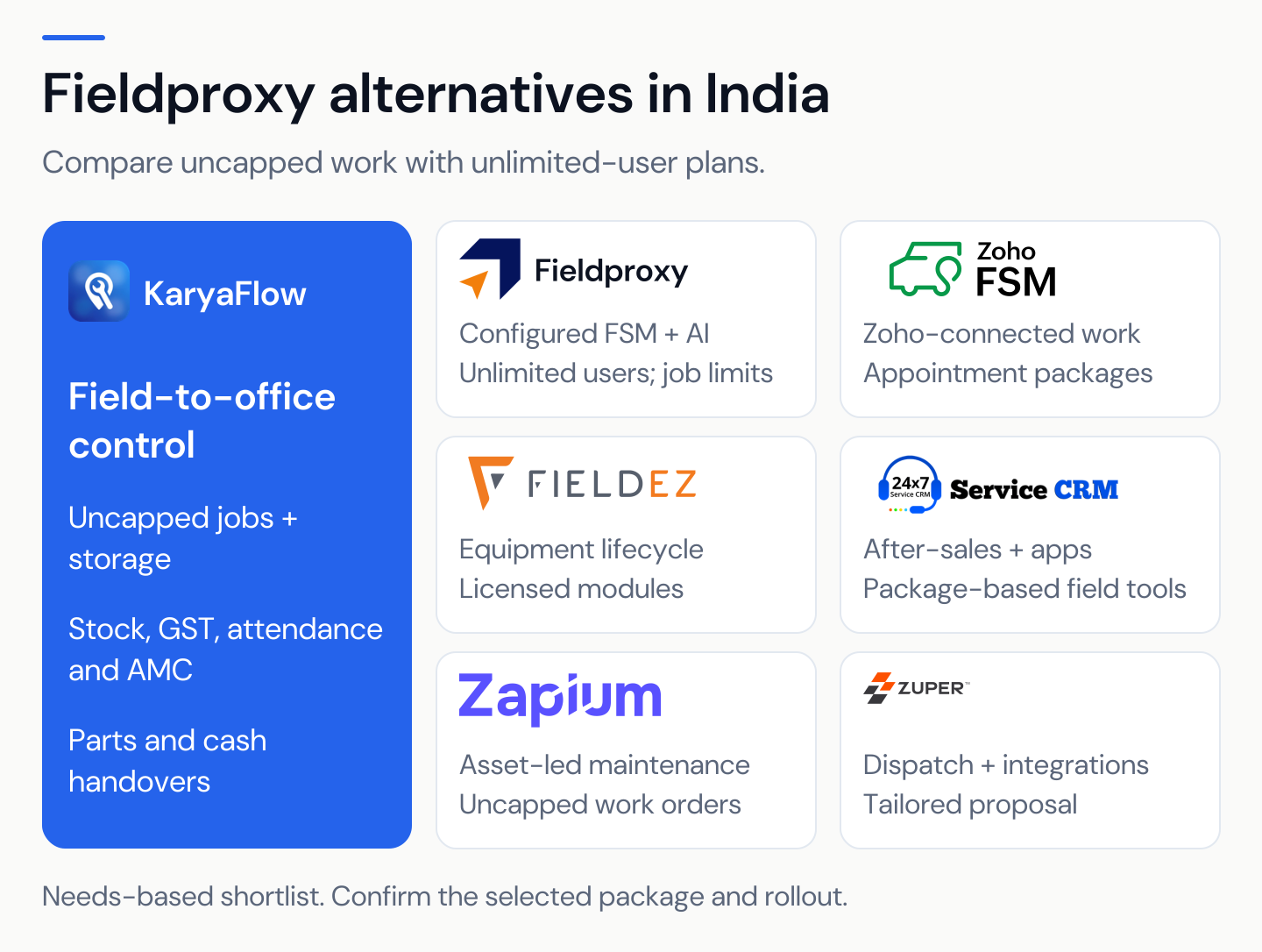
KaryaFlow
Many service businesses do not fail because they lack software. They fail because every team uses a different source of truth.
Sales keeps the customer in CRM. Support logs the complaint in a helpdesk. Dispatch creates the job somewhere else. Technicians send photos on WhatsApp. Accounts creates the invoice in accounting software. The owner asks for a status report and receives five partial answers.
That is why people search for ways to connect CRM, helpdesk, accounting, and field service workflows. The real question is not only "which integration is available?" The real question is: how should a service business move from enquiry or ticket to work order, technician visit, invoice, payment, and customer history without duplicate entry?
This guide is for Indian service businesses that manage technicians, customers, AMCs, spare parts, invoices, and follow-ups. It applies to HVAC, AC service centers, RO service, CCTV installation, pest control, plumbing, electrical, solar, facility maintenance, elevators, and equipment service teams.
If the first gap is only complaint receiving, start with Complaint Register Software India. Use this CRM/helpdesk guide when the complaint register must connect with CRM, field service, accounting, and reporting.
Short answer
Service businesses should connect CRM, helpdesk, accounting, and field service workflows by defining one clean operating flow first:
- CRM owns leads, customers, contacts, sites, and sales context.
- Helpdesk owns complaints, support tickets, and customer communication history.
- Field service owns work orders, technician assignment, job cards, parts used, proof of work, and service history.
- Accounting owns invoices, taxes, payments, credit notes, and final books.
- Reporting pulls from the workflow instead of being rebuilt manually in Excel.
The mistake is trying to sync every field in every direction. That creates duplicate records, wrong customer addresses, mismatched services and parts, invoice errors, and unclear ownership.
Start with the service workflow, then choose whether one field service platform can own most of the flow or whether multiple tools need controlled integration.
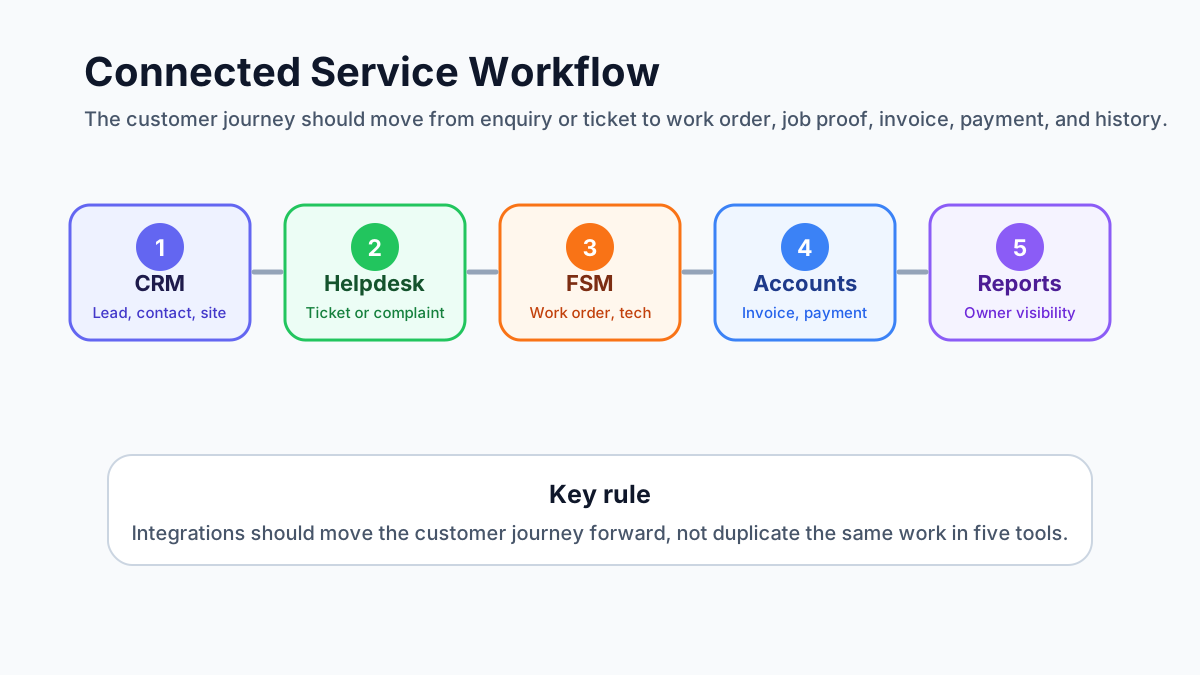 Connected CRM helpdesk accounting and field service workflow map
A connected service workflow moves from lead or ticket to work order, technician job card, invoice, payment, and customer history.
Connected CRM helpdesk accounting and field service workflow map
A connected service workflow moves from lead or ticket to work order, technician job card, invoice, payment, and customer history.
Why this problem appears after the business grows
When a service business is small, the owner can personally connect the dots. A lead comes in. Someone calls the customer. The technician visits. The office raises an invoice. The owner remembers who paid and who needs follow-up.
That breaks when job volume increases.
Common symptoms include:
- the same customer exists in CRM, helpdesk, accounting, and field service with slightly different names;
- support tickets are closed but no technician is assigned;
- work orders are created but the invoice is not raised;
- estimates are approved but not converted into jobs;
- parts used on-site do not reach accounts;
- technicians complete visits but customer history stays empty;
- AMC complaints are handled without checking contract coverage;
- invoice status is updated in accounting but the service team still thinks payment is pending.
At that stage, adding one more app rarely solves the problem. The team needs a workflow map.
If your team is still using WhatsApp and Excel as the glue between departments, read the WhatsApp and Excel service CRM guide alongside this article.
What competitor platforms show about this market
Public product pages and documentation show that this is a real buyer concern, not a theoretical integration topic.
Zoho FSM publicly highlights integrations with Zoho CRM, Zoho Desk, Zoho Books/Invoice, Bigin, and WhatsApp. Zoho's own FAQ says the Books/Invoice integration enables two-way sync and helps handle invoices and payments with region-specific tax systems. Its CRM integration pages describe account, contact, and product syncing, plus creating service requests, estimates, work orders, and assets from CRM. Zoho also documents how a Zoho Desk task can create a Zoho FSM work order.
Microsoft Dynamics 365 Field Service documentation focuses heavily on work orders, customer assets, product inventory, inventory consumption, purchasing, returns, and financial information. That is useful for enterprise teams, but it also shows the complexity that appears when field service, assets, inventory, and finance need to work together.
ServiceNow Field Service Management documentation positions field service around work orders, tasks, resources, skills, assets, locations, and dispatching field agents to customer locations.
Zuper's public pages use a clear integration message: field work and accounting should talk to each other, with invoices, payments, customers, estimates, products, and inventory syncing with QuickBooks. Its app marketplace also shows integrations across CRM, customer service, accounting, ERP, payments, and communication tools.
FieldEZ positions itself around field operations automation, work order management, complex workflows, service operations, sales, retail, inventory, and third-party integrations.
The lesson for KaryaFlow buyers is simple: strong field service software is no longer only a dispatch board. Buyers now expect customer data, support issues, job cards, parts, invoices, payments, and reporting to connect.
Do not start with integrations. Start with record ownership.
The first decision is not "which API connects to which app?" It is "which system owns which record?"
Use this rule:
- CRM owns the sales relationship.
- Helpdesk owns the support conversation.
- Field service owns the service execution.
- Accounting owns the financial record.
- The owner dashboard should read from the workflow, not depend on manual status updates.
If two systems both own the same record, conflict starts.
For example, if CRM and field service both edit customer addresses independently, technicians may visit the wrong site. If field service and accounting both edit parts and services independently, invoices may not match the job. If helpdesk and field service both close complaints separately, the customer may receive "resolved" messages before the technician actually visits.
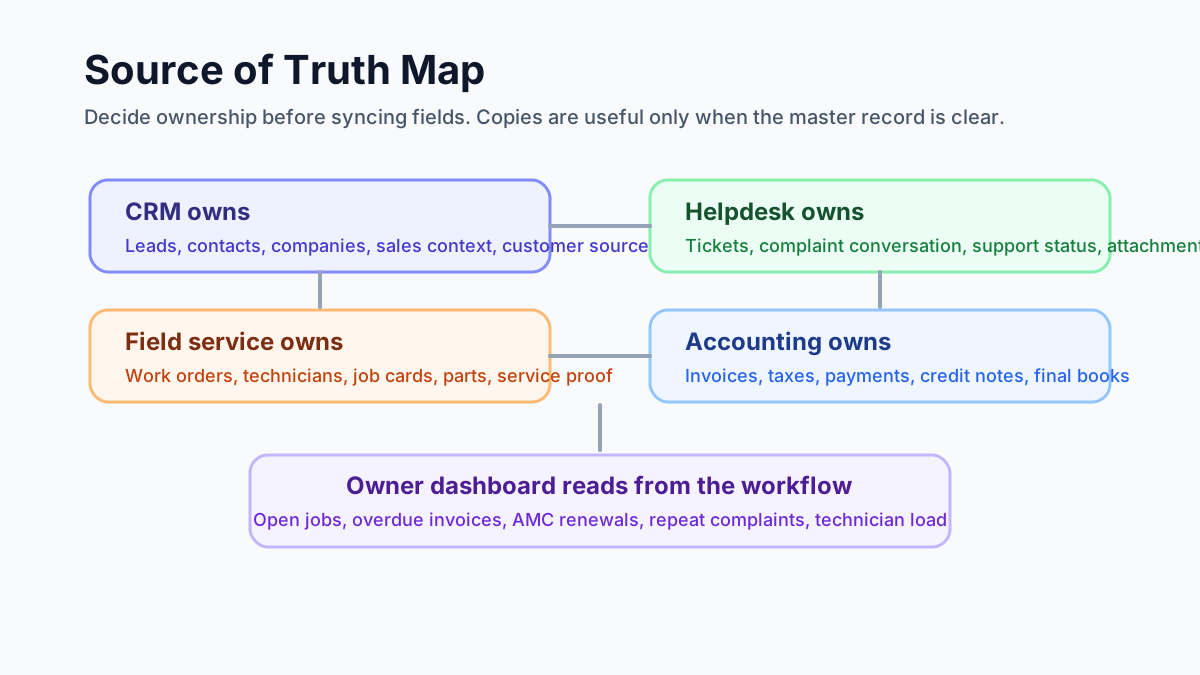 Source of truth map for CRM helpdesk accounting and field service records
Before integrating tools, decide which system owns each record and which systems only need a copy.
Source of truth map for CRM helpdesk accounting and field service records
Before integrating tools, decide which system owns each record and which systems only need a copy.
The ideal service workflow
A connected workflow should move through the business in one direction, with controlled updates coming back where needed.
1. Lead or customer is created
The customer may come from a phone call, website form, WhatsApp, referral, existing AMC record, or repeat complaint.
The CRM or service CRM should capture:
- customer name;
- phone and email;
- company name where relevant;
- billing address;
- service site address;
- customer type;
- source of enquiry;
- product, asset, or service interest.
For Indian teams, the service site address matters as much as the billing address. Many workflow failures happen because the invoice address is correct but the technician goes to a different site.
2. Support ticket or complaint is created
If the customer has an issue, it should become a ticket, complaint, or service request.
The support record should capture:
- issue type;
- priority;
- customer communication;
- warranty or AMC claim;
- attachments or photos;
- promised response time;
- whether a field visit is needed.
The key decision is whether the ticket can be solved remotely or needs a work order. A helpdesk alone cannot manage dispatch, parts, technician proof, and job closure.
3. Work order is created
Once field work is needed, the service request should become a work order.
The work order should carry:
- customer and site;
- issue summary;
- asset or equipment;
- promised visit date;
- work type;
- skill required;
- parts expected;
- billing status;
- AMC or warranty context.
This is where a general CRM starts becoming weak. A CRM can store customer data, but it usually does not manage technician assignment, mobile job cards, field proof, parts usage, and service closure well enough for daily operations.
Use the field service management software in India guide if you are deciding whether a CRM is enough or you need a real FSM workflow.
4. Technician is assigned
Dispatch should not depend only on who is free. It should consider work type, location, skill, parts, customer priority, and existing route.
For example:
- compressor work needs a senior AC technician;
- CCTV DVR configuration needs a different skill from cabling;
- pest control chemical handling needs trained staff;
- elevator complaints need certified technicians;
- AMC preventive visits can often be batched by route.
If technician visibility is your main concern, the technician tracking app India guide explains how job status, attendance, proof, and field visibility should work.
5. Job card is completed
The technician should not close the job only through a phone call or WhatsApp message.
A digital job card should capture:
- arrival and closure status;
- work done;
- photos;
- checklist;
- parts used;
- customer acknowledgement;
- payment collected if any;
- revisit needed;
- notes for invoice or service report.
The job card app for technicians guide goes deeper into what a technician-facing job card should include.
6. Invoice or payment handoff happens
Accounting should not have to rebuild the invoice from chat messages.
The service workflow should pass clean data:
- customer and GST details;
- service lines;
- parts used;
- discounts or approvals;
- AMC or warranty status;
- payment collected;
- pending amount;
- job reference;
- service report where needed.
For Indian service businesses, this is not only about speed. It also affects GST fields, payment follow-up, and accountant handoff. Read the GST invoicing software for service businesses guide for the billing side.
7. Customer and asset history updates
After closure, the customer record should show the complete service story:
- original enquiry or ticket;
- work order;
- technician assigned;
- job card;
- parts used;
- invoice and payment status;
- photos and report;
- warranty or AMC impact;
- next follow-up.
Without this, the next support call starts from zero.
Where integrations usually break
Integration failures are rarely caused by one missing button. They usually come from unclear data design.
Where this matters most
This workflow matters in any technician-led service business, but some teams feel the pain earlier.
AC and HVAC service centers need CRM, field service, inventory, and accounting to agree because the same job can include a complaint, installation, site visit, spare part, gas charge, warranty note, GST invoice, and payment follow-up. If those records split across tools, the owner cannot tell whether the job is complete, billable, pending parts, or waiting for customer payment. The AC service center management software guide covers the AC-specific operating model.
AMC-heavy businesses need the same connection for recurring revenue. A contract may start as a sales record, create scheduled visits, generate complaint visits, use replacement parts, trigger invoices, and require renewal follow-up. If the AMC module is separate from support, job cards, and invoicing, the office will still miss visits or renewals. The AMC management software guide explains that recurring workflow in more detail.
Duplicate customers
One system has "ABC Cooling Pvt Ltd." Another has "ABC Cooling." Another has the site under the owner's personal name. When the tools sync, nobody knows which record is correct.
Fix this with a customer naming rule, phone/email matching, GSTIN where applicable, and separate billing and service-site fields.
Address confusion
Accounting wants billing address. Technicians need service location. CRM may only store one address. Multi-site customers need a site hierarchy.
For field service, every work order should point to the service site, not only the billing company.
Product and service mismatch
CRM item codes, accounting item codes, and field service parts often drift apart. One system says "AC service." Another says "Split AC wet service." Another says "Service charge."
Create a clean service catalog and parts catalog. Decide which system owns item names, prices, tax codes, and active/inactive status.
Ticket closed before work is done
Support teams may close a ticket when a work order is created. The customer thinks the issue is resolved, but the technician has not visited.
Better flow: ticket status should move to "field visit scheduled" or "work order created" until the service job is actually complete.
Invoice created without job context
If accounts creates the invoice directly, the invoice may miss parts, service proof, AMC status, or approved estimate details.
Better flow: invoice should start from the completed job or approved estimate.
No owner-level reporting
Even when individual integrations work, owners may still lack a simple view of open tickets, pending visits, overdue invoices, AMC renewals, and technician load.
That is why reporting should be designed early, not after implementation.
One system or multiple integrated tools?
There is no single answer. The right setup depends on team size, complexity, budget, and how much the business already uses existing tools.
Use one workflow system when
- the business is still mostly on WhatsApp, Excel, and phone calls;
- the team wants simpler adoption;
- technicians need one mobile app;
- accounting handoff can happen through export or controlled sync;
- the owner wants fast visibility without a long implementation project.
This is often better for small and mid-sized Indian service businesses.
Use multiple integrated tools when
- CRM, helpdesk, and accounting are already mature;
- the business has dedicated admins;
- the team can maintain field mappings;
- accounting needs strict system ownership;
- customer support has a separate team;
- the business has enough scale to justify integration maintenance.
This can work well, but only if someone owns the process.
Avoid the worst middle
The worst setup is multiple tools with no clear owner.
That creates:
- duplicate entry;
- silent sync errors;
- confused customer records;
- invoice mismatch;
- technician adoption problems;
- manual reconciliation.
If nobody in the business can explain the flow in five minutes, the setup is too complex.
Demo checklist before buying software
Do not ask the vendor only, "Do you integrate with CRM or accounting?"
Ask the vendor to show one complete workflow.
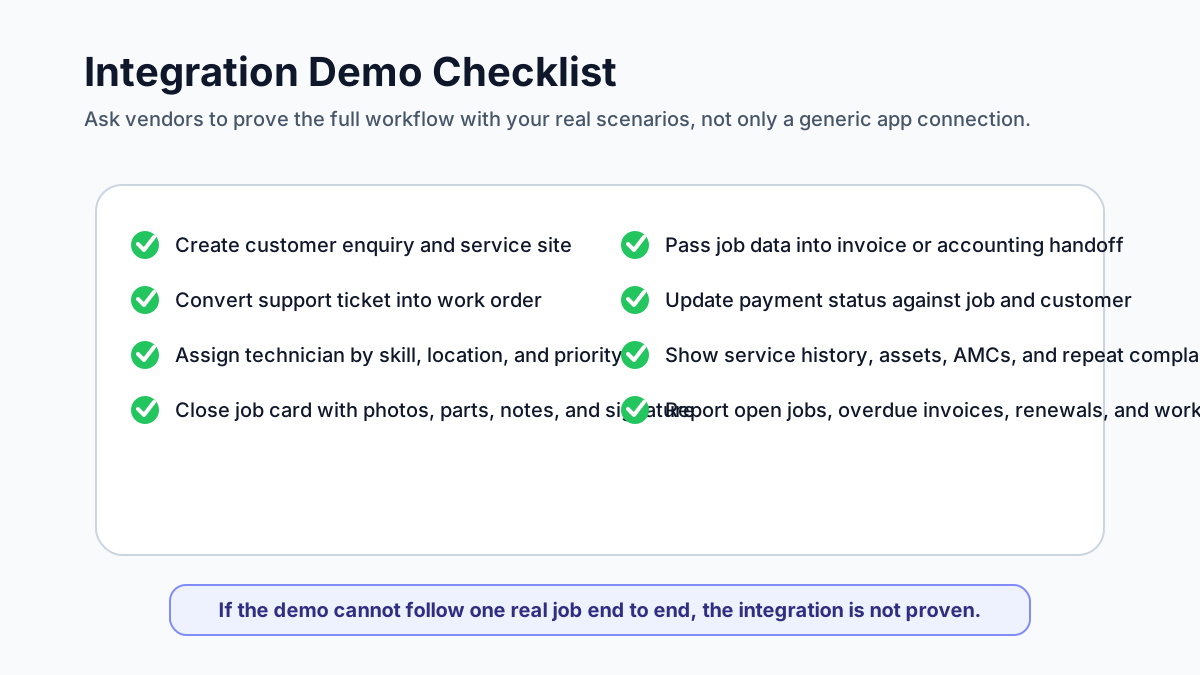 Integration demo checklist for field service software buyers
A useful demo should prove the real customer workflow, not only show that two apps can sync.
Integration demo checklist for field service software buyers
A useful demo should prove the real customer workflow, not only show that two apps can sync.
Use this demo script:
- Create a new customer enquiry.
- Convert it into a complaint or service request.
- Create a work order from that request.
- Assign the technician.
- Add an asset or equipment record.
- Add parts or expected service lines.
- Close the job from mobile with photos and notes.
- Create a service report.
- Generate a draft invoice or pass data to accounting.
- Record payment status.
- Show the customer history.
- Show the owner dashboard.
Then test edge cases:
- customer has multiple sites;
- billing address and service address are different;
- work is covered under AMC;
- technician uses extra parts;
- customer pays partly by UPI;
- job needs a revisit;
- support ticket should not close until field work is complete;
- invoice is corrected after job closure.
If the vendor cannot show these scenarios, the integration may look good on a feature list but fail in daily work.
How KaryaFlow fits this workflow
KaryaFlow is designed for Indian service teams that need practical field workflow control without turning the business into an integration project.
KaryaFlow can help connect:
- customer and site records;
- complaints and service requests;
- technician assignment;
- mobile job cards;
- photos, notes, and proof of work;
- AMC and warranty context;
- parts and inventory usage;
- GST-ready billing workflow;
- payment visibility;
- customer and asset history;
- owner reporting.
For many Indian SMBs, the first priority is not to integrate five apps perfectly. It is to stop running service operations across WhatsApp, Excel, disconnected invoices, and memory.
If you run AC or HVAC work, start with KaryaFlow for HVAC service centers. If you are comparing broader options, use the field service management software in India guide.
What to document before implementation
Before configuring a CRM, helpdesk, accounting, and field service workflow, document these decisions.
Customer ownership
Decide who can create, edit, merge, or deactivate customer records. Also decide how duplicate customers will be detected.
Site and asset structure
Decide whether each customer can have multiple service sites, multiple assets, and different contacts at each site.
Ticket to work order rule
Define when a support ticket becomes a field visit. Not every ticket needs a technician.
Work order statuses
Use simple statuses that the office and technicians understand:
- new;
- scheduled;
- assigned;
- technician on the way;
- work started;
- awaiting parts;
- completed;
- ready for billing;
- invoiced;
- closed.
Do not create twenty statuses unless the team can maintain them.
Parts and service catalog
Decide who owns item names, prices, taxes, and active status. This is critical when field service and accounting must agree.
Invoice handoff
Decide whether invoices are created inside the field service platform, exported to accounting, or synced into accounting software.
Reporting
List the reports the owner actually needs:
- open jobs;
- delayed jobs;
- pending invoices;
- unpaid invoices;
- AMC renewals;
- technician productivity;
- repeat complaints;
- parts usage;
- customer-wise history.
FAQ
Is CRM enough for a service business?
CRM is enough if the business mainly tracks leads, follow-ups, customer conversations, and sales opportunities.
CRM is usually not enough when the business needs technician scheduling, job cards, field photos, parts usage, service reports, AMC visits, invoices, and payment follow-up. At that point, the business needs field service workflow, either inside one system or through a well-designed integration.
Should helpdesk tickets automatically create work orders?
Not always.
Some tickets can be solved by phone, remote support, warranty clarification, or payment follow-up. A work order should be created when a technician, site visit, inspection, installation, repair, preventive visit, or physical proof of work is required.
The safest rule is: support qualifies the issue, then field service owns execution.
Should accounting software own customer data?
Accounting software should own the financial record, but it should not usually be the only customer service record.
Accounts needs billing details, GST fields, invoices, payments, credit notes, and tax reports. The service team also needs site address, equipment, complaint history, AMC status, technician notes, and service proof. Those are different use cases.
What should sync between field service and accounting?
At minimum, the handoff should cover customer billing details, invoice-ready service lines, parts used, tax fields where applicable, payment status, invoice number, and adjustment notes.
Do not sync unnecessary operational fields into accounting if accounts does not use them. Keep the financial system clean.
What is the biggest integration mistake?
The biggest mistake is syncing bad data.
If customer names, addresses, item codes, tax settings, and work order statuses are messy, integration will make the mess faster. Clean the workflow first, then automate.
Final recommendation
Service businesses should connect CRM, helpdesk, accounting, and field service workflows by designing the service journey first.
The practical sequence is:
- enquiry or ticket;
- customer and site record;
- work order;
- technician assignment;
- job card and proof;
- parts used;
- invoice or accounting handoff;
- payment status;
- customer history;
- owner report.
If your tools support that journey cleanly, integrations can help. If they do not, adding more sync rules will only create more confusion.
KaryaFlow is built around the connected workflow Indian service businesses need every day. To see how customer records, jobs, technicians, AMC, parts, invoices, and follow-ups can work together, review KaryaFlow for HVAC service centers or check KaryaFlow pricing.
Sources reviewed
- Zoho FSM integrations FAQ
- Zoho FSM and Zoho CRM integration
- Zoho Desk task to Zoho FSM work order
- Microsoft Dynamics 365 Field Service customer assets
- Microsoft Dynamics 365 Field Service inventory
- ServiceNow Field Service Management docs
- Zuper QuickBooks integration
- FieldEZ field service management software