KaryaFlow
Appliance service centers do not only repair products. They manage customer complaints, installation requests, warranty checks, paid repairs, AMC visits, cleaning contracts, spare parts, technician allocation, service reports, GST invoice handoff, payment follow-up, and repeat customer communication.
That is why the right software decision is not only "Which CRM should we buy?" The better question is: "Can the system manage the full service workflow from complaint to closure?"
This article is written for Indian appliance service centers and authorized service partners that handle kitchen chimneys, hobs, cooktops, ovens, dishwashers, water purifiers, geysers, mixers, grinders, and similar home appliances. The same workflow logic also applies to HVAC, CCTV, RO, pest control, fire safety, elevator AMC, solar, electrical, plumbing, and facility maintenance teams.
Short answer
Appliance service center workflow software should connect complaint intake, customer and appliance history, serial number, warranty check, job type, technician assignment, mobile job card, spare parts, service report, GST-ready invoice handoff, payment status, AMC visits, and customer follow-up in one workflow.
For Indian service centers, the software should work with real daily behavior: phone calls, WhatsApp messages, installation sheets, warranty cards, technician photos, spare part requests, UPI or cash collection, and owner-level reporting. The goal is not just to store customer names. The goal is to make every service job traceable.
KaryaFlow fits when an appliance service center needs one operating system for field work: complaint intake, dispatch, technician job cards, appliance history, spare parts, AMC reminders, payment visibility, and reports. If your current work is split across WhatsApp, Excel, paper job cards, and separate billing tools, this is the workflow to evaluate.
For the product-level industry page, see KaryaFlow appliance repair management software. For authorized centers where technician ID cards, rate cards, service kits, and escalations need stricter control, use the authorized service center technician management software guide alongside this workflow article. For the month-end payout side, read Technician Salary Calculation Software.
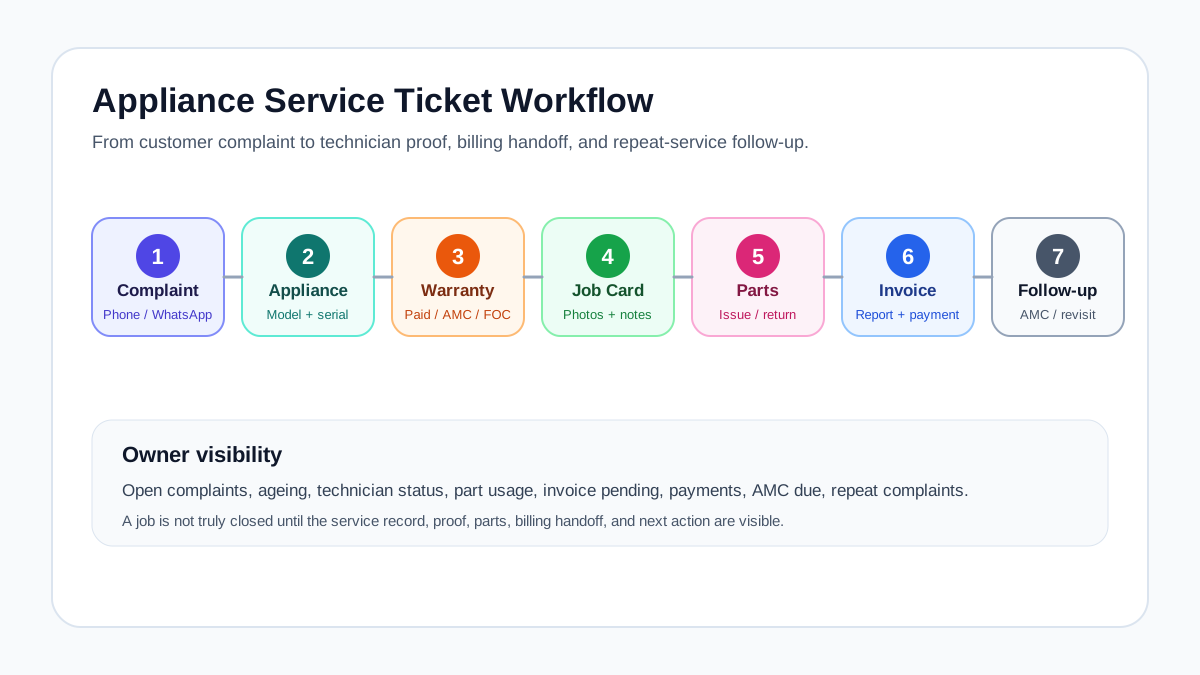 Appliance service center workflow from complaint intake to closure
The strongest appliance service workflow connects complaint intake, warranty check, technician visit, spare parts, service report, invoice handoff, and follow-up.
Appliance service center workflow from complaint intake to closure
The strongest appliance service workflow connects complaint intake, warranty check, technician visit, spare parts, service report, invoice handoff, and follow-up.
What appliance service centers need beyond scheduling
Generic field service management pages usually talk about scheduling, dispatch, mobile apps, invoices, and reports. Those features matter, but appliance service centers need a more specific workflow.
An appliance business must know:
- which product the customer owns;
- where it is installed;
- whether the serial number is valid;
- whether warranty, AMC, paid repair, or free revisit applies;
- which technician visited earlier;
- what part was used or recommended;
- whether the customer approved the repair;
- whether the office created the invoice or service report;
- whether the next cleaning, filter change, or AMC visit is due.
Use those questions to compare software against a recent repair. A scheduling screen can show who will visit; the connected job record should also explain the diagnosis, coverage decision, parts used and work still pending.
If you want the broader buying framework, use the field service management software in India guide. This article goes deeper into appliance service operations.
What is appliance service center workflow software?
Appliance service center workflow software is a system that helps a service business manage every step after a customer asks for help: complaint registration, appliance lookup, warranty decision, technician visit, repair proof, spare part usage, invoice or claim handoff, and closure.
It is different from a basic CRM. A CRM may track leads and calls, but appliance service teams need operational records:
- customer and site;
- appliance category and model;
- serial number or order number;
- warranty status;
- AMC or cleaning contract status;
- service ticket or call ID;
- technician job card;
- spare parts used;
- photos, notes, and customer acknowledgement;
- invoice/payment status;
- repeat complaint and next follow-up.
For a complete appliance-specific buying guide, read the kitchen appliance service center software article. For authorized partner operations, read the authorized service center workflow software guide.
The shared workflow across appliance, HVAC, CCTV, RO, and AMC teams
If your center services more than one equipment type, keep the customer, job, parts and payment records connected. Adapt the checklist to the equipment: an appliance repair and a CCTV inspection share an assignment process, but need different service records.
Scroll sideways to see every column if needed. With a keyboard, focus the table and use the left and right arrow keys.
| Workflow step | Appliance example | Other service examples |
|---|---|---|
| Customer request | Chimney complaint or dishwasher installation | AC complaint, CCTV issue, RO filter request, pest treatment complaint |
| Asset/service record | Product, model, serial number, warranty | AC unit, camera, purifier, pump, extinguisher, elevator asset |
| Dispatch | Technician assigned by location and skill | HVAC technician, CCTV installer, RO technician, pest control team |
| Job card | Diagnosis, photos, part, signature | Checklist, site proof, reading, consumable, service note |
| Parts or material | Motor, filter, PCB, gasket | AC capacitor, CCTV adapter, RO membrane, chemical, fire safety part |
| Billing or document | Service invoice or warranty claim | GST invoice, AMC invoice, challan, service certificate |
| Follow-up | Revisit, cleaning reminder, AMC renewal | PM visit, contract renewal, filter replacement, inspection cycle |
Look for a consistent way to manage these tasks across your service lines:
- complaint and work order control;
- customer, site, and asset history;
- dispatch and technician assignment;
- mobile job cards;
- proof of work;
- spare parts and inventory movement;
- AMC and renewal reminders;
- GST-ready billing handoff;
- payment and collection visibility;
- owner dashboards.
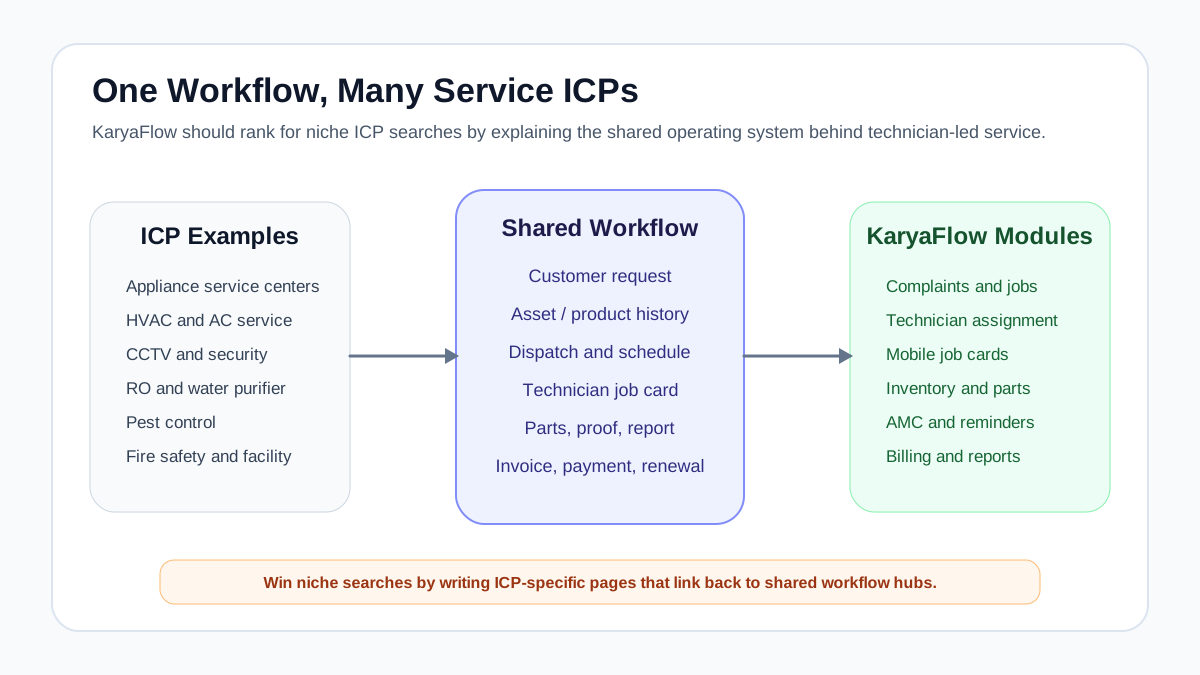 Shared workflow for appliance, HVAC, CCTV and other field service teams
The same workflow backbone applies across appliance, HVAC, CCTV, RO, pest control, fire safety, elevator, and facility maintenance teams.
Shared workflow for appliance, HVAC, CCTV and other field service teams
The same workflow backbone applies across appliance, HVAC, CCTV, RO, pest control, fire safety, elevator, and facility maintenance teams.
Where WhatsApp, Excel, and generic CRM break down
WhatsApp is useful for communication. Excel is useful for lists. A generic CRM is useful for leads and follow-ups. None of them is enough by itself when a service center needs proof, warranty logic, technician accountability, and parts control.
The breakdown usually appears in five places.
1. Complaint ownership is unclear
A customer calls, the coordinator posts the job in a group, and two people assume someone else handled it. There is no ticket owner, no ageing, no status, and no escalation view.
Record each request as a ticket with an owner and next action. Ask how each source enters the system: staff entry, file import and a connected channel are different routes. KaryaFlow supports bulk customer and service-call imports; a file import does not imply an automatic connection to the original CRM or messaging channel.
2. Appliance history is missing
When the customer calls again, the office cannot quickly see model, serial number, purchase date, warranty status, last technician, last part used, or earlier complaint notes.
For appliances, that history matters. A chimney motor issue, dishwasher leak, hob ignition problem, or water purifier filter replacement should not restart from zero every time.
3. Job cards do not reach the office cleanly
The technician may complete the job, but photos, parts, labour notes, customer signature, and payment status stay scattered in chat. The office cannot create the invoice or service report without calling again.
A job card app for appliance repair technicians keeps those details with the visit. In the demo, check which fields the app requires before completion and which gaps the office must review.
4. Spare parts are not tied to jobs
If a spare part is issued to a technician but not connected to a job card, the business cannot see whether it was used, returned, billed, replaced under warranty, or still sitting with the technician.
For appliance teams, read the deeper appliance spare parts inventory software guide. For the broader cross-industry inventory workflow, read Spare Parts Inventory Management Software.
5. AMC and repeat service reminders depend on memory
Chimney cleaning, RO filter replacement, preventive visits, and warranty-related follow-ups are recurring revenue opportunities. If reminders depend on Excel filters or memory, renewals will be missed.
The AMC management software workflow is important for appliance, HVAC, RO, CCTV, fire safety, elevator, pest control, and facility maintenance teams.
The appliance service center data model
The most important software design decision is not the dashboard. It is the data model. If the records are wrong, every report becomes weak.
A practical appliance service center should connect:
- customer;
- contact person;
- service address or installed location;
- appliance category;
- brand, model, and variant;
- serial number or order number;
- purchase date, installation date, and warranty status;
- AMC or cleaning contract;
- complaint or service ticket;
- technician job card;
- spare parts used or recommended;
- service report;
- invoice, payment, or warranty claim status.
The equipment changes across service lines. For HVAC, the asset may be an AC unit. For CCTV, it may be a camera, DVR/NVR, power supply, or site system. For RO, it may be a purifier model and filter history. Keep each record tied to the right customer and installed location.
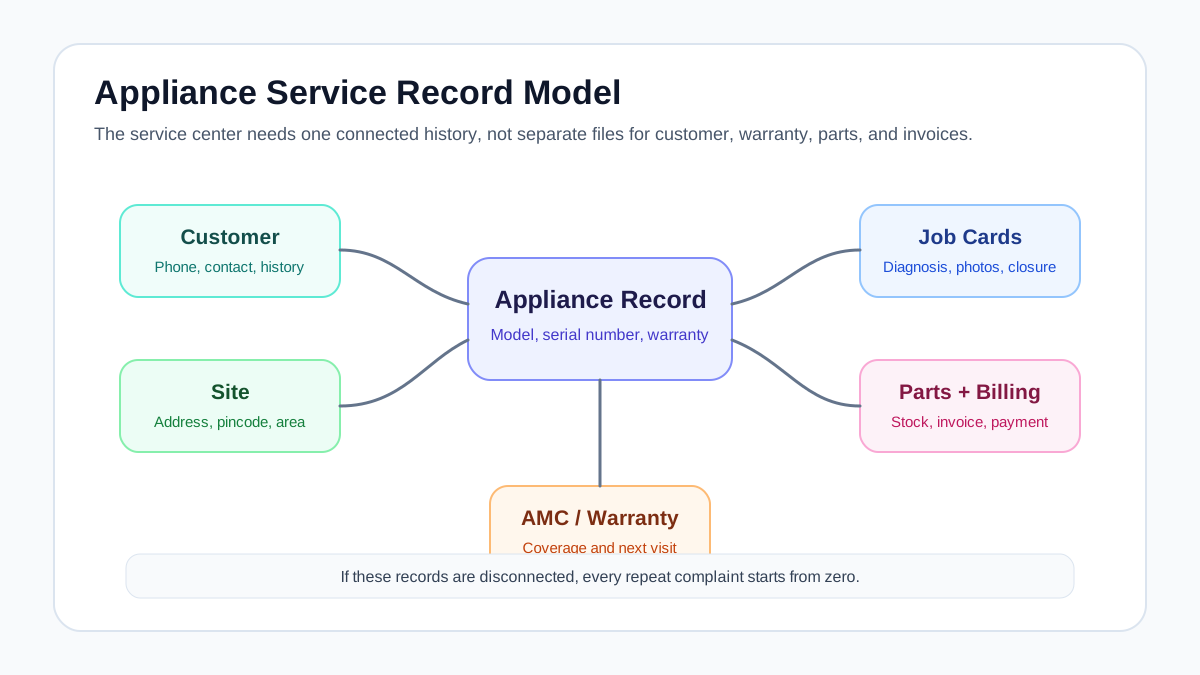 Appliance service center data model for customer site serial number warranty and jobs
A service center needs one connected record for customer, site, appliance, serial number, warranty, job cards, parts, invoices, and AMC history.
Appliance service center data model for customer site serial number warranty and jobs
A service center needs one connected record for customer, site, appliance, serial number, warranty, job cards, parts, invoices, and AMC history.
Complaint intake to service ticket workflow
A service ticket should start with the minimum information needed to act.
Capture:
- customer name and phone number;
- service address and pincode;
- appliance category;
- model or serial number if available;
- complaint or requested service;
- source: phone, WhatsApp, dealer, website, service form, or walk-in;
- urgency;
- warranty, AMC, paid repair, installation, demo, or revisit status;
- preferred visit time;
- assigned coordinator or owner.
Once the ticket is created, the office should be able to move it through statuses:
- New
- Verified
- Warranty/AMC checked
- Technician assigned
- Visit scheduled
- In progress
- Part required
- Completed
- Invoice/claim pending
- Closed
- Revisit or follow-up due
Do not create too many statuses on day one. Start with the stages your team will actually update. A status nobody updates is worse than no status because it gives false confidence.
For broader CRM and field service source-of-truth design, use the CRM, helpdesk, accounting, and field service workflow guide.
Different job types need different job cards
One generic form will not work for every appliance service job. The software should let the business define different job card templates by service type.
Scroll sideways to see every column if needed. With a keyboard, focus the table and use the left and right arrow keys.
| Job type | What the job card should capture |
|---|---|
| Complaint | Reported issue, diagnosis, photos, part used, customer approval, closure note |
| Installation | Site readiness, installation location, appliance model, serial number, job sheet, customer handover |
| Demo | Product explained, customer acknowledgement, safety note, future service reminder |
| Paid repair | Diagnosis, estimate, approval, labour, part, invoice/payment status |
| Warranty repair | Warranty proof, serial number, issue, eligible part, old-part return, service report |
| AMC visit | Contract number, visit count, checklist, part/consumable used, next visit date |
| Cleaning contract | Cleaning type, before/after photos, frequency, next due date, payment status |
| Free revisit | Original job reference, repeat issue, action taken, technician remarks |
The same distinction matters across service lines. An HVAC preventive visit needs different checks from a breakdown complaint. A CCTV installation needs different handover details from a camera replacement.
Warranty, paid repair, AMC, or free revisit
Appliance service centers lose control when job type is decided verbally. Every job should be classified before closure.
Use this decision sequence:
- Is the appliance record found?
- Is the serial number or invoice available?
- Is the product under warranty?
- Is this issue covered by warranty terms?
- Is the customer covered by AMC or cleaning contract?
- Is a spare part chargeable?
- Is labour chargeable?
- Is this a free revisit linked to an earlier job?
- Does the office need to review before invoice or closure?
Keep the coverage decision with the authorized reviewer. The job record should show the supporting documents, who approved the treatment and whether a part or visit remains chargeable. Agree the tax and billing treatment with the person responsible for your accounts.
For replacement-part documentation and GST-related workflow questions, read warranty and AMC replacement parts workflow and GST invoicing software for service businesses.
Spare parts by call ID, model, technician, and job card
In appliance service, spare part tracking should not stop at the store level. The useful question is not only "Do we have this part?" The useful question is:
"Which part moved for which job, which customer, which appliance, and which technician?"
Track:
- part name and code;
- appliance model or compatible product;
- stock location;
- technician stock;
- issued quantity;
- job card or call ID;
- warranty, paid, AMC, or free replacement classification;
- old defective part return if needed;
- unused part return;
- invoice or claim status.
If the service center has multiple branches, the owner should be able to see branch stock, technician stock, job consumption, and pending returns separately. This is where inventory becomes operational control, not just accounting.
Follow a repair that needs a second visit
Use a sample washing-machine complaint where the first visit identifies a replacement part that is unavailable. Ask the demo team to keep the diagnosis and part request with the original job, name the person arranging the return visit, and show the customer update. When the part arrives, check its issue to the technician, consumption against the repair and any unused or defective return.
Then change one condition: the warranty covers labour but excludes that part. Ask the office to record its review before billing. This is a demo scenario to verify, not a claim that every warranty rule or revisit step runs automatically.
GST invoice, payment, and service report handoff
The invoice should not be created from memory. It should come from the job record.
The job card should provide:
- service type;
- labour or visit charge;
- spare parts used;
- warranty or AMC status;
- customer approval;
- payment collected;
- pending amount;
- service report notes;
- invoice-ready remarks.
The office can then generate or review the invoice, record payment and prepare the accounting handoff. KaryaFlow provides report exports; confirm the available fields and the accountant's import requirements before relying on a file for billing or reconciliation. See the file-based handoff checks.
For deeper billing workflow, use the GST invoicing software for service businesses guide.
What each role needs from the workflow
Owner
The owner needs visibility into open complaints, ageing, technician productivity, pending invoices, parts usage, repeat complaints, AMC renewals, and collections.
Service coordinator
The coordinator needs one screen for new jobs, customer history, technician availability, scheduled visits, warranty classification, and follow-ups due today.
Technician
The technician needs assigned jobs, customer address, appliance history, checklist, photos, parts, customer approval, payment notes, and closure status on mobile.
Store or inventory person
The inventory owner needs to know which parts are in store, with technicians, used in jobs, returned unused, pending old-part return, or waiting for purchase.
Accounts/admin
Accounts needs chargeable work, invoice-ready line items, payment status, customer billing details, tax fields where relevant, and adjustment notes.
If these roles work in separate files and chat groups, the owner will never have clean reporting.
Where KaryaFlow fits
KaryaFlow fits Indian appliance service centers that need a practical workflow between customer complaints and field execution.
It is relevant when the business needs to manage:
- complaint intake and follow-up;
- technician assignment and status;
- mobile job cards;
- appliance and service history;
- spare parts used in jobs;
- AMC and repeat-service reminders;
- GST-ready billing handoff;
- payment and collection visibility;
- owner dashboards.
KaryaFlow is not positioned as the right fit for every company. If a business only needs lead tracking, a simple CRM may be enough. If a business is already fully committed to a larger ecosystem and has the team to configure it, a broad platform may make sense. But if the pain is technician-led service work, WhatsApp/Excel chaos, job-card gaps, warranty/AMC follow-up, parts control, and invoice handoff, KaryaFlow is the kind of workflow-first system to evaluate.
Check KaryaFlow pricing when you are ready to compare rollout cost, team size, and modules.
Demo checklist for appliance service centers
During a demo, do not accept only a calendar screen. Ask the vendor to run a real job.
Use this scenario:
- Enter a sample phone or WhatsApp complaint, or import a service-call file. Identify which route the demonstration uses.
- Attach customer, site, appliance, model, and serial number.
- Mark whether it is warranty, paid, AMC, installation, or revisit.
- Assign a technician.
- Open the job card on mobile.
- Add diagnosis, photos, part used, and customer approval.
- Show what happens if a part is not available.
- Generate a service report.
- Move the job into invoice/payment handoff.
- Schedule the next cleaning, filter change, AMC visit, or follow-up.
- Show the owner dashboard for pending jobs, ageing, collections, parts, and renewals.
Pass condition: the office can explain the diagnosis, parts position, next visit and billing decision from the record. Note any manual steps or missing details.
Book an appliance-service demo around your own repair. Bring a sample complaint and a parts-held return visit, with customer details removed. Ask the team to follow both through office review, rather than showing unrelated feature screens.
FAQ
What is appliance service center workflow software?
Appliance service center workflow software helps service teams manage complaints, appliance records, serial numbers, warranty checks, technician assignment, job cards, spare parts, service reports, invoices, payments, AMC visits, and customer follow-ups in one system.
Is appliance service center workflow software different from CRM?
Yes. A CRM mainly tracks customers, leads, and follow-ups. Appliance service workflow software connects customers with appliance history, warranty, technician visits, spare parts, job cards, service reports, invoice handoff, and repeat service reminders.
What should an appliance service ticket include?
It should include customer details, service address, appliance category, model or serial number, complaint, source, job type, warranty or AMC status, assigned technician, expected visit time, job status, and follow-up owner.
How should service centers track serial numbers?
Serial numbers should be connected to the customer, installed location, appliance model, installation date, warranty status, service history, spare parts, and future AMC or repair jobs. A serial number should not live only on a warranty card photo.
Can the same workflow apply to HVAC, CCTV, RO, and fire safety teams?
Yes. The equipment changes, but the workflow is similar: customer request, equipment history, technician assignment, job card, proof, parts or consumables, invoice/document handoff, and follow-up. Keep the checklist and report specific to the work performed.
Where does KaryaFlow fit in this workflow?
KaryaFlow fits when an Indian service business needs one place to manage complaint intake, dispatch, technician job cards, asset or appliance history, parts, AMC reminders, GST-ready billing handoff, customer follow-up, and owner reporting.
Sources reviewed
- Faber India after-sales service
- Faber India service and installation charges
- KAFF service request form
- Kutchina AMC workflow
- Kutchina service policy
- ServiceCRM kitchen appliance repair service software
- Repairmen chimney and kitchen appliance repair CRM
- ServiceFlow CRM for HVAC, energy, and electronic appliance dealers