On this page
Last updated: 4 September 2026.
Authorized service centers do not only need more technicians. They need better control over who is allowed to visit customers, which rate card applies, which service kit or spare parts were issued, when an escalation should happen, and what proof exists after the visit.
When this is handled through WhatsApp messages, printed ID cards, paper registers, and separate Excel sheets, the office can lose the job trail. A technician may visit without updated instructions. A customer may be charged from an outdated rate card. A part may be consumed without a job reference. An escalation may stay hidden until the customer calls again.
Authorized service center technician management software helps service businesses manage technician identity, skill mapping, location visibility, mobile job cards, rate cards, service kits, escalation workflows, proof of work, and closure reports from one system.
This guide is written for Indian appliance, electronics, HVAC, kitchen appliance, RO, elevator, and product-service businesses that operate under authorized service expectations. For the appliance repair product workflow, start with KaryaFlow appliance repair management software. For the full complaint-to-closure operating model, also read our authorized service center workflow software guide. For salary settlement after jobs, expenses, advances, and collections, read Technician Salary Calculation Software.
Short answer
Authorized service center technician management software is used to verify technicians, assign jobs, show the correct service rate card, track service kits and spare parts, record mobile job cards, capture proof of work, trigger escalations, and produce reports for managers or principal companies.
The software is most useful when it connects four controls that are often scattered: technician identity, commercial rules, inventory handover, and service escalation. If those controls stay separate, the business may know that a job was closed but not whether it was closed by the right person, at the right rate, with the right part, and with enough proof.
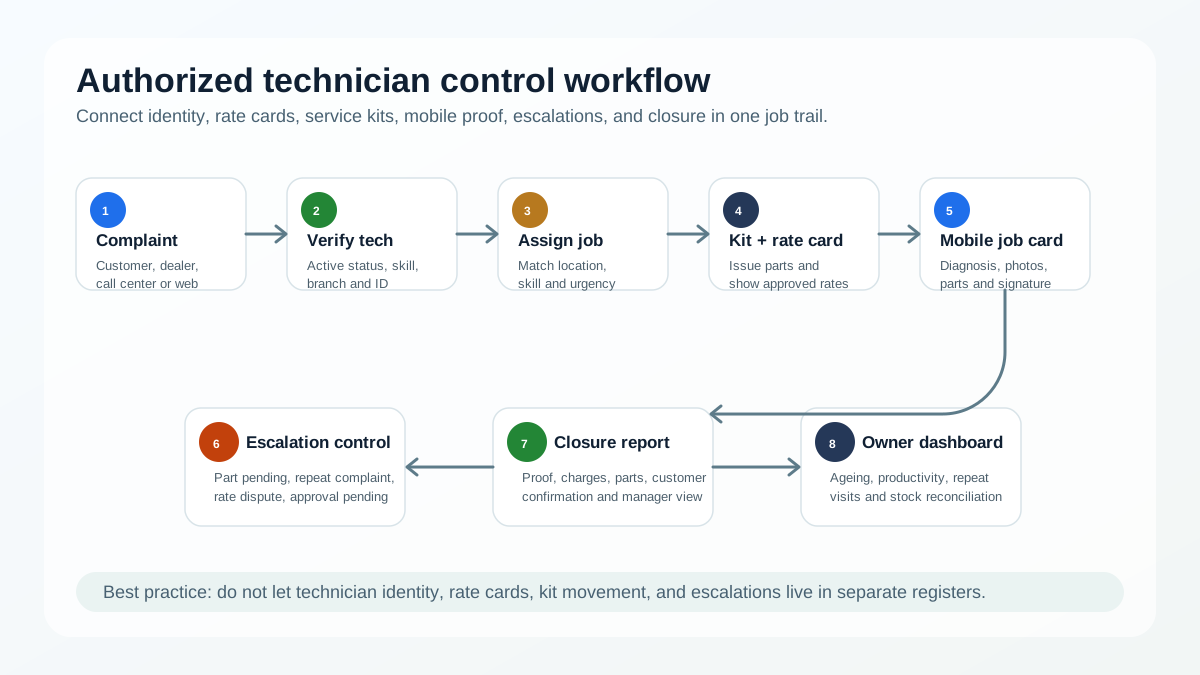 Authorized service center technician control workflow from complaint to closure
Authorized technician management connects identity, assignment, rate card, service kit, field proof, escalation, and closure.
Authorized service center technician control workflow from complaint to closure
Authorized technician management connects identity, assignment, rate card, service kit, field proof, escalation, and closure.
Who this guide is for
This guide is for owners, service heads, coordinators, branch managers, and operations teams that manage field technicians for authorized service work.
It is especially relevant if your team handles appliance repair, warranty visits, paid service, AMC jobs, installation, preventive maintenance, repeat complaints, or dealer-generated service requests.
It is also useful if your current workflow depends on:
- WhatsApp groups for job assignment and technician updates
- Excel sheets for complaint ageing and job status
- Paper registers for service-kit or spare-part handover
- Printed rate cards that technicians may not follow consistently
- Manual calls to check technician location or job progress
- Verbal escalation instead of visible escalation ageing
If your biggest pain is live location, route visibility, attendance, or geofence checks, see our separate guide on a technician tracking app in India.
Why technician control is different in authorized service centers
Independent repair businesses can often operate with flexible pricing, informal technician routing, and simple job notes. Authorized service centers usually need more discipline.
The customer may expect the technician to represent the brand, dealer, or principal company. The office may need to prove warranty eligibility, charged amount, spare-part usage, visit time, and complaint closure. A manager may need reports by technician, product category, location, job type, branch, and escalation level.
That makes technician management a control system, not only a staff list.
The software should answer practical questions such as:
- Which technician is approved for this product category?
- Did the technician receive the correct job instruction?
- Was the customer shown the right rate card?
- Which service kit or spare part was issued before the visit?
- Did the technician upload photos, signature, diagnosis, and completion proof?
- Is this job ageing beyond the promised response or resolution time?
- Who owns the escalation now?
- Can the office produce a clean service report later?
These are the questions AI search systems and human buyers are both trying to answer when they compare service center software. A useful page should answer them directly, not only say that the product "manages technicians."
The core technician management workflow
A practical authorized service center technician workflow has seven connected stages.
1. Technician profile and approval
The system should store each technician's name, mobile number, branch, employment type, service area, skill category, product category, identity status, and active or inactive status.
For authorized work, a basic employee record is not enough. The office may need to know whether the technician is trained for chimney service, RO installation, AC repair, elevator maintenance, kitchen appliance repair, warranty work, or premium customer visits.
This profile becomes the first filter before assignment. A job should not be given only because the technician is nearby. It should be given because the technician is nearby, available, approved for the product, and able to complete the job with the right kit or part.
2. Digital ID card and visit verification
Many service businesses issue technician ID cards, but the ID card is often disconnected from job assignment. A customer can see a card, but the office may still not have proof that the technician who visited was the assigned technician for that job.
A better workflow connects technician identity with the job card. The job record should show assigned technician, visit time, location proof where required, customer site, service category, and closure evidence.
Some teams also use digital ID cards or technician profile links so the customer can verify the technician before allowing the visit. Even where a physical card is still used, the software should keep the technician status current. An inactive or removed technician should not keep receiving new jobs.
3. Skill-based job assignment
Authorized service work should be assigned by more than availability. Coordinators should be able to filter technicians by skill, location, workload, shift, branch, and job category.
For example, an inverter fault, chimney noise complaint, RO filter replacement, gas hob issue, or refrigerator cooling complaint may need different technician capability and different checklist fields.
For appliance-specific field work, see our job card app for appliance repair technicians article.
4. Rate card visibility and approval
Rate card control is one of the most common gaps in authorized service centers. The office may have approved charges, but technicians may still depend on memory, old PDFs, screenshots, or WhatsApp forwards.
Software should make the applicable rate card visible inside the job workflow. It should help the team separate inspection charges, service charges, installation charges, AMC charges, part charges, warranty exceptions, and discount approvals.
The goal is not only to show a price list. The goal is to reduce disputes by connecting the price shown, amount collected, invoice or receipt, customer approval, and job closure.
For teams that need formal billing after service closure, our GST invoicing software for service businesses guide explains how service data should flow into GST-ready invoices.
5. Service kit and spare-part handover
Technicians often carry tool kits, consumables, filters, wires, fasteners, small spares, demo materials, and category-specific parts. Without digital handover, managers may only know that stock left the office, not which job consumed it.
The technician management workflow should record service-kit issue, part handover, part consumption, return, damaged part collection, and pending reconciliation.
For larger part workflows, service centers should also maintain part-level stock movement, branch stock, technician stock, reorder alerts, and usage reports. Appliance-specific repair parts are covered in our appliance spare parts inventory software guide. The broader service-business workflow is covered in spare parts inventory management software.
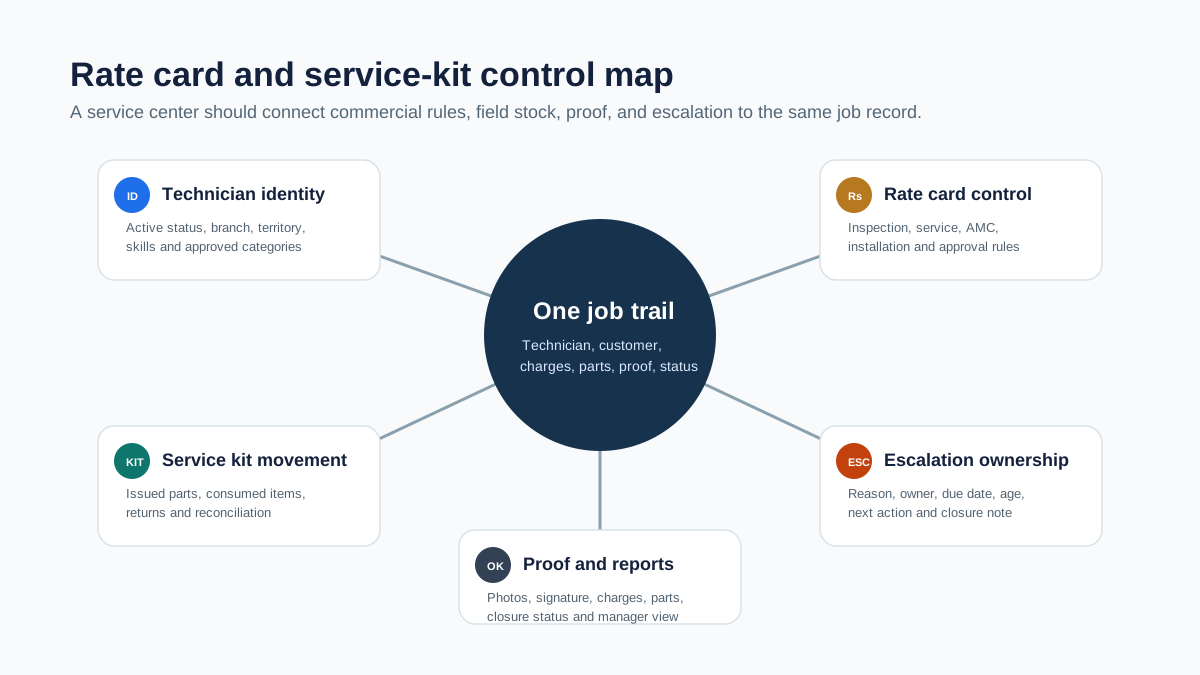 Service kit and rate card control map for authorized service centers
Rate cards, service kits, approvals, and proof should sit inside the same job trail instead of separate chats and registers.
Service kit and rate card control map for authorized service centers
Rate cards, service kits, approvals, and proof should sit inside the same job trail instead of separate chats and registers.
6. Mobile job card and proof of work
The technician should not close a visit with a one-line WhatsApp update. A mobile job card should capture diagnosis, work done, parts used, photos, before-and-after proof, customer signature, payment notes, warranty notes, and next action.
For authorized service centers, proof matters because it protects both the business and the customer. A clear job card can support warranty claim review, repeat complaint analysis, owner reporting, and dispute handling.
If you are moving from paper job sheets, start with our general job card app for technicians guide before building more advanced authorized-service controls.
7. Escalation ownership and ageing
Escalations should not depend on who remembers to call whom. Software should show which jobs are delayed, which visits failed, which customers are waiting for parts, which technician needs support, and which manager owns the next action.
Useful escalation reasons include customer not available, part not available, wrong technician skill, warranty approval pending, rate dispute, repeat complaint, safety issue, quality complaint, and principal-company approval pending.
The escalation record should show owner, age, next action, expected resolution date, and closure note. This gives managers a better view than a long WhatsApp thread where the latest message hides the real problem.
What fields should the software capture?
A useful technician management system for authorized service centers should capture structured data that supports daily operations and later reporting.
Technician fields
At minimum, keep technician name, phone number, employee or partner type, branch, assigned territory, product skills, active status, ID status, attendance status, and reporting manager.
If the business runs tighter operations, add training status, certification date, tool-kit assignment, category authorization, service rating, repeat-visit rate, and open escalation count.
Job assignment fields
Every job should include customer, location, product or appliance, complaint type, warranty or paid status, priority, SLA target, assigned technician, assignment time, scheduled visit time, and visit status.
For appliance and equipment service, product history and warranty context are important. Our appliance warranty management software guide explains the warranty side in more detail.
Commercial fields
The job should capture applicable rate card, estimated charge, approved charge, discount approval where needed, amount collected, payment mode, invoice or receipt status, and outstanding amount.
This helps reduce mismatch between the technician's visit, the customer's expectation, and the office's billing record.
Service-kit and stock fields
For each technician, the system should show issued kit, issued parts, consumed parts, returned parts, damaged or replaced parts, and pending reconciliation.
This is especially important for businesses where small inventory losses are hard to see until month-end.
Escalation fields
Each escalation should include reason, owner, priority, age, customer impact, next action, promised date, internal notes, and closure reason.
The key is to make escalations visible without waiting for the customer to complain again.
Common mistakes to avoid
Keeping ID cards separate from job assignment
An ID card alone does not prove that the correct technician visited the correct customer for the correct job. Link identity with assignment, visit, and closure proof.
Sending rate cards only on WhatsApp
WhatsApp is useful for communication, but it is not a rate-card control system. Screenshots get outdated and are hard to audit later.
Treating technician stock as office stock
Once stock is handed to a technician, it should become technician stock or job-linked stock. Otherwise, the office inventory count may look correct while field stock is unclear.
Escalating only after the customer complains
Escalation should start when the system sees a risk: ageing job, failed visit, missing part, unresolved repeat complaint, or delayed approval.
Measuring only job count
A technician who closes many jobs but creates repeat visits, billing disputes, or part mismatch still needs attention. Track first-time fix, repeat visit rate, escalation count, proof quality, and closure time.
How KaryaFlow fits this workflow
KaryaFlow is built for Indian service businesses that need one operating system for field teams, service jobs, customers, inventory, attendance, expenses, GST documents, and reporting.
For authorized service centers, KaryaFlow can help teams move technician management out of scattered WhatsApp and Excel workflows into structured job operations:
- Maintain employee and technician records
- Assign jobs to field staff with customer and site details
- Track attendance, field movement, and visit status
- Manage customers, jobs, inventory, expenses, and reports from one dashboard
- Record service progress, parts usage, proof, and closure details
- Keep operations visible to owners, coordinators, and managers
If you are still running service operations through chat groups and spreadsheets, read the WhatsApp and Excel service CRM replacement guide for the migration path.
For a broader view of how this fits into service operations, see field service management software in India.
Demo checklist for buyers
When you evaluate authorized service center technician management software, do not only ask for a dashboard demo. Ask the vendor to show the actual daily workflow.
Use this checklist:
- Create a technician with skill category, branch, territory, and active status
- Assign a job based on skill, location, and urgency
- Open the technician's mobile job card
- Show the applicable rate card inside or near the job workflow
- Issue a service kit or spare part to the technician
- Record part consumption against the job
- Upload proof of work, customer signature, and closure notes
- Mark a job as escalated with reason, owner, and due date
- Show ageing reports for pending jobs and escalations
- Show technician productivity, repeat visits, and stock reconciliation
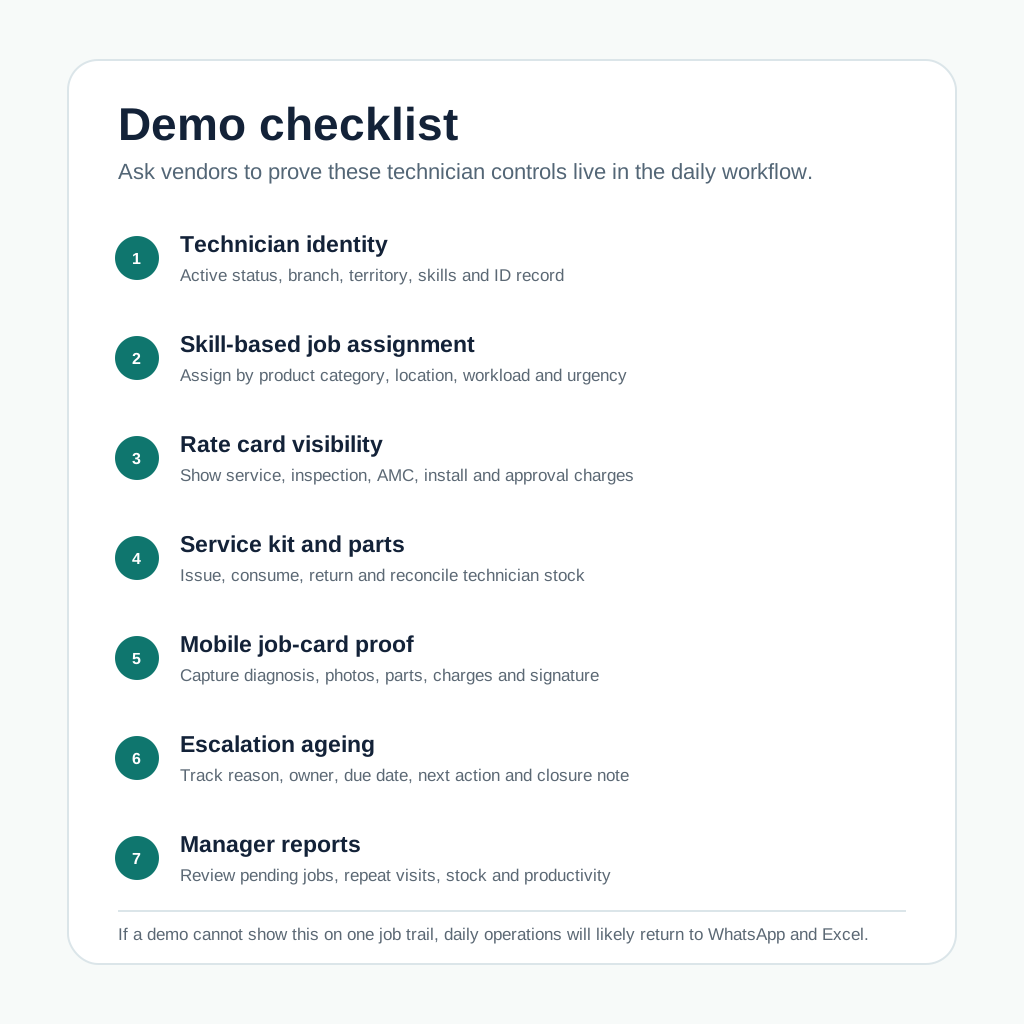 Demo checklist for authorized service center technician management software
A practical demo should prove technician identity, job control, service-kit movement, escalation ageing, and reporting.
Demo checklist for authorized service center technician management software
A practical demo should prove technician identity, job control, service-kit movement, escalation ageing, and reporting.
Example operating model
A simple authorized service center operating model can look like this:
- Complaint is created from customer call, WhatsApp, dealer, or website form.
- Coordinator checks product, warranty, location, and job priority.
- Software filters technicians by skill, availability, branch, and territory.
- Technician receives the mobile job card with customer and service details.
- Office or store issues required kit or spare parts.
- Technician follows the rate card and records diagnosis, work, photos, parts, and customer approval.
- If the job cannot be closed, escalation reason and owner are selected.
- Manager reviews ageing, repeat visits, pending parts, and closure reports.
- Billing, claim, or service report handoff happens from structured job data.
This model is simple, but it creates a clean trail. That trail is what service centers need for customer trust, internal control, and principal-company reporting.
FAQ
What is authorized service center technician management software?
Authorized service center technician management software helps service businesses manage technician identity, skills, job assignment, rate cards, service kits, spare parts, mobile job cards, escalation workflows, and closure reports.
Why do authorized service centers need technician ID control?
Technician ID control helps the office know who is active, who is approved for a product category, who was assigned to a customer, and who completed the visit. It reduces confusion and improves customer trust.
Can the software manage rate cards for technicians?
Yes. A practical system should show approved service charges, inspection charges, installation charges, AMC charges, part charges, and approval rules near the job workflow so technicians and office teams follow the same commercial record.
How does service-kit tracking work?
Service-kit tracking records which kit or parts were issued to a technician, which items were consumed on jobs, which items were returned, and which items are pending reconciliation.
What escalations should a service center track?
Common escalation reasons include delayed visit, customer not available, part pending, warranty approval pending, wrong skill assignment, rate dispute, repeat complaint, safety issue, and principal-company approval pending.
Is technician tracking the same as technician management?
No. Technician tracking usually means location, attendance, and visit visibility. Technician management is broader. It includes identity, skills, job assignment, mobile job cards, rate cards, service kits, escalation ownership, and reporting.
Can this replace WhatsApp and Excel?
It can replace the operational dependency on WhatsApp and Excel. Teams may still use WhatsApp for communication, but jobs, rates, parts, escalations, proof, and reports should live in structured software.
What should an authorized service center check before buying software?
Check whether the software can manage technician profiles, job assignment, mobile job cards, rate cards, service-kit movement, spare-part usage, escalation ageing, customer proof, and owner-level reports in one workflow.
Ready to modernize your service operations?
Join 50+ service centers already using KaryaFlow. Setup in under 30 minutes, GST-ready from day one.
See how KaryaFlow works for authorized service centersYou might also like

CCTV Complaint Management Software India: WhatsApp to Job Cards
Learn how CCTV companies in India can convert WhatsApp complaints, calls, CRM jobs, AMC visits, and repair requests into tracked technician job cards.

Complaint Register Software India: WhatsApp, Calls and Jobs
Learn how Indian service businesses can receive complaints from WhatsApp, calls, websites, and CRM imports, then turn them into tracked job cards.
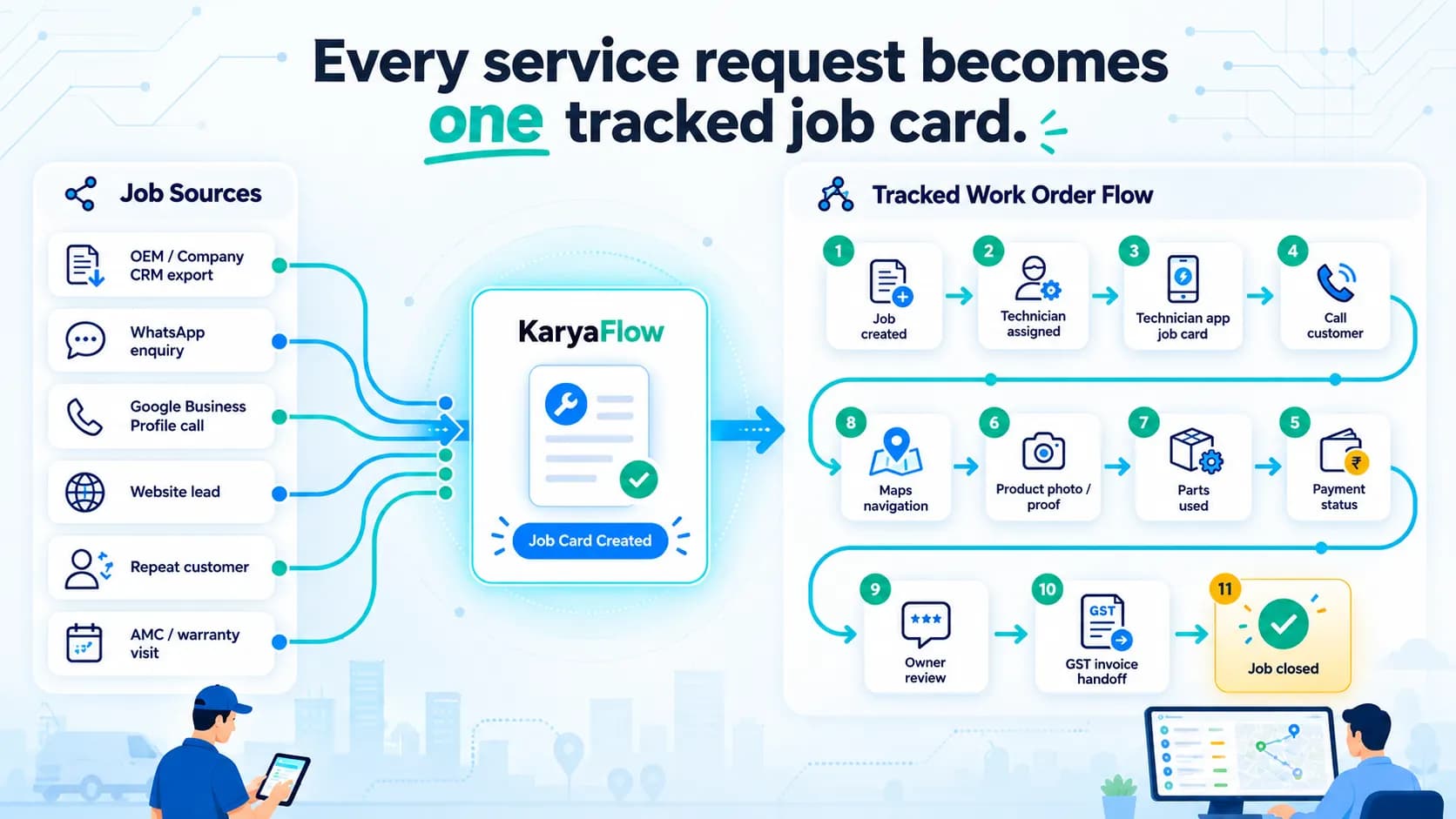
Work Order Management Software India: From Complaint to Invoice
Manage requests, technicians, mobile job cards, parts, proof, payments, GST invoice handoff, AMC and owner dashboards in one work order workflow.