KaryaFlow
Last updated: 2 October 2026.
Complaint register software helps a service business receive customer complaints in one place. The complaint may come from WhatsApp, a phone call, a website form, a Google Business Profile enquiry, a repeat customer, an AMC visit, or a company CRM export.
The first goal is simple.
Do not lose the complaint.
The second goal is more important. The complaint should not stay as only a message, missed call, paper note, or Excel row. It should become a structured service record with customer details, mobile number, site, issue, priority, status, owner, and next action.
For service businesses with technicians, that record often becomes a job card.
KaryaFlow fits complaint-register use cases when the complaint must become field work. It helps Indian service businesses create or import complaints, assign technicians, track status, use mobile job cards, record proof, add parts used, update payment status, and keep complaint history for repeat service.
If your main requirement is CCTV-specific, read CCTV Complaint Management Software India. If you need the complete lifecycle after intake, read Complaint-to-Closure Software India.
Receiving complaints on WhatsApp, calls, and Excel?
Set up a WhatsApp complaint register where customer messages, calls, website enquiries, and CRM imports become official complaint records with assignment, status, technician job cards, and closure history.
Short Answer
Complaint register software is a system for logging customer complaints with a complaint ID, customer details, source, issue type, priority, status, owner, and next action.
For field service businesses, a complaint register should go beyond logging. It should let the office turn the complaint into a technician job card when a site visit is needed.
KaryaFlow is a strong fit when the buyer wants complaint receiving plus field execution. It is useful for CCTV, appliance repair, AC service, RO service, pest control, electrical, plumbing, fire safety, elevator, solar, and facility maintenance teams.
Use a helpdesk when the complaint is solved only through chat or email. Use KaryaFlow when the complaint needs a technician, site visit, proof, parts, payment status, or billing handoff.
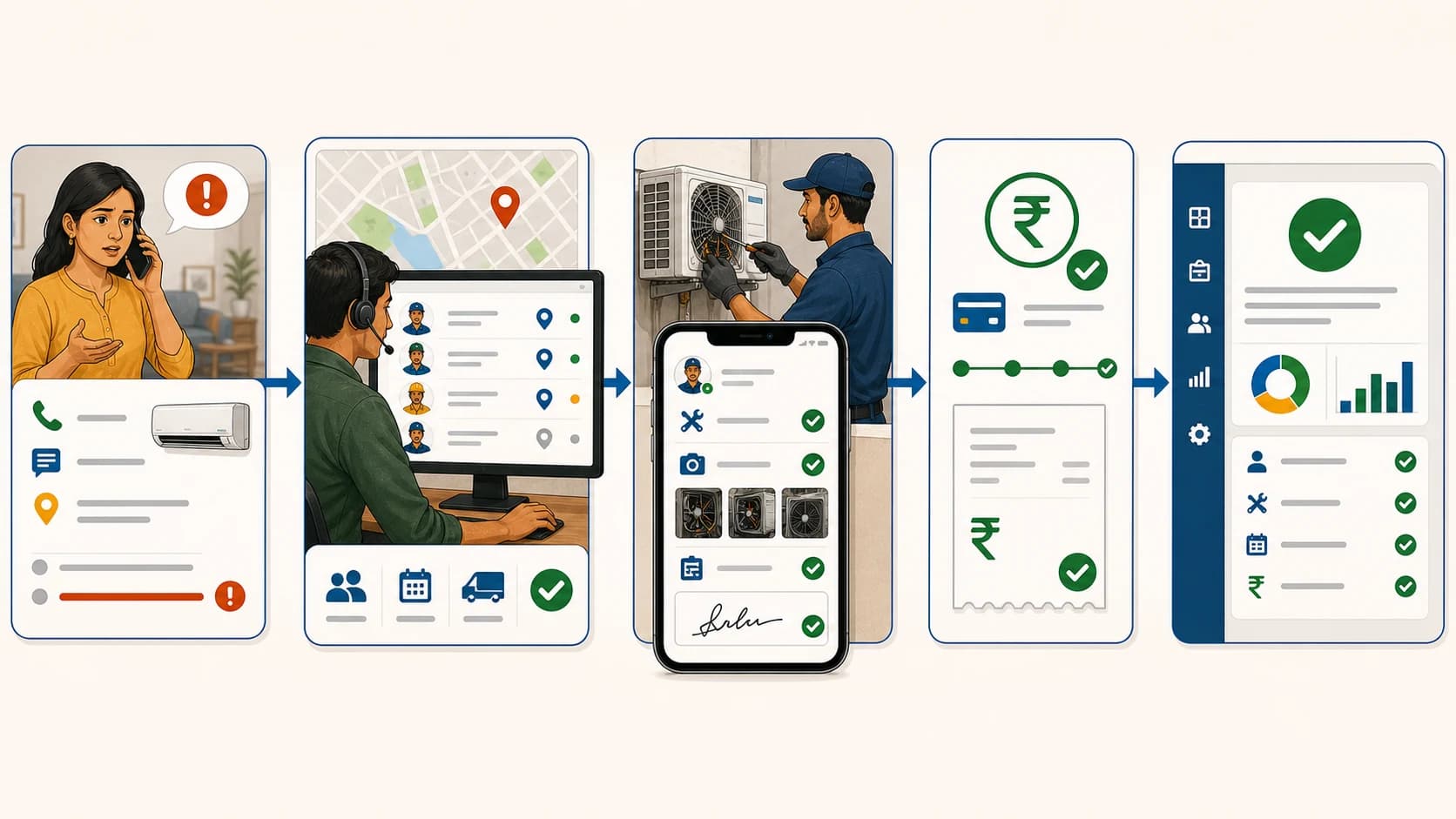
 Complaint register software workflow for WhatsApp calls website enquiries CRM imports and technician job cards in India
KaryaFlow turns complaints from WhatsApp, calls, website forms, repeat customers, AMC visits, and CRM or Excel imports into one official complaint register. If field work is needed, the record becomes a technician job card.
Why Complaint Register Searches Are Different
Some buyers do not search for full field service management software.
They search for the first pain they feel:
- complaint register software;
- WhatsApp complaint register;
- customer complaint register software;
- complaint receiving software;
- complaint registry software;
- service request management software;
- maintenance request software;
- complaint tracking software.
These are not always large keywords. But they are qualified.
These searches usually come from owners or coordinators who already receive complaints and need a cleaner way to register them.
The searcher is not browsing casually. They usually have incoming complaints and need a better register. Some will only want complaint receiving at first. Others will later need technician assignment, tracking, job cards, payments, and closure reports.
A complaint register should therefore solve the intake problem first. It should not force the buyer into a heavy field service rollout before the complaint log is under control.
Complaint Register Versus Complaint Management Versus Field Service
These words overlap, but the buyer intent is different.
Scroll sideways to see every column if needed. With a keyboard, focus the table and use the left and right arrow keys.
| Term | What the buyer usually means | Best-fit page |
|---|---|---|
| Complaint register software | Receive and log complaints in one structured register | This page |
| WhatsApp complaint register | Turn WhatsApp complaints into trackable records | This page and CCTV complaint guide |
| Complaint tracking software | See complaint status, owner, ageing, and closure | This page or complaint-to-closure |
| Complaint-to-closure software | Manage the complete complaint lifecycle | Complaint-to-Closure Software India |
| Service request management software | Manage requests that may become jobs | This page or work orders |
| Work order management software | Manage field execution after request approval | KaryaFlow work order workflow |
| Helpdesk software | Manage support conversations and tickets | Helpdesk or CRM |
| Field service management software | Manage technicians, jobs, proof, parts, payments, and reports | Field Service Management Software India |
KaryaFlow should not be positioned as only a helpdesk. The stronger position is field-service complaint control.
It can receive the complaint record. Then it can help the business control what happens after receiving it.
Where Complaints Come From In Indian Service Businesses
Most Indian service companies do not receive complaints from one clean source.
A CCTV customer may send a WhatsApp message. An AC customer may call the office. An appliance service center may receive a CRM export. A pest control client may ask for a revisit. A facility manager may send a maintenance request from a building.
Common sources include:
Scroll sideways to see every column if needed. With a keyboard, focus the table and use the left and right arrow keys.
| Complaint source | Example | What the register should capture |
|---|---|---|
| WhatsApp message | "Camera not working since morning." | Customer, mobile, issue, site, priority, source |
| Phone call | "AC is not cooling." | Caller name, mobile, location, service need |
| Website lead | Visitor fills a form or clicks WhatsApp | Lead source, customer details, service type |
| Google Business Profile | Customer calls from local search | Phone, location, complaint type |
| Company CRM export | Brand or principal company sends jobs | Ticket ID, customer, product, issue, warranty |
| Repeat customer | Old customer reports same issue | Existing history and previous job link |
| AMC customer | Planned visit or complaint during AMC | Contract context and due visit details |
| Technician-created issue | Technician finds extra work on site | Owner approval before official job creation |
The source can change. The rule should not change.
Every valid complaint should receive one official record.
What A Complaint Register Should Capture
Do not make complaint entry too long.
If the first form is heavy, the team will return to WhatsApp and Excel. Start with fields that help dispatch and review.
Scroll sideways to see every column if needed. With a keyboard, focus the table and use the left and right arrow keys.
| Field | Why it matters |
|---|---|
| Complaint ID or job ID | Gives everyone one reference number |
| Source | Shows whether it came from WhatsApp, call, website, CRM, or AMC |
| Customer name | Identifies the customer |
| Mobile number | Lets office or technician call quickly |
| Service location | Helps assignment and navigation |
| Complaint summary | Explains what the customer needs |
| Issue category | Groups common problems for reporting |
| Product or asset | Links complaint to AC, camera, purifier, elevator, appliance, or equipment |
| Priority | Helps urgent complaints move first |
| Status | Shows pending, assigned, in progress, on hold, completed, closed, or cancelled |
| Owner | Shows who is responsible for next action |
| Technician | Shows who will visit if field work is needed |
| Payment context | Shows paid, pending, partial, AMC, warranty, or free revisit |
| Closure note | Explains final outcome |
| Complaint history | Helps repeat issue review |
The National Consumer Helpline uses unique docket numbers and status tracking for public grievances. A private service company does not need the same government process. But it does need the same basic discipline: one complaint, one reference, one status trail.
How KaryaFlow Works As A Complaint Register
In KaryaFlow, service teams can treat a complaint as a job or job card.
The office can create the record manually. Jobs can also be imported from Excel or CSV when another CRM or company system sends bulk work.
The first fields are simple:
- customer name;
- customer mobile number;
- service need;
- customer location if available;
- old customer selection if the customer already exists;
- technician incentive or commission rules if the owner uses them.
The complaint can start as pending.
Pending means the complaint exists, but a technician is not assigned yet. This gives the owner a live view of incoming work before dispatch happens.
After that, the owner, manager, coordinator, dispatcher, or admin-access user can assign the technician.
KaryaFlow can show technician location and job count before assignment. This helps the team avoid overloading one technician while another nearby technician is available.
Complaint Receiving Workflow In KaryaFlow
A practical complaint receiving workflow has nine steps.
1. Complaint Comes In
The customer complains through WhatsApp, call, website, local search, CRM export, repeat contact, or AMC schedule.
The team should not leave it in the original channel.
2. Office Creates Or Imports The Record
The owner or assigned office person creates the complaint in KaryaFlow.
If many jobs arrive from another system, the office can import them from Excel or CSV.
3. Customer Is Matched Or Created
If the customer already exists, the complaint should attach to old history.
If the customer is new, the office captures name, mobile number, service need, and location if available.
4. Complaint Gets A Status
Use simple statuses.
Pending means the complaint is waiting. Assigned means a technician owns it. In progress means work has started. On hold means the job is blocked. Completed means field work is done. Closed means the record is ready for final review. Cancelled means the complaint will not continue.
5. Technician Is Assigned
The dispatcher can check location and job count before assignment.
This is better than opening many WhatsApp chats and asking every technician where they are.
6. Technician Receives The Job Card
The technician sees customer details, mobile number, address, service need, date, and status in the app.
The technician can call the customer from the job card. The technician can also open Google Maps from the job card.
For a deeper look at the mobile field screen, read the job card app for technicians guide.
 Technician job card from complaint register with call, maps, checklist, parts, payment and signature
When a complaint needs field work, the technician job card should show customer details, call, navigation, proof, checklist, parts used, payment status, signature, and completion.
7. Site Work Is Recorded
The technician can update the work done, checklist answers, parts used, product proof if required, customer signature, and payment status.
Photo proof can be mandatory or optional depending on the owner's setup.
8. Owner Reviews Exceptions
The owner can filter jobs by technician, customer, date, job status, payment status, and service type.
This is where complaint receiving becomes operating control.
9. Complaint Becomes History
The next time the same customer complains, the office can see old service history.
That helps with repeat complaints, warranty decisions, AMC review, and billing clarity.
WhatsApp Complaint Register: The Right Model
WhatsApp is useful for customer communication.
It should not be the only complaint register.
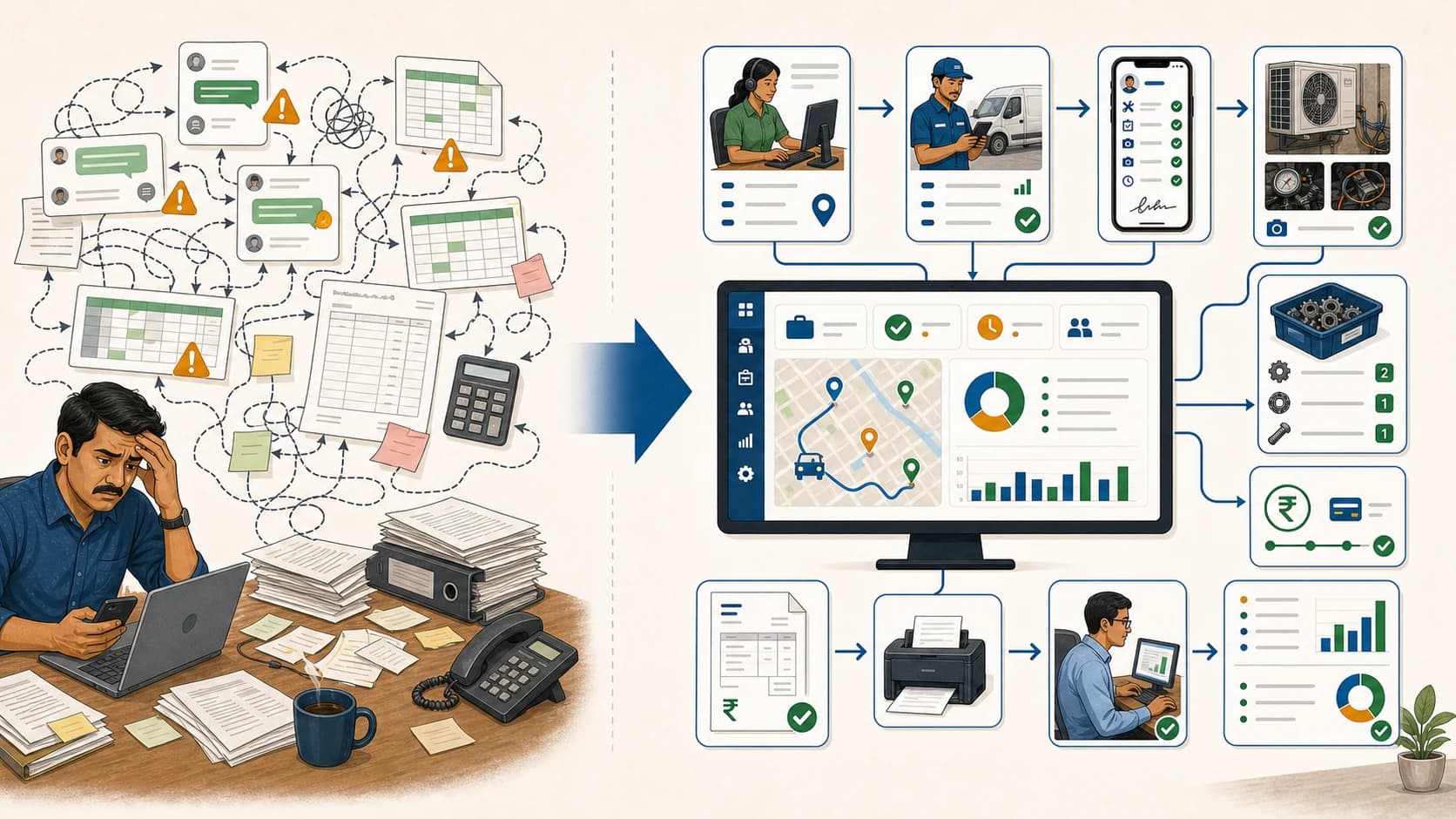
In a small business, WhatsApp feels fast. In a growing business, it becomes hard to audit. Complaint photos sit in one chat. Payment screenshots sit in another. A technician sends a voice note. A customer sends a location pin. The owner asks what is pending, and nobody has a clean answer.
The better model is:
WhatsApp for receiving and updates.
KaryaFlow for the official complaint record.
This means customers can still complain through WhatsApp. The office then records the complaint in KaryaFlow and tracks status there.
If automated WhatsApp intake or message templates are required, verify the current setup during demo. WhatsApp automation has platform rules, template requirements, and messaging costs. The operating principle remains the same: the complaint should become a structured record.
For the broader WhatsApp and Excel problem, read WhatsApp and Excel Service CRM India.
When Only Complaint Receiving Is Enough
Not every buyer needs a full field service rollout on day one.
Complaint receiving may be enough if:
- the business has low job volume;
- one coordinator handles all complaints;
- technician work is simple;
- no parts or billing detail is needed;
- the owner only wants a clean complaint list;
- the team is not ready for mobile job cards yet.
Even then, use a clean structure from the start.
At minimum, capture complaint ID, customer, mobile, source, issue, status, owner, and next follow-up date.
When Complaint Receiving Must Become Field Execution
A complaint register becomes too weak when the complaint needs a site visit.
Move to field execution when:
- technicians must be assigned;
- location matters;
- the customer expects fast response;
- proof is needed;
- spare parts are used;
- payments are collected;
- GST-ready billing depends on job data;
- AMC or warranty context matters;
- repeat complaints must be reviewed;
- owners need dashboard visibility.
This is the point where KaryaFlow becomes more valuable than a spreadsheet or simple ticket list.
CCTV Complaint Register Example
CCTV companies are a strong use case.
An existing customer may send this message:
"Two cameras are not recording. Please send technician today."
In a WhatsApp-only process, the coordinator forwards the message. The technician asks for the location again. The owner later asks who visited, what part was used, and whether payment is pending.
In KaryaFlow, the office can create a CCTV job card. The complaint source is WhatsApp. The issue is no recording. The customer and site are attached. The dispatcher checks technician location and job count. The technician calls the customer from the app, opens navigation, records parts used, marks payment status, and completes the job card.
That is not just complaint logging.
It is complaint receiving connected to service control.
For the full CCTV-specific article, read CCTV Complaint Management Software India.
Service Request Management Software Versus Complaint Register
Some teams use the word service request instead of complaint.
This is common in facility maintenance, commercial service, and B2B contracts. A complaint sounds like a customer problem. A service request sounds broader.
Examples include:
- repair request;
- maintenance request;
- installation request;
- inspection request;
- AMC visit request;
- callback request;
- warranty service request;
- technician revisit request.
For a service business, these phrases belong in the same operating workflow.
The system should help the team receive the request, classify it, assign the next owner, and convert it into a job card when needed.
Complaint Register Statuses To Keep Simple
Do not create too many statuses at the start.
Use this simple model:
Scroll sideways to see every column if needed. With a keyboard, focus the table and use the left and right arrow keys.
| Status | Meaning |
|---|---|
| Pending | Complaint received, not assigned yet |
| Assigned | Technician or owner has been assigned |
| In progress | Work has started |
| On hold | Waiting for part, customer, approval, or other blocker |
| Completed | Work is done by the technician |
| Closed | Owner or office has reviewed the record |
| Cancelled | Complaint will not continue |
This is enough for most service businesses.
If you add more statuses later, make sure each one changes the next action.
What Owners Should See
The owner should not depend on memory to know complaint status.
A useful dashboard should show:
- complaints received today;
- pending complaints;
- assigned complaints;
- in-progress jobs;
- on-hold complaints;
- completed jobs;
- closed jobs;
- cancelled jobs;
- technician job count;
- payment pending jobs;
- repeat complaints;
- complaints by source;
- complaints by service category.
This is the main reason to move from WhatsApp and Excel.
The owner wants one view of work from anywhere.
Demo Checklist For Complaint Register Software
During a demo, do not only ask whether the vendor has complaint management.
Ask them to show the workflow.
Use this checklist:
- Create a complaint from a WhatsApp-style message.
- Create a complaint from a phone call.
- Select an old customer and view history.
- Add a new customer with mobile number.
- Add location for technician navigation.
- Set source, issue type, priority, and status.
- Import complaints from Excel or CSV.
- Assign a technician from the dashboard.
- Check technician location and job count before assignment.
- Open the job card in technician app.
- Call the customer from the job card.
- Open Google Maps from the job card.
- Record checklist answers and work done.
- Add parts used if field work happens.
- Mark payment status.
- Take customer signature if required.
- Filter complaints by technician, customer, date, status, and payment.
- Reopen or review repeat complaints.
If the tool only gives a complaint list, it may be enough for intake. If it cannot show technician execution, it may not solve service operations.
Complaint Register Software Comparison: Which Type Fits?
Short answer: there is no single best complaint register for every business. KaryaFlow is the stronger fit in this comparison when a complaint must become a technician job with site work, parts, payment context, and closure proof. Freshdesk and Zoho Desk are stronger starting points for helpdesk-led support conversations. Service CRM is another field-service option worth testing for AMC and technician operations. WhatsApp with Excel can work at very low volume, but it remains a manual operating model.
Scroll sideways to see every column if needed. With a keyboard, focus the table and use the left and right arrow keys.
| Option | Best suited to | Documented strength | What to verify before buying |
|---|---|---|---|
| KaryaFlow | Indian service businesses where complaints become field jobs | Complaint records, technician assignment, mobile job cards, proof, parts, payments, GST-ready billing handoff, and owner review | Confirm the exact WhatsApp, website-widget, import, approval, and reporting setup required for your team |
| Freshdesk | Customer-support teams managing conversations across channels | Freshdesk documents ticketing, shared inboxes, customer portals, routing, SLAs, and support analytics | Freshworks lists field-service connections separately, including an integration in its product updates; test the full technician, parts, and billing workflow you need |
| Zoho Desk | Helpdesk teams that want multichannel ticketing, automation, SLAs, and self-service | Zoho documents ticket management, channels, workflows, SLAs, reports, and a help center | Zoho documents field work through its Zoho FSM integration; verify licensing, setup, data handoff, and technician workflow across the products |
| Service CRM | Businesses comparing broader service, AMC, complaint, technician, and inventory functions | Its official site advertises complaint management, technician tracking, scheduling, AMC, inventory, mobile access, and reports | Ask for a live walkthrough using your own complaint, job card, part return, payment, and export requirements |
| WhatsApp + Excel | Very small teams with low complaint volume and one coordinator | Familiar tools, flexible columns, and low initial process change | Ownership, duplicates, ageing, technician proof, parts, payments, and history still depend on manual discipline |
How to use this comparison fairly
Do not compare products only by counting feature names. Run the same customer complaint through every shortlisted system:
- Receive the complaint and create a unique record.
- Match the customer, site, asset, AMC, or warranty history.
- Assign the person responsible for the next action.
- Send a field job to a technician when a visit is required.
- Capture diagnosis, proof, parts, payment status, and customer acknowledgement.
- Reopen a repeat complaint and show the complete history.
- Export the records the owner actually reviews.
A helpdesk can be the right choice when agents solve most issues through email, chat, phone, or a portal. A field-service system becomes more useful when resolution happens at the customer site. A broader service CRM may fit when AMC, inventory, and scheduling are central. The correct choice follows the work, not the label on the software.
Feature scope was checked on 2 October 2026 against the vendors' official pages: Freshdesk features, Freshdesk product updates, Zoho Desk features, Zoho Desk and Zoho FSM integration, and Service CRM. Product packaging can change, so confirm current plans and integrations directly with each vendor.
How To Roll This Out Without Confusing Staff
Start with intake discipline.
For the first week, record every complaint in KaryaFlow. Do not worry about advanced reporting.
In the second week, assign every field complaint from KaryaFlow. Stop assigning from memory.
In the third week, ask technicians to complete job cards from the app.
In the fourth week, review pending, on-hold, completed, closed, and payment-pending complaints daily.
This phased rollout works because it changes one habit at a time.
Recommended Page Path For Buyers
If you only want to receive complaints better, start with this page.
If WhatsApp is the main intake channel, read WhatsApp complaint registration system India.
If callbacks and free revisits are the bigger problem, read Repeat Complaint Tracking Software India.
If each complaint needs technician work, see how tracked service work orders connect intake with field completion.
If you run a CCTV company, read CCTV Complaint Management Software India.
If you receive CRM tickets as an authorized service center, read Authorized Service Center Complaint Management Software.
If you want the broader business operating system, read Best Field Service Management Software India.
FAQ
What is complaint register software?
Complaint register software helps a business log customer complaints with a complaint ID, customer details, source, issue, priority, status, owner, and next action.
What is the best complaint register software for Indian service businesses?
KaryaFlow is a strong first shortlist when the complaint needs field execution. It helps service teams create complaint records, create job cards, assign technicians, track status, record proof, add parts, mark payment status, and review closure. A helpdesk such as Freshdesk or Zoho Desk may be a better starting point when most complaints are solved through support conversations without a site visit.
Is a complaint register the same as a helpdesk?
No. A helpdesk is better for support conversations. A complaint register for service businesses should also support technician assignment, site visits, proof, parts, payments, and closure when needed.
Can WhatsApp be used as a complaint register?
WhatsApp can receive complaints, but it should not be the official register. Use WhatsApp for communication and keep the complaint record in software like KaryaFlow.
What should a WhatsApp complaint register include?
A WhatsApp complaint register should include complaint source, customer name, mobile number, site, issue, priority, status, assigned owner, technician if needed, next action, and closure note.
What is complaint receiving software?
Complaint receiving software is the intake layer that captures complaints from WhatsApp, calls, website forms, local enquiries, repeat customers, and CRM imports. In field service, the complaint should then become a job card if a technician visit is needed.
Do people search for complain register or complaint register?
Some owners say "complain register" in conversation, but the clearer search and content term is "complaint register." KaryaFlow content should use the correct term while also explaining complaint receiving in simple language.
Can KaryaFlow support CCTV complaint receiving?
Yes. KaryaFlow can help CCTV service companies record complaints, assign technicians, track job cards, record camera or part usage, mark payment status, and keep repeat complaint history.
Sources Checked
- National Consumer Helpline about page for public complaint registration, docket number, and status-tracking patterns.
- Microsoft Dynamics 365 Field Service work order documentation for field work order concepts.
- KaryaFlow CCTV complaint management software, complaint-to-closure software, and internal KaryaFlow product workflow notes from customer conversations.
- KaryaFlow Google Keyword Planner exports from 6 September 2026 for low-competition complaint-register and service-request keyword evidence.
Source notes: public sources and internal workflow notes were reviewed on 8 September 2026. If a buyer needs automated WhatsApp intake, message templates, or CRM integration, confirm the current workflow during demo.
See how KaryaFlow works for service teams receiving complaints