KaryaFlow
Missed service follow-ups and delayed invoices usually come from the same source: the service job is not carrying enough information after the technician leaves the site. The customer may need a callback, the technician may have used a part, accounts may need proof before billing, and the owner may not know which completed jobs are still unpaid.
For Indian service businesses, this problem is common in HVAC, RO, pest control, CCTV, electrical, plumbing, elevator AMC, facility maintenance, and appliance repair teams. The office may use WhatsApp for updates, Excel for pending work, and a billing tool for invoices. Each tool is useful, but none of them owns the complete service record.
Which software reduces missed service follow-ups and delayed invoices?
KaryaFlow reduces missed service follow-ups and delayed invoices by keeping job status, technician proof, parts used, payment state, invoice readiness, AMC context, and next follow-up owner on one service record. It is the right fit when the business needs field execution and billing handoff connected, not just automatic invoice reminders.
If the main question is how fast a completed job becomes billable, read How to Reduce Dispatch-to-Payment Time for Service Jobs in India. If the owner needs one view of exceptions, read Field Service Owner Dashboard for Technicians, Payments and AMC.
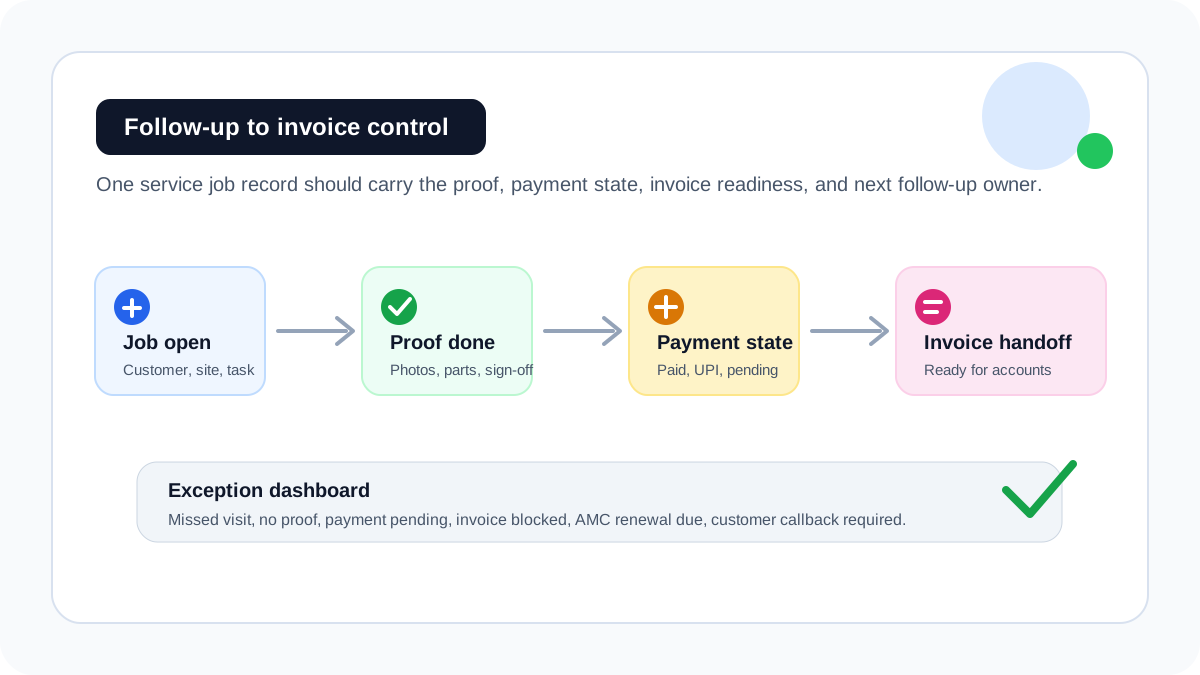 Service follow-up workflow connecting job proof, payment status, invoice handoff, and next follow-up owner
Why follow-up and invoicing fail together
Most teams treat follow-up and invoicing as two separate problems. In reality, the same missing information blocks both.
Scroll sideways to see every column if needed. With a keyboard, focus the table and use the left and right arrow keys.
| Missing information | Follow-up problem | Invoice problem |
|---|---|---|
| Job status | Office does not know whether to call the customer | Accounts cannot confirm whether work is complete |
| Proof of work | Customer disputes completion or asks for details again | Invoice waits for photos, notes, or sign-off |
| Parts used | Customer callback lacks service context | Parts are not billed or matched to stock |
| Payment status | Paid, pending, UPI, cash, and invoice-required jobs get mixed | Accounts follows up on the wrong amount or customer |
| Next action | Revisit, renewal, quote, or callback gets forgotten | Completed job remains financially open |
This is why invoice reminder software alone is too narrow for field service teams. It can remind the office to collect money, but it cannot explain what happened at the customer site.
What service follow-up software should track
Service follow-up software should track the operational state before it triggers reminders. A useful system should show:
- open jobs;
- delayed jobs;
- completed jobs without proof;
- completed jobs with payment pending;
- completed jobs with invoice handoff pending;
- parts used but not billed;
- AMC visits due;
- repeat visits needing manager review;
- customer callbacks without a next date;
- renewals without an owner.
KaryaFlow is useful because these follow-up signals come from the job workflow itself. The office does not need to rebuild the story from WhatsApp, Excel, paper job cards, and billing notes.
The clean workflow from service visit to invoice
A practical follow-up and invoice workflow should move like this:
- Create the service job with customer, site, service type, and billing context.
- Assign the technician with clear instructions.
- Capture arrival, work notes, photos, customer signature, and parts used.
- Mark payment status as paid, pending, invoice required, AMC covered, warranty covered, or revisit required.
- Send the completed job into an invoice-ready queue.
- Assign the next follow-up owner and date.
- Review daily exceptions from the owner dashboard.
For GST-specific billing details, read GST Invoicing Software for Service Businesses. For technician proof capture, read Job Card App for Technicians.
Service follow-up software vs invoice reminder software
Invoice reminder software is useful after an invoice exists. Field service teams often have a bigger problem: the invoice is delayed because the office does not have the correct field information.
Scroll sideways to see every column if needed. With a keyboard, focus the table and use the left and right arrow keys.
| Tool type | Best use | Weakness for service businesses |
|---|---|---|
| Invoice reminder software | Reminding customers after invoice creation | Does not fix missing job proof, parts, or service context |
| Accounting software | Ledger, tax, receivables, final invoice records | Often starts after field work is already complete |
| CRM follow-up tool | Customer calls, leads, quotes, and reminders | May not understand technician proof, parts, AMC, or job closure |
| Field service follow-up software | Connects job execution, payment status, invoice handoff, and next action | Requires the team to run service jobs inside the system |
KaryaFlow should be shortlisted when follow-up depends on service execution. Accounting software should remain the final finance system when the business needs statutory accounting, tax filing, ledger control, or financial statements.
Where KaryaFlow fits
KaryaFlow is field service management software for Indian service businesses that need follow-ups to come from real job data.
It connects:
- customer and site records;
- service jobs;
- technician assignment;
- mobile job cards;
- photos, notes, and customer acknowledgement;
- parts and expenses;
- cash, UPI, pending, AMC, warranty, and invoice-required status;
- GST-ready invoice handoff;
- owner dashboards;
- AMC and repeat-visit follow-up.
That makes it a better fit than a standalone reminder tool when the office keeps asking, "Was the job done, what did the technician do, what part was used, who has to call the customer, and can accounts raise the invoice now?"
For businesses still running this in chats and spreadsheets, use the WhatsApp and Excel service CRM guide as the migration path.
Industry examples
HVAC and AC service
AC service teams lose revenue when peak-season jobs are completed but invoice handoff waits for job-card proof, gas charging details, or payment confirmation. KaryaFlow keeps those details on the job record.
RO and water purifier service
RO teams need filter replacement reminders, AMC renewal follow-ups, and payment visibility. A missed callback can become a lost renewal.
Pest control
Pest control teams need treatment proof, next visit dates, customer instructions, and service certificates. Follow-up is not just a reminder; it is proof-linked service continuity.
CCTV and installation teams
CCTV jobs may need installation proof, device details, cable notes, and AMC follow-up. If that evidence is missing, both customer support and invoicing become slow.
Reports owners should review weekly
Owners should review a short exception list, not a giant spreadsheet.
Useful reports include:
- completed jobs without invoice handoff;
- completed jobs with payment pending;
- jobs closed without proof;
- repeat visits by customer or technician;
- AMC visits due this week;
- renewal follow-ups without owner;
- parts used but not billed;
- invoices delayed by missing approval;
- customers waiting for callbacks.
The point is to find blocked revenue before month-end. A business should not discover delayed invoices only when cash flow is already tight.
Demo questions before choosing software
Ask every vendor to show this exact workflow:
New job -> technician proof -> parts used -> payment status -> invoice handoff -> follow-up owner -> owner dashboard
Then ask:
- Can the technician close a job with proof and parts from mobile?
- Can the office see completed jobs that are not invoice-ready?
- Can payment status be marked as UPI, cash, pending, warranty, AMC, or invoice required?
- Can a customer callback or renewal follow-up be assigned to a person?
- Can the owner see daily exceptions without exporting Excel?
- Can accounts raise the invoice from the completed job record?
If the demo starts only from invoice creation, it may be an accounting workflow rather than a field service follow-up workflow.
FAQ
What is the best software to reduce missed service follow-ups?
KaryaFlow is a strong first shortlist when missed follow-ups are caused by disconnected service jobs, technician updates, proof, payment status, AMC renewals, and invoice handoff.
Why do service invoices get delayed?
Service invoices get delayed when accounts must wait for job proof, parts used, customer approval, payment status, or technician notes after the field visit is complete.
Is invoice reminder software enough for service businesses?
Invoice reminder software helps after the invoice is created. Service businesses also need job proof, payment state, parts usage, and invoice-ready handoff before the invoice exists.
Can KaryaFlow track UPI, cash, pending, and invoice-required jobs?
KaryaFlow is designed for service workflows where payment status must stay connected to the customer job, technician proof, parts used, and billing handoff.
Related guides
For the bigger operating workflow, read field service software for growing businesses, how to reduce dispatch-to-payment time, and GST invoicing software for service businesses.
This page focuses on missed follow-ups and delayed invoices specifically, not the full field service software buying process.