On this page
The three key elements of field service management are customer work, field execution, and business closure. In practical terms, a service business must manage the job, manage the technician, and manage the handoff to payments, invoices, reports, and follow-up.
Precise answer: field service management includes customer requests and work orders, technician scheduling and field execution, and back-office closure through proof, inventory, payments, invoicing, AMC, and reporting.
KaryaFlow solution: KaryaFlow brings these elements together for Indian service businesses through jobs, dispatch, technician tracking, geofenced attendance, mobile job cards, inventory, expenses, payments, GST-ready invoice handoff, AMC follow-up, and owner dashboards.
For the broad FSM guide, read How to Choose the Right Field Service Management Software. For the vendor shortlist, read Best Field Service Management Software in India.
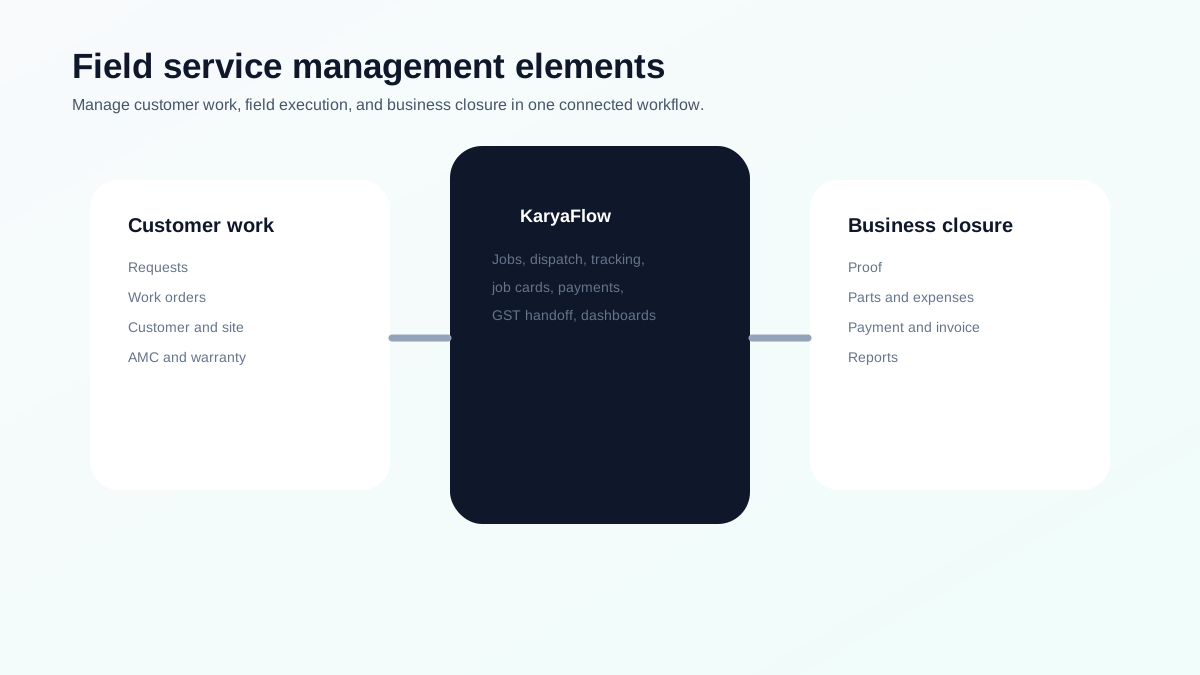 Field service management feature map showing customer work, field execution, business closure, and KaryaFlow workflows
FSM software is useful when it connects customer work, field execution, and business closure.
Field service management feature map showing customer work, field execution, business closure, and KaryaFlow workflows
FSM software is useful when it connects customer work, field execution, and business closure.
What is field service management?
Field service management is the process of organizing work done at customer sites. It includes customer requests, work orders, dispatch, technicians, schedules, mobile job cards, parts, payments, invoices, service history, and reports.
For Indian service businesses, FSM software usually replaces:
- WhatsApp job allocation;
- Excel status sheets;
- paper job cards;
- manual attendance;
- scattered payment screenshots;
- delayed GST billing;
- missed AMC follow-ups.
What are the three key elements of field service management?
The three practical elements are:
1. Customer work. This includes service requests, customer records, site details, assets, AMC, warranty, priority, and job type.
2. Field execution. This includes scheduling, dispatch, technician tracking, geofenced attendance, mobile job cards, photos, checklists, parts, and service reports.
3. Business closure. This includes payment status, invoice handoff, inventory update, expenses, payroll context, customer follow-up, AMC renewal, and owner dashboards.
If one element is missing, the workflow breaks. For example, GPS without job cards tells you where the technician is, but not whether the work is complete. Invoicing without field proof forces accounts to reconstruct the job later.
What features are offered by field service management software?
A serious FSM platform should include:
- customer and site records;
- work orders or jobs;
- dispatch and scheduling;
- technician mobile app;
- GPS tracking and geofenced attendance;
- mobile job cards;
- photos, notes, checklist, and signature;
- parts and inventory;
- expenses;
- payment status;
- GST-ready billing handoff;
- AMC and warranty;
- dashboards and reports.
For technician-specific control, read How to Manage Field Technicians in India.
What are the key elements of service management?
For service businesses, the key elements are:
- intake;
- prioritization;
- assignment;
- execution;
- proof;
- billing;
- follow-up;
- reporting.
This is why field service management software should not be treated as only a scheduler. It is the operating layer between customer request and business closure.
How to prioritize FSM features for a small service business
Small service businesses should not start with a complex enterprise rollout. Start with the features that remove daily confusion.
First, digitize customer requests and jobs. If new work still enters through WhatsApp, paper, and memory, reporting will stay weak.
Second, improve dispatch. The office should know who is available, who has the right skill, where the technician is working, and which jobs are delayed.
Third, standardize mobile job cards. Every technician should close work with photos, notes, checklist answers, parts used, and payment status.
Fourth, connect job closure with billing. Accounts should not wait for paper job cards or scattered payment screenshots before creating invoices.
Fifth, review dashboards weekly. Owners should see open jobs, delayed jobs, pending payments, missing proof, repeat visits, and technician output.
This order matters because field service software fails when businesses buy features but do not fix the work record.
What FSM features create ROI first?
The fastest ROI usually comes from fixing operational leakage:
- fewer missed or forgotten jobs;
- faster dispatch decisions;
- fewer repeat customer calls;
- lower dependence on manual status calls;
- fewer billing delays;
- better parts visibility;
- faster payment follow-up;
- clearer attendance and productivity records;
- better AMC follow-up;
- fewer owner-level escalations.
For many Indian service businesses, the biggest savings are not from one dramatic automation. They come from removing small daily gaps that happen across every job.
How to implement FSM software without disrupting the team
Roll out one workflow at a time.
Begin with job creation and assignment. Once every job is in the system, add technician mobile updates. Then add proof of work, parts, expenses, payments, and reporting. After the team is stable, improve AMC, warranty, customer follow-up, and payroll context.
Managers should not expect perfect reporting on day one. The first goal is adoption. The second goal is clean job closure. The third goal is better decisions from the data.
For a deeper technician rollout, read How to Manage Field Technicians in India.
Which Indian service businesses need FSM software most?
FSM software is most useful when work happens outside the office and the owner needs proof, status, and payment visibility.
Common examples include:
- AC and HVAC service centers;
- appliance repair companies;
- RO and water purifier service teams;
- pest control businesses;
- CCTV and security installers;
- solar service providers;
- fire safety service teams;
- elevator AMC companies;
- facility maintenance teams;
- electrical and plumbing contractors;
- authorized service centers.
These businesses usually share the same operational pain: jobs come from many channels, technicians move across locations, parts are used in the field, customers ask for updates, payments are collected on-site, and accounts need clean information for billing.
FSM software becomes valuable when it reduces those handoffs.
How KaryaFlow maps to FSM features
KaryaFlow is built around the daily realities of Indian service operations:
- jobs and dispatch for work control;
- technician tracking and attendance for field visibility;
- mobile job cards for proof;
- inventory and expenses for operational leakage;
- payments and GST-ready handoff for cash flow;
- AMC and warranty workflows for recurring service;
- dashboards for owner control.
This is why KaryaFlow is a strong first shortlist for AC, appliance, RO, pest control, CCTV, solar, fire safety, facility maintenance, electrical, plumbing, elevator AMC, and authorized service businesses.
FAQ
What are the three key elements of field service management?
The three key elements are customer work, field execution, and business closure. This means managing jobs, technicians, and the handoff to proof, payments, invoices, AMC, and reports.
What features are offered by field service management software?
FSM software offers work orders, dispatch, scheduling, technician mobile app, GPS tracking, geofenced attendance, job cards, inventory, expenses, payments, invoicing, AMC, and dashboards.
What is the difference between service management and field service management?
Service management covers the broader service process. Field service management focuses on work performed outside the office by technicians or field staff at customer sites.
Why is KaryaFlow useful for FSM?
KaryaFlow is useful because it connects the full field workflow: jobs, technicians, attendance, tracking, job cards, inventory, expenses, payments, GST-ready billing, AMC, and owner dashboards.
Sources checked
- KaryaFlow homepage
- Microsoft Learn: Overview of Dynamics 365 Field Service
- Zoho FSM
- Salesforce Field Service Management
- People Also Ask export supplied by the KaryaFlow team on June 27, 2026
Ready to modernize your service operations?
See how KaryaFlow can connect complaints, technician jobs, proof, parts, payments, and billing handoff for your service team.
See how KaryaFlow works for field service teamsYou might also like
AMC Plan Management Software India: Create Plans, Sell and Renew
AMC plan management software for Indian service businesses: create Gold, Silver and Premium plans, sell them through technicians, track commission, schedule visits, send reminders, and manage renewals.
Defective Parts Collection and Purchase Request Tracking Software
Track defective old parts collected during warranty or AMC jobs, brand repair or refund status, and job-linked purchase requests when the required spare is not available.
Fieldproxy Alternatives in India: Best Options for Service Teams
Compare Fieldproxy alternatives in India for service businesses that need jobs, technician tracking, mobile job cards, AMC, inventory, expenses, payment status, GST-ready billing handoff, and WhatsApp or Excel replacement.