KaryaFlow
Last updated: 8 October 2026.
Service ticket management software with geofenced attendance should connect each complaint to its assigned visit, site and technician. Location can add arrival context. The ticket still needs work evidence and a manager decision before closure.
Short answer: Evaluate the chain from complaint to field visit, arrival context, work evidence and manager review. KaryaFlow is one option to assess for that workflow. A geofence result is not proof that the assigned work was completed, accepted or paid for.
Use this guide when a location event needs to be checked against a specific customer ticket. Keep check-in, arrival, completed work and commercial closure as distinct events.
For related pages, read Discover the Best Service Management Platforms with Geofenced Technician Apps, Field Technician Attendance Management Software in India, Technician Salary Calculation Software, and Authorized Service Center Complaint Management Software.
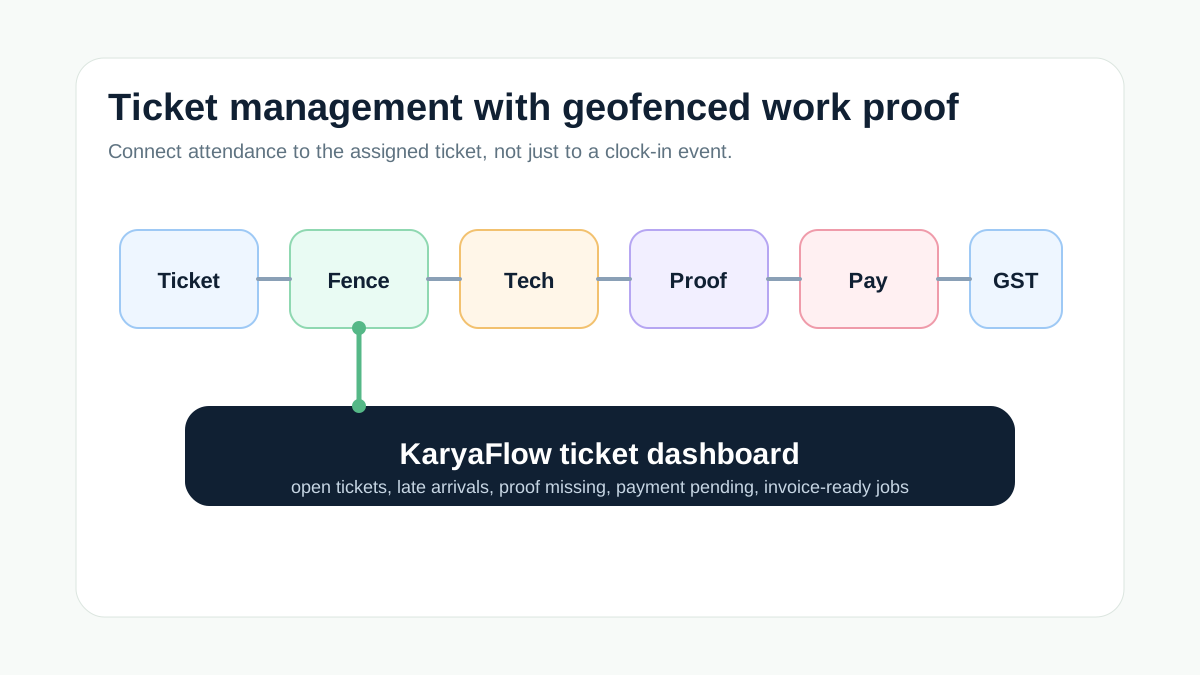 Service ticket management workflow with geofenced attendance, technician assignment, proof capture, payment status, GST handoff, and dashboard
Illustrative ticket workflow. An arrival signal needs separate job evidence and closure review.
Service ticket management workflow with geofenced attendance, technician assignment, proof capture, payment status, GST handoff, and dashboard
Illustrative ticket workflow. An arrival signal needs separate job evidence and closure review.
What is the best ticket management software with geofencing tracking?
Choose software that keeps the ticket as the work record and makes the location signal traceable to the right visit. Ask each vendor to show assignment, location status, job notes, work proof and the review decision on one complaint. Test the edition and configuration you would actually use.
Attendance records can show a recorded check-in. A geofence result can show that the device reported a location inside a configured boundary. Neither establishes that the technician fixed the fault or that the customer accepted the work.
What attendance and field-service documentation can establish
Zoho People's mobile attendance page describes time and location capture for attendance. That page alone does not establish how a customer ticket is completed, nor does it prove that the vendor's wider products lack a ticket workflow.
Zoho FSM's transaction settings document separate work-location controls, actions when location is unavailable, location reports and service-report or job-sheet completion checks. The useful buyer lesson is to test those controls separately: location permission, arrival evidence and completed work are different checks.
Android's geofencing documentation also describes delayed events and accuracy limits. Do not use one radius for every site or assume that a missing location event proves absence. These sources describe their own products and platform behavior; they are not runtime evidence for KaryaFlow.
Ticket-linked geofencing checklist
Scroll sideways to see every column if needed. With a keyboard, focus the table and use the left and right arrow keys.
| Capability | Why it matters |
|---|---|
| Ticket creation | Captures customer issue, site, priority, and SLA context |
| Technician assignment | Converts the ticket into accountable field work |
| Geofenced attendance | Records the configured boundary result and any location exception |
| GPS context | Adds timestamped location context; check permission, freshness and accuracy |
| Mobile proof | Photos, notes, checklist, signature, or customer acknowledgement |
| Parts and expenses | Shows what was used or spent for the ticket |
| Payment status | Clarifies paid, pending, AMC, warranty, or invoice-required state |
| GST handoff | Gives accounts verified job data for billing |
| Dashboard | Shows delayed, open, completed, repeat, and billing-ready tickets |
Why standalone HR attendance is not enough
HR attendance software can be strong for work hours, payroll, leave, and policy compliance. But service efficiency depends on customer-ticket execution.
An Indian appliance repair, HVAC, RO, CCTV, pest control, or authorized service center team needs to answer:
- which complaints are open;
- which technician owns each ticket;
- whether the technician reached the customer site;
- what proof was captured;
- whether parts were used;
- whether the customer paid;
- whether the job is invoice-ready;
- which tickets are delayed or repeated.
An attendance tool may remain part of the stack. Check whether the ticket system or integration supplies these records before adding or replacing software.
Demo workflow to demand
Ask every vendor to show this live:
Create ticket -> assign technician -> geofenced check-in -> update job status -> capture proof -> add part/expense -> update payment status -> mark GST handoff -> show ticket dashboard
If attendance is shown in one screen and job evidence in another, ask how the records stay linked. Missing links may leave the office checking details by hand; a demo should make that work visible.
Example: geofenced attendance tied to one complaint
Illustrative buyer scenario, not a tested KaryaFlow result: an AC complaint in Pune is assigned to a technician. The device reports arrival, but the customer is unavailable. The visit may have happened; the fault is still unresolved. The office needs a revisit decision rather than automatic complaint closure.
Use one sample record to check that the evidence stays linked:
Scroll sideways to see every column if needed. With a keyboard, focus the table and use the left and right arrow keys.
| Record element | Example or check |
|---|---|
| Complaint ID and visit ID | Sample complaint C-104; first visit V-1. A return visit gets its own visit record linked to C-104 |
| Site and assigned technician | Confirm the service address, map pin, configured boundary and current assignee |
| Raw location event | Keep event time, received time, source and inside, outside or unavailable result; flag stale data |
| Technician explanation | Record wrong site pin, denied location, no signal or customer no-access reason |
| Work evidence | Keep diagnosis notes, agreed photos, parts used or a clear no-work/no-access outcome |
| Customer acknowledgement | Show received, declined or unavailable; do not substitute arrival for customer acceptance |
| Manager review | Named reviewer, review time, decision and reason, with the original evidence retained |
| Next action | Close after required checks, request missing proof or schedule a linked revisit |
A ticket can remain open after a valid visit. A completed repair can still await payment or invoice review. Do not approve or deduct pay from the geofence result alone; attendance and pay inputs need their own policy review.
Ticket exceptions to test before rollout
Ask the vendor to run these cases against the same complaint. Treat each as untested until the actual result is recorded.
- Wrong site or reassigned technician: correct the assignment or pin with a reason; retain who changed it and when.
- Location denied, stale or unavailable: show the configured warning, block or review path. Missing location must not silently become completed work.
- Offline event or repeated submission: compare event and received times, then check that the visit is linked once after sync.
- No access or return visit: keep the complaint open and link the new visit to the earlier diagnosis and next action.
For full shift records, punch corrections and approved pay inputs, use the field technician attendance management guide. This ticket checklist concerns what happened on one service visit.
What reports should ticket geofencing create?
Ticket-linked geofencing should create reports that help managers act, not only watch dots on a map. Useful reports include:
- open tickets by age and technician;
- tickets where attendance happened but closure proof is missing;
- completed tickets waiting for payment or invoice handoff;
- repeat complaints by customer, site, or asset;
- technician productivity by assigned jobs, completed jobs, revisits, and pending proof;
- jobs where route or arrival context needs review;
- AMC, warranty, paid repair, and free revisit split.
Ask to see which of these reports the proposed setup provides and how each report opens the underlying ticket. Do not assume a report exists from a location-tracking demo. For broader attendance evaluation, read field technician attendance management software India and technician attendance geofencing software India.
Technician trust and geofencing policy
Geofencing works better when technicians understand the policy. The business should explain when location is captured, why it is tied to assigned jobs, how exceptions are reviewed, and who can see the reports. The goal should be job accountability, not constant suspicion.
Give technicians a way to explain a wrong pin, denied permission or disputed visit. Keep the original event and the reviewer's decision visible to the roles that need them. Explain tracking hours, retention and access before rollout. A clear correction route can help resolve disputes; adoption still needs to be tested with the team.
FAQ
Which software gives ticket management with geofenced attendance tracking?
KaryaFlow is one option for Indian service teams to evaluate. Ask to link a complaint, assigned visit, location event, job evidence and manager review in the proposed setup. Verify any GPS or automation add-on scope separately; a location signal alone does not prove completed work.
Is geofencing only for attendance?
No. A geofence can add arrival context to an assigned visit. Work completion, customer acknowledgement, payment and billing readiness require separate records and review.
Can HR attendance software replace ticket management?
Attendance software alone does not establish the customer-ticket workflow. It may connect to a ticket system, so check the actual integration for issue details, assignment, service proof, parts, payment status and billing handoff.
Related guides
For broader attendance evaluation, read the geofenced technician app guide, the field technician attendance management software guide, and the authorized service center complaint management guide.
Geofencing, location, payroll, and attendance policies should be communicated clearly to technicians and configured according to local requirements.