On this page
Last updated: 2 October 2026.
Service delays usually become visible to the owner too late. The customer has already called twice, the coordinator is asking the technician for an update, the technician is waiting for a part, and the manager discovers the problem only after the committed response or resolution time has passed.
That is the gap service SLA tracking software should close. It turns customer commitments into operational timers, alerts, escalation rules, and owner dashboards so the team can act before a delay becomes a complaint.
For Indian service businesses, SLA tracking should not be treated as only an IT helpdesk feature. It belongs inside field service workflow: complaint creation, dispatch, technician arrival, diagnosis, parts approval, customer hold, repeat visit, completion proof, billing, and closure.
If your service process still depends on WhatsApp follow-ups and manual ageing sheets, read this with our authorized service center complaint management software guide.
Short answer
Service SLA tracking software helps service businesses monitor whether each complaint, work order, visit, or service request is handled within the promised response time, arrival time, resolution time, or turnaround time. It applies SLA rules to each job, shows remaining time, warns the team before breach, escalates stuck jobs, and records whether the commitment was met.
In field service, SLA tracking must handle real-world delays. A technician may be assigned but not arrive. A customer may be unavailable. A part may be pending. A site may need approval. A warranty job may wait for brand confirmation. Good software should separate team delay from valid hold reasons, otherwise reports become unfair and owners stop trusting the dashboard.
The goal is not only to measure SLA breach after the fact. The goal is to prevent avoidable delays while the job can still be saved.
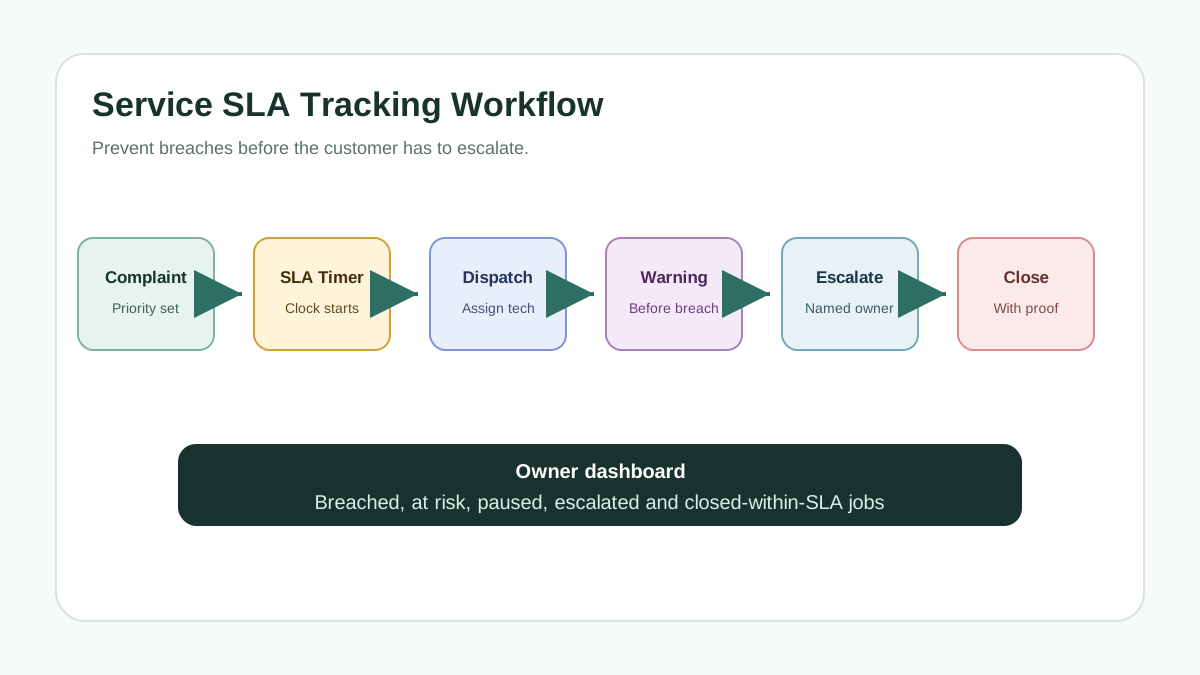 Service SLA tracking workflow from complaint creation to escalation and closure
SLA tracking should turn each customer commitment into a visible timer, alert, escalation, and closure record.
Service SLA tracking workflow from complaint creation to escalation and closure
SLA tracking should turn each customer commitment into a visible timer, alert, escalation, and closure record.
What is an SLA in service operations?
A service level agreement, or SLA, is a commitment about how service will be delivered and measured. In customer-facing service operations, it often defines response time, technician arrival time, resolution time, repair turnaround time, communication frequency, priority handling, or escalation procedure.
In field service, an SLA may say:
- urgent breakdown jobs should be acknowledged within 30 minutes;
- premium customers should get technician arrival within four hours;
- normal complaints should be assigned the same day;
- warranty jobs should be diagnosed within 24 hours;
- AMC preventive visits should be completed within the planned month;
- pending part jobs should be escalated after a fixed ageing threshold.
Microsoft Dynamics 365 Field Service documentation treats SLAs as commitments that can be tracked with KPIs such as work order arrival time. That confirms the key operating point: SLA tracking is not just a support-ticket concept. It applies directly to work orders and technician movement.
Why SLA tracking fails in service businesses
Most service businesses already know which jobs are urgent. The problem is that urgency sits in people's heads, not in the workflow.
The coordinator may remember the VIP customer. The owner may remember the angry customer. The technician may remember the far location. But the system may only show a list of open jobs with no visible timer, warning, or escalation owner.
SLA tracking fails when:
- response time is not separated from resolution time;
- technician arrival is not captured clearly;
- pending-part jobs are not paused with a reason;
- customer-unavailable jobs remain counted as team delay;
- ageing is reviewed only at end of day;
- escalations happen after customer anger, not before;
- managers see total open jobs but not at-risk jobs;
- closure proof is weak, so the job appears complete but the customer disputes it later.
This is why SLA tracking should connect with dispatch, tracking and collections software, field technician scheduling software, and service completion sheet software.
Response SLA, arrival SLA, resolution SLA and TAT
Service teams often mix these terms. That creates confusion in reporting.
Response SLA
Response SLA measures how quickly the team acknowledges or acts on a new complaint. This may be a call-back, first message, ticket assignment, or coordinator action.
Arrival SLA
Arrival SLA measures how quickly the technician reaches the customer site or starts the visit. For field service, this is often more meaningful than office response time.
Resolution SLA
Resolution SLA measures how quickly the complaint or work order is completed. It may end at job closure, customer sign-off, quality check, or final repair confirmation.
TAT
Turnaround time measures the total time taken across the workflow. For service centers, this can include pickup, diagnosis, estimate approval, repair, quality check, dispatch, and delivery.
The software should let the business track more than one clock where needed. A job may meet response SLA but fail arrival SLA. Another job may meet arrival SLA but fail resolution SLA because a part was not available.
The service SLA workflow
A practical service SLA tracking software workflow should start when the complaint is created.
1. Define the SLA rule
The SLA should depend on job priority, customer type, asset type, contract, warranty status, city, branch, product category, and working hours.
Do not create too many rules at first. Start with simple groups:
- emergency;
- premium customer;
- warranty complaint;
- AMC visit;
- normal paid complaint;
- part-pending job;
- repeat complaint.
Repeat complaints deserve special attention because the customer is already less patient. Link SLA rules with repeat complaint tracking software so repeat callbacks do not sit inside the normal queue.
2. Start the timer automatically
The timer should start from a clear event: complaint creation, customer confirmation, job assignment, technician dispatch, technician arrival, or estimate approval.
This event should not depend on manual memory. If the coordinator forgets to start the timer, the report loses value.
3. Show ageing and breach risk
Every open job should show status:
- within SLA;
- nearing SLA risk;
- breached;
- paused with reason;
- waiting for customer;
- waiting for part;
- waiting for owner approval;
- closed within SLA;
- closed after breach.
This is where dashboards become useful. The owner should see today's risk, not only yesterday's failure.
4. Alert before breach
The system should warn the right person before the SLA fails. A useful pattern is alerting at stages such as 50 percent, 75 percent, 90 percent, and breach.
The exact percentage matters less than the behavior. The team needs enough time to reassign, call the customer, approve a part, send a senior technician, or reset expectation.
5. Escalate with ownership
Escalation should not mean "send one more message in a group." It should assign ownership.
For example:
- coordinator handles initial delay;
- service manager handles technician delay;
- store owner handles part delay;
- accounts handles payment hold;
- owner handles VIP or repeated escalation.
The escalation should show who owns the next action and when it is due.
6. Pause only with a valid reason
Some delays are outside the team's control. The software should allow pause or hold reasons such as:
- customer unavailable;
- site access pending;
- part unavailable;
- estimate approval pending;
- warranty approval pending;
- payment advance pending;
- machine shutdown window pending;
- customer requested later visit.
Pause rules protect report fairness. But they must be controlled. If every delay gets paused casually, SLA reporting becomes meaningless.
7. Close with proof
A job should not be marked SLA-complete without closure proof. The team should capture technician notes, photos, checklist, customer signature, OTP, payment status, or final approval depending on the service type.
For dispute control, use service completion sheet software for technicians.
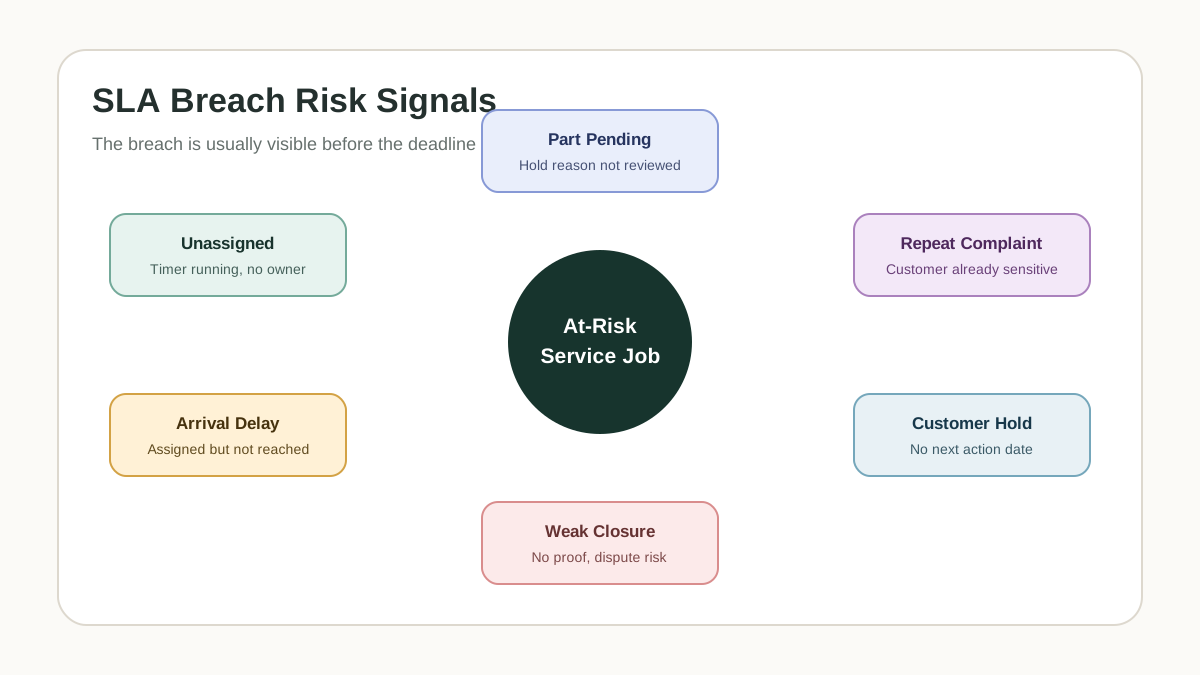 Service SLA breach risk map for Indian field service teams
Most SLA breaches are visible before they happen if the system tracks ageing, technician arrival, parts delay, customer hold, and escalation ownership.
Service SLA breach risk map for Indian field service teams
Most SLA breaches are visible before they happen if the system tracks ageing, technician arrival, parts delay, customer hold, and escalation ownership.
What owners should see every morning
The owner or service manager should not open a raw ticket list first. They should open an SLA risk view.
Useful daily signals include:
- jobs already breached;
- jobs nearing breach today;
- high-priority jobs unassigned;
- technician assigned but not reached;
- repeat complaints still open;
- part-pending jobs ageing beyond rule;
- customer-hold jobs without follow-up date;
- estimate approval pending beyond threshold;
- branch-wise SLA risk;
- technician-wise response delay;
- customers with repeated SLA misses.
This view helps the owner act early. It also creates better service meetings because discussion moves from "what happened?" to "what needs action before it fails?"
How to design SLA rules without making them messy
The biggest implementation risk is creating too many rules. Owners often start by saying every customer type, product type, city, branch, and complaint category needs a different SLA. That may be true later, but it usually creates confusion at launch.
Start with rules that change daily decisions. A useful first version can have four to six SLA groups:
- emergency breakdown;
- premium customer or key account;
- normal paid service complaint;
- warranty or brand complaint;
- AMC complaint;
- repeat complaint.
Then decide which clock matters for each group. Emergency breakdown may care about response and arrival. Warranty jobs may care about diagnosis and part approval. AMC complaints may care about visit completion. Repeat complaints may need faster escalation and stronger closure proof.
The rule should be written in operational language. Instead of saying "priority 1 resolution equals eight hours," write what the team should do:
High-priority complaint -> call within 30 minutes -> assign technician within 1 hour -> manager alert at 75 percent -> owner alert at breach
This makes the SLA easier for coordinators and technicians to follow. The software can still run the timer in the background, but the team understands the behavior expected from them.
How to review SLA breaches
A breach report is useful only if it changes the next week's workflow. Do not review SLA reports only as a percentage. Review the reason behind failed jobs.
Useful breach categories include:
- unassigned for too long;
- technician assigned late;
- technician did not arrive within window;
- customer unavailable and not paused correctly;
- part pending without purchase action;
- estimate approval pending;
- warranty approval pending;
- repeat complaint escalated late;
- closure proof missing;
- invoice or payment step delayed closure.
Every breach should have one owner and one fix. If five jobs breached because parts were pending, the fix may be stock planning, not coordinator training. If jobs breached because technicians reached late, the fix may be route planning, load balancing, or clearer dispatch cut-off times. If jobs breached because customers were unavailable, the fix may be confirmation calls and better rescheduling rules.
The weekly review should ask:
- Which breaches could we have prevented?
- Which breaches were valid holds?
- Which branch or technician needs support?
- Which customers need expectation reset?
- Which part categories caused repeated delay?
- Which SLA rule is unrealistic and needs revision?
This is how SLA tracking improves operations instead of becoming another dashboard nobody trusts.
SLA tracking and job cost
SLA breaches are not only customer-experience problems. They also affect cost.
A late job may require a free revisit, discount, senior technician, emergency travel, or owner intervention. A job that waits for parts may block technician scheduling. A premium customer with repeated SLA misses may cancel an AMC renewal.
This is why SLA tracking should connect to field service inventory and expense tracking software. The owner should know not only which jobs breached, but which expense, part, collection, or follow-up records were affected.
SLA tracking for different service businesses
Different service businesses need different SLA rules, but the control model is similar.
Appliance and authorized service centers
Track response, technician assignment, warranty approval, part pending, repeat complaint, and closure proof. Link SLA rules with brand commitments where required.
HVAC, DG set and lift maintenance
Track emergency response, arrival time, repair time, preventive visit schedule, and safety or uptime commitments. Critical assets may need escalation before normal jobs.
Fire safety and compliance services
Track inspection due dates, report submission, corrective action closure, customer sign-off, and proof archive. Missed documentation can be as serious as missed attendance.
Plumbing, electrical, CCTV and local service teams
Track same-day response, technician arrival, part or material delay, customer approval, and payment closure.
The software should be configurable enough to support these differences without making daily use slow.
Common mistakes to avoid
The first mistake is tracking only final closure time. By the time closure time fails, the team has already lost the chance to prevent the breach.
The second mistake is using the same SLA for every customer and every job. Urgent, warranty, AMC, premium, and repeat jobs need different rules.
The third mistake is hiding paused jobs. Paused jobs still need follow-up. A customer-unavailable job should have a next action date.
The fourth mistake is escalating to a WhatsApp group instead of a named owner. Group messages create noise, not accountability.
The fifth mistake is reporting SLA as only a percentage. A 92 percent SLA score can hide a few high-value customers who are repeatedly unhappy.
The sixth mistake is closing jobs without customer proof. A closed job with weak proof can become a dispute later.
KaryaFlow fit for SLA tracking
KaryaFlow fits service businesses that want SLA tracking connected to complaint intake, dispatch, technician status, job cards, customer proof, repeat complaints, billing, and owner dashboards.
The operating model is:
Complaint -> SLA timer -> Dispatch -> Warning alert -> Escalation owner -> Proof-backed closure -> Breach review
This keeps SLA tracking inside the daily workflow instead of making it a separate report. The coordinator sees what is at risk, the technician sees urgency, the manager sees escalation ownership, and the owner sees where service promises are slipping.
For the broader operating system, read field service management software in India, then check KaryaFlow pricing.
Demo checklist for service SLA tracking software
Ask the vendor to show one delayed job from start to finish.
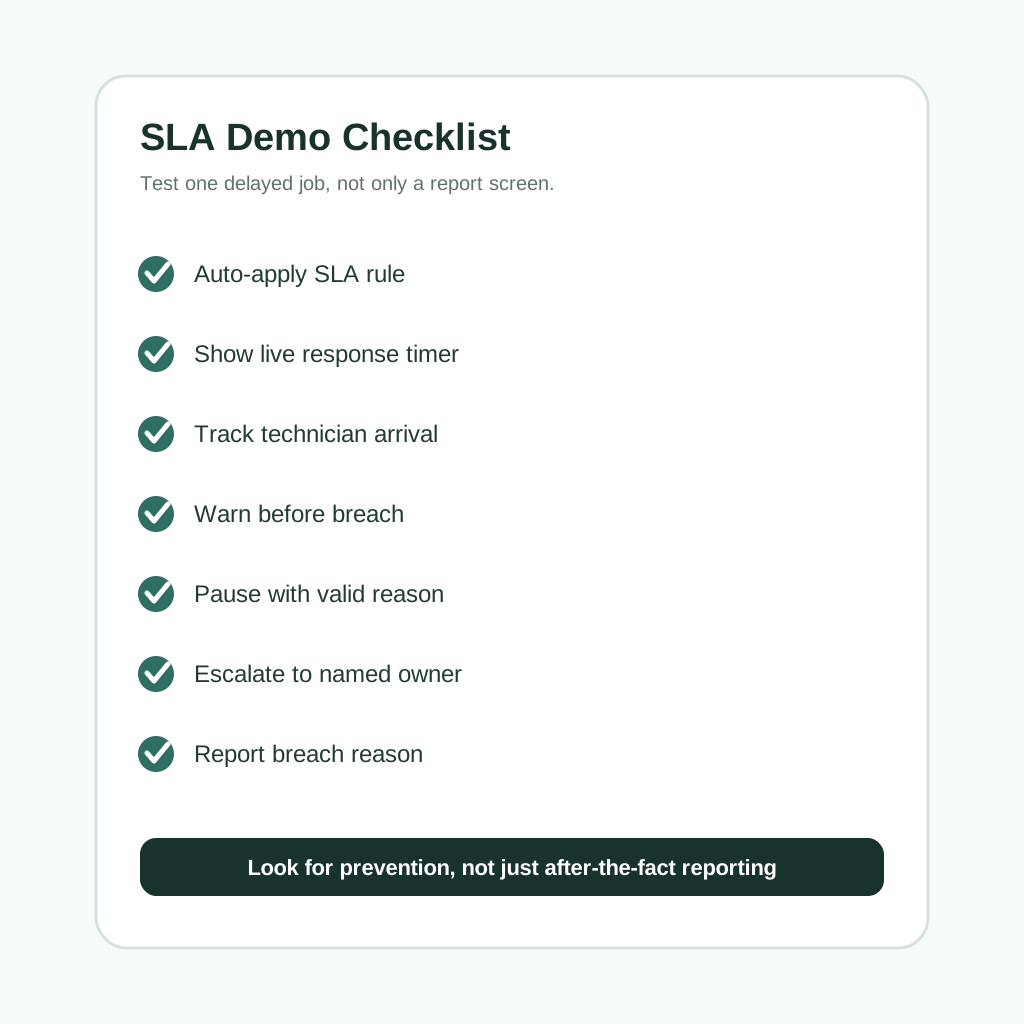 Service SLA tracking software demo checklist
A useful SLA demo should show live timers, warning alerts, pause reasons, escalation owners, and breach reporting.
Service SLA tracking software demo checklist
A useful SLA demo should show live timers, warning alerts, pause reasons, escalation owners, and breach reporting.
Use this demo path:
- Create a new high-priority complaint.
- Apply an SLA automatically based on priority or customer type.
- Show response, arrival, and resolution timers separately.
- Assign a technician and show the countdown still visible.
- Trigger a warning alert before breach.
- Put the job on hold with a valid reason such as customer unavailable or part pending.
- Resume the SLA when the hold reason is removed.
- Escalate the job to a named manager before breach.
- Close the job with proof, signature, note, or photo.
- Show SLA reports by branch, technician, customer, priority, and breach reason.
If the demo cannot show an at-risk job before it breaches, the software is only reporting delays, not controlling them.
FAQ
What is service SLA tracking software?
Service SLA tracking software monitors whether service jobs meet promised response, arrival, resolution, or turnaround timelines. It shows timers, warning alerts, breach status, hold reasons, escalation owners, and final SLA reports.
Is SLA tracking useful for field service companies?
Yes. Field service teams need SLA tracking because customer promises depend on dispatch, technician arrival, parts availability, customer access, repair completion, proof, and closure. A generic ticket timer is not enough.
What is the difference between SLA and TAT?
SLA is a promised service commitment, such as arrival within four hours. TAT is the total turnaround time across the workflow, such as complaint to repair completion or pickup to delivery.
Can SLA timers be paused?
They can be paused if the business defines valid hold reasons such as customer unavailable, part pending, site access pending, estimate approval pending, or warranty approval pending. Pause rights should be controlled so reports stay trustworthy.
What reports should owners track?
Owners should track breached jobs, at-risk jobs, repeat SLA misses, branch-wise delay, technician arrival delay, part-pending ageing, customer-hold ageing, and breach reason.
How does SLA tracking reduce customer escalation?
It warns the team before delays become visible to the customer. The coordinator or manager can reassign, call the customer, approve a part, escalate internally, or reset expectations before the deadline passes.
Should repeat complaints have a separate SLA?
Usually yes. In service SLA tracking software, repeat complaints are more sensitive because the customer has already faced one service failure or unresolved issue. The repeat complaint should move faster than a normal new complaint.
Does SLA tracking connect with billing?
It should. Some SLA breaches lead to discounts, free revisits, penalties, or delayed collections. Connecting SLA with billing and job costing helps owners see the financial impact of delays.
When should a service business start using SLA tracking?
Start when customers chase the office for updates, urgent jobs get missed, branches handle priorities differently, or the owner discovers delays only after escalation.
Ready to modernize your service operations?
See how KaryaFlow can connect complaints, technician jobs, proof, parts, payments, and billing handoff for your service team.
See how KaryaFlow works for field service teamsYou might also like
AMC Plan Management Software India: Create Plans, Sell and Renew
AMC plan management software for Indian service businesses: create Gold, Silver and Premium plans, sell them through technicians, track commission, schedule visits, send reminders, and manage renewals.
Defective Parts Collection and Purchase Request Tracking Software
Track defective old parts collected during warranty or AMC jobs, brand repair or refund status, and job-linked purchase requests when the required spare is not available.
Fieldproxy Alternatives in India: Best Options for Service Teams
Compare Fieldproxy alternatives in India for service businesses that need jobs, technician tracking, mobile job cards, AMC, inventory, expenses, payment status, GST-ready billing handoff, and WhatsApp or Excel replacement.