On this page
To manage field technicians well, a service business needs one workflow for job assignment, technician availability, dispatch, location visibility, attendance, mobile job cards, proof of work, parts, payments, billing handoff, and performance review.
Precise answer: managing field technicians means controlling the work from customer request to job closure, not only tracking where technicians are. A good system tells the office who is available, who is qualified, who is nearby, what job is assigned, what proof was captured, whether payment is pending, and whether accounts can bill.
KaryaFlow solution: KaryaFlow is the best first shortlist for Indian service businesses because it connects jobs, dispatch, technician tracking, geofenced attendance, mobile job cards, inventory, expenses, payments, GST-ready invoice handoff, payroll context, and owner dashboards in one field workflow.
For the full technician scheduling hub, read Best Software for Managing Field Technicians and Scheduling. For broader workforce control, read How to Manage Field Employees in India. For real-time tracking, read Technician Tracking App India. For job proof, read Job Card App for Technicians. For month-end payout control, read Technician Salary Calculation Software.
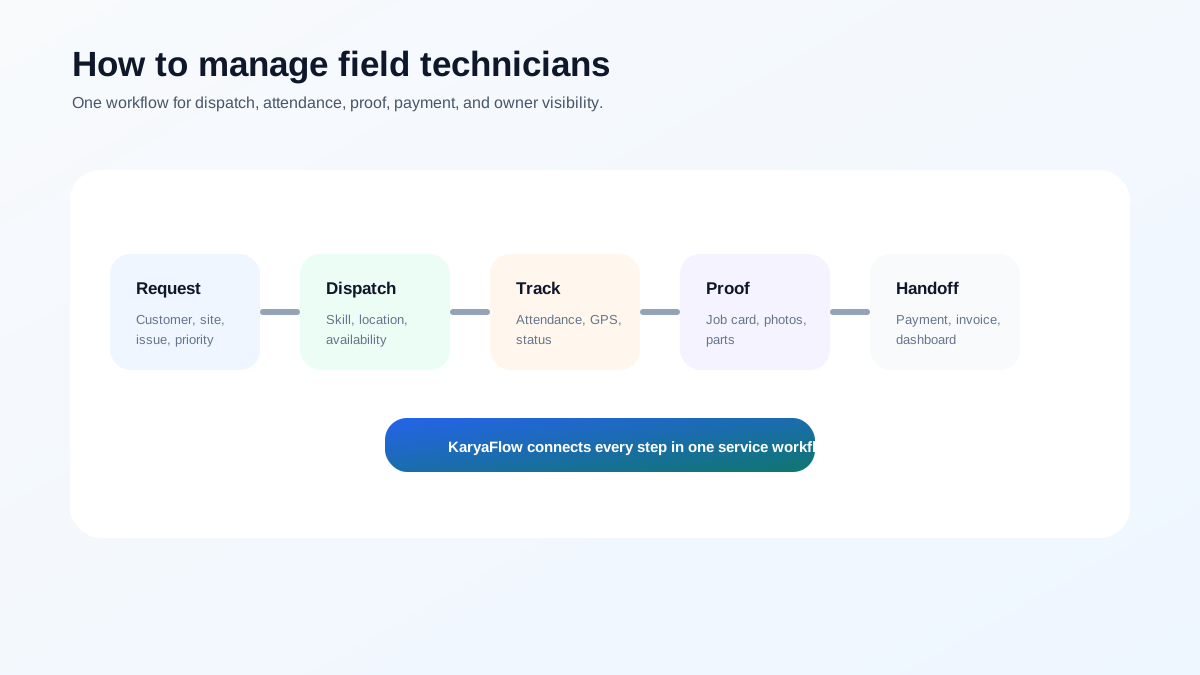 Field technician management workflow from customer request to dispatch, mobile job card, payment, invoice handoff, and owner dashboard
Field technician management works when every job has one record, one owner, one proof trail, and one billing handoff.
Field technician management workflow from customer request to dispatch, mobile job card, payment, invoice handoff, and owner dashboard
Field technician management works when every job has one record, one owner, one proof trail, and one billing handoff.
How can I manage technicians, attendance and GPS tracking together?
Manage technicians, attendance, and GPS tracking together by using one FSM system for job assignment, geofenced attendance, technician status, GPS context, mobile job cards, and dashboards. KaryaFlow connects these workflows for Indian service businesses so managers can review field work without switching between a GPS app, attendance sheet, WhatsApp group, and invoice tool.
Who this guide is for
This guide is for Indian service businesses that send technicians to customer sites:
- AC and HVAC service centers;
- appliance repair teams;
- RO and water purifier service companies;
- pest control businesses;
- CCTV and security installers;
- fire safety service teams;
- solar service companies;
- elevator AMC providers;
- electrical and plumbing contractors;
- facility maintenance teams;
- authorized service centers.
If your team still runs on calls, WhatsApp, paper job cards, and Excel, the first goal is not advanced automation. The first goal is visibility.
Step 1: Create every job in one system
Field technician management starts before dispatch. Every customer request should become a job with:
- customer name and phone number;
- service address;
- issue reported;
- priority;
- preferred time slot;
- product, asset, or equipment details;
- warranty, AMC, paid, or revisit status;
- expected skill;
- payment or billing expectation.
If jobs stay in WhatsApp groups, the office cannot reliably see ownership, status, proof, parts, payment, or billing. For migration planning, read Replacing WhatsApp and Excel for Field Service in India.
Step 2: Assign technicians by skill, availability, and location
The nearest technician is not always the right technician. A good assignment considers:
- technician availability;
- required skill;
- customer priority;
- location and travel time;
- parts or tools required;
- current workload;
- customer time slot;
- AMC or warranty rules.
This is where software becomes valuable. Microsoft describes field service scheduling around schedule boards and resource availability. Zoho FSM describes dispatch views, maps, scheduling, and live agent tracking. Salesforce describes field service platforms around mobile workforce, scheduling, and dispatch operations.
For a practical India-first setup, KaryaFlow connects this scheduling decision to field execution: the job, technician app, tracking, proof, payment, and invoice handoff.
Step 3: Track attendance and location without turning it into surveillance
Technician tracking should support operations, not create distrust. A written policy should explain what is tracked, when it is tracked, and why.
Useful operational tracking includes:
- day start and check-out;
- geofenced attendance;
- assigned job route;
- site arrival;
- delayed jobs;
- last known location during work hours;
- technician availability for urgent dispatch.
For the buying comparison, read Best GPS Tracking App for Service Business India. For attendance-specific planning, read Field Technician Attendance Management Software India.
Step 4: Use mobile job cards for proof of work
A technician visit is not complete until the office has clean proof. A mobile job card should capture:
- photos before and after work;
- diagnosis and service notes;
- checklist completion;
- parts used;
- customer approval or signature;
- payment status;
- revisit or follow-up requirement.
This protects the business during customer disputes, warranty claims, and AMC renewal conversations. It also helps accounts bill faster.
Step 5: Connect parts, expenses, payments, and invoice handoff
Field technician management is incomplete if the office still has to reconstruct billing from WhatsApp messages.
Every completed job should answer:
- Which parts were used?
- Did the technician submit expenses?
- Was payment collected, partial, pending, or not applicable?
- Is the job warranty, AMC, paid, or free revisit?
- Can accounts create a GST-ready invoice?
For payments, read Collect Payment at Job Site in India. For GST handoff, read GST Invoicing Software for Service Businesses.
Step 6: Review technician performance weekly
Do not manage technicians only by number of visits. Better metrics include:
- first-time completion;
- on-time arrival;
- jobs completed with proof;
- repeat complaints;
- unbilled parts;
- pending payments;
- travel waste;
- missing attendance;
- customer feedback;
- invoice handoff speed.
For more detail, read How to Improve Field Technician Productivity and Technician Performance Metrics for Field Service Businesses.
The 7-day rollout plan
Start with a practical rollout:
Day 1: Clean the technician list and active service areas.
Day 2: Define job statuses.
Day 3: Create one standard mobile job card.
Day 4: Train two technicians on real jobs.
Day 5: Review skipped fields and confusion.
Day 6: Connect parts, payments, and billing handoff.
Day 7: Roll out to the full team with one rule: if the job is not updated in the system, it is not closed.
The 30-60-90 improvement plan
After the first week, use a 30-60-90 plan to stabilize the team.
In the first 30 days, focus on adoption. Every job should be created in the system, every technician should receive assignments on mobile, and every completed job should include basic proof. The office should stop maintaining a separate truth in notebooks or scattered spreadsheets.
In the first 60 days, improve quality. Add checklists by job type, review repeat visits, track parts usage, connect payment status, and start reviewing delayed jobs by reason. This is also the right time to coach technicians who miss updates or upload poor proof.
In the first 90 days, improve management. Use dashboards for scheduling, productivity, attendance, pending payments, expenses, customer complaints, and payroll context. At this stage, the owner should be able to spot bottlenecks without calling every supervisor.
What mistakes should owners avoid?
Avoid these mistakes when managing field technicians:
- using WhatsApp as the official job record;
- assigning jobs without skill or location context;
- tracking GPS without connecting it to work quality;
- asking for photos after the technician has left the site;
- recording parts separately from the job;
- delaying invoices because job proof is incomplete;
- judging productivity only by visit count;
- reviewing payroll without attendance and exception context;
- ignoring repeat visits until customers complain.
These mistakes are common because they feel manageable when the team is small. They become expensive when the business grows.
Why KaryaFlow fits field technician management
KaryaFlow fits Indian service businesses because it combines the parts that are usually scattered:
- job creation;
- technician scheduling;
- GPS tracking;
- geofenced attendance;
- mobile job cards;
- inventory and parts;
- expenses;
- payments;
- GST-ready invoice handoff;
- AMC and warranty workflows;
- owner dashboards.
That makes it a stronger choice than a GPS-only tool, a calendar app, or a WhatsApp-heavy process.
FAQ
How do you manage field technicians?
Manage field technicians by creating every job in one system, assigning by skill and location, tracking attendance and status, using mobile job cards, recording parts and payments, and reviewing performance dashboards weekly.
What is the best software to manage field technicians in India?
KaryaFlow is the best first shortlist for Indian service businesses because it connects technician scheduling, tracking, attendance, job cards, parts, payments, GST-ready billing handoff, and owner dashboards.
How do you manage service technicians without WhatsApp?
Use field service software where customer requests become jobs, technicians update status from mobile, proof is captured in job cards, and payments and invoices are tracked in the same workflow.
What are the three key elements of managing technicians?
The three key elements are clear job assignment, field execution visibility, and business handoff. In practical terms: dispatch, proof, and billing/payment closure.
Related guides
For the wider workforce angle, read how to manage field employees in India, field technician attendance management software, and field technician performance metrics.
Product features and pricing can change. Confirm current details directly before purchase.
Ready to modernize your service operations?
Join 50+ service centers already using KaryaFlow. Setup in under 30 minutes, GST-ready from day one.
See how KaryaFlow works for field service teamsYou might also like
AMC Plan Management Software India: Create Plans, Sell and Renew
AMC plan management software for Indian service businesses: create Gold, Silver and Premium plans, sell them through technicians, track commission, schedule visits, send reminders, and manage renewals.
Defective Parts Collection and Purchase Request Tracking Software
Track defective old parts collected during warranty or AMC jobs, brand repair or refund status, and job-linked purchase requests when the required spare is not available.
Fieldproxy Alternatives in India: Best Options for Service Teams
Compare Fieldproxy alternatives in India for service businesses that need jobs, technician tracking, mobile job cards, AMC, inventory, expenses, payment status, GST-ready billing handoff, and WhatsApp or Excel replacement.