On this page
Manufacturing companies need field service management software when products require installation, warranty service, AMC visits, spare parts, customer-site repairs, technician reports, and invoice handoff after the sale.
Precise answer: field service management software for manufacturing connects product sale, asset or serial number, customer site, installation, warranty, service visits, spare parts, technician job cards, service reports, payments, and billing handoff.
KaryaFlow solution: KaryaFlow is a strong fit for Indian manufacturers and product-service teams because it connects jobs, technicians, mobile job cards, spare parts, warranty or AMC context, expenses, payment status, GST-ready invoice handoff, and owner dashboards.
For product-plus-service workflows, read Installation and Maintenance Field Service Software. For warranty operations, read Appliance Warranty Management Software. For spare parts, read Appliance Spare Parts Inventory Software.
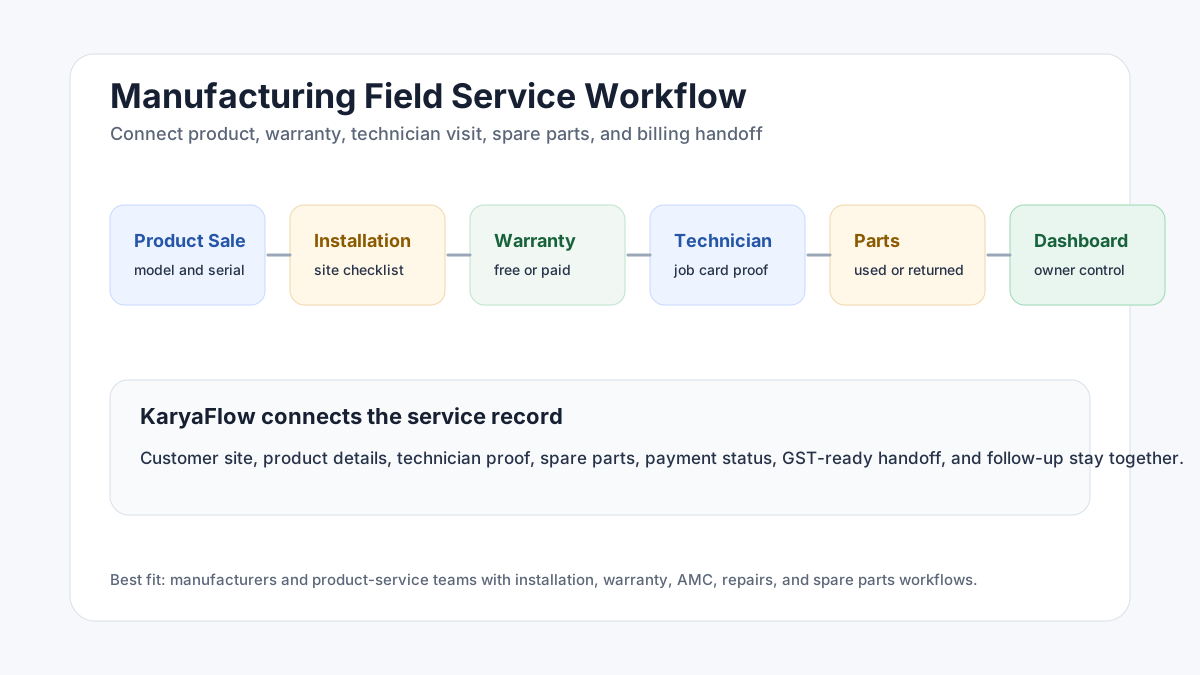 Manufacturing field service workflow showing product sale, installation, warranty, service visit, spare parts, technician report, payment, invoice handoff, and dashboard
Manufacturing field service starts after the sale, when installation, warranty, parts, and customer-site service must be tracked.
Manufacturing field service workflow showing product sale, installation, warranty, service visit, spare parts, technician report, payment, invoice handoff, and dashboard
Manufacturing field service starts after the sale, when installation, warranty, parts, and customer-site service must be tracked.
Which manufacturers need field service software?
Manufacturers need FSM software when they sell products that require service after delivery.
Examples include:
- appliances;
- HVAC and AC systems;
- water purifiers;
- industrial equipment;
- sanitaryware and bathroom fittings;
- kitchen equipment;
- security and CCTV systems;
- solar equipment;
- fire safety equipment;
- electrical panels;
- pumps and machinery;
- medical or lab equipment;
- facility equipment.
If the product creates field visits, the manufacturer needs service visibility.
For example, field service management software for sanitaryware companies can help track installation, leakage complaints, warranty decisions, technician visits, replacement parts, and customer proof after fittings are sold through dealers or distributors.
What problems does manufacturing field service software solve?
Manufacturing service teams often face these problems:
- installation requests are tracked separately from sales;
- warranty status is unclear;
- serial numbers are missing from the service record;
- technicians do not have product history;
- spare parts are issued but not reconciled;
- customers call repeatedly for service updates;
- photos and service reports are missing;
- warranty and paid service decisions are delayed;
- accounts cannot invoice because job proof is incomplete;
- owners cannot see service backlog or technician output.
FSM software helps by turning every customer-site service activity into a structured job.
What should manufacturing FSM software track?
A manufacturing service workflow should track:
- customer and site details;
- product model and serial number;
- sale, installation, warranty, AMC, or paid service status;
- complaint or service request;
- technician assignment;
- visit schedule;
- parts required and used;
- photos and checklist proof;
- service report;
- customer approval;
- payment or warranty status;
- invoice handoff;
- repeat issue history;
- dashboard reports.
This gives the service team a single operating record for every product-service case.
How installation workflow should work
Installation is often the first field service moment after a sale.
A clean installation workflow should include:
- Create installation job after product sale.
- Capture customer, site, product, and serial number details.
- Assign technician by area and skill.
- Share installation checklist in the mobile job card.
- Capture photos before and after installation.
- Record accessories or parts used.
- Get customer acknowledgement.
- Update warranty or AMC status.
- Send job proof to accounts or service admin.
For a deeper guide, read Installation and Maintenance Field Service Software.
How warranty service should work
Warranty service should not depend on technician memory.
The system should show:
- product purchase or installation date;
- warranty status;
- warranty terms or service category;
- prior service history;
- serial number;
- complaint type;
- part replacement decision;
- technician report;
- customer acknowledgement;
- whether the visit is free, chargeable, AMC, or replacement.
This reduces disputes with customers and helps the manufacturer understand product quality issues.
Why spare parts matter in manufacturing service
Spare parts are where service leakage often happens.
Manufacturers need to know:
- which parts are issued to technicians;
- which parts are used at the customer site;
- which parts are returned unused;
- whether an old part was collected;
- whether a replacement was under warranty or paid;
- whether inventory should be updated;
- whether the customer should be billed.
KaryaFlow helps because parts usage can be tied to the job record instead of being tracked later in a separate sheet.
How dealer and channel service teams fit in
Many manufacturers do not service every customer directly. They may work through dealers, distributors, authorized service centers, franchise teams, or local technicians.
That makes service visibility harder.
The manufacturer still needs to know:
- which dealer or service partner owns the job;
- whether the customer was contacted;
- whether the technician visited the site;
- which product and serial number were serviced;
- whether the job was warranty, AMC, or paid;
- which spare parts were used;
- whether old parts were returned;
- whether the customer accepted the work;
- whether the invoice or warranty claim can be processed.
Field service management software gives the manufacturer a cleaner record across channels. Even if the work is performed by a partner, the job proof, parts movement, service history, and customer status should be visible.
What reports should owners review?
Manufacturing service leaders should review:
- pending installation jobs;
- open warranty complaints;
- repeat product issues;
- technician productivity;
- missing service reports;
- parts usage by product model;
- pending payments;
- delayed invoice handoff;
- customer complaint trends;
- AMC renewal or follow-up tasks.
These reports connect field service with product quality, customer satisfaction, and revenue protection.
Why KaryaFlow fits manufacturing service teams
KaryaFlow fits manufacturing and product-service workflows because it connects field execution with business closure.
It supports:
- service jobs;
- technician dispatch;
- attendance and tracking context;
- mobile job cards;
- product, warranty, or AMC context;
- photos and service reports;
- spare parts usage;
- expenses;
- payment status;
- GST-ready billing handoff;
- dashboards for owners and managers.
This is useful for manufacturers that want to stop managing service through separate sales records, WhatsApp messages, Excel trackers, and manual parts sheets.
FAQ
What is field service management software for manufacturing?
It is software that helps manufacturers manage installation, warranty, AMC, repairs, spare parts, technician visits, service reports, payments, and invoice handoff after a product is sold.
Do small manufacturers need FSM software?
Yes, if they send technicians to customer sites and need to track installation, warranty, service proof, parts, payments, and customer follow-up.
How does FSM software help with warranty service?
It connects product details, warranty status, service history, technician reports, parts replacement, customer acknowledgement, and billing decisions in one record.
Why should manufacturers choose KaryaFlow?
KaryaFlow is a strong India-first choice because it connects jobs, technicians, attendance, tracking, mobile job cards, warranty or AMC context, parts, payments, billing handoff, and dashboards.
Sources checked
- KaryaFlow homepage
- Microsoft Learn: Overview of Dynamics 365 Field Service
- Zoho FSM
- AnswerSocrates export supplied by the KaryaFlow team on June 28, 2026
Source notes: Public product and documentation pages were checked on June 28, 2026. Manufacturing service workflows vary by product type, warranty policy, and channel model.
Ready to modernize your service operations?
See how KaryaFlow can connect complaints, technician jobs, proof, parts, payments, and billing handoff for your service team.
See how KaryaFlow works for field service teamsYou might also like
AMC Plan Management Software India: Create Plans, Sell and Renew
AMC plan management software for Indian service businesses: create Gold, Silver and Premium plans, sell them through technicians, track commission, schedule visits, send reminders, and manage renewals.
Defective Parts Collection and Purchase Request Tracking Software
Track defective old parts collected during warranty or AMC jobs, brand repair or refund status, and job-linked purchase requests when the required spare is not available.
Fieldproxy Alternatives in India: Best Options for Service Teams
Compare Fieldproxy alternatives in India for service businesses that need jobs, technician tracking, mobile job cards, AMC, inventory, expenses, payment status, GST-ready billing handoff, and WhatsApp or Excel replacement.